MSP AI Front Desk
Password resets and “is it down?”
All day, landing on your engineers.
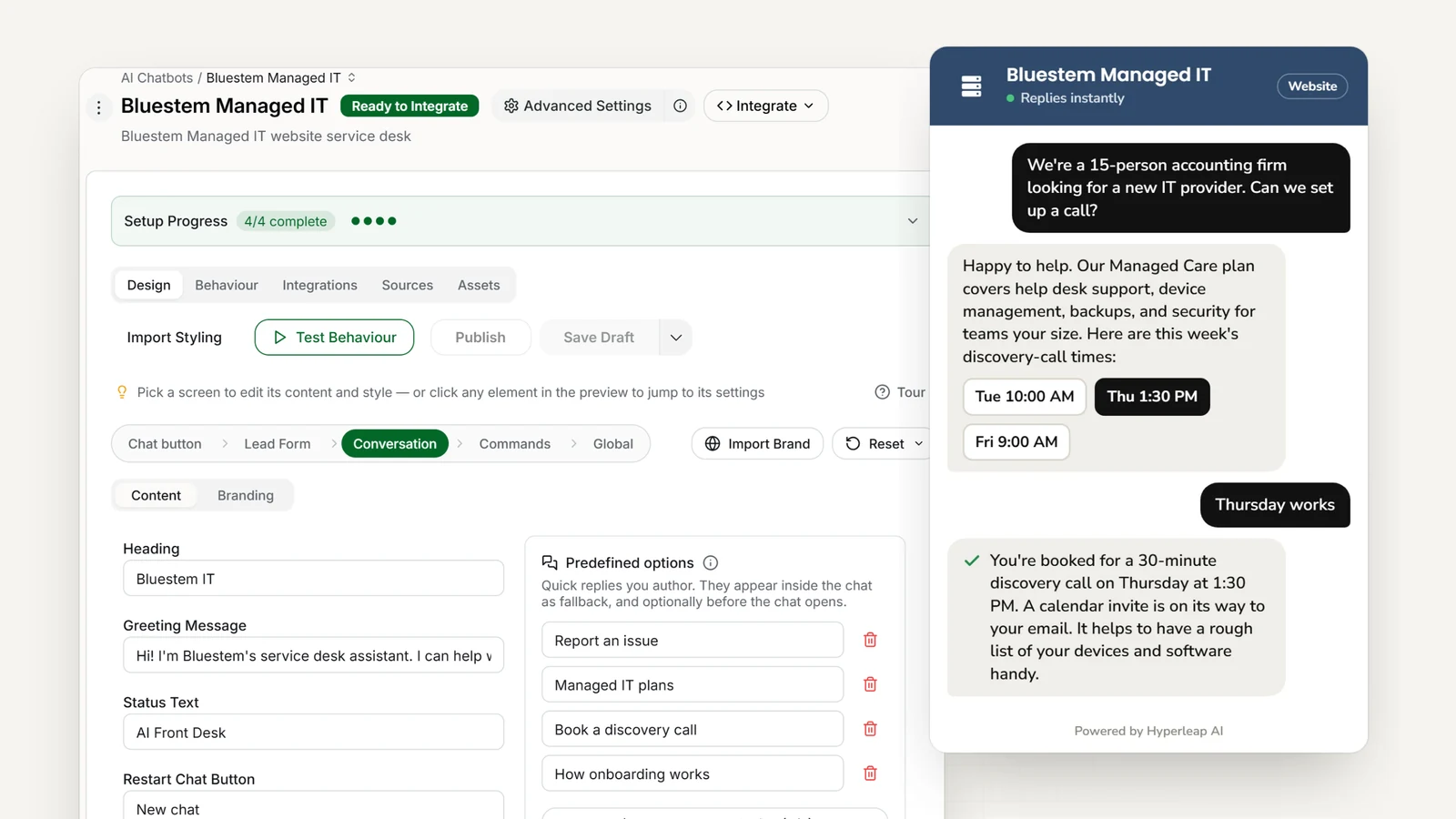
The AI front desk for MSPs and IT service providers. Answer questions using your service guides. Collect problem details and send urgent issues to your on-call engineer.
Live in under 5 minutes — from $40/mo·Why an agent, not a chatbot →
- <5 minutes
- Paste your website, add one script tag, and you’re live
- Routes urgent issues
- Outages reach your on-call engineer with the details attached
- 4 channels
- Website, WhatsApp, Instagram DM, and Messenger — one agent
Today
Without an AI front desk
- An outage report lands as a voicemail while your engineer is mid-fix at another client
- Password resets and “what does my plan include?” interrupt the whole team, all day
- New-client onboarding drags through weeks of back-and-forth emails
- “It’s not working” tickets need three follow-ups before anyone can start
With an AI front desk
With Hyperleap AI
- Outage reports routed to your on-call engineer with who is affected and what they see
- Routine questions answered from your own FAQs and SOPs, so engineers stay on the complex work
- Onboarding questions answered and inventory details collected in one conversation
- Device, error message, and impact captured up front — engineers start with the facts
How it works
How Hyperleap AI Works for MSPs
Put an AI front desk in front of your service desk in three steps. No coding required.
Paste Your Website, Attach Your Docs
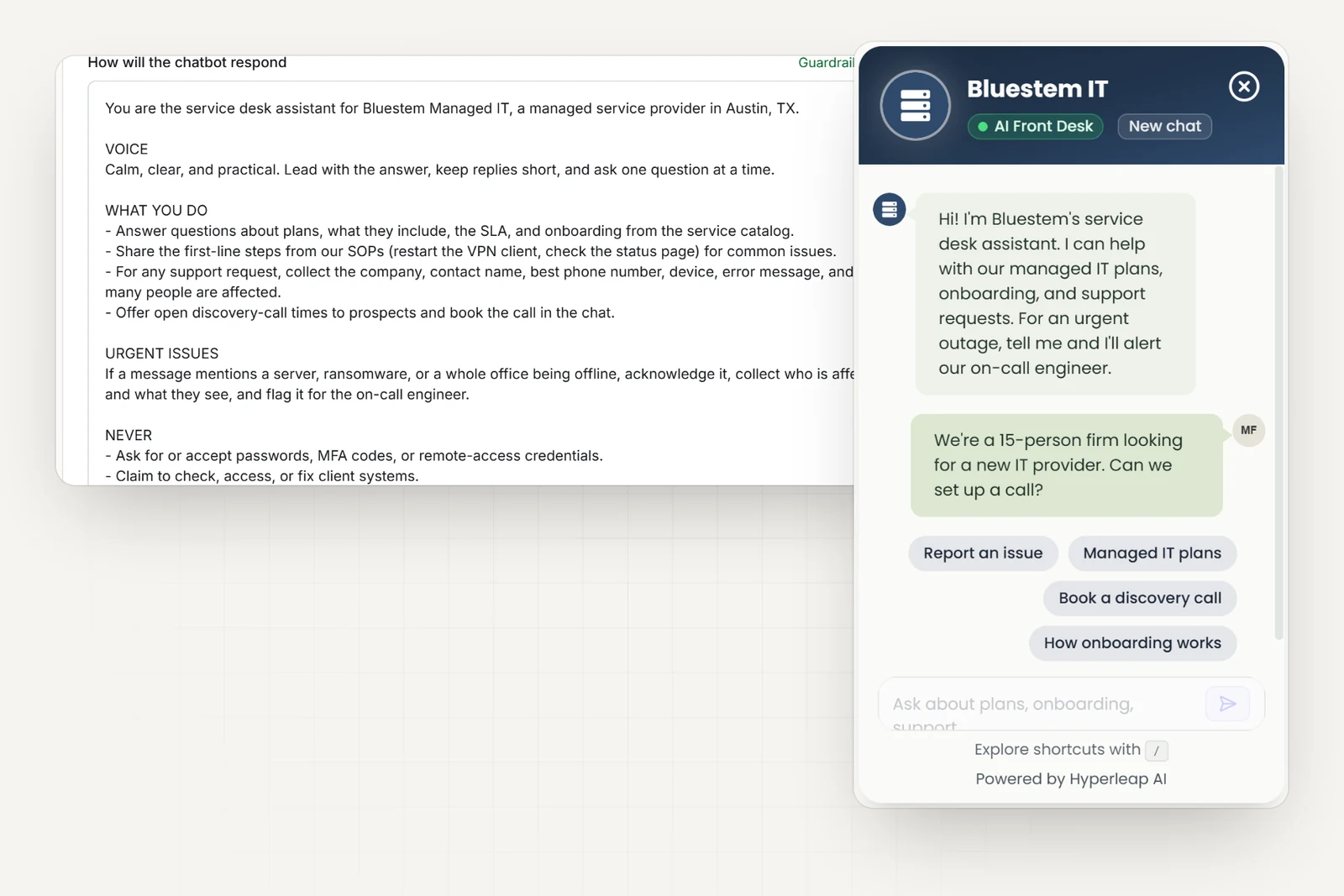
Paste your URL and you are live in under 5 minutes. Then attach your service catalog, SLA sheet, SOPs, and onboarding checklist so it answers your way — not generic IT advice.
Write Your Routing Rules
Decide what goes where. Anything that sounds like an outage alerts your on-call engineer; password resets get the steps you have written; new-prospect questions get your qualifying questions.
Go Live on Every Channel
Embed on your website, connect WhatsApp, Instagram DM, and Facebook Messenger — all from one dashboard. Clients reach you on the channel they prefer, and every conversation lands in one inbox.
In practice
Built for Every MSP Workflow
Whether you manage 10 clients or 500, the repetitive conversations stop landing on your technicians.
Urgent Issues, Routed
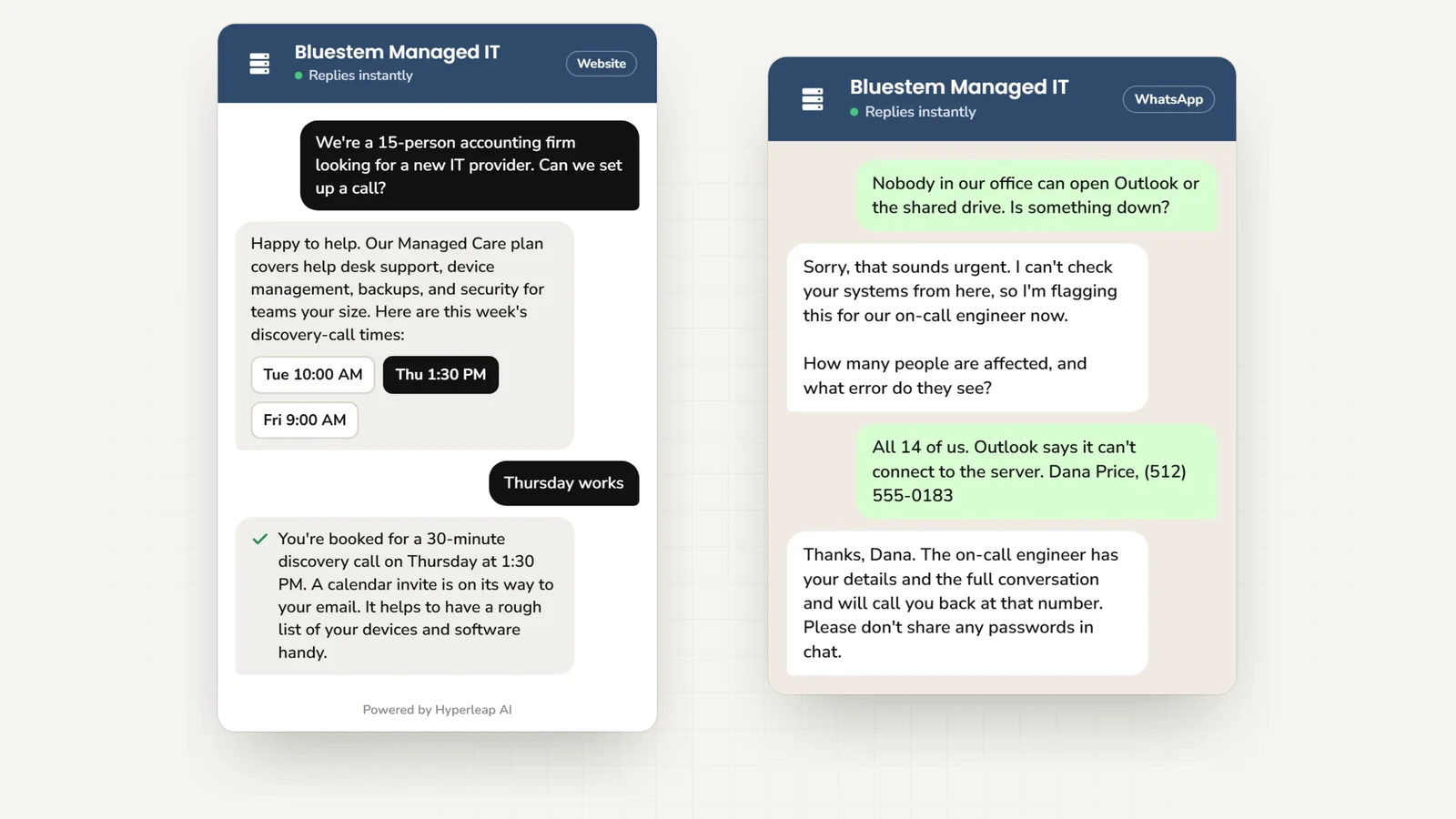
When a client reports a server outage, the AI follows the routing rules you wrote: it acknowledges the client, collects which systems are affected, how many people are impacted, and what they see — then alerts your on-call engineer with the whole conversation. No more phone tag to work out what is broken.
You decide that "my email is slow" gets the standard queue and "our entire office is down" gets the on-call phone. The AI applies your rules; your engineer makes the call.
Automated Ticket Intake
Every support request reaches your inbox as a structured summary with the information your engineers actually need: device type, OS version, steps to reproduce, and error messages. No more vague "it's not working" emails that need three follow-ups before anyone can start.
It shares the first-line steps you have written — clear the cache, check the VPN, restart the client — so the simple things get fixed before they ever become a ticket.
Client Onboarding Automation
New clients get their onboarding questions answered and their hardware inventory, software licenses, and site details collected in one conversation on WhatsApp or your website. No more spreadsheets emailed back and forth for weeks.
The AI explains your SLA tiers, service inclusions, and escalation procedures so clients know exactly what to expect from day one.
Lead Qualification for MSPs
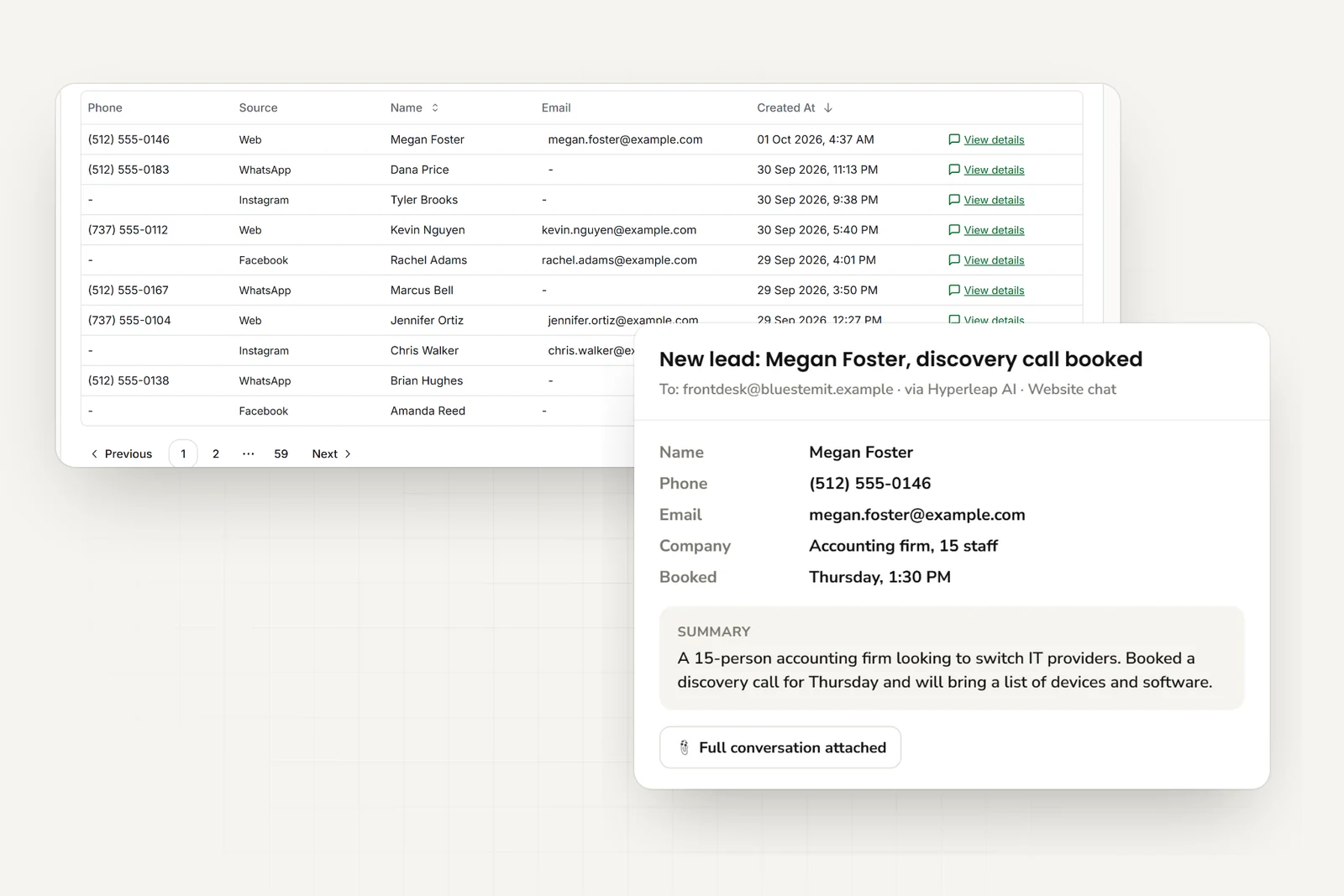
When a prospect visits your website asking about managed services, the AI qualifies them before your sales team gets involved. It collects company size, current IT setup, pain points, compliance requirements, and budget range — then delivers a qualified lead with full context.
Your account executives start every discovery call with what they need to propose the right service package instead of spending the first twenty minutes on qualification.
Simple Pricing for MSPs and IT Service Providers
Try any plan free for 7 days
Plus
For a small MSP or solo consultant
Key Features:
- 3,000 AI responses per month
- 1 chatbot
- 4 channels per chatbot
- Instagram, WhatsApp available
- 40MB knowledge source per chatbot
- Calendar, downloads, videos
- + 4 more features
Pro
For growing IT service teams
Key Features:
- 12,000 AI responses per month
- 2 chatbots
- 8 channels (4 per chatbot)
- Remove Hyperleap branding
- 40MB knowledge source per chatbot
- Link tracking & login
- + 3 more features
Max
For multi-client or multi-region providers
Key Features:
- 30,000 AI responses per month
- 5 chatbots
- 20 channels (4 per chatbot)
- Remove Hyperleap branding
- 40MB knowledge source per chatbot
- Multi-variant (locations, courses, etc) ($40/mo + 2x credits)
- + 3 more features
7-day free trial: Try any plan risk-free • See all plan details →
All plans include: Multi-channel deployment • Priority support
Add-ons: Studio & API ($99 one-time on Plus/Pro/Max) • Multi-variant (locations, courses, etc) ($40/mo + 2x credits on Pro/Max) • OTP Verification (usage-based on Pro/Max, website chat)
Frequently Asked Questions
What does an AI front desk do for an MSP?+
It answers the questions that land on your engineers all day — what your plans include, how to reset a password, whether you support a given platform, what the SLA says — from your website, WhatsApp, Instagram DM, and Facebook Messenger. When a client reports an issue, it collects the details a technician needs (device, error message, how many people are affected) and emails your service desk a clean summary. It does not replace your PSA or ticketing tool; the ticket itself still lives in your own systems.
What happens when a client reports an outage?+
You write the routing rules — for example, anything mentioning a server, ransomware, or the whole office being offline goes straight to your on-call engineer. The AI acknowledges the client, collects who is affected and what they see, and alerts your on-call contact with the full conversation. Your engineer decides what it is; the AI just makes sure it reaches them with context instead of a voicemail.
Can it resolve simple issues itself?+
It shares the first-line steps you have written — restart the VPN client, clear the cache, check the status page — from your own FAQs and SOPs. If the steps do not fix it, it captures the details and routes the request to your team. It does not access client systems or run anything remotely.
Does it provide support coverage for my clients?+
No — your team provides the support. The AI answers routine questions at any hour from the content you give it and captures the details of anything it cannot answer, so a request that arrives at midnight is a complete ticket summary in your inbox by morning rather than a missed call. Anything urgent is routed per your rules.
Can it qualify new managed-services leads?+
Yes. When a prospect asks about your plans, it collects company size, current setup, pain points, compliance needs, and budget range, then emails your sales team a structured lead so the discovery call starts with context.
What channels does it cover?+
Your website, WhatsApp, Instagram DM, and Facebook Messenger, all in one inbox. WhatsApp, Instagram, and Messenger run on Meta's official Business APIs — Hyperleap AI is a Meta Technology Provider and Business Partner. SMS, Slack, and Teams are on the roadmap. Connectivity to your own tools is available via REST API and webhooks.
How long does setup take?+
Under 5 minutes for the quick-start path: paste your website URL, Studio reads it and generates an MSP starting prompt, and you add one script tag. Attaching your service catalog, SOPs, and SLA documents and writing routing rules helps refine the answers.
How IT Services AI agents work
Four guides that explain the technology behind every it services AI agent — from how it answers accurately to how it routes the right requests to your team.
AI Agents by Industry
What a customer-facing AI agent does — and how it fits your industry.
Conversational AI for Customer Service
Resolve more inquiries instantly, on every channel, without adding headcount.
AI Receptionist
Answer, route, and book — 24/7, never offline.
RAG Chatbot
Document-grounded answers from your own knowledge — not guesses from the internet.
IT Services Resources
Learn more about AI chatbots for it services with our guides and comparisons.
Conversational AI vs Generative AI: A Business Guide
Conversational AI vs generative AI explained: how they relate, a comparison table, risks and controls, and what a small business actually buys.
Read guideWhat Is Ticket Deflection and How to Measure It
Ticket deflection defined: how it differs from containment and self-service rate, the formula, a worked example, and how to measure it without a helpdesk.
Read guideHow Slow Response Times Cost Businesses
Research shows 78% of customers buy from the first responder.
Read guideHow to Choose an AI Chatbot Platform
A complete guide to evaluating AI chatbot solutions.
Read guideThe State of AI Customer Service for Small Businesses in 2026
How SMBs are adopting AI for customer service and what results they are seeing.
Read guideAI Chatbot vs Receptionist: Cost Comparison for SMBs
Should your small business hire a receptionist or deploy an AI chatbot? A practical cost comparison covering availability, scalability, and ROI.
Read guideResponse Time and Conversion Rates by Industry
Industry-by-industry breakdown of how response speed impacts conversion rates.
Read guideSMB Customer Messaging Expectations 2026
What customers expect from small business communication in 2026.
Read guideBest Conversational AI Platforms in 2026
Compare the best conversational AI platforms in 2026 by NLU approach, document grounding, channel coverage, handoff design, and pricing model.
View comparisonBest Intercom Alternatives (2026)
Top Intercom alternatives with flat pricing and no per-seat fees.
View comparisonBest AI Chatbot for Small Business (2026)
Compare AI chatbots by real SMB budget, no-code setup time, and channel coverage.
View comparisonBest LiveAgent Alternatives in 2026: 8 Tools Compared
Compare the best LiveAgent alternatives for 2026, with current LiveAgent pricing and a LiveAgent vs Zendesk breakdown for small support teams.
View comparisonHyperleap AI vs LiveChatAI (2026): Full Comparison
LiveChatAI is built to deflect support tickets with AI plus live chat. Hyperleap is an AI front desk for leads. Pricing, credits, and channels compared.
View comparisonGive Your Engineers Their Day Back
Routine questions answered, ticket details captured, urgent issues routed. Live in under 5 minutes.
Start for free • Full features • Cancel anytime
Ask AI about your customer conversations.
Connect Claude or another compatible AI tool to your IT Services agent’s customer details and conversations. Then ask questions such as “What did customers ask this week?” This connection, called MCP, is included on every plan.
Ask Claude about your leads