Add AI chat to any website.
Choose your platform.

Shopify
Add AI chat to your Shopify store. Works with any theme.
Read the guide
WordPress
Install our official plugin, or add the code directly to your site.
Read the guide
Webflow
Embed the chat using Webflow’s custom code feature.
Read the guide
Squarespace
Add the chat via Code Injection on Core plans and above.
Read the guide
Wix
Embed using Wix’s custom code or an HTML element.
Read the guide
Custom HTML
Add to any website with a simple script tag.
Read the guideBook appointments in the chat.
Calendly
On Pro and Max, the agent reads live availability from your Calendly event, offers real open times, and books the one the customer picks in the chat. In-chat booking needs Calendly Standard or higher; on Calendly Free, the customer confirms the chosen time on Calendly's page.
How booking worksCal.com
On Pro and Max, paste your cal.com event link and the agent offers open times and books the appointment in the conversation. Works on any Cal.com plan with cal.com-hosted event links.
How booking worksThe agent creates new bookings only; customers cancel or reschedule from their confirmation email. No direct Google Calendar or Outlook connection.
Connect it to the tools you already use.
Leads in your inbox
Leads and chat summaries are emailed to your team on every plan. Nothing to set up.
Look things up in your own system
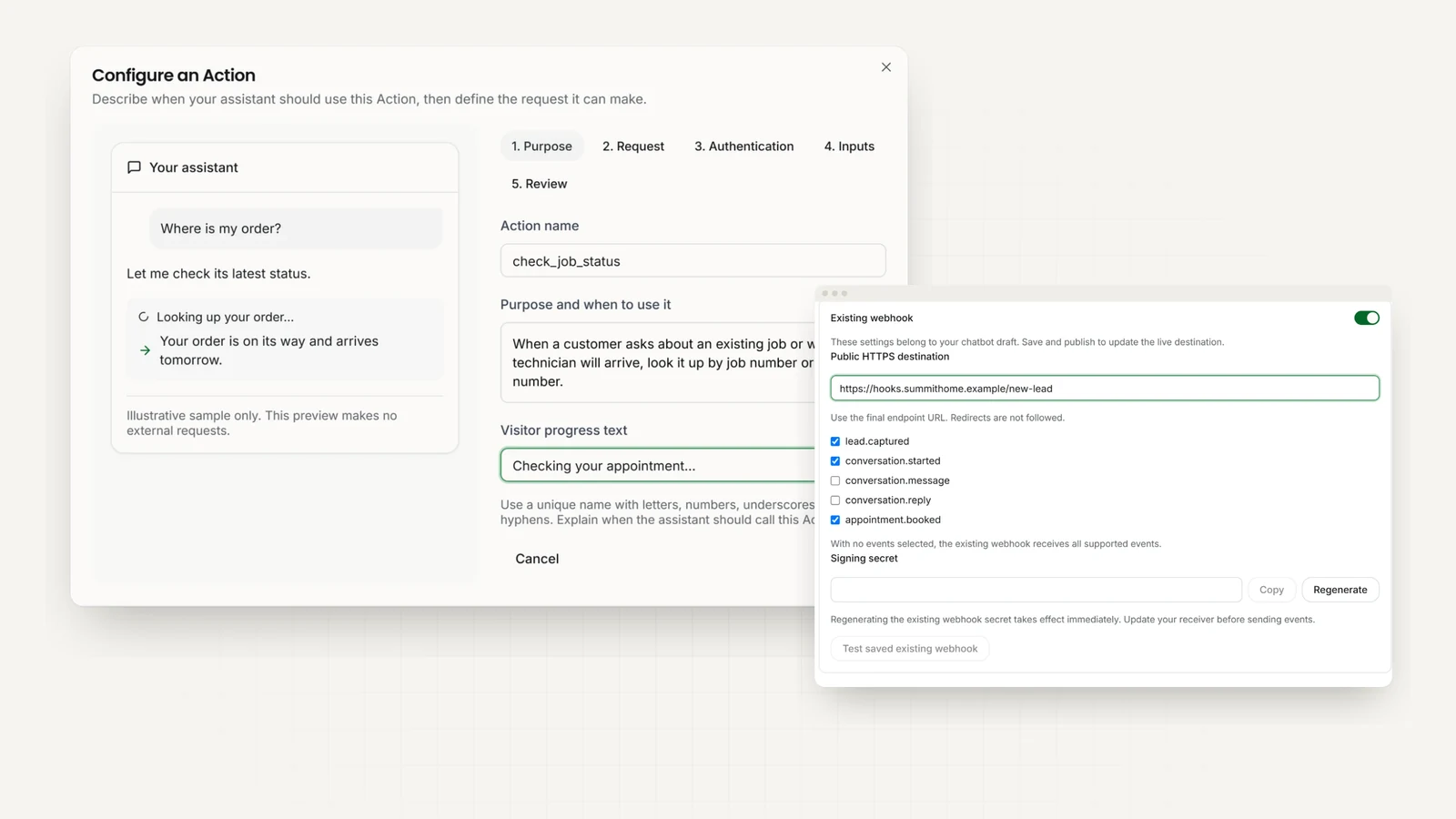
With Actions, the agent checks an order, a job or stock through an API you already have, or submits a lead or a ticket. Pro and Max plans.
Send leads to your other tools
Webhooks pass new leads, conversations, and bookings to the tools you already use, as they happen. Pro and Max plans.
Technical details for your developer
Actions (custom API tools, Pro and Max)
Up to 10 per chatbot, each calling an HTTPS API you own, on all four channels. Calls run server-side with a 20-second timeout, and requests to private or internal addresses are blocked. Auth can be none, a bearer token, an API-key header, or a connected account; credentials are stored encrypted and never shown to the AI or the visitor. Set up through a guided form with draft-and-test.
Webhooks and API
Webhooks (Pro and Max) send lead captured, conversation started, new message, new AI reply, conversation ended, feedback submitted, and booking events. Payloads are HMAC-SHA256 signed, with a test-event button and delivery history. A full REST API is available too, and the MCP server lets Claude or ChatGPT read your leads.
Three steps to live.
- 01
Create your AI agent
Start a 7-day free trial and paste your website address. Hyperleap reads your pages to learn your business; add documents or FAQs if you like.
- 02
Make it yours
Choose your colours, welcome message, and tone. Set the contact details and questions you want the AI to ask.
- 03
Paste one snippet
Copy your embed code from the dashboard into your site’s footer, or install our official WordPress plugin. The widget loads asynchronously, so it does not block your page.
Show the embed code
This code works on any website. Paste it before the closing </body> tag, then swap in the chatbot ID and private key from your dashboard.
<script>
   (function () {
        // Define chatbot configuration
        window.userChatbotConfig = {
            chatbotId: "YOUR_CHATBOT_ID",
            privateKey: "YOUR_PRIVATE_KEY",
        };
        // Dynamically load chatbot plugin
        var chatbotScript = document.createElement("script");
        chatbotScript.src = "https://chatjs.hyperleap.ai/chatbot.min.js";
        chatbotScript.async = true;
        document.head.appendChild(chatbotScript);
    })();
</script>
Need a different integration?
Other CRMs and tools can connect through the REST API, or through webhooks or Actions on Pro and Max. Tell us what you need and we'll point you to the simplest route.
Common questions.
How do I install it?
Copy a small snippet of code and paste it into your website’s footer, or install our official WordPress plugin. There are step-by-step guides for Shopify, WordPress, Webflow, Squarespace, Wix, and custom HTML.
Will the chatbot slow down my website?
The widget loads asynchronously and is designed to avoid blocking your initial page load. As with any third-party script, measure it on your own site as part of your normal performance checks.
Does it work on mobile?
Yes, the chat widget is fully responsive and works on phones and tablets as well as desktops.
Can it read my website content?
Yes. Give it your website address and it reads your pages to learn about your products and services. You can add documents and FAQs too.
Can I customize the look and feel?
Yes. You can customize the colors, logo, welcome message, and position of the chat widget to match your brand.
Can the chatbot book appointments?
Yes, on the Pro and Max plans, with Calendly or Cal.com, on your website, WhatsApp, Instagram DM, and Facebook Messenger. The agent checks your live availability, offers real open times, and books the one the customer picks; your scheduler emails them the calendar invite. It creates new bookings only, so customers cancel or reschedule from their confirmation email. In-chat booking with Calendly needs Calendly Standard or higher. On Plus, or with any other scheduling tool, the agent shares your booking link.
Can the agent look things up or submit data in my own systems?
Yes, with Actions. You add up to 10 per chatbot, each pointing at an HTTPS API you already have. During the conversation the agent calls it to look up information, such as order status, stock, or account details, or to submit data, such as a lead, a ticket, or a request. It works on your website, WhatsApp, Instagram DM, and Facebook Messenger. The calls run on our servers, and your API credentials are stored encrypted and never shown to the AI or the customer. Actions connect to your API; they are not a built-in integration with the software behind it. Actions are available on the Pro and Max plans.
Still have questions? Talk to us.