Mental Health AI Front Desk
Stop losing new clients
to an unanswered inbox.
The AI front desk for therapy and counseling practices. Answer questions about your services. Collect contact details and book the appointment. Crisis messages receive crisis-line information and go to your team.
From $40/mo · live in under 5 minutes·Why an agent, not a chatbot →
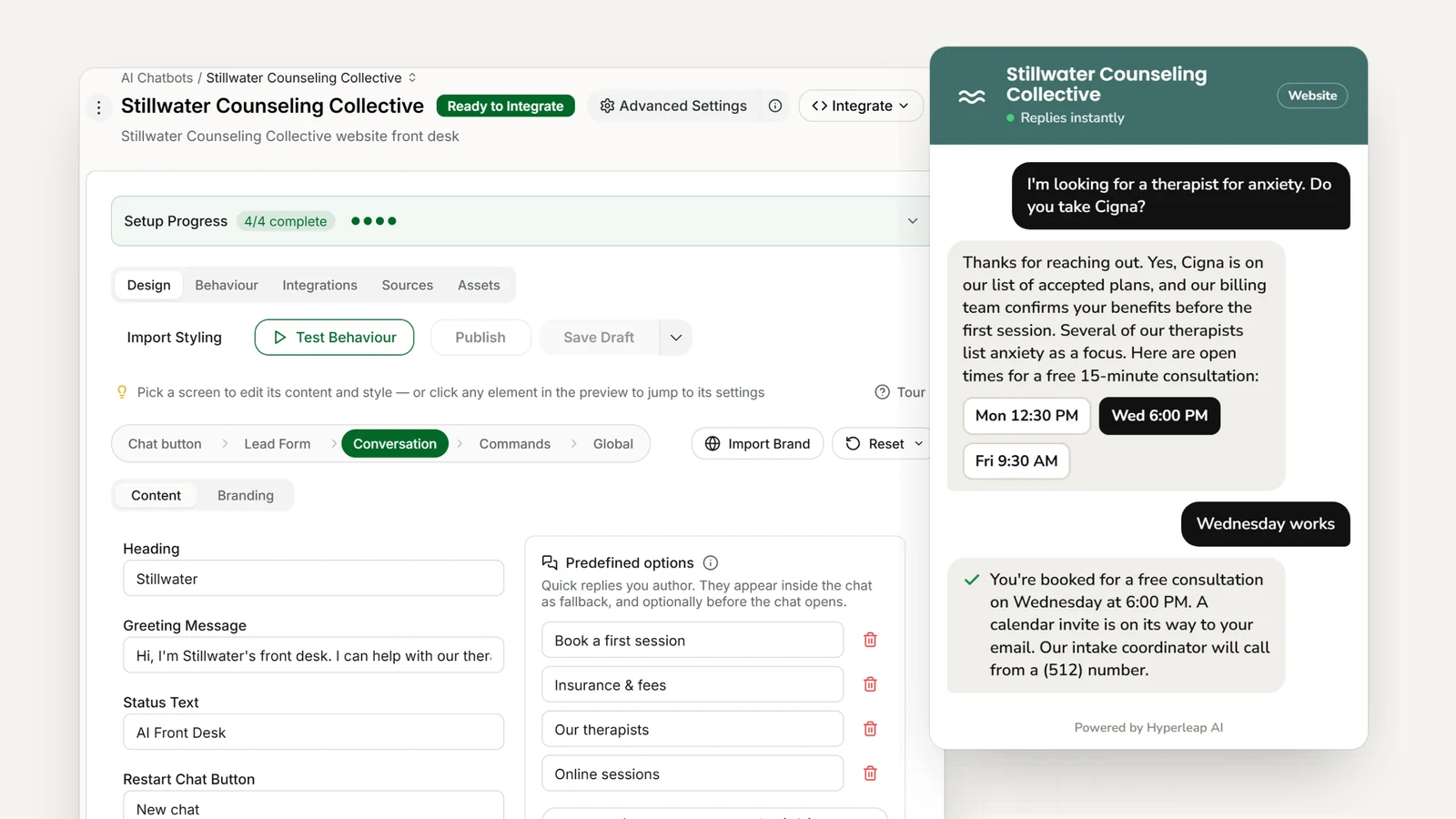
- <5 minutes
- To go live — paste your site, add one script tag
- 4 channels
- Website, WhatsApp, Instagram DM, Messenger
- Routes crisis messages
- Crisis line first, then name and number for your team
The problem
The Challenge for Mental Health Practices
Today
Without an AI front desk
- The same questions — insurance, rates, approaches — land on you between sessions
- Prospective clients who message and hear nothing move on to the next practice
- Basic details (contact, what they’re looking for, carrier) get collected by phone tag
- Telehealth, fees, and “do you see teens?” answered one voicemail at a time
- Crisis messages sit in a shared inbox until someone checks it
With an AI front desk
With Hyperleap AI
- Answers questions about approaches, insurance, and availability in seconds
- Books the initial consultation through Calendly or Cal.com (Pro and Max) the moment a client is ready
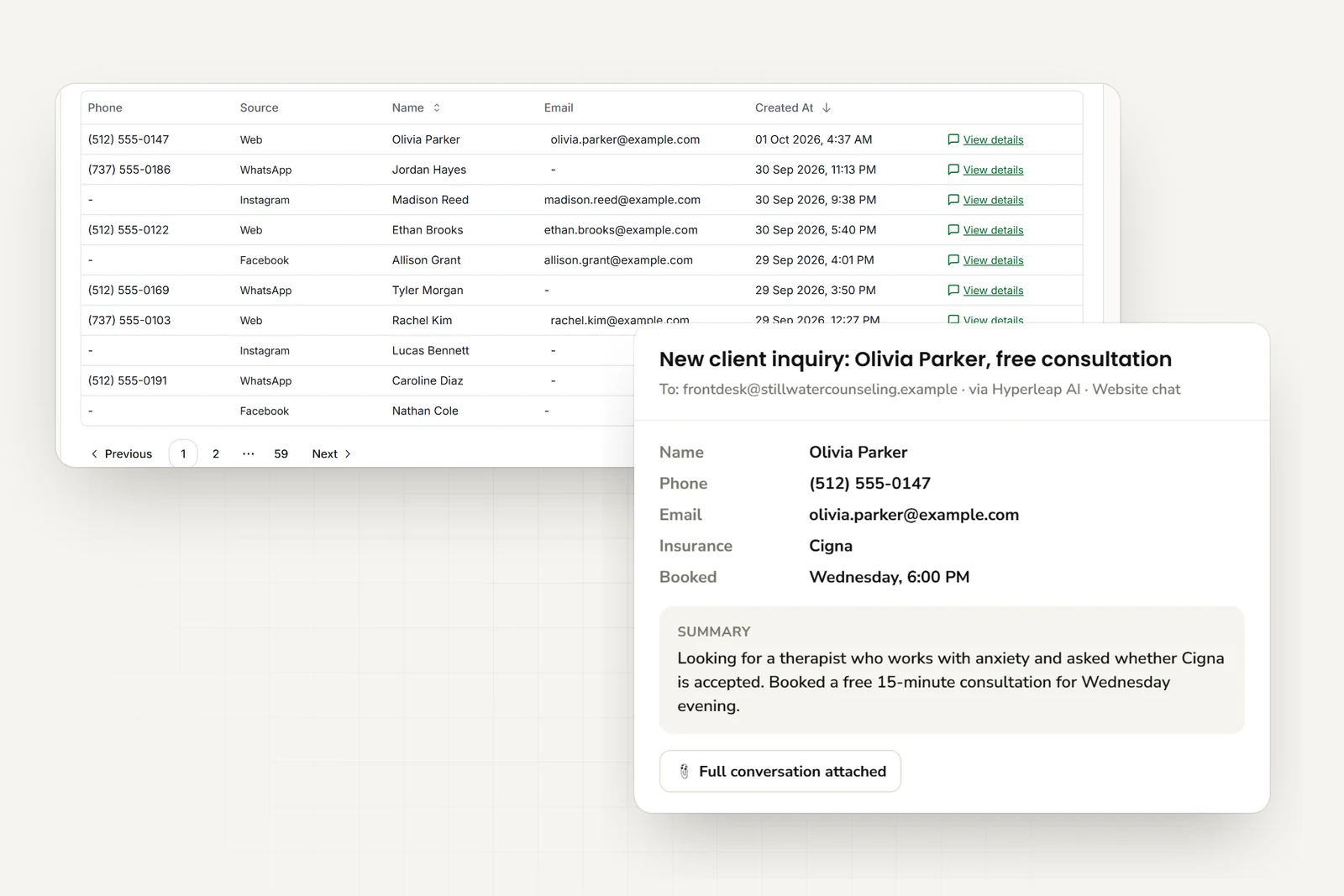
- Captures name, phone, carrier, and what the client is looking for — emailed to you as a summary
- Explains what a first session looks like from your own FAQ
- Crisis messages route to your team with crisis-line information, including outside office hours
Features
Everything Your Practice Needs
One AI front desk across your website, WhatsApp, Instagram, and Facebook Messenger
Session Booking
Books the initial consultation in the chat through Calendly or Cal.com (Pro and Max) when a client is ready (or shares your booking link), and emails you the request.
Intake Questions
Collects contact details, what the client is looking for, insurance carrier, and availability — no clinical history in the chat.
Routes to the Right Therapist
Asks what the client is looking for and which therapist profiles from your list fit; your intake coordinator confirms the match.
Insurance Questions
Answers from the carrier list you provide, plus rates and sliding-scale options. Your team verifies benefits.
Telehealth Information
Explains your telehealth options, what clients need on their end, and how online sessions work — from your own pages.
Therapy Approach FAQs
Answers what to expect in a first session and how your practice describes its approaches (CBT, EMDR, DBT) — in your words, not the AI’s.
In practice
Common Scenarios Your AI Agent Handles
Ready to Book
“I’d like to set up a first appointment.” AI shares your booking link and takes name and phone for your inbox.
Insurance Questions
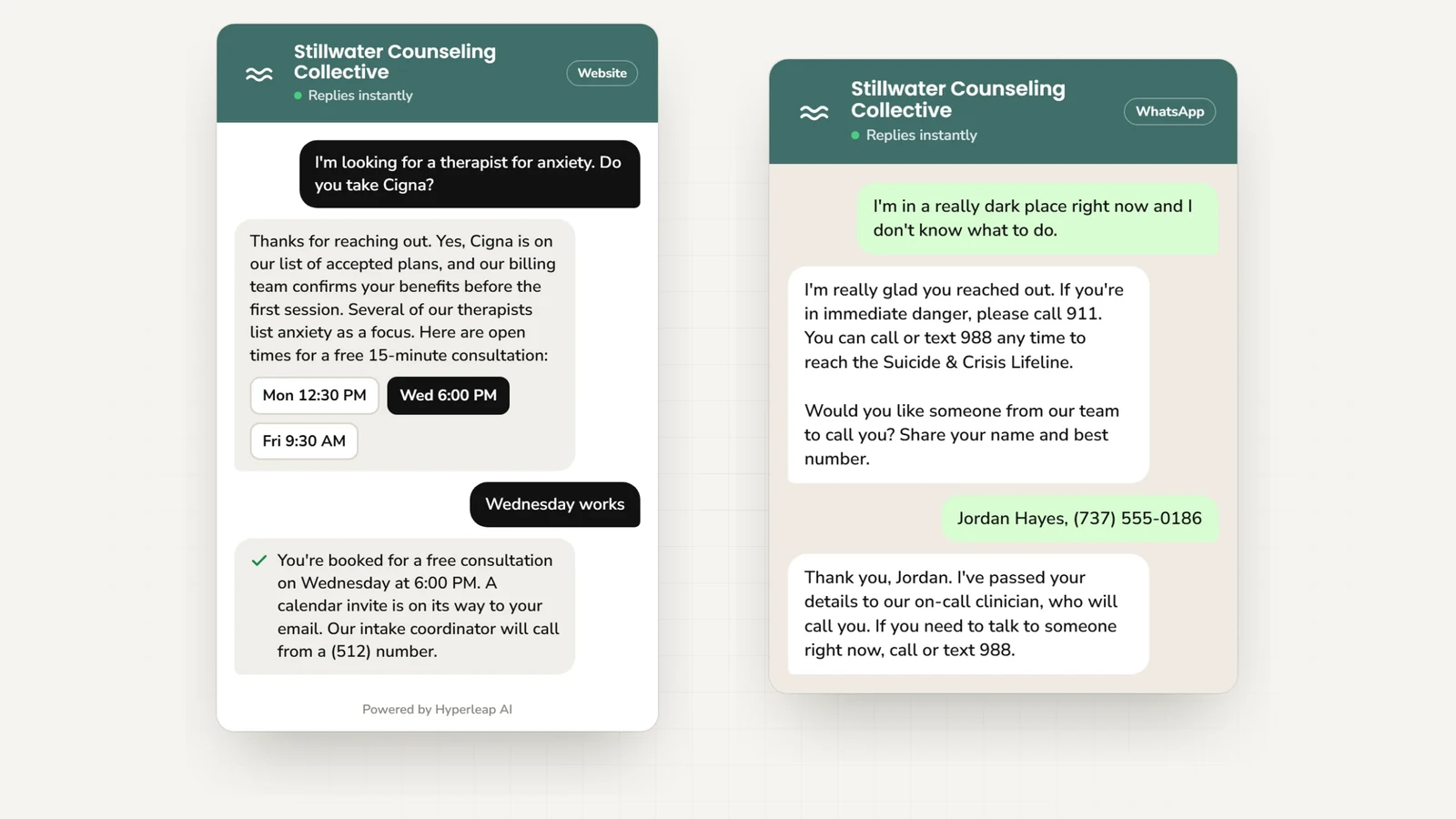
“Do you take Aetna?” AI answers from your carrier list and notes the carrier for your team to check benefits.
Approach Question
“Do you offer CBT?” AI answers from your practice pages and names the therapists you list under it.
Finding the Right Therapist
“Who works with teens?” AI shares the matching profiles from your team page and routes the request to your intake coordinator.
Telehealth vs In-Person
“Do you offer online sessions?” AI explains your telehealth setup and shares the booking link for virtual sessions.
Couples Counseling
“Do you see couples?” AI explains how couples sessions work at your practice and shares the booking link.
First Session
“What happens in the first session?” AI answers from your FAQ — length, paperwork, confidentiality.
Cost Questions
“How much is a session?” AI gives your rates and sliding-scale options, and routes fee questions you haven’t covered.
Crisis Message
“I don’t think I can keep going.” AI shares the crisis line you configure, then collects name and number for your on-call clinician.
Outcomes
Benefits for Your Mental Health Practice
Reduce Administrative Burden
The questions that interrupt your day — insurance, approaches, fees — get answered without you. Your team handles what needs a person.
Replies in Seconds
A prospective client gets an answer and your booking link while they’re still on your site, instead of a voicemail.
Better Client Experience
Clear answers about fees, approaches, and what a first session involves lower the barrier to reaching out.
Warm Leads in Your Inbox
Every conversation arrives as an email summary — name, phone, carrier, what they’re looking for — so your intake coordinator picks up warm.
Multi-Channel Engagement
One front desk covers your website, WhatsApp, Instagram, and Facebook Messenger — wherever a client feels comfortable reaching out.
Crisis Messages Routed, Not Handled
Crisis-line information first, then name and number to your on-call clinician. The AI routes; it does not evaluate.
Who it fits
Perfect For
Individual Therapists
Licensed therapists and counselors in private practice offering individual therapy
Group Practices
Multi-therapist practices that want enquiries routed to the right therapist profile
Specialty Practices
Practices focused on specific populations (trauma, LGBTQ+, addiction, eating disorders)
Simple Pricing for Mental Health Practices
Try any plan free for 7 days
Plus
For individual therapists
Key Features:
- 3,000 AI responses per month
- 1 chatbot
- 4 channels per chatbot
- Instagram, WhatsApp available
- 40MB knowledge source per chatbot
- Calendar, downloads, videos
- + 4 more features
Pro
For small practices
Key Features:
- 12,000 AI responses per month
- 2 chatbots
- 8 channels (4 per chatbot)
- Remove Hyperleap branding
- 40MB knowledge source per chatbot
- Link tracking & login
- + 3 more features
Max
For mental health networks
Key Features:
- 30,000 AI responses per month
- 5 chatbots
- 20 channels (4 per chatbot)
- Remove Hyperleap branding
- 40MB knowledge source per chatbot
- Multi-variant (locations, courses, etc) ($40/mo + 2x credits)
- + 3 more features
7-day free trial: Try any plan risk-free • See all plan details →
All plans include: Multi-channel deployment • Priority support
Add-ons: Studio & API ($99 one-time on Plus/Pro/Max) • Multi-variant (locations, courses, etc) ($40/mo + 2x credits on Pro/Max) • OTP Verification (usage-based on Pro/Max, website chat)
You stay in control
Why Mental Health Practices Choose Hyperleap
No Technical Skills Required
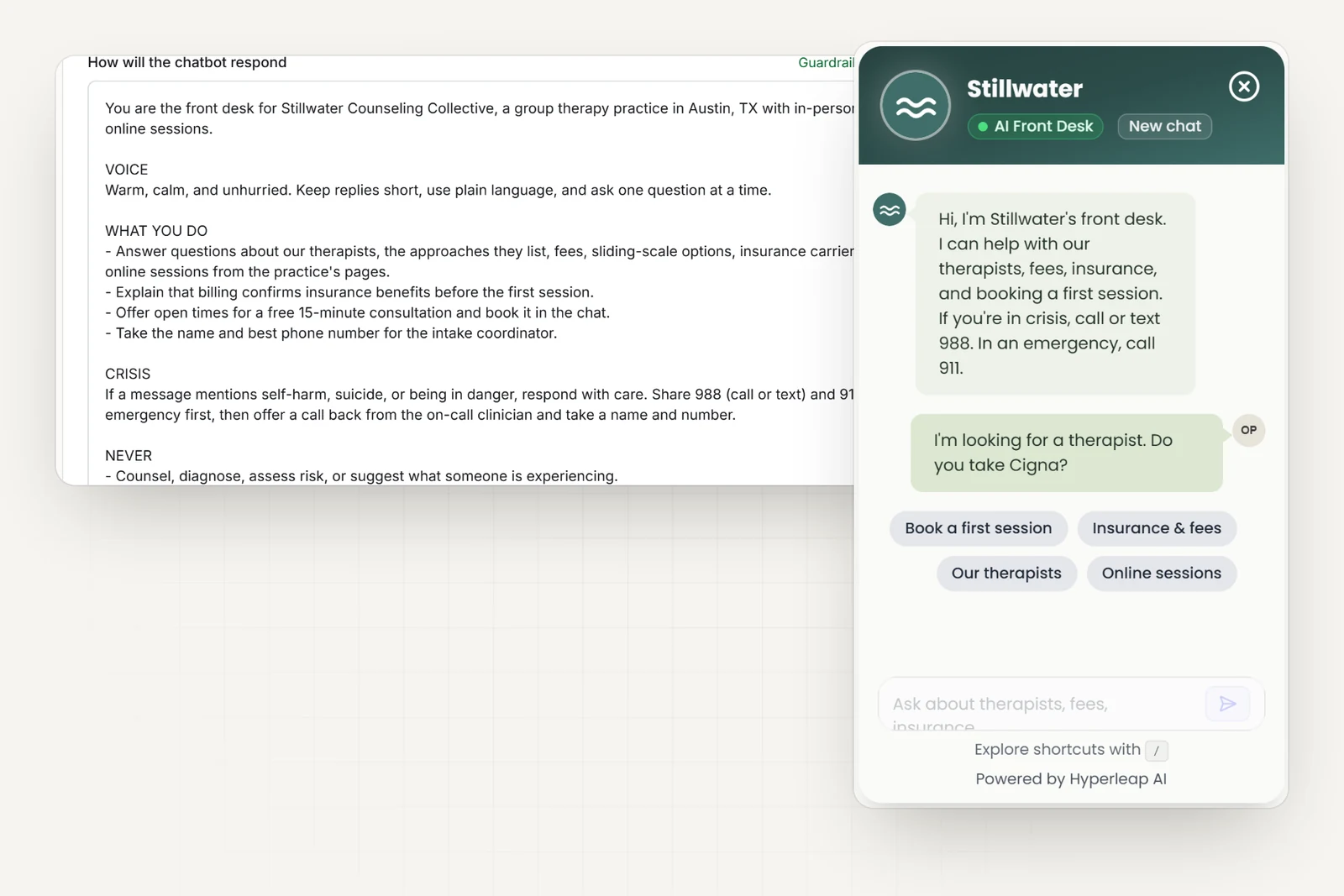
Live in under 5 minutes — paste your website, add one script tag. Attaching your rate sheet and writing instructions helps refine the answers.
Works With Your Existing Tools
Books through Calendly or Cal.com (Pro and Max), or shares your booking link. The AI emails your front desk a clean summary — nothing to connect to your EHR or practice software.
Multi-Language Support
Communicate with clients in 100+ languages automatically. Perfect for serving diverse communities without hiring multilingual staff.
Privacy by Design
Designed to keep protected health information out of the chat — clinical details route to your team. Compliance for your deployment stays with you.
Frequently Asked Questions
What does an AI front desk do for a therapy practice?+
It answers the questions prospective clients ask before they ever book — which therapists you have, what you charge, which insurance carriers you accept, whether you offer telehealth — then captures name and phone and shares your booking link. Your team gets an email summary of every conversation.
What happens if someone in crisis messages the practice?+
The AI acknowledges the message, gives the crisis line you configure (988 in the US, or your local line), and collects a name and number for your on-call clinician. It does not screen or evaluate anyone — it routes.
How does it help clients find the right therapist?+
It asks what the client is looking for and which therapist profiles from your list fit — approach, population, availability — and passes that to your intake coordinator, who confirms the match.
Does it answer insurance questions?+
It answers from the carrier list and rates you provide, and collects the carrier name for your team. Your team verifies benefits before the first session.
Is client information kept out of the chat?+
The AI is designed to keep protected health information out of the chat — it collects contact details and what the client is looking for, and routes clinical details to your team. Compliance for your deployment stays with you.
How long does setup take?+
Live in under 5 minutes: paste your website URL and Studio reads your services and therapist pages, then add one script tag. Attaching your rate sheet and writing instructions helps refine the answers.
How Mental Health AI agents work
Four guides that explain the technology behind every mental health AI agent — from how it answers accurately to how it routes the right requests to your team.
AI Agents by Industry
What a customer-facing AI agent does — and how it fits your industry.
Conversational AI for Customer Service
Resolve more inquiries instantly, on every channel, without adding headcount.
AI Receptionist
Answer, route, and book — 24/7, never offline.
RAG Chatbot
Document-grounded answers from your own knowledge — not guesses from the internet.
Mental Health Resources
Learn more about AI chatbots for mental health with our guides and comparisons.
AI Front Desk for Mental Health Practices: Non-Clinical Only
A non-clinical AI front desk for mental health practices answers fee questions 24/7, routes crisis messages to a human, and keeps PHI out of the chat.
Read guideHIPAA Compliant Chatbot Checklist: Free 2026 Tool
Build patient-facing chatbots that meet healthcare privacy requirements.
Read guideHealthcare Patient Communication Statistics 2026
Key statistics on patient communication gaps, preferences, and automation adoption.
Read guideWhat to Look for in an AI Solution for Your Medical Practice
HIPAA compliance, EHR integration, and 5 more must-haves for healthcare AI.
Read guideAI Chatbot vs Receptionist: Cost Comparison for SMBs
Should your small business hire a receptionist or deploy an AI chatbot? A practical cost comparison covering availability, scalability, and ROI.
Read guideResponse Time and Conversion Rates by Industry
Industry-by-industry breakdown of how response speed impacts conversion rates.
Read guideHow to Choose an AI Chatbot Platform
A complete guide to evaluating AI chatbot solutions.
Read guideThe State of AI Customer Service for Small Businesses in 2026
How SMBs are adopting AI for customer service and what results they are seeing.
Read guideBest AI Chatbots for Healthcare (2026)
Compare top AI chatbot platforms for clinics, hospitals, and healthcare providers.
View comparisonBest AI Receptionist Software (2026)
Compare voice AI answering services vs. chat-first AI receptionists by cost, channels, and setup.
View comparisonBest No-Code Chatbot Builders (2026)
Compare no-code chatbot platforms that let you build AI chatbots without coding.
View comparisonBest Multi-Channel Chatbots (2026)
Compare chatbots that work across website, WhatsApp, Instagram, and Facebook.
View comparisonReady to Transform Your Practice?
Answer routine questions and receive new client details by email. From $40/mo.
Ask AI about your customer conversations.
Connect Claude or another compatible AI tool to your Mental Health agent’s customer details and conversations. Then ask questions such as “What did customers ask this week?” This connection, called MCP, is included on every plan.
Ask Claude about your leads