HIPAA Compliant Chatbot Checklist: Free 2026 Tool
Is your chatbot HIPAA compliant? Free 30-question self-assessment covering BAAs, PHI handling, encryption, and audit logging — get a downloadable report.

TL;DR: A HIPAA compliant chatbot must satisfy HIPAA's Privacy, Security, and Breach Notification Rules to avoid penalties up to $1.5 million per incident. Key requirements include AES-256 encryption, Business Associate Agreements, OTP patient verification, comprehensive audit logging, and role-based access controls. Non-PHI use cases like appointment scheduling and FAQs carry lower risk and are the best starting point for most practices.
What Makes a Chatbot HIPAA Compliant? Interactive Checklist
A HIPAA compliant chatbot isn't a single feature you turn on — it's a combination of technical safeguards, a signed Business Associate Agreement, and operational controls that together satisfy HIPAA's Privacy, Security, and Breach Notification Rules. Use the free interactive tool below to self-assess your deployment against the 30 HIPAA controls that auditors actually look for. Answer each item — Yes / Partial / No / Not Applicable — and get a composite score, per-category scorecard, top-3 critical gaps, and a downloadable Markdown report you can hand to your compliance team.
HIPAA Compliance Self-Assessment
31 controls across 11 categories. All answers stay in your browser — nothing is sent to a server.
PHI Handling
Do you have a documented inventory of every system, vendor, and channel that touches PHI?
P3Is PHI tagged or classified separately from non-PHI data in your storage layer?
P2Do you de-identify PHI before sending it to any non-HIPAA-eligible third party (analytics, LLMs, etc.)?
P3Is PHI prevented from being sent to consumer LLMs (ChatGPT, Gemini, Claude consumer plans)?
P3
Business Associates
Do you have a signed BAA with every vendor that touches PHI?
P3Are BAAs reviewed annually and on every contract renewal?
P2Do you require subcontractor BAAs to flow down liability for PHI?
P2
Audit Logs
Are all PHI access events logged with user, timestamp, action, and record ID?
P3Are audit logs retained for at least 6 years?
P3Are audit logs reviewed regularly for anomalous access patterns?
P2
Access Controls
Is access to PHI granted on a least-privilege, need-to-know basis?
P3Is multi-factor authentication enforced for every account that can access PHI?
P3Are user accounts deprovisioned within 24 hours of role change or termination?
P2Are unique user IDs used (no shared/generic accounts) for PHI access?
P3Is automatic logoff/session timeout enforced on all PHI-handling apps?
P1
Encryption
Is PHI encrypted at rest using AES-256 or equivalent?
P3Is PHI encrypted in transit using TLS 1.2 or higher?
P3Are encryption keys managed via a dedicated KMS / HSM?
P2Are mobile devices and laptops with PHI access fully-disk encrypted?
P2
Incident Response
Do you have a written incident-response plan covering breach notification timelines (60 days)?
P3Is the IR plan tested at least annually (tabletop or live)?
P2Is there a designated Privacy Officer and Security Officer?
P2
Workforce Training
Does every workforce member complete HIPAA training at hire and annually?
P2Is sanction policy for HIPAA violations documented and applied?
P1
Risk Management
Have you completed a HIPAA risk analysis in the last 12 months?
P3Is there a documented risk-management plan with prioritized remediations?
P2
Physical Safeguards
Are servers, backups, and workstations with PHI in physically secured locations?
P2Is there a documented media disposal / sanitization policy for drives that held PHI?
P1
Backup & DR
Are PHI backups taken regularly, tested, and stored encrypted off-site?
P2Is there a written disaster-recovery / contingency plan with RTO/RPO targets?
P2
Patient Rights
Do you have a documented Notice of Privacy Practices and a process for patient access requests?
P2
0 / 31 answered
Building a HIPAA compliant chatbot for healthcare requires navigating complex compliance requirements. A wrong step can result in HIPAA violations with penalties up to $1.5 million per incident (Source: U.S. Department of Health and Human Services). The implementation guide below covers what each checklist item means in practice, how to staff the controls, and which non-PHI use cases let you start fast without a full BAA pipeline.
How this checklist works
The tool scores you across 12 control categories — administrative safeguards, BAAs, encryption (rest + transit), authentication, audit logging, breach notification, minimum-necessary access, training, vendor diligence, incident response, patient rights, and PHI minimisation. Each "No" answer in a critical category counts double. Anything below 80% is treated as a real gap.
What HIPAA Means for AI Chatbots
The Health Insurance Portability and Accountability Act (HIPAA) establishes standards for protecting sensitive patient health information. For AI chatbots, this creates specific requirements and constraints.
Protected Health Information (PHI)
PHI includes any information that can identify a patient and relates to their health:
- Patient identifiers: Name, address, phone, email, SSN, medical record numbers
- Health information: Diagnoses, treatments, medications, test results
- Payment information: Insurance details, billing records
- Care communications: Appointment details, provider notes
Critical Understanding
Any AI chatbot that can access, transmit, or store PHI must comply with HIPAA regulations—regardless of whether you intend it to handle PHI.
HIPAA Rules That Apply to Chatbots
Privacy Rule
Governs how PHI can be used and disclosed:
- Minimum necessary standard (only access what's needed)
- Patient authorization requirements
- Notice of privacy practices
Security Rule
Technical and administrative safeguards for electronic PHI (ePHI):
- Access controls
- Audit logs
- Encryption
- Integrity controls
Breach Notification Rule
Requirements when PHI is compromised:
- Patient notification within 60 days
- HHS notification for breaches affecting 500+ individuals
- Media notification for large breaches
Required Security Features
Technical Safeguards
1. Data Encryption
All patient data must be encrypted both in transit and at rest.
In Transit:
- TLS 1.2 or higher for all communications
- HTTPS for all web traffic
- Encrypted WebSocket connections for real-time chat
At Rest:
- AES-256 encryption for stored data
- Encrypted database fields for PHI
- Secure key management practices
// Example: Encrypted data handling
const encryptedData = {
  patientId: encrypt(patientId, AES_256_KEY),
  appointmentDate: encrypt(date, AES_256_KEY),
  // All PHI fields encrypted individually
};
2. Access Controls
Strict controls on who can access PHI:
User Authentication:
- Strong password requirements
- Multi-factor authentication (MFA)
- Session timeout after inactivity
- Unique user identification
Role-Based Access:
- Minimum necessary permissions
- Separate roles for different staff types
- No shared credentials
Patient Verification:
- OTP verification before sharing PHI
- Identity confirmation questions
- Secure authentication flows
3. Audit Logs
Complete tracking of all PHI access:
Required Log Elements:
- User identification
- Date and time of access
- Type of action (view, modify, delete)
- Data accessed
- System used
Retention Requirements:
- Minimum 6 years for HIPAA
- May be longer based on state laws
- Secure, tamper-proof storage
4. Automatic Logoff
Sessions must terminate after inactivity:
- Configurable timeout periods
- Automatic session termination
- Re-authentication required
Administrative Safeguards
Business Associate Agreement (BAA)
Any vendor handling PHI must sign a BAA with your organization.
BAA Requirements:
- Defines permitted uses of PHI
- Requires safeguards implementation
- Establishes breach notification obligations
- Allows for compliance audits
BAA Is Non-Negotiable
If a chatbot vendor won't sign a BAA, they cannot be used for any healthcare application that might handle PHI. Period.
Staff Training
All personnel with PHI access need training:
- Initial HIPAA training
- Annual refresher courses
- Documentation of training completion
- Role-specific security training
Risk Assessment
Regular evaluation of security risks:
- Annual security risk assessments
- Vulnerability scanning
- Penetration testing
- Remediation planning
Physical Safeguards
Even for cloud-based chatbots, physical security matters:
Data Center Requirements:
- SOC 2 Type II certification
- Physical access controls
- Environmental controls
- Disaster recovery capabilities
Implementing HIPAA-Compliant AI Chatbots
Step 1: Determine PHI Exposure
Before implementation, map potential PHI touchpoints:
| Chatbot Function | PHI Risk | Mitigation |
|---|---|---|
| Appointment scheduling | Medium | Verify identity before confirming |
| FAQ responses | Low | No PHI in responses |
| Prescription refills | High | OTP + full verification |
| Test results | High | Secure portal redirect |
| Billing inquiries | Medium | Verify identity, limit detail |
Step 2: Select Compliant Vendor
Verify these requirements with any chatbot vendor:
Mandatory Requirements:
- Willing to sign BAA
- SOC 2 Type II certified (or equivalent)
- AES-256 encryption at rest
- TLS 1.2+ in transit
- Comprehensive audit logging
- US-based data storage (or approved locations)
Recommended Features:
- OTP patient verification
- Role-based access controls
- Automatic session timeout
- Breach detection capabilities
- Regular security assessments
Step 3: Configure Security Settings
Once you've selected a vendor, configure appropriately:
Patient Verification Flows
For any PHI access, implement verification:
Patient: "What time is my appointment?"

Bot: "I'd be happy to help with your appointment details.
     For your security, I'll need to verify your identity.
     Please enter the 6-digit code sent to your phone."

Patient: [Enters OTP]

Bot: "Thank you for verifying. Your appointment with
     Dr. Smith is scheduled for Tuesday, March 15th at 2:30 PM."
Escalation Protocols
Define when to transfer to human agents:
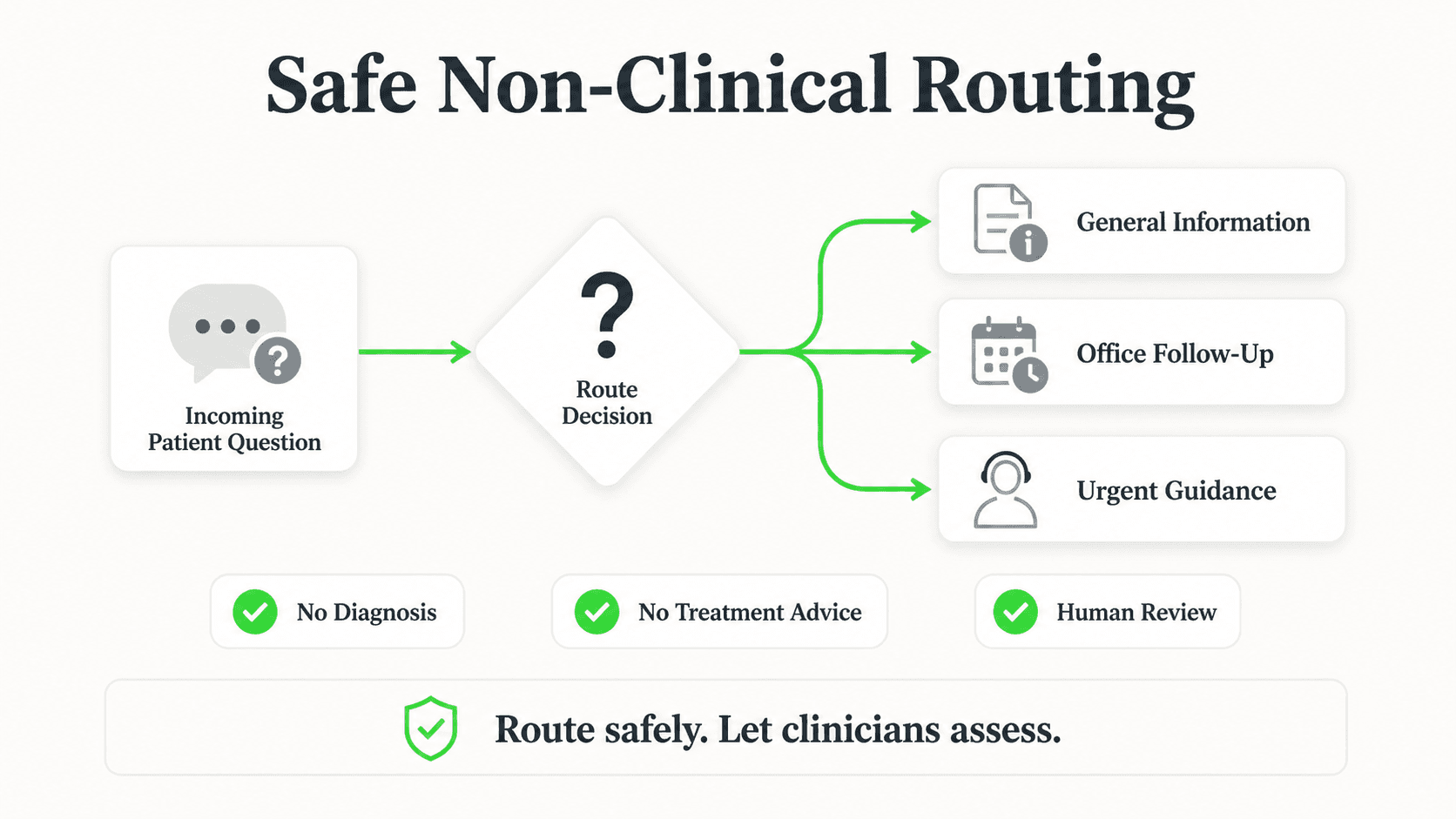
- Medication questions beyond basic info
- Clinical symptoms requiring assessment
- Insurance disputes or complex billing
- Patient complaints
- Any request for detailed medical records
Data Retention Settings
Configure based on your policies:
- Conversation logs: 6+ years
- Audit trails: 6+ years
- Anonymous analytics: As needed
- PHI purging: Per your retention policy
Step 4: Train Staff
Before launch, ensure all staff understand:
For Front Desk / Support Staff:
- How to access chatbot admin panel
- When and how to review conversations
- Escalation handling procedures
- Incident reporting process
For IT / Security:
- Audit log review procedures
- Security alert response
- Vendor communication protocols
- Breach response procedures
Step 5: Document Everything
HIPAA requires documentation of all compliance efforts:
Required Documentation:
- Risk assessment reports
- BAA with vendor
- Security policies and procedures
- Training records
- Audit log reviews
- Incident reports
OTP Verification for Patient Safety
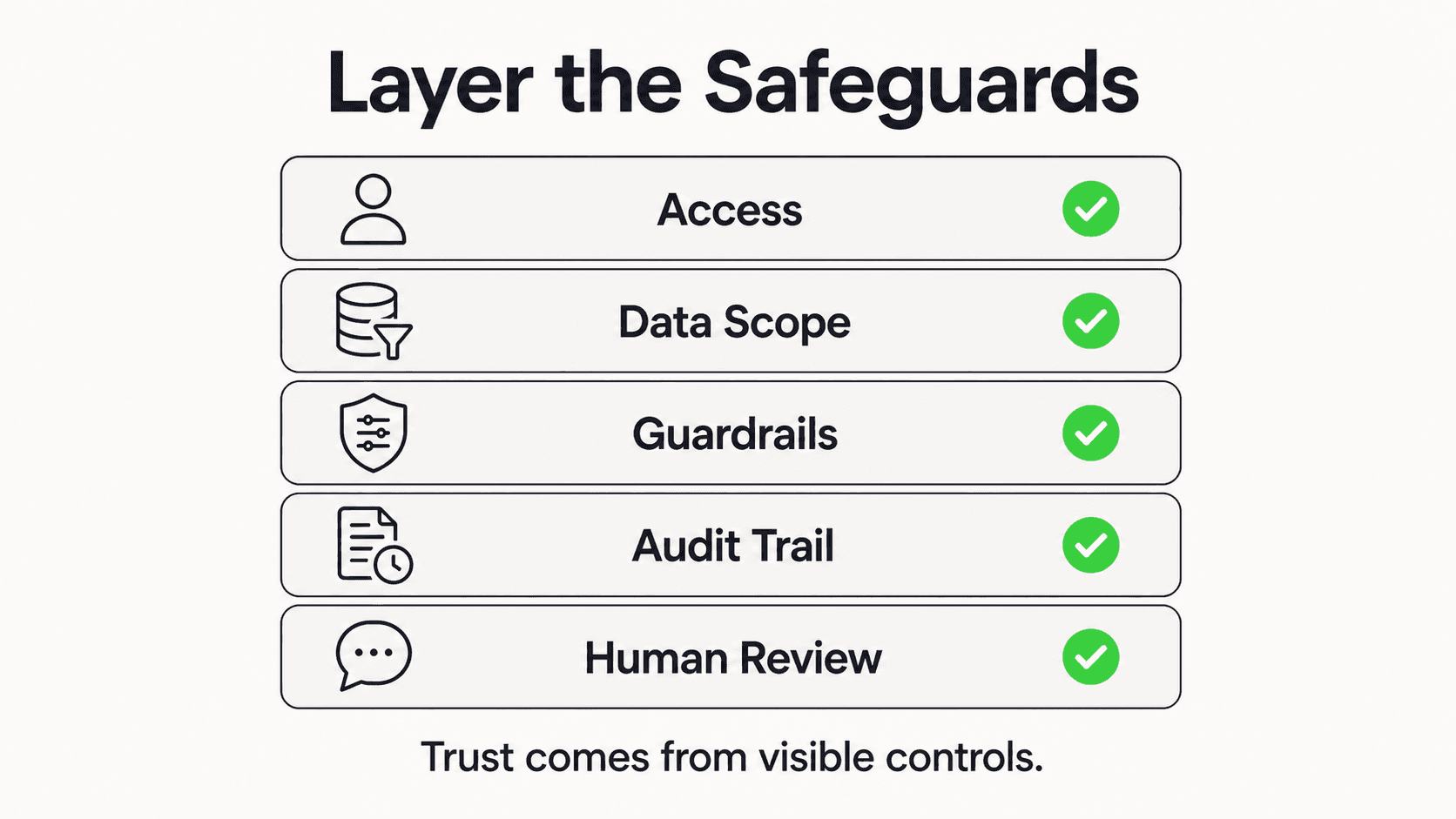
One-Time Password (OTP) verification is essential for protecting PHI in chatbot conversations.
When to Require OTP
| Scenario | OTP Required? |
|---|---|
| General FAQ (hours, location, services) | No |
| Appointment scheduling (new patient) | No |
| Appointment confirmation (existing patient) | Yes |
| Prescription refill requests | Yes |
| Test results inquiry | Yes |
| Billing details | Yes |
| Medical record requests | Yes + additional verification |
OTP Implementation Flow
1. Patient requests PHI-related information
2. Chatbot requests phone number on file
3. System sends OTP via SMS (or email as backup)
4. Patient enters OTP in chat
5. System verifies OTP (time-limited, single-use)
6. PHI access granted for that session
7. Session expires after inactivity
Security Best Practices for OTP
- Time limitation: OTP valid for 5-10 minutes maximum
- Attempt limits: Lock after 3 failed attempts
- Single use: Each OTP can only be used once
- Secure transmission: SMS or authenticated email only
- Audit logging: Record all OTP generations and verifications
Healthcare-Ready AI for Your Practice
Deploy AI chatbots designed with security in mind — encrypted data handling, OTP verification (paid add-on), and configurable guardrails. Verify compliance requirements with your team before deployment.
Explore AI Agents"HIPAA compliance isn't optional, but it also isn't the barrier to AI adoption that many healthcare providers fear. The majority of high-value chatbot use cases -- appointment scheduling, insurance FAQs, directions, office hours -- don't even touch PHI. Start there, prove the ROI, and expand with proper safeguards," says Gopi Krishna Lakkepuram, Founder & CEO of Hyperleap AI and former Microsoft engineer.
Common Compliance Mistakes to Avoid
Mistake 1: Assuming Non-PHI Chatbots Are Exempt
Even if your chatbot is designed to avoid PHI, patients may volunteer health information. Have policies for:
- Detecting PHI in user messages
- Redirecting to secure channels
- Not storing volunteered PHI inappropriately
Mistake 2: Using Consumer Chat Platforms
Standard chat platforms (WhatsApp personal, Facebook Messenger, regular SMS) are not HIPAA compliant. Use:
- HIPAA-compliant chat platforms
- WhatsApp Business API with proper configuration
- Secure patient portals
Mistake 3: Inadequate Vendor Due Diligence
Don't accept "we're HIPAA compliant" at face value. Verify:
- SOC 2 reports (request copies)
- BAA willingness (get it signed)
- Security documentation (review policies)
- Reference checks (talk to healthcare clients)
Mistake 4: Forgetting About Business Associates
Every vendor in the data flow needs a BAA:
- Chatbot platform
- Cloud hosting provider
- Analytics tools
- Integration partners
Mistake 5: Insufficient Staff Training
One untrained employee can cause a breach. Ensure:
- All staff with access are trained
- Training is documented
- Refresher training is conducted annually
- Specific training for chatbot administration
Where Hyperleap AI Fits: Non-PHI by Design
Hyperleap AI is built for SMB practices, and its healthcare approach is deliberately non-PHI by design — the exact starting pattern this guide recommends. Instead of pulling protected health information into the chatbot, it is configured to keep PHI out of the conversation entirely:
- Lead form before chat: contact details are collected in a structured form before the conversation begins, so the chat itself stays focused on general questions
- Document-grounded answers: the AI answers from your uploaded documents — services, hours, insurance plans accepted, pricing, new-patient policies — rather than generating clinical content
- Routing, not triage: anything clinical (symptoms, diagnoses, prescriptions, billing detail) is routed to your team to handle through your existing secure channels, not answered in chat
- Booking link sharing: the AI can share your scheduling link so patients enter booking details in your existing system, not the chat transcript (on Pro and Max, Hyperleap can also book Calendly or Cal.com slots inside the chat — for healthcare, weigh what that puts in the transcript)
- OTP verification add-on: available on Pro/Max plans for website chat only (usage-based, from $100) when you want to confirm a visitor's phone number before your team follows up
What Hyperleap AI does not offer: a Business Associate Agreement. If your deployment requires PHI to flow through the chatbot itself — intake forms with health history, insurance member IDs, clinical questions answered in-chat — you need a vendor that signs a BAA, and Hyperleap AI is not the right fit for that use case. For the non-PHI use cases that drive most of the ROI (scheduling requests, office hours, insurance-accepted FAQs, new-patient questions), no BAA is required because no PHI enters the system. That model — contact details collected via a lead form before the conversation, answers grounded in your practice documents, clinical questions routed to staff — is how non-PHI deployments stay both useful and compliant.
Implementation Checklist
Use this checklist before going live:
Pre-Implementation
- Conduct security risk assessment
- Document PHI touchpoints in chatbot
- Obtain signed BAA from vendor
- Review vendor SOC 2 report
- Configure encryption settings
- Set up access controls and roles
Configuration
- Implement OTP verification flows
- Configure session timeout
- Set up audit logging
- Define escalation procedures
- Test patient verification flows
- Verify data encryption
Training
- Train administrative staff
- Train clinical staff (if applicable)
- Document training completion
- Create quick reference guides
- Establish ongoing training schedule
Documentation
- Update privacy policies
- Create chatbot-specific procedures
- Document incident response plan
- Establish audit review schedule
- Create patient communication about chatbot
Go-Live
- Soft launch to limited patient group
- Monitor conversations for issues
- Verify audit logs are capturing correctly
- Confirm OTP verification working
- Full launch with monitoring
Ongoing
- Monthly audit log reviews
- Quarterly security assessments
- Annual risk assessment
- Annual staff training refresh
- Regular vendor security reviews
Further Reading
Authoritative external sources used and recommended for further research on this topic:
Start With the Non-PHI Use Cases That Drive ROI
Hyperleap AI keeps PHI out of the conversation by design — lead form before chat, document-grounded answers, and routing of clinical questions to your team. See it in action.
Try for FreeHave specific compliance questions for your healthcare organization? Explore AI Agents for healthcare, view pricing, or schedule a demo to see the non-PHI approach in action.
For the mental-health-specific version of this boundary — including crisis-routing design — see AI front desk for mental health practices.
Frequently Asked Questions
How does the HIPAA compliance checklist score my chatbot?
The tool walks you through 30 questions across 12 control categories. Each "Yes" earns full credit, "Partial" earns half, "No" subtracts (and double-counts in critical categories like BAAs and encryption), and "Not Applicable" is excluded from the denominator. The composite is a weighted percentage; below 80% is a real gap and we surface the top 3 to fix first.
Is the checklist a substitute for a formal HIPAA audit?
No. It's a self-assessment to spot obvious gaps before you hand a vendor or auditor a compliance package. A full audit still requires a Privacy Officer signoff, a real risk analysis, and (depending on your size) a third-party SOC 2 report. The downloadable Markdown report is a starting point, not a certification.
Are AI chatbots HIPAA compliant?
AI chatbots can be HIPAA compliant when built with proper safeguards: end-to-end encryption, Business Associate Agreements (BAA), access controls, audit logging, and data minimization. Not all chatbot platforms meet these requirements—verify that your vendor provides a signed BAA and SOC 2 certification before handling any patient data.
What patient data can a HIPAA-compliant chatbot collect?
A compliant chatbot can collect appointment requests, reported symptoms for routing to clinical staff, insurance information, and contact details with proper consent and encryption. It should never store Protected Health Information (PHI) unnecessarily. Best practice is to collect only what's needed, encrypt at rest and in transit, and purge data according to your retention policy.
How do I verify a chatbot vendor is HIPAA compliant?
Request these documents: signed BAA, SOC 2 Type II report, encryption specifications (AES-256 at rest, TLS 1.2+ in transit), data center certifications, and incident response procedures. Verify they perform regular security audits and penetration testing. A vendor that refuses to sign a BAA is not HIPAA ready.
What are the penalties for HIPAA violations with chatbots?
HIPAA violations carry penalties from $100 to $50,000 per violation, with annual maximums up to $1.5 million per category (Source: U.S. Department of Health and Human Services). Criminal penalties can include up to 10 years imprisonment for intentional violations. Using a non-compliant chatbot that exposes patient data can trigger both civil and criminal liability for the healthcare organization.
Can patients use WhatsApp to communicate with healthcare providers?

WhatsApp Business API can be used for non-PHI communications like appointment reminders and general health tips. For PHI-containing conversations, you need a HIPAA-compliant messaging platform with BAA coverage. Standard WhatsApp does not meet HIPAA requirements for storing or transmitting protected health information.
What happens if a patient shares PHI in a chatbot conversation?
Patients will volunteer health information even when the chatbot is designed for non-clinical tasks. A compliant system must detect when PHI is shared, avoid storing it in unprotected fields, and redirect the conversation to a secure channel if clinical follow-up is needed. The chatbot should acknowledge the information without repeating sensitive details back and route the patient to a secure patient portal or direct phone line for further discussion. Audit logs must capture that PHI was received so compliance officers can review handling procedures.
How do HIPAA-compliant chatbots handle appointment reminders?
Appointment reminders must balance usefulness with privacy. A compliant chatbot can send reminders that confirm a patient has an upcoming appointment without disclosing the provider's specialty, reason for visit, or treatment details. For example, "You have an appointment on Tuesday at 2:30 PM" is acceptable, while "Your dermatology follow-up for your skin biopsy results is Tuesday at 2:30 PM" discloses PHI. Reminders sent via SMS or WhatsApp should use minimum necessary information, and patients should have the ability to opt out of automated reminders through a documented consent process.
What audit trails are required for HIPAA compliance?
HIPAA requires healthcare organizations to maintain detailed audit trails for all access to ePHI, including chatbot interactions. Every instance where a patient's protected information is accessed, modified, or transmitted through the chatbot must be logged with the user identity, timestamp, action type, and data involved. These logs must be stored securely for a minimum of six years and be tamper-proof. Organizations should review audit logs monthly to detect unauthorized access patterns, and the chatbot vendor must provide exportable log data for compliance audits and breach investigations.
Keep exploring
- AI agents for healthcare practices - Automate patient intake and scheduling securely
- Conversational AI for customer service - Route and answer patient questions across channels
Healthcare & Dental Resources
- Best AI Chatbots for Healthcare 2026 - Platform comparison
- Best AI Chatbots for Dental Practices 2026 - Dental solutions
- AI Chatbot Statistics 2026 - Industry benchmarks
- How to Choose an AI Chatbot Platform - Selection guide
Related Comparisons
- Best No-Code Chatbot Builders 2026 - No-code platforms
- Best Multi-Channel Chatbots 2026 - Omnichannel solutions
Glossary
- What is a Chatbot? - Chatbot fundamentals
- OTP Validation - Verified patient capture
- Knowledge Base Grounding - Ensuring AI accuracy
Industry Solutions
See how AI chatbots work for these industries:
Related Articles

AI Chatbot Security & Data Privacy: A Business Owner's Guide
What business owners need to know about AI chatbot security, data privacy, and compliance before deploying customer-facing AI.

Automate Patient Appointment Scheduling (2026)
A step-by-step guide to automating appointment booking, reminders, and rescheduling while maintaining the personal care patients expect.
AI Receptionist for Veterinary Clinics: A Guide
An AI receptionist for veterinary clinics answers intake and pricing questions, routes emergencies to your team, and shares your booking link 24/7.

AI Receptionist for Pharmacies: The Non-Clinical Front Desk
An AI receptionist for pharmacies answers hours, services, and insurance questions 24/7 — and routes every medication question straight to your pharmacist.