What to Look for in an AI Solution for Your Medical Practice
A practical evaluation guide for medical practices choosing AI communication tools. 7 must-have capabilities from HIPAA compliance to emergency routing.

TL;DR: Dozens of AI tools now claim healthcare capabilities, but most were built for retail or general customer service and lack the compliance, safety, and workflow features medical practices need. This guide covers the 7 must-have capabilities to evaluate before choosing an AI solution for your practice: HIPAA compliance with a signed BAA, EHR integration, emergency routing, appointment scheduling, patient intake automation, multi-channel access, and healthcare-specific analytics.
Every unanswered patient call is a patient who may never call back. Research shows that 85% of patients who cannot reach a practice on the first attempt will call a competitor instead (Source: AgentZap, 2025). For a small practice, that translates to thousands of dollars in lost lifetime patient value every month. Meanwhile, front-desk staff are drowning in phone calls, insurance questions, and scheduling requests that pile up faster than any team of two or three can handle.
The promise of AI is clear: automate the repetitive, free your team for what matters, and be available when patients need you. But the healthcare AI market has exploded with options, and most of them were never designed for the realities of running a medical practice. They lack HIPAA safeguards. They cannot connect to your EHR. They have no protocol for a patient who describes chest pain at 11 PM.
Choosing the wrong AI tool does not just waste money. It creates compliance risk, erodes patient trust, and adds work instead of removing it. This guide walks you through exactly what to look for so you make the right choice the first time.
Who This Guide Is For
This guide is written for medical practice owners, office managers, and healthcare administrators at small to mid-size U.S. practices (1-20 providers) who are evaluating AI communication tools for the first time or replacing an underperforming solution.
What Is AI for Medical Practice Communication?
AI for medical practice communication refers to intelligent software that handles patient-facing interactions across your practice's digital channels. Unlike traditional rule-based chatbots that follow rigid decision trees, modern AI systems use large language models trained on your practice's specific knowledge base to understand and respond to patient inquiries naturally.
For medical practices, these AI tools typically handle:
- Appointment scheduling and rescheduling across web, messaging, and phone channels
- Patient intake by collecting pre-visit information, insurance details, and medical history forms
- FAQ responses about office hours, accepted insurance plans, procedures, parking, and preparation instructions
- After-hours availability so patients can get answers at 10 PM without waiting until morning
- Emergency routing that immediately directs patients describing urgent symptoms to appropriate care or 911
- Multi-language support for diverse patient populations
The critical distinction from general-purpose AI tools is that healthcare AI must operate within strict compliance boundaries. It must never attempt clinical assessment, must protect patient information according to HIPAA standards, and must have clear escalation paths to your clinical team for anything beyond routine communication.
This is where most AI vendors fall short. A tool that works well for an e-commerce store or a real estate agency may be dangerous in a medical setting if it lacks healthcare-specific safeguards.
Why Most AI Solutions Fall Short for Medical Practices
They Were Not Built for Healthcare Compliance
The majority of AI chatbot platforms were designed for retail, hospitality, or general customer service. They may encrypt data in transit, but they do not offer Business Associate Agreements, lack audit logging for patient interactions, and store conversation data on servers that do not meet HIPAA's Security Rule requirements. According to the U.S. Department of Health and Human Services, HIPAA violations carry penalties of up to $1.5 million per violation category per year. A generic chatbot that inadvertently collects protected health information without proper safeguards exposes your practice to significant legal and financial risk.
They Cannot Handle Clinical Urgency
General-purpose AI tools treat every conversation the same. A patient asking about parking directions gets the same response workflow as a patient describing severe abdominal pain. Medical practices need AI that recognizes when a conversation involves potential urgency and immediately routes that patient to a live team member or directs them to emergency services. Without this capability, an AI tool becomes a liability rather than an asset.
AI Does Not Perform Clinical Assessment
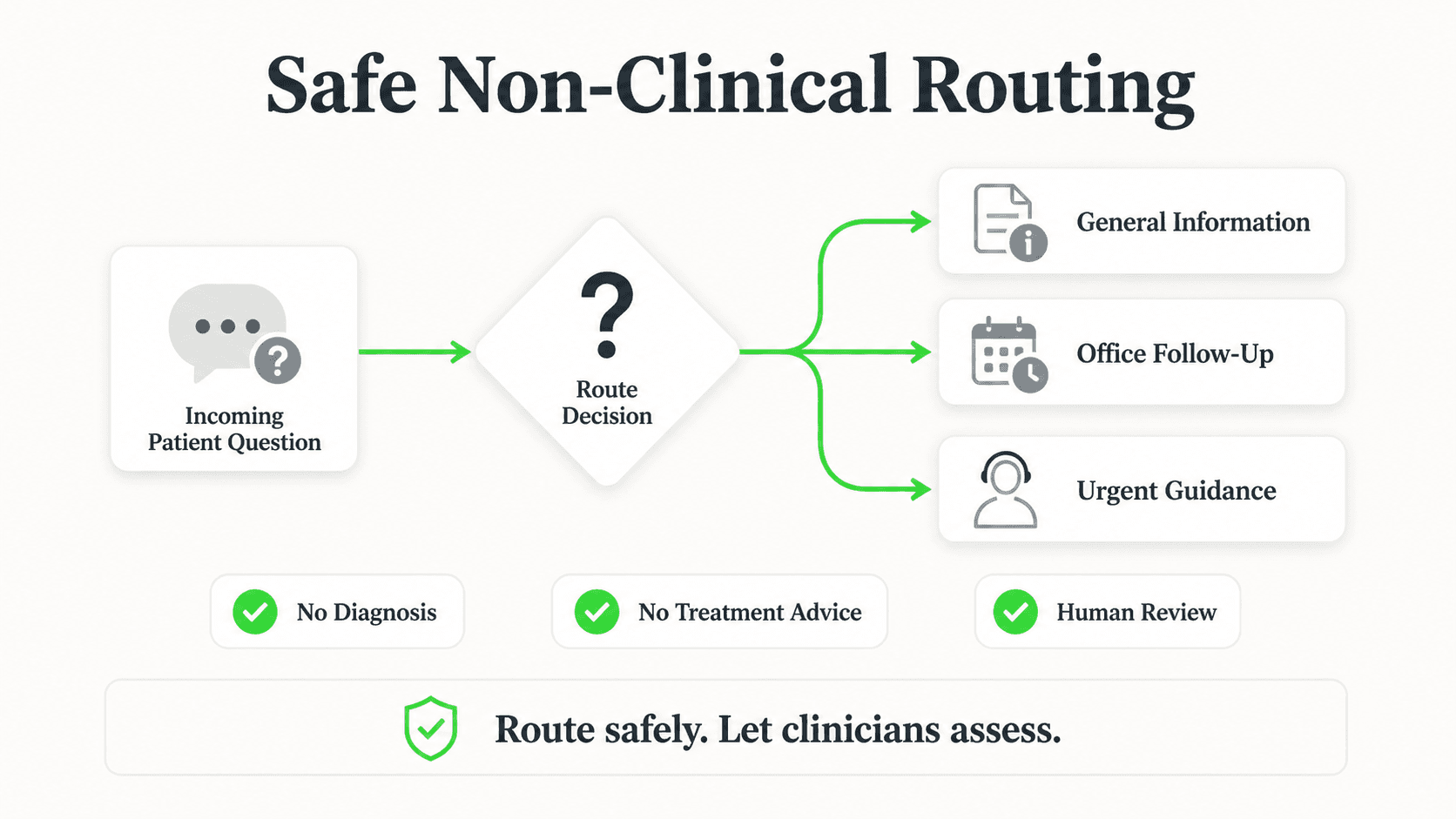
No AI chatbot should ever assess, diagnose, or advise on medical conditions. The role of AI in a medical practice is to route patients to the right human resource, not to replace clinical judgment. When evaluating any vendor, ask specifically how their system handles patients who describe symptoms. The only acceptable answer is immediate routing to your clinical staff or emergency services.
They Create Data Silos Instead of Efficiency
An AI tool that cannot connect to your electronic health records, practice management system, or scheduling platform creates more work, not less. Your staff ends up manually transferring information between systems, which introduces errors and defeats the purpose of automation. Research from athenahealth shows that practices using integrated technology platforms save an average of 8 hours per provider per week on administrative tasks compared to those using disconnected tools.
They Lack Healthcare-Specific Analytics
General chatbot dashboards track metrics like "conversations started" and "messages sent." Medical practices need to know how many appointment requests were completed, how many patients were routed to staff for urgent concerns, what the most common patient questions are by time of day, and how after-hours engagement compares to business hours. Without healthcare-specific analytics, you cannot measure ROI or identify opportunities to improve patient communication.
7 Things to Look for in an AI Solution for Your Medical Practice
1. HIPAA Compliance with a Signed Business Associate Agreement
What this looks like in practice: The vendor provides a signed Business Associate Agreement before you deploy their tool. Their infrastructure meets HIPAA's Security Rule requirements including AES-256 encryption at rest, TLS 1.2+ encryption in transit, role-based access controls, and comprehensive audit logging.
Real-world impact: A signed BAA is not optional. It is the legal document that holds your AI vendor accountable for protecting patient information under federal law. Without it, your practice bears sole liability for any data exposure. The 2025 HIPAA Security Rule update eliminated the distinction between "required" and "addressable" safeguards, meaning encryption and access controls are now mandatory across the board.
Why it works: HIPAA compliance is not just about avoiding fines. It is about building the foundation of trust that healthcare depends on. Patients who know their information is protected are more willing to engage with digital tools, which increases adoption and improves outcomes for your practice.
Key features to demand:
- Signed BAA provided before implementation, not upon request
- AES-256 encryption at rest, TLS 1.2+ in transit
- Comprehensive audit trails for every patient interaction
- Role-based access controls for your staff
- SOC 2 Type II certification or equivalent security attestation
- Clear data retention and deletion policies
For a deeper dive into compliance requirements, see our complete guide to HIPAA-compliant AI chatbots for healthcare.
2. EHR and Practice Management System Integration
What this looks like in practice: The AI tool connects directly to your electronic health records and practice management system through standard APIs (FHIR/SMART or HL7), so appointment availability, patient records, and scheduling updates flow bidirectionally without manual intervention.
Real-world impact: Integration eliminates double data entry. When a patient books an appointment through the AI chatbot, it appears in your EHR scheduling module immediately. When your staff blocks off time for a procedure, the AI tool knows not to offer that slot. This bidirectional sync prevents the most common automation failures: double bookings, outdated availability, and lost patient information.
Why it works: The most common reason medical practices abandon AI tools is that the tool creates more administrative work than it removes. Integration is the difference between an AI assistant that truly automates and one that just moves the manual work to a different screen.
Key features to evaluate:
- EHR connectivity method: pre-built integrations vs. FHIR API vs. REST API and webhooks — understand what your vendor actually ships today
- Compatibility with your specific EHR platform (Epic, athenahealth, Oracle Health, DrChrono, eClinicalWorks)
- Real-time bidirectional data sync for scheduling and patient information
- Fallback protocols when the integration encounters errors
- HIPAA-compliant data flow throughout the integration chain
Note: Integration depth varies significantly by platform. Hyperleap AI connects to existing workflows via REST API and webhooks. Ask any vendor to demonstrate their specific integration with your EHR before committing.
FHIR Is the Industry Standard
As of 2026, certified EHR systems must support FHIR/SMART-based data exchange. When evaluating AI vendors, prioritize those using FHIR APIs for integration. This ensures compatibility as healthcare technology standards evolve and protects your investment long-term.
3. Emergency Routing Protocols
What this looks like in practice: When a patient describes symptoms that could indicate an emergency, such as chest pain, difficulty breathing, or severe injury, the AI immediately stops the standard conversation flow, displays emergency contact information including 911, and attempts to route the patient to a live clinical team member. Every such interaction is logged for follow-up.
Real-world impact: This is the capability that separates healthcare-ready AI from general-purpose chatbots. A patient reaching out at 11 PM with worrying symptoms needs to be directed to emergency services instantly, not guided through a scheduling flow. Without proper emergency routing, an AI chatbot in a medical setting is a patient safety risk.
Why it works: Emergency routing protocols protect both your patients and your practice. Patients get directed to appropriate care faster. Your practice demonstrates a standard of care that extends beyond office hours. And every routed interaction creates a documented record that your system acted appropriately.
Key features to demand:
- Keyword and context-based detection of potential emergency language
- Immediate display of 911 and your practice's emergency contact information
- Automatic attempt to route to live on-call staff
- Complete logging of the interaction for clinical team review
- Configurable escalation rules that your clinical team can update
- Clear messaging to the patient that the AI does not provide medical advice
4. Appointment Scheduling and Management
What this looks like in practice: Patients can book, reschedule, and cancel appointments directly through the AI tool on your website, WhatsApp, Facebook Messenger, or Instagram. The system checks real-time provider availability, confirms the appointment, and sends automated reminders at intervals you configure.
Real-world impact: Scheduling is the highest-volume administrative task in most medical practices. Research shows that 40% of appointment requests happen outside business hours, which means your practice is losing bookings every evening and weekend your phones are off. AI-powered scheduling captures those after-hours requests and reduces no-shows through automated reminders. Practices using smart scheduling report up to a 30% improvement in provider utilization.
Why it works: Patients want to book on their schedule, not yours. A patient who remembers to schedule a follow-up at 9 PM on a Sunday should not have to wait until Monday at 8 AM. AI scheduling meets patients where they are and converts intent into confirmed appointments before that intent fades.
Key features to demand:
- Real-time availability sync with your EHR scheduling module
- Support for multiple appointment types and provider-specific rules
- Automated reminders via the patient's preferred channel
- Rescheduling and cancellation handling without staff involvement
- Waitlist automation that fills canceled slots by notifying standby patients
For a step-by-step implementation guide, see our article on how to automate patient appointment scheduling.
5. Patient Intake Automation
What this looks like in practice: Before a patient's visit, the AI tool collects the information your practice needs: demographic details, insurance information, reason for visit, current medications, allergies, and relevant medical history. This information is formatted and delivered to your staff or EHR system before the patient walks through the door.
Real-world impact: Manual patient intake is one of the biggest bottlenecks in small practices. Patients arrive, fill out paper forms, and staff manually enters the data into the EHR. This process takes 15-20 minutes per new patient and is prone to transcription errors. Digital intake through an AI chatbot reduces check-in time, improves data accuracy, and lets your clinical team review patient information before the appointment begins.
Why it works: Patients increasingly expect a digital-first experience. Filling out forms on a clipboard in a waiting room feels outdated compared to completing intake on their phone the night before. Practices that offer pre-visit digital intake report shorter wait times, fewer data entry errors, and higher patient satisfaction scores.
Key features to demand:
- Customizable intake forms that match your practice's requirements
- Conditional logic that adjusts questions based on visit type and patient responses
- Secure document upload for insurance cards, referrals, and IDs
- Pre-population of returning patient data to reduce redundant questions
- HIPAA-compliant storage and transmission of all collected information
6. Multi-Channel Patient Access
What this looks like in practice: Patients can interact with your AI through your practice website, WhatsApp, Facebook Messenger, and Instagram DM, all from one unified platform. Every conversation is logged in a single dashboard regardless of channel, and patients get a consistent experience whether they message you on Instagram or visit your website.
Real-world impact: Different patient demographics prefer different channels. Younger patients may message through Instagram. Families may use WhatsApp. Patients searching for a new provider will start on your website. A multi-channel AI solution meets every patient segment on the channel they already use, without requiring your staff to monitor five separate inboxes.
Why it works: Channel preference is generational, cultural, and situational. A practice that only offers a website chatbot misses the patients who spend most of their digital time on messaging apps. Multi-channel access expands your practice's reach without expanding your staff workload.
Key features to demand:
- Unified dashboard for all patient conversations across channels
- Consistent AI behavior and knowledge base across every channel
- Channel-specific formatting (rich media on WhatsApp, quick replies on Messenger)
- Seamless handoff to live staff from any channel
- Analytics broken down by channel for understanding patient preferences
For a detailed look at how multi-channel AI works for healthcare, visit our healthcare AI agents page.
See Multi-Channel AI in Action for Healthcare
Hyperleap AI connects your practice to patients on web, WhatsApp, Instagram, and Messenger from one platform, with a non-PHI design that keeps health details out of the chat.
Get Started7. Healthcare-Specific Analytics and Reporting
What this looks like in practice: Your dashboard shows metrics that matter for medical practices: appointment booking completion rates, most common patient questions by category, after-hours vs. business-hours engagement, emergency routing frequency, average response time, and patient satisfaction trends.
Real-world impact: Generic chatbot analytics tell you how many messages were sent. Healthcare-specific analytics tell you how many appointments were booked, how many patients needed to be routed to staff, which insurance questions come up most often, and whether your after-hours AI is capturing the bookings your practice was previously losing. These insights drive staffing decisions, marketing priorities, and operational improvements.
Why it works: What gets measured gets managed. Practices that track healthcare-specific metrics can calculate the exact ROI of their AI investment, identify gaps in their knowledge base, and continuously improve the patient experience based on real data rather than assumptions.
Key features to demand:
- Appointment funnel metrics (started, completed, abandoned, rescheduled)
- Conversation categorization (scheduling, insurance, clinical routing, general FAQ)
- After-hours engagement reporting
- Emergency routing logs with timestamps and outcomes
- Exportable reports for practice management meetings
- Trend analysis over time to measure improvement
Real Results: What Medical Practices Are Achieving
Revenue Recovery
- Practices that capture after-hours appointment requests report recovering bookings from the 40% of patients who want to schedule outside of 9-5
- Reducing no-shows by 10 percentage points can recover an estimated $100,000+ annually for an average-sized practice
- Waitlist automation fills canceled slots that would otherwise generate zero revenue
- Practices with faster response times generate significantly more new patient inquiries because 82% of patients expect an immediate response when reaching out (Source: HubSpot)
Operational Efficiency
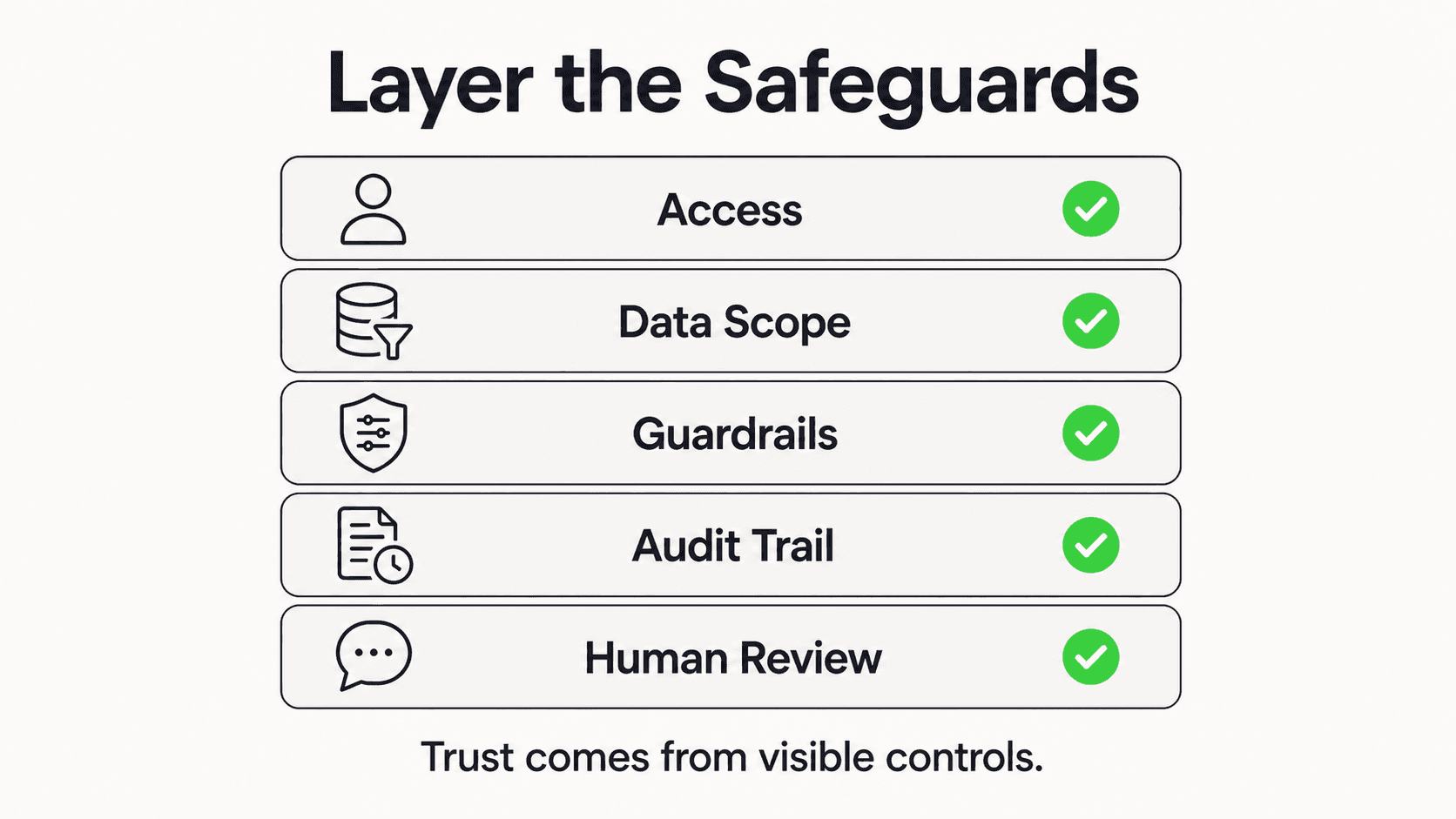
- Front-desk phone volume decreases as patients shift to self-service channels for routine questions
- Staff time previously spent on manual intake, scheduling calls, and FAQ responses can be redirected to patient care and revenue-generating activities
- Fewer scheduling errors and data entry mistakes from manual transcription
- After-hours coverage without overtime costs or additional staffing
Patient Experience
- 67% of patients prefer to book appointments online rather than by phone (Source: DocResponse)
- Patients who self-schedule are statistically more likely to keep their appointments (Source: MGMA)
- Multi-language support removes barriers for diverse patient populations
- Instant responses build trust and set your practice apart from competitors who leave patients on hold
Competitive Advantage
- Practices offering digital communication differentiate themselves in markets where most providers still rely exclusively on phone-based communication
- Younger patient demographics actively seek providers with online booking and messaging options
- Multi-channel availability positions your practice as modern and patient-centered
- Data-driven insights from AI analytics enable smarter decisions about hours, staffing, and service offerings
Implementation Roadmap for Medical Practices
Phase 1: Evaluate and Select (Weeks 1-2)
- Audit your current patient communication workflow: call volume, missed calls, after-hours inquiries, most common patient questions
- Use the 7 criteria in this guide to create a vendor evaluation scorecard
- Request demos from 2-3 vendors and test their emergency routing protocols specifically
- Verify HIPAA compliance, BAA availability, and EHR integration compatibility
- Check references from other medical practices of similar size and specialty
Phase 2: Configure and Integrate (Weeks 3-4)
- Sign BAA with your chosen vendor
- Connect the AI tool to your EHR and practice management system
- Upload your practice knowledge base: services, providers, insurance accepted, office policies, preparation instructions, and FAQs
- Configure emergency routing rules with input from your clinical team
- Set up appointment types, provider availability rules, and booking parameters
- Build patient intake forms that match your current workflow
Phase 3: Test and Soft Launch (Weeks 5-6)
- Run end-to-end testing of every patient scenario: scheduling, intake, FAQ, emergency routing, and handoff to staff
- Deploy on your primary channel (typically your practice website) with a subset of appointment types
- Train front-desk staff on the new workflow, dashboard, and escalation procedures
- Monitor conversations daily during the soft launch period and refine the knowledge base based on real patient questions
- Gather staff feedback on workflow improvements and pain points
Phase 4: Expand and Optimize (Weeks 7-12)
- Add additional channels: WhatsApp, Facebook Messenger, Instagram DM
- Enable the full range of appointment types and providers
- Activate automated reminders and waitlist features
- Begin tracking core metrics: booking completion rate, no-show rate, after-hours engagement, routing frequency
- Review analytics monthly and update your knowledge base quarterly
- Survey patients about their experience with the new communication tools
Start Small, Prove Value, Then Expand
The most successful medical practice AI implementations start with one channel and a few appointment types. Prove the value in 30 days, then expand. Trying to launch everything at once leads to longer timelines, more configuration issues, and slower staff adoption.
Smarter Patient Communication Starts with the Right Choice

The gap between what patients expect and what most medical practices deliver is widening every year. Patients want instant answers, after-hours availability, and the ability to interact on the channels they already use. Practices that meet these expectations capture more patients, reduce no-shows, and build stronger relationships. Those that do not will steadily lose ground to competitors who do.
But not every AI tool is built for healthcare. The 7 criteria in this guide, from HIPAA compliance with a signed BAA to healthcare-specific analytics, separate the solutions that will genuinely help your practice from the ones that will create new problems.
The practices that thrive will be the ones that choose carefully, start small, and expand based on data. If your practice is ready to explore AI-powered patient communication built for healthcare, Hyperleap AI offers document-grounded responses, multi-channel access across web, WhatsApp, Instagram, and Messenger, and architecture designed with healthcare compliance in mind.
Frequently Asked Questions
Will an AI solution replace my front-desk staff?
No. AI handles the repetitive, high-volume tasks that consume most of your front desk's time: routine scheduling, appointment reminders, insurance FAQs, and after-hours inquiries. Your staff remains essential for complex patient situations, insurance disputes, in-person check-ins, and the personal interactions that build patient loyalty. Think of AI as giving your team more time for meaningful work, not replacing their role.
How much does AI for a medical practice cost?
Costs vary by platform and features. AI-powered chatbot solutions for medical practices typically range from $40 to $200 per month depending on the number of AI responses, chatbots, and channels you need. When evaluating cost, factor in the revenue recovered from reduced no-shows, after-hours bookings captured, and staff time redirected to higher-value tasks. Most practices see a positive return within 60-90 days of deployment.
How long does it take to implement an AI solution?
Most medical practices can go live on their first channel within 2-4 weeks. This includes vendor selection, EHR integration, knowledge base configuration, and staff training. Full multi-channel deployment with optimization typically takes 6-12 weeks. The timeline depends primarily on the complexity of your EHR integration and the number of appointment types you need to configure.
How does AI handle emergencies if a patient describes symptoms?
A properly configured healthcare AI tool does not assess or advise on medical conditions. Instead, it uses keyword and context detection to recognize when a patient describes potentially urgent symptoms. When triggered, the AI immediately displays emergency contact information including 911, attempts to route the patient to your on-call staff, and logs the interaction for clinical team review. This routing-based approach ensures patients are directed to appropriate care without the AI overstepping its role.
Can AI work with my existing EHR system?
Integration capabilities vary by platform. When evaluating vendors, request a technical integration review to confirm compatibility with your specific EHR. Look for vendors that use FHIR/SMART APIs, as this is the mandated interoperability standard. Hyperleap AI connects to existing workflows via REST API and webhooks — verify whether this meets your specific EHR integration requirements before committing.
Do I need technical expertise to manage the AI tool?
No. Modern healthcare AI platforms are designed for non-technical staff. Day-to-day management, including updating your knowledge base, adjusting appointment rules, and reviewing analytics, is typically done through a visual dashboard. Initial setup may require vendor support for EHR integration, but ongoing management should be straightforward for your office manager. For guidance on evaluating platforms, see our guide to choosing an AI chatbot platform.
What happens if the AI gives a patient incorrect information?
Healthcare AI tools that use document-grounded responses are designed to answer only from the knowledge base you provide. This significantly reduces the risk of inaccurate information compared to open-ended AI. However, no system is perfect. Best practices include reviewing AI conversations regularly during the first 30 days, keeping your knowledge base current, and configuring the AI to escalate to staff when it is not confident in an answer rather than guessing. Look for vendors that provide confidence scoring and automatic escalation for low-confidence responses.
Ready to Modernize Your Patient Communication?
See how Hyperleap AI helps medical practices automate scheduling, intake, and patient inquiries while keeping your team in control.
Start Your Free TrialIndustry Solutions
See how AI chatbots work for these industries:
Related Articles

7 Questions Before Adding AI to Your Real Estate Biz
Not all AI tools are built for real estate. Ask these 7 questions to protect your leads, your client relationships, and your commission checks.
AI Receptionist for Veterinary Clinics: A Guide
An AI receptionist for veterinary clinics answers intake and pricing questions, routes emergencies to your team, and shares your booking link 24/7.

How Many Languages Does ChatGPT Support?
OpenAI doesn't publish an official language count for ChatGPT. Here's what's known, and why it matters less than you'd think for a business chatbot.

AI Chatbot for Chiropractic Clinics: 2026 Guide
How an AI chatbot for chiropractic clinics answers new-patient questions, shares booking links, and reduces no-shows — without giving medical advice.