Childcare AI Front Desk
The same parent questions,
all day, in the middle of circle time.
The AI front desk for daycare and childcare centers. Answer parent questions about your center. Collect contact details and book the tour.
From $40/mo · live in under 5 minutes·Why an agent, not a chatbot →
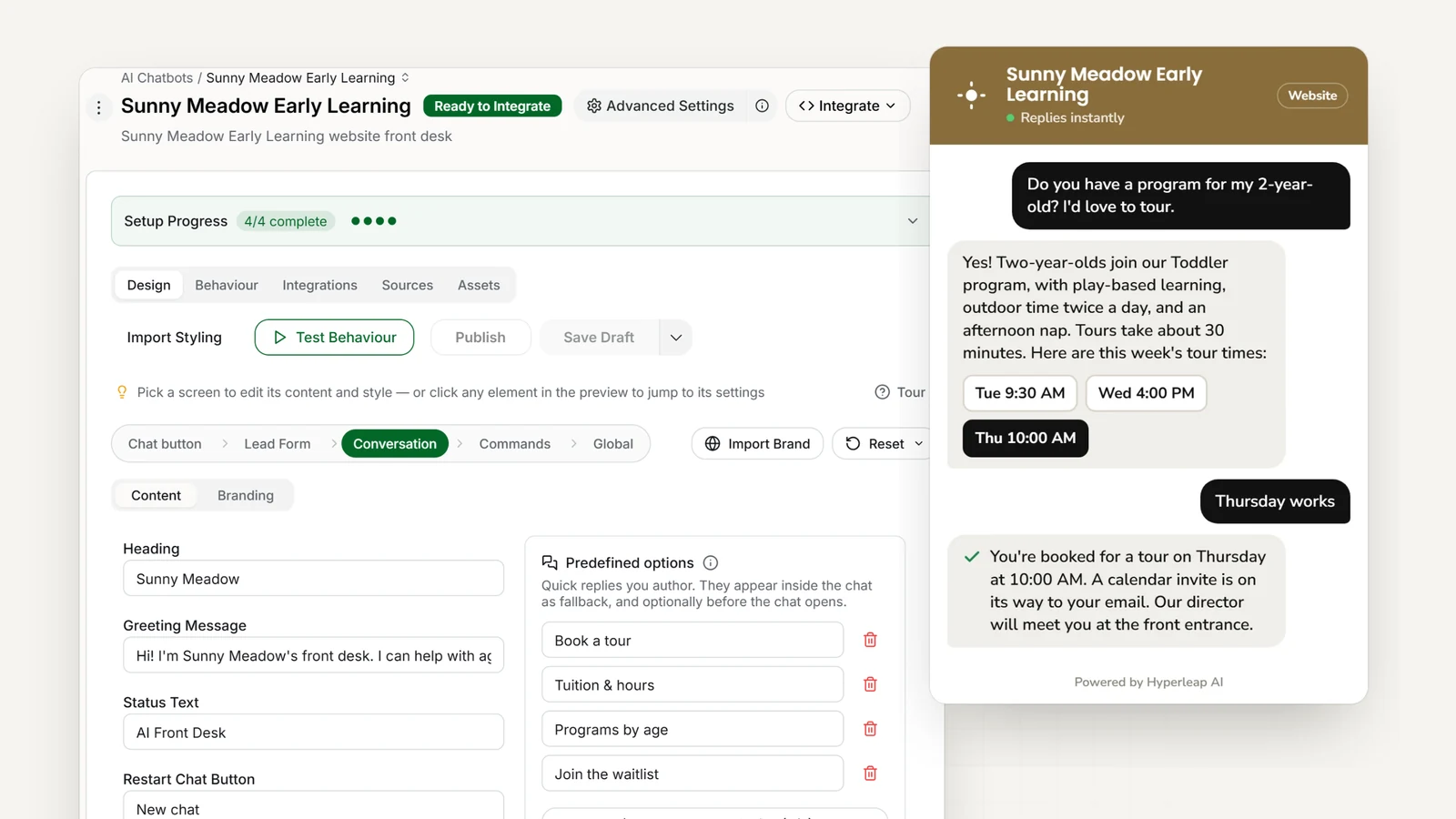
- <5 minutes
- To go live — paste your site, add one script tag
- 4 channels
- Website, WhatsApp, Instagram DM, Messenger
- Routes to your director
- Waitlist requests and questions about a specific child go to a person, with the parent's number
Today
Without Hyperleap AI
- The director is pulled out of circle time to answer "Do you have openings for 2-year-olds?" again
- Tuition, hours, and curriculum questions land on whoever picks up the phone
- Tour requests turn into phone tag around nap time and pickup
- Waitlist requests arrive by email, DM, and voicemail and get retyped by hand
- Facebook and WhatsApp messages pile up during drop-off and pickup
- Parents who message and hear nothing book a tour at the next center
With an AI front desk
With Hyperleap AI
- Age groups, hours, tuition, curriculum, and meals answered from your own handbook and rate sheet
- Tour requests get booked in the chat through Calendly or Cal.com (Pro and Max)
- Waitlist requests captured with the child's age and start date, emailed to your director
- Questions about a specific child's needs route to a person, with the parent's number
- Website, WhatsApp, Instagram DM, and Messenger in one inbox
- Your staff stays with the children; the summary is waiting in your inbox
Features
What Your Childcare Front Desk Handles
From the first parent question to a lead in your inbox — with enrolment decisions left to your director.
Tour Booking
Parents ask to visit and book a tour time in the same conversation through Calendly or Cal.com (Pro and Max), along with what to bring and what a tour includes.
Age Groups & Waitlist Requests
Explains which program fits the child's age (infant, toddler, preschool, pre-K) and how your waitlist works, then passes the request to your director. It does not confirm places.
Curriculum & Philosophy FAQs
Your educational approach (Montessori, Reggio, play-based), daily schedule, teacher credentials, and learning goals — from the handbook you attach.
Safety & Licensing Info
Your licensing details, teacher-to-child ratios, entry and check-in procedures, and allergy policy, exactly as you have written them.
Four Channels, One Inbox
Website chat, WhatsApp, Instagram DM, and Facebook Messenger. Every conversation lands in one inbox in Studio.
100+ Languages
Parents write in their own language; the AI detects it and replies in kind — Spanish, Mandarin, Vietnamese, Korean, and more.
In practice
Real Conversations Your AI Handles
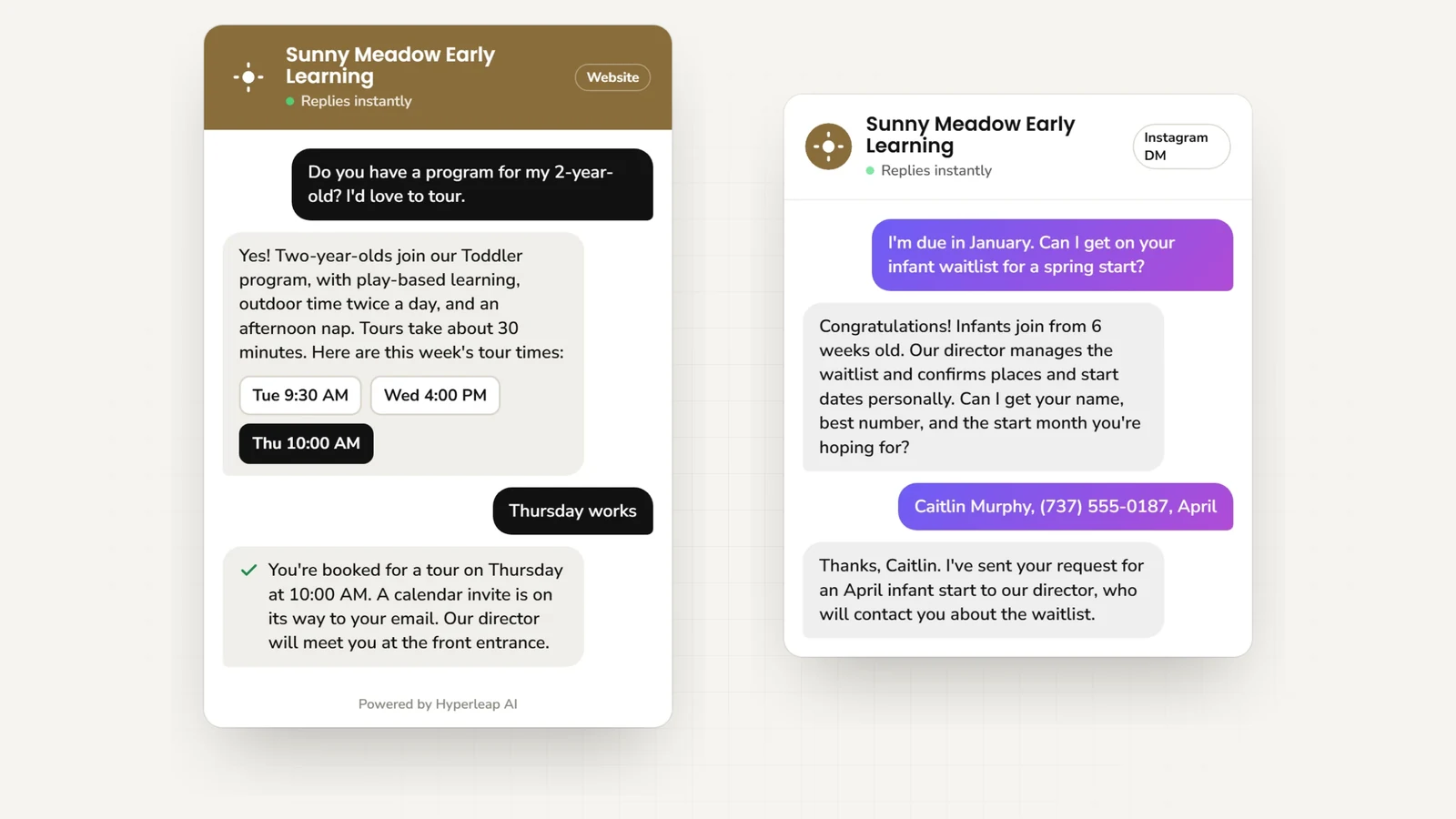
Openings Question
Parent messages: "Do you have openings for an 18-month-old starting in August?" AI explains the Toddler program, captures the start date and phone, and passes it to your director.
Pricing Questions
Website chat: "How much for full-time infant care?" AI quotes your infant rate and explains what it includes (meals, diapers, supplies).
Curriculum Inquiry
Facebook message: "What's your teaching philosophy?" AI explains your approach from your handbook and shares the tour link.
Waitlist Request
Expecting parent: "I'm due in 6 months, when should I enroll?" AI explains how your waitlist works, captures her details, and emails the request to your director.
Tour Request
WhatsApp: "Can we tour Saturday morning?" AI shares your tour booking link and captures the parent's name and number for your director.
Safety & Security
Anxious parent: "How do you keep kids safe?" AI explains your secure entry, check-in procedure, and allergy policy as written in your handbook.
Potty Training Policy
Parent asks: "Does my 2-year-old need to be potty trained?" AI explains your policy, transition support, and partnership with families.
Meals & Allergies
Inquiry: "My child has a peanut allergy, can you accommodate?" AI shares your nut-free kitchen policy and routes the specifics to your director.
Drop-Off Hours
Working parent: "What time can I drop off for a 7am shift?" AI gives your hours, early drop-off option, and late-pickup fee from your rate sheet.
Outcomes
Why Daycare Centers Choose Hyperleap AI
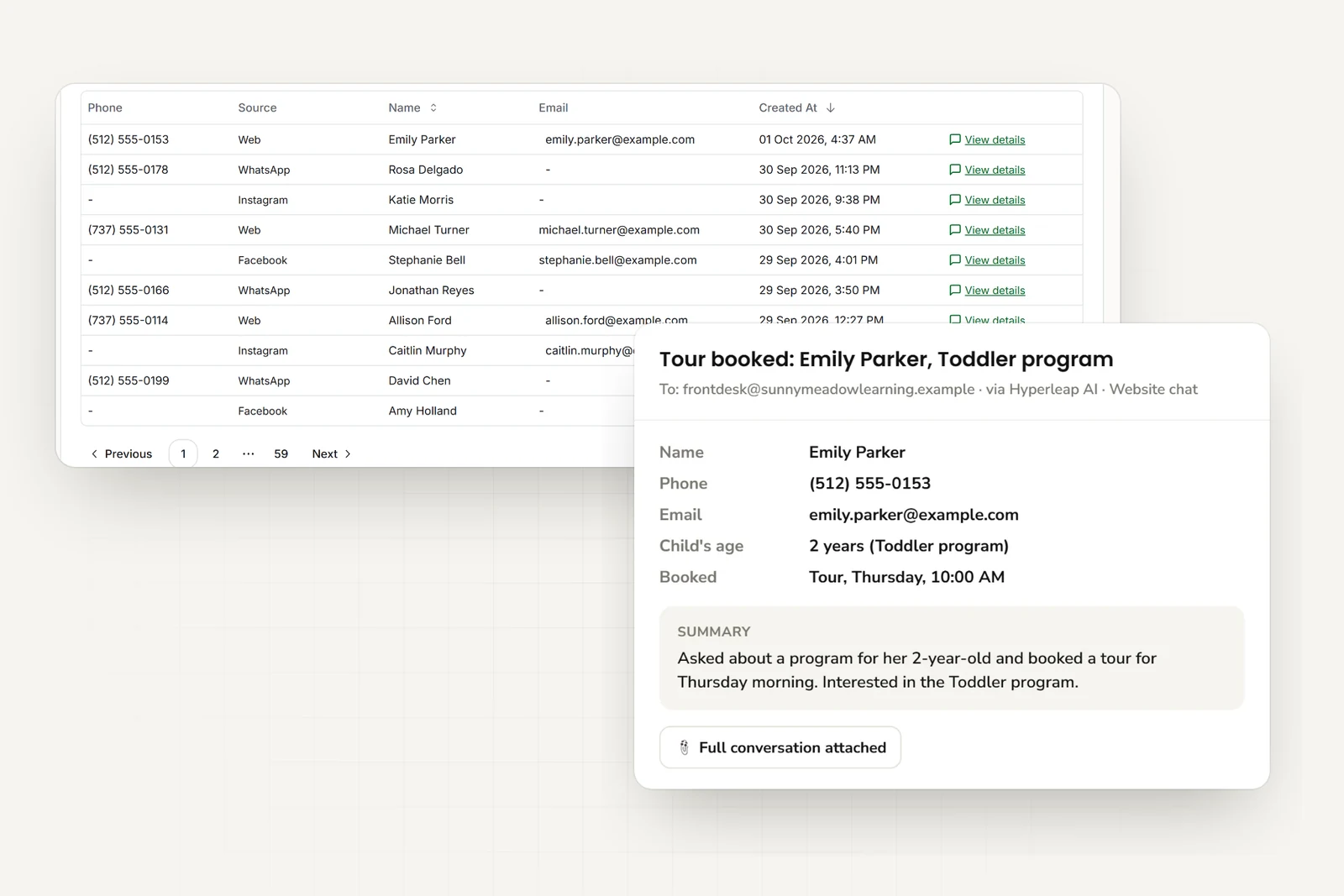
Tour Requests Don't Go Cold
Whoever asks to visit gets your tour link in the same reply, and your director gets their name, number, and the child's age.
Fewer Interruptions in the Classroom
The repeat questions get answered in chat, so circle time, snack, and nap carry on and your staff stays with the children.
Patient, Plain Answers
First-time parents have a lot of questions. They get unhurried answers to the basics — ratios, meals, hours — before they ever have to call.
Waitlist Requests in One Place
Every waitlist request arrives in your inbox with the child's age and start date, so your director works from one list instead of scattered DMs.
Context Before the Tour
Parents arrive already knowing your curriculum, ratios, and hours, and your director knows what they asked about.
Live in Under 5 Minutes
Paste your website URL, add one script tag. Attaching your parent handbook, rate sheet, and sample menu helps refine the answers.
Who it fits
Built for Every Type of Childcare Provider
Daycare Centers
Licensed centers with infant through pre-K programs. The AI answers enrollment questions, shares your tour link, and passes waitlist requests to your director.
Preschools & Pre-K
Programs for 3- to 5-year-olds. The AI explains your curriculum, kindergarten readiness approach, and teacher credentials from your own materials.
In-Home & Montessori
Small-group and specialized programs. The AI explains your philosophy, ratios, and approach in your own words.
Simple Pricing for Daycare Centers
Try any plan free for 7 days
Plus
For home daycares
Key Features:
- 3,000 AI responses per month
- 1 chatbot
- 4 channels per chatbot
- Instagram, WhatsApp available
- 40MB knowledge source per chatbot
- Calendar, downloads, videos
- + 4 more features
Pro
For childcare centers
Key Features:
- 12,000 AI responses per month
- 2 chatbots
- 8 channels (4 per chatbot)
- Remove Hyperleap branding
- 40MB knowledge source per chatbot
- Link tracking & login
- + 3 more features
Max
For daycare chains
Key Features:
- 30,000 AI responses per month
- 5 chatbots
- 20 channels (4 per chatbot)
- Remove Hyperleap branding
- 40MB knowledge source per chatbot
- Multi-variant (locations, courses, etc) ($40/mo + 2x credits)
- + 3 more features
7-day free trial: Try any plan risk-free • See all plan details →
All plans include: Multi-channel deployment • Priority support
Add-ons: Studio & API ($99 one-time on Plus/Pro/Max) • Multi-variant (locations, courses, etc) ($40/mo + 2x credits on Pro/Max) • OTP Verification (usage-based on Pro/Max, website chat)
You stay in control
Why Childcare Centers Trust Hyperleap AI
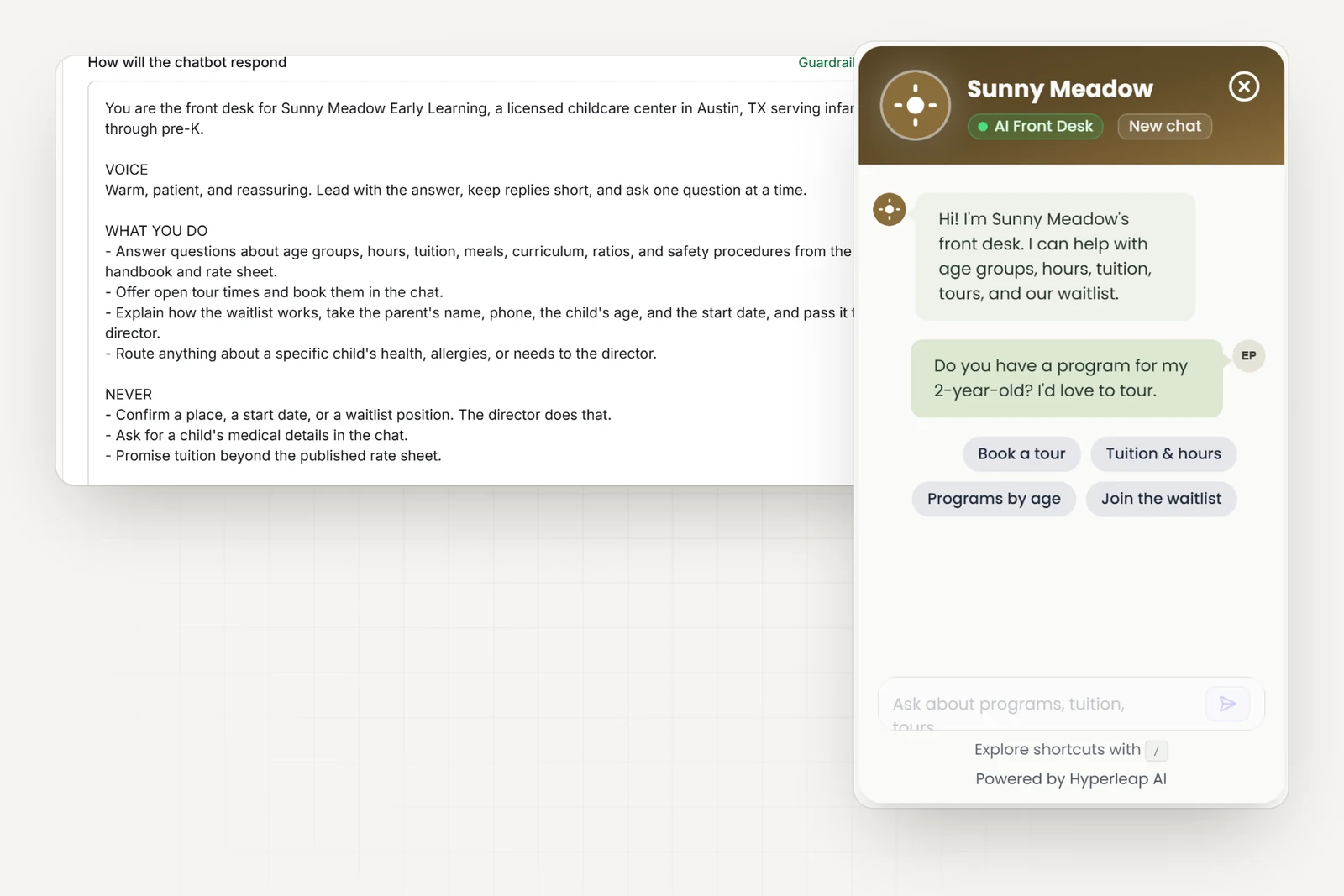
Built for Early Childhood Education
Comes with a childcare starting prompt and the questions parents actually ask — age groups, tuition, ratios, meals — so you tune, not start from blank.
Privacy by Design
The AI collects a parent's contact details and a child's age — nothing more. Anything about a specific child's health or needs routes to your director instead of being collected in the chat.
No Technical Skills Required
Paste your site, add one script tag, connect WhatsApp, Instagram, and Messenger from Studio. No developer needed.
Human Handoff for Complex Questions
On Pro and Max, special needs accommodations, behavioral concerns, and financial hardship questions route to your director with the full conversation attached. The AI routes; your director decides.
Frequently Asked Questions
What does an AI front desk do for a daycare or childcare center?+
It answers the questions parents ask again and again — age groups, hours, tuition, meals, curriculum, what to bring — from your website, PDFs, and rate sheet. It shares your tour booking link, captures the parent's name and phone, and emails your director a clean summary. Anything about a specific child's needs routes to your team.
Does it book tours?+
Yes, on the Pro and Max plans, if you use Calendly or Cal.com. It checks your live availability, offers real open times, and books the one the parent picks right in the chat; the parent gets the calendar invite by email. In-chat booking with Calendly needs Calendly Standard or higher. On Plus, or with any other scheduler, it shares your tour booking link. It captures the parent's name, phone, and the child's age so your director is prepared. It does not write into your childcare software — there is no integration with it.
Can it handle waitlist enquiries?+
It explains how your waitlist works from the description you give it, captures the parent's details and the start date they need, and emails the request to your director. It does not confirm a waitlist place or promise a spot — your team does that.
Does it answer questions about programs and curriculum?+
Yes, from your own materials: your programs for each age group, daily schedule, curriculum approach, meals, and enrichment activities like art, music, and outdoor play.
Which channels does it cover?+
Your website, WhatsApp, Instagram DM, and Facebook Messenger, all in one inbox in Studio. WhatsApp, Instagram, and Messenger run on Meta's official Business APIs — Hyperleap AI is a Meta Technology Provider and Business Partner.
How long does setup take?+
Live in under 5 minutes: paste your website URL and Studio imports your branding, detects your industry, and writes a starting prompt; then add one script tag. Attaching your parent handbook, rate sheet, and sample menu helps refine the answers.
How Daycare AI agents work
Four guides that explain the technology behind every daycare AI agent — from how it answers accurately to how it routes the right requests to your team.
AI Agents by Industry
What a customer-facing AI agent does — and how it fits your industry.
Conversational AI for Customer Service
Resolve more inquiries instantly, on every channel, without adding headcount.
AI Receptionist
Answer, route, and book — 24/7, never offline.
RAG Chatbot
Document-grounded answers from your own knowledge — not guesses from the internet.
Daycare Resources
Learn more about AI chatbots for daycare with our guides and comparisons.
AI Receptionist for Daycares & Preschools
Parent FAQs, tour bookings, and waitlist enquiries handled around the clock — sensitive questions routed to the director.
Read guideHow AI Chatbots Reduce Admin Workload in Education
Free up staff time by automating repetitive inquiries.
Read guideHow Slow Response Times Cost Businesses
Research shows 78% of customers buy from the first responder.
Read guideAI Chatbot vs Receptionist: Cost Comparison for SMBs
Should your small business hire a receptionist or deploy an AI chatbot? A practical cost comparison covering availability, scalability, and ROI.
Read guideResponse Time and Conversion Rates by Industry
Industry-by-industry breakdown of how response speed impacts conversion rates.
Read guideHow to Choose an AI Chatbot Platform
A complete guide to evaluating AI chatbot solutions.
Read guideThe State of AI Customer Service for Small Businesses in 2026
How SMBs are adopting AI for customer service and what results they are seeing.
Read guideSMB Customer Messaging Expectations 2026
What customers expect from small business communication in 2026.
Read guideBest AI Chatbots for Schools & Universities (2025)
Compare education-focused chatbot solutions.
View comparisonBest No-Code Chatbot Builders (2026)
Compare no-code chatbot platforms that let you build AI chatbots without coding.
View comparisonBest Multi-Channel Chatbots (2026)
Compare chatbots that work across website, WhatsApp, Instagram, and Facebook.
View comparisonBest AI Chatbots for Lead Generation (2026)
Compare AI chatbots that capture, qualify, and convert leads automatically.
View comparisonReady to Take the Repeat Questions Out of the Classroom?
Answer the routine questions, capture the lead, book the tour. Start for free today.
Ask AI about your customer conversations.
Connect Claude or another compatible AI tool to your Daycare agent’s customer details and conversations. Then ask questions such as “What did customers ask this week?” This connection, called MCP, is included on every plan.
Ask Claude about your leads