Legal AI Front Desk · Replies while you're in court
Stop losing new clients
to unanswered messages.
The AI front desk for law firms and solo attorneys. Answer questions about your services and fees. Collect client details and book the consultation. Legal advice stays with your attorneys.
Intake on your website, WhatsApp, Instagram, and Messenger — from $40/mo·Why an agent, not a chatbot →
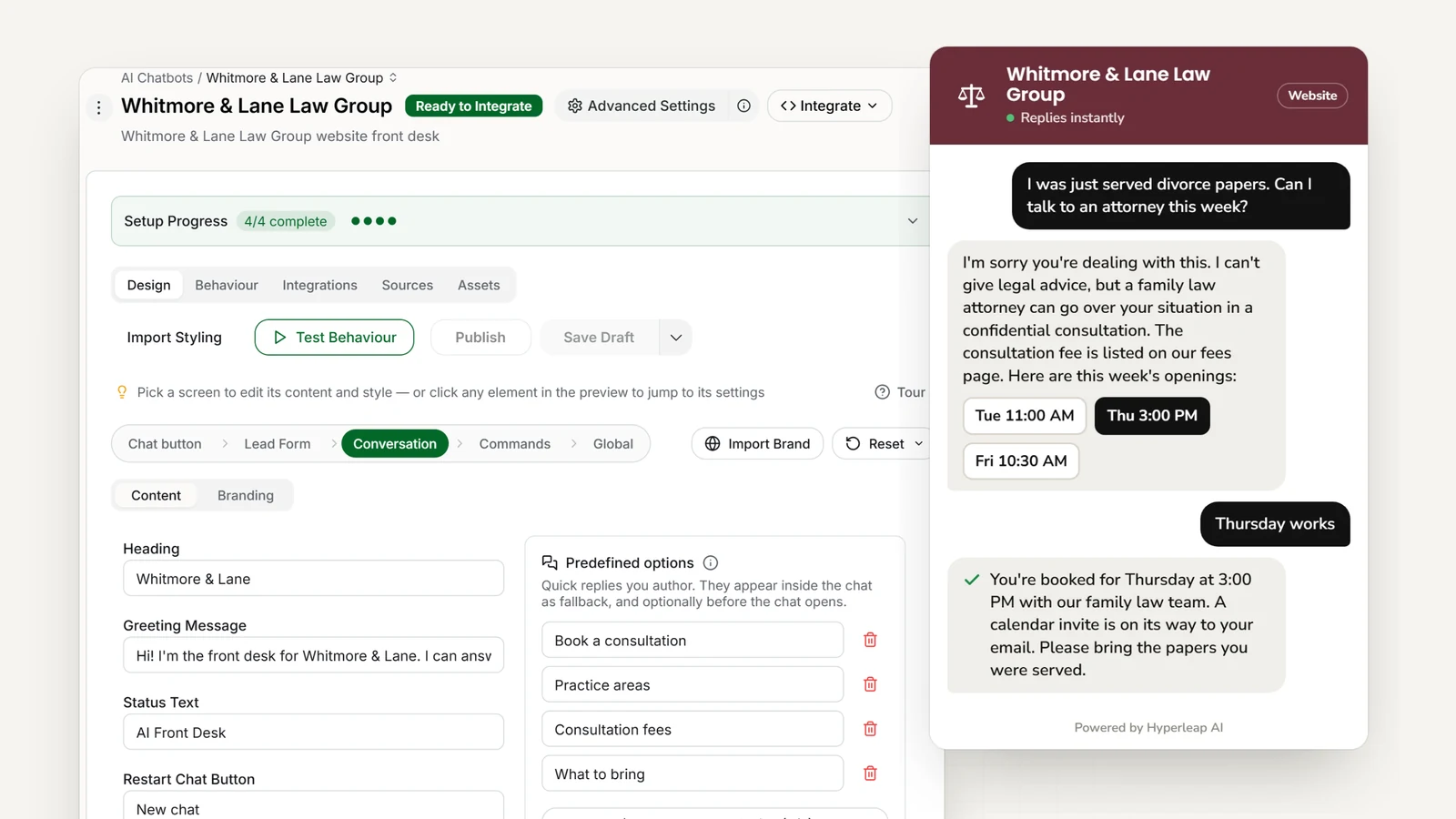
- <5 minutes
- Live from your website URL and one script tag
- 4 channels
- Website, WhatsApp, Instagram DM, Messenger — one inbox
- Routes to an attorney
- Intake only — legal advice stays with your licensed attorneys
Today
Without Hyperleap AI
- "Do you handle divorce?" lands on you between hearings
- Staff answer "what areas of law do you practice?" all day
- Website visitors browse, then leave without contacting you
- Unqualified leads use up attorney consultation time
- The same fee and process questions, answered one at a time
- Potential clients go quiet waiting for a callback
With an AI front desk
With Hyperleap AI
- Every inquiry answered in seconds, whether you are in court or not
- Instant answers to practice areas, experience, and firm information
- Website visitors get your consultation link without waiting
- Intake details collected before an attorney is involved
- Consistent, professional answers to common questions
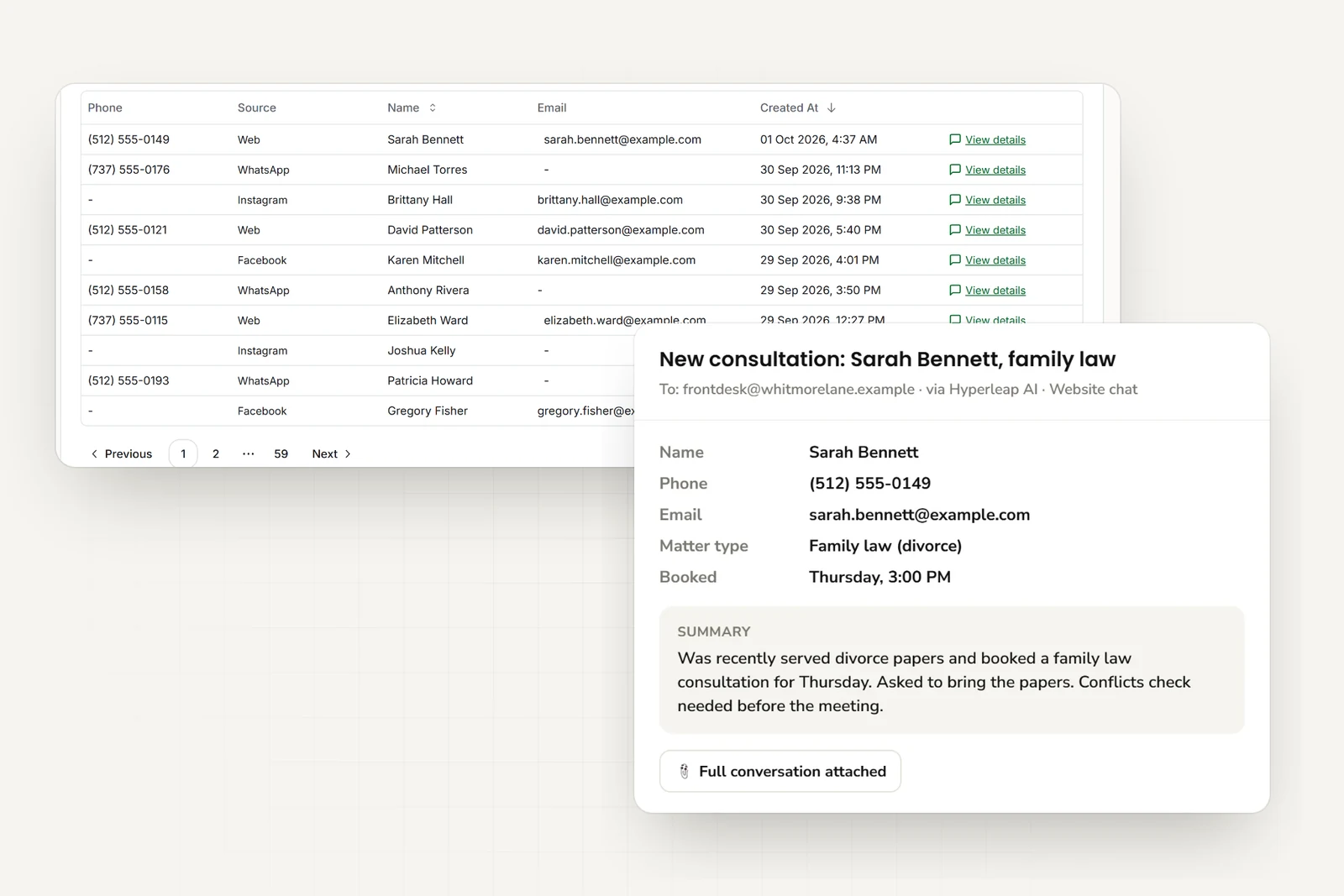
- Your team gets an email summary of every lead
Features
Everything Law Firms Need
From first question to consultation link, the AI front desk handles your first-touch intake.
Consultation Booking
Once intake is collected, books the consultation in the chat through Calendly or Cal.com (Pro and Max), or shares your booking link, and emails your team the details so attorneys walk in prepared.
Practice Area Answers
Explains your practice areas, experience, and approach. Routes each inquiry to the right attorney.
Multi-Channel Support
Clients reach you via website chat, WhatsApp, Instagram DM, or Facebook Messenger. One AI handles all channels.
Intake Capture
Gathers matter type, timeline, and contact details. Every lead arrives with a clean summary.
Fee Information
Explains consultation fees, retainer structures, payment plans, and contingency arrangements from your fee sheet.
100+ Languages
Serve diverse clients in their native language. Critical for immigration law and international matters.
In practice
Real Conversations Your AI Handles
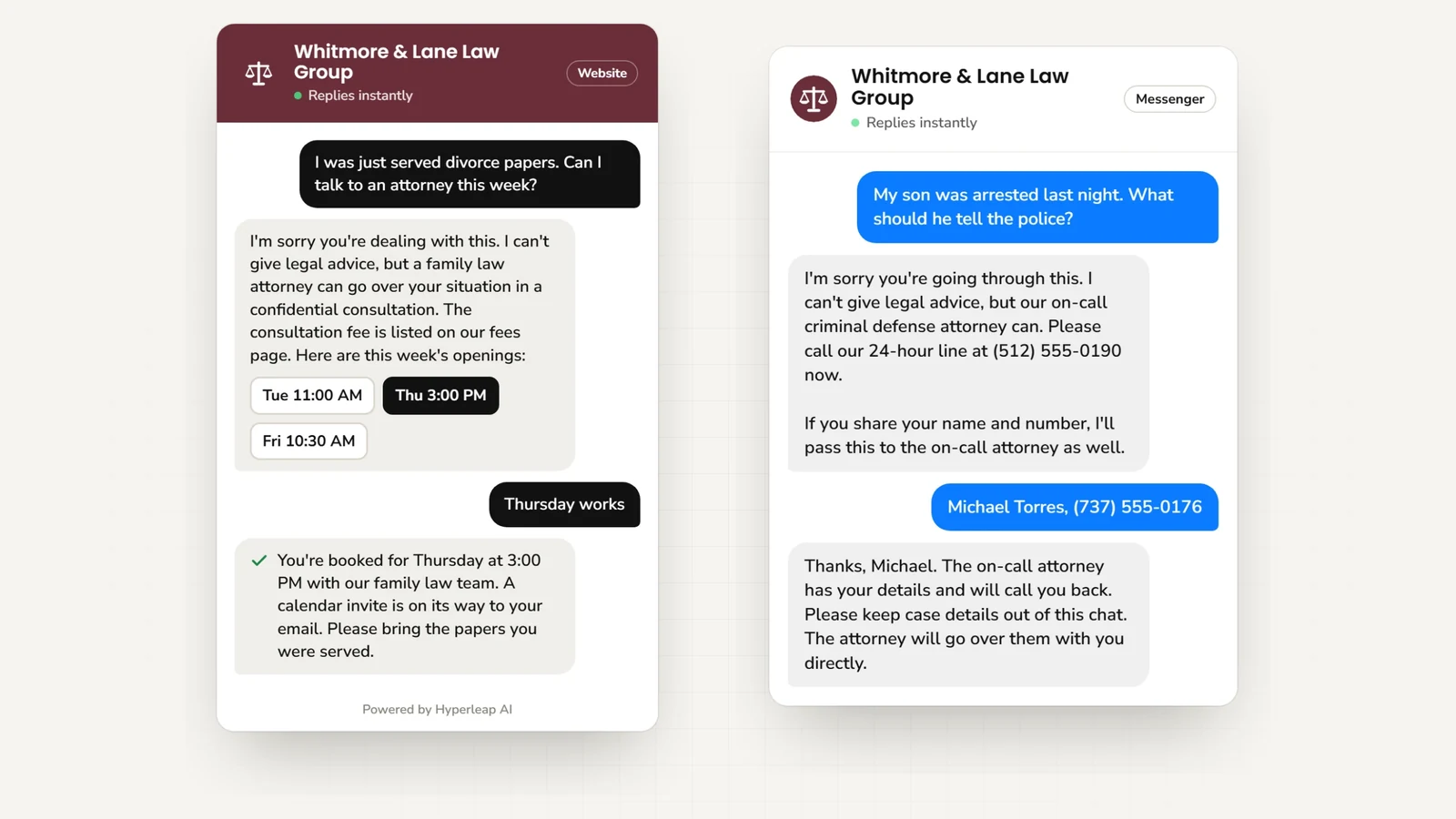
Divorce Papers Served
"I was just served divorce papers." AI explains the consultation process, collects name and phone, and shares your consultation link.
Practice Area Match
"Do you handle employment discrimination?" AI confirms practice area, asks about situation, and routes to appropriate attorney.
Fee Questions
"How much do you charge for a personal injury case?" AI explains contingency fee structure, no upfront costs, and offers free consultation.
Immigration Inquiry
"I need help with my visa application." AI asks about visa type, timeline, and collects details for immigration attorney review.
Estate Planning
"I want to create a will." AI explains your estate planning services, asks about family situation, and shares your consultation link.
Business Formation
"I'm starting a business, what entity should I choose?" AI explains your formation services, collects the details, and routes the question to an attorney.
Criminal Defense
"My son was arrested last night." AI shares your emergency line, collects name and number, and routes to the on-call attorney.
Document Collection
"What documents do I need for my consultation?" AI shares your checklist for that case type.
Case Status
Existing client: "What's the status of my case?" AI routes to appropriate staff with client details.
Outcomes
Why Law Firms Love Hyperleap AI
Fewer Interruptions, Same Answers
The "what do you practice?" questions get answered without pulling you out of a hearing or a client meeting.
Pre-Qualify Before Consultation
Matter type, timeline, and expectations arrive by email. Attorneys start consultations informed and prepared.
Free Up Staff Time
Stop answering "what practice areas do you cover?" Let AI handle intake so staff focuses on active clients.
Confidentiality-First Design
AI handles initial inquiries without collecting sensitive case details until consultation. Your data is encrypted.
Convert More Consultations
A reply in seconds and a consultation link in hand. No more leads lost to slow follow-up.
Live in Under 5 Minutes
Paste your website URL and add one script tag. Attach practice-area PDFs and fee sheets afterwards as tuning.
Who it fits
Built for Every Type of Law Practice
Solo Practitioners
Individual attorneys who need intake handled without hiring staff. The AI front desk takes first contact while you practice.
Small to Mid-Size Firms
Multi-attorney firms wanting to scale client intake. Route leads to appropriate practice areas automatically.
Multi-Office Firms
Firms with multiple locations. The AI routes by office and practice area.
Simple Pricing for Law Firms
Try any plan free for 7 days
Plus
For solo practitioners
Key Features:
- 3,000 AI responses per month
- 1 chatbot
- 4 channels per chatbot
- Instagram, WhatsApp available
- 40MB knowledge source per chatbot
- Calendar, downloads, videos
- + 4 more features
Pro
For small to mid-size firms
Key Features:
- 12,000 AI responses per month
- 2 chatbots
- 8 channels (4 per chatbot)
- Remove Hyperleap branding
- 40MB knowledge source per chatbot
- Link tracking & login
- + 3 more features
Max
For large firms and practices
Key Features:
- 30,000 AI responses per month
- 5 chatbots
- 20 channels (4 per chatbot)
- Remove Hyperleap branding
- 40MB knowledge source per chatbot
- Multi-variant (locations, courses, etc) ($40/mo + 2x credits)
- + 3 more features
7-day free trial: Try any plan risk-free • See all plan details →
All plans include: Multi-channel deployment • Priority support
Add-ons: Studio & API ($99 one-time on Plus/Pro/Max) • Multi-variant (locations, courses, etc) ($40/mo + 2x credits on Pro/Max) • OTP Verification (usage-based on Pro/Max, website chat)
You stay in control
Why Law Firms Choose Hyperleap AI
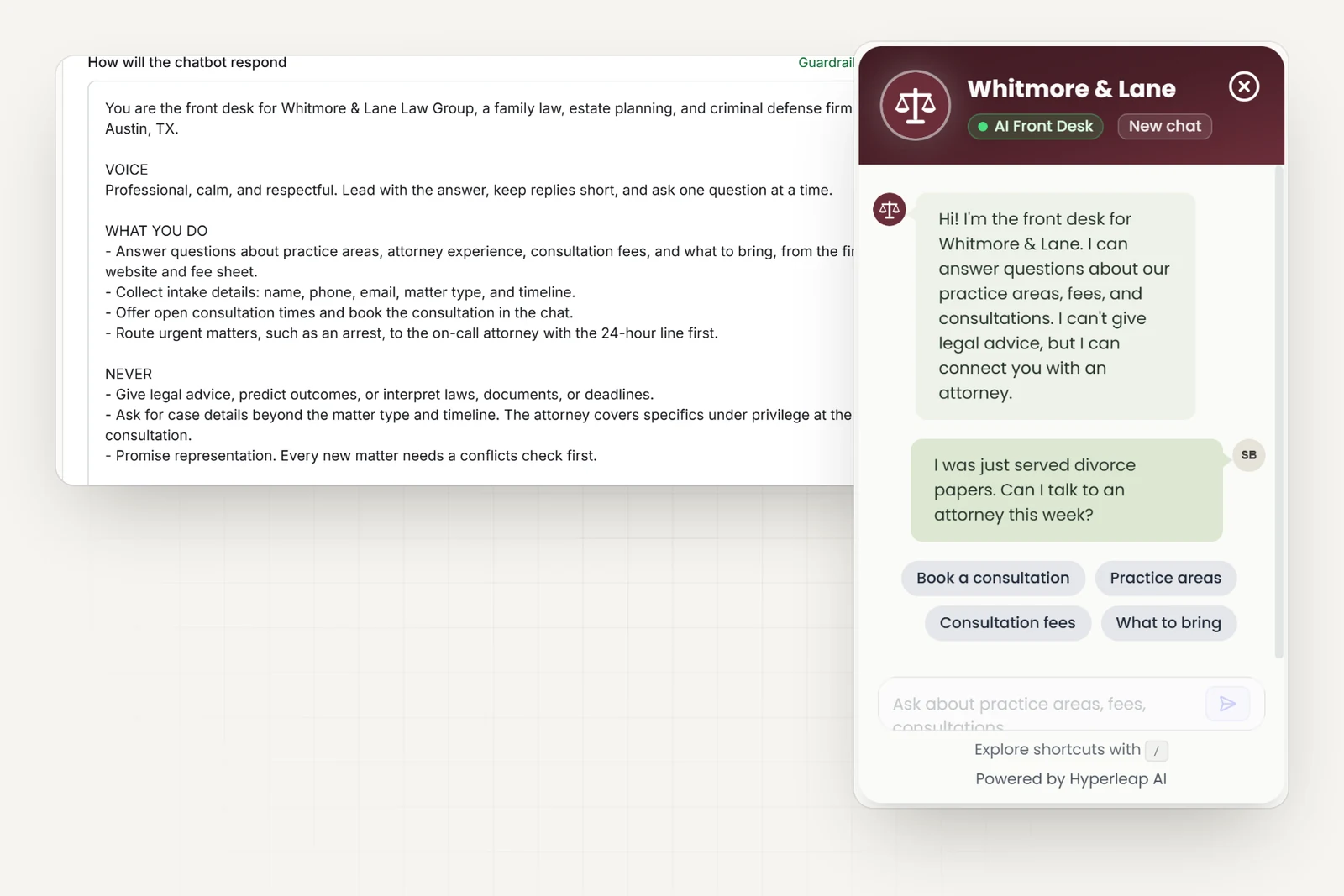
Built for Legal
Comes with a legal starting prompt and the questions law firms actually get asked — practice areas, fees, and what to bring.
Confidentiality-First
AI handles general inquiries without collecting sensitive case details. Your data is encrypted and never shared.
No Technical Skills Required
Add one line of code to your website. Connect social channels in 5 minutes. No developers or IT team needed.
Human Handoff When Needed
On Pro and Max, urgent matters, complex questions, or sensitive situations get routed to attorneys with full conversation context.
Frequently Asked Questions
What does an AI front desk do for a law firm?+
It answers the questions that interrupt your day — practice areas, fees, what to bring to a consultation — from your website, PDFs, and fee sheet. It collects intake details (name, phone, matter type, timeline), shares your consultation link, and emails your team a clean summary. Anything that needs judgment routes to an attorney.
Will the AI accidentally give legal advice?+
It's configured not to. The AI explains your practice areas, attorney experience, fee structure, and consultation process, then routes the matter to an attorney. It will not opine on case strategy, statute interpretation, likelihood of success, or specific legal recommendations — and tells the prospect so explicitly when asked. This is the right boundary: prospects get fast answers about working with you, and substantive counsel happens with a licensed attorney where it belongs.
How does it qualify a personal-injury lead versus a corporate-M&A lead before our intake paralegal sees it?+
Practice-area-specific intake. The AI asks the questions that actually matter for each matter type: for PI — date of incident, type of injury, was there a police report, current treatment status, prior counsel; for corporate — deal size, target close date, counterparty, jurisdiction, conflicts check needed. By the time your intake team picks up the lead, it's already sorted into "consult this week," "needs conflict check first," or "decline / refer out."
What about confidentiality? Some of these inquiries are sensitive.+
The AI is configured to collect what's needed for intake (name, contact, matter type, urgency, conflicts info) and explicitly avoid pressing for sensitive case detail in the chat — it tells the prospect their attorney will cover specifics under privilege at the consultation. Conversation transcripts are encrypted at rest, never used for model training, and accessible only to your team via your Hyperleap workspace.
Does this replace a paid intake service like Smith.ai or LegalSites?+
For first-touch qualification and sharing your consultation link, yes — and you're not paying per-minute for a human answering service to take a message. For live screening that needs nuanced judgment or court-deadline emergencies, a hybrid setup (AI for the routine questions, a human service for the complex ones) often makes sense. We don't pretend to replace human judgment for high-stakes intake.
How Legal AI agents work
Four guides that explain the technology behind every legal AI agent — from how it answers accurately to how it routes the right requests to your team.
AI Agents by Industry
What a customer-facing AI agent does — and how it fits your industry.
Conversational AI for Customer Service
Resolve more inquiries instantly, on every channel, without adding headcount.
AI Receptionist
Answer, route, and book — 24/7, never offline.
RAG Chatbot
Document-grounded answers from your own knowledge — not guesses from the internet.
Legal Resources
Learn more about AI chatbots for legal with our guides and comparisons.
Small Business Answering Service Alternatives (2026)
8 small business answering service alternatives for 2026 compared on coverage, cost, and setup — from voice AI to chat-first AI receptionists.
Read guideChat vs Voice AI Receptionists: An Honest Comparison
Chat vs voice AI receptionists compared honestly: cost, setup, lead quality, and which fits phone-first vs message-first small businesses.
Read guideHow to Choose an AI Receptionist: A Buyer's Checklist
How to choose an AI receptionist: an 18-point buyer checklist covering channels, lead capture, pricing traps, data handling, and a 7-day trial plan.
Read guideAI Receptionist vs. Virtual Receptionist: Which to Hire?
Compare AI receptionists (chat-first, from $40/month) to human virtual receptionist services like Ruby and Smith.ai — cost, hours, and fit by business type.
Read guideConversational AI vs Generative AI: A Business Guide
Conversational AI vs generative AI explained: how they relate, a comparison table, risks and controls, and what a small business actually buys.
Read guideChatbot-to-Human Handoff: Escalation Design That Works
How to design chatbot-to-human handoff: when to escalate, what context to pass, routing options, SLAs, and a copy-ready escalation script.
Read guideWhat Missed Calls Really Cost Your Small Business
A worked example of what missed calls cost small businesses in lost jobs, plus where inquiries actually arrive now and what to do about it.
Read guideAI Chatbot for Accounting Firms
How an AI chatbot for accounting firms answers service, fee, and process questions 24/7 — and where every question routes to a CPA instead.
Read guideHow to Build an AI Chatbot for Your Business
How to build an AI chatbot for your business: decide the jobs it should do, gather knowledge, choose channels, test, and go live in under 5 minutes.
Read guideHow to Add an AI Chatbot to an HTML Website
Add an AI chatbot to a plain HTML site with one script tag before </body>. Step-by-step setup, testing, styling, and knowledge base tips.
Read guideAI Legal Receptionist: What It Handles for Your Firm
An AI legal receptionist captures and qualifies after-hours client intake and answers general firm questions — routing matters to attorneys, never giving legal advice.
Read guideWhy Law Firms Lose Cases from After-Hours Inquiries
After-hours legal inquiries go unanswered 67% of the time. Learn why this costs firms high-value cases.
Read guideLaw Firm Intake Stats 2026: 26% Never Respond to Leads
Key statistics on how law firms handle client intake and where they lose potential cases.
Read guideHow to Automate Legal Client Intake Without Compromising Confidentiality
Automate intake while maintaining attorney-client privilege and bar association ethics compliance.
Read guide5 Questions to Ask Before Automating Your Law Firm Client Intake
Essential evaluation criteria before adding AI to your law firm intake process.
Read guide100+ Free Customer Service Chatbot Templates (2026)
Copy-paste AI chatbot templates for FAQs, billing, bookings and support — organized by industry and ready to customize in minutes.
Read guideAI Receptionist Cost in 2026: What You Actually Pay
AI receptionist cost ranges from $20/month for automated voice AI to $300+/month for live-agent phone answering. Full breakdown by category.
Read guide24/7 Customer Support for Small Business: 5 Real Options
Compare 5 ways small businesses offer 24/7 customer support — realistic costs, coverage, and what each option actually handles at 3am.
Read guideAI Customer Service Best Practices for 2026
12 AI customer service best practices covering disclosure, escalation design, knowledge base upkeep, weekly KPI review, and PII handling for SMB teams.
Read guideBest Conversational AI Platforms in 2026
Compare the best conversational AI platforms in 2026 by NLU approach, document grounding, channel coverage, handoff design, and pricing model.
View comparisonBest Intercom Alternatives (2026)
Top Intercom alternatives with flat pricing and no per-seat fees.
View comparisonBest AI Receptionist Software (2026)
Compare voice AI answering services vs. chat-first AI receptionists by cost, channels, and setup.
View comparisonBest No-Code Chatbot Builders (2026)
Compare no-code chatbot platforms that let you build AI chatbots without coding.
View comparisonReady to Capture More Legal Leads?
Every consultation request answered and routed while you work. Start for free today.
Ask AI about your customer conversations.
Connect Claude or another compatible AI tool to your Legal agent’s customer details and conversations. Then ask questions such as “What did customers ask this week?” This connection, called MCP, is included on every plan.
Ask Claude about your leads