Automate Legal Client Intake Without Confidentiality Risk
A step-by-step guide to automating your law firm's client intake while maintaining attorney-client privilege and bar association compliance.

TL;DR: Law firms can automate the administrative half of client intake — contact collection, case-type identification, basic qualifying questions, scheduling, document collection — without violating attorney-client privilege or bar ethics rules. What cannot be automated is anything substantive: legal advice, conflicts checks, fee agreements, and case evaluation must stay under attorney supervision (per ABA Formal Opinion 512, July 2024). The Clio 2024 Legal Trends Report shows only 40% of firms answer phones and just 33% respond to email inquiries, while firms with online intake tools earn 50% more revenue on average. This guide gives managing partners and practice administrators a step-by-step framework to deploy fast, compliant intake — treating the technology as the front desk, not the lawyer.
Every missed call to your law firm is a potential client calling the next attorney on the list. According to the Clio 2024 Legal Trends Report, only 40% of law firms answer incoming phone calls, and just 33% respond to email inquiries. That means the majority of potential clients never reach a human at all. Meanwhile, the same report found that firms with online client intake tools earn 50% more revenue on average.
The tension is real: prospective clients expect immediate responses, but the legal profession operates under strict confidentiality obligations that make "just automate everything" a dangerous proposition. You cannot treat client intake like an e-commerce checkout. Attorney-client privilege, bar association ethics rules, and data security requirements all demand careful consideration.
But the firms that solve this equation — fast response times plus rigorous confidentiality — are pulling ahead. This guide shows you exactly how to automate your intake process without putting your practice at risk.
Who This Guide Is For
This guide is written for managing partners, practice administrators, and legal operations professionals at small and mid-sized law firms who want to modernize their client intake process while staying compliant with ABA Model Rules and state bar ethics requirements.
What Is Automated Client Intake for Law Firms?
Automated client intake is the use of technology to handle the initial stages of engaging a prospective client — from the first point of contact through scheduling an initial consultation. It replaces or augments the traditional process of a receptionist or paralegal answering the phone, asking qualifying questions, and manually entering data into your case management system.
What CAN be automated:
- Contact information collection — Name, phone, email, preferred contact method
- Case type identification — Practice area, general nature of the legal matter
- Basic qualifying questions — Statute of limitations inquiries, jurisdiction, prior representation
- Appointment scheduling — Booking consultations directly on attorney calendars
- Document collection — Intake forms, retainer agreements, ID verification
- Follow-up communications — Confirmation emails, reminder messages, directions to the office
What CANNOT (and should NOT) be automated:
- Legal advice — Even preliminary legal guidance requires attorney involvement
- Conflicts of interest checks — These require access to your full client database and professional judgment
- Privileged communications — Substantive case discussions must occur under attorney supervision
- Fee agreements — Engagement terms require attorney review and client understanding
- Case evaluation — Determining the merits of a matter requires legal expertise
Ethics Note
The ABA Standing Committee on Ethics and Professional Responsibility's Formal Opinion 512 (July 2024) explicitly warns against delegating client-related decisions to AI without ensuring adequate attorney supervision. A chatbot may screen for practice area fit, but it cannot detect subtleties like conflicts of interest, credibility concerns, or emotional factors that impact the attorney-client relationship.
The distinction matters. When done correctly, automated intake handles the administrative burden while preserving the attorney's role in every substantive decision. The technology is the front desk, not the lawyer.
Why Law Firms Struggle with Client Intake
Most law firms know their intake process needs improvement. Few have the time, budget, or technical confidence to fix it. Here are the five most common bottlenecks.
The Front Desk Bottleneck
A single receptionist cannot answer the phone, greet walk-ins, manage the calendar, and process new client paperwork simultaneously. During peak hours, calls go to voicemail. According to Clio's data, 48% of law firms are essentially unreachable by phone during business hours. Every unanswered call is a potential client who moves on to a competitor who picks up.
After-Hours Gaps
Legal problems do not follow business hours. A person arrested on Friday night, served with divorce papers on Saturday morning, or involved in a car accident on Sunday afternoon needs to reach an attorney immediately. Without after-hours intake capability, these high-value leads are lost entirely. By Monday morning, they have already retained someone else. For more on why this matters, see our guide on how law firms lose cases from after-hours inquiries.
Manual Data Entry Errors
When a paralegal transcribes intake information from a phone call into a case management system, errors are inevitable. Misspelled names, transposed phone numbers, and incorrect case details create downstream problems — from failed conflicts checks to missed deadlines. Manual entry also means the same information gets entered multiple times across different systems.
Slow Follow-Up Losing Leads
The Clio Legal Trends Report found that among firms that did respond to emails, only 18% provided clear next steps or cost information, and a mere 2% referenced the specifics of the prospective client's inquiry. Slow, generic follow-up signals to the prospect that they are not a priority.
Paralegal and Staff Overload
Intake is time-intensive. A thorough phone intake can take 20 to 30 minutes per prospect. Multiply that by 10 to 15 calls per day, and your staff spends half their time on intake instead of supporting active cases. This creates a painful cycle: the more cases you take on, the worse your intake becomes, which means you lose the next round of cases.
7 Steps to Automate Client Intake While Protecting Confidentiality
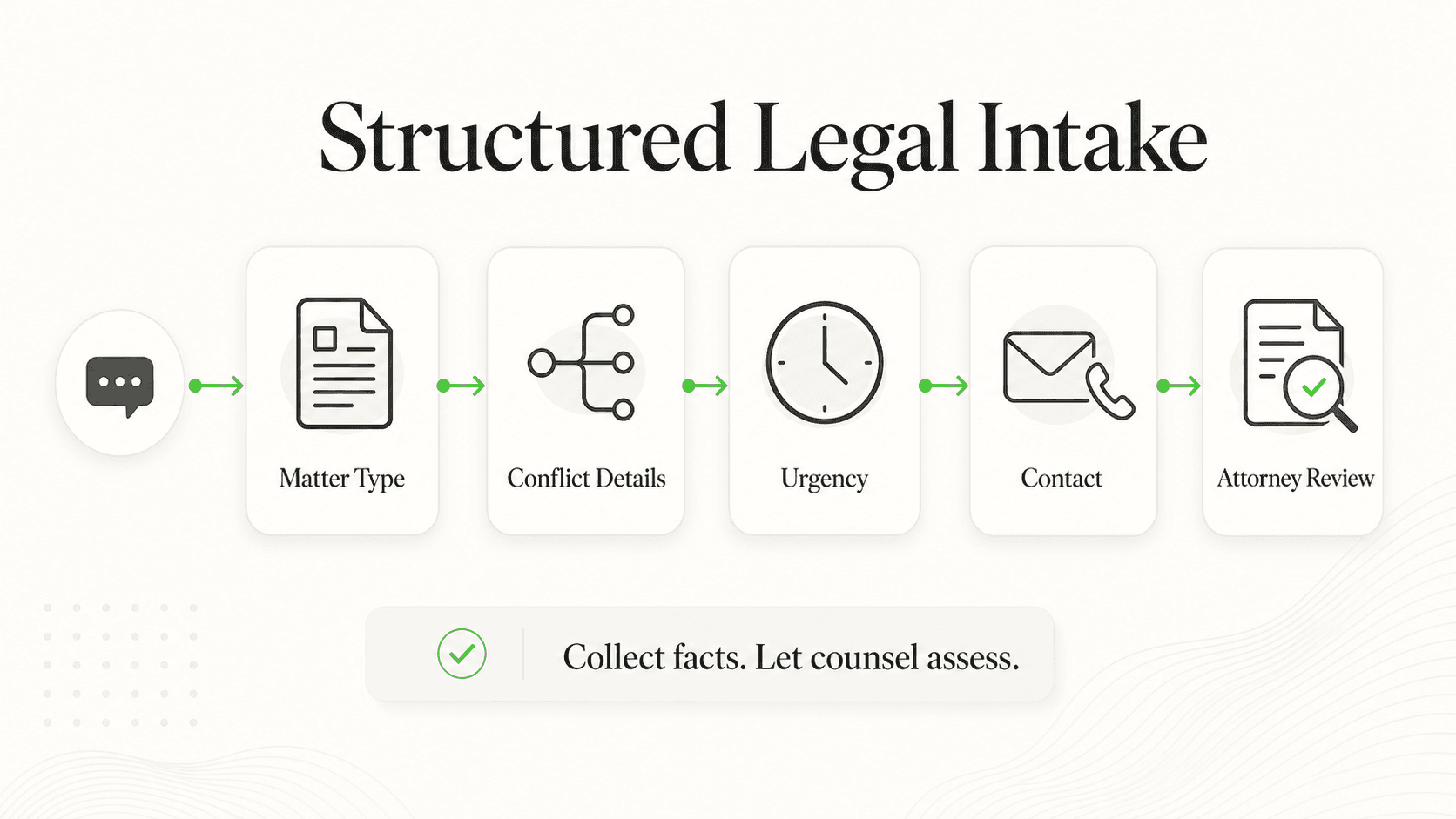
Getting intake automation right requires a methodical approach. Skip steps and you risk either a system that does not work or one that creates ethics problems. Here is the complete playbook.
1. Map Your Current Intake Workflow
Before you automate anything, document exactly how your current intake process works. You cannot improve what you have not measured.
What this looks like in practice: Walk through the entire journey of a prospective client, from the moment they first contact your firm to the point where they either sign a retainer or are declined. Track every touchpoint: Who answers the phone? What questions do they ask? Where does the information go? How long does each step take?
Key actions:
- Time each step — How many minutes from first call to consultation scheduled? From consultation to retainer signed?
- Identify handoffs — Every time information passes from one person or system to another is a potential failure point
- Count your drop-offs — How many prospects call but never schedule? How many schedule but never show? These are your biggest leaks.
- Document your tools — What systems are involved? Phone, email, spreadsheet, practice management software, paper files?
Why it works: Most firms discover that their biggest bottleneck is not where they expected. A firm might assume they need a better answering service when the real problem is that leads sit in an inbox for 48 hours before anyone follows up.
Quick Audit Tip
Have a friend or colleague call your firm posing as a prospective client at 10 AM on a Tuesday and again at 7 PM on a Thursday. Compare the experience. The gap between the two reveals your after-hours vulnerability.
2. Separate Automatable from Non-Automatable Steps
With your workflow mapped, categorize every step into one of three buckets: fully automatable, partially automatable, and attorney-required.
Fully automatable (no attorney involvement needed):
- Answering the phone or web inquiry
- Collecting basic contact information
- Identifying the general practice area
- Scheduling a consultation on an available slot
- Sending confirmation and reminder messages
- Collecting intake forms and documents before the meeting
Partially automatable (attorney sets the rules, technology executes):
- Preliminary qualifying questions (statute of limitations, jurisdiction)
- Basic screening for practice area fit
- Providing general information about your process and fees
- Routing inquiries to the appropriate attorney
Attorney-required (never automate these):
- Conflicts of interest analysis
- Case merit evaluation
- Legal advice of any kind
- Engagement decisions
- Fee negotiations
Why it works: This framework keeps your automation squarely within ethical boundaries. The technology handles the administrative work; the attorney handles the legal work. When in doubt about whether a step can be automated, keep it in the attorney-required column and revisit later.
3. Choose the Right Technology
There are three main categories of intake automation technology. Each has strengths and limitations, and the right choice depends on your firm's size, budget, and practice areas.
Legal answering services (human-powered):
Companies like Ruby, Smith.ai, and LEX Reception provide trained receptionists who answer your phones, follow your intake scripts, and enter data into your systems. Strengths include a human touch, legal-specific training, and the ability to handle complex or emotional callers. Limitations include cost (typically $200 to $800 per month depending on call volume), limited availability during peak demand, and inconsistency between operators.
AI chatbots and virtual assistants:
AI-powered tools on your website or messaging channels can engage prospective clients instantly, collect intake information through conversational interfaces, and route qualified leads to your team. Platforms like Hyperleap AI, Lawmatics, and others offer solutions designed for law firms. Strengths include 24/7 availability, consistent experience, lower per-interaction cost, and the ability to handle multiple conversations simultaneously. Limitations include the inability to handle highly emotional or complex situations without human escalation.
Online intake forms and workflows:
Tools built into practice management platforms (Clio Grow, PracticePanther, MyCase) or standalone form builders let prospective clients fill out structured intake questionnaires. Strengths include structured data collection, direct integration with case management, and client convenience. Limitations include a passive experience — the prospect has to find the form and be motivated enough to complete it without real-time interaction.
The hybrid approach works best. Most successful firms combine two or more of these: an AI chatbot on the website for immediate engagement, an answering service for phone calls during business hours, and online intake forms for prospects who prefer self-service. The key is ensuring all three feed into the same system.
For a deeper dive on evaluating AI chatbot platforms specifically, see our complete guide to choosing an AI chatbot platform.
4. Configure Confidentiality Safeguards
This is the step that separates a legally compliant automation setup from a liability. Every piece of technology in your intake stack must meet your confidentiality obligations under ABA Model Rule 1.6(c), which requires lawyers to "make reasonable efforts to prevent the inadvertent or unauthorized disclosure of, or unauthorized access to, information relating to the representation of a client."
Encryption requirements:
- In transit — All data transmitted between the client's device and your systems must use TLS 1.2 or higher encryption. This applies to web forms, chatbot conversations, and email communications.
- At rest — Client data stored in any system must be encrypted using AES-256 or equivalent standard. This includes your practice management database, document storage, and any third-party tools.
Access controls:
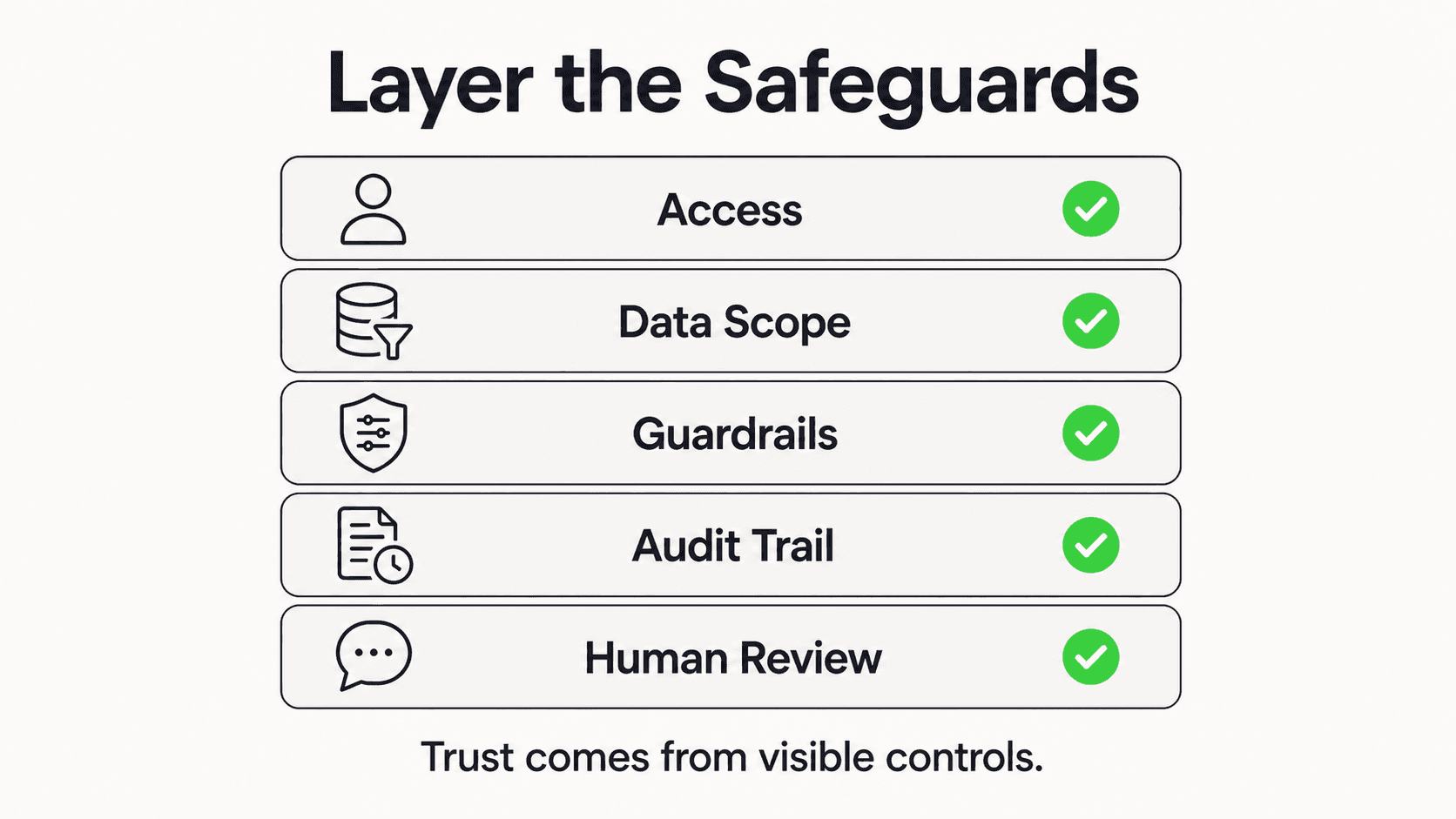
- Implement role-based access so that only authorized personnel can view intake data
- Require multi-factor authentication for any system containing client information
- Maintain a log of who accesses intake records and when
Data retention policies:
- Define how long you retain intake data for prospects who do not become clients
- Ensure non-client data is purged on a regular schedule
- Document your retention policy in writing
Vendor due diligence:
- Any third-party technology that touches client data should have a security certification (SOC 2, ISO 27001, or equivalent)
- Review vendor terms of service for data ownership and usage rights — some platforms may claim rights to data processed through their systems
- Execute a data processing agreement with every vendor that handles client information
Ethics Note
ABA Formal Opinion 477R clarifies that while routine unencrypted email may be acceptable for general communications, "particularly strong protective measures, like encryption, are warranted in some circumstances" — including when transmitting sensitive client information. Intake data often falls into this heightened category, especially for practice areas like criminal defense, family law, and immigration.
State-specific considerations: Beyond the ABA Model Rules, check your state bar's specific guidance. California requires multi-jurisdictional compliance for AI cloud tools. Florida's Ethics Opinion 24-1 requires informed consent before disclosing client information to AI tools. Texas Opinion No. 705 (February 2025) mandates human oversight of all AI-generated work. New York requires lawyers to complete CLE credits in AI competency.
5. Design the Automated Intake Conversation Flow
A well-designed intake flow feels natural to the prospective client while systematically gathering the information your attorneys need. Poor design frustrates prospects and increases drop-off.
Opening the conversation:
Start with empathy and clarity. The first message should acknowledge that the person likely has a legal problem and explain what will happen next. Example: "Thank you for reaching out to [Firm Name]. I will ask a few questions to help connect you with the right attorney. This should take about 2 to 3 minutes."
Essential questions to include (in this order):
- Name and contact information — Start here because it is low-friction and lets you follow up even if they abandon the form
- Nature of the legal matter — Use a practice area selector (personal injury, family law, criminal defense, etc.) rather than open text to ensure proper routing
- Urgency and timeline — Is there a court date, deadline, or statute of limitations concern?
- Prior representation — Are they currently represented by another attorney?
- How they found you — Marketing attribution for tracking lead sources
- Preferred contact method and time — When and how should the attorney reach out?
When to hand off to a human:
Build explicit escalation triggers into your automated flow. The system should immediately route to a live person when the prospect expresses emotional distress or describes an emergency, when the inquiry involves potential conflicts, when the prospect asks for legal advice, or when the matter is outside your practice areas and requires a referral.
What NOT to include:
Never ask for detailed case facts in an automated intake flow. Collecting the basic nature of the matter (e.g., "I was in a car accident") is different from gathering detailed facts that could be discoverable or raise privilege concerns. Save the substantive discussion for the attorney consultation.
6. Integrate with Your Practice Management System
Your intake automation is only as good as its connection to the systems your attorneys and staff use daily. Data that lives in a standalone chatbot or form builder but never reaches your case management platform creates extra work, not less.
Clio: Clio's Grow module provides built-in intake forms that feed directly into the Clio Manage platform. New submissions appear in a lead dashboard where they can be reviewed, assigned, and converted into contacts and matters. Clio also offers an extensive integration marketplace with hundreds of third-party connections. If you are using an external chatbot or intake tool, check for a native Clio integration first.
PracticePanther: PracticePanther bundles intake, communication, and payment features into a single platform, which reduces the number of integration points you need to manage. It includes native ePayments, business texting, and eSignatures alongside standard case management features.
MyCase: MyCase includes client intake and lead management within its core platform, with conditional logic forms, a leads dashboard, and automated follow-up workflows. Leads move through defined stages and convert to contacts and cases without re-entering data.
Filevine: Filevine is a strong choice for litigation-heavy practices (personal injury, mass tort) that need highly customizable workflows. Its Lead Docket add-on handles intake specifically, with Vinesign for e-signatures and deep automation capabilities.
Integration best practices:
- One source of truth — All intake data should ultimately land in your practice management system. Avoid maintaining separate spreadsheets or databases.
- Automate the handoff — Use native integrations or middleware tools (Zapier, Make) to push data from your chatbot or forms directly into your PMS. Manual copy-paste defeats the purpose.
- Map your fields — Ensure that the data fields in your intake tool match the fields in your PMS. A "practice area" dropdown in your chatbot should map to the correct matter type in Clio or PracticePanther.
- Test the full loop — Before going live, run 10 to 15 test intakes through the complete system, from first contact through matter creation, to verify that data flows correctly and nothing is lost.
7. Train Your Team and Measure Results
Technology alone does not transform your intake process. Your team needs to understand how the new system works, when to intervene, and how to measure success.
Staff training essentials:
- Walk every team member through the automated flow so they understand what the prospect experiences
- Define clear response time expectations — for example, an attorney must call back a qualified lead within 30 minutes during business hours
- Establish escalation protocols: who handles overflow, who manages after-hours emergencies, who resolves technical issues
- Train on the ethical boundaries — every person in the firm should understand what the chatbot can and cannot say
Key metrics to track:
- Response time — How quickly does a prospect get a reply (automated or human)?
- Lead-to-consultation rate — What percentage of inquiries result in a scheduled consultation?
- Consultation-to-retention rate — What percentage of consultations result in signed retainers?
- Cost per lead — Total intake costs divided by number of qualified leads
- Drop-off points — Where in the intake flow are prospects abandoning?
- Client satisfaction — Ask new clients about their intake experience
Why it works: Measurement creates accountability and reveals optimization opportunities. A firm might discover that their chatbot captures 90% of after-hours inquiries but only 40% convert to consultations because the morning callback takes too long. That is an actionable insight that leads directly to a process improvement.
Ready to Automate Your Law Firm's Intake?
See how AI-powered client intake can help your firm respond to every lead instantly while maintaining full confidentiality.
Get StartedWhat Firms Are Achieving with Automated Intake
The impact of intake automation varies by firm size, practice area, and implementation quality. Here is what the data shows, with appropriate caveats that results will vary.
Faster Response Times
Firms that implement automated intake typically reduce their initial response time from hours (or days) to seconds. When a chatbot or intake form captures lead information instantly and triggers an immediate confirmation message, the prospect knows they have been heard. According to Clio's research, firms with client intake tools see 50% more incoming potential clients than those without — largely because faster response prevents leads from moving to competitors.
Higher Lead Capture Rates
After-hours leads are the biggest opportunity for most firms. An AI chatbot or intake form that operates 24/7 captures inquiries that would otherwise go to voicemail and never return. Firms that previously had no after-hours coverage see the largest gains — essentially going from zero after-hours captures to capturing every inquiry that comes in overnight or on weekends. Results vary depending on how much after-hours traffic the firm was missing before.
Staff Time Savings
Automating the initial data collection and scheduling steps frees significant paralegal and receptionist time. When a prospective client arrives for their consultation having already completed intake forms, provided relevant documents, and confirmed their appointment, the attorney can spend the full meeting on substantive matters rather than administrative data gathering. Firms commonly report recovering 10 to 15 hours of staff time per week.
Improved Client Experience
Clio's research indicates that 51% of clients find chatbots useful for exploring legal options, while 67% still prefer having the ability to speak with a human when needed. This underscores the importance of the hybrid approach: let automation handle the initial engagement and data collection, but always offer a path to a real person. To understand how automation impacts your bottom line, explore our AI chatbot ROI analysis.
Implementation Checklist for Law Firm Intake Automation
Use this timeline to plan your rollout. Rushing the process leads to compliance gaps and poor adoption. Taking it slow ensures you get it right.
Week 1-2: Audit and Plan
- Map your current intake workflow end-to-end (Step 1 above)
- Categorize each step as automatable, partially automatable, or attorney-required
- Review your state bar's ethics opinions on AI and technology in client intake
- Audit your current data security posture — encryption, access controls, vendor agreements
- Define your success metrics and baseline measurements
- Set a budget for technology, implementation, and ongoing costs
Week 3-4: Select and Configure
- Evaluate technology options (answering service, AI chatbot, intake forms, or hybrid)
- Verify vendor security certifications (SOC 2, encryption standards, data ownership)
- Execute data processing agreements with all vendors
- Design your intake conversation flow with escalation triggers
- Configure integration with your practice management system (Clio, PracticePanther, MyCase, Filevine)
- Set up access controls and audit logging
Week 5-6: Test and Refine
- Run 15 to 20 test intakes through the complete system
- Verify data flows correctly from intake to practice management
- Test escalation triggers — ensure the system hands off to humans at the right moments
- Have 2 to 3 team members role-play as prospects across different practice areas
- Review all automated messages for compliance (no legal advice, proper disclaimers)
- Check mobile experience — most prospects will access your intake on a phone
Week 7+: Launch and Optimize

- Train all staff on the new system, escalation protocols, and response time expectations
- Launch with a soft rollout — enable on one practice area or channel first
- Monitor metrics daily for the first two weeks
- Gather client feedback on the intake experience
- Expand to additional practice areas and channels
- Schedule monthly reviews to analyze drop-off points and optimize the flow
Start Small, Scale Smart
Do not try to automate your entire intake process at once. Start with after-hours web inquiries on your highest-volume practice area. Once that works smoothly, expand to other practice areas and channels.
Automate Intake, Win More Clients
The firms that will thrive in the coming years are the ones that combine modern technology with the profession's foundational commitment to confidentiality. Automated intake is not about replacing the attorney-client relationship — it is about removing the administrative barriers that prevent that relationship from forming in the first place.
Every unanswered phone call, every slow email reply, every prospect who abandons a clunky intake form is revenue walking out the door. The technology to solve this exists today, and the bar associations have provided clear guidance on how to use it ethically.
The question is not whether to automate your intake. It is how quickly you can implement it responsibly while your competitors are still sending calls to voicemail.
Start with one practice area, one channel, and one clear goal. Measure the results, refine the process, and expand. Your future clients are searching for an attorney right now — make sure your firm is the one that responds.
For a comparison to how other regulated industries handle AI compliance, see how healthcare practices approach similar challenges in our guide on HIPAA-compliant AI chatbots.
Frequently Asked Questions
Does automated intake violate attorney-client privilege?
No, when implemented correctly. Automated intake collects administrative information — contact details, case type, scheduling preferences — that does not constitute privileged communication. Attorney-client privilege attaches when a client communicates with an attorney (or the attorney's agent) for the purpose of obtaining legal advice. An intake chatbot or form that collects preliminary information before attorney involvement does not trigger privilege concerns. However, you must ensure that the system clearly states it is not providing legal advice and that substantive case discussions are reserved for the attorney consultation. The ABA's Formal Opinion 512 provides detailed guidance on this distinction.
What do bar associations say about AI in client intake?
Bar associations are increasingly providing explicit guidance. The ABA issued Formal Opinion 512 in July 2024, establishing that lawyers using AI must fulfill obligations related to competence, confidentiality, communication, and reasonable fees. At the state level, Florida's Ethics Opinion 24-1 permits AI use with informed consent requirements. Texas Opinion No. 705 (February 2025) mandates human oversight of AI-generated work. New York's Formal Opinion 2024-5 addresses generative AI use broadly, and California requires multi-jurisdictional compliance for cloud-based AI tools. The consensus is clear: AI in intake is permitted but must be supervised, secure, and transparent.
How secure is automated intake?
Security depends entirely on your technology choices and configuration. At a minimum, your intake system should use TLS 1.2+ encryption for all data in transit, AES-256 encryption for data at rest, multi-factor authentication for staff access, role-based access controls, comprehensive audit logging, and regular security assessments. Verify that your vendors hold SOC 2 Type II or ISO 27001 certifications. ABA Model Rule 1.6(c) requires "reasonable efforts" to prevent unauthorized access — what is "reasonable" evolves with technology, so review your security posture annually.
Can automated intake integrate with our existing practice management software?
Yes. The major practice management platforms — Clio, PracticePanther, MyCase, and Filevine — all offer integration capabilities. Clio has the largest integration marketplace with hundreds of third-party connections. Most modern AI chatbot platforms and intake tools offer native integrations or connect through middleware like Zapier. The key is to verify integration compatibility before purchasing any new tool, test the data flow thoroughly, and ensure field mapping is accurate so information does not get lost in translation.
How much does law firm intake automation cost?
Costs vary widely depending on the approach. Legal answering services run $200 to $800 per month depending on call volume. AI chatbot platforms typically range from $40 to $300 per month for small to mid-sized firms. Online intake forms are often included in practice management subscriptions. A hybrid approach combining two or more of these might cost $300 to $1,000 per month total. Compare this to the fully loaded cost of a full-time receptionist ($35,000 to $50,000 per year plus benefits) and the revenue lost from missed calls. For most firms, automation pays for itself within the first month through increased lead capture alone. Visit our pricing page for details on AI chatbot options.
Do clients prefer automated or human intake?
The data suggests clients want both. According to Clio's Legal Trends research, 51% of clients find chatbots useful for exploring legal options, but 67% want the ability to speak with a human. The ideal system provides instant automated engagement followed by a quick handoff to a person when needed. Younger clients (under 40) show a stronger preference for digital-first interactions, while older clients and those with sensitive matters may prefer speaking with a human sooner. The best approach is to offer automated intake as the default while making it easy to reach a live person at any point in the process.
Ready to Modernize Your Firm's Client Intake?
Hyperleap AI helps law firms respond instantly to every inquiry on their website and messaging channels — with encryption, access controls, and the confidentiality safeguards your practice demands.
Get StartedIndustry Solutions
See how AI chatbots work for these industries:
Related Articles

7 Questions Before Automating Law Firm Client Intake
Not all intake automation is created equal. Ask these 7 questions to protect your firm's ethics, security, and client experience.

AI Front Desk for Insurance Agencies: Quoting & Compliance
How an AI front desk handles insurance quoting, lead qualification, and multiple lines of business — and exactly where a licensed agent takes over.

AI Chatbot for Therapy Practices: Respectful Intake
How AI chatbots handle therapy intake logistics — phone tag, forms, scheduling — while clinical work stays with your therapists.

AI Chatbot for Property Managers: Tenant Requests 24/7
How AI chatbots handle routine maintenance, lease, and availability inquiries 24/7 — and lighten the load on property managers.