Guide
WhatsApp Chatbot for Wedding Venues: Auto Bookings
How an AI chatbot on WhatsApp captures wedding venue inquiries from WhatsApp, Instagram, and your website — and books site visits 24/7.

Gopi Krishna Lakkepuram · Founder & CEO
· Updated · 18 min read
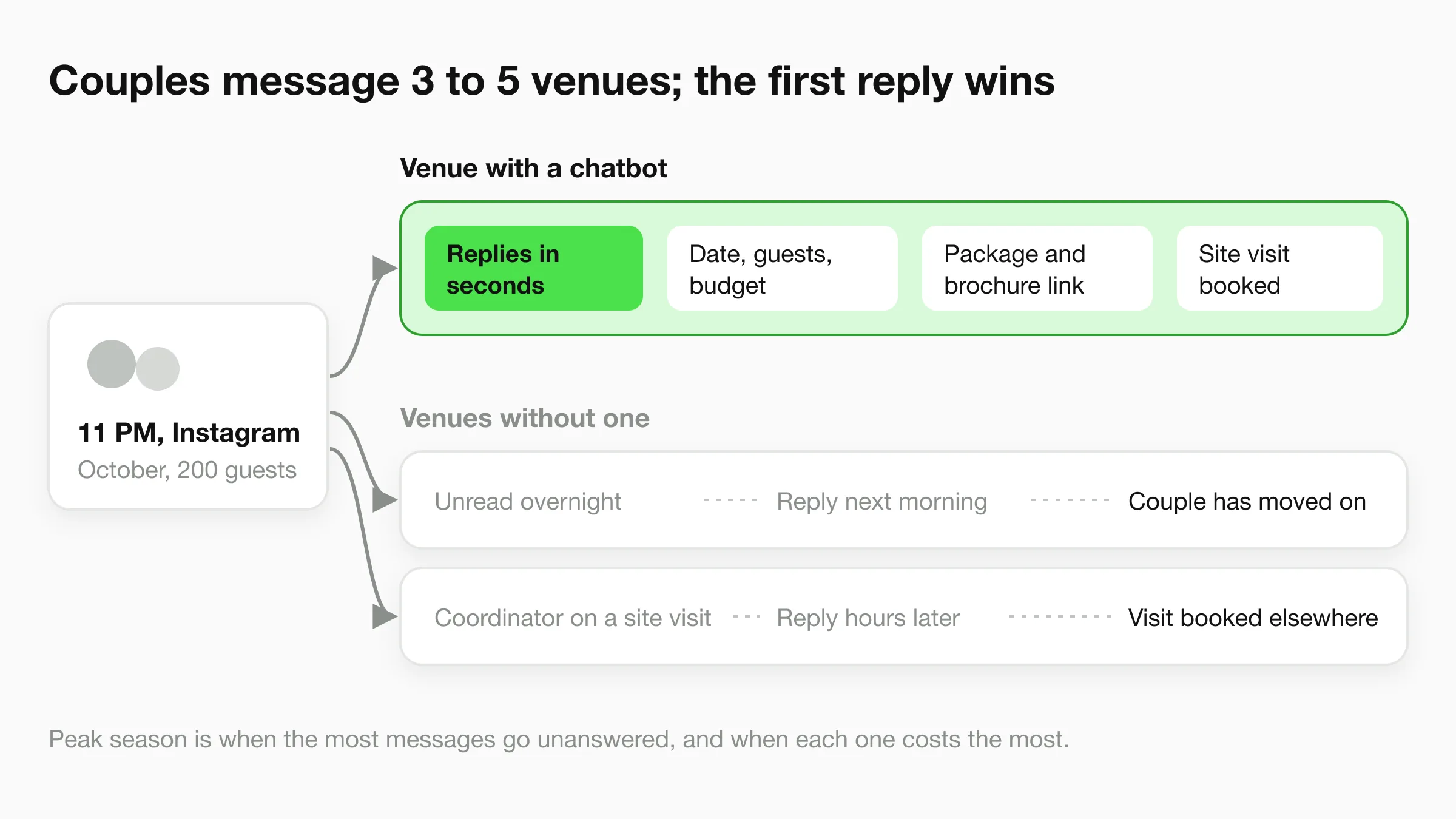
TL;DR: Wedding-venue inquiries operate on a brutal short window — couples message several venues at once and often book with whoever responds first, often late at night or on weekends when coordinators are offline. A WhatsApp chatbot connected to the WhatsApp Business API responds within seconds, handles availability questions, shares package and pricing details, books site visits via your calendar link, and captures qualified lead data 24/7. Responses are grounded in your venue's own knowledge base (packages, capacity, vendor policies, FAQs), so the chatbot does not invent details — it only answers from documents you provide. The chatbot also supports 100+ languages, so multilingual families and international clients get the same instant response in their preferred language. This guide covers the five highest-leverage uses, sample conversations, and setup steps for venue managers.
A couple finds your venue on Instagram at 11pm. They send a WhatsApp message asking about availability and pricing for an October wedding with 200 guests. If no one replies within 30 minutes, they move to the next venue on their list — and there are always more venues on the list.
Wedding venue inquiries operate on a brutally short window. Couples often contact several venues at once and book with whoever responds first. A missed message at 11pm on a Saturday is not a delayed reply — it can be a lost booking worth one of your highest-value events of the year.
Most venue managers cannot respond at 11pm, during weekends, or while they are hosting another site visit. A wedding venue chatbot on WhatsApp changes this dynamic entirely — capturing every inquiry, sharing package details instantly, and booking site visits automatically, around the clock.
What Is a WhatsApp Chatbot for Wedding Venues?
A WhatsApp chatbot for wedding venues is an AI assistant connected to the WhatsApp Business API. It responds to couple inquiries, captures lead details, shares venue information, and books site visits — automatically, without requiring your team to be online.
Unlike a manual WhatsApp Business account where someone must type every reply, an AI chatbot handles multiple conversations simultaneously at any hour. The chatbot draws answers from your venue's own knowledge base: package details, pricing tiers, capacity figures, vendor policies, and FAQ answers. It is designed to only answer from your documents — responses are grounded in the information you provide.
Capabilities specific to wedding venues:
- Date availability guidance from your knowledge base (your coordinator confirms dates)
- Package and pricing information (with customization options)
- Photo gallery link sharing
- Site visit booking in the chat (Calendly or Cal.com) or via your booking link
- Indoor and outdoor capacity details
- Vendor policy explanations (outside catering, DJ rules, decoration guidelines)
- Cancellation and refund policy queries
- Multilingual responses in 100+ languages (Spanish, Arabic, French, Portuguese, and more)
How this differs from manual WhatsApp: Your team has one phone, finite working hours, and limited capacity to handle concurrent conversations. A chatbot has none of these constraints. It responds to the couple messaging at 11pm and the three other couples messaging simultaneously on a Saturday afternoon — while your coordinator is giving a site tour to a fifth couple.
Cover Every Channel Couples Use
Couples and their families compare venues in group chats, on Instagram, and on your website, and expect you to be reachable wherever they found you. A venue that only answers during office hours is effectively unavailable during the evenings and weekends when much of that discovery and comparison happens. WhatsApp is one of the channels your AI front desk covers, alongside your website, Instagram DM, and Messenger.
5 Ways Wedding Venues Use WhatsApp Chatbots
1. After-Hours Inquiry Capture
Evening and weekend hours are when couples and their families do their venue research — not during a coordinator's 9–6 working day. A chatbot operating on WhatsApp captures every inquiry that arrives outside business hours, which is frequently the majority of total inquiry volume.
When a couple messages your venue at 10:30pm, the chatbot responds within seconds. It collects the essential qualification data: preferred wedding date, approximate guest count, budget range, and contact details. It sends your venue brochure link automatically. By the time your coordinator arrives the next morning, they have a fully qualified lead waiting in their inbox — not a missed message from someone who has already booked elsewhere.
For venues in active markets during peak wedding season, missing after-hours inquiries is not a minor inconvenience. Each unanswered inquiry is a potential booking at your venue's average revenue per event. A chatbot closes that gap.
2. Site Visit Scheduling
Scheduling a site visit by phone or email involves multiple back-and-forth exchanges: coordinator proposes a time, couple checks with family, counter-proposes, coordinator checks the calendar, confirms. This process can take days and often loses momentum entirely.
A chatbot compresses this to a single conversation. After capturing basic inquiry details and sharing the package overview, the chatbot offers real open site-visit times and books the couple's pick in the conversation if you schedule visits through Calendly or Cal.com (with any other scheduler, it shares your booking link to confirm the slot). The coordinator receives the confirmed appointment — no scheduling back-and-forth required.
This matters because families make wedding venue decisions together. A couple who has booked a site visit has demonstrated serious intent and has committed time. A couple still trying to schedule one may drift toward a venue that made the process easier.
3. Pricing and Package Queries
Pricing is the first question every couple asks, and it is also the question that consumes the most coordinator time when handled manually. A chatbot can present pricing tiers, package inclusions, and customization options in a structured, readable format the moment a couple asks — without requiring your coordinator to stop what they are doing.
Present your packages by guest capacity and format (indoor hall, outdoor lawn, banquet room combinations). Include what is standard versus add-on: catering, décor, sound systems, parking, accommodation. The chatbot explains each tier clearly and invites follow-up questions. Couples who get this information instantly are better qualified and more ready for a productive site visit conversation with your coordinator.
This also filters out inquiries that do not match your venue's profile. A couple whose budget sits below your minimum package will self-select out early, saving your coordinator time while leaving a positive impression of transparency.
4. Vendor FAQ Automation
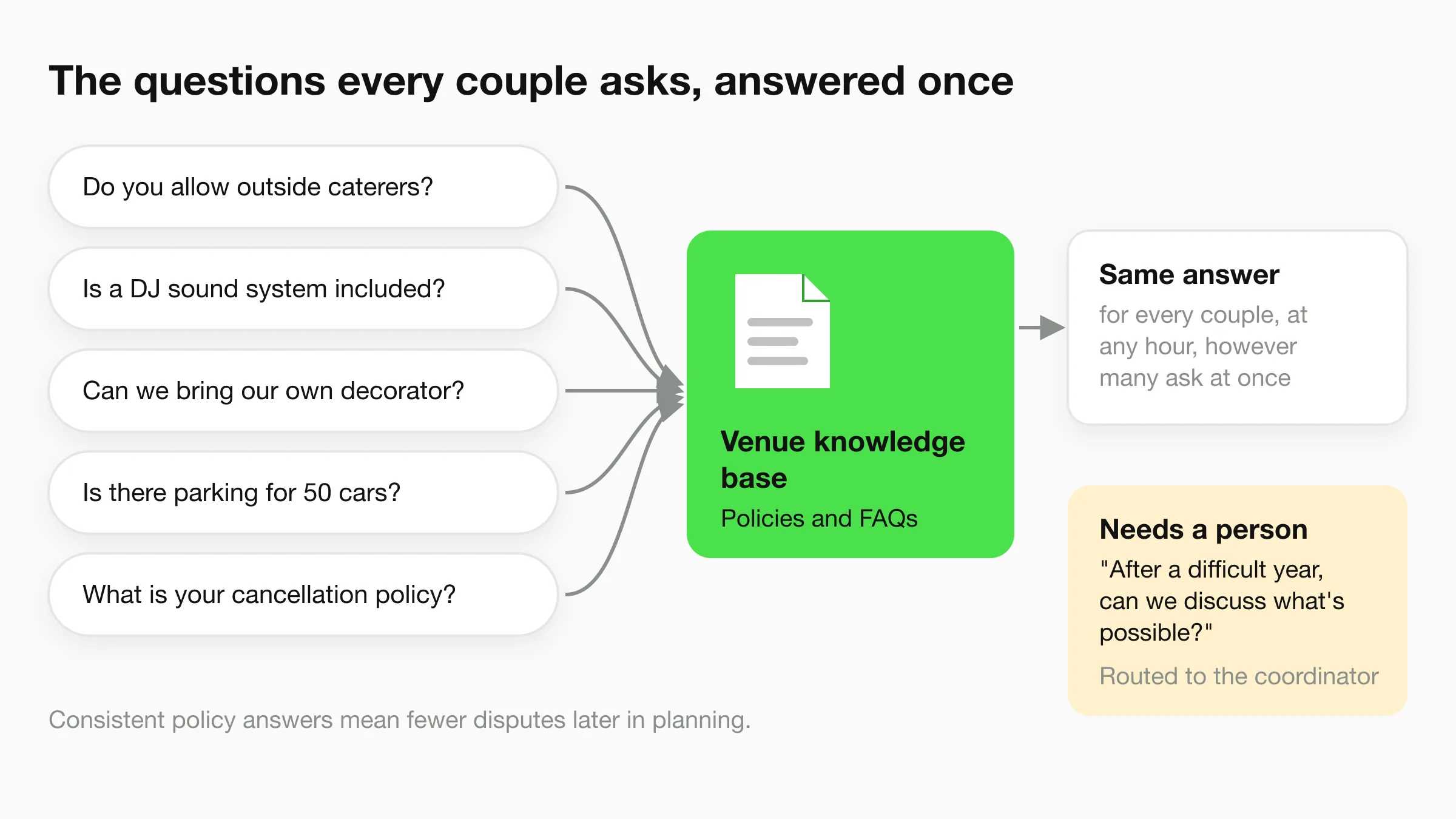
Wedding venues receive the same questions hundreds of times per season: "Do you allow outside caterers?", "Is there a DJ sound system included?", "What is your cancellation policy?", "Can we bring our own decorator?", "Is there parking for 50 cars?", "Do you have a bridal suite?"
Every one of these questions requires coordinator attention if handled manually. A chatbot answers all of them instantly from your venue's knowledge base, at any hour, to any number of couples asking simultaneously. Your coordinator's time is preserved for relationship-building, site visits, and closing conversations — not repetitive informational queries.
The chatbot also ensures consistent answers. Every couple receives the same accurate information about your vendor policies, which reduces the risk of misunderstandings that create disputes during the event planning process.
5. Warm Handoff for Follow-Up
Not every couple books immediately after a site visit. Some are evaluating multiple venues. Some have family members who need to be consulted. Some are waiting for a budget decision. Without a follow-up system, these warm leads go cold.
The chatbot does not send follow-up messages on its own, but it makes your coordinator's follow-up faster. Every conversation becomes a lead record with the couple's dates, guest count, budget, and the questions they asked, and your team gets a summary by email. When a couple comes back with a question days after their site visit, the chatbot answers instantly from the same knowledge base, and the coordinator can pick up from the full conversation history instead of starting cold.
On Pro and Max, Agentic Workflow can email your coordinator a brief on couples who shared a firm date and budget after each conversation, so nobody has to remember which couples are still deciding.
Start Capturing Venue Inquiries 24/7
Hyperleap AI connects to WhatsApp, Instagram DM, Facebook Messenger, and your website. Your wedding venue chatbot can be live in under 5 minutes.
Start for freeSample WhatsApp Script: Venue Inquiry End-to-End
Here is a realistic example of how an AI chatbot handles a wedding venue inquiry on WhatsApp from start to site visit confirmation.
Couple: Hi, we're looking for a wedding venue for around 200 guests

Chatbot: Hi! Congratulations on your upcoming wedding 🎊 I'm the assistant
for [Venue Name] and I'd love to help you find the perfect setting.

Could you share your preferred wedding date or a few dates you're
considering?

Couple: We're looking at 15th October 2026 or 22nd October 2026

Chatbot: Thank you! October is a beautiful time for weddings here. Let me
note both dates.

To share the most relevant packages, could you give me a rough sense of
your budget range?

(a) [Entry budget range]
(b) [Mid budget range]
(c) [Premium budget range]

Couple: Option (b)

Chatbot: Perfect. Here's a quick overview of our packages that match your
date, guest count, and budget:

**The Garden Celebration Package ([package price])**
- Outdoor lawn setting, capacity up to 220 guests
- Floral décor and stage setup included
- In-house catering (vegetarian menu, 150 items)
- Sound system, lighting, and parking for 60 vehicles

You can view photos and full inclusions here: [Venue Brochure Link]

Would you like to schedule a site visit to see the spaces in person?

Couple: Yes, that would be great

Chatbot: Wonderful! Here are our available site visit slots for this week
and next:

📅 Saturday 21st March — 10am, 12pm, or 3pm
📅 Sunday 22nd March — 11am or 2pm
📅 Saturday 28th March — 10am or 12pm

You can confirm your preferred slot here: [Booking Link]

Your coordinator Priya will meet you at the venue and walk you through all
the spaces. Our address: [Venue Address, Google Maps Link]

Couple: Saturday 21st March at 12pm works

Chatbot: Confirmed! 🎉 Your site visit is scheduled for:

📅 Saturday, 21st March at 12:00 PM
📍 [Venue Address]
👤 Coordinator: Priya

You'll get a calendar invite by email. If your plans change, use the
links in that confirmation email.

Looking forward to welcoming you!
This conversation — from first message to confirmed site visit — takes under five minutes and requires zero coordinator involvement. The couple gets immediate, useful information. The venue captures a qualified lead with a locked appointment.
Getting Started: 3 Steps to WhatsApp Automation for Your Venue
Step 1: Apply for WhatsApp Business API Access
A personal WhatsApp account or WhatsApp Business app cannot support a chatbot. You need WhatsApp Business API access, which is set up through a Meta-approved provider.
Hyperleap AI is a Meta Technology Provider and Business Partner, and it guides you through this process — no technical skills required. You provide your venue's business details, phone number, and verification documents, and approval time depends on Meta's business verification. Once approved, your venue's number is connected to the AI chatbot and can receive and reply to messages automatically.
WhatsApp Business API vs. WhatsApp Business App
The WhatsApp Business app (the free app on your phone) is for manual messaging by a single user. The WhatsApp Business API is a programmatic connection that allows software — including AI chatbots — to send and receive messages automatically. Chatbots require the API, not the app.
Step 2: Build Your Venue Knowledge Base
The chatbot answers from the information you provide. Before launching, prepare a knowledge base document that covers:
- Packages: Names, pricing, guest capacity ranges, inclusions (catering, décor, sound, parking, accommodation)
- Spaces: Indoor halls, outdoor lawns, banquet rooms — with dimensions, capacities, and photo links
- Availability windows: General availability calendar, blocked dates, peak season notes
- Vendor policies: Outside caterers, decorators, DJs, alcohol policy
- Cancellation and payment: Deposit amount, payment schedule, cancellation terms
- FAQs: The 20–30 questions your coordinator fields most often
The more complete this document, the more effectively the chatbot handles inquiries without escalating to your coordinator. Most venues can prepare this in a few hours.
Step 3: Set Up Lead Capture and Site Visit Booking
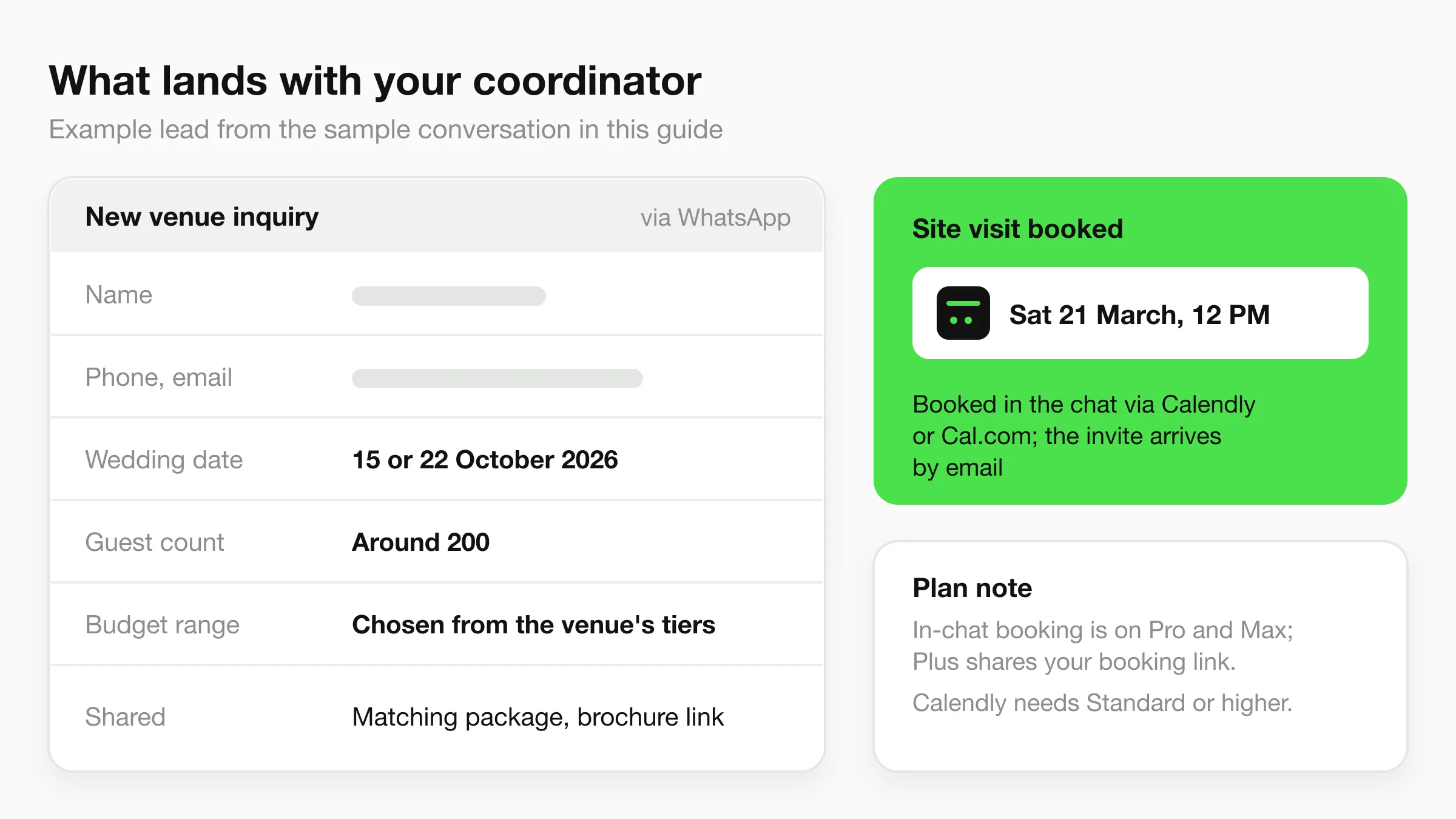
Configure the chatbot to collect the key qualification fields from every inquiry: name, phone number, email, preferred wedding date, guest count, and budget range. These details flow into a lead record your coordinator can review.
For site visit booking on Pro and Max, connect Calendly or Cal.com: the chatbot reads live availability, offers real open slots, and books the visit in the conversation, and the couple gets a calendar invite by email (in-chat booking needs Calendly Standard or higher). On Plus, or if you use another scheduling tool, add your booking link and the chatbot shares it when the couple is ready.
Once live, run a test conversation yourself — message your venue's WhatsApp number as if you were a prospective couple and verify the responses. Adjust any knowledge base gaps before going live publicly.
ROI for Wedding Venues
The Economics of Missed Inquiries
Wedding venue revenue is concentrated in relatively few bookings per year, and each event is high value. That means every missed inquiry represents a meaningful share of annual revenue potential.
The economic argument for a chatbot is simple: if it captures one additional booking per month that would otherwise go unanswered, the return vastly exceeds the tool cost. Results depend on venue size, market, inquiry volume, and conversion rates — but the underlying math is sound.
What Changes With a Chatbot
| Item | Without Chatbot | With Chatbot |
|---|---|---|
| After-hours inquiries | Wait until morning | Answered in seconds |
| Initial response time | Hours, depending on coordinator availability | Seconds |
| Coordinator time on FAQ calls | A large part of the day in peak season | Only the questions that need a person |
| Simultaneous inquiries handled | One at a time | Many at once |
| Monthly Hyperleap cost | — | From $40/month |
The coordinator time savings alone often justify the cost. If your team spends two hours daily answering repetitive pricing and FAQ questions, a chatbot redirects that time toward site visits, relationship management, and event coordination — higher-value work that directly affects booking outcomes.
Peak Season Amplifier
The ROI of a chatbot is highest during peak wedding season, when inquiry volume spikes and coordinator bandwidth is most constrained. This is precisely when the most inquiries go unanswered manually — and when each missed inquiry is most expensive. A chatbot scales with your inquiry volume without scaling your headcount.
Qualitative Benefits Beyond the Numbers
Beyond direct lead capture, automation can improve the couple experience in ways that affect word-of-mouth referrals and online reviews. Couples who receive immediate, accurate responses feel the venue is professional and organized — which is itself a signal about how their wedding day will be managed. A slow or disorganized inquiry process, by contrast, creates doubt before the relationship has even started.
For WhatsApp automation in hospitality broadly, the pattern is consistent: faster response times and consistent information delivery translate to better prospect experience and higher conversion from inquiry to booking.
Never Miss a Wedding Venue Booking Again
Wedding venue success depends on being first to respond — not most eloquent, not cheapest, not largest. First. The couple who gets an immediate, accurate answer to their 11pm WhatsApp message does not need to send the same message to the next venue on their list.
An AI chatbot on WhatsApp closes the response gap for every after-hours inquiry, every weekend message, and every moment when your coordinator is already busy with another couple. The chatbot qualifies the lead, shares the packages, and books the site visit. Your coordinator takes over from there with a warm, informed prospect who already likes how efficiently your venue operates.
The inquiry you miss tonight is the booking someone else has tomorrow morning.
For more on WhatsApp business automation and how venues are using AI to compete on response speed, explore our resources. You can also compare WhatsApp automation tools to understand how different platforms approach this problem.
If slow response times cost businesses in every industry, wedding venues — where the decision window is short, the values are high, and the competition is fierce — feel it most acutely.
Further Reading
Authoritative external sources used and recommended for further research on this topic:
- WhatsApp Business Platform documentation
- WhatsApp Business Platform pricing
- Meta for Developers WhatsApp API
For the fuller picture of how the AI handles capacity, pricing, and qualification beyond WhatsApp, see AI chatbot for wedding venues.
Frequently Asked Questions
Can a chatbot handle the emotional nature of wedding inquiries?
Yes — and the division of labor is the key insight here. The chatbot handles logistics and information: availability, pricing, packages, scheduling. Your coordinator handles relationship-building, emotional intelligence, and closing. Most couples appreciate a fast, accurate initial response more than they mind the first exchange being automated. The chatbot's job is to qualify the lead and book the site visit; your coordinator's job is to convert the site visit into a signed contract.
If a couple asks something that requires a personal touch — "We're planning the wedding after a difficult year for our family, can we discuss what's possible?" — the chatbot can flag this as a priority and route it to your coordinator immediately.
What information should I load into the wedding venue chatbot?
Load everything a first-time enquirer would want to know: package names and pricing, capacity ranges for each space (indoor and outdoor), inclusions versus add-ons, vendor restriction policies (outside caterers, DJs, decorators, alcohol), payment and cancellation terms, parking capacity, accommodation options, and your most frequently asked questions. Include links to your photo gallery and virtual tour if available. The more complete the knowledge base, the fewer conversations the chatbot will need to escalate.
Can the chatbot check real-time venue availability?
For site visits, yes — on Pro and Max, if you schedule them through Calendly or Cal.com, Hyperleap AI reads live availability and books the visit in the chat. Wedding-date availability is different: the chatbot shares the date guidance you provide in the knowledge base and routes date requests to your coordinator, because it does not check or hold dates in your event calendar.
How much does a WhatsApp chatbot cost for a wedding venue?
Hyperleap AI starts at $40/month for the Plus plan, which includes WhatsApp, website chat, Instagram DM, and Facebook Messenger in a single subscription, with a 7-day trial. Meta's WhatsApp fees are separate: you pay them to Meta directly, according to Meta's current pricing. Because a single wedding booking is usually worth far more than a year of the tool, one additional booking from after-hours lead capture can cover the cost many times over. The Pro plan at $100/month adds a second chatbot, native Calendly and Cal.com booking, and white-label (the Hyperleap badge comes off the widget).
Does the chatbot work in other languages?
Yes. Hyperleap AI supports 100+ languages, including Spanish, Arabic, French, and Portuguese. The chatbot detects the language from the couple's first message and responds in kind — no separate setup required. For venues in multilingual markets or hosting destination weddings, this means the chatbot can handle inquiries from families who prefer communicating in their own language without any manual intervention.
Never Miss a Wedding Venue Inquiry Again
Hyperleap AI connects to WhatsApp, Instagram, and your website. Capture every lead, share your packages, and book site visits — automatically.
Start for freeIndustry Solutions
See how AI chatbots work for these industries:
Put this into practice
Related Articles
View all
Guide22 min read
Multi-Channel AI Chatbot Strategy: Website, WhatsApp & More
Learn how to deploy AI chatbots across website, WhatsApp, Instagram DM, and Facebook Messenger — with a unified inbox and consistent answers everywhere.
Guide18 min read
AI Chatbot for Daycares: Streamline Parent Communication
Daycare AI chatbots handle enrollment inquiries, daily updates, and parent questions so your staff can focus on the children.
Guide16 min read
AI Receptionist for Landscaping Businesses
An AI receptionist for landscaping businesses answers quote and service questions 24/7, qualifies property details, and shares your booking link.
Guide18 min read
AI Receptionist for Roofing Companies: Never Miss a Lead
An AI receptionist for roofing companies answers storm-damage and estimate questions 24/7, qualifies homeowners, and routes leads to your team.