Answer questions. Book the appointment in the chat.
Your AI front desk answers questions about services, prices, and opening hours. When a customer is ready, it checks your Calendly or Cal.com availability, offers real open times, and books the one they pick — without them leaving the conversation. Booking in the chat is on the Pro and Max plans; on Plus, the agent shares your booking link.
Quick Answer
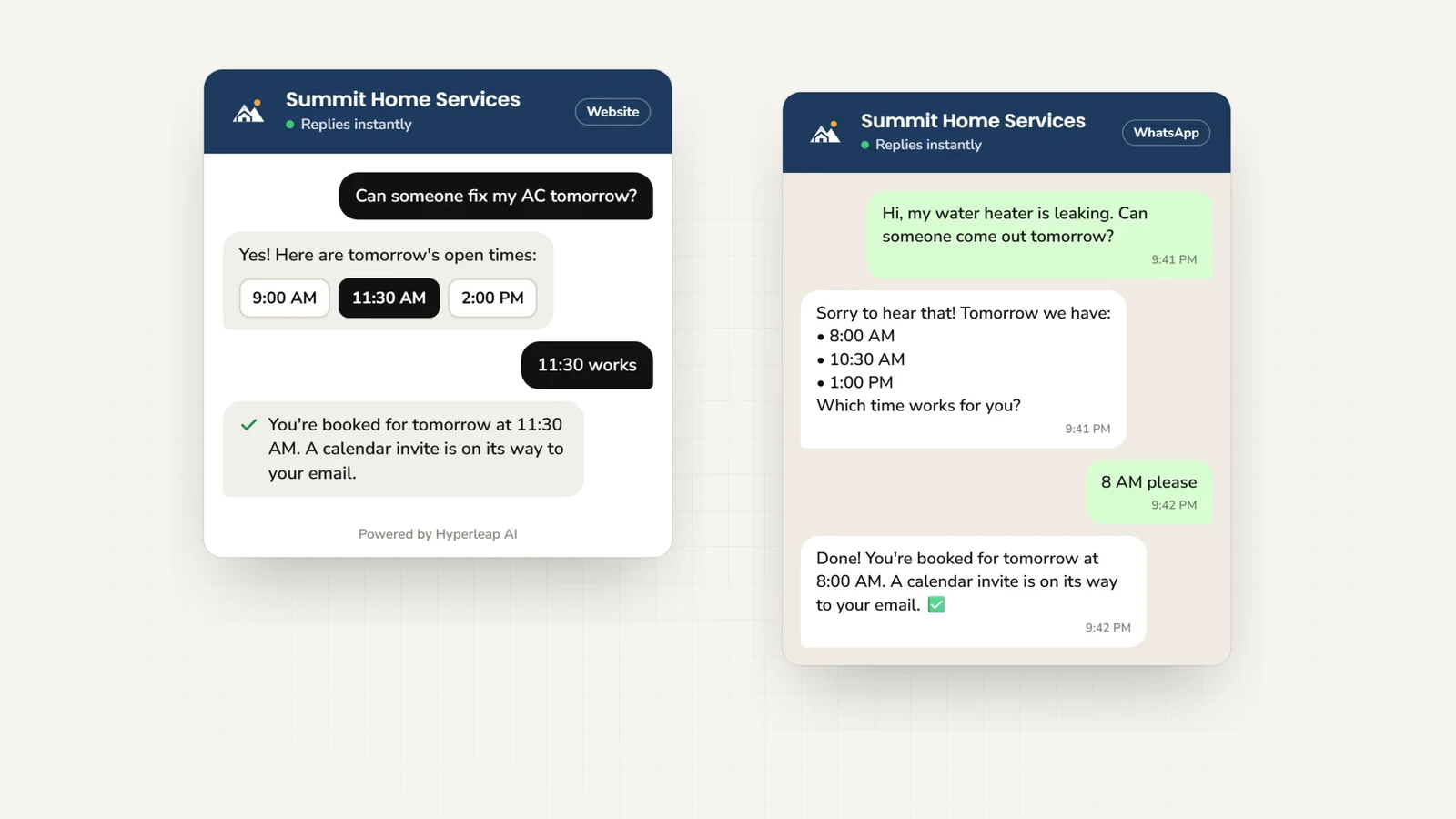
Hyperleap AI answers service questions, collects customer details, and, on the Pro and Max plans, books appointments natively with Calendly and Cal.com on your website, WhatsApp, Instagram DM, and Facebook Messenger. It reads your live availability, offers real open times, and creates the booking in the conversation; the customer gets the calendar invite by email. On Plus, or with any other scheduling tool, it shares your booking link.
From first question to booked appointment
Answer pre-booking questions
Services, pricing, location, what to bring — the questions people ask before they commit to a time, answered from your own information.
Ask what they need
Ask about the service they need and collect their contact details, so your team knows who is coming and why.
Offer real open times
The agent reads live availability from your Calendly or Cal.com event and offers times that are actually free — no back-and-forth.
Book it in the conversation
The customer picks a time and the agent creates the booking. Your scheduler emails the calendar invite, day or night.
How the booking actually happens
On Pro or Max, connect your Calendly or Cal.com event in Hyperleap Studio. When a customer asks to book, the agent checks that event's live availability, offers open times, and creates the booking once the customer chooses. Your scheduler sends the customer the calendar invite by email, exactly as if they had booked on your page.
On your website
Customers tap a time in a slot picker inside the chat widget, then see a confirmation card with the booked time.
On WhatsApp, Instagram, and Messenger
The agent lists the open times in its reply, the customer answers with the one they want, and the agent confirms the booked time in text.
Good to know before you connect
- Your Hyperleap plan: in-chat booking is on Pro and Max. On Plus, the agent shares your booking link.
- Calendly: in-chat booking needs Calendly Standard or higher. On Calendly Free, the agent still offers real open times, and the customer confirms the chosen time on Calendly's page.
- Cal.com: works on any Cal.com plan with cal.com-hosted event links. Self-hosted Cal.com is not supported.
- New bookings only: the agent does not cancel or reschedule. Customers use the links in their confirmation email.
- Other scheduling tools: the agent shares your booking link in the conversation instead.
- Not included: direct Google Calendar or Outlook connections, practice-management or reservation systems, and appointment reminders or no-show follow-ups.
Frequently asked questions
What is an appointment scheduling chatbot?
Does the chatbot actually book the appointment?
Can it cancel or reschedule appointments?
Does it sync with Google Calendar or Outlook?
How is that better than just putting a booking link on my site?
What channels does it work on?
How much does an appointment scheduling chatbot cost?
Keep exploring
Help customers take the next step
Answer service questions and book the appointment in the chat, even while your team is busy.
7-day free trial on all plans. Cancel anytime.