AI answers based on your own documents
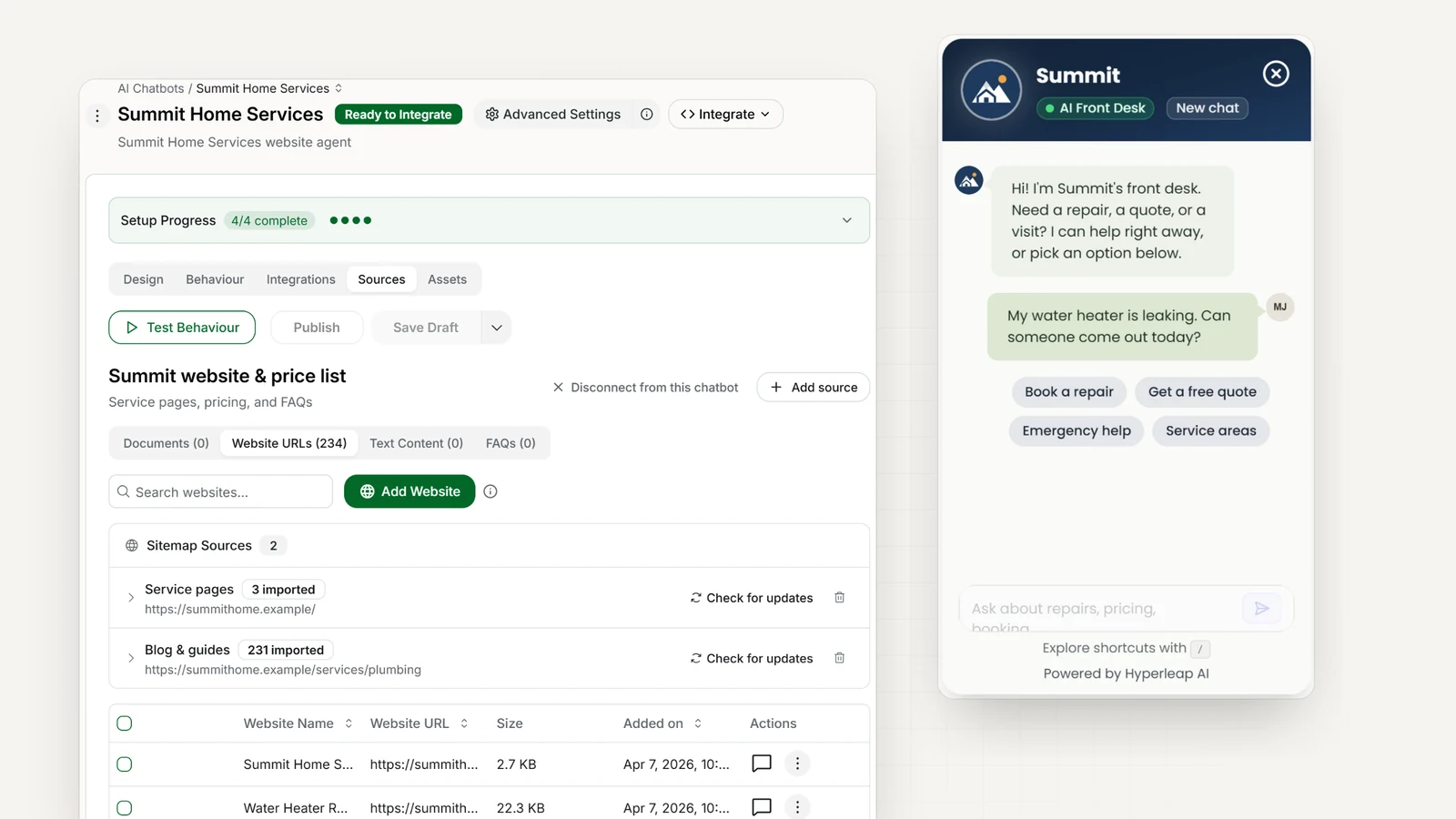
Your AI front desk searches your documents before it answers. This is called RAG. It helps the AI use your actual prices, policies, and product details when replying to customers.
Quick Answer
A RAG chatbot searches your documents for relevant information, then uses it to write a reply. RAG stands for Retrieval-Augmented Generation. For a business, that means answers that use your real prices, policies, and hours, and that change as soon as you update a document. It helps reduce made-up answers, but the AI can still make mistakes, so test it before it goes live.
How it works
How a RAG chatbot works
Grounding means the AI answers from material you gave it, not from whatever it learned on the open internet. Each answer goes through the same four steps.
1. Add your information
Your documents and website content are split into passages and indexed so they can be searched by meaning, not just keywords.
2. Find the relevant details
When a customer asks something, the system finds the most relevant passages from your knowledge base.
3. Write the answer
The language model writes the reply using those retrieved passages as its source — answering from your material, not generic knowledge.
4. Stay accurate over time
Update your knowledge base and answers update with it. No retraining, no stale responses.
The technical detail: indexing, retrieval, and generation
Indexing
When you add a document or web page, its text is extracted (navigation, scripts, and images are skipped), split into passages, and each passage is turned into an embedding: a list of numbers that represents what the passage means. Passages about the same thing end up with similar embeddings even when they use different words.
Retrieval
When a customer asks a question, the question gets an embedding too, and the system looks for the passages closest to it in meaning. “Are you open Sundays?” can match a passage that says “weekend hours: Saturday mornings only”, even though the two share no keywords.
Generation
The best-matching passages go to the language model along with your instructions and guardrails, and the model writes the reply from them. On Hyperleap AI that model is GPT-6 Luna by default, with Claude Haiku 5.5 as the other included option; you can also bring your own OpenAI or Anthropic key.
Why not paste everything into the prompt?
A model can only read so much at once, and a prompt stuffed with every page you own makes answers slower and less focused. Retrieval sends only the passages that matter for this question.
What retrieval cannot fix
If the answer is not in your sources, there is nothing to retrieve, and that is when your fallback should take over. If two sources disagree, say an old and a new price list, the model may quote either one. Both are source problems, and the fix is in your sources, not the model.
Why it matters
Why RAG matters for a business chatbot
Designed to minimize hallucinations
Using your documents as a source helps reduce made-up answers. AI can still make mistakes.
Always reflects your real data
Your pricing, policies, and products — current, because the chatbot reads your knowledge base, not a frozen training snapshot.
Scales with your business
Add documents as your business grows. With several similar locations or courses, the optional Multi-variant (locations, courses, etc) add-on answers from the right one ($40/mo plus 2x credits per request, Pro and Max).
Consistent on every channel
One knowledge base powers website, WhatsApp, Instagram, and Facebook — the same answer everywhere.
Your sources
What to upload, and what to leave out
The agent can only be as good as what you give it. Start with the material behind the questions you answer most, and keep anything private out of it. Every plan includes 40MB of knowledge per chatbot.
Add
Your website pages
Add the pages customers ask about — services, pricing, FAQ, policies, contact — one at a time, or crawl a section of linked pages.
Documents
PDF, Word (.docx, .doc), and plain-text files: price lists, service menus, policies, brochures, manuals.
Question-and-answer pairs
The questions you get every day, answered the way you would answer them. The most direct way to pin down an exact answer.
Leave out
Anything you would not tell a customer
Internal pricing, margins, staff notes. If it is in a source, the agent can quote it.
Old versions next to new ones
Last year's price list beside this year's invites the wrong answer. Replace, don't stack.
Content the indexer cannot read
Text inside images or videos, and pages behind a login. Write prices and hours as text.
Structure helps retrieval: clear headings, one topic per section, and very long documents split by topic. For a fuller walkthrough, read our knowledge base best practices or see the knowledge base chatbot overview.
Staying current
How to keep answers current
A RAG chatbot is only as current as its sources. The upside is that keeping it current is ordinary housekeeping, not an AI project.
- 1
Change the source, not the AI
Edit the document or page, and the next answer uses the new version. There is nothing to retrain.
- 2
Refresh changed web pages
After you update a page on your site, refresh that URL in Sources so the index picks up the change.
- 3
Replace, then delete the old copy
Upload the new price list and remove the old one, so two documents never disagree.
- 4
Give every source an owner
Name the person who knows when hours, prices, or policies change, and make updating the source part of that change.
- 5
Retest what the change touches
Ask the agent the questions the update affects before your customers do.
Hours and prices change most often. The knowledge source checklist covers the routine, and resolving conflicting sources covers what to do when two documents disagree.
Guardrails and fallback
What happens when it should not answer
Retrieval decides what the agent knows. Guardrails and fallback decide what it does at the edges: questions it should not touch, and questions your sources do not cover. You write both, in plain language.
Guardrails
Plain-language rules for what the agent must not do: "Do not discuss competitor pricing." "Do not give medical or legal advice." "Do not promise refunds or delivery dates." Specific rules work better than vague ones.
Fallback
What the agent says when your sources don't have the answer. Give a next step — an email address, a link, an offer to take their details — instead of a guess or a bare "I don't know".
Human handoff (Pro and Max)
Visitors can ask for a person and your team is alerted in Studio. Any teammate can take over the conversation, including on WhatsApp, Instagram, and Messenger, then hand it back to the AI.
In healthcare, legal, and financial services, write guardrails that route rather than advise. The agent can share your published information and pass urgent or personal questions to your team; it does not assess symptoms or give legal advice.
Accuracy
How to test accuracy on your own questions
An accuracy percentage from any vendor or benchmark was measured on someone else’s documents and someone else’s questions. What matters is how the agent does on yours, and you can measure that yourself during your free trial.
Step 1
Collect real questions
Pull them from your inbox, DMs, and call notes: the everyday ones, the awkward ones, and a few your sources cannot answer.
Step 2
Write the answer you expect
Next to each question, note the correct answer and the document it should come from.
Step 3
Ask them before you publish
Run every question in the test preview, against your draft, before customers see it.
Step 4
Score every reply
Use the outcomes in the table below. Count them; do not go by feel.
Step 5
Fix the source, then rerun
Most misses trace back to a missing, outdated, or conflicting source. Rerun the full set after every significant change.
| Outcome | What to do |
|---|---|
| Correct, from your sources | Working as intended. |
| Correct, but not traceable to a source | Tighten your instructions so answers come from your documents. |
| Declined when it should have answered | The information is missing or hard to find. Add it, or restructure the document. |
| Wrong | Find the source it used in the conversation log. Fix or remove that source, or add a guardrail. |
| Declined correctly | The question is outside your sources and the fallback did its job. |
For a deeper method, including what “accurate enough” means for your business, read how accurate are AI chatbots.
Change safely
Draft, test, publish, and see where answers came from
Testing only helps if changes can’t reach customers before you’ve tried them, and if you can trace a bad answer to its cause.
Draft → test → publish, with version history
Saving a draft doesn’t touch the live agent. You try the draft in a preview, then publish, and every publish is kept as a version. Open any past version to see what changed, section by section, and restore it to your draft in one click. Nothing goes live until you publish again.
Source citations in the conversation log
In the conversation log, each answer shows which of your sources it drew on. The citation is for your team, not shown to customers in the chat, and it is the fastest way to trace a wrong answer back to the document that caused it.
Compared
RAG chatbot vs. a regular AI chatbot
| Regular AI chatbot | RAG chatbot | |
|---|---|---|
| Source of answers | Model training data | Your documents |
| Risk of hallucination | Higher (ungrounded) | Lower (grounded by design) |
| Reflects your real info | Often not | Yes |
| Updating answers | Needs retraining | Edit your knowledge base |
| Best for | General chit-chat | Accurate customer answers |
Compared
RAG vs. fine-tuning
Fine-tuning retrains a model on your examples. It is the other way people try to make AI “know” their business, and it solves a different problem.
| RAG | Fine-tuning | |
|---|---|---|
| What it changes | What the AI knows when it answers: your documents | How the model writes or behaves: tone, format, a specialized task |
| Updating a fact | Edit or replace a document; the next answer uses it | Prepare new training examples and train again |
| Seeing where an answer came from | Traceable to the source passage | Blended into the model; no source to point to |
| What it takes to start | Your website and documents | Curated training examples, ML expertise, and compute |
| Good fit | Business facts that change: prices, hours, policies, products | A consistent voice or format at large scale, or a narrow specialized task |
They are not rivals. Teams with ML engineers sometimes fine-tune a model for tone and still use retrieval for facts. For a business answering customer questions, retrieval plus clear written instructions covers the job, and that is how Hyperleap AI works: there is no model training step. The RAG vs fine-tuning vs prompt engineering guide goes further.
FAQ
Frequently asked questions
What is a RAG chatbot?
How does RAG reduce hallucinations?
What is the difference between a RAG chatbot and a regular AI chatbot?
What documents can I use to train a RAG chatbot?
How do I test whether my RAG chatbot is accurate?
Can I see which document an answer came from?
What if my business has several similar locations or courses?
Can a RAG chatbot work across WhatsApp and other channels?
How do I build a RAG chatbot without coding?
Further reading
Go deeper on grounded answers
AI chatbot knowledge base: best practices for accuracy
How to structure, write, and maintain the content your agent answers from.
How accurate are AI chatbots?
How to benchmark accuracy on your own questions, and what "accurate enough" means.
Keep AI answers current when hours and prices change
A checklist for updating sources, retiring stale copies, and retesting answers.
Conflicting AI sources: an owner review workflow
What to do when two documents give the agent different answers.
RAG vs fine-tuning vs prompt engineering
The three ways to teach AI about your business, in plain English.
Glossary: Retrieval-Augmented Generation (RAG) · AI hallucination · Fine-tuning
Retrieval is the accuracy half of the job. For the whole workflow it sits inside, see conversational AI for customer service.
Related
Keep exploring
Knowledge Base Chatbot
Answer customers from your own docs, FAQs, and policies.
AI Chatbot for Multi-Location Businesses
One knowledge base, answers from the right location — the Multi-variant add-on in production.
Conversational AI for Customer Service
Resolve more conversations across every channel.
AI Receptionist
Answer, route, and book — the front desk that never sleeps.
AI Agent vs. Chatbot
The difference between bots, assistants, and agents.
AI Chatbot for Business
Choosing and setting up the right platform.
Put your business information to work
Add your website and documents. Hyperleap AI uses them to answer customer questions, with no coding required.
7-day free trial on all plans. Cancel anytime.