AI Front Desk for Mental Health Practices: Non-Clinical Only
A non-clinical AI front desk for mental health practices answers fee questions 24/7, routes crisis messages to a human, and keeps PHI out of the chat.
TL;DR: An AI front desk for a mental health practice is strictly a non-clinical front-office tool. It answers questions about therapist availability, modalities, fees and sliding-scale terms, and insurance accepted; shares intake-form links; captures appointment requests and waitlist sign-ups; and routes everything else to a human. Any message suggesting crisis or self-harm is routed immediately to a person and paired with a crisis-line message — the US 988 Suicide & Crisis Lifeline, or the visitor's local emergency number outside the US. The AI never counsels, screens, or evaluates anyone. Hyperleap is not HIPAA-compliant and offers no Business Associate Agreement, so clinical detail and protected health information stay out of the chat by design.
Someone searching for a therapist at midnight is often at the hardest part of the decision — the part where they finally typed "therapist near me" into a search bar. They land on a practice's website, see a chat widget, and ask a question that would otherwise wait until office hours reopen: "Do you have anyone taking new clients who works with anxiety?" "Do you take my insurance?" "What's the difference between your sliding-scale rate and your standard fee?"
A mental health practice sits at the intersection of two hard requirements: the front office genuinely needs automation — intake coordinators are often the busiest, most stretched role in a practice — and the tolerance for getting anything wrong is close to zero, because the population asking these questions includes people in real distress. This guide is written specifically for that intersection, covering what an AI front desk can responsibly handle for a therapy practice and drawing the line precisely where clinical judgment has to start.
If you want the fuller deployment picture, AI agents for mental health practices is the pillar page — this post goes deeper on the individual front-office workflows and, most importantly, the crisis-routing design. For the broader healthcare-adjacent category, see AI agents for healthcare, and for how the human-handoff mechanism works generally, human handoff.
What a Non-Clinical Front Desk Actually Handles
An AI front desk for a therapy practice is a document-grounded chat agent that answers strictly from content your practice has already written down — therapist bios, fee schedules, insurance lists, and intake procedures — running on your website chat widget, WhatsApp Business, Instagram DM, and Facebook Messenger.
Here's the practical scope:
- Therapist availability and modalities, from your content. "Does anyone at your practice specialize in EMDR?" or "Is Dr. Chen taking new clients?" — answered from the therapist profiles and availability status you maintain, not a live scheduling system.
- Fees and sliding-scale explanations. "What's your standard session rate, and how does the sliding scale work?" — answered clearly from your published fee schedule, including how a prospective client would apply for a reduced rate if you offer one.
- Insurance-accepted lists — no eligibility checks. The AI confirms whether a carrier is on your accepted list. It does not check a specific person's benefits, deductible, or session authorization — that stays entirely with your billing team.
- Intake-form links. Once someone is ready to move forward, the AI shares your intake-form link and explains what to expect next, without collecting any clinical content itself.
- Appointment-request routing. The AI captures a name, contact method, and general reason for reaching out (e.g., "looking for individual therapy," "couples counseling"), and routes the request to your intake coordinator — it does not book directly into a clinician's calendar.
- Waitlist capture. For practices where every therapist is full, the AI can capture waitlist sign-ups with the same non-clinical information, so no inquiry is simply lost to a "we're full" message with no follow-up path.
- Crisis-message routing, immediately. Covered in full detail below — this is the most important workflow in this entire guide.
- Privacy boundaries, enforced by design. The AI is built and configured to keep clinical detail and protected health information out of the conversation entirely.
This is not a substitute for a crisis line, and it should never be positioned as one
Everything in this guide describes front-office automation. None of it — including the crisis-routing workflow — should be described to clients or the public as a mental health resource, a screening tool, or any form of clinical support. The AI's only job in a crisis is to get a human involved fast and to surface the right emergency resource.
Crisis Routing: The Design That Has to Be Right
This is the section that matters most in this guide, and it deserves to be read in full before configuring anything else.
What triggers crisis routing
A practice configures a list of keywords and phrases that indicate a message may involve crisis or self-harm risk — direct statements, common euphemisms, and adjacent language your clinical staff decide should trigger immediate routing. This list is written and owned by the practice, ideally with clinical input, not treated as an out-of-the-box default that fits every practice identically.
What happens the instant a match is detected
Two things happen immediately and simultaneously, not sequentially:
- The conversation routes to a human without delay. The AI does not continue any scripted intake flow, does not ask qualifying questions, and does not attempt to keep the person engaged in conversation while waiting for staff. It flags the conversation for immediate human attention through whatever notification channel your practice has configured — a real-time alert, not a queued ticket reviewed later.
- The AI surfaces a crisis-line message. In the US, that means naming the 988 Suicide & Crisis Lifeline as an example resource; for a visitor outside the US, the message points to their local emergency number, since crisis line numbers and services vary meaningfully by country. This message is delivered without asking the person to wait for it — it appears immediately in the same response that acknowledges their message.
What the AI explicitly does not do
The AI does not ask "are you thinking about hurting yourself," does not attempt to gauge severity, does not offer coping strategies, and does not continue a conversation as though it were providing support. It does not screen. It does not evaluate. It routes, and it names the resource. That is the entire job, by design — a real crisis deserves a real person and a real crisis line, immediately, not a chatbot's best attempt at a supportive response.
Why this can't be an afterthought feature
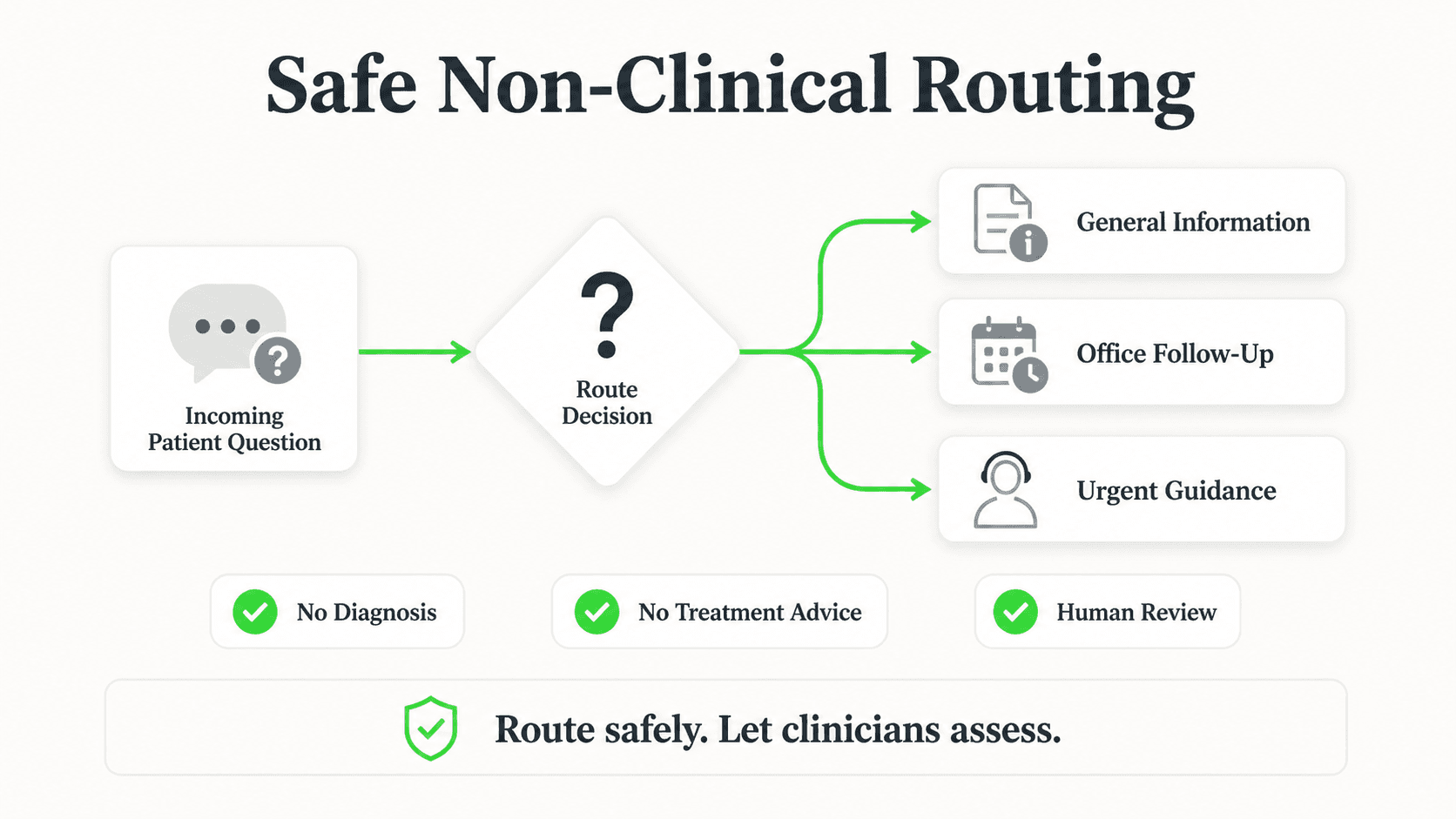
A therapy practice's website and social channels are exactly the kind of place someone in crisis might reach out, precisely because it feels lower-stakes than calling a hotline directly. That means the keyword list, the immediate-routing behavior, and the resource message all need to be treated as core configuration — tested before launch, reviewed periodically, and never left at a generic default without clinical review.
988 and local emergency numbers
The 988 Suicide & Crisis Lifeline (call or text 988) is the standard crisis resource to name for US-based visitors. For visitors outside the US, the AI should point to "your local emergency number" rather than assuming 988 applies — crisis infrastructure differs by country, and naming the wrong number could delay help.
Why Therapy Practice Front Offices Get Overloaded
Intake coordinators at mental health practices are frequently the single busiest role in the building, and the reasons are specific to how therapy practices operate.
Matching is harder than in most healthcare specialties
A prospective client asking "who do you have who works with teenagers and anxiety" requires matching against modality, population, and availability simultaneously — a genuinely more complex lookup than "which doctor is available Tuesday," and one that eats real time when done manually over the phone, repeatedly, all day.
Fee and insurance questions carry more hesitation than in most specialties
Cost is a well-documented barrier to people starting therapy, and prospective clients often hesitate to even ask about sliding-scale rates over the phone. A chat interface that answers the fee question plainly, without a person on the other end, removes a real point of friction for people who are already anxious about reaching out.
After-hours interest is disproportionately high
Deciding to seek therapy is frequently a private, evening decision — not something people research during a lunch break at work. A practice whose only contact option is a business-hours phone line misses a meaningful share of the exact moment someone finally decided to reach out.
Every inquiry carries more emotional weight
Unlike a missed call about a haircut or an oil change, a missed message to a therapy practice can represent someone who worked up the nerve to reach out once and won't necessarily try again. That's the strongest possible argument for having something answer immediately — as long as what answers is honest about what it is and isn't.
See a Non-Clinical Front Desk Handle a Real Inquiry
Watch how an AI front desk answers therapist and fee questions, captures appointment requests, and routes crisis messages to a human immediately.
See How It Works7 Front-Office Workflows an AI Handles for a Therapy Practice
1. Therapist and Modality Matching From Published Profiles
What this looks like in practice: "Do you have anyone who works with teens and does EMDR?" The AI checks your therapist profiles for specialty and population fit and lists who matches, without making any clinical judgment about whether that therapist is right for the person's specific situation.
Why it works: This is the single most time-consuming lookup for a human intake coordinator to do repeatedly over the phone, and it's fully answerable from content the practice already maintains.
Key features:
- Matching based on published specialties and populations, not clinical need
- Availability status pulled from what staff keep current
- Final fit confirmed by your intake coordinator, not the AI
2. Fee Schedule and Sliding-Scale Explanations
What this looks like in practice: "What's the difference between your full rate and the sliding scale, and how do I apply?" Answered plainly from your published fee schedule, without judgment or follow-up questions about income.
Why it works: Cost hesitation keeps people from even asking the question aloud to a person; a chat interface removes that friction.
Key features:
- Answers pulled from your actual fee document
- No income or financial detail collected by the AI itself
- Application process routed to your intake coordinator
3. Insurance-Accepted Confirmation
What this looks like in practice: "Do you take my insurance?" gets a yes/no from your accepted-carrier list, with a note that your billing team confirms actual benefits before the first session.
Why it works: This is one of the top reasons a prospective client abandons the search for a therapist altogether if the answer isn't clear quickly.
Key features:
- List-based confirmation only, never a live eligibility check
- Consistent answer across every channel and shift
- Billing-verification language included automatically
4. Intake-Form Link Sharing
What this looks like in practice: Once someone decides to move forward, the AI shares the intake-form link and briefly explains what happens next — without asking the person to describe anything clinical in the chat first.
Why it works: It moves someone from interest to the actual next step immediately, instead of leaving them to search the website for a form.
Key features:
- No clinical content collected in the chat itself
- Link-sharing only, consistent across channels
- Clear next-step framing so the client knows what to expect
5. Appointment-Request and Waitlist Capture
What this looks like in practice: "I'd like to set up individual therapy" gets a name, contact method, and general reason captured and routed to your intake coordinator — or, if every therapist is full, added to a waitlist with the same information.
Why it works: No inquiry gets a dead-end "we're full" response with no path forward, and your team gets a clean, written request instead of a voicemail.
Key features:
- Non-clinical intake fields only
- Waitlist and active-request paths both supported
- Routed to a human for actual scheduling
6. Immediate Crisis Routing
What this looks like in practice: As covered in depth above — any message matching your configured crisis language routes instantly to a human and surfaces the appropriate crisis-line message, with no scripted flow continuing in between.
Why it works: It's the one workflow where speed and correctness matter more than anything else in this guide, and it's treated as such in the AI's design.
Key features:
- Practice-configured, clinically reviewed keyword list
- Immediate human notification, not a queued alert
- Crisis-line message delivered in the same response
7. After-Hours Coverage Across Channels
What this looks like in practice: The same fee, availability, and intake-link answers a prospective client would get during business hours are available at 11 PM on a Sunday, on the practice's website, WhatsApp, Instagram DM, or Messenger.
Why it works: The decision to reach out to a therapist is frequently made in a private, off-hours moment — a practice that's silent then risks losing that specific moment of readiness.
Key features:
- 24/7 availability across all four channels
- Identical crisis-routing behavior regardless of hour
- Same knowledge base as business-hours interactions
Privacy Boundaries: What Stays Out of the Chat
Hyperleap AI is not HIPAA-compliant and does not offer a Business Associate Agreement. For a mental health practice, that fact has to shape configuration more strictly than in almost any other industry Hyperleap serves.
No clinical detail in the chat, ever. Symptoms, diagnoses, session content, medication information, and anything resembling a clinical history stay entirely out of the conversation. The AI is configured to ask only for what a front-office intake genuinely needs: name, contact method, and a general reason for reaching out.
No PHI intake. Detailed intake forms — the ones that actually collect clinical and health information — live outside the chat, on your existing HIPAA-appropriate intake platform or paper process. The AI's job is to hand someone the link, not to collect the form's contents itself.
No therapist matching based on clinical need. The AI can point someone toward a therapist's stated specialties and populations served, but the actual clinical fit — whether a specific therapist is right for a specific person's situation — is a judgment your intake coordinator or the therapist makes, not the chatbot.
No screening tools of any kind. Standardized screening instruments (PHQ-9, GAD-7, and similar) are clinical tools that require a trained person to administer and interpret. The AI never presents these, in any form, to a prospective client.
No conversation logs treated as clinical records. Conversation history should be handled by your practice as front-office correspondence, not clinical documentation, and access should be restricted the way any front-office system would be — compliance for your specific deployment remains your responsibility.
How Practices Phrase the AI's Role to Clients
Language matters here more than in most industries. A practice's chat widget greeting, website copy, and any staff explanation of the tool should be precise about what it is.
Good framing: "Our website chat can answer questions about our therapists, fees, and insurance, and help you find our intake form. For anything urgent, it will connect you with our team right away."
Avoid: Any phrasing that implies the chat offers support, guidance, or a listening ear — "chat with us about how you're feeling," "get support 24/7," or similar language that could be read as inviting a clinical conversation with the AI itself.
On the crisis line specifically: Practices should be transparent that the chat will surface a crisis resource if it detects concerning language, both so clients aren't surprised and so the practice is being upfront about the tool's actual capability — routing, not counseling.
Implementation Roadmap for Mental Health Practices
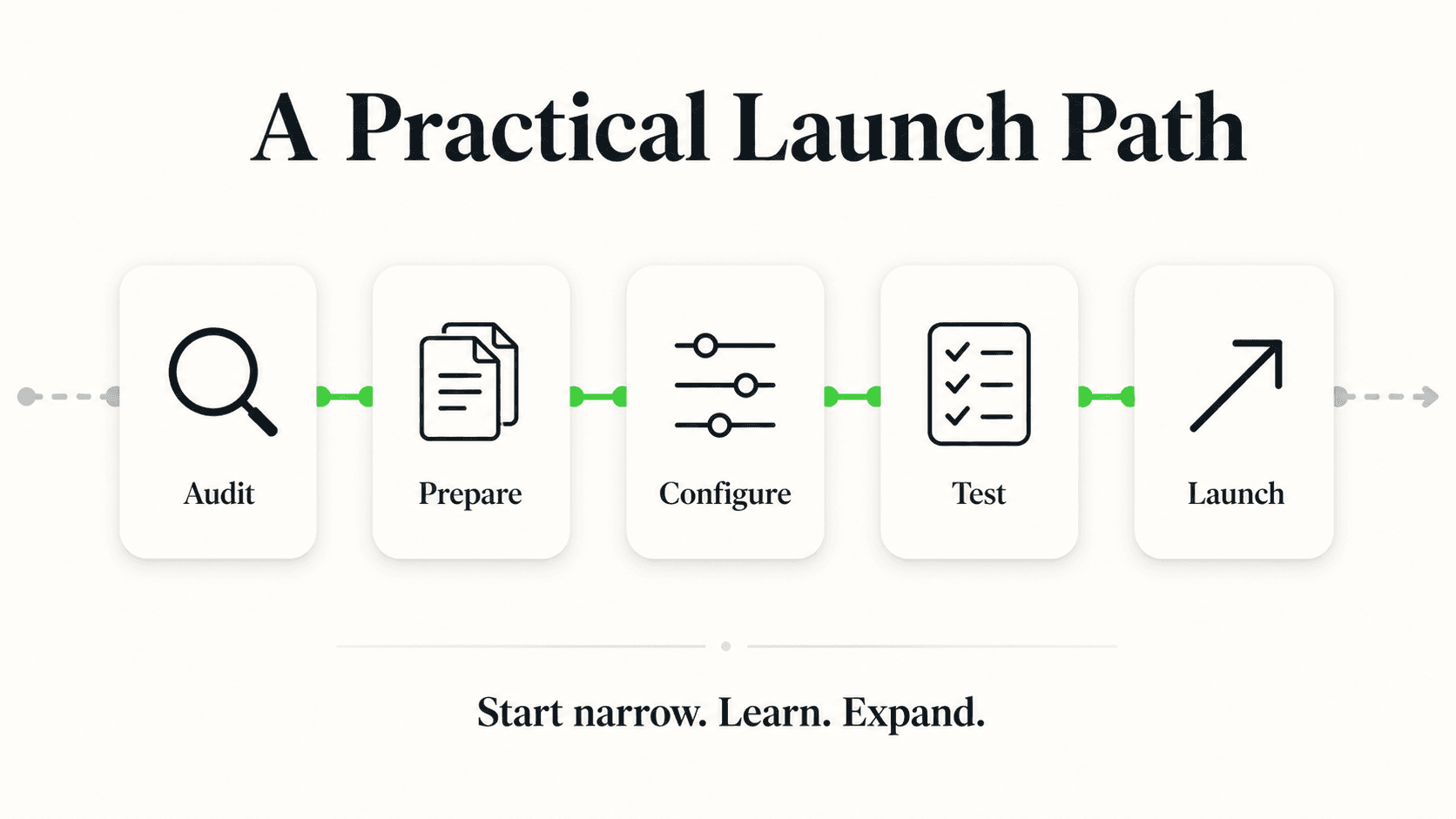
Week 1 — Import your site and connect channels. Paste your website URL and Studio reads your therapist bios, fee information, and general practice content, drafting a starting prompt — live in under 5 minutes for the quick-start path. Start with the website widget, then add WhatsApp, Instagram DM, and Messenger.
Week 2 — Build the crisis-routing configuration with clinical input. This is the step that should not be rushed or left at a generic default. Work with a clinician on staff to write the keyword list, confirm the crisis-line message (988 for US, local emergency number elsewhere), and set up an immediate, monitored notification channel for flagged conversations.
Week 3 — Attach fee schedules, insurance lists, and intake-form links. These are the documents the AI answers from for the majority of non-crisis conversations. Accuracy here directly affects how much friction a prospective client experiences before booking.
Week 4 — Test the crisis flow exhaustively before going live. Send test messages using real phrasing variations your clinical team anticipates, and confirm every one routes immediately and surfaces the correct resource, before opening the front desk to real visitors on any channel.
Common mistake to avoid
Don't treat the crisis-keyword list as a one-time setup task. Review it periodically with clinical staff, and update it when your team notices phrasing patterns the current list misses. A stale keyword list is the single biggest risk in this entire deployment.
Related reading: AI chatbot for physical therapy clinics and AI front desk for senior living communities apply the same non-clinical routing pattern; chatbot-to-human handoff best practices covers the escalation design in depth.
Frequently Asked Questions
What happens if someone messages the practice's chat about self-harm or crisis?
The AI routes the conversation to a human immediately, without continuing any scripted intake flow, and surfaces a crisis-line message in the same response — the 988 Suicide & Crisis Lifeline for US visitors, or the visitor's local emergency number elsewhere. It does not screen, evaluate, or attempt to assess severity. It routes and names the resource, and a person takes it from there.
Can the AI recommend a specific therapist based on someone's symptoms?
No. It can share which therapists offer which modalities and populations served, based on your published profiles, but matching a prospective client's actual clinical needs to a specific therapist is a judgment call for your intake coordinator or a therapist, not the AI.
Does it perform any kind of mental health screening?
No. Standardized screening tools require a trained person to administer and interpret, and the AI never presents them. It answers non-clinical front-office questions and routes anything else to your team.
Is this HIPAA-compliant?
Hyperleap AI is not HIPAA-compliant and does not offer a Business Associate Agreement. The AI is configured to keep clinical detail and protected health information out of the chat entirely — front-office questions only, with everything else routed to a human and handled through your existing HIPAA-appropriate systems.
Can it check whether my insurance is accepted?
It confirms whether a carrier is on your practice's accepted-insurance list. It does not verify a specific person's benefits, deductible, or authorized session count — that verification stays with your billing team.
Does it book my first appointment for me?
It shares your intake-form link and captures a name, contact method, and general reason for reaching out, then routes that to your intake coordinator. It does not book into your EHR or practice-management calendar. If you offer free consultation calls through Calendly or Cal.com, it can offer open times and book that call in the chat (on Pro and Max), still without collecting clinical detail.
How does the AI know what counts as a crisis message?
Your practice configures a list of keywords and phrases, ideally with clinical staff input, that trigger immediate human routing and the crisis-line message. This list should be reviewed and updated periodically rather than left at a generic default, since phrasing around distress varies and evolves.
Getting Started
The right scope for an AI front desk at a mental health practice is narrow and deliberate: answer the fee, insurance, and therapist-availability questions that create friction before someone books, capture appointment requests and waitlist sign-ups cleanly, and route every clinical or crisis-adjacent message to a human without hesitation. That's a smaller job than "AI for mental health" might suggest — and it's the only version that belongs in a practice serving people who are often reaching out at their most vulnerable.
If your intake coordinator is stretched thin fielding the same fee and availability questions, or your practice has no answer for what happens when someone messages after hours, this is worth testing against your own therapist roster and crisis protocol.
Ready to Build a Front Desk That Handles This Responsibly?
Set up an AI front desk that answers fee and availability questions 24/7, captures appointment requests, and routes crisis messages to your team immediately.
Start Your Free TrialIndustry Solutions
See how AI chatbots work for these industries:
Related Articles

Hotel Event-Space Enquiries: Build a Useful Brief
Collect useful hotel meeting-space enquiries with layout, attendance, equipment and catering prompts, without implying a venue reservation.

Cleaning Enquiries: Scope Questions Before a Quote
Collect clearer cleaning quote enquiries with residential and commercial scope questions, exclusions, access notes and a practical team-review worksheet.
Mobile AI Front Desk QA: A Practical Review Sheet
Review your mobile AI front desk from opening to follow-up, with practical checks for reading, keyboard obstruction, links, forms and close controls.

AI Front Desk Leads to CSV: A Follow-Up Workflow
Turn a chatbot lead export into a usable follow-up list with field checks, careful deduplication, clear ownership and a synthetic CSV example.