AI Chatbot for Physical Therapy Clinics: PT Front Desk
An AI chatbot for physical therapy clinics answers insurance and scheduling questions 24/7, shares booking links, and routes clinical questions to therapists.
TL;DR: An AI chatbot for physical therapy clinics is a front-desk automation tool — running on your website, WhatsApp, Instagram DM, and Facebook Messenger — that answers new-patient questions (referral needed or not, insurance accepted, hours and location), shares your booking link, routes cancellation and reschedule requests to staff, and answers "what to bring" logistics questions instantly. It never verifies insurance coverage, never gives exercise or plan-of-care advice, and never replaces the clinical conversation between a patient and their therapist — those stay entirely with your team.
A patient with a new referral for lower back pain searches "physical therapy near me" at 7 PM, finds three clinics, and opens the chat widget on each site to ask the same two questions: "Do you take my insurance?" and "How soon can I get in?" The clinic that answers in seconds gets the booking. The other two get a voicemail the patient doesn't leave, because they've already moved on.
That's the practical case for front desk automation in physical therapy — a specialty where new-patient volume depends heavily on referral timing and insurance fit, and where the front desk is often one or two people juggling phones, scheduling, billing questions, and the patients physically in the waiting room. Search data shows real demand for exactly this: "PT front desk automation" is a query clinic owners are actually typing into Google, and it's a topic with essentially no dedicated coverage yet on Hyperleap's physical therapy agents hub.
This guide walks through what a PT-specific AI chatbot handles day to day, and — just as important for a clinical setting — where it deliberately stops. For the broader healthcare category this sits inside, see AI agents for healthcare, and for the adjacent medical-receptionist mechanics, AI medical receptionist and automating patient appointment scheduling cover related ground from a general-practice angle.
What an AI Chatbot for a Physical Therapy Clinic Actually Does
A PT clinic's AI chatbot is a document-grounded front desk that answers from your own published content — your insurance list, hours, location, service offerings, and new-patient logistics — across your website chat widget, WhatsApp Business, Instagram DM, and Facebook Messenger.
The practical job list looks like this:
- Referral vs. direct-access questions. Many states allow direct access to physical therapy without a physician referral, but the rules vary. The AI answers from your clinic's own documented policy — whether you require a referral, and if not, what direct-access intake looks like — rather than attempting to interpret state law itself.
- Insurance-accepted questions, answered from your list. "Do you take Blue Cross?" gets answered from the carrier list you've configured. This is a coverage-accepted answer, not a live eligibility check — the AI never verifies a specific patient's benefits or authorized visit count.
- Location and hours. Straightforward, but high-volume: which of your locations is closest, parking details, and hours including any holiday exceptions.
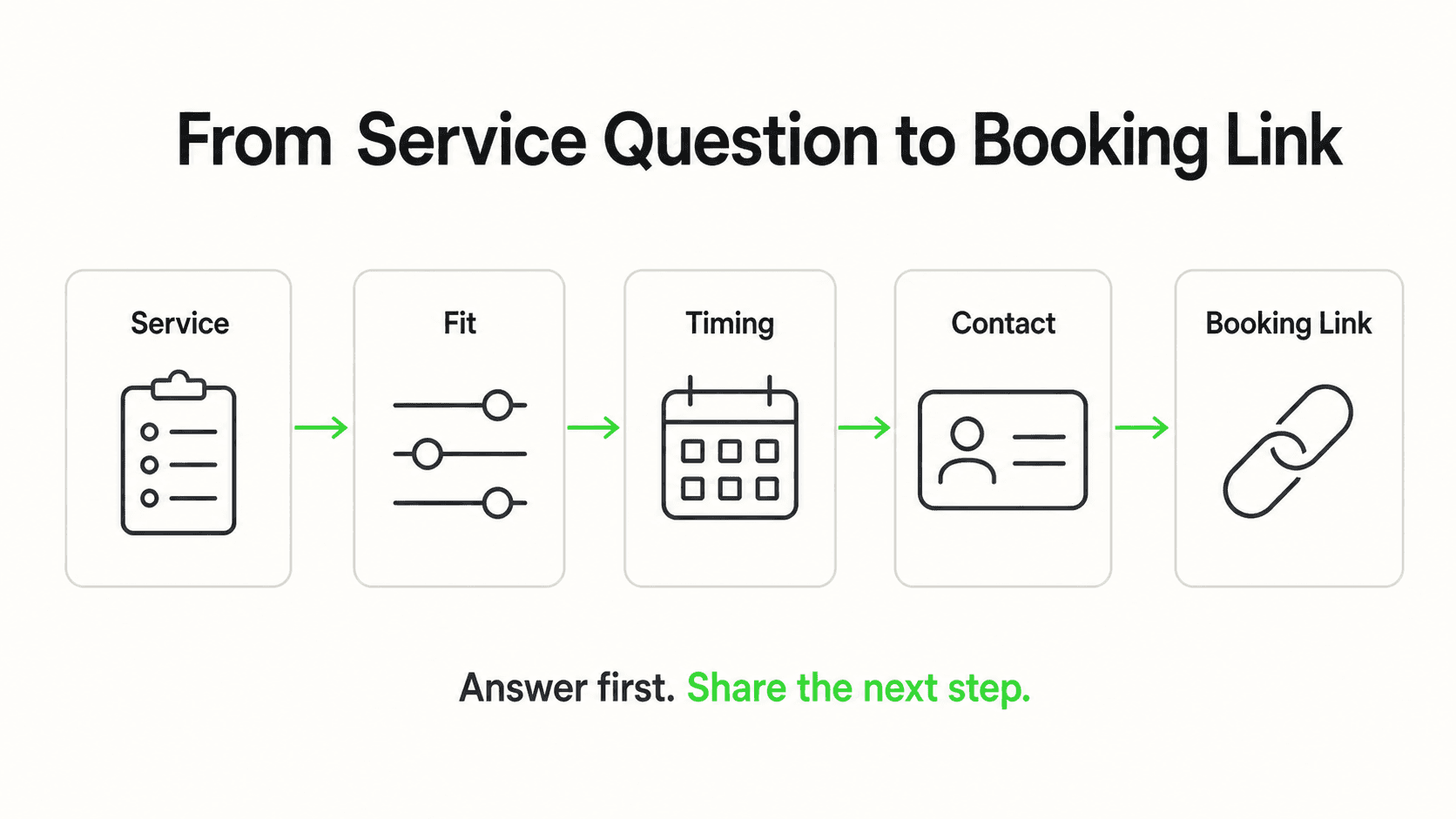
- Scheduling via your booking link. The AI shares your scheduling link and helps a new patient get to it, collecting name, phone, and referral status along the way so your front desk has context before the patient even calls.
- Cancellation and reschedule requests, routed to staff. A patient messaging "I need to move my Thursday appointment" gets acknowledged and routed to your front desk with the request details — the AI does not have write access to your scheduling system, so it captures the request rather than actioning it.
- "What to bring and wear" logistics. A genuinely common first-visit question — comfortable clothing, whether to bring imaging or referral paperwork, arriving early for intake forms — answered instantly from your own new-patient instructions.
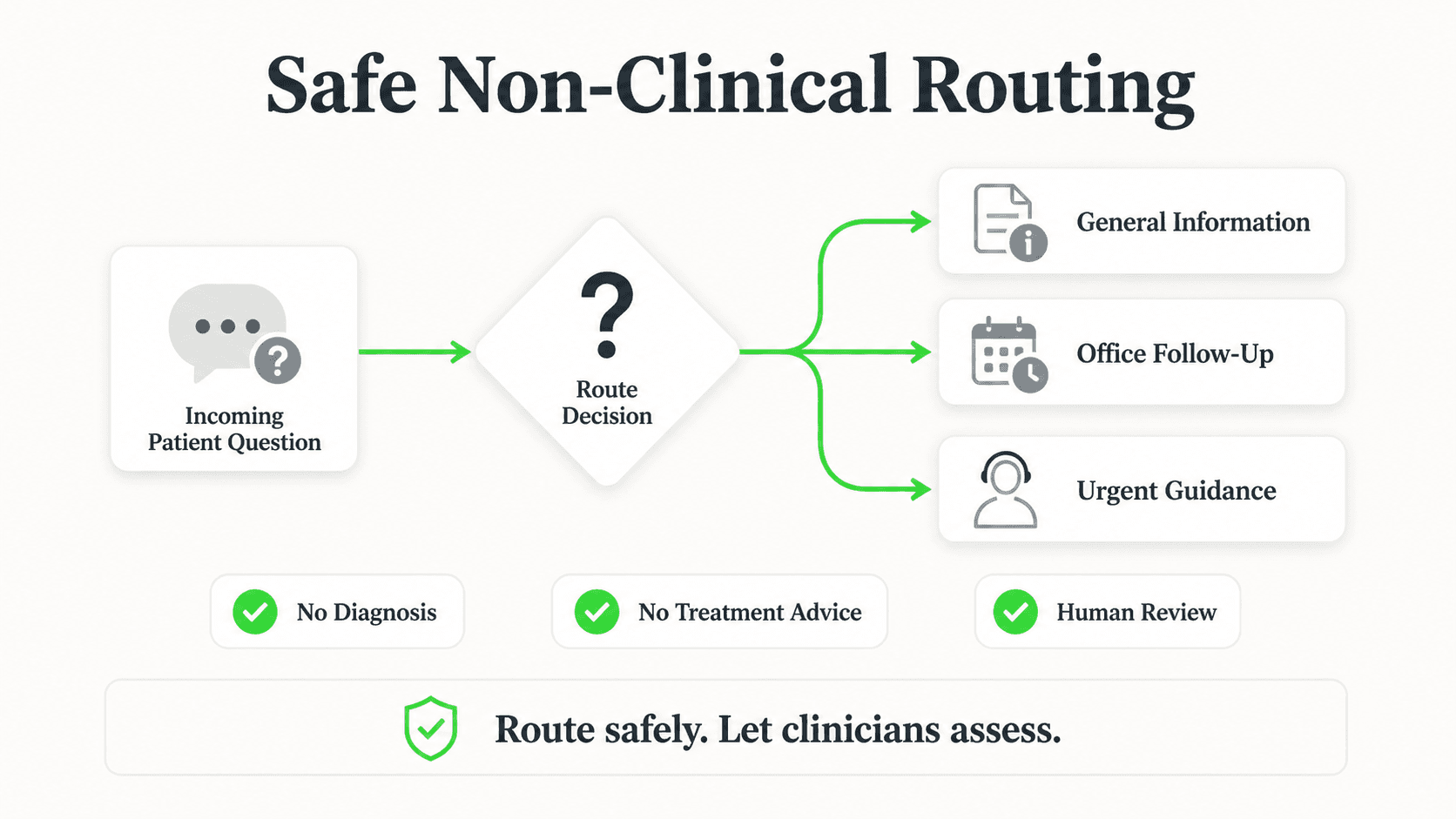
- Plan-of-care questions, routed to clinicians. "Is it normal that my knee still hurts after three sessions?" is a clinical question. The AI does not answer it — it captures the message and routes it to the patient's therapist, with full context.
- Multilingual answers. Clinics serving patients across language groups can answer the same front-desk questions in 100+ languages automatically, without needing bilingual staff on every shift.
- After-hours capture. New-patient inquiries and existing-patient questions that arrive nights and weekends get an instant, accurate answer instead of a voicemail waiting for Monday morning.
Why insurance-accepted answers matter more here than in most industries
Insurance fit is often the single deciding factor in whether a prospective PT patient books with your clinic at all. Answering "do you take my plan" instantly — even as a general coverage-accepted answer, not a benefits check — removes the single biggest point of hesitation before a new patient ever calls.
Why PT Front Desks Get Overloaded
Physical therapy clinics run a specific kind of scheduling complexity that makes front desk load heavier than it looks from the outside.
New-patient calls require the most back-and-forth of any visit type
A returning patient calling to reschedule takes thirty seconds. A new patient call involves confirming insurance, checking whether a referral is on file, explaining what to bring, and finding an opening that matches both the patient's availability and a therapist's caseload. That's the call that eats the most time — and it's also the exact call an AI chatbot can front-load before the phone even rings.
Referral status is a common point of confusion
Patients frequently don't know whether their state requires a referral for PT, or whether their specific insurance plan requires one even where the state doesn't. Answering this clearly and consistently — from your clinic's documented policy — prevents a scheduling error that otherwise surfaces awkwardly at check-in.
Cancellations and reschedules are constant, low-value interruptions
A therapist's calendar in a PT clinic changes constantly — patients cancel for pain flare-ups, work conflicts, and weather. Every one of those changes currently requires a phone call that interrupts whoever's at the front desk, often while a patient is checking in for their own appointment.
After-hours demand doesn't pause for clinic hours
Patients research their options and message clinics in the evening, after a workday spent managing the pain that sent them looking for PT in the first place. A clinic that only answers during business hours misses a meaningful share of new-patient interest before a competitor's chat widget catches it instead.
See a PT Front Desk Answer a Real New-Patient Question
Watch how an AI chatbot answers insurance and referral questions, books the evaluation (or shares your booking link), and routes clinical questions to your therapists.
See How It WorksWhat Stays With Your Clinicians — No Exceptions
Physical therapy sits close enough to clinical care that the boundary matters as much as the automation itself. Hyperleap AI is not HIPAA-compliant and does not offer a Business Associate Agreement, which shapes every design choice below.
No exercise or rehabilitation advice, ever. The AI does not tell a patient how to modify a home exercise, whether pain during a movement is normal, or how to adjust their program. Those questions are captured with name and phone and routed straight to the patient's therapist.
No live insurance verification. The AI answers "is this carrier on our accepted list" from your documented list — it does not check a specific patient's deductible, authorized visit count, or copay. That verification stays with your billing team, exactly as it does today.
No plan-of-care discussion. Progress, pain levels, and treatment adjustments are clinical conversations between a patient and their therapist. The AI recognizes this category of question and routes it rather than attempting a reassuring or informative answer.
No PHI intake through the chat. Medical history, injury details, and symptom descriptions stay out of the chat widget and DM threads. New-patient intake forms — the ones collecting that information — remain in your existing paper or portal-based process.
No scheduling system write access. The AI shares your booking link and captures reschedule and cancellation requests as messages to your front desk. It does not hold, write, or confirm appointments inside your practice-management or EMR system — there is no such integration, only REST API and webhook connectivity for a clinic that wants to build one. (If you schedule evaluations through Calendly or Cal.com, the AI can book those slots in the chat on Pro and Max.)
This mirrors the same non-clinical design pattern covered in AI receptionist for pharmacies and HIPAA-compliant AI chatbots for healthcare — the front desk automates, the clinical judgment stays entirely human.
7 Ways a Physical Therapy Clinic Uses an AI Chatbot
1. New-Patient Referral and Direct-Access Triage
What this looks like in practice: A prospective patient asks "do I need a referral?" The AI answers from your clinic's documented policy and, if a referral is needed, tells them what to bring or fax over before their first visit.
Why it works: This single question determines whether a booking request is ready to schedule or needs a follow-up step — resolving it instantly avoids a wasted round trip.
Key features:
- Answers grounded in your specific state and clinic policy, not generic legal guidance
- Captures referral status alongside the booking request
- Routes ambiguous cases to your front desk rather than guessing
2. Insurance-Accepted Questions
What this looks like in practice: "Do you take Aetna?" gets an instant yes/no from your carrier list, with a note that your billing team confirms specific coverage and visit authorization before the first appointment.
Why it works: Removing this uncertainty before a patient calls is often the difference between a booked evaluation and a patient who quietly checks a competing clinic instead.
Key features:
- Answers from a list you maintain and update
- Clear language that this is not a benefits verification
- Consistent answer across every channel, every shift
3. Location, Hours, and What-to-Bring Logistics
What this looks like in practice: "Which of your locations is closer to downtown, and what should I bring to my first visit?" Answered instantly from your published new-patient instructions.
Why it works: These are the questions that consume front desk time in small doses all day — automating them frees staff for calls that actually need a person.
Key features:
- Multi-location support from one shared knowledge base
- New-patient checklist shared automatically
- No clinical content mixed into logistics answers
4. Booking-Link Sharing for New Evaluations
What this looks like in practice: Once referral status and insurance are confirmed, the AI shares your scheduling link and captures name and phone so your front desk has full context before the patient even shows up in the calendar.
Why it works: A warm, pre-qualified booking request is far easier for front desk staff to process than a cold call starting from zero information.
Key features:
- Booking link sharing (or in-chat booking on Pro and Max if you schedule through Calendly or Cal.com), no PMS or EMR calendar write access
- Lead capture before the conversation proceeds
- Summary email to your front desk with every request
5. Cancellation and Reschedule Request Routing
What this looks like in practice: "I need to cancel my 2pm tomorrow" gets acknowledged immediately, and the request — with patient name, appointment time, and reason if given — routes to your front desk to action in your actual scheduling system.
Why it works: Patients get instant acknowledgment instead of an unanswered call, and your front desk gets a clean, written request instead of a rushed voicemail to transcribe later.
Key features:
- No live calendar changes — request routing only
- Full context passed to staff, including timestamp
- Works identically across chat, WhatsApp, and DM
6. Plan-of-Care Question Escalation
What this looks like in practice: "Should I still be doing the exercises if my shoulder hurts more?" The AI does not answer. It tells the patient their therapist will follow up and routes the message with full context.
Why it works: This is the boundary that keeps clinical judgment where it belongs, and it protects the patient from advice that should come from the person actually treating them.
Key features:
- Pattern-based detection of clinical-sounding questions
- Immediate human handoff (Pro and Max), not a delayed queue
- No attempted reassurance or guidance from the AI
7. After-Hours New-Patient Capture
What this looks like in practice: A patient researching PT options at 9 PM gets the same insurance, referral, and location answers they'd get during business hours, plus a booking-link share and lead capture.
Why it works: New-patient decisions often happen in the evening, after the workday that caused or aggravated the pain in the first place — a clinic that's silent then loses that patient to whoever answers.
Key features:
- 24/7 availability across all four channels
- Same knowledge base as business-hours interactions
- Lead summary waiting for staff the next morning
Real Results: What PT Clinics Are Reporting
Hyperleap does not have a published physical therapy case study with verified metrics as of this writing — the framing below is qualitative and, where marked, illustrative.
Fewer repeat calls for the same five questions. Clinics that route insurance-accepted, referral, and location questions to an AI chatbot report front desk staff spending noticeably less time on the phone repeating information that's already on the website, once patients actually find and use the chat.
More new-patient inquiries captured after hours. Illustrative example: a clinic that previously only captured new-patient interest during business hours starts converting evening website visits into booking requests with referral and insurance status already attached.
Cleaner reschedule handling. Instead of a voicemail transcribed secondhand, front desk staff get a written request with the patient's name, appointment time, and reason — reducing the chance of a miscommunication at rebooking.
Consistent multilingual coverage. Clinics serving patients across language groups report being able to answer the same front-desk questions in a patient's own language without needing a bilingual staff member on every shift.
For the after-hours pattern with first-party, verified numbers, see the hospitality-sector Jungle Lodges case study — a useful reference point for the underlying dynamic even outside healthcare.
Implementation Roadmap for Physical Therapy Clinics
Week 1 — Import your site and connect channels. Paste your website URL and Studio reads your services, locations, and hours automatically, drafting a starting prompt — live in under 5 minutes for the quick-start path. Connect your website widget first, then WhatsApp, Instagram DM, and Messenger.
Week 2 — Attach your real documents. Upload your insurance-accepted list, new-patient instructions, and referral policy. This is the content the AI will answer from — accuracy here matters more than any other configuration step.
Week 3 — Set up the escalation rules. Configure the AI to route plan-of-care, symptom, and pain-related questions directly to your clinicians, and cancellation/reschedule requests to your front desk with full context.
Week 4 — Test with real-world phrasing. Send test messages the way an actual patient would phrase them — "does my insurance cover this," "is it normal that it still hurts" — and confirm each routes correctly before opening the chatbot to live traffic.
Common mistake to avoid
Don't configure the AI to reassure patients about pain or exercise progress, even with a generic disclaimer attached ("this is common, but check with your therapist"). Route the question entirely instead. A partial clinical answer followed by a disclaimer still reads as clinical advice — full routing is the safer and clearer design.
Frequently Asked Questions
Can an AI chatbot verify my insurance coverage for physical therapy?
No. It answers whether a carrier is on your clinic's accepted list — a general coverage-accepted answer — but it does not check a specific patient's deductible, copay, or authorized visit count. That verification stays with your billing team, the same as it does today without a chatbot.
Does it replace our front desk staff?
No. It handles the repetitive, document-based questions — insurance-accepted, hours, referral policy, what to bring — so your front desk spends less time on the phone repeating information and more time on scheduling complexity and patients physically in the clinic. Clinical and billing judgment calls stay entirely with your team.
Can it schedule a new-patient evaluation directly?
It shares your booking link and captures the patient's name, phone, and referral status so the request is ready for your front desk. It does not write into your practice-management or EMR calendar — there is no integration with those systems. If you book evaluations through Calendly or Cal.com instead, the AI can offer live open times and book the slot in the chat on Pro and Max (Calendly needs the Standard plan or higher).
What happens if a patient asks about their symptoms or exercise program?
The AI does not answer. It acknowledges the message, tells the patient their therapist will follow up, and routes the full conversation to your clinical team. This applies to any question about pain, progress, or plan-of-care adjustments.
Is this HIPAA-compliant?
Hyperleap AI is not HIPAA-compliant and does not offer a Business Associate Agreement. The chatbot is configured to stay in non-clinical, front-of-house territory — insurance-accepted lists, hours, referral policy, booking-link sharing — and to keep protected health information out of the chat.
Does it work in multiple languages for patients who don't speak English?
Yes. It answers the same front-desk questions in a patient's own language automatically across 100+ languages, without requiring bilingual staff on every shift.
How much does an AI chatbot for a physical therapy clinic cost?
Hyperleap AI runs on three paid plans — Plus at $40/month, Pro at $100/month, and Max at $200/month — each with a 7-day free trial and a credit card required to start. There's no free plan. See pricing for full plan details, including response limits and channel counts.
Getting Started
PT front desk automation works best when it's scoped honestly: answer the insurance, referral, and logistics questions that eat the most front desk time, share the booking link cleanly, and route anything that touches a patient's actual care to the people qualified to answer it. That's a narrower job than "AI for healthcare" sometimes implies, and it's also the version that's genuinely safe and useful for a clinic without a compliance team.
If your front desk is fielding the same insurance and referral questions on repeat, or new-patient interest is going quiet after hours, this is worth testing against your clinic's own policies and booking link.
Ready to Free Up Your Front Desk?
Set up an AI chatbot that answers insurance, referral, and scheduling questions 24/7 and routes anything clinical straight to your therapists.
Start Your Free TrialIndustry Solutions
See how AI chatbots work for these industries:
Related Articles
AI Chatbot for Wedding Venues: Handling Inquiries
See how an AI chatbot for wedding venues answers date, capacity, and pricing questions after hours, qualifies couples, and shares your tour link.
AI Receptionist for Med Spas: What It Actually Handles
An AI receptionist for med spas answers treatment and pricing questions, captures consultation requests on Instagram DM, and routes anything clinical to staff.

How to Build a WhatsApp Chatbot: Step-by-Step Guide (2026)
Learn how to build a WhatsApp chatbot using the official Business API — from getting API access to going live, with a no-code step-by-step setup guide.

Hotel Event-Space Enquiries: Build a Useful Brief
Collect useful hotel meeting-space enquiries with layout, attendance, equipment and catering prompts, without implying a venue reservation.