How to Build a WhatsApp Chatbot: Step-by-Step Guide (2026)
Learn how to build a WhatsApp chatbot using the official Business API — from getting API access to going live, with a no-code step-by-step setup guide.

TL;DR: Yes, you can integrate a chatbot with WhatsApp — but it requires the official WhatsApp Business API, not the consumer WhatsApp app. To build a WhatsApp chatbot, you need API access through a registered Business Solution Provider or Meta directly, a verified WhatsApp Business Account, and a dedicated phone number. From there, the practical path splits in two: (1) a no-code AI platform — connect the API, load your knowledge base, configure your lead capture form and greeting, and go live in a few days; or (2) custom development — more flexible, but 8–16 weeks and $20,000+ to build. For most businesses, the no-code platform path delivers the outcome in days at a fraction of the cost.
Who This Guide Is For
This guide is written for business owners, marketers, and operators who want to add a WhatsApp chatbot to their customer communication stack — without a deep technical background. It covers both the no-code platform path and the custom development path honestly, so you can choose based on your actual situation. Cost and timeline estimates reflect market knowledge as of mid-2026; they are benchmarks, not quotes.
WhatsApp has over 2 billion active users globally (Meta, 2024). Your customers are already there — and they expect a reply in minutes, not hours. The problem is that WhatsApp, unlike email or a web form, is an inherently synchronous channel. Someone who messages your business at 11 PM or from a different time zone is not waiting until morning. If no one answers immediately, they move on.
A WhatsApp chatbot solves that. It answers questions instantly, collects contact information, qualifies leads, and routes complex requests to the right person — whether your team is online or not. But building one properly requires more than pointing a bot at your personal phone number. It requires the official WhatsApp Business API, and there are steps to clear before a single automated message goes out.
This guide walks through every one of them: what you actually need, how to get API access, the honest build-vs-buy decision, a seven-step setup walkthrough, and the common mistakes that undermine otherwise solid deployments. By the end, you will know exactly what is involved — and whether you can go live in days or need to plan for months.
Can I Integrate a Chatbot with WhatsApp?
Yes — using the WhatsApp Business API. This is Meta's official platform for businesses that want to automate and scale WhatsApp conversations. The consumer WhatsApp app (the one you use on your personal phone) does not support chatbots, automation, or third-party integrations. Any tool that claims to automate the consumer app is operating outside Meta's terms of service and risks permanent account bans.
The WhatsApp Business API is what legitimate businesses use. It provides:
- Programmatic access to send and receive WhatsApp messages at scale
- Support for rich media — images, documents, buttons, lists, cards, and carousels
- Multi-agent inbox access so your whole team works from one business number
- Integration with AI platforms, CRMs, and automation tools via REST API and webhooks
- Compliance with Meta's business messaging policies and data handling requirements
You access the API in one of two ways: directly through Meta's Cloud API (technically self-serve but requires more setup work), or through a Business Solution Provider (BSP) — also called a Meta Technology Provider — which manages the API infrastructure on your behalf. Most businesses choose the BSP route because it eliminates the hosting, compliance overhead, and API credential management.
The important caveat to set expectations honestly: getting approved on the WhatsApp Business API requires Meta business verification, which typically takes 1–3 business days. It is not instant, regardless of which platform you use. Once approved, you can run a chatbot handling unlimited inbound conversations and send outbound messages using pre-approved templates.
For a full breakdown of how the API works and what it costs on a per-conversation basis, see our guide on the WhatsApp Business API.
What You Need Before You Start Building
Before configuring a single greeting message, four things need to be in place. Understanding these prerequisites upfront prevents the most common go-live delays.
A Facebook Business Manager Account with Verified Business
You need a Meta Business Manager account with a verified business. This is the identity layer Meta uses to confirm you are a legitimate organization — not a spam operation. The verification process involves submitting your legal business name, registered address, and website. Meta reviews this and typically responds within 24 hours to 3 business days. There is no way to skip or accelerate this step — it is a Meta requirement applied universally, not a platform-specific one.
One practical note: the most common reason for verification delays is inconsistency between your business name on the submission form, your website, and your legal registration documents. Use your exact legal name throughout.
A Dedicated Phone Number
The number you connect to the WhatsApp Business API cannot simultaneously be registered to a personal WhatsApp account or an existing WhatsApp Business app account. Most businesses use a dedicated mobile or VoIP number for this purpose. If you are migrating from an existing WhatsApp Business app number, a migration process exists — but you will lose chat history in the process. Plan for this if historical conversations matter to your team.
Access to the WhatsApp Business API
You need API access either via Meta's Cloud API directly or through a registered BSP. A BSP handles the API infrastructure on your behalf and typically provides a simpler, guided setup flow. If you use a platform like Hyperleap AI, which is a registered Meta Technology Provider, the API connection is established within the platform setup — you do not configure API credentials separately.
Your Knowledge Base Content Ready to Upload
The chatbot is only as useful as the knowledge it has access to. Before you go live, gather:
- Your 20–30 most frequently asked customer questions and their answers
- Product or service descriptions
- Pricing information
- Policies — returns, cancellations, operating hours, guarantees
- Any qualification questions you want the bot to ask incoming leads
Content preparation is consistently underestimated. Plan 2–8 hours depending on how organized your existing documentation is. Businesses that rush this step launch with a chatbot that cannot answer the questions customers actually ask.
Build vs. Buy: No-Code Platform vs. Custom Development
This is the first real decision point. Your choice here determines how long it takes, what it costs, and who does the work.
| No-Code AI Platform | Custom Development | |
|---|---|---|
| Time to go live | 2–5 days (after Meta verification) | 8–16 weeks |
| Upfront cost | $40–$200/month (subscription) | $20,000–$100,000+ |
| Technical skill required | None — configure via a browser UI | Engineering team throughout |
| WhatsApp API access | Managed by the platform (BSP) | Set up separately via Meta |
| Maintenance | Platform handles model and infrastructure | Your responsibility or agency retainer |
| Customization ceiling | Platform feature set | Unlimited with enough budget |
| Best for | SMBs, fast deployment, predictable costs | Proprietary legacy integrations, strict on-premise data requirements, novel AI logic |
For most businesses — a service firm, a retail brand, a professional practice, an ecommerce operation — a no-code platform delivers the vast majority of the functionality at a fraction of the cost and timeline. The situations that genuinely justify custom development are narrow: deep integrations with legacy systems that have no API surface, strict data residency requirements in regulated industries, or chatbot behavior that no existing platform can model.
If you are unsure which path fits your situation, our guide on AI chatbot development services covers the full build-vs-buy decision with cost tables and honest criteria for when custom development is and is not the right call.
The rest of this guide focuses on the no-code platform path — because that is where most businesses should start.
See a WhatsApp chatbot on your own content
Hyperleap AI is a registered Meta Technology Provider. Connect WhatsApp Business API, load your documents, and go live in days — no coding required.
Explore PlansHow to Build a WhatsApp Chatbot: 7 Steps from API Access to Go-Live

These steps reflect the setup flow for a no-code AI chatbot platform. The underlying requirements apply to any legitimate WhatsApp Business API deployment.
Step 1: Create Your Platform Account and Choose a Plan
Sign up for a chatbot platform that is a registered Meta Technology Provider. This matters because a legitimate BSP manages the WhatsApp API compliance layer — your messages are sent through their Meta-approved infrastructure, which means the verification and policy requirements are handled by the platform, not you individually.
For Hyperleap AI: Plus starts at $40/month (1 chatbot, 4 channels, 3,000 AI responses per month), Pro at $100/month (2 chatbots, 8 channels, 12,000 AI responses), Max at $200/month (5 chatbots, 20 channels, 30,000 AI responses). All plans include a 7-day free trial. Credit card is required at signup. There is no free plan.
Get into the dashboard and familiarize yourself with the interface before you touch the WhatsApp connection. You will not need any WhatsApp credentials yet — that comes in the next step.
Step 2: Submit for Meta Business Verification
Inside the platform, the WhatsApp channel setup initiates the Meta business verification flow. You will link or create a Facebook Business Manager account, then submit your business details:
- Legal business name (must match your registration documents)
- Registered business address
- Business website
- Business phone number (this is your contact number for verification purposes, separate from the WhatsApp number you will connect)
Meta reviews this information to confirm your business is legitimate. Plan for 1–3 business days. Accounts with complete, consistent information across all fields tend to move faster. If Meta requests additional documentation — a business registration certificate or utility bill — respond promptly; delays in their review queue are usually caused by slow document submission, not Meta processing time.
While waiting for verification, you can begin building your knowledge base (Step 4) in parallel.
Step 3: Connect Your Dedicated Phone Number
Once Meta verifies your business, you will add a phone number to your WhatsApp Business Account. This becomes your public WhatsApp business number — the one customers will see and message.
You will receive a verification code via SMS or voice call to confirm you control the number. Enter it to complete the connection. The number will then appear as a verified WhatsApp Business number to anyone who messages it, complete with your business name and profile.
Critical: If this number is currently registered to a personal WhatsApp or WhatsApp Business app account, you must delete that account first. The API and consumer app cannot share a number simultaneously. If you skip this, the verification code step will fail.
Step 4: Build Your Knowledge Base
This is where the chatbot gets its intelligence. Upload the documents and FAQ content you prepared before starting. The AI uses Retrieval-Augmented Generation (RAG) to pull answers directly from your uploaded content — meaning responses are grounded in what you have actually written, not generated from a general language model with no context about your business.
In practice: if a customer asks "What are your cancellation terms?" the chatbot retrieves that answer from your policy document. If the answer is not in your knowledge base, the chatbot acknowledges the gap rather than generating a plausible-but-wrong response. This document-grounded approach is what distinguishes a trustworthy business chatbot from one that guesses.
After uploading, test 15–20 questions yourself to confirm answers are accurate and complete before configuring the conversation flow. Fix knowledge gaps now, not after going live.
Step 5: Configure the Lead Capture Form, Greeting, and Routing
This is the most consequential configuration step — and the most commonly underdone.
The lead capture form appears at the start of every conversation. This is where the chatbot collects the customer's name, email address, and phone number before the AI conversation begins. The form gates the conversation — structured contact information is captured regardless of how the conversation develops or how quickly the customer leaves. This is the standard operational model for business chatbots: the form runs first, the conversation follows. Keep the form to three fields maximum (name, email, phone) to maximize completion rates.
The greeting message is what the chatbot sends immediately after the form is submitted. It sets the tone, confirms what the bot can help with, and invites the first question. Keep it short and specific to your business — not a wall of text the customer has to scroll past.
Routing rules determine what happens when the chatbot reaches the limit of its knowledge or when a customer requests a human. Configure at least one escalation path: define the trigger phrase or condition ("speak to someone", "urgent", a question type the bot cannot answer), and map it to the right team member or inbox. A chatbot with no escalation path is a dead end for the customer — which is worse than no chatbot.
Step 6: Review Template Message Requirements (for Outbound)
If your plan includes sending proactive outbound messages — notifications, follow-ups, appointment reminders — those require Meta-approved message templates before you can use them. Template messages follow a fixed structure and go through a Meta review that typically takes 24–48 hours.
Inbound conversations (a customer messages you first) do not require templates. You can respond freely within a 24-hour service window. Outbound-initiated conversations — where your business messages a customer first — always require an approved template. This is a Meta policy that applies universally across all WhatsApp Business API accounts, not a platform limitation.
If you are only handling inbound inquiries to start, you do not need templates before going live. If outbound messaging is part of your launch plan, draft and submit templates in the platform's template manager at least 2 business days before your planned go-live date.
Step 7: Test End-to-End, Then Go Live

Before announcing your WhatsApp number publicly, test the complete experience from the customer's perspective. Open WhatsApp on your own phone, message your business number, and verify:
- The lead capture form loads and submits correctly
- The greeting appears immediately after form submission
- Knowledge base answers are accurate for your 15–20 most common questions
- Edge cases — questions the bot cannot answer — trigger the escalation path
- Your team receives lead notifications when the form is submitted
- Escalation alerts reach the right person in the right format
Walk through at least 15 different question types, including questions you expect customers to ask and questions you expect the bot to get wrong. Fix every gap before going live. Common issues at this stage: knowledge base answers that are incomplete, escalation triggers that are too narrow to catch real escalation scenarios, and lead form submissions that are not mapped to the notification workflow correctly.
Once you have tested thoroughly, update your website contact section, email signature, and any marketing materials with the WhatsApp option. For ecommerce-specific conversation flows — sales qualification, product questions, post-purchase support — our guide on WhatsApp chatbots for ecommerce covers how to optimize the setup for selling.
What Makes a WhatsApp Chatbot Actually Perform
Getting the chatbot live is one milestone. Getting it to consistently generate leads, deflect support volume, and protect your team's time requires four operational decisions done right.
Lead Capture Must Happen at the Start of Every Conversation
The most common configuration mistake is making the lead form optional or placing it mid-conversation. Customers who have a quick question and leave without completing a form are invisible — you have no contact record, no way to follow up, no data on who visited. The form before the conversation ensures every interaction produces a contact record, even if the customer leaves after two exchanges.
Three fields is the right starting point: name, email, phone. Further qualification (company, budget, use case) can happen through the AI conversation that follows. Fewer fields at the form stage means higher completion rates.
Your Knowledge Base Sets the Quality Ceiling
An AI chatbot surfaces what is in its knowledge base. A thin, poorly organized knowledge base produces thin, poorly organized answers. The businesses that get the most value from their WhatsApp chatbot invest real time in building a proper knowledge base before launch — not patching it afterward.
Organize content the way customers ask questions, not the way your internal teams think about the information. "How much does it cost?" is how a customer asks. "Pricing module description" is not. Structure your FAQ documents around actual customer phrasing and the chatbot's answers will be meaningfully more accurate and useful.
Human Escalation Is a Design Requirement, Not an Afterthought
Every WhatsApp chatbot needs a clear, tested handoff path to a human. Some inquiries — complaints, complex or sensitive situations, anything requiring judgment or authority — should not be handled by AI. Design your escalation explicitly: what triggers it, who gets notified, and how quickly the team is expected to respond.
The best implementations treat the chatbot as a pre-qualification and volume-handling layer, not a replacement for human attention. The chatbot handles the first pass; your team handles the relationships.
Keep the Knowledge Base Current Operationally
A chatbot's accuracy degrades the moment your business changes and the knowledge base does not. New pricing, new services, updated policies — these need to be reflected in the knowledge base immediately, not at the next quarterly review. Build knowledge base maintenance into your operational workflow from day one. A chatbot confidently giving a customer outdated pricing information is a customer experience problem, not just a technical one.
Common Mistakes When Building a WhatsApp Chatbot
These errors consistently undermine otherwise solid deployments. Recognizing them upfront is faster than fixing them after launch.
Using a non-API tool. Any solution that automates the consumer WhatsApp app — rather than the official Business API — operates outside Meta's terms of service. Numbers running these tools are subject to bans without warning or appeal. Always use the WhatsApp Business API through a registered BSP.
Skipping the lead capture form. A chatbot configured to answer questions without collecting contact information first generates conversations with no business record. You cannot follow up, attribute the interaction, or measure outcomes. The form before the conversation is non-negotiable for business use.
Launching with an incomplete knowledge base. A chatbot that fails to answer the ten questions your customers ask most often will frustrate rather than help. Test before you go live. Plan for the knowledge base to need iteration based on real conversations in the first month.
Not planning for template approval timelines. If your go-live includes outbound messaging, template approval needs to be submitted at least 2 business days before launch. Not accounting for this is the most common cause of pushed launch dates.
No escalation path from day one. A chatbot with no way for the customer to reach a human creates dead ends. Some customers will simply leave. Others will leave angry. Build and test at least one escalation trigger before you go live.
Treating launch as the finish line. The first two weeks of live conversations will surface knowledge gaps, edge cases, and configuration issues you did not anticipate. Plan to review conversation logs weekly for the first month and update the knowledge base based on what you actually see.
Ignoring the 24-hour conversation window. The WhatsApp Business API allows free-form responses within 24 hours of the customer's last message. After that window, you need an approved template to re-open the conversation. Structure your team's follow-up workflows around this constraint — a customer whose window closed cannot be messaged freeform.
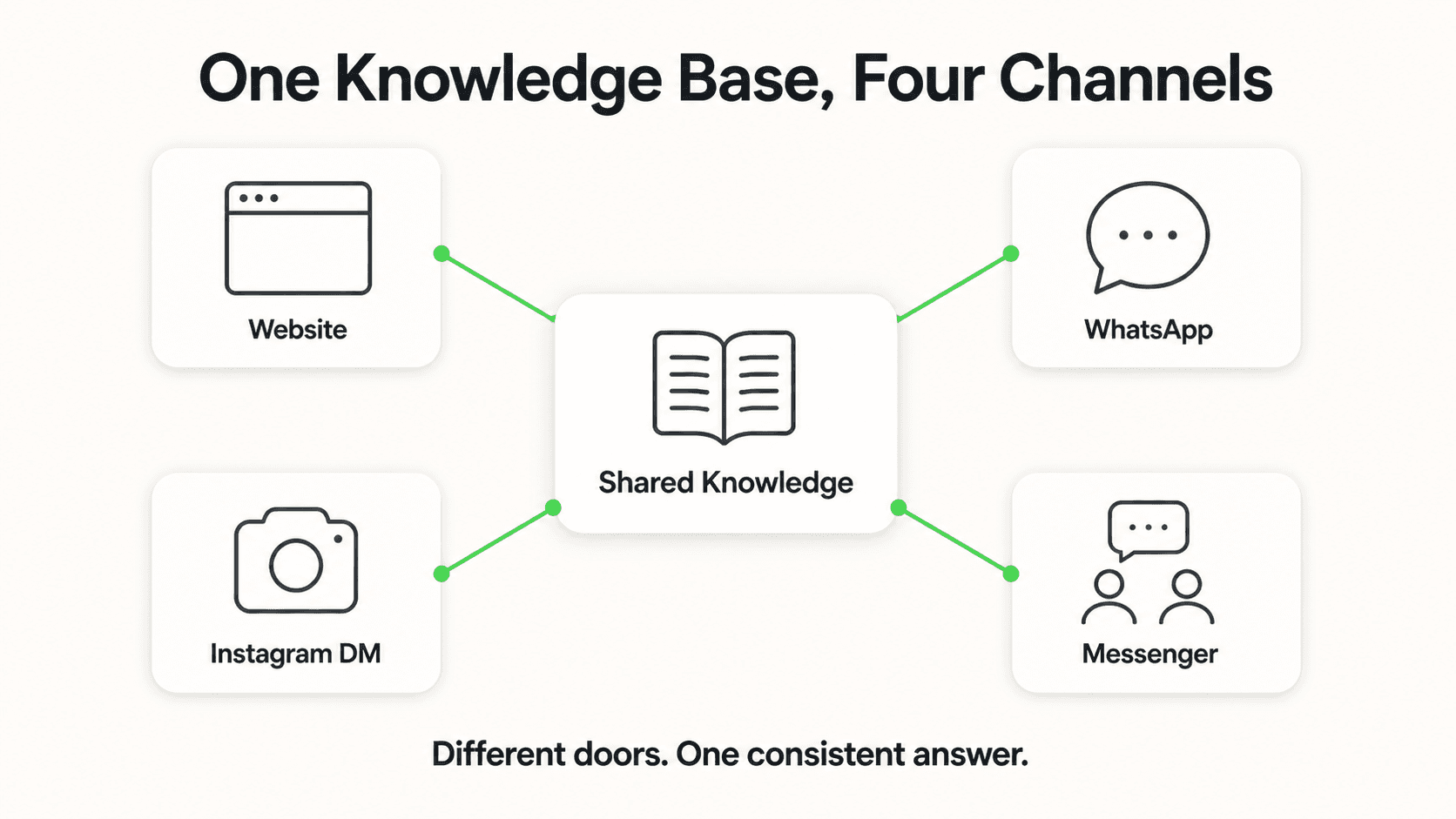
For detailed configuration guidance on the WhatsApp channel setup and how it fits alongside Website, Instagram DM, and Facebook Messenger in a multi-channel deployment, the channel guide covers every setting.
Data Sources
- Meta, "Two Billion Users and Counting" (2024) — monthly active user figure for WhatsApp
- Meta WhatsApp Business Platform documentation — API structure, template policy, conversation windows, and pricing model (June 2026)
- WhatsApp pricing calculator — per-conversation pricing by category and region
Frequently Asked Questions
Can I integrate a chatbot with WhatsApp?
Yes. The official route is through the WhatsApp Business API — Meta's platform for businesses that want to automate WhatsApp conversations at scale. The consumer WhatsApp app does not support chatbots or third-party automation. You access the API either through Meta's Cloud API or through a registered Business Solution Provider, which manages the API infrastructure on your behalf. Once connected, you can build a chatbot that answers questions, collects lead information via a form, qualifies inquiries, and routes conversations to your team — running 24 hours a day without manual intervention.
Do I need technical skills to build a WhatsApp chatbot?
Not if you use a no-code chatbot platform. Modern platforms handle the WhatsApp Business API connection through a guided setup — you configure the conversation flow, upload your documents, set up the lead capture form, and go live through a browser UI with no programming required. If you want to integrate the chatbot with a custom CRM or proprietary system via REST API or webhooks, some technical knowledge is helpful. But the core chatbot experience — answering questions, capturing leads, routing to your team — requires no code on a well-designed platform.
How long does it take to build a WhatsApp chatbot?
The setup itself typically takes 1–3 days of active work on a no-code platform: creating your account, loading your knowledge base, configuring the conversation flow, and testing. Meta's WhatsApp Business Account verification runs in parallel and takes 1–3 business days. In practice, most businesses are live within 3–5 days of starting the process. If you need outbound message templates approved, add another 1–2 days for Meta's template review.
How much does a WhatsApp chatbot cost?
There are two cost components. First, the chatbot platform subscription — typically $40–$200 per month depending on the plan and usage tier. Second, WhatsApp Business API messaging costs set by Meta — charged per conversation, with rates varying by conversation type (service, marketing, utility, authentication) and the country where the customer's number is registered. See our breakdown of WhatsApp Business API costs for the per-conversation pricing detail. For most businesses handling inbound customer inquiries, the Meta API costs are modest relative to the platform subscription. Custom-built solutions cost $20,000–$100,000+ upfront plus ongoing maintenance — appropriate for complex technical requirements, not typical SMB deployments.
What is the difference between the WhatsApp Business app and the WhatsApp Business API?
The WhatsApp Business app is a mobile app for small businesses to manage customer conversations manually — one device, one user at a time, no automation. The WhatsApp Business API is a programmatic interface designed for businesses that need automation, multiple agents working from one number, and integration with AI platforms and CRMs. Chatbots require the API. The consumer app does not support automation and cannot be connected to third-party AI systems without violating Meta's terms of service.
What happens when my WhatsApp chatbot does not know the answer?
A properly configured chatbot acknowledges the gap and triggers an escalation — alerting the appropriate team member that a customer needs help the AI could not provide. This is correct behavior and is why every deployment should include at least one tested escalation trigger. The alternative — a chatbot that attempts to answer questions it has no information for — produces document-ungrounded responses and erodes customer trust. The standard is for the chatbot to stay within its knowledge base and hand off gracefully when it reaches the edge.
Can I run the same AI agent on WhatsApp, my website, and other channels?
Yes. A platform like Hyperleap AI lets you deploy the same AI agent across Website chat, WhatsApp, Instagram DM, and Facebook Messenger from a single configuration. Your knowledge base, lead capture form, and routing rules carry across all four channels — you do not build separate chatbots for each. This is the operational efficiency argument for multi-channel deployment: one setup, four customer touchpoints, consistent experience everywhere.
Your WhatsApp Chatbot Can Be Live in Days
Building a WhatsApp chatbot used to mean months of development and a significant engineering budget. The WhatsApp Business API, combined with a no-code AI platform, has compressed that to a few days of setup and a monthly subscription most businesses recover on the first lead they convert.
The prerequisites are real — Meta business verification, a dedicated phone number, a knowledge base worth building. None of them are blocking for a business with a legitimate operation and a genuine need to respond to customers faster. What separates the businesses doing this well from those struggling is not the technology. It is operational decisions: a lead capture form at the start of every conversation, a knowledge base built before launch, a tested escalation path, and a commitment to improving based on real conversation data week by week.
The first automated reply to a customer who messaged at midnight and got an answer in seconds is the moment the value becomes concrete.
Ready to build your WhatsApp chatbot?
Hyperleap AI is a registered Meta Technology Provider. Connect WhatsApp Business API, load your knowledge base, and go live in days — starting at $40/month with a 7-day free trial.
See Plans and PricingWhatsApp Business API pricing is set by Meta and subject to change. Platform subscription prices reflect Hyperleap AI's current plans as of June 2026. Setup and verification timelines are estimates based on typical Meta review queues and depend on your content readiness and business verification completeness.
Related Articles

WhatsApp Chatbot for Ecommerce: The Complete 2026 Guide
How DTC and ecommerce brands use a WhatsApp chatbot to answer product questions, capture leads, share booking links, and respond in the customer's language — 24/7 across WhatsApp, website, Instagram, and Messenger.
AI Chatbot for Wedding Venues: Handling Inquiries
See how an AI chatbot for wedding venues answers date, capacity, and pricing questions after hours, qualifies couples, and shares your tour link.
AI Chatbot for Physical Therapy Clinics: PT Front Desk
An AI chatbot for physical therapy clinics answers insurance and scheduling questions 24/7, shares booking links, and routes clinical questions to therapists.
Conversational AI vs Generative AI: A Business Guide
Conversational AI vs generative AI explained: how they relate, a comparison table, risks and controls, and what a small business actually buys.