WhatsApp Chatbot for Ecommerce: The Complete 2026 Guide
How DTC and ecommerce brands use a WhatsApp chatbot to answer product questions, capture leads, share booking links, and respond in the customer's language — 24/7 across WhatsApp, website, Instagram, and Messenger.

TL;DR: A WhatsApp chatbot for ecommerce is an AI-powered agent that connects to the official WhatsApp Business API and answers your customers' questions — product details, shipping timelines, return policies, sizing guides — instantly, from your own documentation, around the clock. It captures and qualifies leads before the conversation starts, shares booking or consultation links, and responds in over 100 languages. The same AI agent also runs on your website chat widget, Instagram DM, and Facebook Messenger, so no inquiry falls through. This guide covers exactly what it can — and honestly, what it cannot — do for your store.
Who This Guide Is For
This guide is written for ecommerce operators, DTC brand owners, and marketing managers who get high inquiry volume on WhatsApp and want to know whether an AI chatbot can handle it reliably. It covers pre-sale support, lead qualification, and booking workflows — not order management, payment processing, or Shopify catalog sync, which require different tooling.
A shopper finds your store at 11:30 PM in a different timezone. They have three questions before they will buy: Is the leather treated for water resistance? Will it arrive before the weekend? What is your return window if it does not fit? These are not complicated questions. But if no one answers them before morning, that shopper has almost certainly bought from whoever did.
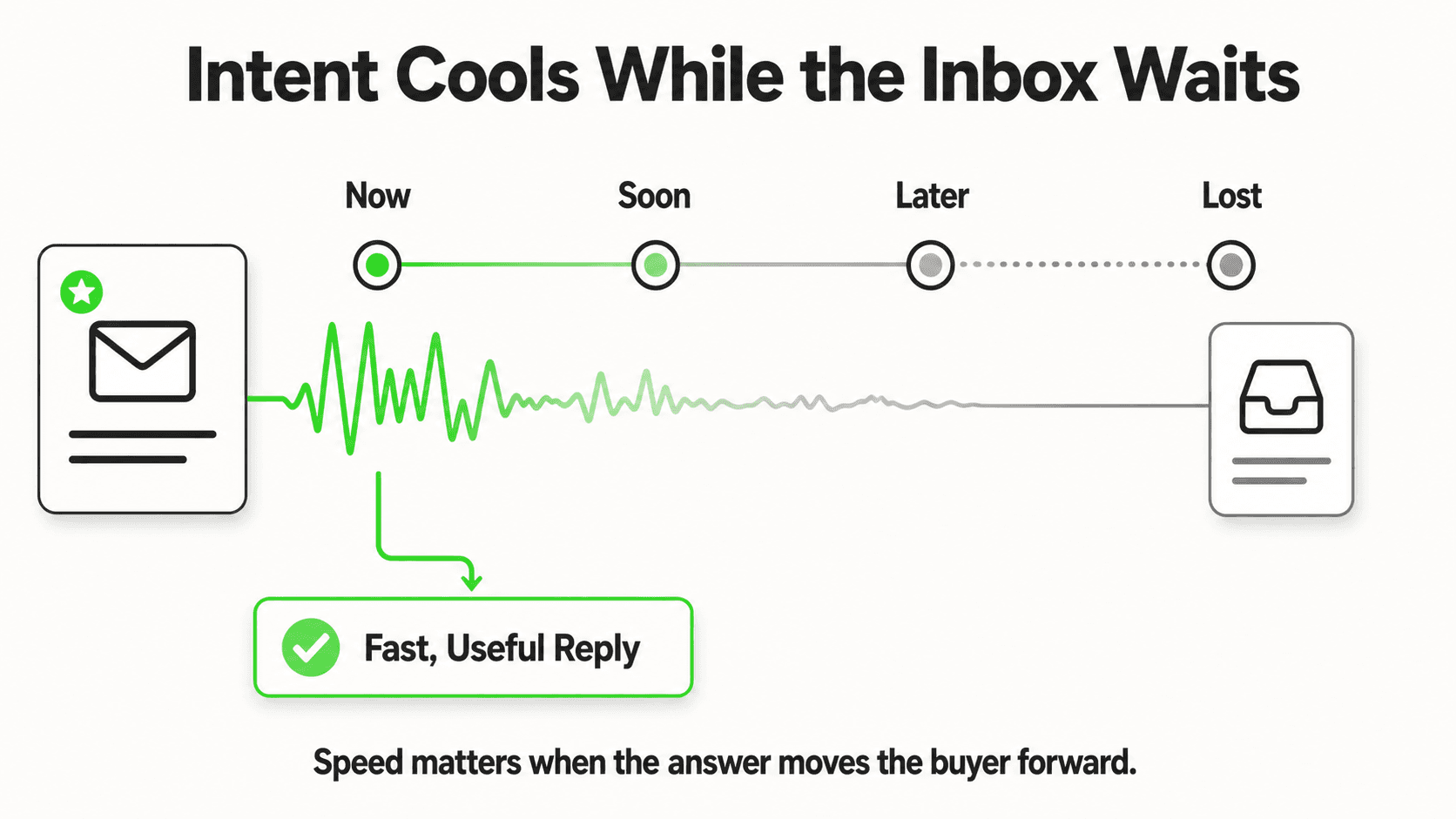
WhatsApp has over 3 billion monthly active users (Meta, 2025). In many markets, it is the primary channel customers reach for when they want a quick answer from a business. The problem is that "quick answer" breaks the moment your team logs off. The gap between when a customer asks and when your store responds is where purchase intent dies — and according to a Harvard Business Review study on online sales lead response, the probability of qualifying a lead drops dramatically after the first five minutes.
A WhatsApp chatbot for ecommerce does not replace your team. It fills the gap — every night, every weekend, in every language your customers speak. This guide explains how it works, what it handles well, and where human judgment still belongs.
What Is a WhatsApp Chatbot for Ecommerce?
A WhatsApp chatbot for ecommerce is an AI agent that connects to the official WhatsApp Business API and responds to customer messages using your own product documentation, policies, and FAQs as its knowledge base. Rather than relying on rigid decision trees or keyword matching, modern chatbots use Retrieval-Augmented Generation (RAG): they retrieve relevant passages from your documents and generate accurate, contextual responses.
This is a meaningful distinction. A keyword-matching chatbot answers "what is your return policy?" correctly only if the customer uses those exact words. A RAG-based chatbot understands "can I send it back if my wife does not like it?" and pulls the same answer from your policy document. The experience is different for the customer, and so are the results.
What a WhatsApp ecommerce chatbot typically handles:
- Product questions (materials, dimensions, compatibility, stock levels — if your docs cover it)
- Shipping and delivery questions (timelines, carriers, tracking link instructions)
- Return and exchange policy queries
- Sizing guides and comparisons
- Pre-sale qualification (budget, use case, volume needs for B2B buyers)
- Consultation booking for higher-ticket items — in the chat via Calendly or Cal.com, or by sharing your booking link
- Multilingual support — the same bot responds in whichever language the customer writes in
What it does not replace:
- Your Shopify backend — a WhatsApp chatbot connected via the Business API cannot pull live order status, track shipments in real time, or modify cart contents without a custom integration layer. If your priority is post-purchase order lookup, that requires webhook-level integration with your OMS, not a standard chatbot deployment.
- Payment processing — the chatbot shares information and links, but does not handle transactions.
- WhatsApp Catalog browsing — this is a separate Meta product and not a feature of the chatbot layer.
- Complex complaint resolution — nuanced issues still need a human. The chatbot's job is to answer what it can and escalate what it cannot.
For a deeper look at AI chatbots specifically in the ecommerce context, the AI chatbot for ecommerce hub covers the full landscape.
Why Ecommerce Brands Lose Revenue Without WhatsApp Automation
Understanding the problem precisely matters, because the solution only makes sense in proportion to what it costs you to leave it unsolved.
### The After-Hours Gap Is Larger Than It Looks
Most ecommerce stores field a significant share of their inquiries outside business hours. Shoppers browse in the evening. International customers are in different time zones. The question that arrives at 10 PM is just as real as the one that arrives at 10 AM — and often represents higher purchase intent, since the customer is actively shopping rather than browsing casually. Without automation, every after-hours message is an unanswered question that expires.
### Response Time Is a Conversion Variable, Not Just a Service Metric
The relationship between response speed and conversion is well-documented in B2C sales research. When a customer sends a message asking whether a product is right for them, they have not yet committed. They are still evaluating. Every minute they wait is a minute they spend on a competitor's website or reading a competitor's reviews. For high-consideration purchases — furniture, electronics, skincare routines, custom products — this window is even narrower because the questions are more complex and the commitment is larger.
### Multilingual Queries Multiply the Problem
A global DTC brand does not have a single customer language. Spanish-speaking customers, French-speaking customers, customers writing in Arabic or Portuguese or Mandarin — they all shop in their native language when they have the choice. Staffing for multilingual support across channels and time zones at scale is genuinely expensive. An AI chatbot that reads and responds in 100+ languages changes that cost structure entirely.
### Inconsistent Answers Erode Trust
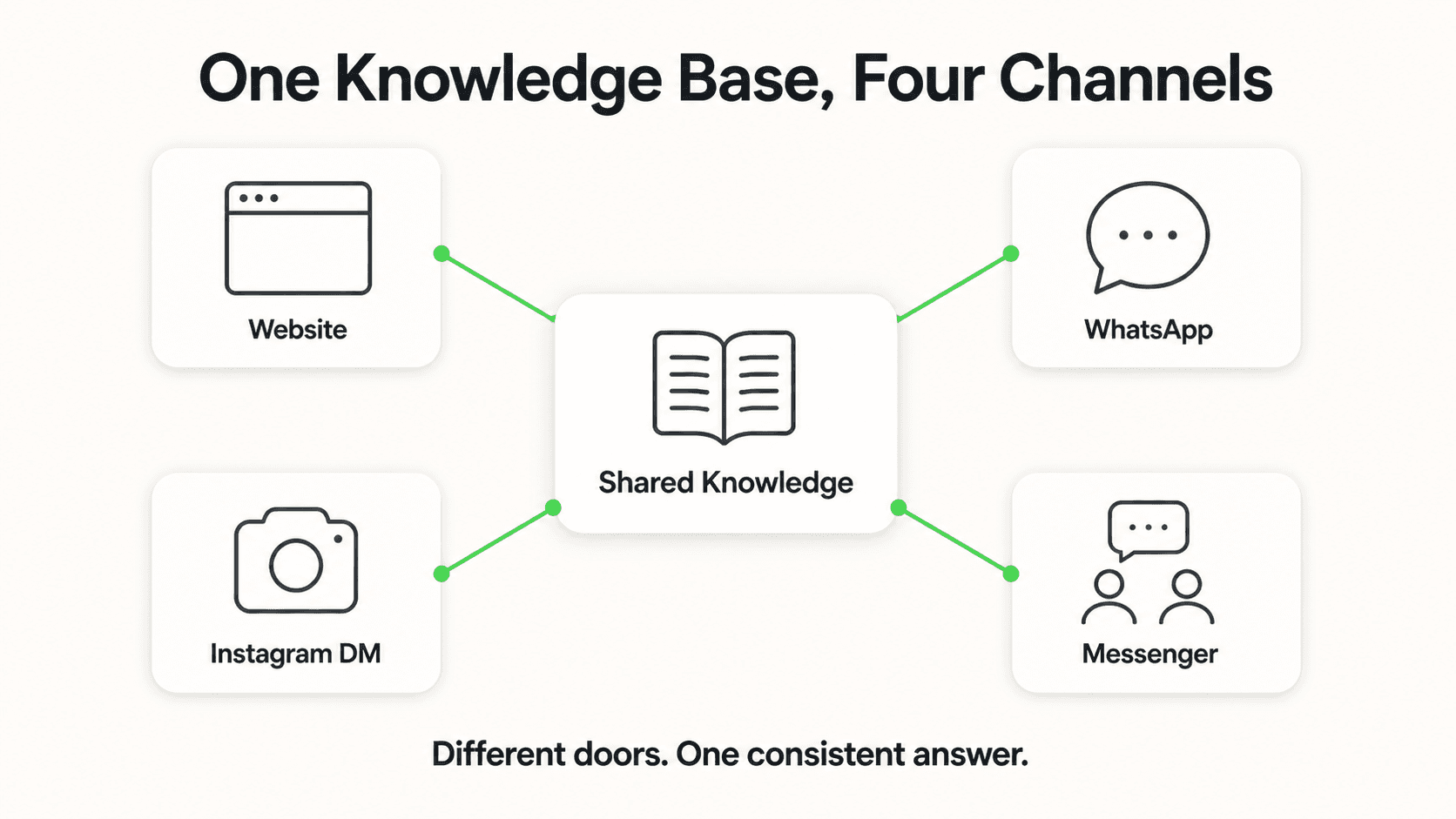
When customers ask the same question through different channels — your website chat, WhatsApp, Instagram DM — and get different answers, it signals disorganization. A knowledge-base-driven AI agent gives the same accurate answer regardless of which channel the customer uses, because it pulls from the same source documents every time.
7 Ways Ecommerce Brands Use WhatsApp Chatbots
1. Answering Pre-Sale Product Questions Instantly
What this looks like in practice: A customer messages your WhatsApp number at 2 AM asking whether your running shoe is suitable for trail running or if it is road-only. Your AI agent reads the relevant product spec page from your knowledge base and responds in seconds with the specific answer — grip type, recommended surface, waterproofing grade — without any human intervention.
Why it works: Customers who ask detailed pre-sale questions are close to buying. They have already filtered by category, price, and probably brand. They just need confidence on a specific dimension. A fast, accurate answer at that moment converts. A next-morning response often does not — not because the customer left permanently, but because they bought from whoever was faster.
Key features needed:
- Product spec sheets and comparison docs loaded into the knowledge base
- Document-grounded responses that cite your actual product data rather than generating plausible-sounding answers
- Escalation path when a question falls outside the knowledge base
2. Handling Shipping and Returns Queries 24/7
What this looks like in practice: "Where is my order?" is one of the most common ecommerce customer service queries — but it is also one of the most frustrating to handle without real-time OMS access. A well-configured chatbot can answer the policy side of this clearly ("We ship within 2 business days via FedEx or DHL; tracking is emailed at dispatch") while setting accurate expectations and directing customers to their tracking link rather than promising live status it cannot retrieve.
Real-world impact: Shipping and returns questions tend to spike after a product launch, during peak seasons, and in the 48 hours post-purchase when customer anxiety is highest. A chatbot handles this volume without adding headcount.
Why it works: Most shipping and returns questions are policy questions, not status questions. Policy questions are exactly what a document-grounded agent handles well — the answer is in your policy doc, and the bot retrieves it accurately and consistently every time.
Key features needed:
- Returns policy, shipping timelines, carrier information in the knowledge base
- Clear handoff language for queries that require live order lookup ("For your specific shipment status, your tracking link was emailed at dispatch — our team is also available at [email] during business hours")
3. Capturing and Qualifying Leads Before the Conversation Starts
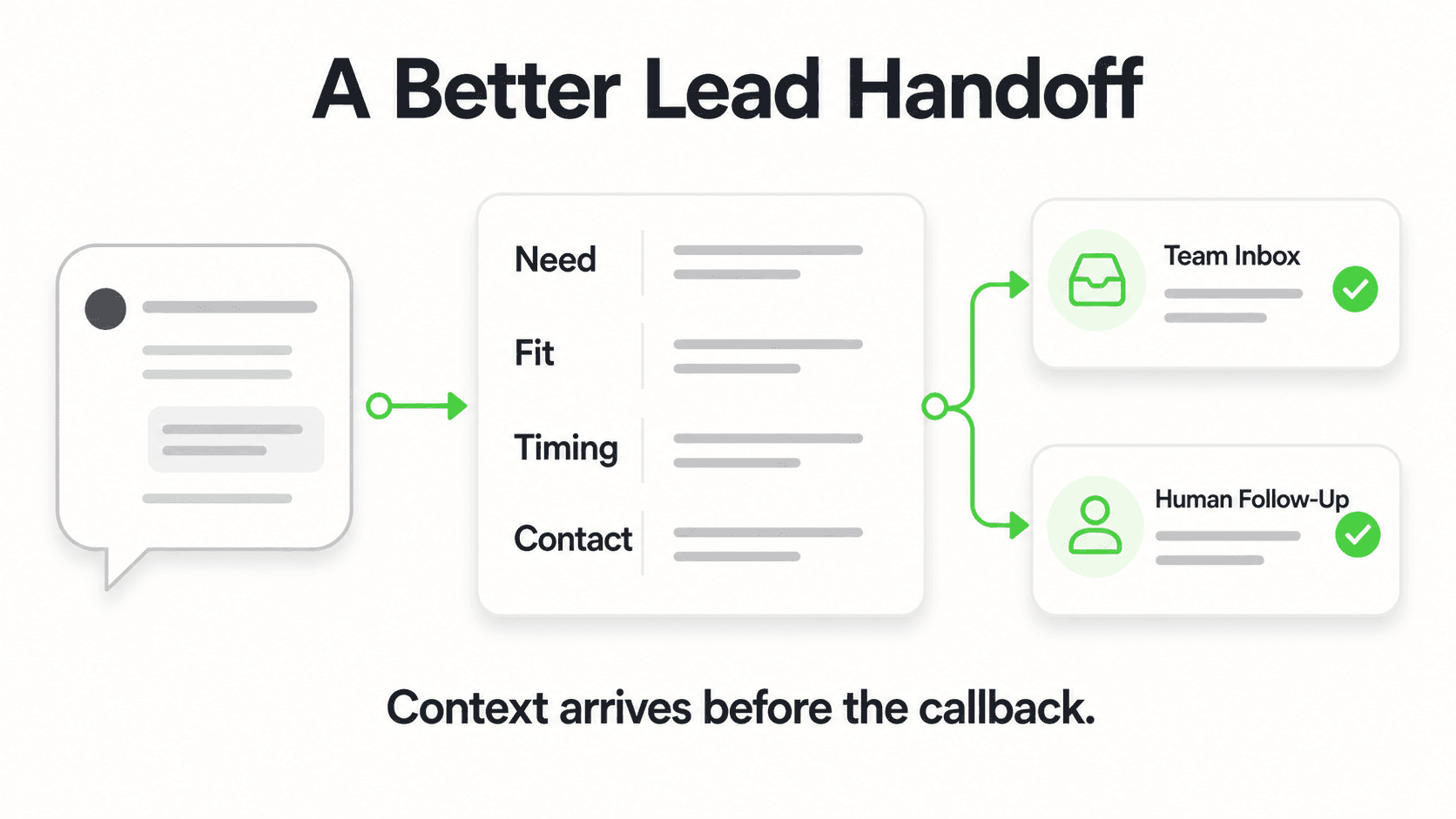
What this looks like in practice: Before the AI conversation begins, the customer fills out a short contact form — name, email, and one or two qualifying fields relevant to your product (size, use case, quantity, budget range for B2B buyers). This means every conversation starts with a qualified contact on record, and your team receives a clean summary by email even if the customer never reaches a human.
Why it works: Lead capture before the conversation is the right order of operations. If someone abandons mid-conversation, you still have their contact details. If they complete it, you have a qualified lead with context. The AI agent then uses those answers to personalize its responses — a customer who indicated they need 50 units gets a different answer path than one who needs one.
What this is not: Conversational lead capture without a form. The contact details are collected via a structured form field before the AI conversation starts. This is intentional — it ensures every inbound inquiry is captured regardless of conversation outcome.
Key features needed:
- Configurable pre-chat form fields
- Lead summary emails to your team on every new conversation
- Clean lead export for follow-up
4. Booking Consultations for High-Consideration Products
What this looks like in practice: A customer browsing your custom furniture line messages to say they are not sure which configuration suits their room dimensions. The AI answers the general questions it can from your catalog, then — at the right moment — offers a 20-minute call with a design advisor, listing real open times from your Calendly or Cal.com calendar. The customer picks one and is booked right in the conversation, with a calendar invite by email.
Why it works: Higher-ticket ecommerce increasingly involves a consultative step — a design review, a fit consultation, a product walkthrough. The chatbot's job in these flows is not to replace the consultation; it is to qualify the customer, answer the accessible questions, and get the ready buyer booked before they lose momentum.
Key features needed:
- Calendly or Cal.com connected so the agent can book calls in the chat (in-chat booking needs Calendly Standard or higher; for any other scheduler, the agent shares your booking link)
- AI trained to recognize when to offer the booking path vs. continue answering directly
5. Responding in the Customer's Language — Automatically
What this looks like in practice: A customer writes in Spanish. The AI responds in Spanish, drawing from your English-language knowledge base and generating an accurate translated response. Another customer writes in French; same seamless experience. The customer never needs to know — or care — what language your documentation was written in.
Why it works: Language is a conversion barrier. Customers who have to choose between a store with fast support in their language and one that responds only in English will, all else being equal, choose the former. For a global DTC brand, 100+ language support is not a nice-to-have — it is table stakes for markets outside the English-speaking world.
Key features needed:
- Automatic language detection and response matching
- Knowledge base that covers the same content regardless of inquiry language
See the WhatsApp AI agent in action
Hyperleap AI connects to the official WhatsApp Business API and runs the same AI across your website, Instagram DM, and Facebook Messenger. 7-day free trial, no free plan.
Explore Plans6. Deploying the Same AI Across WhatsApp, Website, Instagram DM, and Messenger
What this looks like in practice: Your product knowledge base is loaded once. The same AI agent then runs across four channels simultaneously: your website chat widget, WhatsApp via the Business API, Instagram DM, and Facebook Messenger. A customer who sees your product on Instagram and DMs a question gets the same accurate answer as one who opens your website chat. The experience is consistent because the underlying knowledge base is the same.
Why it works: Customers do not segment their behavior by channel — they reach for whichever platform is most convenient in the moment. A shopper who discovers your brand on Instagram should not get a worse support experience than one who found you via Google. Multi-channel deployment eliminates the gap without requiring separate setups or separate knowledge management.
Key features needed:
- Single knowledge base powering all four channels
- Channel-consistent response quality (on Pro and Max, rich cards render on Website, WhatsApp, Instagram DM, and Facebook Messenger, with carousels on Instagram DM and Messenger)
- Unified conversation inbox so your team has visibility across all channels
7. Escalating Gracefully When Human Judgment Is Needed
What this looks like in practice: A customer's question falls outside what your documentation covers. Instead of generating a plausible-sounding but potentially inaccurate answer, the AI acknowledges the gap: "I do not have that information in my current knowledge base — I want to make sure you get an accurate answer. You can reach our team directly at [email] or [WhatsApp business hours note]." The conversation is flagged for follow-up; your team reviews and responds.
Why it works: The failure mode of a poorly configured chatbot is confident inaccuracy — generating answers that sound right but are wrong. Document-grounded agents are designed to minimize this by only answering from what they know and escalating what they do not. For an ecommerce brand, a wrong answer about a product feature that leads to a return is worse than no answer at all.
Key features needed:
- Clear escalation triggers and handoff messaging
- Fallback to human team with context passed along
- Team notification when escalation occurs
What Honest WhatsApp Chatbot Implementation Looks Like
Before listing what the technology can do, it is worth being precise about what a standard WhatsApp chatbot deployment — not a custom-engineered order management system — actually covers in 2026.
In scope for a knowledge-base-driven chatbot:
- Any question whose accurate answer exists in your documentation, product pages, policies, or FAQs
- Lead qualification based on form-collected data
- Consultation booking (Calendly or Cal.com) or booking-link sharing
- Multilingual response generation
- Multi-channel coverage (WhatsApp, website, Instagram DM, Messenger) from one knowledge base
- Escalation to your human team when needed
Not in scope without custom integration engineering:
- Live order status lookup (requires API connection to your OMS or Shopify backend)
- Real-time inventory availability by SKU
- WhatsApp Catalog browsing (a separate Meta product, currently on the roadmap for platforms like Hyperleap, not yet shipped)
- Payment collection through the conversation
- Automated post-purchase sequences triggered by order events (these require OMS webhook integration)
This is not a limitation unique to any single platform — it is the honest boundary of what a WhatsApp Business API connection paired with a knowledge-base-driven AI agent does. If post-purchase order management is your primary use case, evaluate purpose-built commerce messaging tools in addition to or instead of a general AI chatbot. If your primary need is pre-sale support, lead capture, and 24/7 availability in the customer's language, a knowledge-base chatbot is the right tool.
For more detail on evaluating WhatsApp chatbot platforms specifically for Shopify stores, the best chatbot for Shopify 2026 comparison covers the trade-offs across the major options.
Getting Started: An Implementation Roadmap
Step 1: Audit Your Inquiry Volume and Question Types (Days 1–3)
Before configuring anything, spend a few days pulling your most common customer questions across every channel — support email, existing WhatsApp messages, live chat transcripts, Instagram DMs. Categorize them:
- Answerable from existing documentation: product specs, policies, shipping info — these go into your knowledge base immediately
- Require real-time data lookup: live order status, current stock availability — these need separate handling or honest escalation language
- Require human judgment: complaints, complex custom requests, high-value negotiations — these are escalation triggers
This exercise tells you exactly what percentage of your inquiry volume an AI chatbot will deflect versus escalate. For most ecommerce brands, the majority of pre-sale questions fall into the first category.
Step 2: Build Your Knowledge Base (Days 3–7)
Gather and structure your documentation:
- Product documentation: spec sheets, material guides, size charts, comparison tables, use-case guidance for your top 20–30 SKUs
- Shipping and fulfillment: carrier options, timelines by region, tracking instructions, cutoff times
- Returns and exchanges: full policy, eligibility criteria, process steps, timelines
- FAQ compilation: the questions from Step 1 that your documentation already answers — format these as clean Q&A pairs
- Brand tone guidelines: how you want the AI to sound (conversational, formal, friendly)
Quality of the knowledge base is the largest determinant of chatbot accuracy. A well-structured, comprehensive knowledge base produces consistently accurate answers. A sparse or ambiguous one produces escalations. Invest the time here.
Step 3: Connect WhatsApp via the Business API
Connecting to the WhatsApp Business API requires a verified Meta Business account and a dedicated phone number for your business. A Meta Technology Partner (Hyperleap AI is one) handles the technical API connection — the process typically takes a few days for account verification and approval, then a few hours for technical setup.
Once connected, the same AI agent extends to your website widget, Instagram DM, and Facebook Messenger with minimal additional configuration, since the knowledge base is shared across all channels.
Step 4: Configure Lead Capture and Escalation Flows
Set up:
- Pre-chat form: collect at minimum name and email; add qualifying fields relevant to your business (size, quantity, use case)
- Escalation triggers: define the question types and scenarios where the AI should hand off to your team and what message it sends
- Team notification: configure lead summary emails so every new conversation is visible to your team even when no human joins
Step 5: Test Before You Go Live
Before enabling the chatbot publicly, run it against your actual most-common questions. Check:
- Are product answers accurate to your specs, not hallucinated?
- Does the return policy answer match your current policy exactly?
- Does the shipping timeline answer reflect your current carrier and processing speed?
- Does the escalation trigger work as expected for out-of-scope questions?
Update the knowledge base wherever the answers are off. This is expected — the first test pass almost always reveals gaps in documentation that were invisible until a customer asked about them.
Step 6: Go Live and Monitor Conversations
Start with WhatsApp and your website widget. Review actual conversations weekly for the first month:
- Where does the AI answer well? Reinforce those knowledge base sections.
- Where does it escalate unnecessarily? Add documentation that covers those gaps.
- Where does it give inaccurate answers? Fix the source document and re-test.
The chatbot improves with iteration. The teams that get the most value are the ones that treat the first 30 days as a refinement phase, not a "set and forget" deployment.
If you want a detailed technical walkthrough of the connection process, how to build a WhatsApp chatbot covers the full setup flow step by step.
How Hyperleap AI Fits This Picture
Hyperleap AI is a chatbot platform — not an agency, not a custom development shop. Here is exactly what connecting your store through Hyperleap means in practice.
Hyperleap connects to WhatsApp via the official Business API (Hyperleap is a Meta Technology Provider). You load your product documentation, policies, and FAQs into the knowledge base. The AI generates document-grounded responses — it answers from your content, and when a question falls outside that content, it escalates rather than guessing.
The same agent runs simultaneously on your website chat widget, WhatsApp, Instagram DM, and Facebook Messenger. Every inbound conversation starts with a lead capture form — name, email, and whatever qualifying fields you configure. Your team receives a clean summary email for every new conversation. When a customer is ready to book a consultation, the AI offers live open times and books it in the chat through Calendly or Cal.com on Pro and Max — or shares your booking link on Plus or if you use another scheduler.
Plans:
| Plan | Monthly | AI Responses | Chatbots | Channels |
|---|---|---|---|---|
| Plus | $40/mo | 3,000 | 1 | 4 |
| Pro | $100/mo | 12,000 | 2 | 8 (4 per chatbot) |
| Max | $200/mo | 30,000 | 5 | 20 (4 per chatbot) |
All plans include a 7-day free trial. Credit card required. There is no free plan. If you want professional help with setup rather than doing it yourself, Managed Setup ($299 Free) is available as an add-on on any plan.
What Hyperleap does not do: process payments, connect to Shopify's e-commerce API for live order/catalog data, or offer WhatsApp Catalog browsing (that is on our roadmap, not yet shipped). If your primary need is post-purchase order lookup from WhatsApp, evaluate whether a custom OMS integration is the right layer to build on top.
Ready to answer every WhatsApp inquiry — 24/7?
Hyperleap AI connects to the official WhatsApp Business API and runs the same knowledge-base AI across your website, Instagram DM, and Facebook Messenger. 7-day free trial.
See Plans and PricingFrequently Asked Questions
What is a WhatsApp chatbot for ecommerce?
A WhatsApp chatbot for ecommerce is an AI agent connected to the official WhatsApp Business API that answers customer questions about your products, shipping, and policies using your own documentation as its knowledge source. It is available 24/7, responds in the customer's language, and captures lead contact details before the conversation starts. The same agent typically runs across multiple channels — WhatsApp, website chat, Instagram DM, and Facebook Messenger — from a single knowledge base, so every customer gets consistent answers regardless of where they reach out.
Can a WhatsApp chatbot handle order tracking and live inventory questions?
Not without custom integration engineering. A standard WhatsApp chatbot connected to the Business API answers questions from your knowledge base — product specs, policies, shipping timelines, return procedures. It cannot pull real-time order status or inventory availability from your Shopify backend or OMS without a dedicated API integration layer. For live order status, the honest chatbot approach is to acknowledge the limitation clearly and direct customers to their tracking email or a human support contact. If post-purchase order management automation is your primary goal, evaluate commerce-specific messaging platforms alongside or instead of a general AI chatbot.
How does a WhatsApp chatbot capture leads for my store?
Lead capture happens before the AI conversation starts. When a customer opens the chat, they complete a short contact form — name, email, and any qualifying fields you configure (such as product interest, quantity, or budget range). This means every conversation starts with a captured contact on record. Your team receives an email summary of each new conversation, including the form data and the full conversation transcript. Even if the customer leaves the chat before your team joins, you have the contact details for follow-up.
Is WhatsApp a viable channel for global ecommerce — not just certain regions?
Yes. WhatsApp has over 3 billion monthly active users across more than 180 countries (Meta, 2025). While WhatsApp penetration is highest in parts of Europe, Latin America, the Middle East, and Southeast Asia, global brands find meaningful WhatsApp inquiry volume from customers in nearly every market. That said, channel preference varies by market — some customer segments in the US still prefer website chat or email. The case for WhatsApp in ecommerce is not that it replaces other channels, but that it covers the channel where a significant portion of your customers already are, in the app they already use daily.
How accurate are the chatbot's product answers?
Accuracy depends directly on the quality of your knowledge base. A document-grounded AI agent generates responses by retrieving relevant passages from your uploaded content — product spec sheets, policy documents, FAQ files — and formulating an answer from that material. It does not generate product information from general AI training. This means: if the answer is in your documentation and your documentation is accurate, the bot's answer will be accurate. If a question falls outside the documented content, the bot should escalate rather than guess. "Document-grounded responses" is the honest framing — not "zero errors" or "100% accuracy," which no AI system can guarantee.
How long does it take to set up a WhatsApp chatbot for my store?
The knowledge base preparation is the longest step — expect three to seven days to gather, clean, and upload your product documentation, policies, and FAQ content. WhatsApp Business API connection and approval typically takes two to five days, depending on your Meta Business verification status. Technical platform setup is usually same-day once the API is connected. Most stores are live within one to two weeks from the moment they start the process, assuming their documentation is reasonably organized. If documentation needs to be written from scratch, add time for that work.
Do I need a developer to connect WhatsApp to my store's chatbot?
Not for a standard chatbot deployment. WhatsApp Business API connection through a Meta Technology Partner (like Hyperleap AI) is a guided process that does not require code — you verify your Meta Business account, connect your WhatsApp number, load your knowledge base, and configure your channels through a web interface. Where developer involvement becomes relevant: if you want to connect the chatbot to your OMS for live order data, configure custom webhooks to push leads into your CRM, or build a bespoke integration with your Shopify backend. The core chatbot experience — AI answers, lead capture, booking links, multi-channel deployment — is no-code.
The Competitive Gap Is Already Opening
Most ecommerce stores treat after-hours support as an operational limitation they will eventually address. A growing number are treating it as a competitive variable they can act on now. The difference in conversion rate between a store that answers a pre-sale question in two minutes and one that answers it the next morning is not small — it is the difference between making the sale and losing it to whoever was faster.
The WhatsApp chatbot use case for ecommerce is honest in scope: it handles the questions your documentation already answers, captures every lead that initiates a conversation, and responds in the customer's language at any hour. It does not replace your logistics team, your Shopify backend, or your human judgment on complex cases. What it does is eliminate the gap between when a customer asks and when your store responds — and that gap is where revenue leaks.
If you want to see what this looks like configured on your actual product content, the trial does not require a long commitment. Seven days is enough to know whether it changes the conversation volume your team wakes up to.
WhatsApp user figures are sourced from Meta's publicly reported monthly active user data (2025). Conversion and lead response research referenced is from Harvard Business Review's study on online sales lead response time. Platform-specific figures reflect Hyperleap AI's current plans and features as of June 2026.
Related Articles

How to Build a WhatsApp Chatbot: Step-by-Step Guide (2026)
Learn how to build a WhatsApp chatbot using the official Business API — from getting API access to going live, with a no-code step-by-step setup guide.

Hotel Accessibility Questions: A Source Sheet
Prepare factual hotel accessibility answers with a source sheet for entrances, room features, measurements, review dates and named staff follow-up.
Ask for Contact Details Without Blocking the Answer
Use practical contact-request scripts that explain the purpose, respect customer choice and keep useful answers separate from lead capture.
Booking Links vs Integrations: What AI Can Actually Do
Separate sharing a booking link from checking availability, creating a reservation and confirming it with this practical AI front desk buyer checklist.