AI Medical Receptionist: The Complete Guide for Clinics
An AI medical receptionist answers patient FAQs, captures new-patient inquiries, and shares booking links 24/7 across chat — reducing front-desk load without replacing your team.
TL;DR: an AI medical receptionist is a chat agent — running on your website, WhatsApp, Instagram DM, and Facebook Messenger — that answers patient FAQs around the clock, collects new-patient details via a lead form before the conversation starts, shares your booking links, and routes anything clinical or urgent straight to your staff. It does not answer phone calls. It does not assess symptoms. It makes your front desk faster and your after-hours coverage real — without replacing the people already doing the job.
Picture a Monday at 8:15 in the morning. Your front desk opens at 8:00. By 8:05, three patients are already standing at reception waiting to be checked in. Four messages have arrived on your clinic's WhatsApp since Sunday evening — all asking variations of the same question: "Do you accept my insurance?" Two more just came in through your website contact form overnight asking about appointment availability. Your receptionist has not yet had a chance to turn on the monitor.
This is not a staffing failure. This is a structural mismatch between when patients want answers and when your team is available to give them.
The overwhelming majority of the questions patients ask before and between appointments are answerable from information you already have: your hours, your services, your accepted insurance providers, your location and parking, your new-patient intake process, your preparation instructions for common procedures. These are not clinical questions. They are operational ones — and they are consuming a disproportionate share of your front desk's day.
An AI medical receptionist is built to close that gap. Not by replacing the human beings who run your practice, but by handling the routine, answerable, repeat-it-a-hundred-times-a-week questions so your staff can focus on the patients standing in front of them.
What Is an AI Medical Receptionist?
An AI receptionist in the medical context is a chat-based agent trained on your practice's own documents — your FAQs, service list, insurance policies, location details, prep instructions, and intake procedures — that responds to patient messages 24 hours a day, seven days a week.
It operates across the channels your patients already use: a website chat widget, WhatsApp Business, Instagram DM, and Facebook Messenger. A patient who finds your clinic through a Google search at 10pm and has a question about whether you take their insurance gets an answer immediately, not a "we'll call you back during business hours" form submission that may or may not be followed up on.
A few things worth stating clearly from the start:
It is not a phone or voice system. An AI medical receptionist works over chat and messaging channels. It does not replace your phone line or your answering service. If your primary patient communication challenge is phone volume, this is a complement to that system — not a substitute.
It does not assess symptoms or provide clinical guidance. This is a digital front desk, not a diagnostic tool. It answers operational questions — hours, services, scheduling, location, prep instructions — and routes anything clinical, urgent, or sensitive to your staff. More on that in a moment.
It works from your knowledge, not generic training data. When a patient asks whether you offer a specific procedure, the agent answers from your documents, not from a general LLM that might hallucinate your service list. Responses are document-grounded: if the information is not in your knowledge base, the agent says so and directs the patient to your team.
This last point matters more than it might seem. A medical practice cannot afford an AI that confidently makes up answers about insurance coverage or preparation instructions. Document-grounded responses are not a feature differentiator — they are a baseline requirement.
The Patient Questions It Handles Best
Before deploying any AI agent on a healthcare property, it is worth being precise about which question categories the system should and should not handle autonomously. The dividing line is operational versus clinical.
Operational questions — the ones that consume most of your front-desk time — are safe to automate. Clinical questions are not.
Here is how the most common patient inquiry categories break down:
| Patient Question Category | AI Handles Autonomously | Routes to Staff |
|---|---|---|
| Hours, location, parking | Yes | — |
| Services offered | Yes | — |
| Insurance accepted | Yes (list from your docs) | Specific coverage details |
| New patient intake process | Yes | — |
| Booking links / appointment scheduling | Yes (books in the chat with Calendly or Cal.com on Pro and Max; shares your link on Plus or for other schedulers) | Complex scheduling needs |
| Preparation instructions for procedures | Yes (from your docs) | Patient-specific modifications |
| What to bring to first appointment | Yes | — |
| Referral requirements | Yes (general) | Specific authorization questions |
| Billing and payment options | Yes (general) | Disputed charges, payment plans |
| After-hours pharmacy / emergency | Routes to staff immediately | — |
| Symptom questions | Routes to staff immediately | — |
| Medication questions | Routes to staff immediately | — |
| Test results | Routes to staff immediately | — |
| Urgent or distressing messages | Routes to staff immediately | — |
The volume lives in the left column. Industry surveys consistently show that 60–80% of inbound patient inquiries before the first appointment are administrative — questions your website FAQs already answer but patients prefer to ask conversationally. After-hours, that percentage climbs further because the only inquiries reaching the chat are from patients actively trying to decide whether to book.
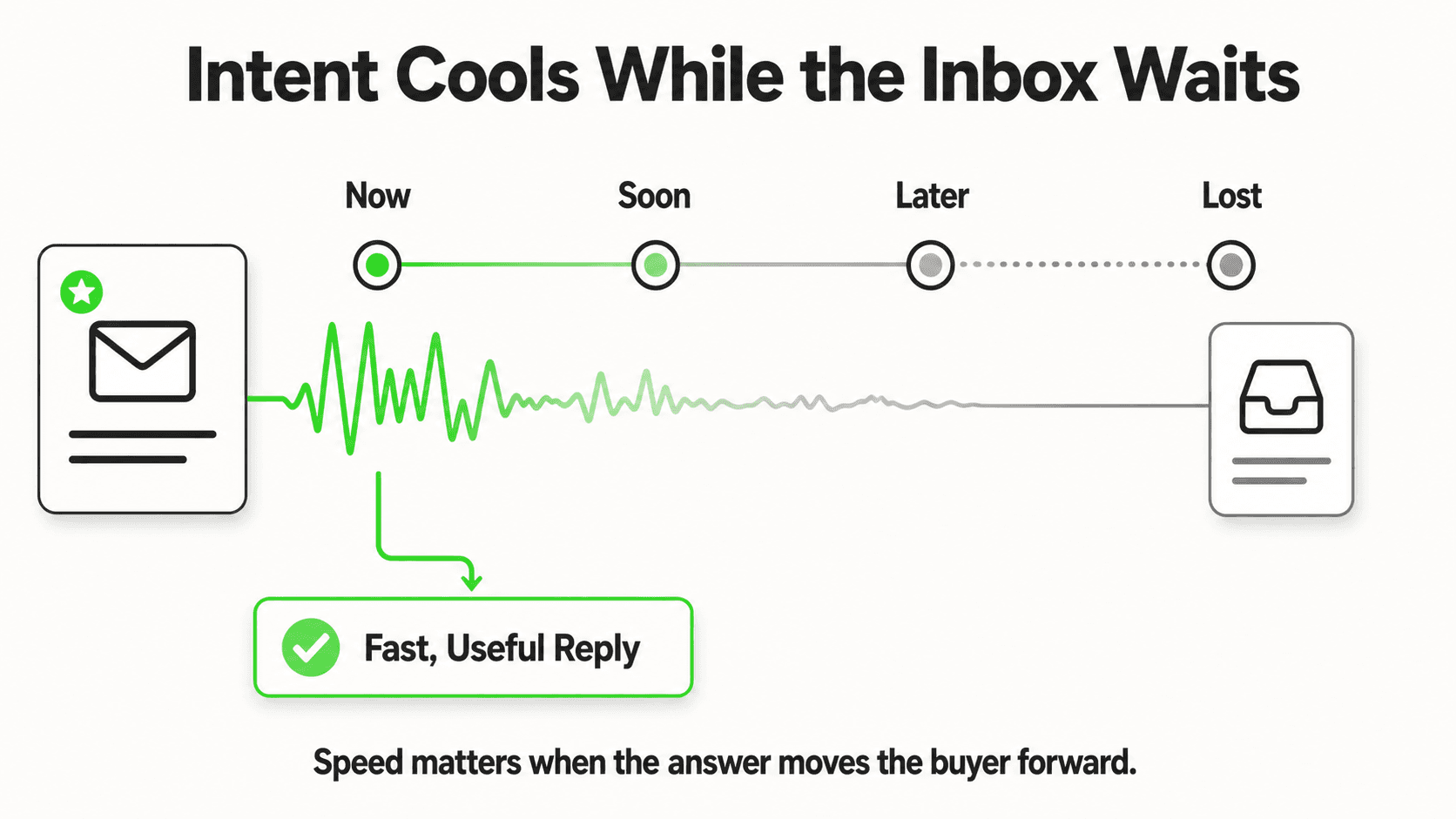
The healthcare AI agent you deploy should be configured to handle the left column fluently and route the right column without hesitation. There is no ambiguous middle ground to optimize toward. When in doubt, route to staff.
What Must Always Route to a Human
This section matters. Get it wrong and an AI that was supposed to improve patient experience becomes a liability.
Clinical matters belong with your clinical team
No AI medical receptionist — including Hyperleap AI — should respond to symptom descriptions, medication questions, test results, or anything that sounds like a patient in distress. These messages must route immediately to a qualified staff member. Configure your agent with clear trigger phrases that escalate without delay: "I'm in pain," "Is this normal after my procedure," "My child has a fever," "I need my results." The response should be: acknowledge, express that a team member will follow up, and if it sounds urgent, provide your emergency contact or direct them to call emergency services. Never generate a clinical response, even a general one.
The routing categories that should trigger immediate human handoff:
Symptom or medical questions. Any message describing physical symptoms, asking whether a symptom is normal, or requesting guidance on a health condition routes to a clinical staff member. The agent acknowledges the message, tells the patient a team member will follow up shortly, and if there are indicators of urgency, provides your emergency contact information.
Medication questions. Whether it is about a prescription, dosage, side effects, or interactions — these route to staff without exception.
Test results and follow-up care. A patient asking about lab results, scan findings, or post-procedure follow-up instructions should always speak to a qualified person.
Distressed or emergency language. Configure your agent to detect keywords like "emergency," "can't breathe," "chest pain," "severe," "bleeding," or "urgent." The response should immediately provide your emergency contact and encourage the patient to call emergency services if needed.
Complaints and sensitive situations. A patient expressing dissatisfaction with care, raising a billing dispute beyond the general, or describing anything that sounds like a potential incident — route to your practice manager.
Your AI agent handles volume. Your staff handles judgment. Keep those roles clean and the system works. Blur them and it creates risk.
After-Hours Coverage: Where New Patients Get Lost
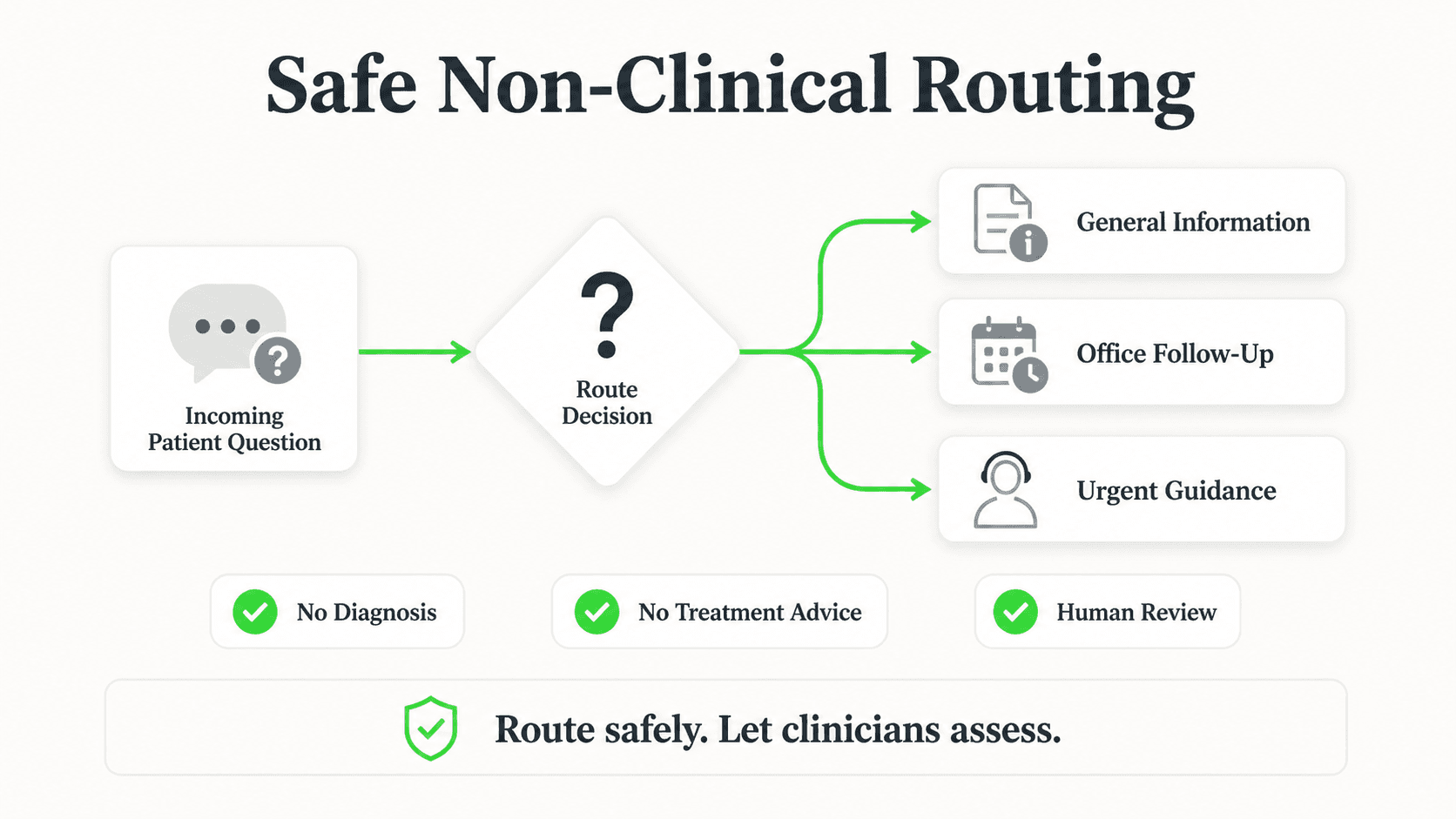
This is where an AI medical receptionist earns its place most clearly.
A prospective patient in your city searches "dermatologist accepting new patients" at 9pm on a Wednesday. They click through to three clinic websites. Two have a contact form. One has a chat widget. They message the one with the chat widget — asking whether you accept their insurance and whether appointments are available in the next two weeks.
With a trained AI agent, they get an answer in seconds. The agent confirms insurance acceptance from your list, shares your booking link, and collects their name and contact details via a brief lead form before the conversation continues. By the time your front desk opens Thursday morning, there is a qualified new-patient inquiry with contact information waiting in your inbox, alongside a clean summary of what the patient asked and what the agent told them.
The other two clinics' contact forms are sitting unanswered until someone gets to them.
This is not a hypothetical. After-hours is disproportionately when people research healthcare providers — after work, after putting children to bed, when they have a quiet moment to think about the health matter they have been putting off. The practices that respond to that window, even through an automated agent, capture inquiries the others miss.
The lead capture mechanic matters here: the form comes before the conversation. The agent presents a brief intake form — name, contact information, what they are looking for — before continuing the dialogue. This gives your front desk actionable information rather than a conversation transcript with no way to follow up.
See How Hyperleap AI Handles After-Hours Inquiries
A live demo shows you exactly how the patient experience works — from the lead form to the booking to the staff handoff summary.
View Pricing and PlansPrivacy and Responsible Use
Patients share personal information when interacting with your clinic, and an AI agent operating in that context needs to handle that information appropriately. A few honest notes on where Hyperleap AI stands and where you, as the practice operator, carry responsibility.
You control what the agent knows and shares. Hyperleap AI is trained on the documents you provide. The agent does not have access to your electronic health records, patient charts, or appointment histories unless you explicitly configure it to retrieve that data through an integration. By default, it knows what your practice knows publicly — your services, policies, hours, insurance list, and FAQs.
Configure what the agent is permitted to discuss. Your setup determines the scope. If you do not want the agent discussing anything beyond scheduling and general FAQs, configure it that way. The agent answers from its knowledge base, and that knowledge base is what you define.
We do not claim HIPAA certification. Hyperleap AI is designed with privacy in mind — data handling, access controls, and encryption are taken seriously — but whether a specific deployment meets your HIPAA obligations depends on your implementation, your Business Associate Agreement arrangements, and your practice's specific requirements. If your practice is subject to HIPAA, work with your compliance advisor to evaluate any technology you introduce into patient-facing workflows. Do not deploy any AI agent — ours or anyone else's — without that evaluation.
Avoid collecting sensitive health information through the chat. The lead form should collect name and contact details. The conversation should handle scheduling, FAQs, and general information. Sensitive clinical information — symptoms, diagnoses, medications, insurance member IDs — should be collected through your existing HIPAA-compliant intake process, not through a chat interface.
Handle the configuration thoughtfully and an AI medical receptionist is a practical, helpful front-desk tool. Treat privacy as an afterthought and any tool in this category creates exposure.
Multilingual Patient Communication
Healthcare is local, and local is multilingual. In most mid-size cities, a medical practice serves patients who speak multiple languages. The question of whether those patients can get answers to basic administrative questions in their preferred language — without asking a bilingual staff member to stop what they are doing — is a real operational and patient-experience question.
Hyperleap AI supports responses in 100+ languages. A patient who messages in Spanish, Arabic, French, or Portuguese gets a response in the same language. This is not perfect machine translation layered on top of English responses — it is native multilingual response generation grounded in your English-language knowledge documents.
The practical effect: a non-English-speaking patient asking about your insurance policies, your hours, or your new-patient process gets an accurate, friendly answer in their language, immediately, without any staff involvement. That reduces friction for patients and reduces the demand on staff members who currently field those translation requests.
This capability matters most for practices in diverse urban areas and for specialties — pediatrics, obstetrics, primary care, dental — where patient populations span a wide range of backgrounds.
Setting Up Your AI Medical Receptionist
A Hyperleap AI agent for a medical practice is typically operational within a few days. Here is what the process looks like in practice:
Step 1: Gather your source documents. The agent's quality is directly proportional to the quality of the documents you train it on. Useful sources include: your patient FAQ page, insurance accepted list, services page, new patient intake instructions, preparation instructions for your most common procedures, your location and hours, and any policy documents you give new patients. If these documents do not exist in a structured form, this setup process is a good prompt to create them.
Step 2: Configure the knowledge base. Upload your documents to Hyperleap Studio. The system ingests them and makes them available to the agent as a searchable knowledge base. Responses the agent generates are drawn from these documents rather than from general training data.
Step 3: Define routing rules. Set the trigger phrases and categories that escalate to your team rather than generating an automated response. The clinical routing categories described above should all be covered here. Test each one to confirm the agent escalates correctly.
Step 4: Set up the lead form. Configure what information you want to collect from new patients before the conversation proceeds — typically name, contact email or phone, and what they are looking for. This becomes the lead record your front desk works from.
Step 5: Choose and configure your channels. Embed the chat widget on your website, connect your WhatsApp Business number, and optionally activate Instagram DM and Facebook Messenger. Each channel reaches a different segment of your patient population — website chat catches search traffic, WhatsApp handles existing patients in markets where it is the dominant messaging platform.
Step 6: Test before you go live. Run through the most common patient questions yourself. Verify that the answers are accurate and appropriately scoped. Confirm that clinical and urgent messages route to staff without generating a clinical response. Have a team member who was not involved in setup ask ten questions from a patient's perspective and flag anything that feels wrong.
The managed setup add-on ($299 Free) covers this entire process if you would rather have a team do it for you.
How Hyperleap AI Fits
The AI receptionist category has a range of players, and the differences matter in a medical context.
Hyperleap AI is built around a few principles that are particularly relevant to healthcare and clinical practice applications:
Document-grounded responses, not generative hallucination. The agent draws answers from your documents. When a patient asks whether you accept a specific insurance plan, the agent searches your uploaded insurance list rather than generating a plausible-sounding answer from general training data. This is not optional for a medical context — it is the baseline.
A lead form before the conversation, not just a chat. Some AI chat tools capture contact details only if the patient chooses to share them mid-conversation. Hyperleap AI presents a lead form before the conversation begins. This means every new-patient inquiry that completes the flow becomes an actionable lead record with contact information — not a conversation transcript with no way to follow up.
Clean staff handoff summaries. When the agent routes a conversation to your team or when a session ends, your staff receives a summary: what the patient asked, what the agent said, and any contact details collected. Your front desk does not need to read through a full conversation log to understand what a new patient needs.
Multi-channel consistency. Whether a patient reaches you through your website chat, WhatsApp, Instagram DM, or Facebook Messenger, they get the same answers from the same knowledge base. Your practice presents consistently regardless of which channel the patient happens to use.
Hyperleap AI plans start at $40/month (Plus), $100/month (Pro), or $200/month (Max), with a 7-day free trial — credit card required. There is no free plan. The Suite add-on ($99 one-time) unlocks AI Tools and AI Assistants for internal use. Managed Setup is offered $299 Free if you want us to configure the agent for your practice rather than doing it yourself.
For practices that handle conversational AI for customer service across multiple locations or specialties, the Pro and Max tiers allow multiple chatbots and more channels — useful if you run, for example, a group practice where each location needs its own configured agent with location-specific hours, insurance panels, and staff routing.
Try an AI Medical Receptionist for Your Practice
Hyperleap AI answers patient FAQs 24/7 on your website, WhatsApp, Instagram DM, and Facebook Messenger — with document-grounded responses and automatic staff handoff for anything clinical.
Start Your Free TrialFor the physical-therapy-specific version of this front desk — insurance-accepted lists, referral routing, and reschedule handling — see AI chatbot for physical therapy clinics.
Frequently Asked Questions
Does an AI medical receptionist replace front-desk staff?
No — and this is worth being direct about. An AI medical receptionist shifts the work your front desk does, not the people doing it. Right now, a meaningful portion of your receptionist's day goes to answering the same questions repeatedly: hours, insurance, location, new-patient intake steps, booking process. An AI agent handles those automatically, freeing your staff for the work that actually requires a human: checking patients in, managing clinical communication, handling billing exceptions, coordinating care, and giving attention to patients who need it in person.
The right frame is not replacement — it is reallocation. Your staff handles harder, more valuable work. Routine, repeat questions route to the agent. Both the practice and the patient experience improve.
Does it answer phone calls?
No. Hyperleap AI operates over chat and messaging channels: website chat widget, WhatsApp Business, Instagram DM, and Facebook Messenger. It is a digital front desk, not a phone or voice system. If your primary challenge is inbound call volume, an AI medical receptionist is a complement to your phone system — capturing the patients who reach out digitally — rather than a replacement for it.
For a related perspective on how AI receptionists work across different channels and contexts, see our guide on the AI virtual receptionist.
Is it HIPAA compliant?

Hyperleap AI is designed with privacy in mind — data is handled with access controls and encryption — but we do not represent the platform as HIPAA-certified, and that representation would not be ours to make unilaterally in any case.
Whether a deployment meets your practice's HIPAA obligations depends on how you configure the agent, what information flows through it, what Business Associate Agreement arrangements are in place, and your specific compliance posture. If your practice is subject to HIPAA — which most clinical practices in the US are — evaluate any patient-facing AI tool with your compliance advisor before going live. This applies to Hyperleap AI and to every other product in this category.
As a practical guideline: configure the agent to collect name and contact information in the lead form, handle scheduling and general FAQs in the conversation, and avoid collecting or surfacing sensitive health information through the chat interface. Sensitive clinical data collection should happen through your existing HIPAA-compliant intake process.
What happens when a patient asks about their symptoms or medications?
The agent does not answer clinical questions. It routes them. When a patient message contains symptom descriptions, medication questions, test result inquiries, or any language that indicates clinical need, the agent acknowledges the message — so the patient knows it was received — and tells them a staff member will follow up. If the message sounds urgent, the agent can be configured to provide your emergency contact information and recommend calling emergency services if the situation warrants it.
This routing behavior is configured during setup and is not a fallback — it is a deliberate design. No response that the agent generates should sound like clinical guidance, even general guidance. The trigger phrases that escalate to staff are defined by you and should be reviewed regularly.
How long does it take to set up?
Most practices are live within two to five business days. The setup timeline depends primarily on how ready your source documents are — the more structured your existing FAQs, insurance lists, and service information, the faster the knowledge base comes together. If those documents are scattered or outdated, expect to spend time there first; the quality of your agent's responses is a direct function of the quality of the documents it draws from.
If you would prefer not to manage setup yourself, the Managed Setup add-on ($299 Free) covers the full configuration process — knowledge base ingestion, routing rules, lead form setup, channel connections, and pre-launch testing.
Industry Solutions
See how AI chatbots work for these industries:
Related Articles

AI Dental Receptionist: What It Handles and How It Works
An AI dental receptionist answers patient questions 24/7, captures new-patient inquiries before they go elsewhere, and routes after-hours emergencies to your team — across chat, WhatsApp, and social.
AI Receptionist for Med Spas: What It Actually Handles
An AI receptionist for med spas answers treatment and pricing questions, captures consultation requests on Instagram DM, and routes anything clinical to staff.

AI Receptionist for Pharmacies: The Non-Clinical Front Desk
An AI receptionist for pharmacies answers hours, services, and insurance questions 24/7 — and routes every medication question straight to your pharmacist.

AI Receptionist for Daycares and Preschools
An AI receptionist for daycares answers parent enquiries, shares tour links, captures waitlist leads, and routes sensitive questions to the director.