AI Dental Receptionist: What It Handles and How It Works
An AI dental receptionist answers patient questions 24/7, captures new-patient inquiries before they go elsewhere, and routes after-hours emergencies to your team — across chat, WhatsApp, and social.
TL;DR: An AI dental receptionist is a messaging-based digital front desk — not a phone system — that answers patient questions 24/7, collects new-patient inquiries through a lead form before starting a conversation, shares your booking link, handles FAQs from your own documents, and routes genuine dental emergencies to your staff. It runs on Website chat, WhatsApp, Instagram DM, and Facebook Messenger. Your human team keeps clinical decision-making; the AI handles the volume of repetitive questions that consume front-desk time.
A new patient searches "emergency dentist near me" at 9:47 PM on a Tuesday. They find your practice website. They see a chat widget. They type: "I cracked a tooth — are you open tomorrow? Do you take Delta Dental?"
If no one is there to respond, they move on to the next listing. They book with a practice that replied instantly. Your front desk staff never knew they existed.
This scenario plays out across dental practices daily, not because the team isn't excellent, but because patients now expect instant answers on the channels they already use — and dental offices are, by necessity, heads-down during business hours and completely dark after hours. The gap between when patients look and when your team can respond is where new-patient revenue quietly walks out the door.
An AI dental receptionist is designed to close that gap. Not by replacing your front desk — but by acting as the always-on messaging layer that answers common questions, qualifies new-patient interest, and hands off to your team when a human is the right person for the job.
This guide explains what a dental AI agent actually handles, how it works in a real practice environment, and what to look for when evaluating one. If you're also evaluating solutions for a broader healthcare context, the companion post on AI medical receptionist covers the wider landscape.
What an AI Dental Receptionist Actually Is
The term "AI dental receptionist" has become a catch-all, and that causes confusion. Let's be specific.
An AI dental receptionist — as this guide uses the term — is a chat-based AI agent that engages patients through written messaging channels: your practice website's chat widget, WhatsApp Business, Instagram DM, and Facebook Messenger. It is not a voice system. It does not handle phone calls. It does not connect to your practice management software to pull schedules or update patient records.
What it does is answer the questions your front desk fields dozens of times a week — grounded entirely in information your practice has provided. Think of it as a highly trained, always-available team member who has read every document, FAQ sheet, insurance policy you've uploaded, and can answer questions from that knowledge base with speed and consistency.
It is also, critically, a lead capture tool. Before a conversation even starts, it collects the patient's contact details through a lead form. That means your team always gets a name and a number or email — even if the patient drops off mid-conversation. The AI doesn't capture leads conversationally as an afterthought; the form is the gateway to the chat. That distinction matters because it means zero ambiguity about whether a new-patient inquiry was collected.
This is fundamentally different from a live chat tool (which requires a human on the other end) and from a phone answering service (which operates in a different channel entirely). An AI dental receptionist is an asynchronous, scalable, document-grounded messaging agent for the digital touchpoints where patients increasingly start their search.
What a Dental AI Receptionist Handles: The Full Job List
Here is a practical breakdown of what an AI dental receptionist handles in a typical practice, and how it handles each job.
| Patient Job | What the AI Does |
|---|---|
| "Are you accepting new patients?" | Answers from your practice's current-status FAQ; collects lead form details; shares booking link |
| "Do you take my insurance?" | Confirms accepted plans listed in your documents; directs billing-specific or eligibility questions to your team |
| "How much does a crown cost?" | Provides general ranges or explains that pricing is provided after an exam; avoids specific guarantees |
| "What are your hours?" | Answers instantly from your knowledge base, including holiday hours if documented |
| "I need to reschedule" | Shares your rebooking link or directs to your scheduling process; does not access your PMS calendar |
| "How do I prepare for my root canal?" | Delivers your pre-procedure instructions from uploaded documents — word for word, no improvisation |
| "I just had a filling — is some pain normal?" | Answers post-care FAQs from your own aftercare documents |
| "I think I have an emergency" | Identifies urgency signals; routes immediately to your on-call staff or emergency contact |
| "Do you offer payment plans?" | Explains financing options (CareCredit, etc.) if documented in your knowledge base |
| "Can I get a same-day appointment?" | Offers open times and books in the chat if you use Calendly or Cal.com on Pro and Max, otherwise shares your booking link; explains your same-day policy if documented |
| "I'm scared of the dentist — do you offer sedation?" | Answers from your services FAQ; validates the patient's concern; moves toward booking |
| Speaking Spanish / French / Arabic | Responds in 100+ languages — the AI detects and matches the patient's language automatically |
Every answer is document-grounded: the AI pulls from the knowledge base your practice uploads. It does not improvise clinical guidance. If a question falls outside what's documented, it tells the patient and routes to your team rather than guessing.
This is the key difference between a useful AI dental receptionist and a liability. The system should be explicitly designed so that anything requiring clinical judgment — "does this sound like an abscess?" or "should I take ibuprofen before my extraction?" — gets routed to a human, not answered by the AI.
Emergency Routing: What the AI Does and Doesn't Do
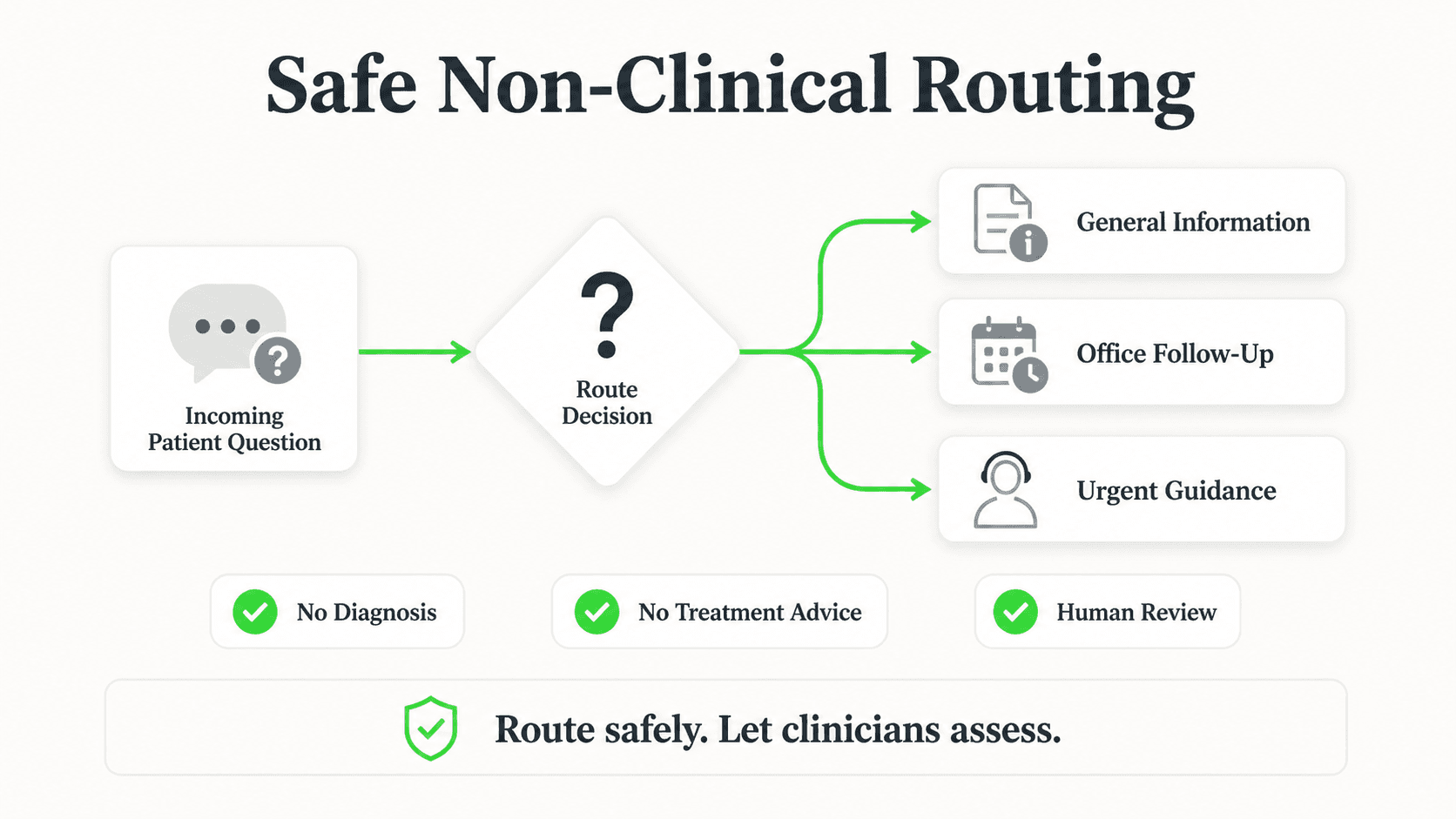
An AI dental receptionist routes dental emergencies to your team — it does not assess, diagnose, or advise on clinical matters. When a patient describes severe pain, swelling, fever, or trauma, the AI's job is to immediately surface your emergency contact details and ensure a human is alerted. It never substitutes for professional clinical judgment.
This is the area where clarity matters most, so let's be direct about what the AI does in an emergency scenario.
When a patient types something like "I have severe swelling on the left side of my jaw" or "I knocked out my tooth — what do I do?" at 11 PM, the AI does the following:
- Acknowledges the urgency — it does not give a scripted FAQ response. It recognizes the signal words your practice has configured as emergency triggers.
- Immediately surfaces your emergency contact — whether that's an on-call number, an after-hours line, or a specific staff member.
- Alerts your team — depending on your configuration, a notification goes to your designated staff so they can follow up.
- Does not tell the patient what is or isn't wrong with them. It does not say "that sounds like an abscess" or "you probably don't need emergency care." It connects the patient to a human who can make that call.
This is what "routing" means in practice. The AI is a triage gateway — it gets the right message to the right person fast. The clinical judgment happens with your team, not the AI.
A well-implemented AI dental receptionist actually reduces the risk of missed emergencies compared to a fully dark practice website, because there is now an active channel available at 11 PM. Without it, the patient sees a static website, guesses there's no one there, and either goes to an urgent care or waits until morning in pain — possibly worsening an infection.
The AI doesn't solve the clinical problem. It makes sure the clinical problem reaches a human who can.
New-Patient Capture: The Most Valuable Use Case
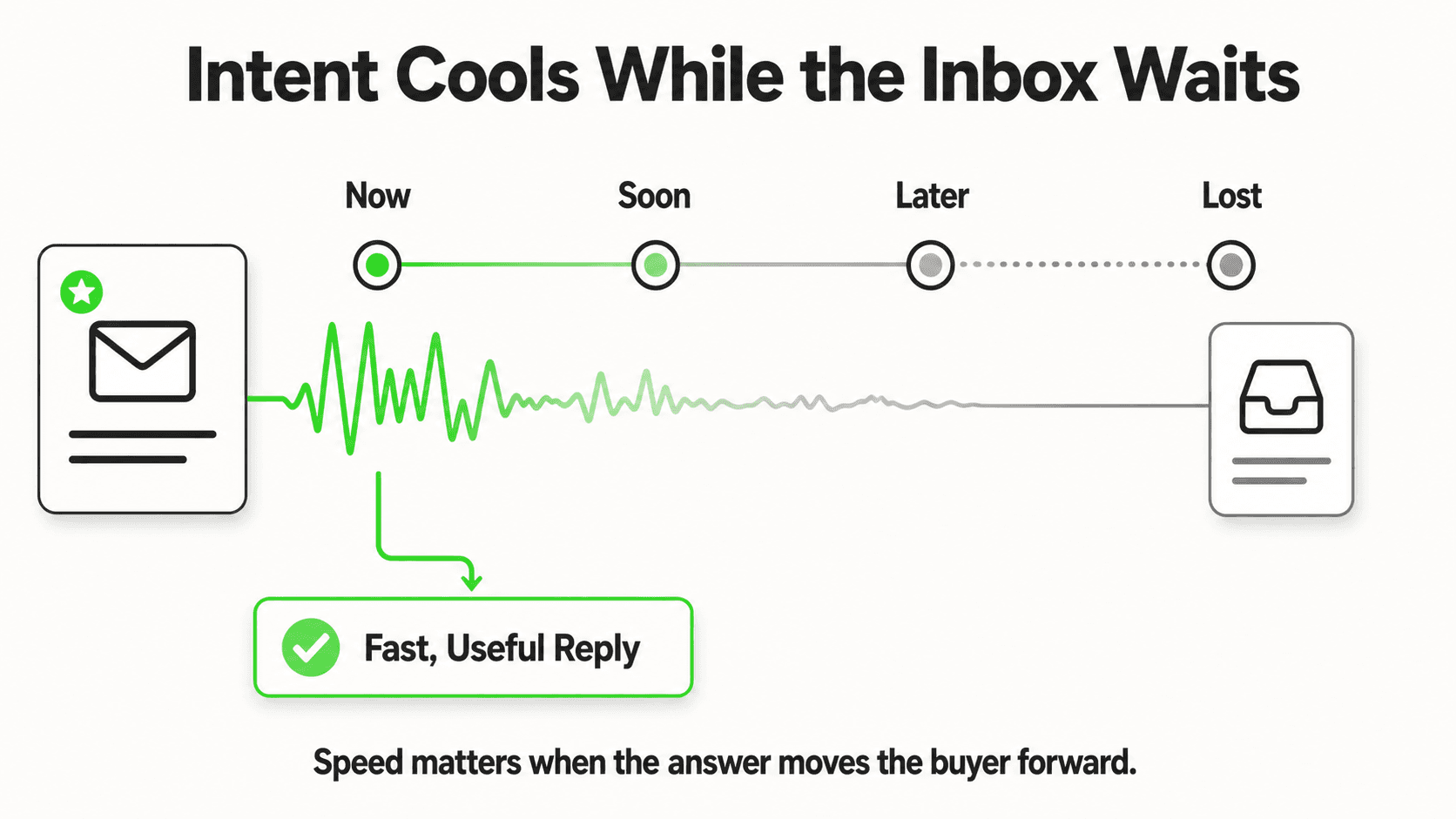
If you ask any dental practice manager where they feel the most acute pain, the answer is often some version of: "We're losing new patients we never even knew were interested."
The window between a potential patient discovering your practice and deciding to book elsewhere is short. Industry patterns consistently show that patients who don't get a response within minutes are likely to contact another provider. For a practice that generates meaningful revenue per new patient — especially for high-value procedures like implants, aligners, or full-mouth restorations — a handful of lost inquiries per month represents significant uncaptured revenue.
An AI dental receptionist changes this dynamic in three concrete ways.
First, it's available when patients look. The overwhelming majority of dental searches happen outside business hours — evenings, early mornings, weekends. These are exactly the times when your front desk is unavailable and your practice website is functionally silent. The AI answers immediately, every time.
Second, it captures contact details before the conversation starts. The lead form — name, phone or email, reason for visit — is collected at the start. Even if the patient drops off before finishing, your team has their information and can follow up. This is the difference between a missed inquiry and a warm lead in your CRM.
Third, it qualifies intent. By the time your front desk opens in the morning, the AI has already identified which inquiries are new-patient interest, which are existing-patient questions, and which are urgent matters needing immediate attention. Your team starts the day with a sorted queue, not a pile of unreviewed messages.
This is the core value proposition of an AI receptionist applied to dental: not replacing the human relationship, but ensuring no qualified inquiry falls through the cracks while humans are unavailable.
Insurance Questions: The Conversation That Kills Front-Desk Productivity
Insurance questions are one of the most time-consuming, repetitive tasks for dental front desk staff. "Do you take Delta Dental?" "Are you in-network with Cigna?" "What's my copay for a cleaning?" These questions have answers that are largely static and completely documentable — and yet they arrive all day, interrupting deeper work.
An AI dental receptionist handles these questions from your uploaded insurance and billing documentation. You provide the AI with a document listing accepted plans, in-network versus out-of-network status, and any general information you want patients to have about billing. The AI serves that information accurately and instantly.
What it does not do is access real-time eligibility data. It cannot query Delta Dental's API to tell a patient exactly what their annual maximum is or how much of their deductible has been met. For those specifics, it routes the patient to your billing team or provides instructions for checking their benefits directly with their insurer.
This is an honest and actually safer approach. Insurance eligibility is complex, changes frequently, and varies patient-by-patient. Providing real-time guarantees via AI would create more problems than it solves. Instead, the AI handles the 80% of insurance questions that have straightforward answers from your documentation, and routes the remaining 20% to a human who can verify specifics.
The result for your front desk: fewer interruptions on questions they've answered hundreds of times, more time for interactions that require actual judgment.
Pre-Op and Post-Op FAQ: Putting Your Instructions to Work
Your practice has already invested in creating pre-procedure preparation documents and post-care instructions. Patients are supposed to receive these at their appointment, but questions still come in — often after hours, when the patient is home and anxious about tomorrow's procedure or experiencing something unexpected after a same-day extraction.
This is an area where an AI dental receptionist delivers immediate, documentable value.
Upload your pre-operative instruction sheets for extractions, root canals, implant placements, and other common procedures. Upload your post-care documents. The AI serves this information on demand, word for word, grounded in what your practice has approved. When a patient asks "I'm having my wisdom teeth out tomorrow — can I eat?" at 10 PM, they get the answer from your document instantly, not a generic internet result.
This also reduces calls to your after-hours line for non-urgent questions. Patients who have a reliable channel to get their pre- and post-care questions answered are less likely to call the on-call number unnecessarily — freeing that line for genuine clinical emergencies.
The AI does not modify, interpret, or supplement your clinical instructions. It delivers them. Anything that requires clinical judgment ("I'm having unusual pain — is this normal?") routes to your team. The line between information delivery and clinical guidance stays clear.
Multilingual Patient Communication
A modern dental practice serves a linguistically diverse patient population. In many markets, a meaningful share of new-patient inquiries arrive in Spanish, Portuguese, French, Arabic, Mandarin, or other languages. When your website chat, Instagram DM, or WhatsApp only effectively serves English speakers, you are functionally invisible to a portion of the patients in your own geography.
A well-built AI dental receptionist detects the language a patient is writing in and responds accordingly, across 100+ languages, without requiring you to build separate workflows or hire multilingual front desk staff.
This capability extends to every channel. A patient who found your practice on Instagram and sends a DM in Spanish gets the same quality of response — hours, insurance basics, new-patient process, booking link — as an English speaker on your website. The lead form collects their contact details in either case. Your team receives the lead with a notation of the language used, so they can assign the right staff member for follow-up if needed.
This is not a peripheral feature. For practices in multilingual markets, it can be the single biggest driver of new-patient inquiries from communities that previously felt the practice was inaccessible.
How Setup Works
A common objection from practice managers is that building and maintaining an AI system sounds technically complex. The concern is understandable — dental practices are not software companies, and anything that requires ongoing technical maintenance creates real operational risk.
In practice, setting up an AI dental receptionist with Hyperleap AI is closer to onboarding a new team member than deploying enterprise software.
Step 1: Build the knowledge base. You gather the documents your practice already has — FAQ sheets, insurance lists, procedure descriptions, pre- and post-care instructions, your hours, your services menu, your booking process. These get uploaded to the platform. The AI learns from your documents, not from generic internet content.
Step 2: Configure the lead form. You decide what information to collect before a conversation starts. At minimum: name, email or phone, and reason for contact. You can add fields relevant to your intake process.
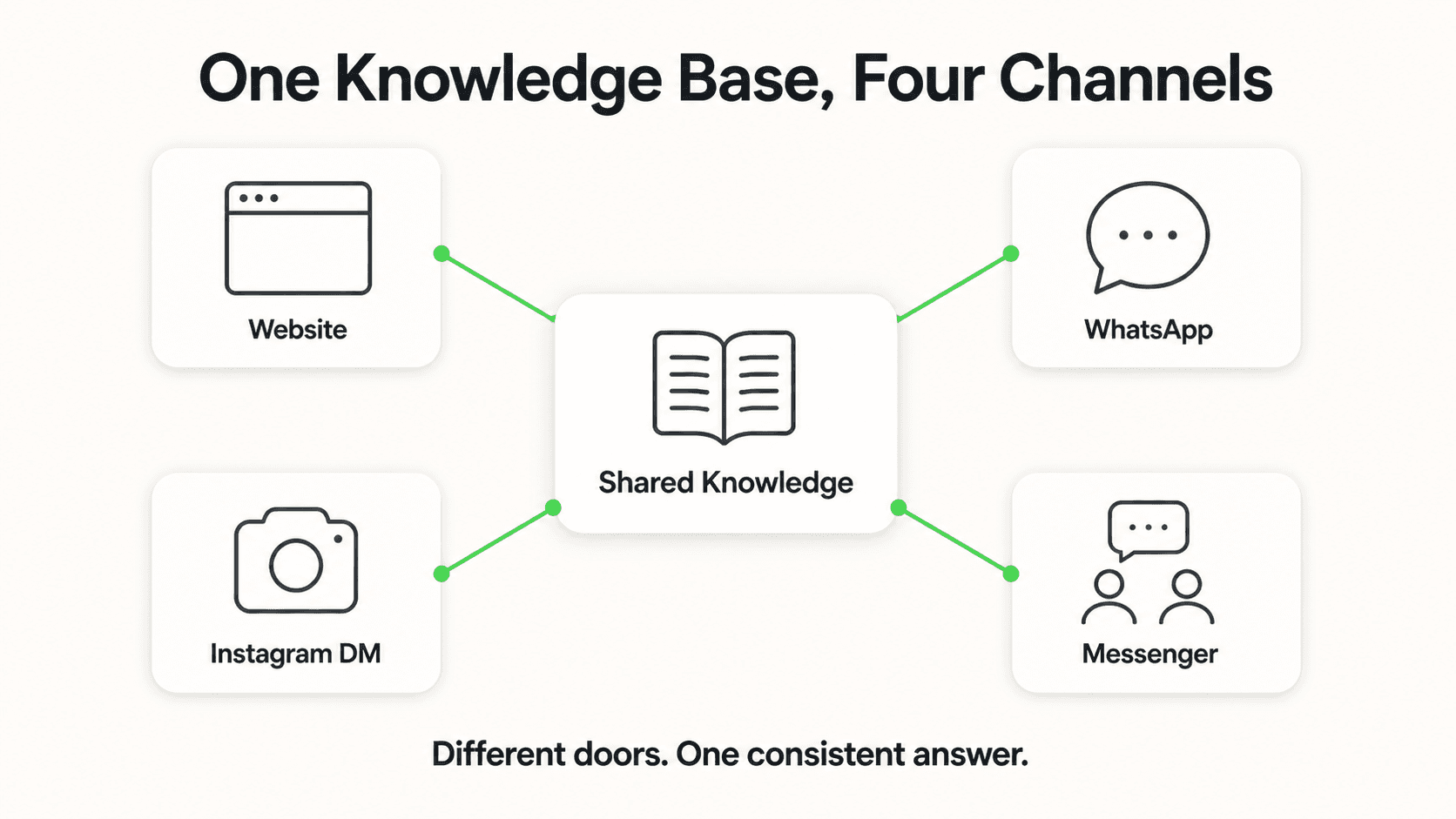
Step 3: Set up channels. The AI agent can be deployed on your website as a chat widget, on WhatsApp Business, on Instagram DM, and on Facebook Messenger. You connect the channels through the platform — no custom development required for standard deployments.
Step 4: Configure emergency routing. You define which keywords or phrases trigger emergency escalation and specify where the alert goes — a staff member's phone, a shared inbox, or an on-call contact.
Step 5: Test and launch. Before going live, you run the agent through your actual patient scenarios. Where it gives incomplete answers, you add to the knowledge base. Where routing needs adjustment, you update the configuration.
Ongoing maintenance is primarily knowledge base updates — when your insurance list changes, when you add a service, when your hours change for the holidays. Those updates are document uploads, not code changes.
For practices that want help with the build, Managed Setup ($299 Free) means the Hyperleap team builds the agent for you based on your materials.
How Hyperleap AI Fits Your Dental Front Desk
Hyperleap AI is an AI agent platform built for businesses that need a reliable, always-on messaging front desk — not a demo, not a chatbot that deflects questions, but a system grounded in your own knowledge that actually answers what patients ask.
Here is what that looks like specifically for a dental practice:
Document-grounded answers. The AI does not pull from the internet. It answers from the documents you upload. When a patient asks about your sedation options, the AI uses your sedation FAQ. When a patient asks about payment plans, it uses your financing document. Nothing is fabricated.
Lead form before chat. Contact details are collected before the conversation starts. Every inquiry — no matter how short — results in a lead your team can follow up with.
Email summary to your team. After each conversation, your designated inbox gets a clean summary: who the patient is, what they asked, what the AI answered, and what action (if any) is needed from your team. Your front desk starts each morning with context, not question marks.
Booking in the chat. If you're on Pro or Max and schedule through Calendly or Cal.com, the AI reads your live availability, offers real open times, and books the slot in the conversation — the patient gets the calendar invite by email (in-chat booking needs Calendly Standard or higher). If you're on Plus, or schedule in your practice-management system or another tool, it shares your booking link instead; it does not connect to your PMS calendar.
Multi-channel from day one. Website, WhatsApp, Instagram DM, Facebook Messenger — all from one platform, one knowledge base, one lead inbox. You don't manage separate bots per channel.
REST API and webhooks for your workflow. Hyperleap AI does not have native integrations with practice management software like Dentrix, Eaglesoft, or Open Dental. Instead, it exposes a REST API and, on Pro and Max, webhook events (on lead creation, new message, conversation started) that your existing tools or a developer can connect to. This is the correct framing: the AI handles the patient-facing messaging layer; your PMS handles clinical and scheduling data; the connection between them, if needed, goes through your development resources or a third-party integration.
Pricing. Plans start at Plus ($40/month) for a single chatbot, Pro ($100/month) for two chatbots and white-label branding, and Max ($200/month) for up to five chatbots. All plans include a 7-day free trial; a credit card is required. There is no free plan. Suite ($99 one-time add-on on Plus/Pro/Max) unlocks AI Tools, AI Assistants, and API access. Managed Setup is $299 Free if you want the team to build the agent for you.
This is not a phone answering service, a telemedicine platform, or a practice management system. It is the conversational AI for customer service layer that sits between a patient's question and your team — available at every hour your team isn't, and genuinely useful in every hour they are.
What This Means for Your Front Desk Team
There is a version of this conversation that frames AI as a replacement for front desk staff. That framing is wrong and counterproductive.
Dental front desk teams handle tasks that require real human judgment: navigating upset patients, coordinating complex scheduling across providers, managing insurance claim disputes, building the long-term relationship that keeps families returning for decades. No AI replaces that.
What AI replaces is the 40-to-60 repetitive questions per day that consume front desk time without requiring human judgment: "What are your hours?" "Do you take my insurance?" "Can I get a cleaning next week?" "How do I prepare for my extraction?" These are questions with known, documentable answers. Answering them takes the same amount of human effort every time, and there is no upside to having a skilled team member answer the same question for the five hundredth time.
When the AI handles the repetitive volume, the front desk reclaims time for the work that actually requires them. They make more progress on insurance follow-up. They spend more time with patients who are in the office. They respond faster to the new-patient leads the AI has already collected and organized.
This is the correct model: AI as a productivity multiplier for a skilled front desk team, not a replacement for the humans who make a dental practice feel like a place patients want to return to.
Frequently Asked Questions
Does an AI dental receptionist handle phone calls?
No. An AI dental receptionist as described in this guide is a messaging-based system. It operates on text channels: your website chat widget, WhatsApp Business, Instagram DM, and Facebook Messenger. It does not handle inbound phone calls, make outbound calls, or interact with your phone system in any way. If patients call your main line, they reach your existing phone setup — answering service, voicemail, or your team. The AI covers the growing share of patient inquiries that arrive via chat and social messaging channels.
Does it integrate with Dentrix, Eaglesoft, or Open Dental?
There is no native integration with practice management software. Hyperleap AI does not connect directly to Dentrix, Eaglesoft, Open Dental, or other dental PMS platforms. The AI operates as the patient-facing messaging layer and handles its own lead data. For practices that want to connect lead data or conversation summaries to their PMS or CRM, Hyperleap AI exposes a REST API and, on Pro and Max, webhook events (lead created, new message, conversation started, reply sent) that a developer or integration tool can use to build that connection.
Can it diagnose whether a patient's symptom is an emergency?
No, and it should not. An AI dental receptionist routes emergency situations to your team — it does not assess clinical severity. When a patient describes severe pain, swelling, trauma, or other urgency signals, the AI immediately surfaces your emergency contact and alerts the designated staff member. The clinical judgment — whether the situation requires immediate care, what the patient should do, whether it is truly an emergency — belongs with your clinical team. The AI's job is to make sure that judgment call reaches a human fast, not to substitute for it.
What languages does it support?
Hyperleap AI supports patient conversations in 100+ languages. The AI detects the language a patient is writing in and responds accordingly, without requiring separate configurations per language. This applies across all channels: website chat, WhatsApp, Instagram DM, and Facebook Messenger. Your knowledge base documents are uploaded in your primary language; the AI handles translation in its responses.
Is patient data handled securely?
Hyperleap AI applies standard security practices to data transmitted through the platform, including HTTPS encryption in transit. However, Hyperleap AI does not make HIPAA certification claims. Practices operating under HIPAA should evaluate the platform's data handling against their compliance requirements — see what a HIPAA compliant AI chatbot needs to cover — and consult with their compliance officer or legal counsel before deploying any AI tool that will handle patient information. The lead form data and conversation summaries generated by the platform are stored within the Hyperleap AI system and accessible to your team through the dashboard.
The Practice That Replies at Midnight Wins the Morning
Dental patients have more choices than ever. A patient searching for a new dentist on a Sunday evening will contact the practices that respond. If your digital front desk is dark — no chat, no answer to the Instagram DM, no response to the WhatsApp message — you are not in the running.
An AI dental receptionist does not make your practice better clinically. It makes your practice more reachable, more responsive, and more likely to capture the new-patient interest that your clinical quality has already earned.
The front desk team you have is good. Give them a tool that handles the volume, so they can focus on the judgment calls that actually require them.
Industry Solutions
See how AI chatbots work for these industries:
Related Articles
AI Medical Receptionist: The Complete Guide for Clinics
An AI medical receptionist answers patient FAQs, captures new-patient inquiries, and shares booking links 24/7 across chat — reducing front-desk load without replacing your team.
AI Receptionist for Med Spas: What It Actually Handles
An AI receptionist for med spas answers treatment and pricing questions, captures consultation requests on Instagram DM, and routes anything clinical to staff.

AI Receptionist for Pharmacies: The Non-Clinical Front Desk
An AI receptionist for pharmacies answers hours, services, and insurance questions 24/7 — and routes every medication question straight to your pharmacist.

AI Receptionist for Daycares and Preschools
An AI receptionist for daycares answers parent enquiries, shares tour links, captures waitlist leads, and routes sensitive questions to the director.