AI Front Desk Leads to CSV: A Follow-Up Workflow
Turn a chatbot lead export into a usable follow-up list with field checks, careful deduplication, clear ownership and a synthetic CSV example.

Downloading a lead file feels like finishing a task. For the person who has to follow up, it is often the beginning of a different one: understanding the columns, finding the actual question, checking repeated records and deciding who should reply. A CSV full of contact details is not yet a working queue.
A practical chatbot lead export workflow preserves the original file, checks the data in a working copy and adds only the operational fields needed for follow-up. It keeps customer-provided facts separate from staff decisions. It also avoids treating an exported row as proof that a person has been contacted, qualified or converted.
This guide walks through that process using entirely synthetic examples. The sample columns are an editorial worksheet, not a promise that your export has identical headers. Hyperleap AI provides a lead export; inspect the actual file from your account before mapping it into Excel or another system. The objective is a small, reviewable follow-up list, not an unverified automatic CRM pipeline.
What Does a Lead Export Give You?
A lead export gives your team a portable snapshot of captured information. It is useful for review, manual follow-up preparation or an import process that you separately configure. It does not establish that the information is complete, that a contact method is verified or that another application has accepted the records.
Hyperleap's current Leads page includes an Export menu with separate Export Leads and Export Conversations actions. The lead action downloads a file using the lead-export path; the current client handles that as CSV. A conversation export is a different action and should not be confused with a flat lead list. Interface details can change, so confirm the options in your account when following this workflow.
The lead-export request uses a date range and selected tags in the current implementation. Do not assume that every search or traffic-source filter visible in the list is automatically applied to the exported file. Check the resulting scope against what you intended to review, especially before distributing the file to another person.
An AI lead-capture workflow is only useful if staff can connect a record to the customer's actual need. The lead-summary guide explains how a concise account differs from a transcript. An export may carry some useful context, but your follow-up process still needs to identify what remains unresolved and who is responsible.
Keep the snapshot concept in mind throughout. A file downloaded this morning does not automatically reflect a corrected email or a new conversation this afternoon. If you refresh the export, reconcile it deliberately with your working list rather than overwriting staff notes or assuming every repeated row is new work.
Use synthetic examples and protect real exports
All names, addresses and enquiry references below are fictional. Real exports can contain customer information. Store and share them through your organization's approved process, limit access to people who need it and do not paste real records into public examples or unrelated tools.
Why a Download Becomes a Messy Follow-Up List
The exported scope is assumed rather than checked
A reviewer may expect the file to match the current screen exactly. If a visible filter is not part of the export request, the file can contain a different set of records. Record the intended date range and selection, then inspect representative rows. A familiar filename is not evidence that the scope is correct.
Spreadsheet formatting changes identifiers
Contact references, postal codes and telephone-like values should not be treated as quantities to calculate. Spreadsheet import settings can affect how text and dates are interpreted. Microsoft's CSV import guidance explains how to control import behavior, including preserving leading zeros as text. Check the imported values against the original before using them.
Repeated contacts are treated as duplicate enquiries
The same person can ask about different services or return with a new question. Two rows sharing an email address are not automatically the same task. Deduplication should consider the request and source reference, not merely remove everything after the first matching contact value.
Staff decisions overwrite customer facts
A working column labeled “status” can become confusing if it mixes customer intent with staff progress. “Wants a quote” and “reviewed by staff” describe different things. Keep the original enquiry separate from the team's next action, ownership and follow-up evidence.
The CRM integration guide covers broader connection choices. This article deliberately starts with a manual, inspectable workflow. A small team benefits from understanding the record before automating its movement, because automation can distribute the same misunderstanding more quickly.
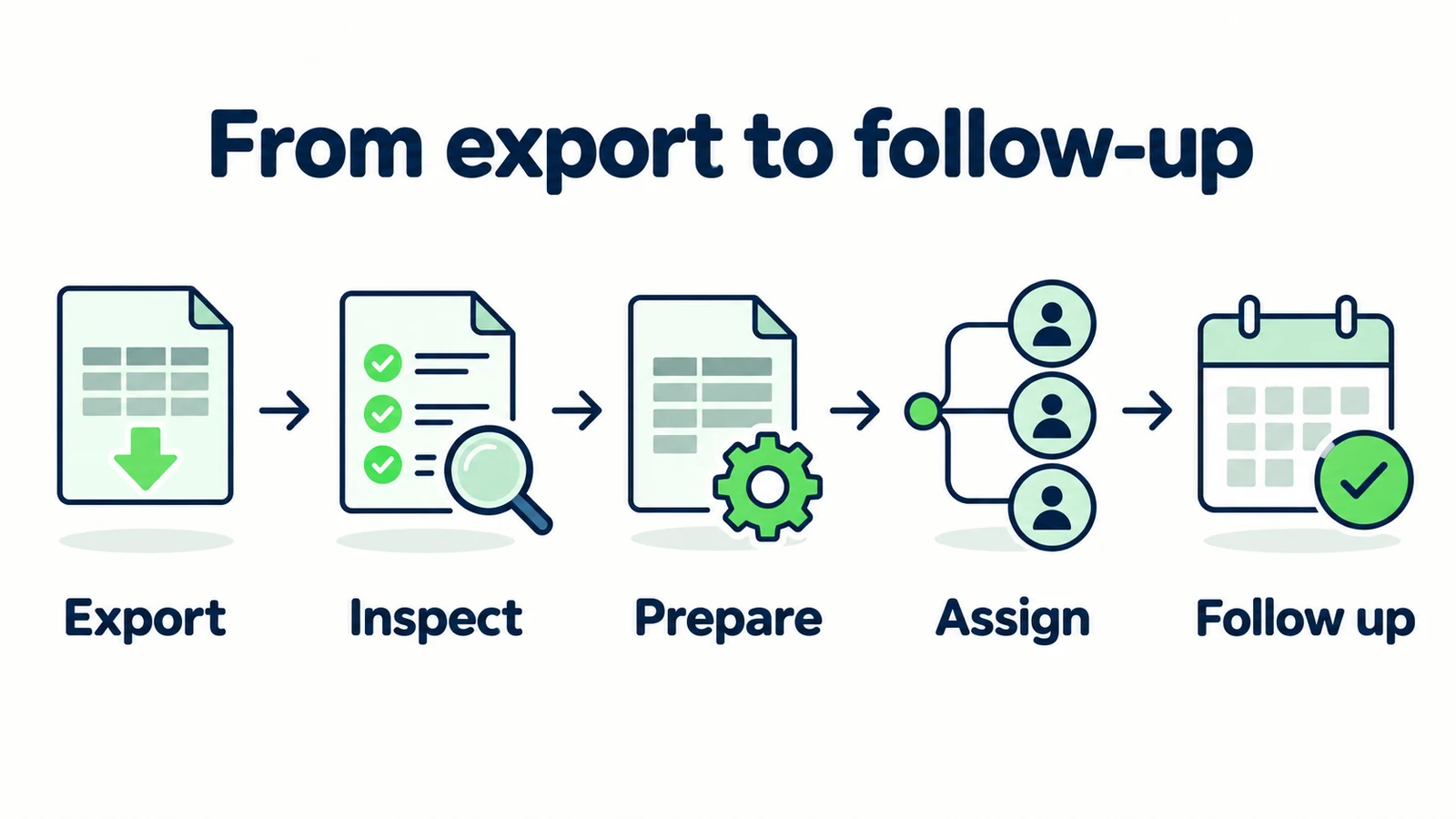
7 Steps From CSV Download to Useful Follow-Up
1. Define the question the export should answer
Before downloading, write the purpose in one sentence. “Review enquiries from the selected period that still need a staff reply” is clearer than “get all leads.” The purpose determines the date range, the people who need access and the additional fields you should create in the working copy.
Record the chatbot or business context, selected range and any tags used. Keep the date convention clear enough that another reviewer can reproduce the selection. If the file contains timestamps, establish how you will interpret their time zone rather than assuming it matches the viewer's location.
Do not change the scope halfway through the review without documenting it. A comparison of one week's enquiries with a different period's follow-up decisions can produce misleading conclusions even when every individual row is accurate.
Start with a manageable, relevant slice. The goal is to validate the process, not to create the largest file possible. Once the team can explain how a row becomes a next action, it can apply the same checks to a broader period. The lead qualification guide can help define which enquiry context matters to that decision.
2. Preserve the original and inspect a working copy
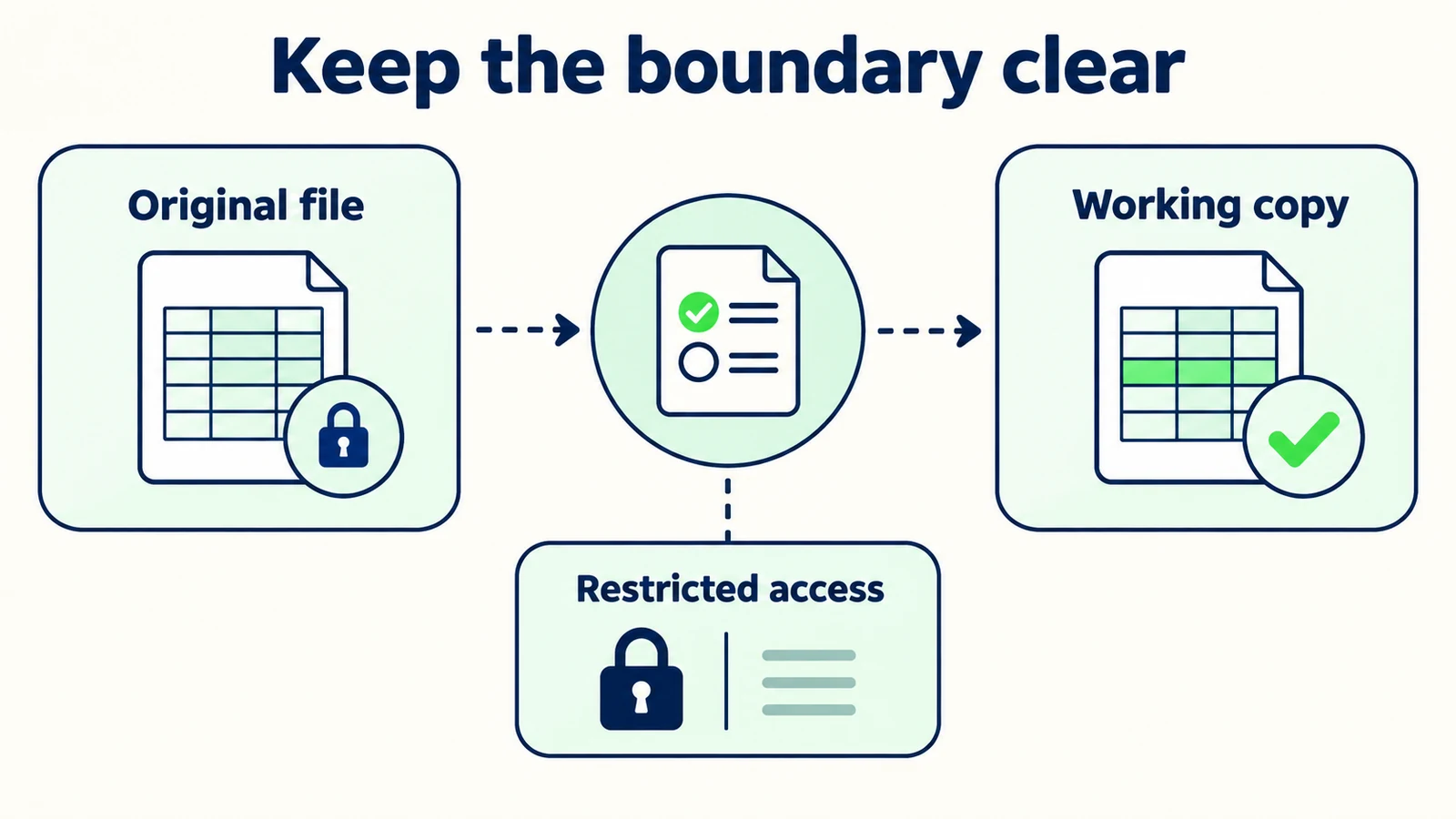
Keep the downloaded file unchanged in an approved location, and make a separate working copy for cleanup and staff notes. This creates a clear boundary between source data and your interpretation. If a formatting mistake occurs, you can compare with the original instead of trying to reconstruct what the system produced.
Inspect the headers, sample rows and empty fields before building formulas or mappings. Does the file contain the expected kind of record? Are multi-line descriptions readable? Are contact values preserved? Is the intended date range represented? A quick inspection is more useful than assuming a successful download means a correct follow-up list.
When importing into Excel, choose settings appropriate to the actual data and review fields that should remain text. Avoid saving over the original as part of this inspection. Microsoft documents the difference between opening and importing text files in its guidance linked above; use the method appropriate to your version and task.
Do not treat a blank as a technical failure automatically. The customer may not have supplied the detail, or the field may not apply. Preserve the difference between missing information and a staff decision to leave a field unused. That distinction becomes important when you decide whether another customer question is needed.
3. Map source fields to a small review worksheet
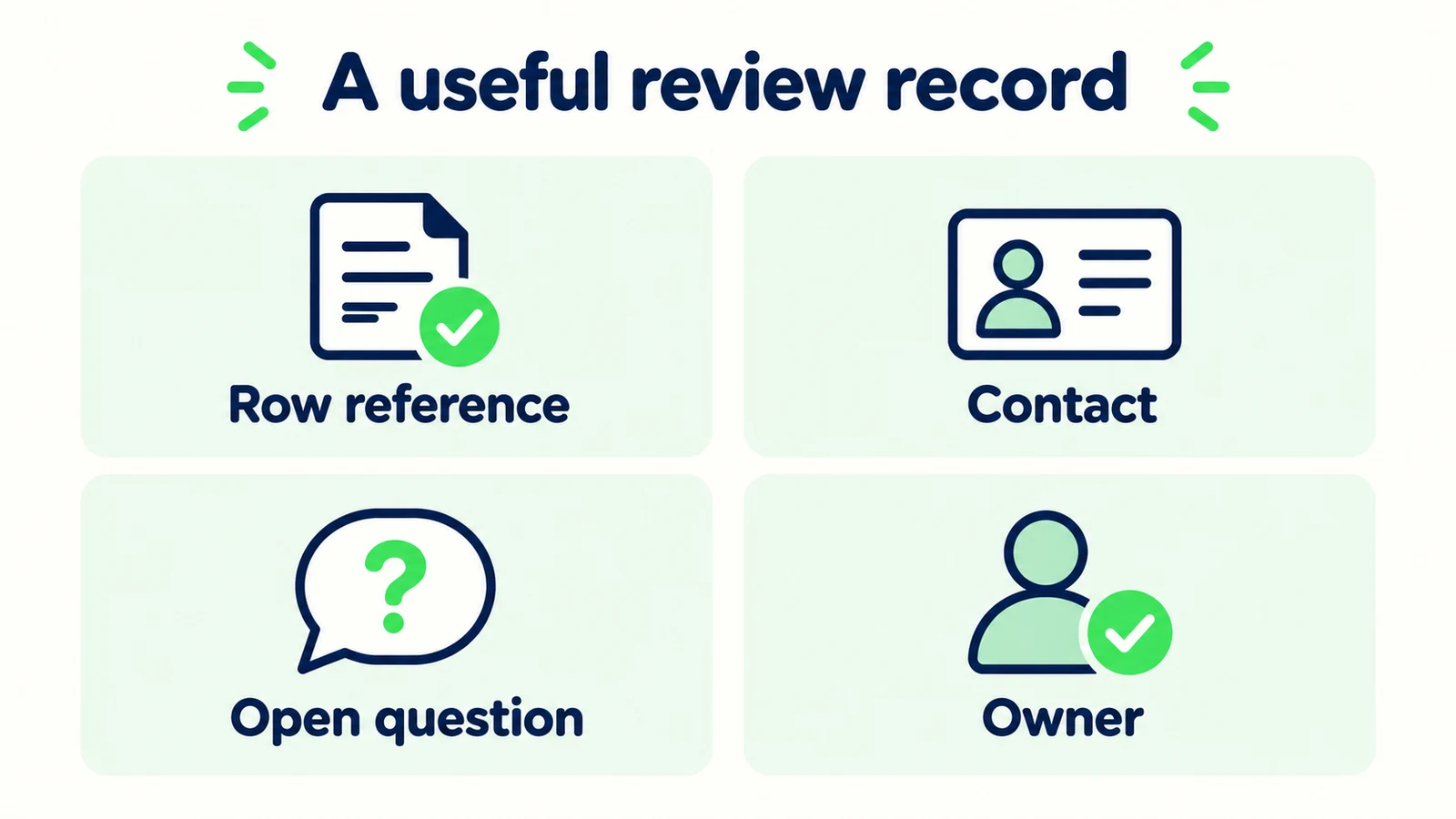
Your working list should make the customer's request actionable without pretending to be a copy of every product field. Map the actual export headers to a stable set of review concepts. Add staff-only columns separately and label them clearly.
| Review concept | Source or responsibility |
|---|---|
| Record reference | Use the actual export reference if present |
| Contact method | Customer-provided information from the record |
| Requested help | The enquiry or an accurately reviewed summary |
| Missing detail | Staff review of what is needed next |
| Next-action owner | Team decision, not a customer fact |
| Follow-up evidence | Staff-recorded action or appropriate system reference |
Do not invent values to make the mapping complete. If the export lacks a stable reference, document the limitation and use an internal review reference without presenting it as a product-generated identifier. If a field exists in the conversation but not the file, retrieve it through an authorized review process rather than guessing.
For a home-services team, “requested help” might distinguish a general service question from a quote request. For a hotel, it might distinguish room information from an event enquiry. The column structure can stay small while the task description remains specific to the business.
4. Review possible duplicates as a decision, not a deletion rule
Use repeated contact values as a signal to inspect, not proof that a row should disappear. The same email can represent a corrected enquiry, a second service request or several people using a shared business address. Removing rows mechanically can erase work the team still needs to handle.
Synthetic review example:
| Review reference | Contact | Request | Review decision |
|---|---|---|---|
| DEMO-A | alex@example.com | Ask about installation scope | Keep as a distinct request |
| DEMO-B | alex@example.com | Correct contact preference for DEMO-A | Link as a correction after review |
| DEMO-C | alex@example.com | Ask about a different service | Keep as a separate task |
These are editorial references, not actual export headers or customer records. The point is that identity similarity and task similarity are different questions. Staff should examine the relevant conversation context before deciding that one record replaces another.
Keep a reversible note of any consolidation. Record which rows were related and why, without modifying the original file. If the team later discovers that two apparently similar enquiries were separate, it should be possible to reconstruct the decision and restore the missing task.
5. Add one next action and one accountable owner
A follow-up list becomes useful when each actionable row has a clear next step. “Contact lead” is often too vague. “Ask whether the visitor needs installation or repair” or “send the approved group-enquiry contact route” tells the owner what to do and why.
Keep ownership as a human operating agreement. These worksheet columns do not imply native automatic assignment, service-level timers or staff scheduling in Hyperleap AI. Your team can use its existing task process, provided someone accepts the responsibility and can access the context needed to act.
Do not assign an owner merely by typing their name into a file they never see. Confirm the handover method and how they indicate that the request has been reviewed. A shared spreadsheet is not automatically a working queue if nobody has agreed when to check it.
The unified-inbox operating guide describes the same distinction between visibility and responsibility. A file extends visibility outside the inbox; it does not remove the need for ownership. If a request is not actionable, record the reason instead of forcing it into a sales follow-up category.
6. Import elsewhere only after a small mapping check
If you intend to import the working file into a CRM or another business tool, inspect that system's current requirements and use a small test through your approved process. Confirm which fields are required, how repeated records are handled and whether the import creates new records or updates existing ones.
Do not describe a manual import as native synchronization. Exporting a CSV from one product and uploading it to another is a human-managed transfer. Changes on either side will not necessarily appear on the other side afterward.
Keep the destination mapping separate from the original source headers. A field called “company” in one system may have a different purpose in another. Validate the meaning, not only the spelling. Review a sample imported record before assuming the whole batch is usable.
Technical alternative: a separately configured integration
Hyperleap AI provides a REST API and webhooks for custom connectivity. Those interfaces can support an implementation designed by your team, but they are not a claim of a shipped native CRM connector or an already configured sync. Define authentication, field mapping, retries, duplicate handling and monitoring before relying on a custom transfer. Keep customer data within approved systems and verify the receiving record directly.
For many small teams, a reviewed manual file is a sensible starting point. Automation becomes useful after the ownership and mapping rules are clear, not as a substitute for deciding them.
7. Record follow-up evidence and reconcile the next export
The working list should distinguish planned work from completed work. “Owner assigned,” “reply prepared” and “reply sent” are different states in your team process. Use evidence appropriate to the action rather than marking a row complete because someone opened it.
For a sent reply, keep a reference available through the authorized system. For an unresolved enquiry, record the remaining question. For a customer who did not request follow-up, avoid creating an outreach task merely because contact information exists in the export.
When you download a newer file, compare it with the previous review scope. Preserve staff notes and identify genuinely new or changed enquiries. Do not overwrite the working queue wholesale and lose ownership decisions. If reconciliation cannot be done reliably, narrow the process until the team can explain what is being compared.
A closed review task is not proof of a sale. A click is not proof of a completed booking. The chatbot measurement guide can help separate activity from business outcomes. Keep the export workflow focused on what it can establish: which requests were reviewed, what action was taken and what remains open.
Turn captured enquiries into clearer follow-up
Collect useful customer context and give your team a practical starting point for its next action.
Start for freeA Worked Synthetic Follow-Up List
Consider a fictional service business reviewing a small export. One visitor asked for published opening hours, one requested an installation quotation and one corrected the email associated with that quotation. A raw count of rows would treat all three as separate leads. A review recognizes different tasks.
The opening-hours conversation may require no staff action if the approved answer resolved the question. The quotation needs a person to clarify the job scope before making a commercial commitment. The correction needs to remain connected to that enquiry rather than becoming a second sales task. None of these conclusions should be inferred from the email column alone.
The team's working note might read: “Quotation enquiry remains open; updated contact value appears in the later conversation; owner to review both before replying.” That is a more responsible instruction than automatically discarding one row or emailing both addresses. It preserves the evidence needed for a person to decide.
This is an illustrative workflow, not a customer result. To measure your own improvement, examine how often staff can identify the next action without reopening several unrelated records, and how often reconciliation finds an incorrect assumption. Do not publish a time-saving or conversion figure until you have a defined method and actual observations supporting it.
Create an Export Checklist Your Team Can Repeat
Give the process a short written checklist and an owner. Record the intended scope, preserve the source file, inspect values, review possible duplicates, assign next actions and reconcile later exports. The checklist should describe your actual tools rather than a hypothetical perfect workflow.
Before sharing the working file, confirm that every recipient needs its contents. A manager reviewing aggregate workload may not need customer contact details. A staff member handling a particular enquiry may not need the entire export. Follow your organization's access and retention process instead of distributing a broad file simply because it is easy to attach.
Run the first review with synthetic or appropriately authorized sample records. Check the import behavior, column mapping and receiving team's interpretation before adopting the process for routine work. Make a note of any missing product field rather than silently replacing it with an assumption.
Hyperleap AI's quick-start path can be live in under five minutes; this operational review is additional work around captured enquiries. Consult the current plans for product choices. The important first milestone is not a large export. It is a small set of requests whose scope, context and next action your team can explain accurately.
Frequently Asked Questions
Does Export Leads produce the same file as Export Conversations?
No. They are separate actions in the current Leads interface. The lead-export path is handled as a CSV download by the current client, while conversations use their own export path. Inspect the selected action and resulting file rather than assuming both contain the same structure.
Can I open the lead CSV in Excel?
Yes, using Excel's text or CSV import facilities. Review how text identifiers, contact values and dates are interpreted before editing or saving. Preserve the original file and compare a sample of imported values so formatting changes do not silently alter the information you intend to use.
Does the export automatically match every visible list filter?
Do not assume that. The current lead-export request uses the date range and selected tags. Inspect the exported scope, especially if you were using search or traffic-source filters in the list. Record the selection you intended and verify representative rows before using the file.
Should repeated email addresses be deleted as duplicates?
Not automatically. One person can make several distinct enquiries or correct a previous record. Review the request and relevant source context before consolidating rows. Keep the original export unchanged and record why any working-list records were related or removed from the active queue.
Does a CSV import create a live CRM integration?
No. A manual import is a transfer at a point in time, not ongoing synchronization. Check the destination tool's mapping and duplicate behavior, then verify a sample record. A custom API or webhook implementation is a separate project with its own requirements and validation.
What should count as completed follow-up?
Use the action your team actually verified, such as a sent reply or an accepted internal review. Opening a row or assigning an owner is not the same as contacting the customer. Keep follow-up activity separate from sales or booking outcomes unless those outcomes have their own evidence.
A Useful Export Ends With a Clear Decision
A CSV is a transport format, not a follow-up strategy. Its value comes from the care around it: a defined selection, preserved source values, thoughtful duplicate review and a person who knows the next action. Keep those steps visible, and the file becomes a practical bridge between captured enquiries and responsible staff work.
Start with one small review period. Confirm the export scope, build a working copy and ask a colleague to act on a sample record without guessing. When that works, expand the process. Automate later only where the manual rules are already clear enough to verify.
Give your team more useful lead context
Build an AI front desk that answers approved questions and captures enquiries your team can work with.
Start for freeIndustry Solutions
See how AI chatbots work for these industries:
Related Articles

Seller Enquiries: A Real Estate Intake Template
Use a seller enquiry template to capture property type, broad area, timing and the next agent conversation without promising valuations or collecting documents.

Ask for Contact Details Without Blocking the Answer
Use practical contact-request scripts that explain the purpose, respect customer choice and keep useful answers separate from lead capture.

Real Estate Lead Handoff: The Agent-Ready Checklist
Use a real estate lead handoff checklist to preserve buyer intent, property context, unanswered questions and the next action without inventing certainty.

Wedding Venue Tour Enquiries: A Question Pack
Prepare better wedding venue tours with questions on date flexibility, guest range, event shape and priorities, plus a copy-ready host handoff.