Chatbot Lead Summaries: What Your Team Should Receive
A raw transcript creates work. A chatbot lead summary — contact details, intent, qualification signals, timeline, and a next action — means your rep is ready to call in 30 seconds.

TL;DR: A chatbot lead summary is the structured output your team should receive the moment a chatbot conversation ends — not the raw transcript, but a processed record containing contact details, the visitor's stated intent in their own words, qualification signals, timeline, a priority flag, and a recommended next action. This article covers the seven fields every great summary needs, why a transcript is not a substitute, how the summary is generated and delivered via webhook in real time, and what the rep does with it in the first thirty seconds. Use it as a spec when evaluating chatbot tools.
The Difference Between a Transcript and a Lead Summary
When a chatbot captures a lead, there are two possible outputs your team can receive: the raw conversation transcript, or a structured lead summary. These are not interchangeable. One creates work; the other eliminates it.
A raw transcript is the verbatim back-and-forth between the chatbot and the visitor. Every message, every button click, every digression is recorded in chronological order. To extract what the rep actually needs — who the person is, what they want, when they need it, and what to say in the first call — someone has to read the whole thing and reconstruct the relevant context manually. For a two-minute chat, that's an eight-minute reading exercise, every time, for every lead.
A chatbot lead summary is processed output. The conversation happened, but what reaches your rep is a structured record: seven labeled fields, each answering a specific question the rep would otherwise have to answer themselves before they could place the call. The rep reads it in thirty seconds and dials with context.
The distinction matters especially at volume. When you have three leads a day, reading transcripts is manageable. When you have thirty, it becomes the bottleneck. A rep who spends the first ten minutes of every call doing the qualification work the chatbot should have handled is not working an optimized pipeline — they are running a manual triage operation on top of a tool that was supposed to automate it.
A well-designed AI lead capture chatbot captures the conversation. A well-designed lead summary workflow is what makes that conversation actionable.
Anatomy of a Great Chatbot Lead Summary
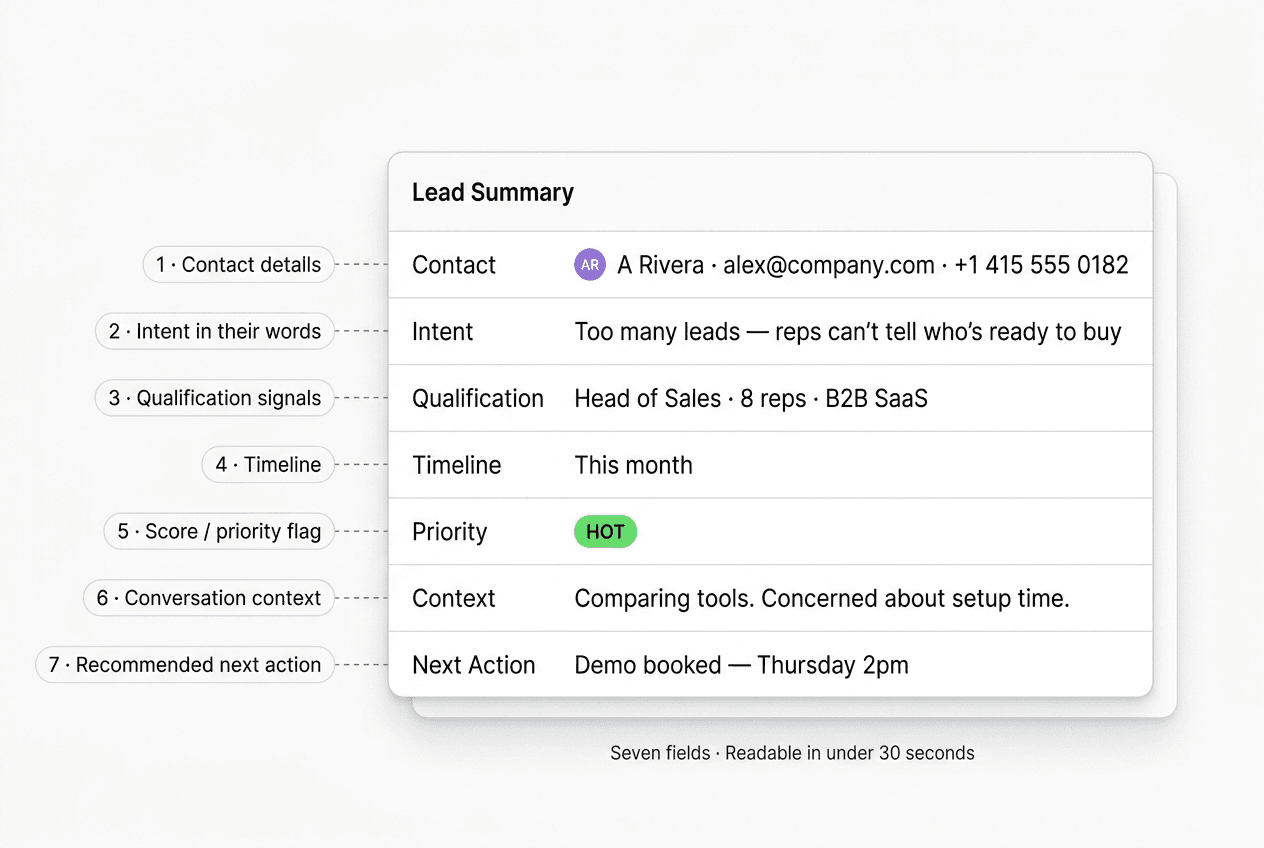
The following seven fields form the minimum viable lead summary. If a chatbot tool you are evaluating cannot produce all seven at conversation end, that is a capability gap — not a minor feature.
1. Contact Details
Name, email address, and phone number if collected. This is the foundation. Without verified contact information, the rest of the summary is interesting context that leads nowhere actionable.
For industries where phone number accuracy is critical — fintech, real estate, healthcare intake, legal — the contact details field should note whether the number has been verified. An OTP verification step during the chat confirms the visitor can actually receive calls at the number they provided, which is not the same as them typing any number into a field.
2. Intent in the Visitor's Own Words
This is the most valuable field in the summary. Not a category label the chatbot applied — the actual phrase or sentence the visitor used to describe what they are trying to solve.
There is a meaningful difference between a summary that says intent: "lead qualification" and one that says intent: "We're getting too many website leads but our reps can't tell which ones are real buyers — we need to stop wasting time on people who aren't ready." The second version tells the rep how to open the call, which objection to expect, and what the visitor's definition of success looks like.
Chatbots that distill intent into a generic dropdown value are discarding the signal. The rep's first sixty seconds on the call will go better if they heard it in the visitor's own words.
3. Qualification Signals
The structured data your qualification framework was designed to collect: company size, industry, role or title, product or service interest, budget range if asked, and any other ICP signals that determine whether this lead is worth a senior rep's time.
These are the fields your sales team defined when they built the chatbot flow. If the chatbot ran a BANT or ICTT sequence, the qualification signals section contains the completed fields from that sequence — not the full exchange, just the captured values.
For a detailed treatment of how to structure the qualification logic that produces these signals, the lead qualification chatbot article covers the frameworks in depth.
4. Timeline
When does the visitor need a solution? This single field routes leads into the right follow-up motion more reliably than almost any other signal.
A visitor who says "this month" goes into the rep's immediate call queue. A visitor who says "just exploring" goes into a nurture sequence. A visitor who says "Q3 budget" gets a calendar reminder for six weeks out. The timeline field makes that routing automatic — if it is present in the summary and connected to your CRM workflow, the rep does not have to make a judgment call.
5. Score or Priority Flag
A hot/warm/cold classification — or a numeric score — derived from the qualification signals and timeline. This is the field that tells your rep which conversation to handle first when they walk in on Monday morning and have twelve new leads waiting.
The scoring logic is defined once in your chatbot configuration: what combination of intent + company fit + timeline constitutes a "hot" lead for your business. The chatbot applies that logic consistently to every conversation. The summary surfaces the result so the rep does not have to re-derive it.
6. Conversation Context
Any signals from the conversation that do not fit neatly into a structured field but would change how a rep approaches the call: objections the visitor raised, competitors they mentioned by name, specific requirements or constraints they expressed, or questions they asked that went unanswered.
This is the field that separates a good summary from a great one. A rep who knows before dialing that the prospect is comparing two specific tools, has a hard 90-day deadline, and is concerned about setup complexity — that rep walks into the call with a plan. A rep who doesn't know any of that is essentially starting from a cold discovery call even though the visitor already shared the information.
7. Recommended Next Action
What should happen with this lead right now? Auto-booked meeting (if the chatbot shared a booking link and the visitor clicked it), send pricing overview, route to enterprise sales, add to nurture sequence, or escalate to a senior rep.
This field closes the loop between lead capture and lead action. Without it, the summary is information. With it, the summary is a work instruction.
Example Lead Summary Card
Here is what a complete, well-structured summary looks like for a B2B SaaS company:
LEAD SUMMARY — Alex Rivera
━━━━━━━━━━━━━━━━━━━━━━━━━━━━
Contact:        Alex Rivera · alex@solutionsco.com · +1 415 555 0182
Intent:         "We have too many inbound leads from our ads but reps
                 can't tell who's serious — I need something that
                 qualifies them before a human gets involved."
Qualification:  Role: Head of Sales · Company: B2B SaaS · Team: 8 reps
                Industry: Software / HR Tech · Stage: Series A
Timeline:       This month — budget approved, decision this week
Priority:       HOT
Context:        Mentioned evaluating Intercom and Drift. Concern: setup
                complexity and onboarding time. Asked about WhatsApp
                capture for their LATAM market.
Next action:    Booked 20-min demo for Thursday 2pm. Send WhatsApp
                channel overview before the call.
━━━━━━━━━━━━━━━━━━━━━━━━━━━━
Conversation: 7 turns · 1 min 48 sec · Website chat
Thirty seconds of reading. The rep knows who to call, why they are calling, what the visitor's actual problem is, what competitors are in the picture, and what to address. That is what chatbot lead summaries are for.
Summary vs Transcript: A Side-by-Side Comparison
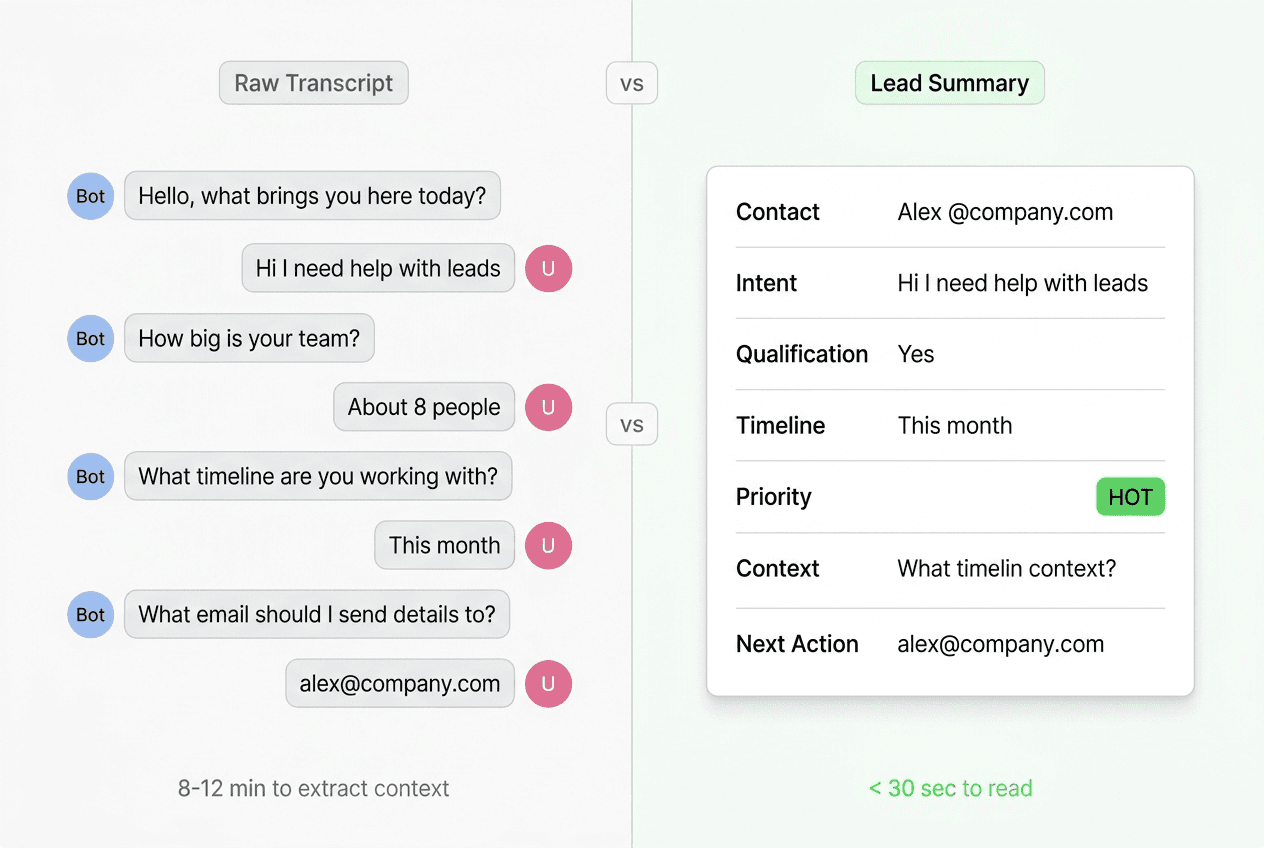
The table below maps what a rep needs against where that information lives in each format.
| What the rep needs | Raw transcript | Structured summary |
|---|---|---|
| Who is this person? | Scattered through the conversation — name in turn 3, email in turn 5, phone maybe in turn 7 | Contact field: name, email, phone in one place |
| What do they actually want? | Has to infer from the full conversation arc | Intent field: visitor's own words, captured and labeled |
| Are they a fit for my ICP? | Reads each answer to qualification questions and mentally scores them | Qualification field: structured values from the flow |
| How urgently do they need this? | Looks for a timeline mention, may be implied not explicit | Timeline field: single value, directly captured |
| Should I prioritize this one? | Uses personal judgment based on reading the whole thing | Priority field: score or flag set by configured logic |
| What do I say first? | Formulates an opening based on full transcript review | Context field: objections, competitors, requirements listed |
| What am I supposed to do right now? | Figures it out | Next action field: explicit instruction |
| Time cost per lead | 5–12 minutes | Under 30 seconds |
The pattern is consistent: every piece of information the rep needs is present in the transcript. The question is whether the rep extracts it manually or whether the system extracts it automatically. At scale, that difference determines whether the chatbot is actually saving time or just shifting work downstream.
How the Summary Is Generated
The summary is not written by a separate AI process you configure after the fact. It is produced at conversation end as part of the chatbot's completion logic.
The sequence works like this:
- Conversation completes. The visitor exits the chat, or the chatbot reaches the end of its qualification flow, or a configurable inactivity timer triggers the conversation-end event.
- The structured fields are assembled. Contact details were captured during the conversation. Intent, qualification signals, and timeline were collected through the question sequence. The chatbot's scoring logic runs against the captured values to produce the priority flag.
- The context field is generated. This is where the AI component does its actual work — reviewing the conversation for signals that do not map to a structured field: objections mentioned in passing, competitor names dropped, specific product questions, concerns the visitor circled back to. These are extracted and written into the context field in plain language.
- The next action is determined. If the visitor booked a meeting, that is recorded. If not, the next action is derived from the lead's score and the routing rules you configured — nurture, demo invite, direct escalation.
- The summary is finalized and queued for delivery.
The whole process happens in the seconds after the conversation ends. By the time the rep's CRM refreshes, the summary is there.
Delivery: Webhook to CRM, Notification, or Inbox
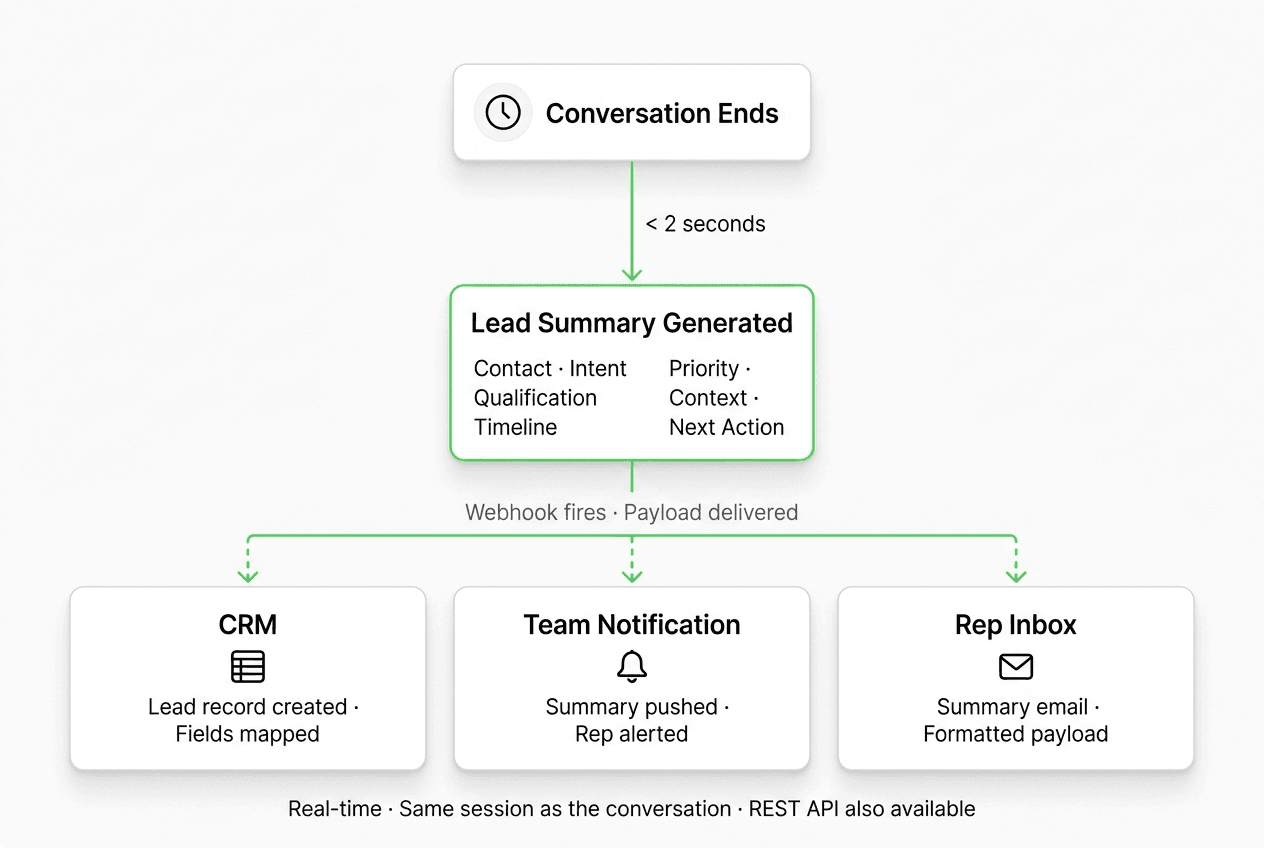
The summary exists. Now it has to reach someone who can act on it. This is where the delivery architecture matters.
Webhook on Lead-Created Event
The primary delivery mechanism for chatbot lead summaries is a webhook fired on the lead-created event. The moment the summary is finalized, the webhook sends a POST request to your configured endpoint — your CRM's inbound lead API, your team's notification system, or any internal endpoint that can receive an HTTP payload.
The key word is real-time. The webhook fires in the same session as the conversation end. There is no batch processing, no nightly sync, no delay proportional to your lead volume. A visitor who finishes a chat at 11:47pm creates a lead record in your CRM at 11:47pm. Your rep's queue updates in the morning showing that lead as new — with the full summary — before they have opened their first email.
This matters because lead response time affects conversion likelihood. A visitor who expressed intent in a chat at 11:47pm and receives a thoughtful follow-up at 8am the next morning is far more likely to progress than one who gets a generic "thanks for your interest" three days later. The webhook is what makes that same-session lead creation possible.
What the Webhook Payload Contains
The webhook delivers a JSON payload that maps to the fields in the summary:
{
  "event": "lead.created",
  "lead_id": "lead_xyz123",
  "created_at": "2026-05-26T23:47:12Z",
  "channel": "website",
  "contact": {
    "name": "Alex Rivera",
    "email": "alex@solutionsco.com",
    "phone": "+14155550182"
  },
  "intent": "Too many inbound leads, reps can't tell who's serious",
  "qualification": {
    "role": "Head of Sales",
    "company_size": "8 reps",
    "industry": "B2B SaaS",
    "timeline": "this_month"
  },
  "priority": "hot",
  "context": "Comparing Intercom and Drift. Concerned about setup complexity. Asked about WhatsApp for LATAM.",
  "next_action": "demo_booked",
  "conversation_id": "conv_abc456",
  "summary_text": "Alex Rivera, Head of Sales at a Series A SaaS company with 8 reps, needs lead qualification this month. Budget approved. Comparing Intercom and Drift. HOT — demo booked Thursday 2pm."
}
Your CRM endpoint receives this payload and maps the fields into your CRM's lead record schema. The summary_text field is a pre-formatted human-readable version suitable for pushing into a CRM note or a Slack-via-webhook notification in a single step.
Destination Options
The webhook endpoint can point to:
- Your CRM's inbound API — most CRMs that support webhook ingestion can receive this payload and create a lead record automatically. Field mapping is configured on the CRM side.
- A notification endpoint — if your team uses a notification service, the lead-created webhook can route to an endpoint that formats the summary and sends a push notification or channel message.
- An internal tool or middleware — for teams with custom lead routing logic, a middleware endpoint can receive the payload, apply additional routing rules, and distribute to multiple downstream systems.
- An email notification endpoint — if the rep's primary interface is email, a webhook-to-email relay sends the summary as a formatted email the moment the lead is created.
The channels overview page has more on the four deployment surfaces. For teams deploying on WhatsApp, the WhatsApp Business API page covers the setup required for that channel's lead delivery to work correctly.
Hyperleap connects via REST API and webhooks — not native CRM integrations. This is a deliberate architectural choice: native integrations introduce version dependencies and limit what you can do with the payload. REST API and webhook delivery means your team controls the field mapping, the routing logic, and the destination. If your CRM has a webhook endpoint, the connection typically takes under an hour to configure. The full Hyperleap features page lists the available API events.
Designing Summary Templates by Use Case
The seven fields described above are universal. But the content of those fields — which qualification signals you collect, how the priority logic runs, what triggers a "hot" flag — should be calibrated to your business.
Here is how the template varies across three common use cases:
B2B SaaS (Self-Serve Funnel)
Qualification signals to collect: Job title or role, company size, current tool they're replacing or comparing, specific use case (team collaboration? customer support? lead capture?).
Priority logic: Hot = decision-maker role + timeline under 30 days. Warm = practitioner role + any timeline. Cold = no timeline given.
Context field emphasis: Competitor mentions, feature gaps they named, pricing sensitivity signals.
Next action defaults: If hot → send pricing page link and book intro call. If warm → add to nurture sequence with product-specific content. If cold → subscribe to newsletter.
Professional Services (Agency, Law Firm, Consulting)
Qualification signals to collect: Service area of interest, company size or revenue range, project type, budget range if asked directly, referral source.
Priority logic: Hot = specific project described + timeline in the next 60 days. Warm = general interest + within ICP. Cold = student / researcher / not a buyer signal.
Context field emphasis: What they have tried before and why it did not work, any specific concerns about methodology or pricing.
Next action defaults: If hot → route to senior partner for direct outreach. If warm → schedule 30-minute consultation. If cold → send overview PDF.
Real Estate or High-Consideration Consumer (Property, Automotive, Education)
Qualification signals to collect: Product category of interest (for real estate: location, budget, unit type), timeline to decision, financing pre-approval status if relevant, number of decision-makers involved.
Priority logic: Hot = specific product interest + immediate timeline + single or primary decision-maker. Warm = general interest within correct segment. Cold = browsing with no stated timeline.
Context field emphasis: Objections about price, location, or timing; competing options they mentioned; family or partner involvement in the decision.
Next action defaults: If hot → direct phone call from a senior rep within the hour. If warm → WhatsApp follow-up with relevant inventory or options. If cold → add to retargeting list.
The qualification flow that produces these summaries is configured in your chatbot setup. The summary template follows from the flow — the fields in the summary are the fields your questions were designed to collect.
The Follow-Up Workflow: What the Rep Does in 30 Seconds
The summary exists. It is in the CRM. The rep opens their queue. Here is the workflow:
Step 1 — Scan the priority flag (3 seconds). Hot leads first, always. This is not a judgment call; the summary made the judgment. The rep's job at this step is to order the queue by the flag, not re-derive the scoring.
Step 2 — Read the intent field (5 seconds). This is the opening line of the call. If the visitor said "We're getting too many leads but can't tell who's serious," the rep opens with: "I read that you're dealing with a high volume of leads where it's hard to identify the real buyers — is that still the right description of what you're trying to solve?" The intent field turns a cold opening into a context-aware one.
Step 3 — Scan qualification signals (5 seconds). Company fit, role, team size. If this is a VP at a 200-person company with a stated budget, the rep knows they are on a higher-stakes call and should adjust accordingly. If it's a solo founder with no budget stated, the rep calibrates the pitch to a different audience.
Step 4 — Check the context field (10 seconds). What objections came up? Which competitors are in the picture? If the visitor mentioned Drift by name and asked about setup time, the rep knows to address both — and knows to have a concrete answer ready, not a vague "we're easier than the competition."
Step 5 — Confirm the next action (5 seconds). Did the visitor book a meeting? If yes, the rep has the time and should show up prepared. If the next action is "send pricing," the rep sends it with a short personal note before dialing, so the email is in the prospect's inbox before the call starts.
Step 6 — Dial. The prep is done. Thirty seconds of reading the summary replaced what would otherwise be eight minutes of transcript review. The rep is ready to have a real conversation, not conduct a discovery exercise to find information the chatbot already collected.
Common Mistakes That Undermine Lead Summaries
1. Treating the Summary as a Transcript Replacement
The summary supplements the transcript — it does not replace it. The full conversation should still be accessible (linked from the summary) for cases where the rep wants to read a specific exchange verbatim. The summary is the first-read; the transcript is the reference document if needed.
2. Collecting Too Many Qualification Fields
A summary with fourteen qualification signals is not better than one with five. If the rep cannot act on the signal — if there is no routing rule that uses a particular field — collecting it just adds noise. Define the minimum set of fields your routing and prioritization logic actually uses, and build the qualification flow around those.
3. Not Configuring Scoring Logic
A summary without a priority flag requires the rep to re-evaluate every lead manually before acting. Priority scoring is the field that makes the queue self-organizing. If your chatbot tool does not support configurable scoring criteria, the summary is still useful — but it is not as operationally efficient as it could be.
4. Using Generic Next Actions
"Follow up with rep" is not a next action. A useful next action is: "Call within 2 hours — visitor requested a same-day callback" or "Demo booked — review pricing page and WhatsApp channel overview before the call." The more specific the next action, the less ambiguity at the top of the queue.
5. Not Testing the Summary Against Real Conversations
Before going live, run the chatbot through ten realistic test conversations and read the resulting summaries from the perspective of a rep who knows nothing about the visitor. If the summary leaves questions you would have needed the transcript to answer, the template needs adjustment — either the questions are not collecting the right signals or the summary fields are not surfacing them correctly.
Hyperleap AI: How Lead Summaries Work in Practice
Hyperleap AI generates a structured lead summary at the end of every qualified conversation across all four channels: Website chat widget, WhatsApp Business API, Instagram DM, and Facebook Messenger.
Generation: When the conversation completes, Hyperleap assembles the summary from the captured fields — contact details, intent, qualification signals, timeline, and score — and generates the context and next action fields based on what the visitor said during the conversation. The process is automatic; no manual post-processing step.
Delivery: A webhook fires on the lead-created event. Your CRM endpoint, notification system, or internal tooling receives a JSON payload containing the full summary within seconds of conversation end. REST API access is also available for teams that want to pull lead records on their own schedule.
Configuration: The qualification fields in the summary map to the question sequence you configured in Hyperleap Studio. The priority scoring logic is set based on your ICP criteria. The next action defaults can be configured per lead tier.
Channel coverage: The same summary format — same fields, same delivery mechanism — applies regardless of whether the conversation happened on your website, on WhatsApp, on Instagram DM, or on Facebook Messenger. One configuration, four channels. See the channels page for channel-specific setup notes.
Pricing: Hyperleap offers three paid plans, all with a 7-day free trial (credit card required, no free plan):
| Plan | Price | AI Responses | Chatbots |
|---|---|---|---|
| Plus | $40/mo | 3,000 | 1 |
| Pro | $100/mo | 12,000 | 2 |
| Max | $200/mo | 30,000 | 5 |
All plans include REST API access; webhook delivery is on Pro and Max. For verified phone numbers in the contact details field, OTP verification is a paid add-on available on Pro and Max plans (website chat only), usage-based with recharges from $100. See the full pricing page for plan details.
FAQ
What is a chatbot lead summary?
A chatbot lead summary is a structured record generated at the end of a chatbot conversation. It contains the key information a sales rep needs to follow up effectively: contact details, the visitor's stated intent in their own words, qualification signals collected during the conversation, timeline, a priority flag, conversation context (objections, competitor mentions, specific requirements), and a recommended next action. It is distinct from the raw conversation transcript, which contains the same underlying information but in unprocessed chronological form.
How is a chatbot lead summary different from a transcript?
A transcript is the verbatim record of the conversation — every message in order. A lead summary is the processed output: seven labeled fields that answer the questions a rep needs answered before placing a follow-up call. Reading a transcript to extract those seven fields takes 5–12 minutes per lead. Reading a well-structured summary takes under 30 seconds. At volume, that difference determines whether your sales team is spending time on sales or on manual data extraction.
How does the chatbot generate the summary automatically?
The summary is assembled at conversation end from two sources. Structured fields — contact details, qualification signals, timeline — are captured directly during the conversation through the question sequence. The context field — objections, competitor mentions, specific requirements the visitor expressed — is extracted by the AI component reviewing the full conversation for unstructured signals. The priority flag is calculated by applying your configured scoring logic to the qualification values. The entire process runs automatically in the seconds after conversation end.
Where is the summary delivered?
Via webhook (Pro and Max) to your configured endpoint — typically your CRM's inbound lead API, a notification system, or an internal tool. The webhook fires on the lead-created event, which means the summary reaches your destination within seconds of conversation end. REST API access is also available for teams that want to pull lead records on demand. Hyperleap uses REST API and webhooks rather than native CRM integrations, which gives your team full control over field mapping and routing logic.
Can I customize what fields appear in the summary?
Yes. The qualification fields in the summary map directly to the question sequence you configure in your chatbot setup. If your qualification flow collects company size, industry, and role, those values appear in the qualification signals field. If it collects budget range, that appears too. The fields in the summary are determined by the questions you built into the chatbot flow — adjusting the flow changes what the summary captures.
What channels generate lead summaries?
On Hyperleap, lead summaries are generated for conversations across all four channels: Website chat widget, WhatsApp Business API, Instagram DM, and Facebook Messenger. The summary format and delivery mechanism are identical regardless of channel. SMS, voice, email, Slack, and Telegram are not channels Hyperleap ships on.
Does the summary work differently for WhatsApp than for the website widget?
The format and delivery are identical across channels. The WhatsApp conversation happens in a different environment — the visitor is in their messaging app rather than your website — but the chatbot qualification logic, summary generation, and webhook delivery work the same way. One difference worth noting: WhatsApp conversations require WhatsApp Business API access, and the visitor must initiate or opt in to the WhatsApp thread. See the WhatsApp Business API page for setup requirements.
Start Receiving Lead Summaries That Move Pipeline
A chatbot that captures conversations but delivers transcripts is moving work downstream, not removing it. Lead summaries are what separate a chatbot that keeps the sales team informed from one that makes them faster.
Ready to see it in action?
- Start your 7-day free trial — credit card required; lead summaries included on every plan, webhook delivery on Pro and Max
- See the full feature set — qualification flows, lead summaries, REST API, webhook events, and more
- Review pricing — Plus at $40/mo, Pro at $100/mo, Max at $200/mo
- Explore all channels — Website, WhatsApp, Instagram DM, and Facebook Messenger
Further Reading
- AI Lead Capture Chatbot: Convert Website Visitors Into Qualified Leads — the full playbook on capturing and qualifying leads across four channels
- Lead Qualification Chatbot: Frameworks and Configuration — BANT, ICTT, and other qualification sequences that feed the summary fields
Put this into practice
Related Articles

Chatbot Lead Routing: How to Send the Right Inquiry to the Right Team
Chatbot lead routing determines which team, rep, or action receives each qualified conversation. Here's how routing logic works, and how to deliver leads via webhooks.

OTP-Verified Lead Capture for AI Chatbots
OTP-verified lead capture confirms a visitor's phone number inside the chat before the lead enters your queue — here's how it works, what it costs, and which industries need it most.

Lead Qualification Chatbot: Questions, Fields, and Handoff Rules
A lead qualification chatbot turns raw contacts into ranked, routed leads — before a rep wastes the first call. Here's the question stack, scoring, and handoff logic that works.

AI Lead Capture Chatbot: Convert Website Visitors Into Qualified Leads
An AI lead capture chatbot does what forms can't: qualify intent, capture contacts, and hand clean leads to your team — across four channels, 24/7.