Chatbot Lead Routing: How to Send the Right Inquiry to the Right Team
Chatbot lead routing determines which team, rep, or action receives each qualified conversation. Here's how routing logic works, and how to deliver leads via webhooks.

TL;DR: Chatbot lead routing is the logic that decides which team, rep, or follow-up action receives each qualified conversation — and the delivery mechanism that gets it there. Without routing, a qualified lead is just a message in a shared inbox waiting for the right person to notice it. This guide covers the six routing dimensions that matter (intent, product line, geography, value tier, language, business hours), how a chatbot moves from qualification signals to a routing decision, how delivery works via webhooks and REST API, and how to configure this in Hyperleap. If you've already read the AI lead capture chatbot and the lead qualification chatbot guides, this is the next step: getting the qualified lead to exactly the right place.
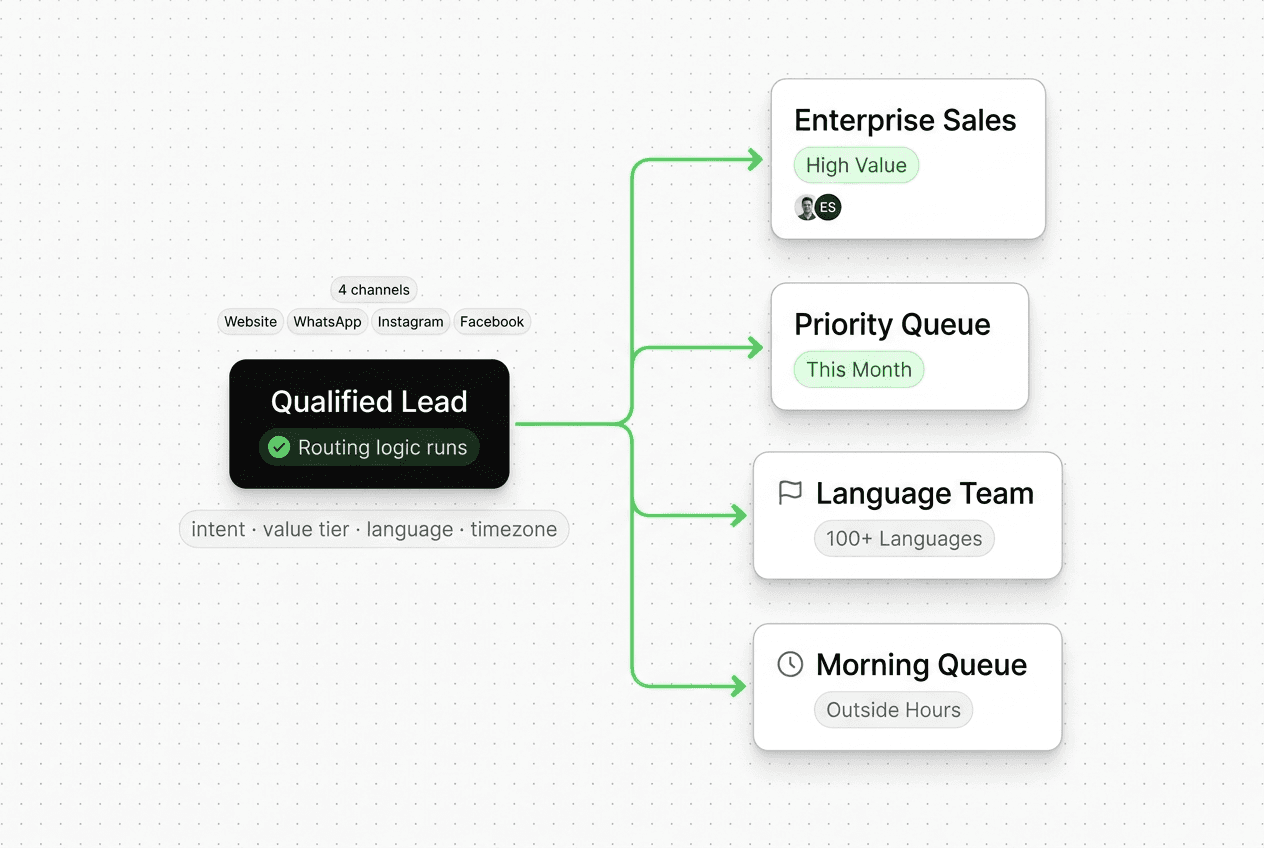
Why Misrouted Leads Are More Expensive Than Missed Leads
A missed lead never entered your pipeline. A misrouted lead did — and then it damaged it.
When an enterprise inquiry lands in the SMB rep's queue, they either escalate it (burning time) or handle it wrong (burning the deal). When a Spanish-speaking prospect is routed to an English-only rep, the lead goes cold in the translation gap. When a high-urgency inquiry sits in a general inbox while someone else handles a tire-kicker, the urgency window closes.
The downstream cost of routing failures is harder to track than a missed lead, which is why most teams underinvest in routing logic. A flat "send everything to the same inbox" setup feels workable until volume grows or team structure changes — then every misrouted lead shows up as a CRM deal stuck at "contacted" with no activity.
Routing is the last mile of your qualification workflow. Qualification decides whether a lead is worth acting on. Routing decides who acts on it, when, and how. Both matter; neither is optional once you're past ten inbound conversations a day.
For context on the capture and qualification steps that precede routing, the AI lead capture chatbot guide covers how to structure qualification conversations, and the lead qualification chatbot guide covers scoring and handoff triggers.
The Six Routing Dimensions That Actually Matter
Most teams that have thought about routing default to one dimension: product line, or sometimes rep assignment. The chatbots that route well use a layered set of conditions that fire in order. Here are the six dimensions worth configuring.
1. Intent
What did the visitor say they want to do? A prospect asking about enterprise pricing routes differently from one asking about a free trial. A visitor describing an urgent problem ("our current vendor is shutting down next month") routes differently from one researching options.
Intent is usually the first and most deterministic signal you collect — it's what the qualification flow asks in turn one or two. Route on intent before anything else.
2. Product Line
If you offer multiple products, product families, or service tiers, route early based on what the prospect is asking about. A prospect who names a specific product routes to the rep or team that knows it. A prospect who is comparing products routes to a different flow — often a general inquiry queue or a more senior rep.
3. Geography and Timezone
Two reasons to route by geography. First, timezone coverage: a prospect in Sydney at 9am shouldn't land in a queue that won't be seen until the US team wakes up seven hours later. Route by visitor timezone to a team or rep who is currently working — or to a notification queue that triggers when the right team comes online.
Second, territory assignments: if your sales team has geographic territories, route by detected location to the territory owner. This prevents deal conflicts and ensures the rep has local market context.
4. Value Tier
High-value signals — company size, deal size, stated budget, specific product interest — warrant a different route than low-value ones. A prospect who describes a 500-seat deployment routes to enterprise sales. A prospect asking about the smallest plan routes to a different rep or a self-serve flow.
Value tier routing prevents your most senior reps from spending time on low-value conversations and ensures high-value leads don't sit in the general queue behind them.
5. Language
If your prospect base spans multiple languages, route by detected language to a rep or team that speaks it. A chatbot that supports 100+ languages is only valuable if the human follow-up matches the language of the conversation. Routing an Arabic-language conversation to an English-only team produces the same result as not qualifying it at all.
Language detection can be explicit (the visitor selects their language at the start) or inferred from the conversation text itself.
6. Business Hours
Routing decisions change based on whether the relevant team is currently working. A prospect who qualifies at 2am should receive a different immediate action than one who qualifies at 2pm on a Tuesday:
- Within business hours: route to the rep's active queue and trigger a real-time notification.
- Outside business hours: send a booking link for the next available slot, add to the morning queue, and send a confirmation to the prospect so they don't go dark overnight.
Business hours routing isn't just a queue management issue — it directly affects the prospect's experience. A booking link at 2am feels like service. A canned "we'll get back to you" message at 2am feels like neglect.
How a Chatbot Moves from Qualification to a Routing Decision
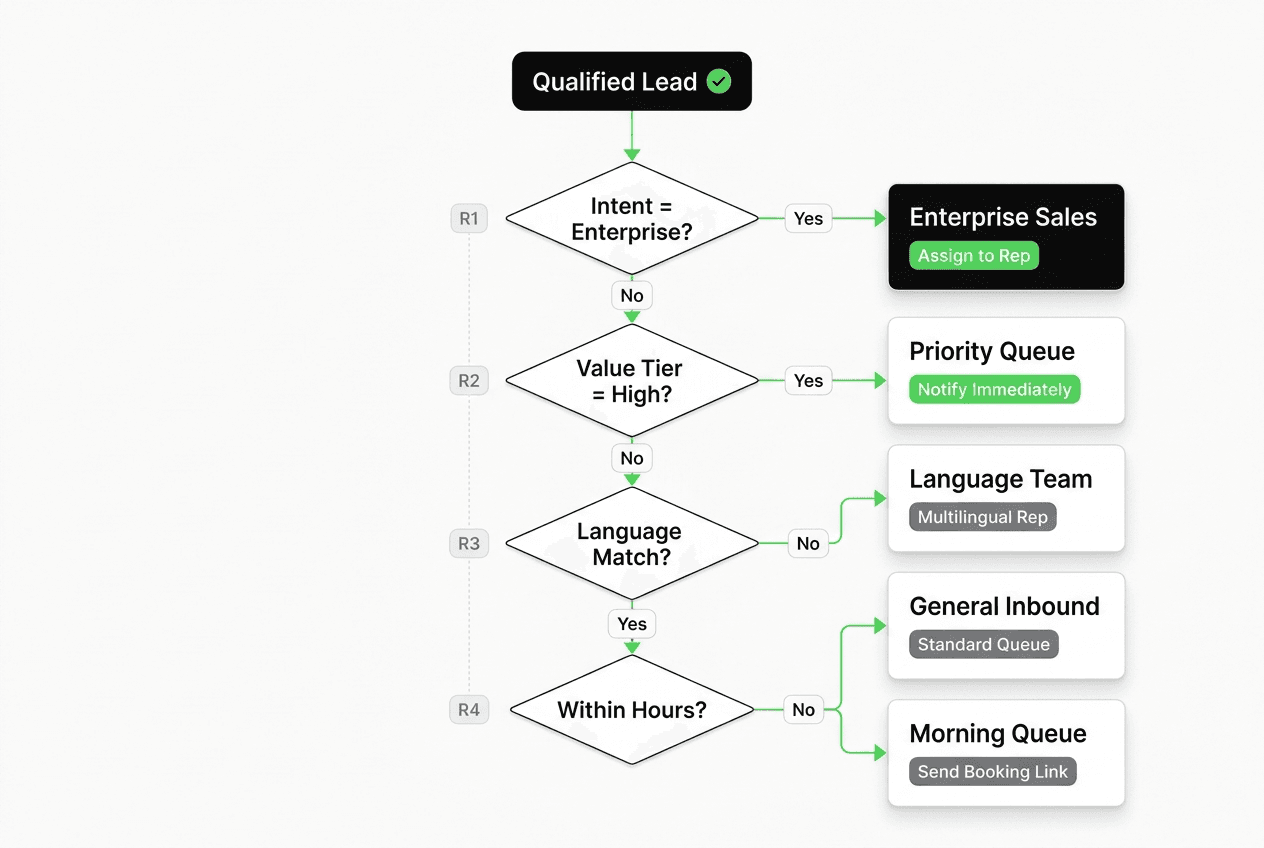
Routing logic doesn't start after qualification — it runs in parallel with it. Every answer a prospect gives during the qualification flow is a potential routing signal. Here's the mechanics.
Step 1: Collect Qualification Signals
The chatbot asks qualification questions in a defined sequence. Each answer populates a signal:
- Turn 1: intent → product interest signal
- Turn 2: company fit → value tier signal
- Turn 3: urgency/timeline → priority signal
- Turn 4 (if applicable): location/language → geography and language signal
- Contact capture: email/phone → lead identity
You don't need to ask about every routing dimension explicitly. Language is inferred from the conversation. Timezone can be inferred from the visitor's local time. Company size and role, asked as part of the qualification flow, carry value-tier signal.
Step 2: Evaluate Routing Rules in Order
When the qualification conversation is complete, the routing engine evaluates the collected signals against your defined rules. Rules run in priority order:
IF intent = "enterprise" AND company_size >= 100
  → route to: Enterprise Sales queue
ELIF detected_language NOT IN ["English", "Spanish"]
  → route to: Multilingual Support queue
ELIF current_time OUTSIDE business_hours[lead_timezone]
  → action: send booking link + add to morning queue
ELIF value_tier = "high" AND timeline = "this month"
  → route to: Priority Sales — notify immediately
ELSE
  → route to: General Inbound queue
Rules like these are configured once in your chatbot platform and applied to every conversation. The chatbot doesn't make a judgment call — it evaluates conditions deterministically.
Step 3: Execute the Routing Action
The routing action is one of four types:
| Action | When to use |
|---|---|
| Assign to rep or team | Qualified lead, business hours, rep is available — get the lead in front of a human immediately. |
| Send a booking link | Qualified lead, outside business hours, or when the rep needs prep time — give the prospect a concrete next step. |
| Route to specialist queue | Lead requires a different skill set (language, product expertise, enterprise deal size) — escalate cleanly rather than misassign. |
| Add to nurture queue | Lead is not ready to buy now (early research stage, long timeline) — keep them warm without burning rep time. |
The action itself is separate from the routing decision — the chatbot decides where the lead goes; the delivery mechanism gets it there.
Delivery Mechanics: Webhooks, REST API, and Notifications
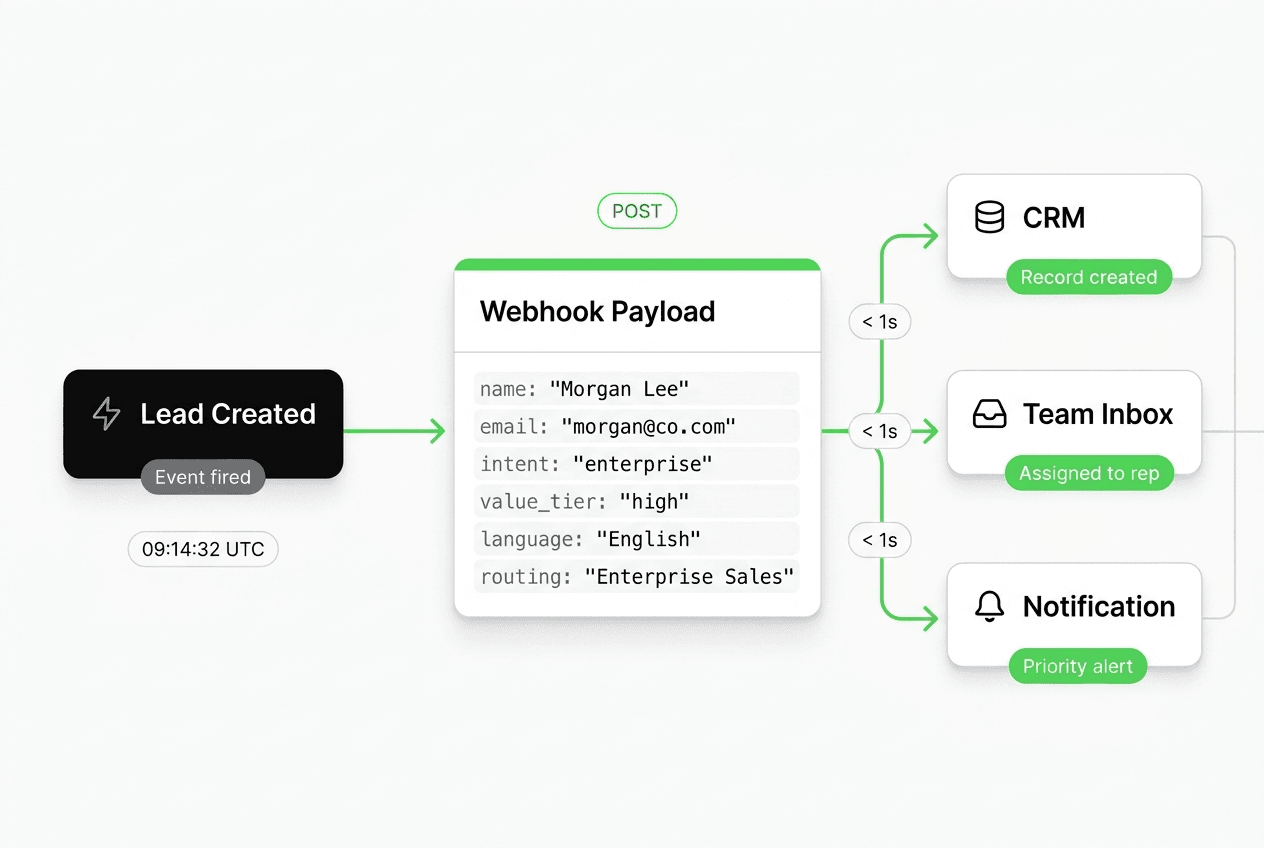
Routing logic lives inside the chatbot. Delivery to your team happens via webhooks and REST API. These are not interchangeable with "native CRM integration" — understanding the distinction matters when you're evaluating vendors or designing your handoff flow.
What Webhooks Do
A webhook is an HTTP POST that fires automatically when a defined event occurs. For lead routing, the relevant events are:
- lead-created: fires when the chatbot creates a new lead record — the most common trigger for routing delivery.
- message-received: fires when a new inbound message arrives on any channel — useful for real-time monitoring and escalation.
- conversation-started: fires when a new conversation begins — useful for pre-qualifying traffic before the full conversation.
Each event delivers a payload to a URL you configure. The payload includes the lead's contact details, the qualification signals collected, the routing outcome (which team/queue the lead was sent to), the channel the conversation came from, and the full or summarized conversation.
What a Routing Webhook Payload Looks Like
A well-structured lead routing webhook payload carries everything the receiving system needs to act:
{
  "event": "lead_created",
  "timestamp": "2026-05-26T09:14:32Z",
  "lead_id": "ld_8f2a4c",
  "contact": {
    "name": "Morgan Lee",
    "email": "morgan@company.com"
  },
  "channel": "whatsapp",
  "qualification": {
    "intent": "enterprise_deployment",
    "company_size": "250+",
    "timeline": "this_month",
    "value_tier": "high",
    "language": "English",
    "timezone": "America/Chicago"
  },
  "routing": {
    "destination": "Enterprise Sales",
    "reason": "intent=enterprise AND company_size>=100",
    "priority": "high",
    "action": "assign_to_rep"
  },
  "summary": "Prospect is evaluating enterprise deployment for 250+ person team. Timeline: this month. Comparing two vendors. Has budget approved.",
  "booking_link_sent": false,
  "created_at": "2026-05-26T09:14:32Z"
}
Your CRM, Slack workspace, team inbox, or internal routing tool receives this payload and acts on it — creating a record, triggering a notification, or assigning the lead to a rep based on the routing.destination field.
Routing Patterns Explained
Webhooks make several routing patterns possible without native CRM integrations:
Skill-based routing: your webhook receiver looks at qualification.intent and qualification.value_tier, then assigns the lead to the rep in your CRM who handles that combination. This logic lives in your integration layer — the chatbot delivers the signals; your tooling does the assignment.
Round-robin routing: your webhook receiver has a queue of rep identifiers; each new lead-created event advances the pointer. Round-robin logic is simple to implement and keeps rep loads balanced for low-value or undifferentiated leads.
Priority routing: the webhook payload includes a priority field derived from the chatbot's routing rules. Your notification tool treats priority: high as an immediate ping; priority: normal goes into the standard queue.
Timezone-aware routing: your webhook receiver checks qualification.timezone against each rep's declared working hours and assigns to the rep who is currently active. This runs in your integration layer; the chatbot delivers the timezone signal.
None of these patterns require a native CRM integration. They require a webhook endpoint and the logic to act on the payload — which most CRM systems, internal tools, and notification platforms already support.
Routing Rules Table
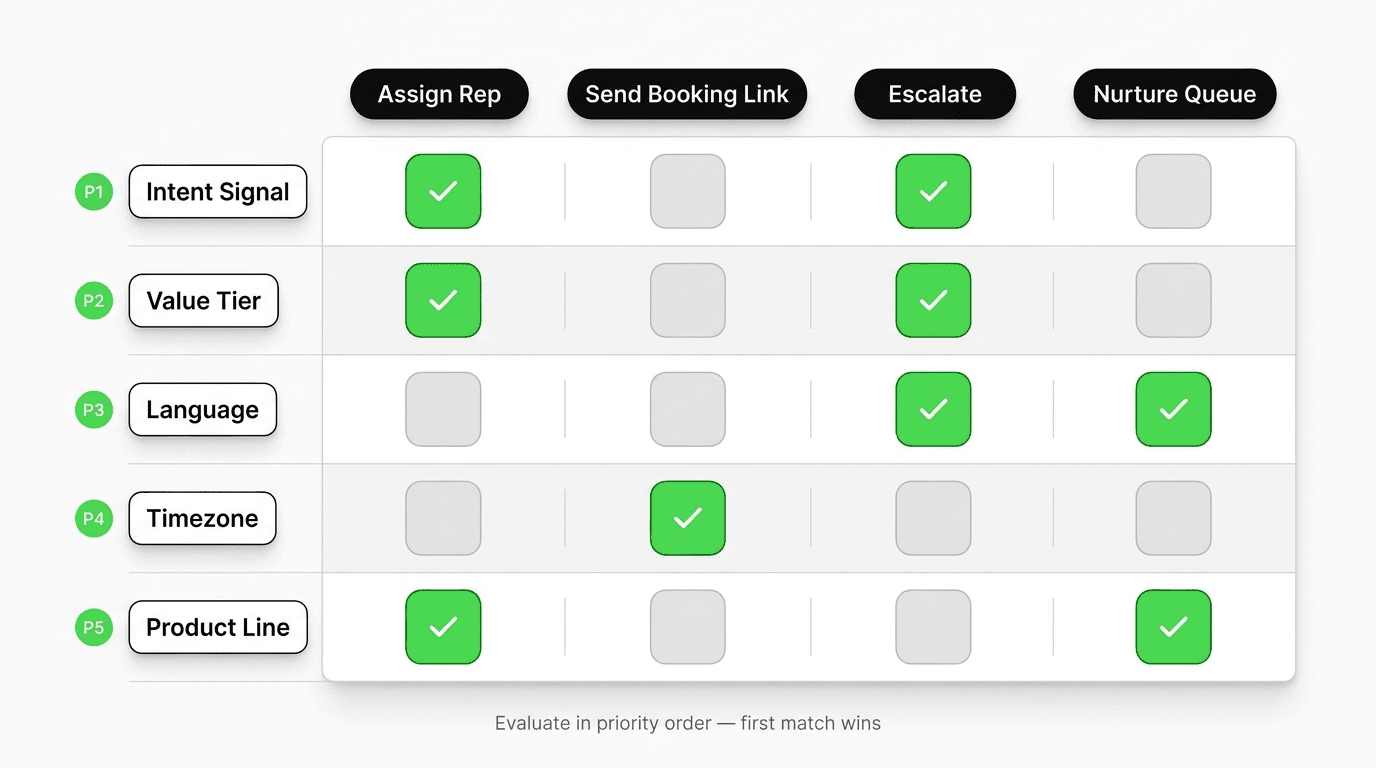
Use this table as a starting template. Adapt the conditions and destinations to match your team structure. Evaluate conditions in priority order — the first matching rule wins.
| Priority | Condition | Destination | Action |
|---|---|---|---|
| 1 | intent = enterprise AND company_size >= 100 | Enterprise Sales queue | Assign to rep + immediate notification |
| 2 | value_tier = high AND timeline = this_month | Priority Sales queue | Assign to rep + immediate notification |
| 3 | language NOT IN [team_languages] | Multilingual queue | Assign to language-matched rep or escalation path |
| 4 | current_time OUTSIDE business_hours[lead_timezone] | Morning queue | Send booking link to prospect + add to next-day queue |
| 5 | intent = specific_product_line | Product-line specialist queue | Assign to product specialist |
| 6 | timeline = just_researching | Nurture sequence | Add to nurture flow, no rep assignment |
| 7 | All other qualified leads | General inbound | Standard rep queue |
A few notes on using this table:
Ordering matters. If rule 6 runs before rule 1, a high-value enterprise prospect who is "still researching" gets sent to nurture instead of Enterprise Sales. Evaluate high-value signals first.
Keep rules readable. Routing rules that look like boolean algebra puzzles are hard to maintain. If a rule has more than two AND conditions, consider splitting it into two rules.
Leave an audit trail. Include the routing.reason field in your webhook payload (shown in the example above) so your team can see which rule fired for each lead. This makes it straightforward to identify misrouted leads and tighten the rules.
Building Chatbot Lead Routing in Hyperleap
Hyperleap AI is an AI chatbot platform built for SMBs that need lead capture, qualification, and routing across four channels. Here is how the routing layer works.
Routing Logic in the Qualification Flow
Qualification and routing are configured in the same flow inside Hyperleap Studio. You define the qualification question sequence, and for each answer branch, you define the routing outcome: which team, which action, which booking link, which notification. When the conversation completes, the routing decision is baked into the lead record.
The chatbot evaluates routing conditions across all four channels — Website, WhatsApp Business API, Instagram DM, and Facebook Messenger — using the same rules. A lead qualified on WhatsApp at 11pm follows the same business-hours routing logic as one qualified on your website at 2pm.
Webhook Delivery
When a qualified lead is created, Hyperleap fires a webhook (Pro and Max) to your configured endpoint. The webhook event carries the contact details, qualification signals, routing outcome, and conversation summary. Your CRM or internal tool receives the payload and assigns the lead based on the routing.destination field.
You define the webhook endpoint URL, the trigger events (lead-created, message-received, conversation-started), and any additional fields to include in the payload. Hyperleap also supports a REST API for querying leads, pulling conversation data, and updating lead status from your systems back to the platform.
For teams that want deeper exploration of what the platform does, the features page covers the current capability set including qualification flows, lead summaries, and webhook configuration.
Language and Timezone Handling
Hyperleap supports 100+ languages. When a prospect initiates a conversation in a language other than your default, the chatbot continues the qualification in that language. The detected language is included in the lead record and webhook payload, so your routing rules can act on it.
Timezone routing is configured by mapping your business hours to UTC; leads created outside those hours receive the outside-hours action you define — typically a booking link and a confirmation message so the prospect has a concrete next step.
Channels
All four channels share the same routing configuration. See the channels overview for how to connect each channel. WhatsApp-specific setup is covered on the WhatsApp Business API page.
Pricing
Hyperleap offers three paid plans, all with a 7-day free trial (credit card required, no free plan):
| Plan | Price |
|---|---|
| Plus | $40/mo |
| Pro | $100/mo |
| Max | $200/mo |
Full plan details and response limits are on the pricing page.
Common Routing Mistakes
1. Treating Routing as an Afterthought
Routing logic is easiest to design before the qualification flow is built, not after. When you define your routing rules before writing your qualification questions, you build the questions to collect exactly the signals your routing rules need. When you add routing after the fact, you often find you've missed a key signal — and you have to revise the whole qualification flow to collect it.
2. One Routing Rule for Everything
A single routing rule ("all leads go to the general inbox") works for a one-person team. It stops working as soon as you have specialization — different reps for different products, different teams for different value tiers, different coverage for different timezones. Build routing rules before you need them; retrofitting them into an active chatbot is harder than getting them right the first time.
3. Forgetting the Outside-Hours Case
Many teams configure routing for business hours and leave the outside-hours case as a fallback dump into the same inbox. The outside-hours case is predictable — you know it will happen every night and every weekend. Handle it explicitly: send the prospect a booking link, set a clear response expectation, and put the lead in a named queue (not the general one) so it doesn't get buried.
4. Routing Before Qualification Is Complete
Routing on partial signals — firing the webhook before the qualification conversation is done — delivers an incomplete lead. Your webhook payload will be missing the signals that would have changed the routing decision. Wait for the conversation to reach a completion state before triggering the routing action.
5. No Audit Trail on Routing Decisions
When a rep gets a misrouted lead, the first question is: why did it route here? If your webhook payload doesn't include the routing.reason (which rule fired and why), the answer requires pulling conversation logs and cross-referencing routing rules manually. Include the routing rationale in every payload from the start — it makes refinement fast.
6. Overcomplicating the Rule Set
Routing rules compound in complexity. Two conditions per rule is manageable. Five conditions per rule with nested OR logic becomes unmaintainable within a few months. Start with four to six rules covering your most important routing splits, validate them with real lead data, and add complexity only where the existing rules consistently fail.
FAQ
What is chatbot lead routing?
Chatbot lead routing is the process of determining which team, rep, queue, or follow-up action receives each qualified conversation from an AI chatbot, based on signals collected during the qualification flow. The routing decision runs inside the chatbot; delivery to the receiving team happens via webhooks or REST API. The goal is to ensure every qualified lead reaches the person or system best equipped to act on it, without manual re-sorting in a shared inbox.
How does lead routing work with webhooks?
When a chatbot qualifies a lead and determines its routing destination, it fires an HTTP POST webhook to a URL you configure. The payload contains the contact details, qualification signals (intent, value tier, language, timezone), the routing outcome (which team or queue), and a conversation summary. Your CRM, notification tool, or internal system receives the payload and acts on it — assigning the lead, triggering a notification, or creating a record — without a native integration being required.
Can a chatbot route leads by language?
Yes, if the chatbot supports multi-language conversations and includes the detected language in the lead record and webhook payload. Hyperleap supports 100+ languages and includes the conversation language as a qualification signal, which your routing rules can act on to send the lead to a language-matched rep or queue. The routing rule evaluates the detected language field and routes accordingly.
What routing patterns work without native CRM integrations?
Skill-based routing, round-robin routing, priority routing, and timezone-aware routing can all be implemented via webhooks without native CRM integrations. The chatbot delivers the routing signals (intent, value tier, timezone, priority) in the webhook payload; your webhook receiver — a simple script, an internal tool, or the CRM's own webhook handler — applies the assignment logic. The chatbot handles qualification and the routing decision; your integration layer handles rep assignment.
How do I handle leads that come in outside business hours?
Configure an explicit outside-hours routing rule: when the lead is created outside your defined business hours (mapped to the prospect's timezone), send the prospect a booking link for the next available slot and add the lead to a named morning queue — not the general inbox. Include a confirmation message in the chat so the prospect knows a specific next step. This prevents leads from sitting in an undifferentiated inbox overnight and gives prospects a concrete action without waiting for a rep to respond.
Does chatbot lead routing require a specific plan?
Routing logic runs as part of the qualification flow configuration, which is available across Hyperleap's plans. Webhook delivery and configuration are on Pro and Max; REST API access and multi-language support are standard. If your routing rules require higher conversation volume (multiple active chatbots, more AI responses per month), evaluate the Pro ($100/mo) or Max ($200/mo) plans against your expected volume. The pricing page has the full plan limits. A 7-day trial (credit card required) lets you configure and test your routing rules before committing.
What's the difference between lead routing and lead qualification?
Lead qualification determines whether a lead is worth acting on — collecting intent, fit, timeline, and contact details to score a conversation as hot, warm, or cold. Lead routing determines where that qualified lead goes — which team, rep, or follow-up action receives it based on the signals collected during qualification. Qualification happens first; routing uses its output. Both steps are necessary: qualification without routing produces a flat inbox; routing without qualification misroutes unqualified contacts to your sales team.
Build Routing Logic That Matches Your Team
A chatbot that captures and qualifies but routes everything to the same inbox solves half the problem. The routing layer — intent-based, value-based, language-aware, timezone-conscious — is what turns a good chatbot into a system your sales team actually relies on.
Ready to configure routing in Hyperleap?
- Explore how Hyperleap handles qualification and routing — qualification flows, lead summaries, webhook configuration, multi-channel routing
- See all four channels — Website, WhatsApp Business API, Instagram DM, Facebook Messenger
- Review pricing — Plus at $40/mo, Pro at $100/mo, Max at $200/mo; 7-day free trial, credit card required
- Start your 7-day free trial — configure your first routing rules with real conversations
Related Articles

Chatbot Lead Summaries: What Your Team Should Receive
A raw transcript creates work. A chatbot lead summary — contact details, intent, qualification signals, timeline, and a next action — means your rep is ready to call in 30 seconds.

OTP-Verified Lead Capture for AI Chatbots
OTP-verified lead capture confirms a visitor's phone number inside the chat before the lead enters your queue — here's how it works, what it costs, and which industries need it most.

Lead Qualification Chatbot: Questions, Fields, and Handoff Rules
A lead qualification chatbot turns raw contacts into ranked, routed leads — before a rep wastes the first call. Here's the question stack, scoring, and handoff logic that works.

AI Lead Capture Chatbot: Convert Website Visitors Into Qualified Leads
An AI lead capture chatbot does what forms can't: qualify intent, capture contacts, and hand clean leads to your team — across four channels, 24/7.