OTP-Verified Lead Capture for AI Chatbots
OTP-verified lead capture confirms a visitor's phone number inside the chat before the lead enters your queue — here's how it works, what it costs, and which industries need it most.

TL;DR: OTP-verified lead capture adds a phone number confirmation step inside the chat conversation — the visitor receives a one-time code on their phone and enters it before the lead is accepted into your queue. The result: a pipeline of contacts with confirmed, callable numbers instead of a pile of mistyped and fabricated entries. This guide covers how the flow works, which industries benefit most, the cost-benefit calculation, and what to look for when evaluating tools. On Hyperleap, OTP verification is a paid add-on available on Pro and Max plans only, for website chat only — it is usage-based with recharges from $100 and is not included in any base plan. That context matters before you compare pricing.
OTP verification is one step in a bigger flow — see chatbot lead generation for the full capture, qualify, notify, and export lifecycle.
What OTP-Verified Lead Capture Is
OTP-verified lead capture is the practice of confirming a visitor's phone number during a chatbot conversation before that lead is routed to your sales team. OTP stands for one-time password — a short numeric code that proves the visitor has access to the phone number they provided.
The mechanism is simple. During a lead capture conversation, the chatbot collects the visitor's phone number and then triggers a verification step. The visitor receives a one-time code on their phone and enters it in the chat window. If the code matches, the number is confirmed and the lead enters the queue. If the visitor can't or won't enter the correct code, the lead is flagged or excluded — depending on how you've configured the flow.
This is distinct from simply asking for a phone number in a form or chat. A form can collect any string of digits. A chat can collect any string of digits. Only a verification step can confirm that the string of digits is a real, reachable number belonging to the person in the conversation.
For industries where a phone call is the primary follow-up action — and where that call is expensive to prepare for — the distinction between a collected number and a confirmed number is the difference between a productive rep and a rep chasing ghosts.
Why Fake and Mistyped Numbers Are a Real Cost
The scope of the problem depends on your volume, your vertical, and how you're currently capturing leads. But the mechanics are consistent across business types.
Mistyped numbers are common and invisible. A visitor filling out a chat prompt on a mobile screen types their phone number once, with no confirmation. A transposition — swapping two digits — is indistinguishable from a valid number in your CRM. Your rep dials, gets a wrong number, marks the lead invalid, and moves on. The time cost per attempt is small; multiplied across a pipeline, it adds up to hours of wasted preparation.
Fabricated numbers are a deliberate friction strategy. Some visitors want the content or the tool on the other side of a contact form — the pricing PDF, the consultation booking link, the property brochure — but do not want to receive a call. They enter a placeholder number to get past the gate. This behavior is most common in high-intent but high-pressure verticals: lending applications, real estate inquiries, legal consultations, healthcare intake. The visitor genuinely wanted something; they just didn't want the phone call that came with it.
The downstream cost accumulates quietly. A rep who prepares a discovery call, pulls context from the CRM, dials a number, and reaches a disconnected line or wrong person has spent 10–20 minutes on a lead that was never real. At scale, in a vertical where qualified leads take days to develop, this is not a rounding error — it's a structural drain on sales capacity.
Unverified numbers also pollute analytics. When a share of your "leads" are uncontactable, your conversion rates look worse than they are, your rep-to-lead ratios are miscalculated, and the performance data you use to tune your funnel is systematically noisy.
OTP verification doesn't eliminate all bad leads. A visitor can verify a number they own and still be unqualified. But it removes a specific, expensive category of noise: contacts that were never reachable. What remains is a pipeline of confirmed, contactable leads — a different operational starting point.
How the OTP Flow Works Inside a Chat Conversation
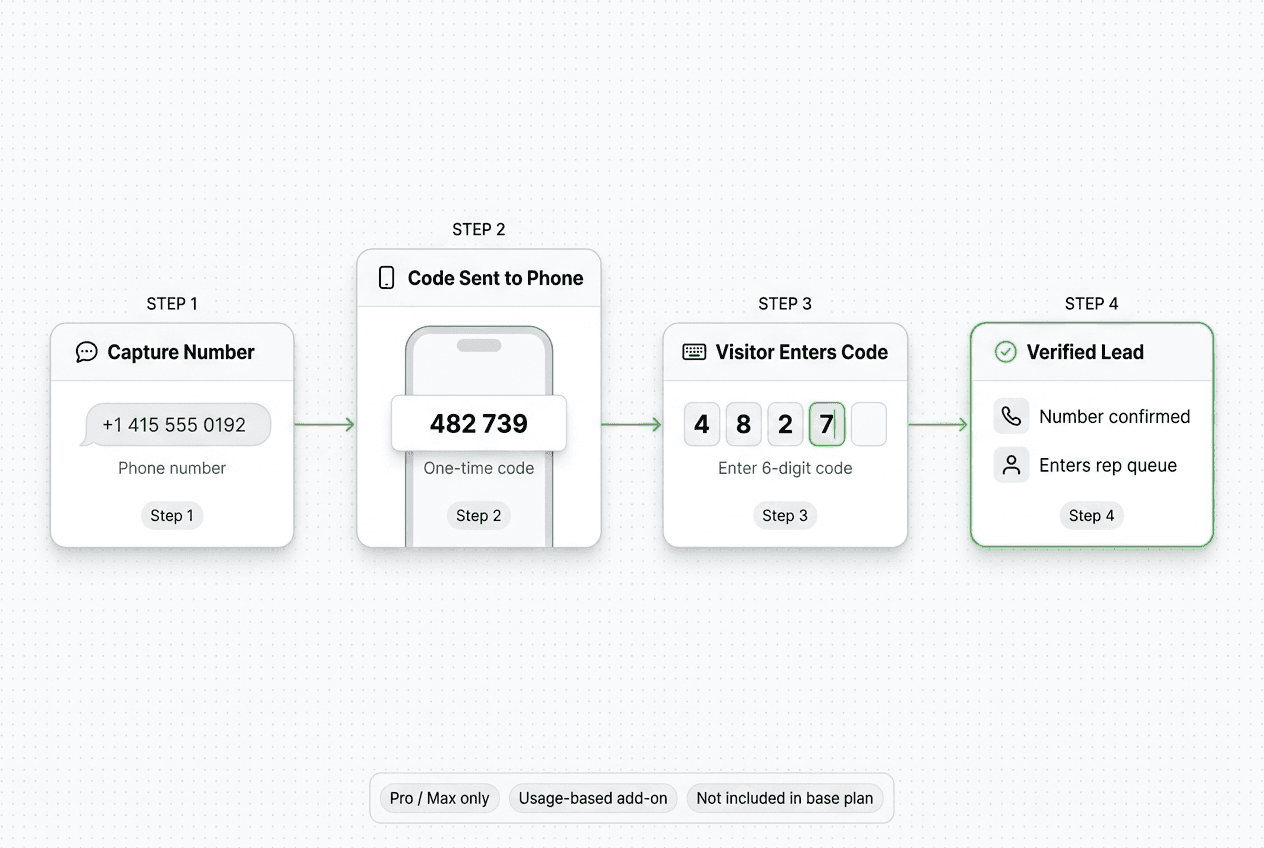
The OTP verification flow sits inside the normal lead capture conversation. It doesn't replace qualification — it adds a confirmation layer to the phone capture step. Here is how it runs in practice.
Step 1 — Capture the Phone Number
The chatbot asks for a phone number as part of the qualification sequence — after intent and fit questions, not as the opening move. The visitor types their number into the chat. At this point, the number is unchecked.
"What's the best number to reach you on?"
Step 2 — Trigger the Verification
The chatbot sends a one-time code to the number provided. The visitor receives this code on their phone. The delivery is handled by the OTP add-on's verification flow, not by a separate messaging channel. Hyperleap is not sending a message as your WhatsApp or Instagram account — it is triggering a verification code as part of the add-on's process. This is separate from the four messaging channels (Website, WhatsApp, Instagram DM, Facebook Messenger) Hyperleap ships for customer-facing conversations.
"I've just sent a 6-digit code to the number you provided. Please enter it here to confirm."
Step 3 — The Visitor Enters the Code
The visitor types the code into the chat window. If the code matches and is within the validity window, the number is confirmed. If the visitor doesn't receive the code, they can request a resend. If the code doesn't match or isn't entered, you decide what happens: flag the lead for manual review, exclude it from the verified queue, or allow the visitor to attempt re-entry.
Step 4 — Verified Lead Enters the Queue
Once the code is confirmed, the lead record is marked as phone-verified and routed to your team. The rep sees a verified badge on the phone field — they know this is a real, reachable number before they dial. No extra pre-call check needed.
What the Flow Does Not Do
OTP verification confirms a phone number is real and accessible. It does not confirm that the visitor is the decision-maker, that the lead is in your ICP, or that the deal will close. You still need qualification logic — intent, fit, and timeline questions — running alongside the verification step. Verification is a hygiene layer, not a substitute for qualification.
Which Industries Benefit Most
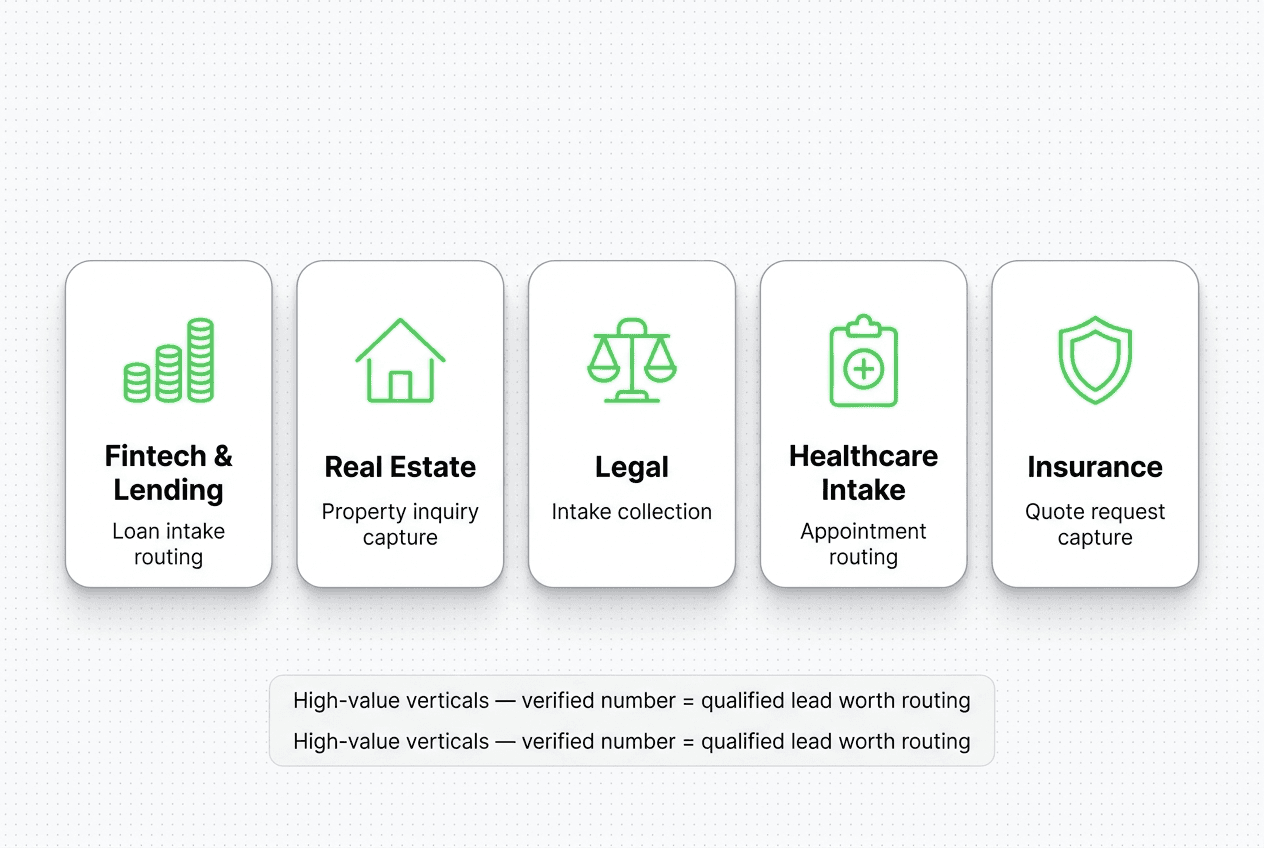
OTP-verified lead capture earns its cost fastest in verticals where leads are high-value, follow-up is call-based, and fake or mistyped numbers represent a meaningful fraction of inbound volume.
Fintech and Lending
Loan applications, mortgage inquiries, and personal finance consultations generate some of the highest per-lead economics in any consumer-facing vertical. A loan officer who prepares a rate quote, pulls credit bureau routing, and dials a disconnected number has wasted significant preparation time. In lending, where compliance and regulatory requirements already make follow-up workflows deliberate and documented, a confirmed mobile number is a minimum threshold for starting a conversation.
OTP verification also reduces the friction of manually cleaning your lead list before calling sessions. Verified leads start as ready-to-contact; unverified ones never entered the queue.
Safe framing for regulated context: the chatbot collects intake information and routes verified leads to your licensed team for evaluation. No financial advice, no pre-qualification decisions in the bot.
Real Estate
Real estate inquiry volumes are high relative to actual buyer readiness. Not every person who asks about a property listing is a serious buyer — and not every serious buyer gives an accurate number on first contact. Agents and coordinators who field unverified leads spend a disproportionate share of their call time on contacts who either entered bad information or aren't responsive.
For real estate teams managing large ad-driven inbound flows — Facebook and Instagram campaigns that send traffic to the website — verified lead capture on website chat creates a cleaner pipeline for follow-up. The per-lead value in real estate (commissions, developer referrals, rental transactions) makes a $100 add-on recharge a small fraction of a single qualified deal.
Safe framing: the chatbot collects property interest, timeline, and verified contact details, then routes the lead to your team for property discussion and site visit coordination.
Legal
Law firms, particularly those running intake for personal injury, immigration, family law, or employment matters, receive significant inbound volume that doesn't convert at high rates. The consultation intake process — whether by phone or in person — is time-intensive for attorneys. An attorney or paralegal preparing a consultation based on an unverified lead and reaching no one has spent valuable billable-time equivalent on a ghost contact.
Verified lead capture reduces this waste and ensures the intake queue entering case management review is reachable.
Safe framing: the chatbot collects intake details and routes leads to the firm for a legal consultation. No legal advice is provided by the chatbot.
Healthcare Intake
Patient intake routing — for dental practices, physiotherapy clinics, med spas, dermatology offices, and similar appointment-driven health services — depends on confirmed contact information for reminder workflows and appointment confirmation. An intake contact with a mistyped number generates a no-show that blocks an appointment slot and wastes clinical time.
Verified lead capture at the intake conversation stage creates a contact record the practice team can actually reach to confirm appointments and send reminders.
Safe framing: the chatbot collects intake details and preferred appointment times, and routes to the front desk for scheduling confirmation. No diagnosis, clinical assessment, or medical triage is performed.
Insurance
Insurance inquiry flows — auto, home, life, health — generate high volumes of comparison shoppers alongside genuine buyers. Quote-request forms and chatbot flows in insurance commonly see fabricated contact information from visitors who want the quote but not the follow-up call. A verified phone number separates buyers who are willing to have a conversation from those who are not.
Safe framing: the chatbot collects quote request details and routes verified leads to your licensed agents for policy discussion. No binding coverage or underwriting decisions are made in the chat.
The Cost-Benefit Calculation
OTP verification as a Hyperleap add-on is usage-based. Recharges start from $100. That $100 covers a defined number of verification events — the cost per verification depends on volume.
The business case rests on a simple comparison: what is a single qualified, verified lead worth in your vertical, versus what does it cost to process a batch of verifications?
In real estate, a single closed transaction generates a commission that is typically multiples of $1,000. In lending, a originated loan generates fees in the same range. In legal, a retained case generates retainer fees. In healthcare, a new patient's lifetime value is a meaningful number.
Against those per-lead values, a $100 recharge to verify a batch of leads represents a fractional cost — provided the verification step meaningfully improves the ratio of contactable leads to total captured leads. The decision to add OTP verification isn't a technology budget question; it's a pipeline efficiency question.
The qualification test: estimate what percentage of your current lead intake is mistyped or fabricated. If you're in a high-intent vertical running paid advertising and capturing phone numbers without verification, even a conservative estimate suggests meaningful waste. A single verified appointment or case intake justifies the add-on cost.
How to Evaluate OTP Lead Capture Tools
Use this checklist when comparing tools that offer OTP or phone verification as part of a chatbot or lead capture flow.
| Criterion | What to verify |
|---|---|
| Is OTP included or an add-on? | Some platforms bury verification in their base plan with per-verification charges you don't see until you scale. Others, like Hyperleap, price it as an explicit add-on. Understand the pricing model before you commit. |
| Which plans include access? | Verify which tiers unlock OTP. At Hyperleap, it's Pro ($100/mo) and Max ($200/mo) only — not Plus. If you're on a lower tier, you'll need to upgrade. |
| How does the flow sit inside the conversation? | Verification should feel like a natural step after the number is provided — not a clunky redirect or a separate form. Ask for a demo of the actual conversation flow. |
| What happens to unverified leads? | You should be able to configure this: flag for manual review, exclude from the primary queue, or route to a nurture flow. Flexibility matters if you don't want to discard every unverified lead. |
| Which channels does it cover? | Confirm which deployed channels run the verification step. At Hyperleap, OTP runs on website chat only, not on WhatsApp, Instagram DM, or Facebook Messenger. |
| How does verified status appear in the lead record? | The rep needs a clear visual indicator — a verified badge on the phone field in the lead summary or CRM record — so they know before dialing. Ask to see an example lead record. |
| Is the CRM handoff immediate? | Verified leads should hit the CRM or webhook destination within seconds of verification, not on a batch. Pre-call context should be current. |
| What are the failure modes? | If the visitor doesn't receive the code, what happens? Is there a resend mechanism? Can the visitor still proceed without verifying (if you allow that)? |
Hyperleap Fit and Pricing
Hyperleap AI ships OTP-verified lead capture as a paid add-on for website chat. The same AI agent runs across four channels: Website, WhatsApp Business API, Instagram DM, and Facebook Messenger.
OTP Verification Add-On
OTP verification is a paid add-on. It is not included in any base plan. Availability and cost:
- Available on Pro and Max plans only. The Plus plan ($40/mo) does not include access to OTP verification.
- Usage-based pricing. You pay per verification event, with recharges starting from $100.
- Not included in the Pro or Max base plan. The add-on is purchased separately and consumed as you use it.
This means your total cost for verified lead capture is the plan cost (Pro at $100/mo or Max at $200/mo) plus the OTP add-on recharge when your balance is depleted. Factor both into your budget calculation.
To understand the full add-on cost structure before purchasing, review the pricing page.
Channels
Hyperleap deploys one AI agent across Website, WhatsApp Business API, Instagram DM, and Facebook Messenger. The same qualification logic runs across all four channels — you configure it once and it applies wherever your leads come from. OTP verification runs on website chat only. For details on the WhatsApp channel specifically, see the WhatsApp Business API page.
Lead Qualification and Handoff
The verification step sits inside a full qualification conversation. You configure intent, fit, and timeline questions in the Hyperleap Studio. When the qualification is complete and the number is verified, a structured lead summary — contact details, intent signals, qualification data, verified status — fires via webhook to your CRM or chosen destination. Full details on the features page.
Pricing Table
| Plan | Price | OTP Verification |
|---|---|---|
| Plus | $40/mo | Not available |
| Pro | $100/mo | Available as paid add-on (recharges from $100, usage-based) |
| Max | $200/mo | Available as paid add-on (recharges from $100, usage-based) |
All plans include a 7-day free trial (credit card required). There is no free plan. See Hyperleap pricing for the complete feature breakdown.
For teams that want the full verification flow configured and tested before launch, the Managed Setup add-on is $299 Free.
Verified vs. Unverified: What Your Lead Queue Looks Like
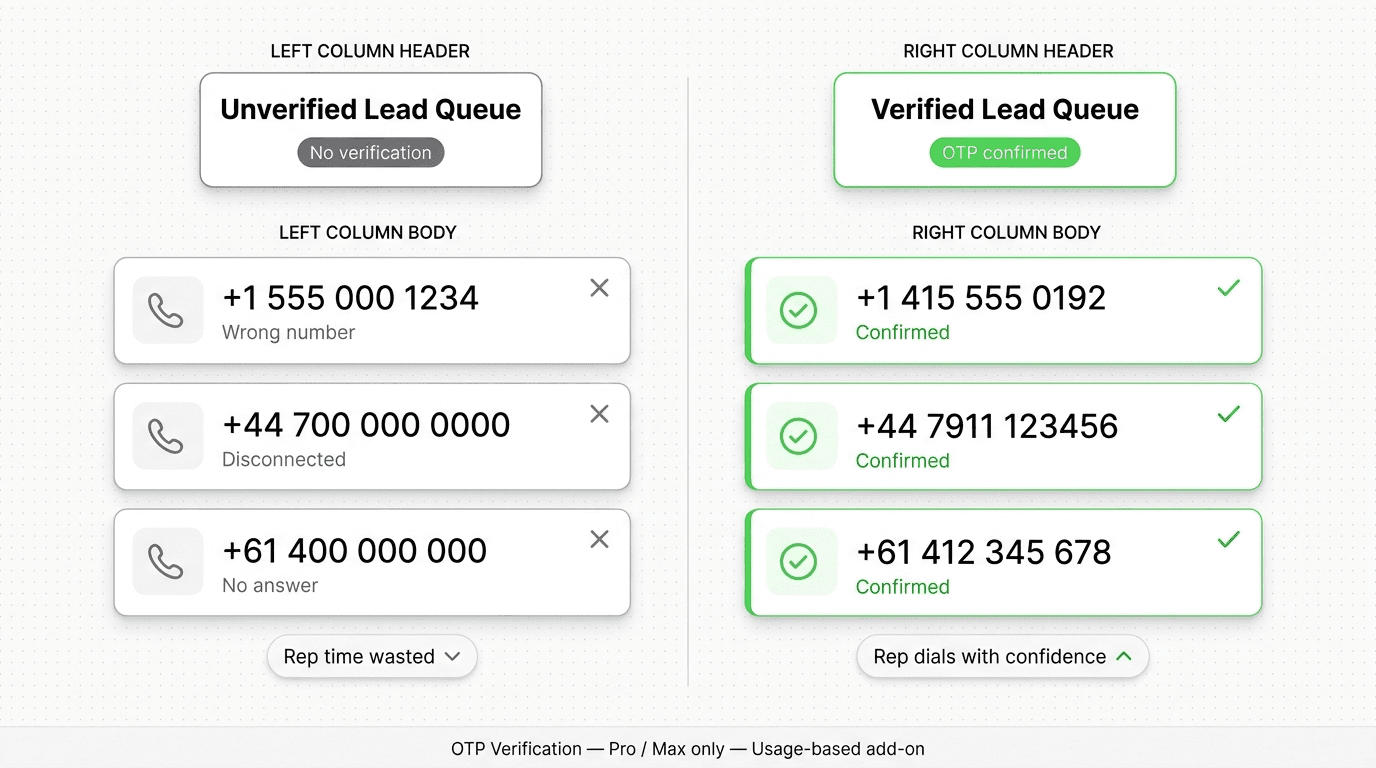
The operational difference between a verified and unverified lead queue shows up most clearly when you look at what a rep actually does with each.
Unverified lead queue: The rep sees a phone number field. They don't know if it's real. Standard procedure: prepare the call context, dial, hope for a connection. When it fails — wrong number, disconnected, voicemail to a different name — they mark the lead invalid and the preparation time is lost. Over a week of calling, a meaningful percentage of rep time goes to contacts that were never real.
Verified lead queue: Every phone number in the queue has been confirmed against the device that received the verification code. The rep dials knowing the connection will happen. Preparation time is spent on context and pitch, not on wondering whether the dial will land.
Neither queue removes the qualification problem — a verified lead can still be the wrong company size, wrong budget, or wrong timeline. But verified leads eliminate a specific category of friction: contacts that were never contactable in the first place.
The pairing of OTP verification (confirmed numbers) with a qualification flow (confirmed fit and intent) produces what teams in high-value verticals actually want: a pipeline of people who are reachable and worth reaching.
Common Mistakes to Avoid
Placing Verification Before Qualification
If the very first message asks for a phone number and triggers verification, you'll see drop-off. Visitors who haven't yet decided they're interested will abandon the flow. OTP verification earns buy-in — visitors verify numbers when they're invested enough in the conversation to want the next step. Run intent and fit questions first, then capture and verify the number as the natural handoff step.
Using Verification as a Filter for Everyone
Not every lead type requires OTP verification. If you're capturing newsletter signups, general inquiries, or low-stakes contacts, adding a verification step introduces friction without proportionate value. Reserve OTP verification for the high-intent, high-value flows where a confirmed mobile number is the operating threshold for the next step.
Not Configuring the Unverified Lead Path
Every OTP flow will produce some visitors who receive the code but don't enter it — whether from distraction, a delivery delay, or a deliberate decision. If you haven't configured what happens to those leads, they either vanish (lost pipeline) or pile up in an unconfigured state. Decide upfront: unverified leads that completed qualification but didn't verify can go to a nurture flow, a manual review queue, or a re-engagement sequence with a different ask.
Assuming Verification Replaces Qualification
Verification confirms a number. It doesn't confirm intent, fit, budget, timeline, or authority. A lead with a verified phone number who is the wrong company size or wrong seniority is still a bad lead. Run both: qualification logic and verification. The combination produces leads that are qualified and contactable.
Forgetting to Surface Verified Status to Reps
A verified lead that isn't marked as verified in the CRM or lead summary defeats the purpose. Reps need to see the confirmed status before dialing so they know the call will connect. Make sure the verified badge appears in the lead record, the webhook payload, and wherever your team manages the follow-up queue.
FAQ
Is OTP verification included in the Hyperleap base plan?
No. OTP verification is a paid add-on and is not included in any base plan. It is available only on Pro ($100/mo) and Max ($200/mo) plans, as a usage-based add-on with recharges starting from $100. The Plus plan ($40/mo) does not include access to OTP verification. See Hyperleap pricing for details.
How does the visitor receive the verification code?
The visitor receives a one-time code on their phone as part of the OTP add-on's verification flow. They enter the code in the website chat window to confirm their number. This is not delivered through Hyperleap's messaging channels (Website chat, WhatsApp, Instagram DM, or Facebook Messenger) — the verification code delivery is handled by the add-on's process, separate from the customer-facing chat channel.
Will OTP verification reduce my lead volume?
Yes, by design — and that's the point. Some visitors who provide false or mistyped numbers won't complete the verification step. Those contacts were not reachable in the first place. The leads that do complete verification are confirmed as contactable. Whether that trade-off is favorable depends on your vertical: in high-value verticals where each qualified lead is worth hundreds or thousands of dollars, filtering out uncontactable leads improves pipeline quality even if raw volume drops.
Which Hyperleap plan do I need for OTP verification?
Pro ($100/mo) or Max ($200/mo). The Plus plan does not include OTP verification. You also need to purchase the add-on separately — it is not included in the Pro or Max plan base cost. Usage is consumption-based with recharges starting at $100.
Can I use OTP verification on WhatsApp and Instagram DM, not just the website widget?
No. OTP verification runs on website chat only; the verification step does not run on WhatsApp, Instagram DM, or Facebook Messenger. See the channels page for deployment details.
What happens if the visitor doesn't enter the correct code?
You configure the behavior. Options include: prompt for a re-send, allow a limited number of re-attempts before flagging the lead, or route the unverified lead to a separate queue for manual review. Visitors who abandon the verification step without completing it are not lost — they can be routed to a nurture flow depending on how far they got in the qualification conversation.
Does OTP verification work for all industries, or only regulated ones?
OTP verification is useful in any context where a confirmed phone number is the primary follow-up mechanism and where fake or mistyped numbers represent meaningful pipeline waste. It is most cost-effective in high-value verticals — fintech/lending, real estate, legal, healthcare intake, insurance — where the per-lead value is high enough to justify the add-on cost. For lower-value or lower-intent flows, the friction it adds may not be worth the benefit.
Start Building a Verified Lead Pipeline
A verified lead pipeline in a high-value vertical operates differently from an unverified one. Reps dial knowing the call will connect. Preparation time converts to actual conversations. The pipeline statistics reflect real buyer behavior, not noise from phantom contacts.
OTP verification on Hyperleap is a paid add-on — Pro and Max plans only, website chat only, usage-based from $100. Not included in any base plan.
- Start your 7-day free trial — credit card required; upgrade to Pro or Max to unlock OTP verification
- Review pricing and the OTP add-on — full breakdown of what's included at each tier
- See all product features — qualification flows, lead summaries, REST API, webhooks, and more
- Explore the four channels — Website, WhatsApp, Instagram DM, Facebook Messenger
For the broader lead capture picture — before you add verification — see the AI lead capture chatbot guide. For qualification logic that runs alongside the verification step, see the lead qualification chatbot guide.
Related Articles

Lead Qualification Chatbot: Questions, Fields, and Handoff Rules
A lead qualification chatbot turns raw contacts into ranked, routed leads — before a rep wastes the first call. Here's the question stack, scoring, and handoff logic that works.

AI Lead Capture Chatbot: Convert Website Visitors Into Qualified Leads
An AI lead capture chatbot does what forms can't: qualify intent, capture contacts, and hand clean leads to your team — across four channels, 24/7.

Chatbot Lead Summaries: What Your Team Should Receive
A raw transcript creates work. A chatbot lead summary — contact details, intent, qualification signals, timeline, and a next action — means your rep is ready to call in 30 seconds.

Chatbot Lead Routing: How to Send the Right Inquiry to the Right Team
Chatbot lead routing determines which team, rep, or action receives each qualified conversation. Here's how routing logic works, and how to deliver leads via webhooks.