Guide
WhatsApp Chatbot Pricing in India 2026: Cost Breakdown
Understand the true cost of WhatsApp chatbots in India. Meta's WhatsApp fees, platform fees, hidden costs, and ROI calculator for Indian businesses.

Gopi Krishna Lakkepuram · Founder & CEO
· Updated · 17 min read
TL;DR: The total monthly cost of a WhatsApp chatbot in India ranges from INR 3,000-25,000 for most SMBs, comprising a chatbot platform fee plus Meta's WhatsApp fees, which you pay Meta directly according to Meta's current pricing. Meta changes its pricing from time to time, so check Meta's pricing page for current rates in India. Return depends on your inquiry volume, conversion rate, and order value.
WhatsApp Chatbot Pricing in India 2026
Planning to deploy a WhatsApp chatbot in India in 2026? Understanding the real costs is crucial for budgeting and ROI calculations. This guide breaks down every cost component — from Meta's WhatsApp fees to platform charges — so you know exactly what to expect.
WhatsApp Business API Pricing Structure
Meta charges businesses directly for using the WhatsApp Business API. Those fees are separate from your chatbot platform plan, and you pay them according to Meta's current pricing. Meta has changed how it prices WhatsApp several times, including what it charges for, which messages are free and the rates in each country, so this guide doesn't quote Meta's rates. Check Meta's WhatsApp Business pricing page for the current model and the rates for India before you budget.
What Drives Meta's Fees?
What you pay Meta depends on Meta's current rules, but in practice it is shaped by:
- What you send: promotional messages, transactional updates and verification codes can be priced differently
- Who starts the conversation: replies to customers who message you first are treated differently from messages your business starts
- Where your customers are: Meta sets rates by country
Message Types to Understand
Meta groups business messages into types. The names and rules change, so confirm them on Meta's pricing page, but the main types are:
| Type | Who Initiates | Use Cases |
|---|---|---|
| Marketing | Business | Promotions, offers, announcements |
| Utility | Business | Order updates, receipts, alerts |
| Authentication | Business | OTPs, verification codes |
| Service | Customer | Customer-initiated queries |
Check Meta's Current Pricing
Meta's fees, including whether any messages are free, are set by Meta and change over time. Your Hyperleap plan doesn't include them: you pay Meta directly, at Meta's current rates. See Meta's WhatsApp Business pricing page.
Detailed Breakdown by Message Type
Marketing Messages
Definition: Business-initiated messages using marketing templates.
Examples:
- New product announcements
- Sale notifications
- Seasonal offers
- Re-engagement campaigns
- Event invitations
When to use: When you want to proactively reach out to customers with promotional content.
Utility Messages
Definition: Business-initiated messages for transactional purposes.
Examples:
- Order confirmations
- Shipping updates
- Appointment reminders
- Payment receipts
- Account notifications
When to use: For transactional, non-promotional messages that customers expect.
Authentication Messages
Definition: Messages containing one-time passwords or verification codes.
Examples:
- Login OTPs
- Payment verification
- Account verification
- Password reset codes
When to use: For secure authentication purposes only.
Service Conversations
Definition: Conversations initiated by customers, where your business replies.
Pricing: Set by Meta. Check Meta's pricing page for how customer-initiated conversations are currently charged.
Examples:
- Customer inquiries
- Support requests
- Product questions
- Booking queries
Platform Costs Beyond Meta
Meta's WhatsApp fees are just one component. Here's the full cost picture:
Chatbot Platform Fees
| Platform | Monthly Fee | WhatsApp Support | AI Included |
|---|---|---|---|
| Hyperleap AI | $40-200 (USD; Plus, Pro, Max) | Official WhatsApp Business API | Yes |
| Interakt | ₹999-4,999 | Native | Basic |
| WATI | ₹4,000-12,000 | Native | Limited |
| Gupshup | Usage-based | Native | Additional |
| Yellow.ai | Enterprise | Native | Advanced |
Business Service Provider (BSP) Fees
Some platforms add their own charges on top of Meta's fees:
| BSP Model | Cost Structure |
|---|---|
| Pass-through | Meta fees only + platform fee |
| Markup model | Meta fees + 10-30% markup |
| Bundled | Fixed monthly fee includes conversations |
Watch for Hidden Markups
Some providers add a markup on Meta's WhatsApp fees. Always ask for transparent pricing and compare the total cost, not just the platform fee.
Total Cost Scenarios
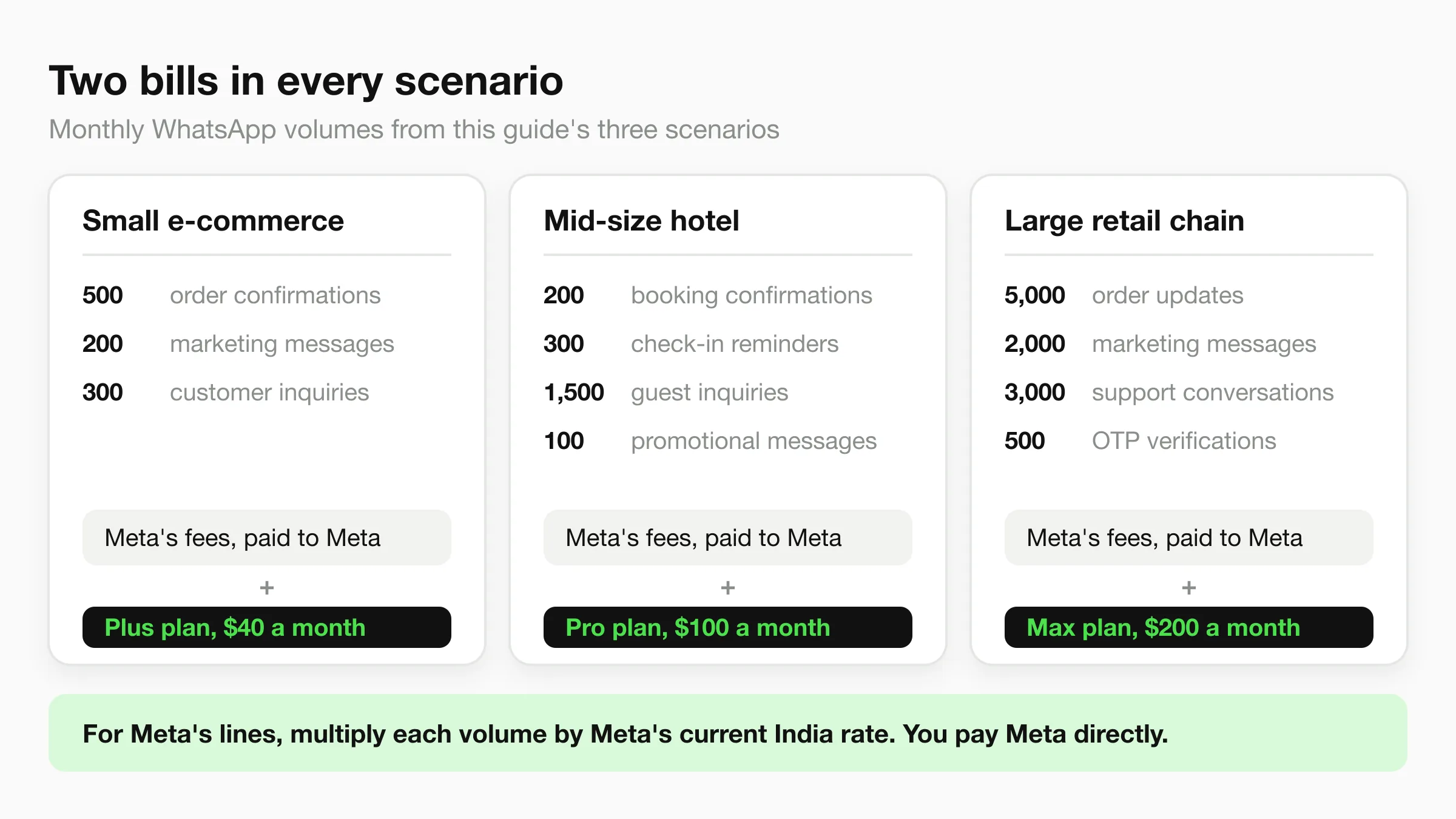
Scenario 1: Small E-commerce Business
Profile:
- 500 monthly customers
- Order confirmations for each
- 200 marketing messages
- 300 customer inquiries
Cost Calculation:
| Component | Quantity | Rate | Cost |
|---|---|---|---|
| Order confirmations (Utility) | 500 | Meta's current rate | Paid to Meta |
| Marketing messages | 200 | Meta's current rate | Paid to Meta |
| Customer inquiries (Service) | 300 | Meta's current rate | Paid to Meta |
| Platform (Hyperleap Plus) | 1 | $40 (USD) | $40 |
| Total monthly cost | — | — | Meta's fees + $40 |
Scenario 2: Mid-Size Hotel
Profile:
- 200 booking confirmations/month
- 300 check-in reminders
- 1,500 guest inquiries
- 100 promotional messages
Cost Calculation:
| Component | Quantity | Rate | Cost |
|---|---|---|---|
| Booking confirmations (Utility) | 200 | Meta's current rate | Paid to Meta |
| Check-in reminders (Utility) | 300 | Meta's current rate | Paid to Meta |
| Guest inquiries (Service) | 1,500 | Meta's current rate | Paid to Meta |
| Promotional messages | 100 | Meta's current rate | Paid to Meta |
| Platform (Hyperleap Pro) | 1 | $100 (USD) | $100 |
| Total monthly cost | — | — | Meta's fees + $100 |
Scenario 3: Large Retail Chain
Profile:
- 5,000 order updates/month
- 2,000 marketing campaigns
- 3,000 customer support
- 500 OTP verifications
Cost Calculation:
| Component | Quantity | Rate | Cost |
|---|---|---|---|
| Order updates (Utility) | 5,000 | Meta's current rate | Paid to Meta |
| Marketing campaigns | 2,000 | Meta's current rate | Paid to Meta |
| Customer support (Service) | 3,000 | Meta's current rate | Paid to Meta |
| OTP verification | 500 | Meta's current rate | Paid to Meta |
| Platform (Hyperleap Max) | 1 | $200 (USD) | $200 |
| Total monthly cost | — | — | Meta's fees + $200 |
To fill in the Meta lines, multiply each quantity by the current rate for India on Meta's pricing page. In each scenario, the Meta fees are paid to Meta directly and the platform fee is your Hyperleap plan.
Get Transparent WhatsApp Automation Pricing
Three plans, priced in USD: Plus $40, Pro $100, Max $200 a month, each with a 7-day trial. One AI reply = one response.
See PricingHidden Costs to Watch
1. Template Rejection Delays
- Failed templates mean messaging delays
- Re-submissions take 1-3 days
- Time cost of template iteration
Mitigation: Use platforms with template guidance and pre-approval review.
2. Phone Number Costs
- Dedicated business number required
- Virtual numbers typically ₹500-2,000/month
- Number porting may have fees
3. Integration Development
If building custom integration:
- Development time: ₹50,000-2,00,000 one-time
- Ongoing maintenance: ₹10,000-25,000/month
- Testing and debugging: Variable
Mitigation: Use platforms with native WhatsApp integration.
4. Training and Onboarding
- Staff training time
- Knowledge base creation
- Conversation flow design
- Template content creation
Typical cost: 20-40 hours of internal time
5. Scaling Challenges
As volume grows:
- Meta's fees grow with your message volume, at Meta's current rates
- Template limits may require planning
- Platform upgrades needed
Cost Optimization Strategies
1. Encourage Customer-Initiated Conversations
Strategy: Design flows where customers initiate contact. Meta has historically priced these more favorably than business-initiated messages; check its current pricing.
Tactics:
- "Click to WhatsApp" buttons on website
- QR codes in stores
- "Reply to this message" prompts
Impact: Depends on Meta's current pricing for customer-initiated conversations
2. Use Utility vs. Marketing Wisely
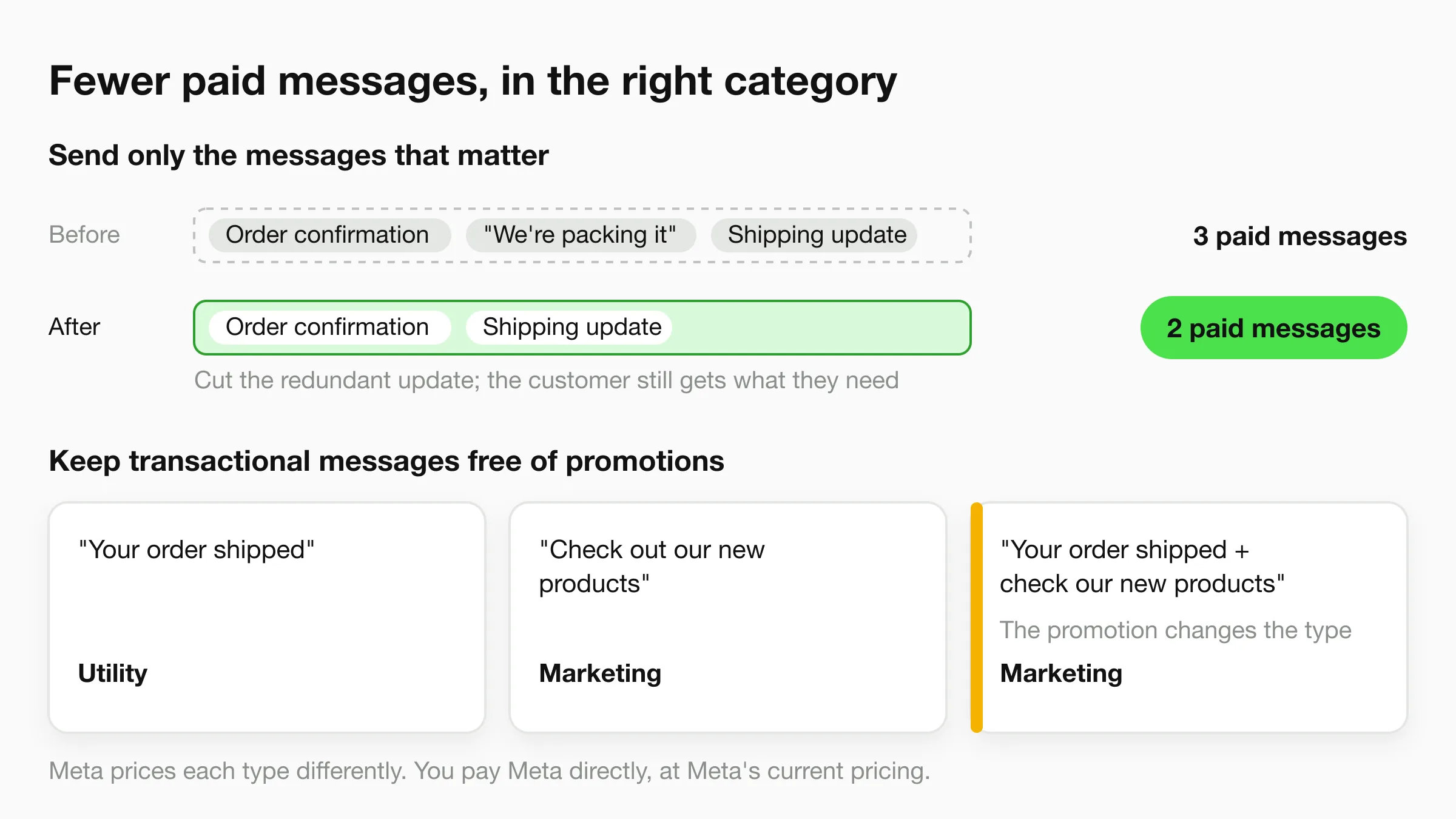
Strategy: Classify messages correctly. Meta prices message types differently, and adding promotional content to a transactional message can change its type.
| Message Type | Likely Category |
|---|---|
| "Your order shipped" | Utility |
| "Check out our new products" | Marketing |
| "Your order shipped + Check our new products" | Marketing |
Impact: Depends on the gap between Meta's current rates for each type
3. Send Only the Messages That Matter
Strategy: Cut redundant business-initiated messages and combine updates where it makes sense for the customer.
Example:
Before: Order confirmation + separate "we're packing it" + shipping update
After: Order confirmation + shipping update
Impact: Fewer paid messages, at whatever Meta currently charges for each
4. Use AI to Reduce Conversations
Strategy: AI handles inquiries in fewer message exchanges.
Example:
- Without AI: 3 separate customer-initiated conversations
- With AI: 1 conversation resolves completely
Impact: Fewer repeat contacts; savings depend on Meta's current pricing
5. Choose the Right Platform
Strategy: Compare total costs, not just visible fees.
At your expected conversation volume, add up:
- The platform fee for the plan you would actually need
- Any markup on Meta's WhatsApp fees
- Setup fees and per-message or overage charges
ROI Calculator
Input Your Numbers
| Variable | Your Business | Example |
|---|---|---|
| Monthly WhatsApp inquiries | ___ | 1,000 |
| Conversion rate | ___% | 10% |
| Average order value | ₹___ | ₹5,000 |
| Customer lifetime value | ₹___ | ₹25,000 |
Calculate Returns
Revenue Generated:
Monthly conversions = Inquiries × Conversion rate
= 1,000 × 10% = 100 conversions

Revenue = Conversions × Average order value
= 100 × ₹5,000 = ₹5,00,000/month
Costs:
Meta's WhatsApp fees (your message mix at Meta's current rates, as in the scenarios above)
+ Platform fee for your plan
= Total monthly cost
ROI:
Count only the extra conversions the chatbot adds, not all WhatsApp revenue
Incremental profit = Extra conversions × Average order value × Your margin
ROI = (Incremental profit - Total monthly cost) / Total monthly cost × 100
ROI Potential
The ROI from WhatsApp chatbots can be substantial because platform costs are low relative to revenue generated from captured leads. However, results vary significantly by industry, inquiry volume, and average order value. Use the calculator above with your own numbers for an accurate estimate.
Try Our Interactive Calculator
Want a more detailed analysis? Use our free ROI Calculator with your specific business numbers.
Comparison: WhatsApp vs. Other Channels
Cost per Customer Interaction
| Channel | Cost per Interaction | Response Time |
|---|---|---|
| WhatsApp (AI) | Meta's current rates + platform fee | Instant |
| Phone support | ₹30-50 | Immediate |
| ₹5-10 | Hours | |
| SMS | ₹0.20-0.30 | Minutes |
| Website chat | ₹0-5 | Varies |
Why WhatsApp Wins in India
- Familiarity: 500M+ Indian users already on WhatsApp (Source: Meta / Statista)
- Trust: Personal channel feels more reliable
- Convenience: No app download, no registration
- Rich media: Images, documents, locations
- Conversation history: Context preserved
"Indian businesses often overpay for WhatsApp automation because of hidden markups on top of Meta's fees. Ask every vendor whether Meta's fees are passed through at cost. Transparency in pricing is as important as the technology itself." — Gopi Krishna Lakkepuram, Founder & CEO of Hyperleap AI
Tips for Reducing Costs
Short-Term Tactics
- Audit your templates: Ensure correct categorization
- Consolidate messages: Cut redundant business-initiated messages
- Recheck Meta's pricing: Review Meta's current rates when you budget
- Review platform fees: Negotiate or switch if overpriced
Long-Term Strategies
- Implement AI chatbots: Higher resolution, fewer conversations
- Build opt-in lists: Enable proactive messaging at scale
- Integrate with CRM: Reduce duplicate conversations
- Analyze conversation data: Identify optimization opportunities
Further Reading
Authoritative external sources used and recommended for further research on this topic:
- WhatsApp Business Platform documentation
- WhatsApp Business Platform pricing
- Meta for Developers WhatsApp API
Get Transparent WhatsApp Pricing
Hyperleap AI runs on the official WhatsApp Business API. Plus $40, Pro $100, Max $200 a month, each with a 7-day trial.
Try for FreeNeed help optimizing your WhatsApp costs? Contact our team for a personalized pricing analysis for your business.
Keep exploring
- AI agents for your business - Build a WhatsApp chatbot that pays for its own message costs
- Conversational AI for customer service - Automate the conversations driving your WhatsApp spend
WhatsApp Resources
- Best WhatsApp Automation Tools 2026 - Platform comparison
- Best Multi-Channel Chatbots 2026 - Omnichannel solutions
- Best Wati Alternatives 2026 - Wati competitor analysis
- Best Interakt Alternatives 2026 - Interakt competitors
Industry WhatsApp Guides
- WhatsApp Automation for Hotels - Hospitality focus
- AI Chatbot for Hotels in Mumbai - City implementation
- How to Choose an AI Chatbot Platform - Selection guide
Price vs Value: What to Evaluate Beyond Monthly Cost
The monthly platform fee is only one component of WhatsApp chatbot costs. Businesses that evaluate total cost of ownership make better purchasing decisions.
Hidden Cost Categories
| Cost Category | Typical Range | How Often Overlooked |
|---|---|---|
| Markup on Meta's fees | Varies by provider | Very common |
| Setup/onboarding fees | ₹5,000-50,000 one-time | Common |
| Integration development | ₹20,000-2,00,000 one-time | Moderate (for custom CRM/ERP) |
| Template creation | ₹2,000-10,000/month (agency) | Common if outsourced |
| Knowledge base maintenance | 5-10 hours/month internal time | Often underestimated |
| Scaling overages | Variable | Triggers at growth thresholds |
What to Ask Before Signing
- "Is Meta's pricing passed through at cost, or do you add a markup?" Some providers add a markup on top of Meta's fees, which compounds significantly at scale
- "Are chatbot flow updates included, or charged separately?" Platforms that charge per-flow-update can cost ₹5,000-15,000 per change
- "What happens when I exceed my plan limits?" Overage fees can cost well above the standard rate
- "Is analytics and reporting included?" Some platforms charge ₹2,000-5,000/month for advanced analytics
- "What is the contract lock-in period?" Annual contracts may offer 15-20% discounts but limit flexibility
How Indian Businesses Budget for WhatsApp Automation
Budget allocation for WhatsApp automation varies by business size, with clear patterns emerging across the Indian market.
Average Monthly Spend by Business Size
| Business Size | Monthly Budget | Conversations/Month |
|---|---|---|
| Micro (1-5 employees) | ₹1,000-3,000 | Under 500 |
| Small (6-25 employees) | ₹3,000-8,000 | 500-2,000 |
| Medium (26-200 employees) | ₹8,000-25,000 | 2,000-10,000 |
| Large (200+ employees) | ₹25,000-1,00,000+ | 10,000+ |
How Spend Changes With Volume
- Smaller businesses usually stay on an entry plan while conversation volume is low
- Spend tends to rise as businesses move to higher tiers when conversation volume increases
Budget Allocation Patterns
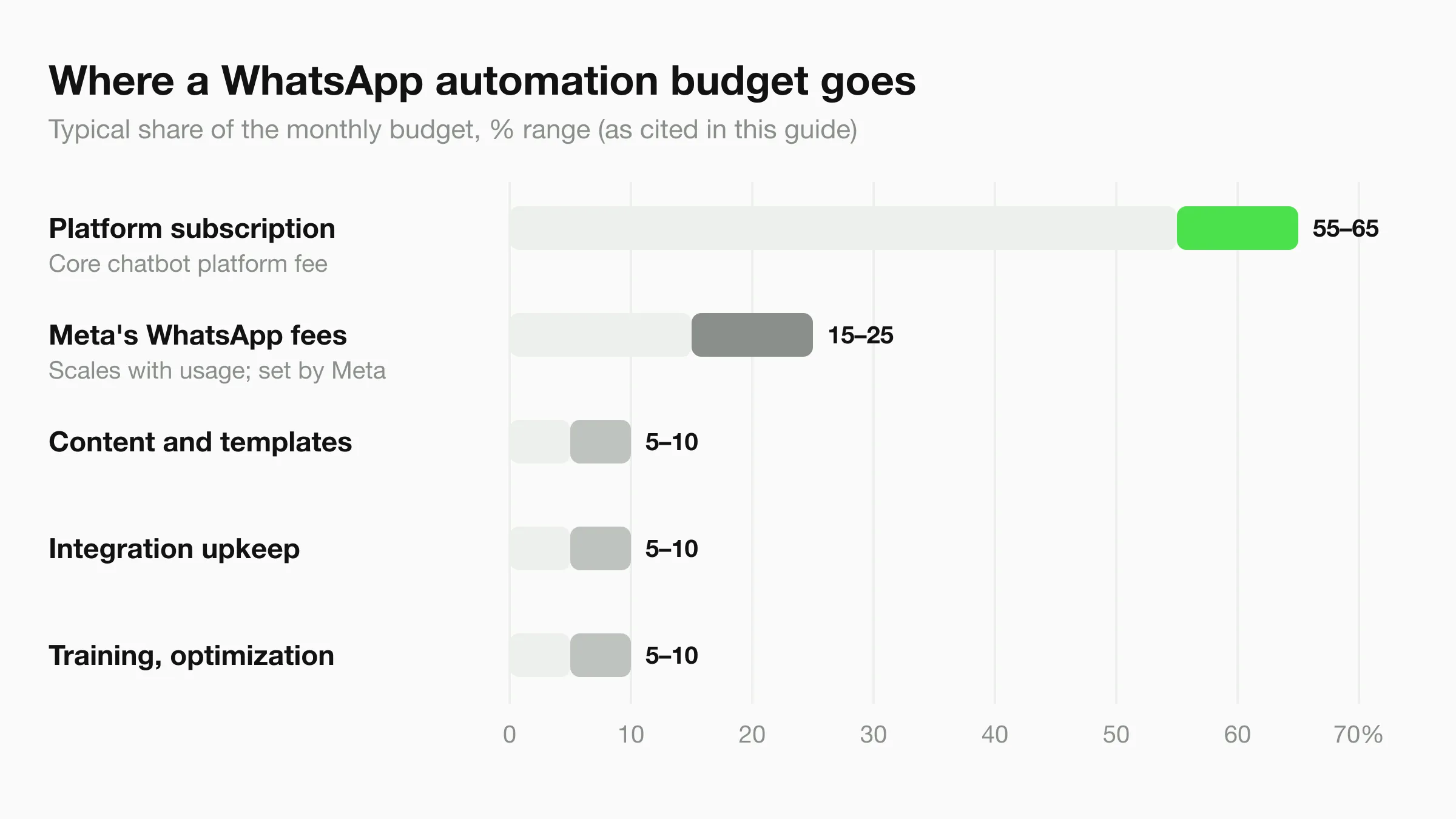
Indian businesses typically allocate their WhatsApp automation budget as follows:
| Component | Percentage of Budget | Notes |
|---|---|---|
| Platform subscription | 55-65% | Core chatbot platform fee |
| Meta's WhatsApp fees | 15-25% | Scales with usage; set by Meta |
| Content and templates | 5-10% | Template creation and updates |
| Integration maintenance | 5-10% | CRM, payment, and analytics connections |
| Training and optimization | 5-10% | Staff training, knowledge base updates |
- A significant share of businesses start on an entry plan and upgrade within 6 months as they see ROI (typical results vary; based on platform adoption patterns)
- Businesses typically see measurable conversion improvements within the first quarter of deployment (typical results vary by industry and implementation quality)
- Many Indian businesses report that WhatsApp automation costs less per interaction than their previous support setup — typical results vary based on inquiry volume and prior method
Frequently Asked Questions
What is the total monthly cost of a WhatsApp chatbot in India?
The total monthly cost typically ranges from ₹3,000-25,000 for most small and mid-sized businesses. This includes the chatbot platform fee, Meta's WhatsApp fees (paid to Meta directly, at Meta's current rates), and any add-ons like CRM integrations or analytics dashboards.
How do Meta's conversation charges work?
Meta charges businesses directly for WhatsApp Business API messaging, separately from your chatbot plan. What you pay depends on Meta's current pricing, which takes into account the type of message and the country, and Meta changes that model from time to time. Check Meta's WhatsApp Business pricing page for the current rules and rates for India.
Are there hidden costs with WhatsApp chatbot platforms?
Common hidden costs include setup fees (₹5,000-50,000 one-time), charges for additional chatbot flows or templates beyond the base plan, and overage fees when you exceed your conversation quota. Always ask vendors about onboarding costs, API call limits, and whether analytics and reporting are included or charged separately.
Are there free tier options for WhatsApp chatbots?
Yes, several platforms offer free tiers or trial periods, and many BSPs offer free plans with limited features supporting up to 100-500 conversations/month. These free tiers are excellent for testing and validation before committing to a paid plan. Hyperleap AI has no free plan; every plan (Plus $40, Pro $100, Max $200 a month) starts with a 7-day trial.
How do you calculate ROI for a WhatsApp chatbot?
Calculate ROI by comparing chatbot costs against savings from reduced support staff time, increased conversions, and higher customer retention. Because WhatsApp platform costs are low relative to the value of a converted lead, even modest lead-to-conversion improvements can yield a strong ROI. Factor in agent time saved on routine queries plus revenue from faster response on inquiries. Actual results vary by industry, inquiry volume, and conversion rates — use the interactive calculator above with your specific numbers.
Glossary
- WhatsApp Business API - API fundamentals
- What is a Chatbot? - Chatbot basics
- OTP Validation - Verified messaging
How much does WhatsApp Business API actually cost?
You pay Meta's WhatsApp fees directly, according to Meta's current pricing, separately from your Hyperleap plan. Meta's rates vary by country and change over time — see Meta's WhatsApp Business pricing page.
Is a WhatsApp Business Account required to use Hyperleap on WhatsApp?
Yes — Meta requires a verified WhatsApp Business Account with a dedicated phone number for the WhatsApp Business API. Hyperleap walks you through provisioning during onboarding.
Can the same chatbot handle WhatsApp and website chat?
Yes. Hyperleap runs one AI agent across Website chat, WhatsApp, Instagram DM, and Facebook Messenger — same knowledge base, same answers, same conversation history in one unified inbox.
Related Articles
View all
Guide18 min read
Conversational AI for Hotels: From Enquiry to Booking
How conversational AI moves a hotel guest from a website or WhatsApp question to a booked room — and what it honestly doesn't do with your PMS or Cloudbeds.
Guide11 min read
Best AI Chatbot for WhatsApp Business 2026: Buyer Guide
WhatsApp is a high-converting channel for many SMBs in 2026. Here's what a serious AI chatbot for WhatsApp Business actually needs to do.
Guide22 min read
Multi-Channel AI Chatbot Strategy: Website, WhatsApp & More
Learn how to deploy AI chatbots across website, WhatsApp, Instagram DM, and Facebook Messenger — with a unified inbox and consistent answers everywhere.
Guide18 min read
AI Chatbot for Daycares: Streamline Parent Communication
Daycare AI chatbots handle enrollment inquiries, daily updates, and parent questions so your staff can focus on the children.