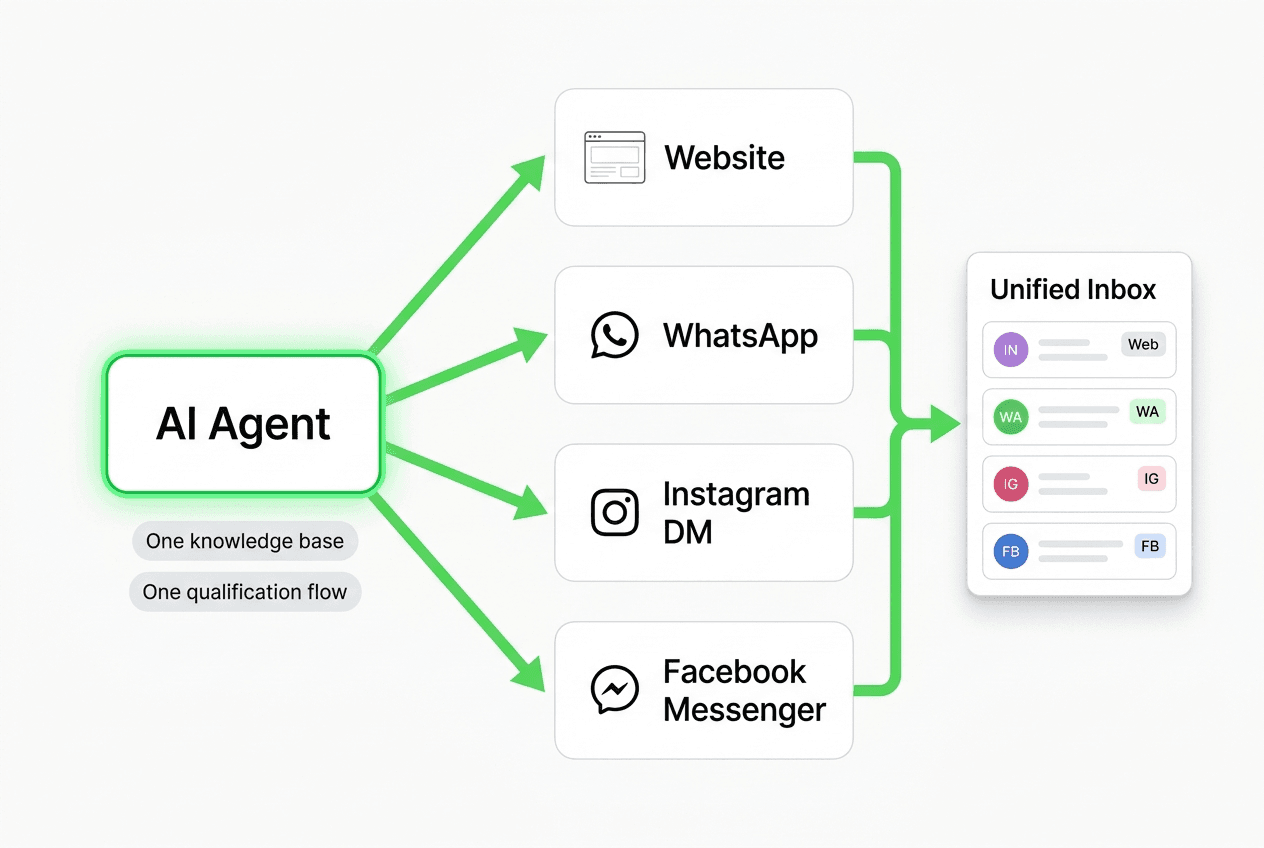
Multi-Channel AI Chatbot: One Agent Across Website and Social Messaging
A multi-channel AI chatbot deploys one agent across Website, WhatsApp, Instagram DM, and Facebook Messenger — qualifying leads on every surface where buyers actually are.
TL;DR: A multi-channel AI chatbot deploys one agent — one knowledge base, one qualification flow, one unified inbox — across Website, WhatsApp Business API, Instagram DM, and Facebook Messenger simultaneously. When a buyer messages your Instagram Story ad at 10pm, the same agent that qualifies website visitors handles it. When you update your pricing FAQ, it updates across all four channels at once. This guide explains the distinct buyer behavior on each channel, the operational case for one agent over four separate bots, and how to set up multi-channel deployment with Hyperleap — including transparent pricing and what WhatsApp Business API actually requires.
Why Single-Channel Loses Leads
Most businesses start with a website chatbot. That is the right first step. But the website is not where all buyers are when they decide to reach out.
A visitor who clicks your Instagram ad does not go to your website, find the chat widget, and open a conversation. They stay on Instagram. They tap the "Send Message" button on your profile or the DM call-to-action on your Story ad. If nothing answers, they move on.
A prospect researching your service who already has your WhatsApp number — from an event, a referral, a business card — messages you on WhatsApp. If the only option is a canned auto-reply or silence, that conversation dies before it starts.
Facebook Messenger works the same way. Local service businesses — HVAC, plumbing, legal, financial services — get significant inbound Messenger volume from Facebook ads and Facebook Page visitors. Most of it goes unanswered or gets a generic "we'll be in touch" response that no one follows up on.
The buyers are already telling you where they want to talk. Single-channel setups say: "We only listen here."
The Fragmentation Tax
The instinct when this problem becomes obvious is to add a separate tool for each channel — a website widget from one vendor, a WhatsApp bot from another, Instagram automation from a third. This solves the coverage problem but creates a worse one: operational fragmentation.
Four separate tools means four separate places to update qualification logic. When you change your pricing, you update four bots. When a product feature changes, four bots. When a new objection emerges that needs a new response, four bots. The fragmentation tax compounds over time.
There is a better model: one AI agent that understands your business once and runs everywhere.
The Four Channels and What Buyers Do on Each
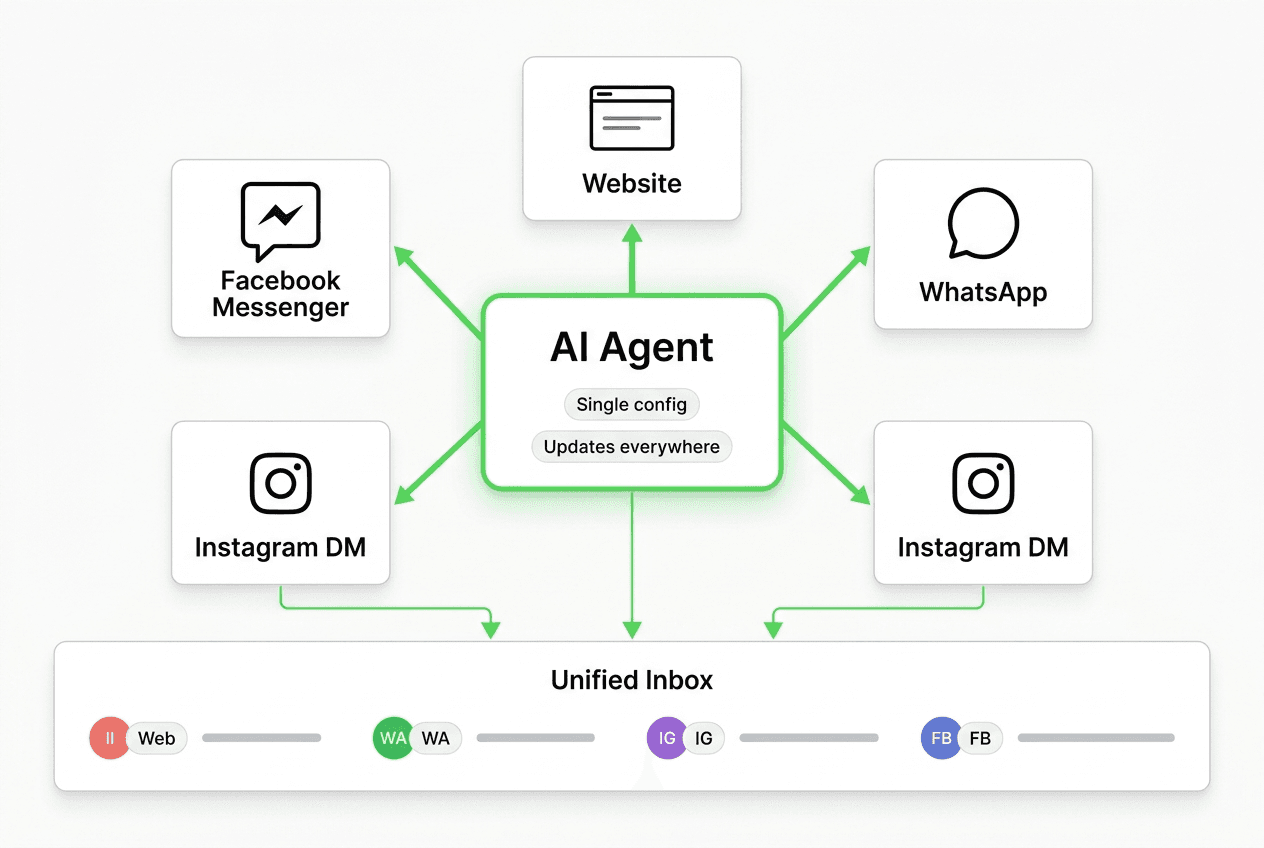
The four channels where AI chatbots are shipped and proven are: Website, WhatsApp Business API, Instagram DM, and Facebook Messenger. Each attracts a different buyer state. Knowing that difference is what makes multi-channel strategy work — it is not just "be everywhere," it is "be useful in the way each channel demands."
Website: High-Intent Search Traffic
The website chat widget serves your highest-intent visitors. These are people who arrived via organic search, paid search, or direct navigation — they were already looking for something. By the time they land on your site, they have done some research and are actively evaluating whether your product fits.
Website visitors have the highest tolerance for qualification questions because they are already in research mode. A five-turn ICTT qualification flow (Intent, Company fit, Timeline, Transfer signal) works here without friction. They came to learn; the chatbot is part of that learning process.
The website is also where buyers compare you against alternatives. Objection-handling knowledge — pricing FAQs, feature comparisons, competitor questions — earns its keep here more than anywhere else.
WhatsApp: Follow-Up and Longer Sales Cycles
WhatsApp conversations happen when a buyer has already decided you are worth talking to. They gave out their WhatsApp number, which is a more personal channel than a website form. The intent signal is strong.
WhatsApp is where longer-cycle deals live — real estate, financial services, professional services, education, healthcare intake. A prospect who is not ready to buy today may follow up on WhatsApp two weeks from now when their situation changes. A well-configured agent handles that follow-up automatically, picks up where the last conversation left off, and keeps the relationship warm until the timing is right.
Important: WhatsApp lead capture requires WhatsApp Business API access, not a personal WhatsApp account. This means completing the Facebook/Meta business verification process and connecting through the API. The WhatsApp Business API page covers what this involves. It is a one-time setup and the channel capabilities it unlocks — automated responses, rich cards, structured lead capture — are worth the process.
Instagram DM: Warm Ad and Story Traffic
Instagram DM is the highest-temperature inbound surface most businesses are currently leaving cold. A prospect who taps your ad, watches your Story, and sends a DM is already engaged. They did not arrive with a search query — they arrived because your content or ad caught them at the moment of interest.
The conversational bar on Instagram is lower than on a website. Buyers expect fast, friendly responses — not a formal qualification form. A well-configured AI agent matches that tone while still collecting the intent and contact information your team needs.
The leverage here is speed. An Instagram DM that gets an intelligent automated response in under two minutes converts at a dramatically different rate than one that sits unanswered for six hours. The buyer is still on their phone. They have not moved on yet.
Facebook Messenger: Local and High-Frequency Inbound
Facebook Messenger drives a different buyer demographic. Businesses running Facebook ads — particularly in home services, legal services, financial planning, and local retail — see consistent Messenger inbound from their ad audiences and from visitors to their Facebook Page.
These buyers are often earlier in the decision process than Instagram DM visitors. They respond to a question, a local ad, or a "Message us" button on the Page. A chatbot that handles that first conversation — introduces the service, asks two or three qualifying questions, and offers a next step — converts cold Messenger traffic into warm leads instead of letting it expire.
The Operational Case for One Agent
Running four separate bots does not just create update overhead. It creates consistency problems.
When a buyer starts a conversation on your website and follows up on WhatsApp the next day, two separate bots see two separate strangers. There is no shared context, no recognition that this is the same prospect, and no continuity in the conversation. Your team has to piece together two incomplete records.
With one agent across all four channels, the same qualification logic, the same knowledge base, and the same lead output format apply everywhere. When a lead is created from an Instagram DM, the structured summary your team receives looks identical to a lead created from the website widget. Your CRM receives the same webhook payload. Your follow-up process is the same.
Define Logic Once, Run Everywhere
The product capability here is the one-to-many agent model. You configure:
- The qualification question sequence (intent opener, company fit, timeline, contact capture)
- The knowledge documents (product FAQs, pricing, use-case examples, objection responses)
- The handoff trigger (the conditions under which a lead is created and a webhook fires)
- The escalation path (when the agent routes to a human)
That configuration deploys simultaneously to all four channels. Update the pricing FAQ, and it is live on WhatsApp, Instagram DM, Facebook Messenger, and the website the moment you save it. No sync delay, no risk of one channel running stale information.
Unified Inbox
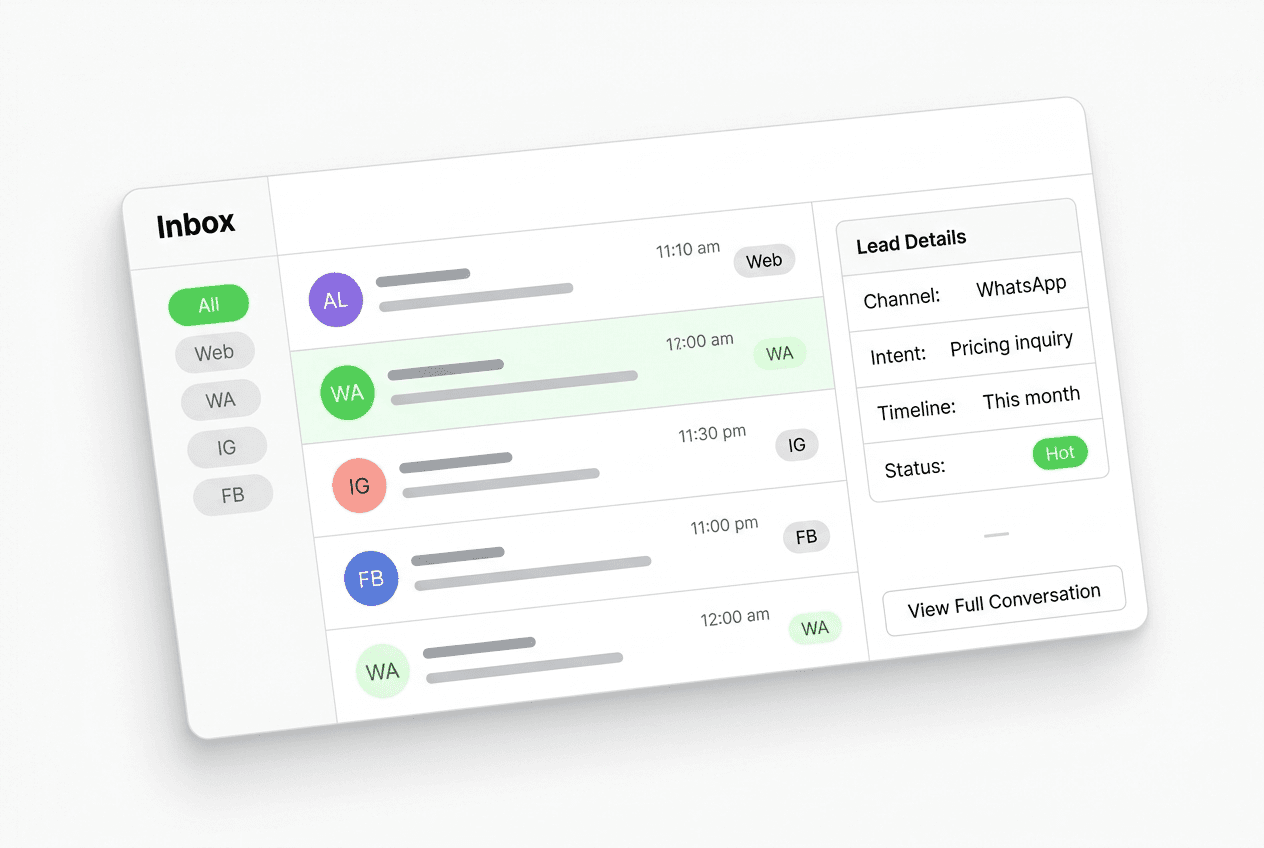
Every conversation — regardless of which channel it started on — lands in the same team inbox. A rep who picks up a lead from Instagram DM can see that the same contact had a website chat three days ago. The context is preserved. The conversation is continuous.
The alternative is four separate inboxes — one per tool — and a team that has to check each one independently while manually correlating leads across platforms. That is the operational overhead that kills multi-channel coverage before it can show results.
One Webhook, All Four Channels
When a lead is created on any channel, one webhook fires to your configured destination. Your CRM, your team notification tool, or your internal system receives the same payload structure regardless of channel. The lead summary includes the channel it came from, which helps your team prioritize and route appropriately (a WhatsApp lead from someone already in the follow-up cycle routes differently than a cold website visitor).
REST API and webhooks are the handoff mechanism. There are no native CRM plug-ins. For most SMBs this is the right architecture — you control the payload shape, the destination, and the trigger condition. If your CRM has a webhook endpoint, the integration typically takes under an hour to configure.
Channel Comparison: What to Expect From Each
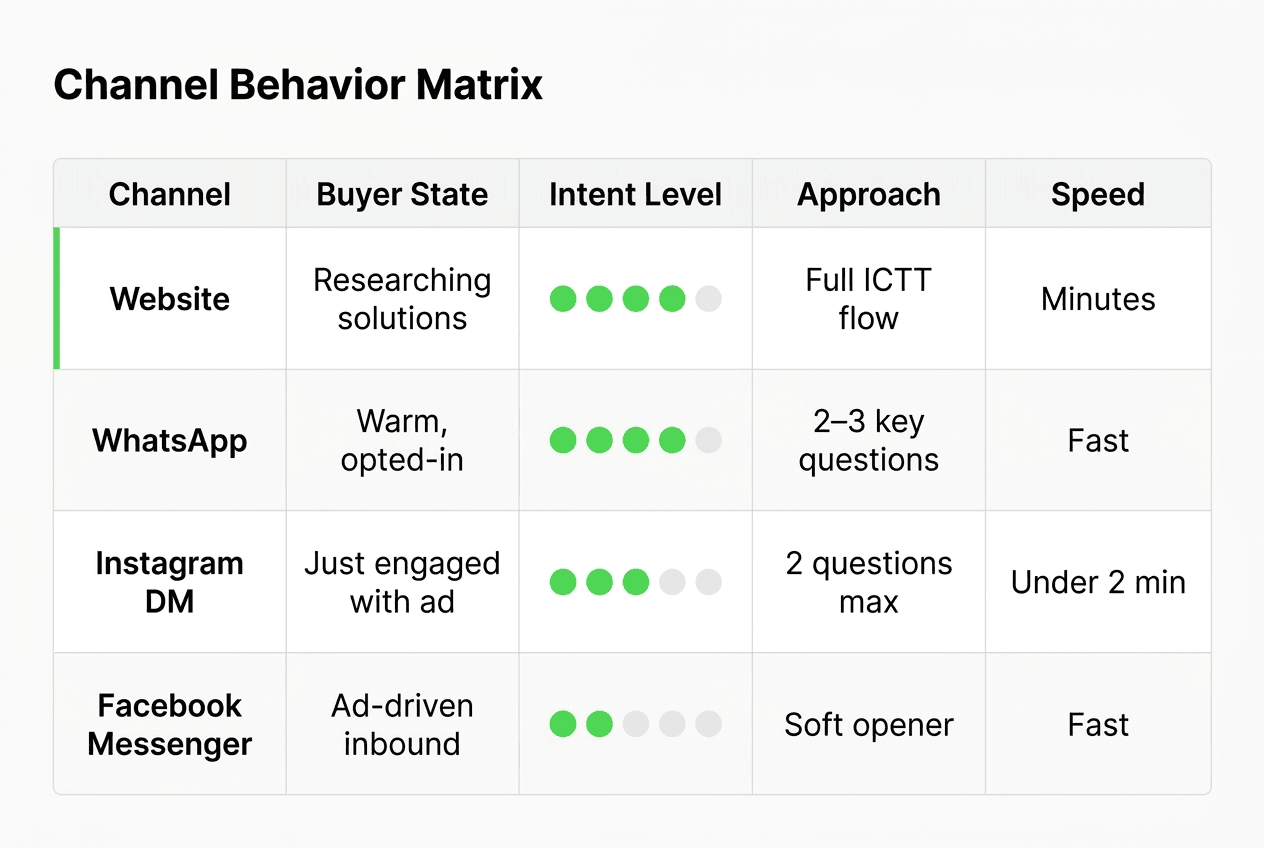
The table below summarizes the distinct buyer behavior patterns across the four channels. Use it to calibrate your qualification approach and messaging tone per channel when you configure your agent.
| Channel | Buyer state on arrival | Typical intent | Best qualification approach | Response speed expectation |
|---|---|---|---|---|
| Website | Active research, evaluating | High — already seeking | Full ICTT flow, 4–5 turns | Minutes to hours acceptable |
| Warm, opted-in follow-up | Medium-high, relationship-based | Friendly, brief — 2–3 key questions | Fast — WhatsApp is a personal channel | |
| Instagram DM | Warm, just engaged with content | Medium — interest triggered | Conversational, 2 questions max then CTA | Under 2 minutes expected |
| Facebook Messenger | Cold-to-warm, ad-driven | Low-to-medium, exploratory | Soft opener, single intent question | Fast — messaging app norms |
The key insight: the same qualification goal (understand intent, collect contact, score the lead) is applied differently on each channel. Instagram DM is not a website widget in a different container. It is a faster, warmer, lower-friction surface that rewards brevity and speed.
Rich Cards and Carousels Across All Four Channels
One capability that often surprises teams who have only run a website chatbot: rich cards and carousels work across all four channels. A product comparison card that displays cleanly in your website widget also displays in WhatsApp, Instagram DM, and Facebook Messenger.
This matters for BOFU conversations. A prospect on Instagram who asks "which plan is right for me?" can receive a three-card pricing carousel — Plus, Pro, Max — with the key differences presented visually, not buried in a wall of text. The same carousel for a WhatsApp follow-up conversation.
Use cases where rich cards earn their keep on social channels:
- Pricing comparison — present the three plans side by side when a prospect asks about cost
- Service menu — for multi-service businesses (legal, medical, home services), show what the agent can help with
- Booking prompt — a card with your booking link and a short description of what the call covers
- FAQ carousel — when the intent question returns a broad answer, offer three specific sub-topics as tappable cards
The practical point is that your content investment — the cards, the carousels, the structured answers — travels with the agent across all four channels. You build it once.
How to Deploy Multi-Channel with Hyperleap
Hyperleap AI ships all four channels — Website, WhatsApp Business API, Instagram DM, and Facebook Messenger — under a single agent configuration. Here is how multi-channel deployment works in practice.
Setup Sequence
1. Create the agent and configure the knowledge base. In Hyperleap Studio, create a new agent and upload your knowledge documents: product/service FAQs, pricing pages, use-case guides, objection-handling content. This is the single knowledge base that will power responses across all four channels.
2. Configure the qualification flow. Define the qualification questions — intent, fit, timeline, contact capture — and the branching logic (what happens if the visitor says "just researching" vs "this month"). This flow runs on every channel.
3. Connect the channels.
- Website: embed the widget code snippet in your site's
<head>. Compatible with Shopify, WordPress, Webflow, Squarespace, Wix, and any custom HTML page. - WhatsApp: connect your WhatsApp Business API account. Requires Meta business verification and a dedicated phone number registered through the API. The WhatsApp Business API guide covers the setup steps.
- Instagram DM: connect your Instagram Business account via Facebook Business Manager. Your agent handles incoming DMs automatically.
- Facebook Messenger: connect your Facebook Page via Business Manager. The agent handles Messenger conversations from your Page and your ads' click-to-Messenger calls-to-action.
4. Set up the webhook. Configure the webhook endpoint where Hyperleap should deliver lead summaries — your CRM, your team Slack, or your internal system. The webhook fires the moment a lead is created on any channel.
5. Test each channel. Send a test conversation on each connected channel before going live. Verify the qualification flow runs correctly, the lead summary looks right, and the webhook delivers to your CRM.
See the full product features page for current capability details. For the channels overview, see the channels page.
Pricing
All three Hyperleap plans include 4 channels per chatbot. Multi-channel is not a premium tier — it is the default.
| Plan | Price | AI Responses | Chatbots | Channels per chatbot |
|---|---|---|---|---|
| Plus | $40/mo | 1,500 | 1 | 4 |
| Pro | $100/mo | 4,000 | 2 | 4 |
| Max | $200/mo | 20,000 | 5 | 4 |
All plans include a 7-day free trial (credit card required). There is no free plan. Full plan details are on the pricing page.
For teams that want the initial multi-channel configuration handled for them, the Managed Setup add-on starts at $299 one-time.
Common Mistakes When Going Multi-Channel
Running Different Qualification Logic per Channel
The biggest mistake teams make when adding a second or third channel is customizing the qualification logic per channel "to match the tone." This well-intentioned decision creates the maintenance problem you were trying to avoid. A changed timeline question has to be updated in three places instead of one.
The right model: one qualification flow, adjusted for length and tone at the agent level. WhatsApp and Instagram conversations use shorter, friendlier openers — not different qualification goals. The branching logic, the thresholds, and the handoff criteria are the same.
Not Connecting WhatsApp Early Enough
Teams often defer WhatsApp setup because it requires the Business API process. This is understandable, but the delay is a real cost. Every week of website-only operation is a week of warm WhatsApp prospects who get no response.
The Business API setup takes one to three days for most businesses that have their Facebook/Meta account in order. Start it in parallel with your website setup, not after.
Treating Instagram as a Lower-Priority Channel
Instagram DM from ad traffic is often the highest-intent inbound channel a business has because the prospect was targeted, engaged with content, and then raised their hand. Treating it as a "nice to have" that gets checked manually once a day inverts the priority.
An AI agent on Instagram DM converts warm ad traffic automatically. No extra headcount. No checking the Instagram app throughout the day. The leads arrive in the same inbox as your website and WhatsApp conversations.
Ignoring the Unified Inbox
The unified inbox is not just a convenience feature. It is the operational foundation that makes multi-channel sustainable. A team that does not actively use the unified inbox — that checks each platform separately, or relies only on webhook notifications without looking at conversation context — loses the cross-channel continuity that is the whole point.
Make the inbox your team's primary working surface for inbound leads. The platform view (checking each channel natively) is for account management, not for lead follow-up.
Skipping Rich Cards on Social Channels
Teams that configure rich cards for the website widget but forget to test them on WhatsApp, Instagram DM, and Messenger miss a meaningful upgrade to social channel conversations. The pricing carousel that makes a website conversation crisp and scannable does the same job on Instagram. Test every card format on every channel before launch.
FAQ
What is a multi-channel AI chatbot?
A multi-channel AI chatbot is an AI agent that runs the same qualification flow, knowledge base, and lead capture logic simultaneously across multiple messaging surfaces — typically Website, WhatsApp, Instagram DM, and Facebook Messenger. One configuration deploys across all channels. When you update the agent, it updates everywhere. Leads from all four channels arrive in a single unified inbox with a consistent data structure.
Which channels does a multi-channel AI chatbot cover?
The four channels where AI chatbots are currently shipped and proven for SMB lead capture are: Website chat widget, WhatsApp Business API, Instagram DM, and Facebook Messenger. SMS, voice, email, Slack, and Telegram are not channels Hyperleap ships. If a vendor claims more than four channels, verify which ones are actually live and what the setup process looks like for each.
Do I need a separate chatbot for each channel?
No — and you should avoid that setup if possible. A single agent configured once and deployed to all four channels keeps your qualification logic, knowledge base, and lead handoff consistent. Separate bots per channel multiply your maintenance overhead and make cross-channel lead context impossible to track. See the AI chatbot for business overview for more on how unified agent deployment works.
What does WhatsApp Business API setup involve?
WhatsApp Business API access requires completing Facebook/Meta's business verification process and registering a dedicated phone number through the API — not a personal WhatsApp account. For most businesses that have their Facebook/Meta account in order, the process takes one to three business days. Once connected, the channel supports automated responses, rich cards, carousels, and structured lead capture. The WhatsApp Business API guide covers the full setup.
Can I run different qualification flows on different channels?
You can adjust the tone and length of the opener per channel, but the qualification goal — intent, fit, timeline, contact — should stay consistent. Instagram and WhatsApp conversations benefit from shorter, more conversational openers than a website widget. The underlying question logic, branching criteria, and handoff threshold should be the same across all channels. Diverging them creates a maintenance burden and inconsistent lead data.
How does a multi-channel chatbot connect to my CRM?
Via REST API and webhooks. When a lead is created on any channel, a webhook fires to your configured endpoint with the structured lead summary, conversation data, and the channel the conversation originated on. There are no native CRM plug-in integrations. Your CRM, internal system, or team notification tool receives the same payload structure regardless of channel. If your CRM has a webhook endpoint, the connection typically takes under an hour to configure. For deeper context on handoff workflows, the AI lead capture chatbot guide covers CRM handoff in detail.
How much does a multi-channel AI chatbot cost?
Hyperleap's plans start at $40/month (Plus), $100/month (Pro), and $200/month (Max). All three plans include 4 channels per chatbot — multi-channel is not a premium add-on. All plans include a 7-day free trial with a credit card required. There is no free plan. See Hyperleap pricing for the full breakdown. For MCP-ready workflows on top of multi-channel, the MCP page covers what that enables — and MCP is included on every plan.
Deploy One Agent, Capture Leads on All Four Channels
A multi-channel AI chatbot is not four separate tools. It is one agent that understands your business, qualifies your leads, and delivers structured handoffs — regardless of which channel the buyer chose to start the conversation on.
The buyers are already on WhatsApp, Instagram, and Facebook Messenger. The question is whether your business is there when they show up.
Ready to deploy?
- Start your 7-day free trial — credit card required, all four channels included on every plan
- See the full feature set — qualification flows, rich cards, unified inbox, REST API, webhooks
- Review the channels overview — Website, WhatsApp Business API, Instagram DM, Facebook Messenger
- See pricing — Plus at $40/mo, Pro at $100/mo, Max at $200/mo
Further Reading
- AI lead capture chatbot: qualification frameworks and setup
- Lead qualification chatbot: how to build a scoring flow
- WhatsApp Business API setup and requirements
- All channels Hyperleap ships
Related Articles
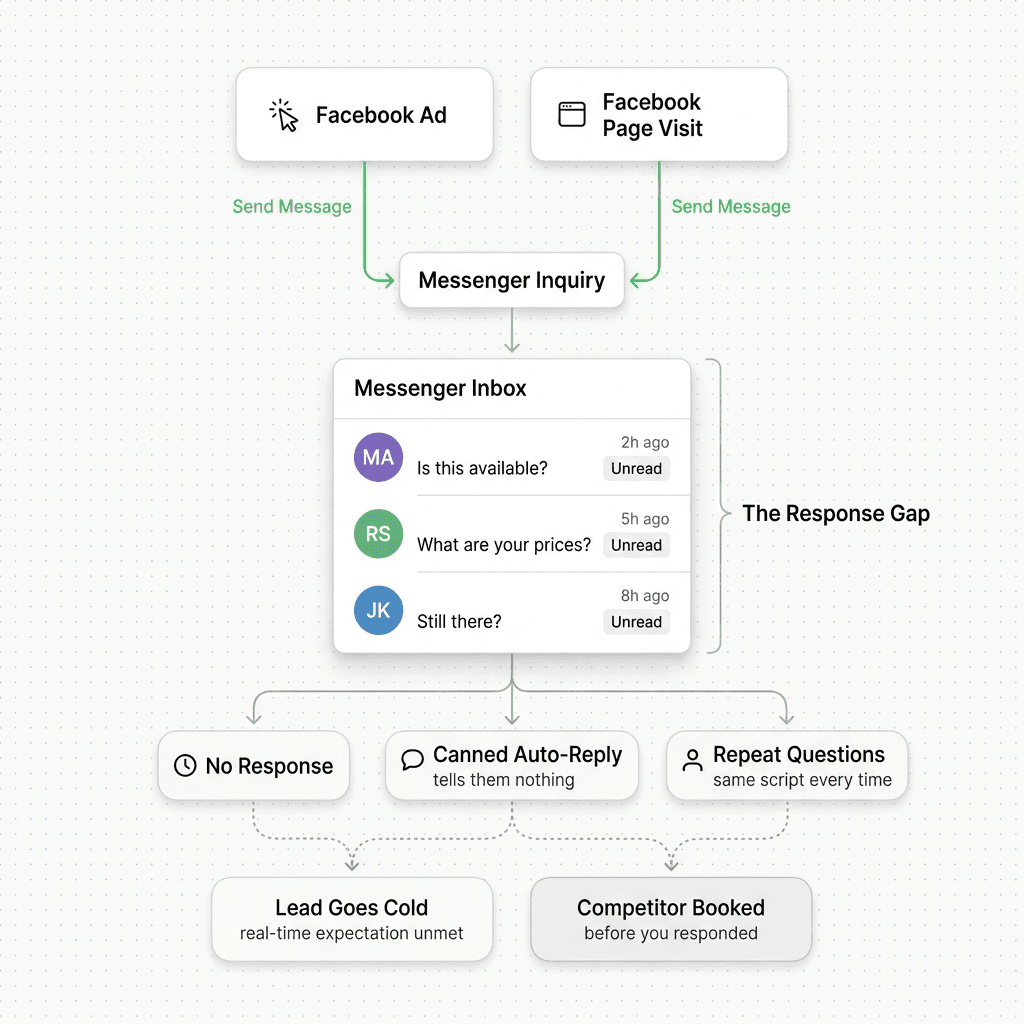
Facebook Messenger Chatbot for Local Businesses
A Facebook Messenger chatbot helps local businesses answer FAQs, capture leads, share booking links, and route inquiries 24/7 — without a human watching the queue.
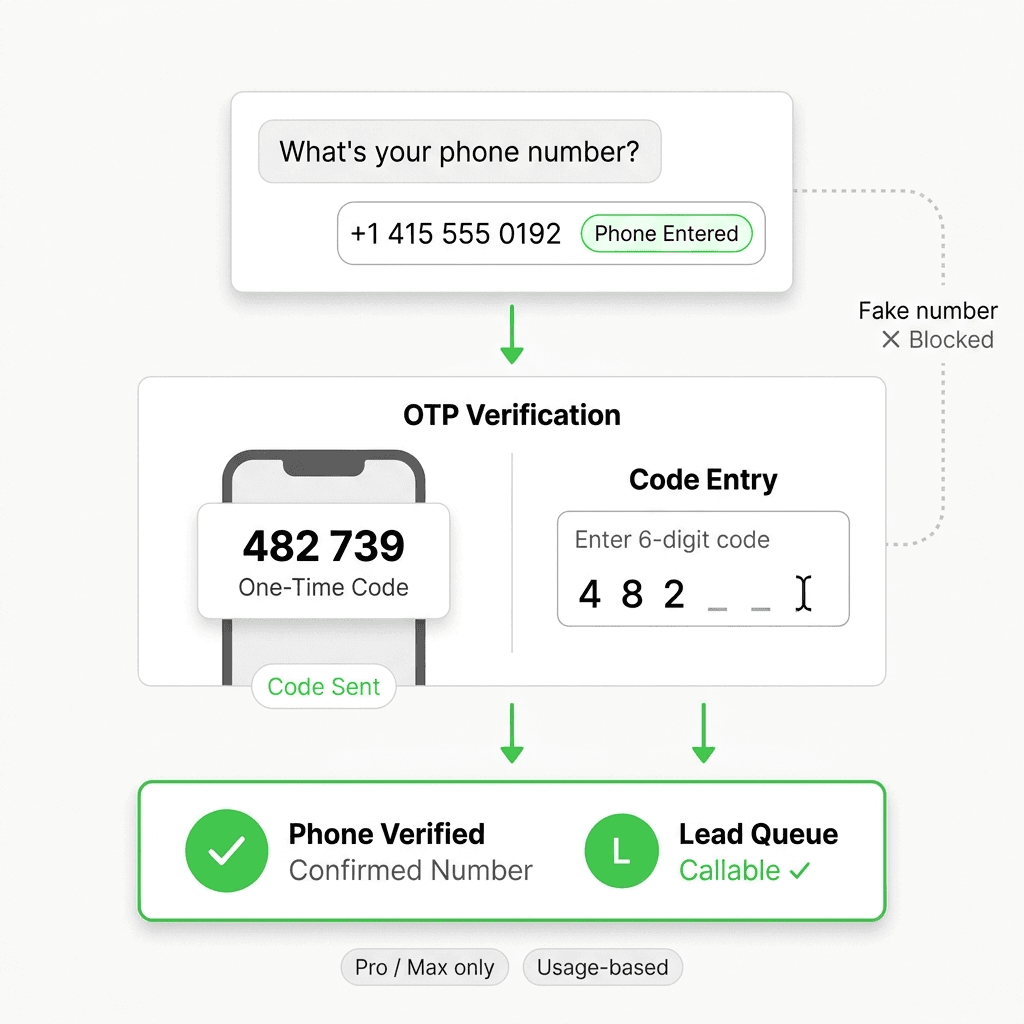
OTP-Verified Lead Capture for AI Chatbots
OTP-verified lead capture confirms a visitor's phone number inside the chat before the lead enters your queue — here's how it works, what it costs, and which industries need it most.
Lead Qualification Chatbot: Questions, Fields, and Handoff Rules
A lead qualification chatbot turns raw contacts into ranked, routed leads — before a rep wastes the first call. Here's the question stack, scoring, and handoff logic that works.
AI Lead Capture Chatbot: Convert Website Visitors Into Qualified Leads
An AI lead capture chatbot does what forms can't: qualify intent, capture contacts, and hand clean leads to your team — across four channels, 24/7.