Facebook Messenger Chatbot for Local Businesses
A Facebook Messenger chatbot helps local businesses answer FAQs, capture leads, share booking links, and route inquiries 24/7 — without a human watching the queue.
TL;DR: A Facebook Messenger chatbot answers inbound inquiries from your Facebook Page and ads automatically — answering FAQs from your own documents, capturing and qualifying leads, sharing your booking link, and routing to your team — 24/7 without a human on queue. This guide covers what a Messenger chatbot should handle for a local business, what it should not handle, a sample conversation, setup steps, evaluation criteria, and where Hyperleap AI fits, including transparent pricing. If you're running Facebook ads or maintaining an active Facebook Page and watching Messenger inbound go unanswered, this is the practical guide to fixing that.
Why Local Businesses Lose Leads in Facebook Messenger
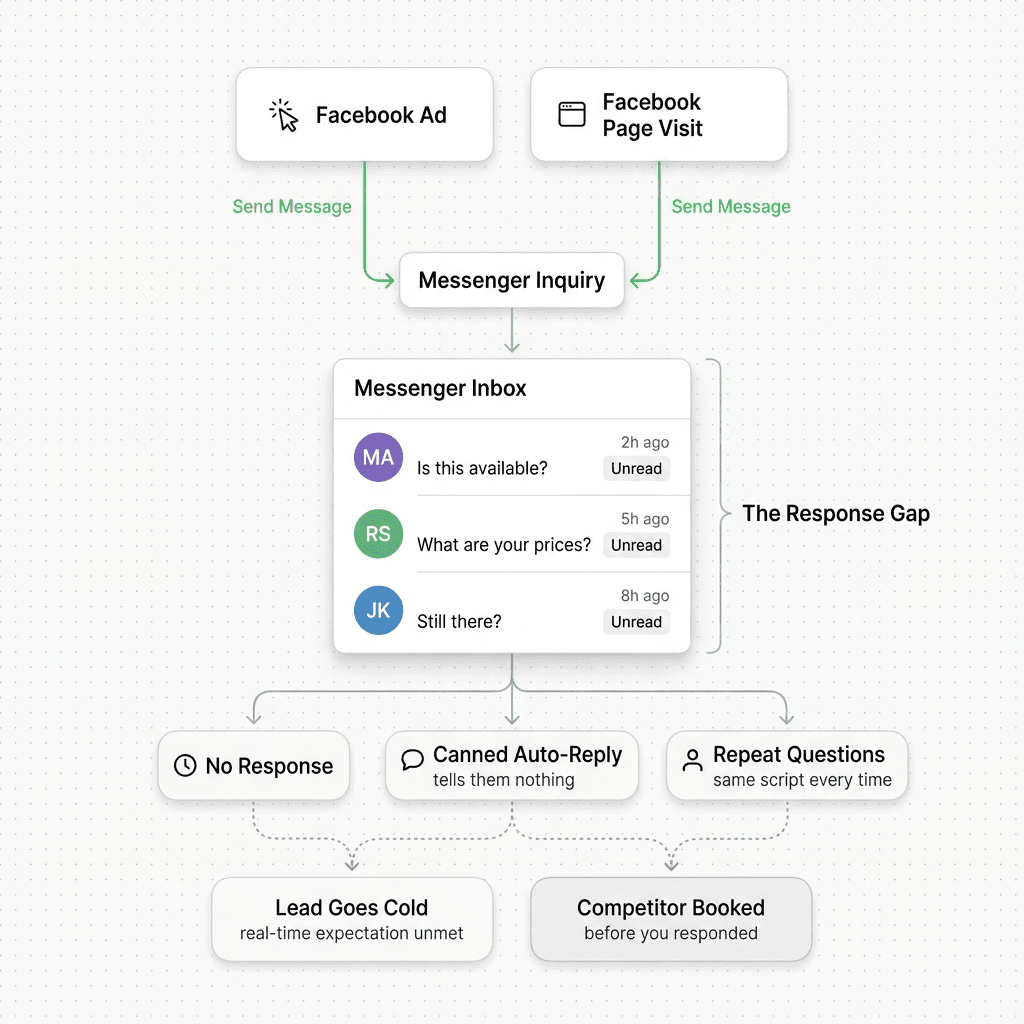
When a local business runs Facebook ads, one of the most common call-to-action outcomes is a Messenger message. A prospect clicks the ad, taps "Send Message," and lands in your inbox. The same thing happens organically — someone finds your Facebook Page, sees your services, and hits "Message."
What happens next is often one of three things:
- Nothing. The message sits unread until a team member spots it — hours or the next morning. By then, the prospect has already booked a competitor or moved on.
- A canned auto-reply. "Thanks for reaching out! We'll get back to you soon." That message closes the loop for the business. It tells the prospect nothing about whether their question has an answer or whether there is availability.
- A manual response that asks the same questions every time. "What service are you looking for?" "What's your location?" The rep starts from zero on every conversation.
For a home services company fielding 40 Messenger inquiries a week, this is 40 missed first-impression opportunities per week. For a dental clinic running weekend appointment promotions, every unanswered Saturday inquiry is a patient scheduling with a different practice — a dental AI chatbot closes exactly that gap. For a salon with a "Book Now" button that routes to Messenger, every quiet hour in the day is an appointment gap.
The core problem is structural: Facebook Messenger creates a real-time expectation in the mind of the person who sent the message. But most local businesses cannot staff Messenger like a live chat channel. The gap between that expectation and the actual response time is where leads go cold.
A well-configured Facebook Messenger chatbot closes that gap. It is always available, always starts the same consistent conversation, and hands your team a qualified lead — not a raw message — by the time they open their inbox.
For a broader look at deploying AI across all four messaging channels, the multi-channel AI chatbot strategy guide covers the full picture.
What a Facebook Messenger Chatbot Should Handle
For a local service business, a Messenger chatbot has four distinct jobs. Each maps to a concrete outcome.
1. Answer FAQs From Your Own Documents
When someone asks "Do you offer same-day service?" or "What are your prices?" or "Do you work in my neighborhood?" — those answers already exist somewhere in your business. On your website, in your service menu, in your pricing sheet.
A well-configured chatbot pulls answers from those documents, not from general AI training data. This matters because general training data does not know your service area, your pricing, your booking process, or your policies. Document-grounded responses are specific and accurate to your business. Generic AI responses are not.
The practical result: a prospect gets a real answer to "Do you do kitchen renovations in the west side of town?" instead of a vague paraphrase of what kitchen renovation services typically look like.
2. Capture and Qualify Leads
Not every Messenger inquiry is a ready buyer. Some are price-checking. Some are comparing options. Some are genuinely ready to book but need one piece of information first.
A chatbot can ask two or three qualification questions in natural dialogue — what service you need, when you need it, what area you're in — and use those answers to route the conversation appropriately. A high-intent prospect gets a booking link immediately. A price-checking visitor gets pricing information and a follow-up prompt. A prospect outside your service area gets a clear, polite no.
The lead your team receives contains name, contact details, service need, location, and timeline — a structured summary, not a raw message thread. That is the difference between a rep spending 90 seconds reviewing a lead and spending 10 minutes piecing together what the person actually wanted.
3. Share Your Booking Link
If your business uses Calendly or Cal.com, the chatbot can show open times and book the slot right inside Messenger (on Pro and Max); on Plus, or with any other booking tool that has a shareable URL, it shares that link — either way at the right moment in the conversation — after the prospect has expressed clear intent, after qualification questions have confirmed they are in your service area and price range.
This is not calendar sync. The chatbot shares a link. The prospect books through your existing tool. It is the same outcome you get when a human rep pastes the link into a chat — automated, consistent, and available at 11pm on a Sunday.
4. Route to Your Team
Some conversations need a human — a complaint about a past job, a complex custom quote request, a sensitive situation that requires judgment. The chatbot should recognize these and escalate clearly: "Let me get a team member for you — they will follow up within [timeframe]."
Routing happens via REST API and webhooks (webhooks on Pro and Max). When the chatbot flags a conversation for handoff, a webhook fires to your team's notification system, your CRM endpoint, or wherever your team tracks inbound. The rep receives context — what was discussed, what was asked, what the visitor said — not a blank inbox item.
What a Facebook Messenger Chatbot Should NOT Handle
Being clear about the boundaries is as important as being clear about the capabilities.
Do not use a Messenger chatbot for payment processing. Collecting credit card details, processing payments, or managing transactions is not a chatbot function. Direct all payment flows to your existing payment platform.
Do not use a Messenger chatbot to give medical or legal advice. For dental clinics, medical practices, and similar: the chatbot handles intake — collecting symptoms, scheduling preferences, insurance type — and routes to the appropriate team member. It does not assess clinical urgency, recommend treatment, or advise on diagnosis. For legal intake: collect practice area, basic case description, and contact details; route to the firm. The chatbot is the intake gate, not the advisor.
Do not expect it to manage orders, reservations, or inventory. For restaurants, the chatbot handles inquiries about hours, menu questions, and reservation interest — but directing it to take orders, manage a waitlist, or access inventory is outside its scope unless you have built a custom integration via the REST API.
Do not let it guess when it does not know. A chatbot that hallucinates an answer to "Is there a cancellation fee?" when you have not configured that information causes more damage than silence. Configure a clear fallback: "I don't have that information — let me get someone who can help" routes the conversation to a human rather than inventing an answer.
Example Messenger Conversation: Home Services Inquiry
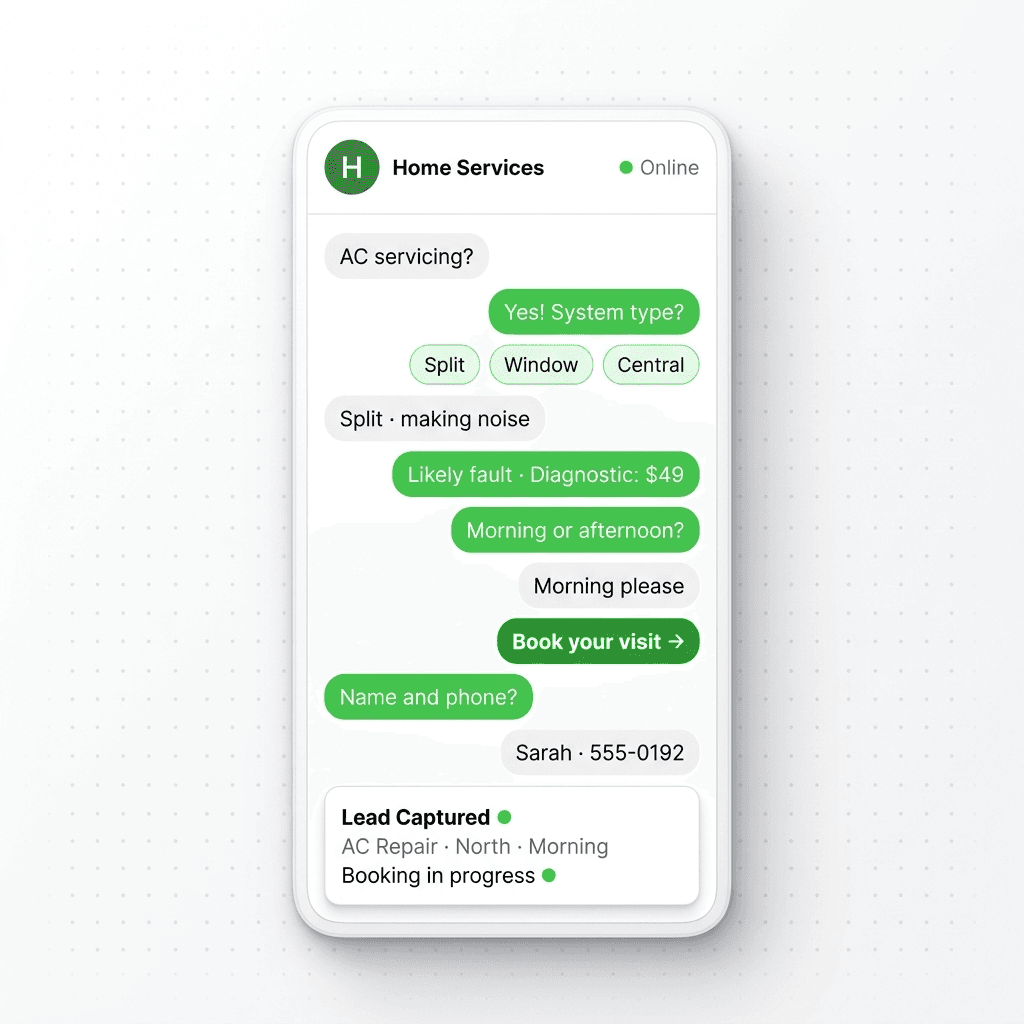
The following is a representative exchange for a home services company that handles plumbing, HVAC, and general repairs — the same qualification pattern an AI chatbot for plumbers or an HVAC AI assistant would run. The chatbot is configured with service areas, pricing ranges, and a booking link.
Visitor: Hi, do you do AC servicing?
Bot: Yes — we service central AC units, mini-splits, and heat pumps. What kind of system do you have?
Visitor: Central AC, about 5 years old. It's been making a loud noise when it starts.
Bot: That sounds like it could be a capacitor or fan motor issue — common on units that age. We'd start with a diagnostic visit. Are you in the metro area or surrounding suburbs?
Visitor: Downtown area.
Bot: Great — we cover that zone. Our diagnostic visit is $79, credited toward any repair. Do you have a preferred time window?
Visitor: This week, preferably afternoon.
Bot: Perfect. Here is our booking link to pick a time that works for you: [booking link]
Can I also grab your name and best number in case we need to reach you before the visit?
Visitor: Sure, it's Marcus — 555-0147.
Bot: Got it, Marcus. You're all set. A confirmation will come through once you book. Is there anything else you'd like us to know before the visit?
Visitor: No that's it, thanks.
[Lead created: Marcus, 555-0147, AC servicing, downtown zone, afternoon preference, booking link shared, no open issues]
Five exchanges. The visitor has the information they needed, a booking link, and a confirmed next step. The team has a structured lead with contact details, service type, location, and an active booking in progress.
How to Set Up a Facebook Messenger Chatbot
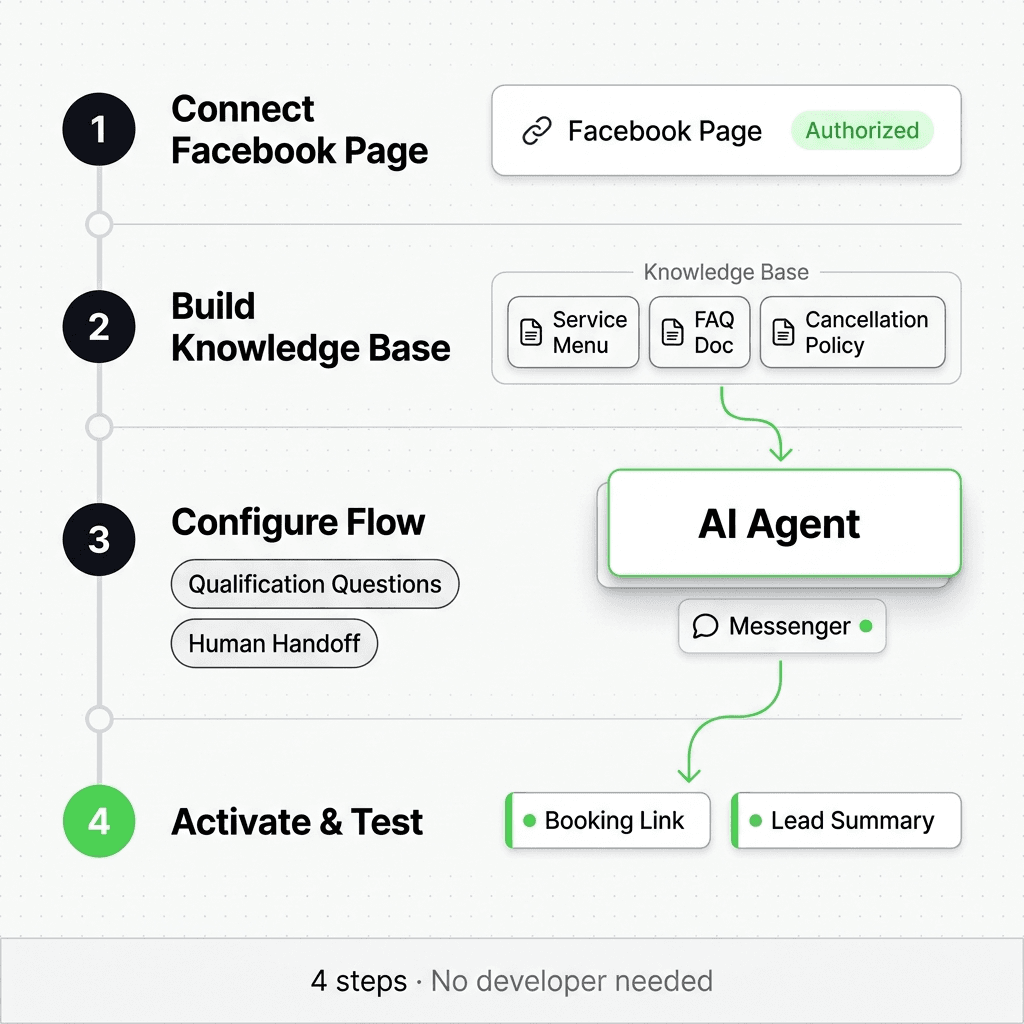
Setup has four steps. None require a developer.
Step 1: Connect Your Facebook Page
In your chatbot platform, connect your Facebook Business account and authorize access to your Facebook Page's Messenger inbox. The platform becomes the handler for incoming Messenger messages — your Page's existing "Message" button remains unchanged for visitors.
Step 2: Build Your Knowledge Base
Upload the documents that contain your business answers: service menu, pricing sheet, service area coverage, FAQs, booking process, cancellation policy. The chatbot answers questions from these documents. The more complete and specific the documents, the more accurate and useful the responses.
Practical minimum for a local services business: a one-page FAQ document and a service-and-pricing sheet. Both can be plain text or PDF.
Step 3: Configure the Conversation Flow
Set up the qualification sequence — the two or three questions that determine service type, location, and urgency. Define what a "route to human" trigger looks like (keywords, question types, or intent signals your team decides on). Configure the fallback response for questions outside the knowledge base.
Step 4: Activate and Test
Send yourself a test message from a personal account or a non-admin profile. Walk through the full flow as a prospect would. Verify the booking link appears at the right moment. Verify the fallback triggers correctly. Verify the lead summary lands in your configured destination.
Total setup time for a single Messenger channel with a basic qualification flow: typically under a day.
Why Pairing Messenger With Your Other Channels Matters
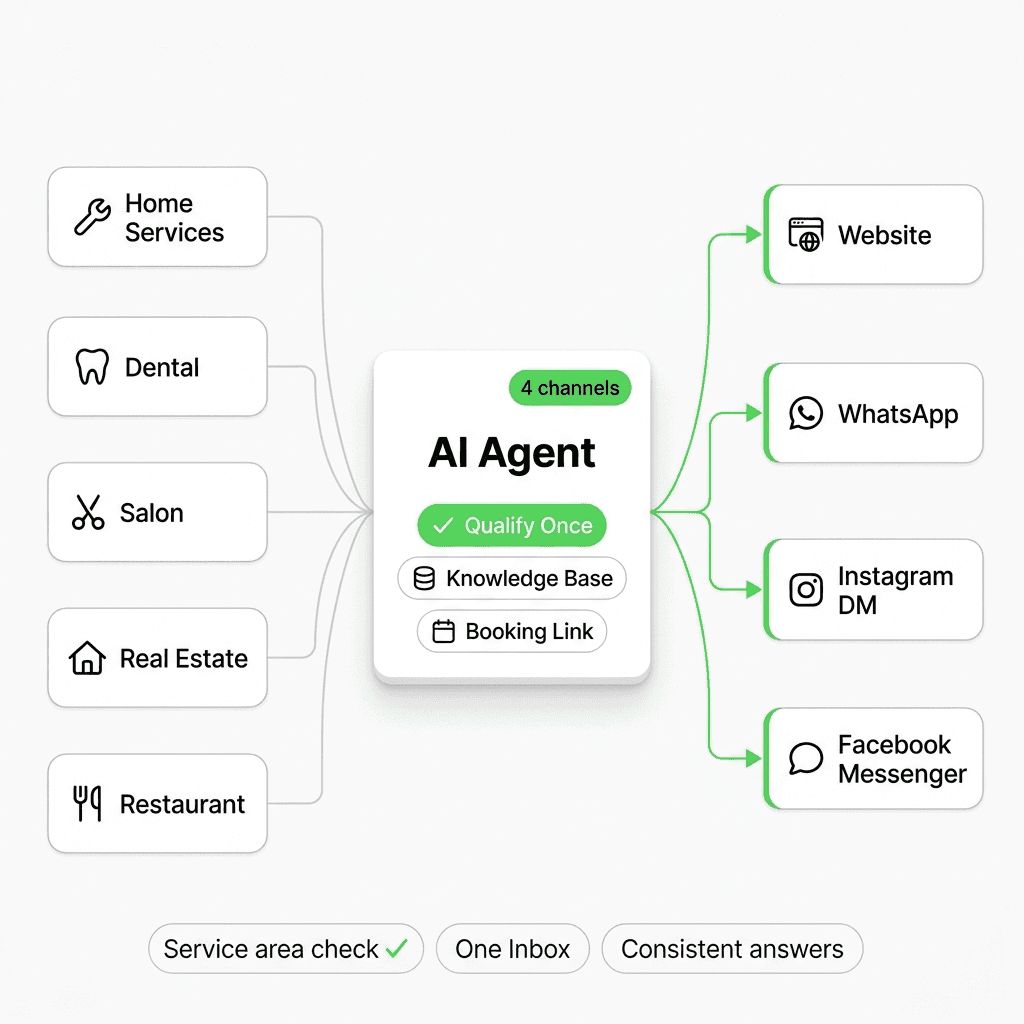
Facebook Messenger solves the problem for visitors who come from your Facebook ads and Page. It does not solve the same problem for visitors who come from Google search and land on your website, or who see your Instagram post and DM you there, or who want to text you on WhatsApp.
For most local businesses, those are three separate lead sources — each with a different audience and a different communication preference.
The operational case for a single AI agent across all four channels — Website, WhatsApp, Instagram DM, and Facebook Messenger — is straightforward:
You configure the qualification logic once. The same service area check, the same booking link, the same knowledge base serves all four inlets. You do not maintain four bots with four separate FAQ lists that drift out of sync.
Your team sees one inbox. Leads from a website chat, a Messenger inquiry, and an Instagram DM on the same afternoon appear in the same place, with the same lead summary format. There is no "check the website inbox and then check Messenger and then check Instagram."
Coverage gaps disappear. A prospect who messages you on Facebook at 9pm and follows up on your website the next morning gets a consistent experience — same answers, same tone, same booking link — regardless of channel.
Local businesses that run Facebook ads but do not have a website chatbot are leaving website inquiry capture to a contact form. Local businesses that post on Instagram but do not have an Instagram DM chatbot are leaving social intent on the table. Messenger is the right place to start if that is where your highest-volume inbound comes from. But the full lead-capture system includes all four.
The AI lead capture chatbot guide covers the qualification framework and handoff workflow that applies across all four channels.
For more on multi-channel deployment architecture, see multi-channel AI chatbot strategy.
Buyer Evaluation Criteria
Use this table when comparing Messenger chatbot platforms. Score each vendor 0–2 per criterion.
| Criterion | What to verify |
|---|---|
| Messenger-specific setup | Can you connect a Facebook Page directly, without developer involvement? Does the bot handle the full Messenger conversation or just respond to keywords? |
| Knowledge grounding | Does the bot answer from your uploaded documents, or from general AI training data? Ask the vendor to show you a response grounded in a specific document. |
| Lead capture output | Does the bot produce a structured lead summary — name, contact, service need, qualification data — or just forward the raw conversation thread? |
| Handoff mechanism | REST API and webhooks are the correct answer. "Native CRM integration" is worth probing — ask which fields it maps and what happens when the CRM API changes. |
| Multi-channel scope | Does the same agent and knowledge base deploy to Website, WhatsApp, and Instagram DM — or is Messenger a separate product? Running separate tools per channel creates maintenance overhead. |
| Fallback behavior | What happens when the bot does not know the answer? Routes to human is correct. Hallucinating a confident answer is a liability. |
| Booking | Can it book in the conversation (e.g. via Calendly or Cal.com), or only share a booking link? |
| Language support | Does it handle inquiries in the languages your prospects actually use? |
| Pricing transparency | Are plan limits (AI responses, chatbots, channels) clearly published? Are add-ons like OTP verification separately priced and disclosed? |
| Trial conditions | Is there a real trial with the full product — not a demo environment? Does it require a credit card? How long is the trial? |
Hyperleap AI: Fit and Pricing
Hyperleap AI is an AI chatbot platform built for SMBs that need lead capture and inquiry handling across multiple channels without a dedicated technical team.
Channels
Hyperleap ships on all four channels: Facebook Messenger, Website chat widget, WhatsApp Business API, and Instagram DM. One agent configuration deploys to all four simultaneously. When you update your service area or pricing in the knowledge base, the update applies everywhere.
The Facebook Messenger setup connects your Page through Hyperleap Studio — no developer required. The same knowledge base and qualification flow that handles your website chat handles your Messenger inbox.
Knowledge Base and Answers
You upload your service documents, FAQ sheet, and pricing information. Hyperleap answers questions from those documents. When the chatbot does not have an answer in its knowledge base, it routes to a human team member instead of generating a response from general training data.
Full capability details are on the features page.
Lead Capture and Handoff
When a conversation qualifies a lead, Hyperleap generates a structured lead summary and delivers it via webhook (Pro and Max) to your configured destination — your CRM endpoint, a Slack channel, an email notification, or any webhook-receiving system. The handoff is via REST API and webhooks, not native CRM plug-ins.
There is no native HubSpot or Salesforce integration. If your CRM accepts webhooks, the connection typically takes under an hour to configure. Hyperleap passes the lead data; your integration layer maps it to your CRM fields.
Booking
Hyperleap connects natively to Calendly and Cal.com on Pro and Max: the agent reads live availability, lists open times in the Messenger reply, and books the slot in the conversation — the prospect gets a calendar invite by email. In-chat booking needs Calendly Standard or higher; it creates new bookings only (no cancel or reschedule). On Plus, or for any other booking tool, Hyperleap shares your booking link.
Channel Coverage
View the channels overview for the full setup guide per channel.
Pricing
All plans include a 7-day free trial (credit card required). There is no free plan.
| Plan | Price | AI Responses / mo | Chatbots | Channels |
|---|---|---|---|---|
| Plus | $40/mo | 3,000 | 1 | 4 per chatbot |
| Pro | $100/mo | 12,000 | 2 | 4 per chatbot |
| Max | $200/mo | 30,000 | 5 | 4 per chatbot |
For local businesses handling moderate Messenger volume, the Plus plan at $40/mo is a reasonable starting point. Businesses running multiple Facebook Pages for different locations, or running concurrent WhatsApp and Messenger campaigns, typically move to Pro.
Full plan details including add-ons are on the pricing page.
FAQ
What is a Facebook Messenger chatbot for local businesses?
A Facebook Messenger chatbot is an AI-powered assistant connected to your Facebook Page's Messenger inbox. When a prospect messages your Page — from an ad, from an organic post, or directly from your Page — the chatbot responds automatically: answering questions from your business documents, capturing contact and qualification details, sharing your booking link, and routing complex requests to your team.
Can a Messenger chatbot replace my team?
No. A Messenger chatbot handles the first layer of every inquiry — FAQs, qualification, booking links, and routing. Complex quotes, complaints, sensitive situations, and judgment calls go to a human. The chatbot's job is to make sure your team only handles conversations that actually need them, with full context in hand.
Will it work for my Facebook ads?
Yes. When your Facebook ad uses a "Send Message" call to action, the conversation opens in Messenger. A chatbot connected to your Page handles those conversations automatically. The chatbot does not require any changes to the ad itself — it handles whatever message the prospect sends after tapping the CTA.
Does Hyperleap integrate with my booking system?
With Calendly or Cal.com connected on Pro and Max, Hyperleap books the appointment inside the Messenger conversation from live availability (in-chat booking needs Calendly Standard or higher). On Plus, or with any other URL-based booking tool, it shares your booking link and the prospect books there. There is no Google Calendar sync or OpenTable integration.
How is a Messenger chatbot different from Facebook's built-in auto-reply?
Facebook's built-in instant reply sends a static message to anyone who contacts your Page: "Thanks for your message, we'll get back to you soon." It does not answer questions, does not capture information, and does not qualify leads. A Messenger chatbot uses your business documents to answer specific questions, asks qualification questions, captures structured lead data, and hands off to your team with context. The two are not comparable in capability. If a static message is all you need for now, make it useful: the free out-of-office message generator writes one that says when you'll reply and what to do if it's urgent.
Can I use the same agent for Instagram DM, WhatsApp, and my website?
Yes, if you use a platform that ships across all four channels. With Hyperleap, one agent configuration — one knowledge base, one qualification flow — deploys to Facebook Messenger, Instagram DM, WhatsApp Business API, and your website chat widget simultaneously. You manage one agent, not four.
What happens when the bot does not know an answer?
When the chatbot encounters a question outside its knowledge base, it routes to a human team member rather than generating a guess. You configure the fallback response — typically something like "I don't have that information — let me get someone who can help you" — and, on Pro and Max, a webhook fires to notify your team. This is the correct behavior; a confident wrong answer is worse than an honest handoff.
Start Converting Messenger Inbound Into Qualified Leads
If you are running Facebook ads or maintaining an active Facebook Page, you already have a Messenger inbox. The question is whether it is working for your business or against it.
A Messenger chatbot answers FAQs from your documents, captures and qualifies leads, shares your booking link, and routes to your team — without a human watching the queue. It is the same consistent conversation at 9am, 9pm, and Sunday morning.
Ready to set it up?
- Start your 7-day free trial — credit card required, all four channels included
- See the full feature set — knowledge base, lead capture, REST API, webhooks, and more
- Review pricing — Plus at $40/mo, Pro at $100/mo, Max at $200/mo
Related Articles

Lead Qualification Chatbot: Questions, Fields, and Handoff Rules
A lead qualification chatbot turns raw contacts into ranked, routed leads — before a rep wastes the first call. Here's the question stack, scoring, and handoff logic that works.
AI Lead Capture Chatbot: Convert Website Visitors Into Qualified Leads
An AI lead capture chatbot does what forms can't: qualify intent, capture contacts, and hand clean leads to your team — across four channels, 24/7.

AI Chatbot for Real Estate: Capture Leads 24/7
An AI chatbot for real estate qualifies buyers and sellers around the clock, capturing leads before agents ever pick up the phone.
Instagram DM Chatbot for Service Businesses
An Instagram DM chatbot for service businesses replies instantly, qualifies intent, shares booking links, and routes warm leads to your team — 24/7.