After publishing your chatbot, the Analytics Dashboard becomes your command center for understanding how users interact with your AI. Track key metrics, identify trends, and make data-driven decisions to improve engagement.
Video Tutorials
Dashboard Overview
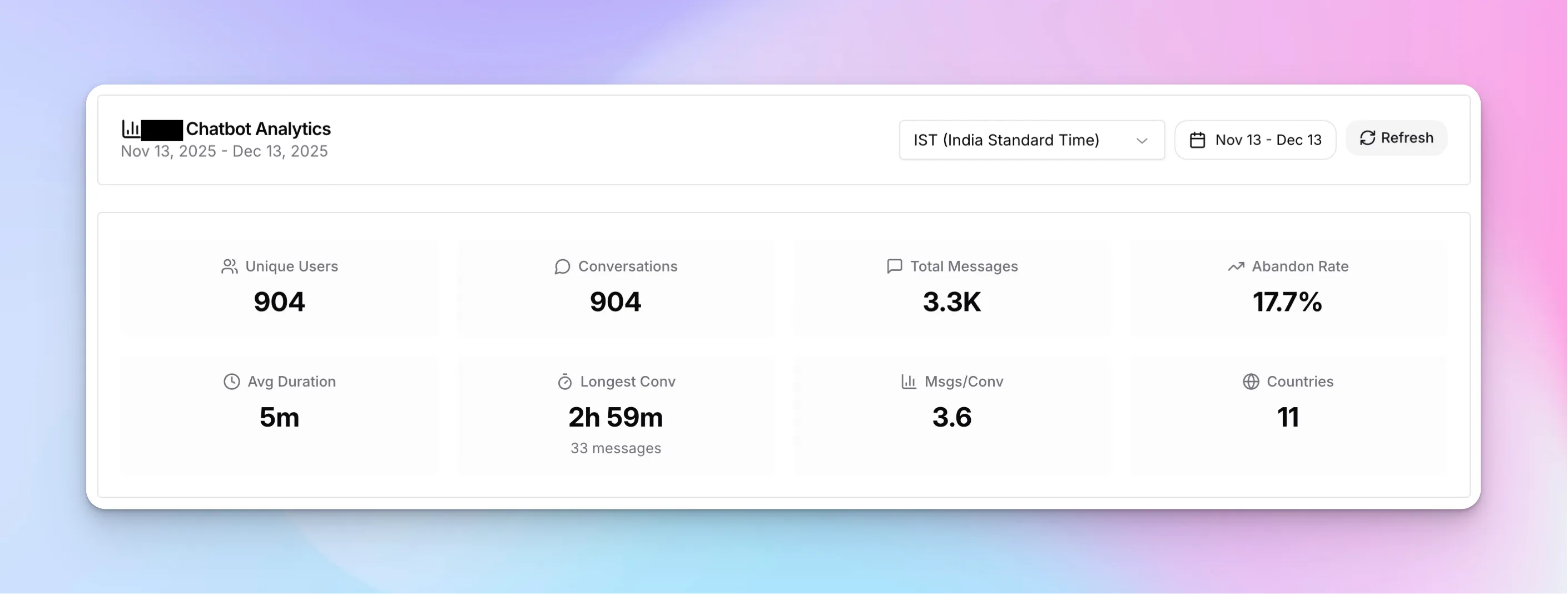
Access analytics by clicking "Analytics" in your chatbot's header menu. The dashboard displays key performance indicators at a glance.
Key Metrics Explained
Unique Users
Total distinct visitors who interacted with your chatbot
Conversations
Number of chat sessions started
Total Messages
Combined user and bot messages exchanged
Abandon Rate
Percentage of users who left without engaging
Avg Duration
Average length of conversations
Countries
Geographic reach of your chatbot
Additional metrics include Longest Conversation (your most engaged user session) and Messages per Conversation (average engagement depth).
Activity Trends
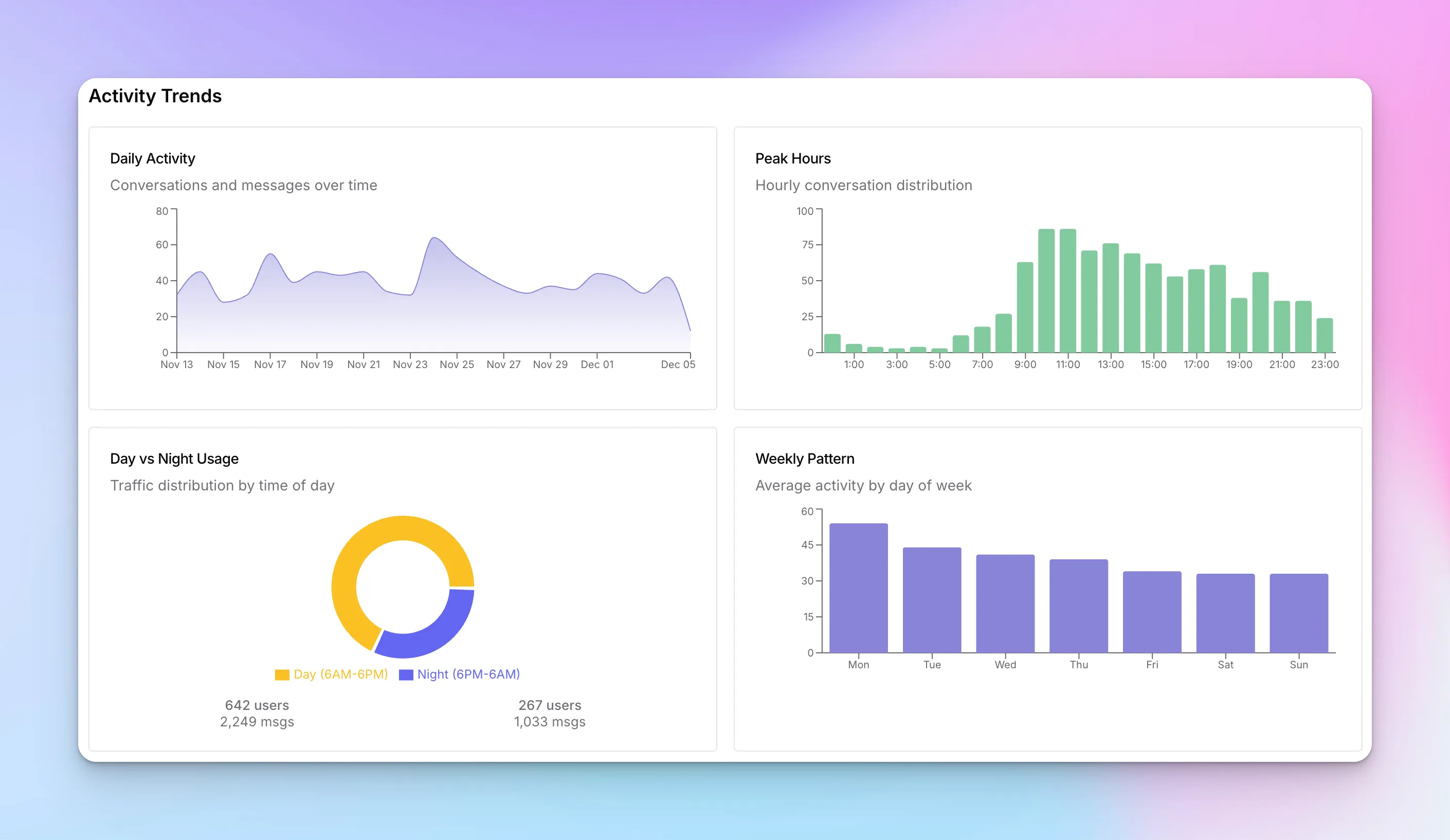
The Activity Trends section reveals when your users are most active, helping you understand usage patterns and optimize your chatbot's availability.
Understanding the Charts
- Daily Activity — Line chart showing conversations and messages over your selected date range. Identify spikes and trends.
- Peak Hours — Hourly distribution showing when users are most active. Use this to schedule live agent availability.
- Day vs Night Usage — Compare daytime (6AM-6PM) vs nighttime engagement. See how your 24/7 availability impacts after-hours leads.
- Weekly Pattern — Average activity by day of week. Identify your busiest days for staffing and campaign planning.
Engagement Quality
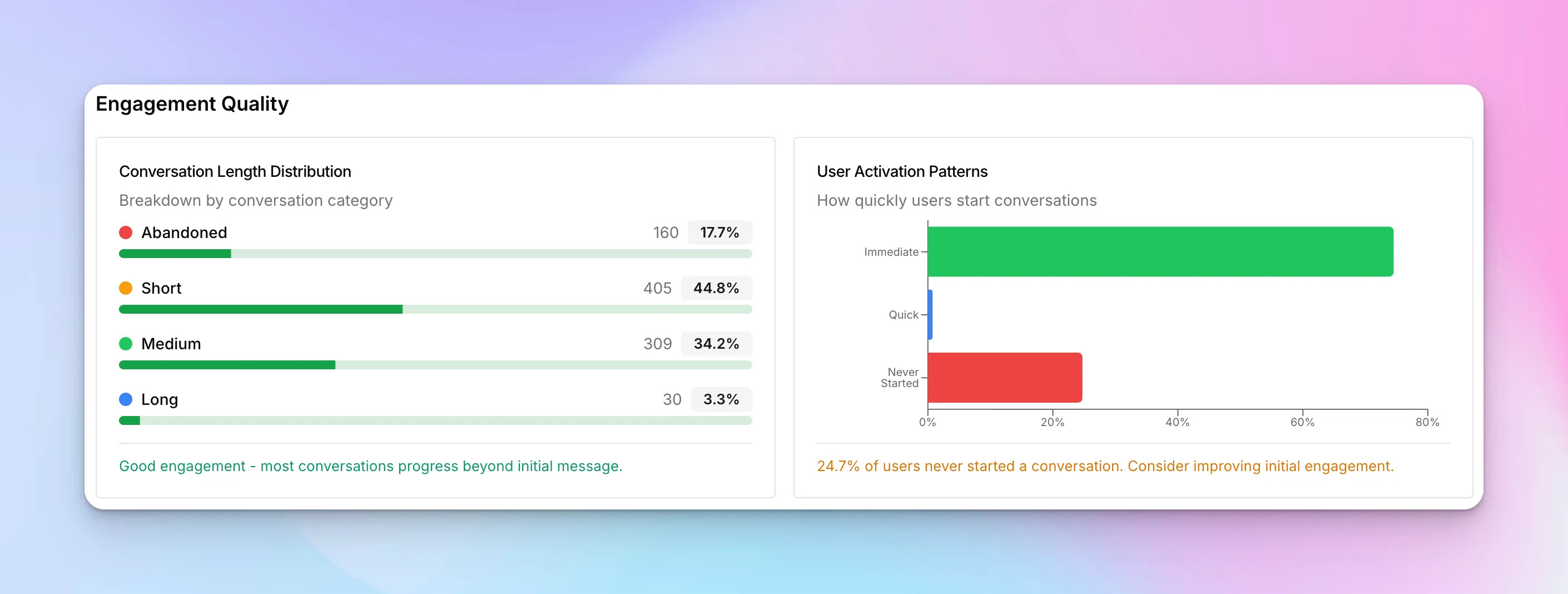
Beyond volume, engagement quality metrics tell you how well your chatbot is performing. Are users actually engaging, or dropping off immediately?
Conversation Length Distribution
Conversations are categorized by engagement depth:
- Abandoned — User left without sending a message (optimize your greeting)
- Short — 1-3 messages (quick questions or early drop-offs)
- Medium — 4-10 messages (healthy engagement)
- Long — 10+ messages (deep conversations, potential high-intent leads)
User Activation Patterns
See how quickly users start conversations after the chatbot appears:
- Immediate — Engaged right away (strong call-to-action)
- Quick — Started within a few seconds
- Never Started — Saw the chatbot but didn't interact (consider A/B testing your greeting)
User Insights
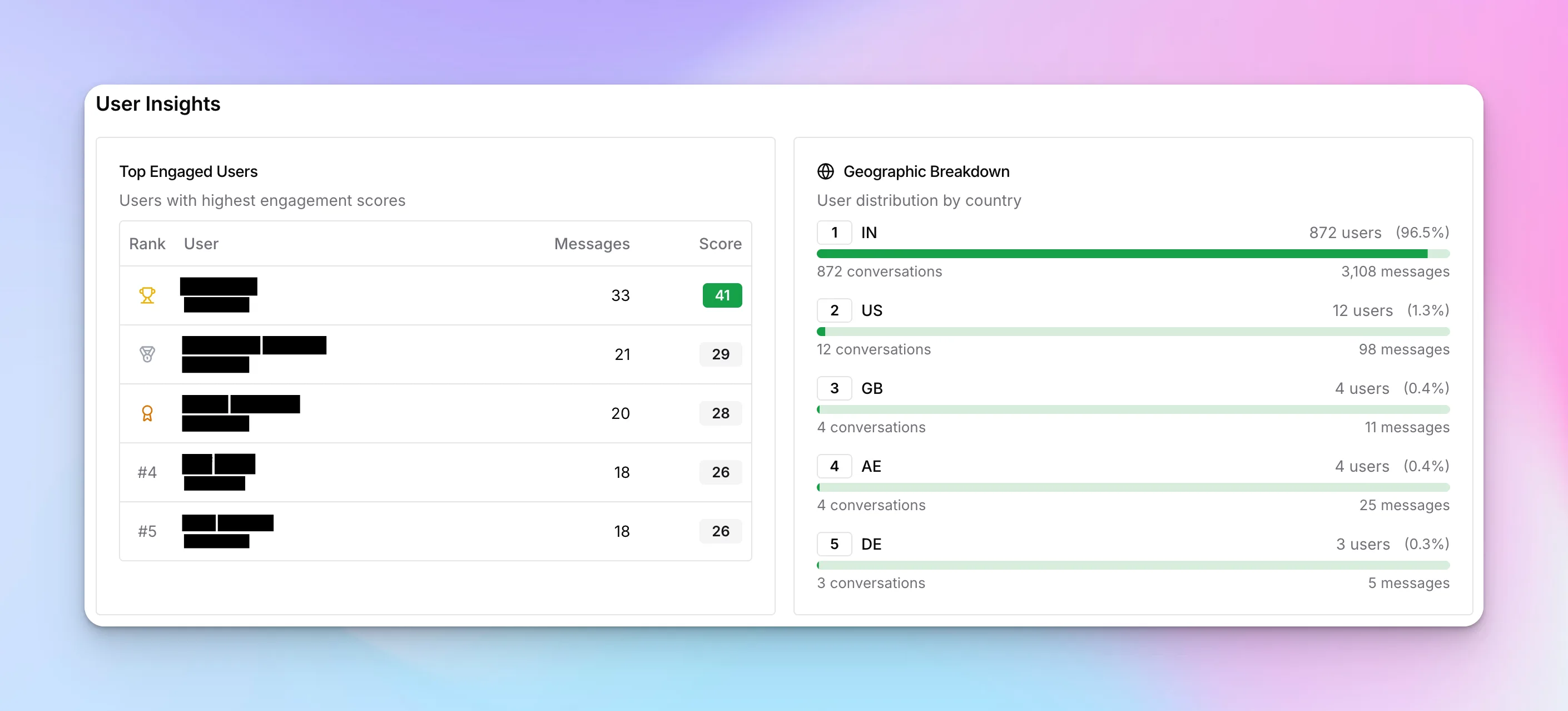
Understand who your chatbot users are with detailed insights on top engagers and geographic distribution.
Top Engaged Users
A leaderboard of users ranked by engagement score, showing:
- User identifier — From lead form or anonymous ID
- Total messages — Number of messages sent
- Engagement score — Calculated from message count, session length, and return visits
Geographic Breakdown
See where your users are located by country. This helps you:
- Identify markets with high engagement
- Consider adding language support for top countries
- Adjust response timing for different time zones
- Plan localized marketing campaigns
Top Conversations
Dive into your most significant conversations to understand what drives deep engagement.
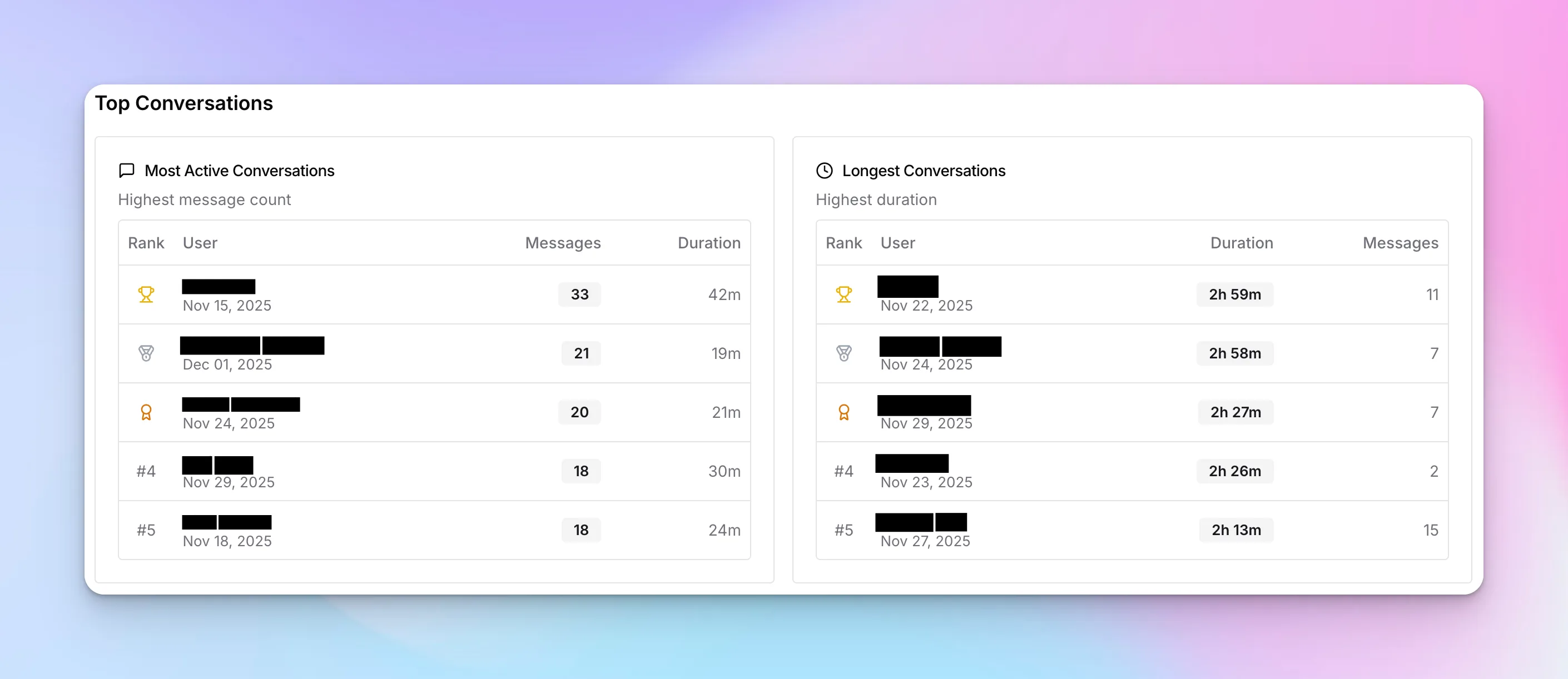
Most Active Conversations
Sorted by message count, these are your chattiest users. Review these to:
- Understand what questions generate the most back-and-forth
- Identify complex topics that might need better documentation
- Find potential testimonials from highly engaged users
Longest Conversations
Sorted by duration, these sessions show sustained engagement. Long conversations often indicate:
- High-intent leads exploring your offerings in depth
- Users with complex needs requiring detailed assistance
- Potential issues where the chatbot couldn't provide a satisfactory answer
Using Analytics Effectively
Weekly Review Checklist
- Check abandon rate — If above 20%, test different greeting messages
- Review peak hours — Ensure live agent coverage during busy times
- Analyze top conversations — Look for common questions to add to your knowledge base
- Monitor geographic trends — Identify emerging markets
- Compare week-over-week — Track improvement trends
Common Optimizations
- High abandon rate? → Improve your greeting message and chat button visibility
- Short conversations? → Add more engaging follow-up questions in your prompt
- Low after-hours engagement? → Promote 24/7 availability in your marketing
- Specific country traffic? → Consider localized content and language support
Next Steps
Now that you understand your chatbot's performance, consider exploring:
- Sources — Improve response accuracy by adding more knowledge
- Behaviour Tab — Refine your system prompt based on conversation patterns
- Content Tab — Optimize lead capture based on engagement data