Digital Customer Care Guide for SMBs
Master digital customer care with this SMB-focused guide covering channels, metrics, governance, and step-by-step roadmap to elevate your support.
A customer sends an Instagram DM at 9:14 p.m. asking if your downtown location has a product in stock. Another person messages your WhatsApp number to book for tomorrow. A third fills out a website form but leaves the wrong phone number. By morning, your team is already behind, and no one is fully sure which message got answered, which one needs follow-up, or whether the lead data is even real.
That's a normal day for many SMBs. It gets harder when you run multiple locations, because each branch may answer differently, use different apps, and keep its own notes. The result isn't just slower service. It's missed bookings, repeated questions, and customers who give up before you reply.
Digital customer care fixes that by giving customers a way to get help through the channels they already use, even when your staff is offline. That matters because by 2026, organizations deploying AI to manage customer interactions are projected to increase customer satisfaction scores by at least 10%, and 74% of consumers now expect 24/7 support, according to Gitnux digital customer experience statistics.
Table of Contents
- Introduction to Digital Customer Care
- Understanding Digital Customer Care and Benefits
- Mapping Common Digital Channels
- Key Metrics and Service Level Agreements
- Best Practices and Governance for Digital Care
- Implementation Roadmap for SMBs
- Real-World Examples for SMBs and Multi-Location Businesses
- Conclusion and Next Steps
Introduction to Digital Customer Care
Digital customer care is the system you use to answer questions, solve problems, capture leads, and guide customers through digital channels such as website chat, messaging apps, social media, and email. It includes both human responses and automated ones.
For a small business, that can sound bigger than it is. It doesn't have to mean a call center or a complex software rollout. In practice, it often starts with a simple goal: make sure customers can reach you after hours, get accurate answers, and move forward without waiting for your team to wake up, open the store, or finish the lunch rush.
For multi-location businesses, consistency becomes even more critical. If one clinic, store, or hotel answers differently from another, the brand feels inconsistent. Customers don't care which branch owns the inbox. They just want an answer that's fast and correct.
Digital customer care works best when it feels simple to the customer, even if several tools are working together behind the scenes.
Understanding Digital Customer Care and Benefits
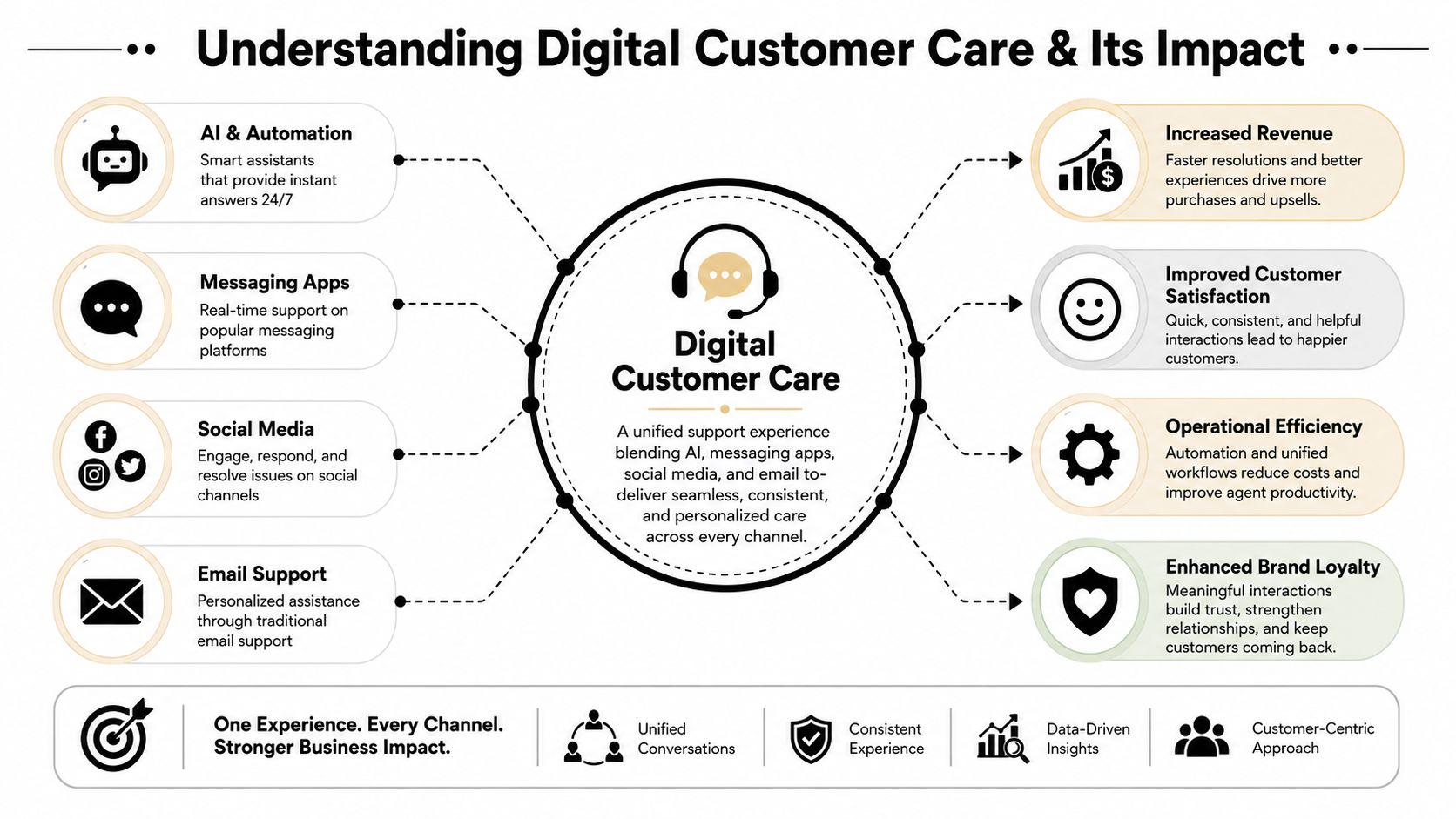
Many SMB owners hear “digital customer care” and think “chatbot.” That's only one piece of it. A better way to think about it is a connected service layer across your customer-facing channels.
What digital customer care actually includes
A working setup usually combines a few elements:
- Website chat for instant answers to common questions
- Messaging apps such as WhatsApp or Facebook Messenger for direct conversations
- Social inboxes for Instagram DMs and comments that need support follow-up
- Email support for detailed requests, confirmations, and edge cases
- Knowledge sources like FAQs, policies, service details, and location information
- Escalation paths so a human can step in when the issue is sensitive, complex, or high value
If you want a practical example of how AI agents fit into this stack, this customer service AI agent overview is useful because it shows where automation helps and where human routing still matters.
Why customers are pushing businesses in this direction
Customers have already shifted channels. 55% of consumers now favor digital channels such as chat, email, social media, and in-app messaging over phone or in-person options, according to NICE research on digital customer service trends.
That preference changes how an SMB should think about support. Phone support is still important for some cases, but it can't be the only lane anymore. Customers often want to message when they're commuting, comparing options, or checking availability outside business hours. Digital care meets them there.
Why this matters financially
Poor service creates direct business risk. The same Gitnux research cited earlier notes that poor customer experience costs businesses an enormous amount globally and that response speed strongly shapes whether people stay loyal or give up. For an SMB, that broad trend shows up in very local ways: abandoned carts, unbooked appointments, no-response leads, and staff spending time answering the same question again and again.
A good digital customer care system protects revenue in three ways:
- It captures demand when staff is offline. Customers can ask, book, or leave verified details at any hour.
- It reduces repeat work. Common questions get answered once through a reusable knowledge base.
- It improves handoffs. When a human takes over, they can see the earlier conversation instead of starting from zero.
Practical rule: Don't treat support as a back-office cost only. For SMBs, support often sits directly in the path of bookings and sales.
Mapping Common Digital Channels
Different channels solve different problems. Many SMBs get into trouble by opening every channel at once, then discovering that each one behaves differently.
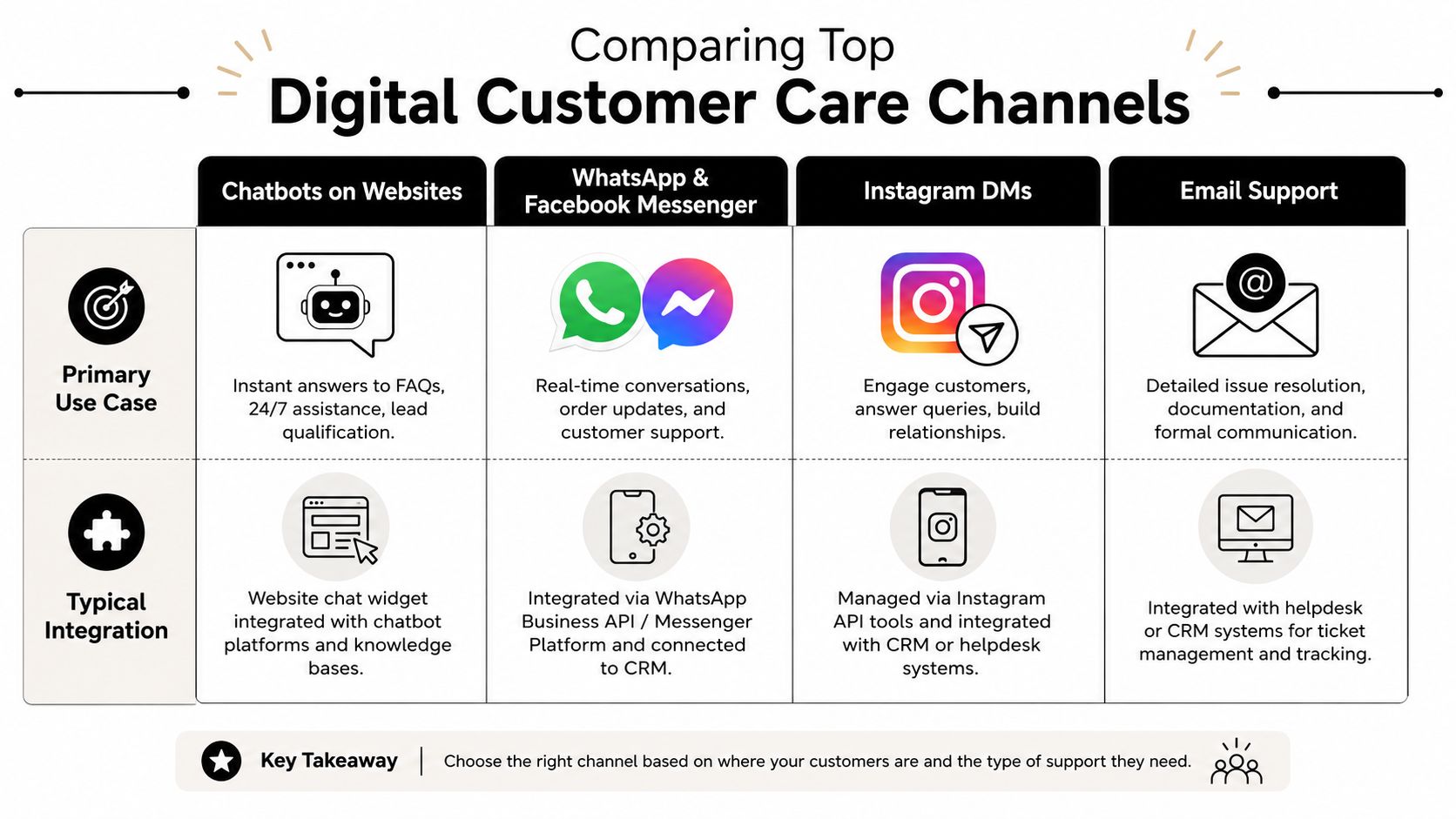
How to think about each channel
A website chatbot is like a front-desk greeter. It's great for store hours, pricing basics, service menus, shipping questions, and booking prompts. It works best when the business already has a reasonably clear website and FAQ content.
WhatsApp and Facebook Messenger act more like a direct line to the business. Customers use them for quick back-and-forth conversations, order updates, appointment questions, and lead capture. They feel personal, which is helpful for service businesses and local brands.
Instagram DMs are a public-facing help desk with private follow-up. They matter when discovery and support overlap. A customer sees a post, asks a question, then expects a quick answer in the same app. Retail, beauty, hospitality, and local experiences often see this pattern.
Email is still the paper trail channel. It's slower, but useful for longer explanations, confirmations, policy details, and cases where attachments matter.
If you're comparing channel setups for commerce brands, Carti's 2026 guide for Shopify CX is a helpful reference because it frames channels by customer use case instead of platform hype.
Where SMBs usually get stuck
The hard part isn't opening a channel. The hard part is preserving context when a customer moves between them. That's where an omnichannel customer service platform becomes relevant. Not because “omnichannel” is a buzzword, but because scattered inboxes create duplicated work.
Here's a simple way to choose:
- Start with website chat if your site already gets regular traffic and repeat questions.
- Start with WhatsApp or Messenger if customers already message your team informally.
- Add Instagram DM support if social content drives inquiries.
- Keep email for exceptions that need records, documents, or longer replies.
Don't launch all four channels on day one unless you already have a clear owner for each one.
Key Metrics and Service Level Agreements
If digital customer care feels fuzzy, metrics fix that. They turn “Are we doing better?” into something your team can check every week.
The metrics that matter most
| Metric | Definition | Benchmark | Impact |
|---|---|---|---|
| First Response Time | How fast the customer gets the first reply | Near-instant for AI responses in strong setups | Shapes whether the customer stays engaged |
| Average Handle Time | How long a human spends resolving a case | Lower when routine cases are filtered out | Helps control staffing effort |
| AI Resolution Rate | Share of conversations solved without human intervention | 80 to 85% for operational efficiency | Shows whether automation is actually useful |
| Ticket Deflection Rate | How many questions never become human-handled tickets because self-service resolves them | No universal figure cited here | Indicates how much load leaves the human queue |
The benchmark to watch most closely is AI Resolution Rate. According to Gorgias customer service benchmarks, an optimal AI Resolution Rate should reach 80 to 85% to be operationally efficient, and that can reduce human agent handle time by up to 40%.
How to set realistic SMB service levels
You don't need enterprise dashboards to start. A spreadsheet, shared inbox, or simple help desk view can work if the team updates it consistently.
Use service levels like these:
- Bot first reply: Immediate, so customers know the message was received
- Human takeover for flagged cases: As fast as your team can reliably maintain during staffed hours
- Escalation categories: Billing, complaints, health-related issues, legal questions, and VIP leads should route differently
- Location-specific ownership: Each branch needs a clear rule for who answers what
If a metric doesn't lead to a staffing or workflow decision, it's just reporting.
How to read the numbers correctly
A fast first reply doesn't mean the system is good. If customers still ask the same question twice, your knowledge base may be weak. If your AI Resolution Rate looks high but complaints are rising, the automation may be closing conversations too early.
The right reading is relational. Look at response speed, escalation volume, and repeated questions together. That combination tells you whether the system is helping or just hiding work.
Best Practices and Governance for Digital Care
A five-location business often learns the same lesson the hard way. The website says one thing, a store manager says another, and the chatbot repeats an outdated answer from three weeks ago. Customers do not see a channel problem. They see one brand that feels unreliable.
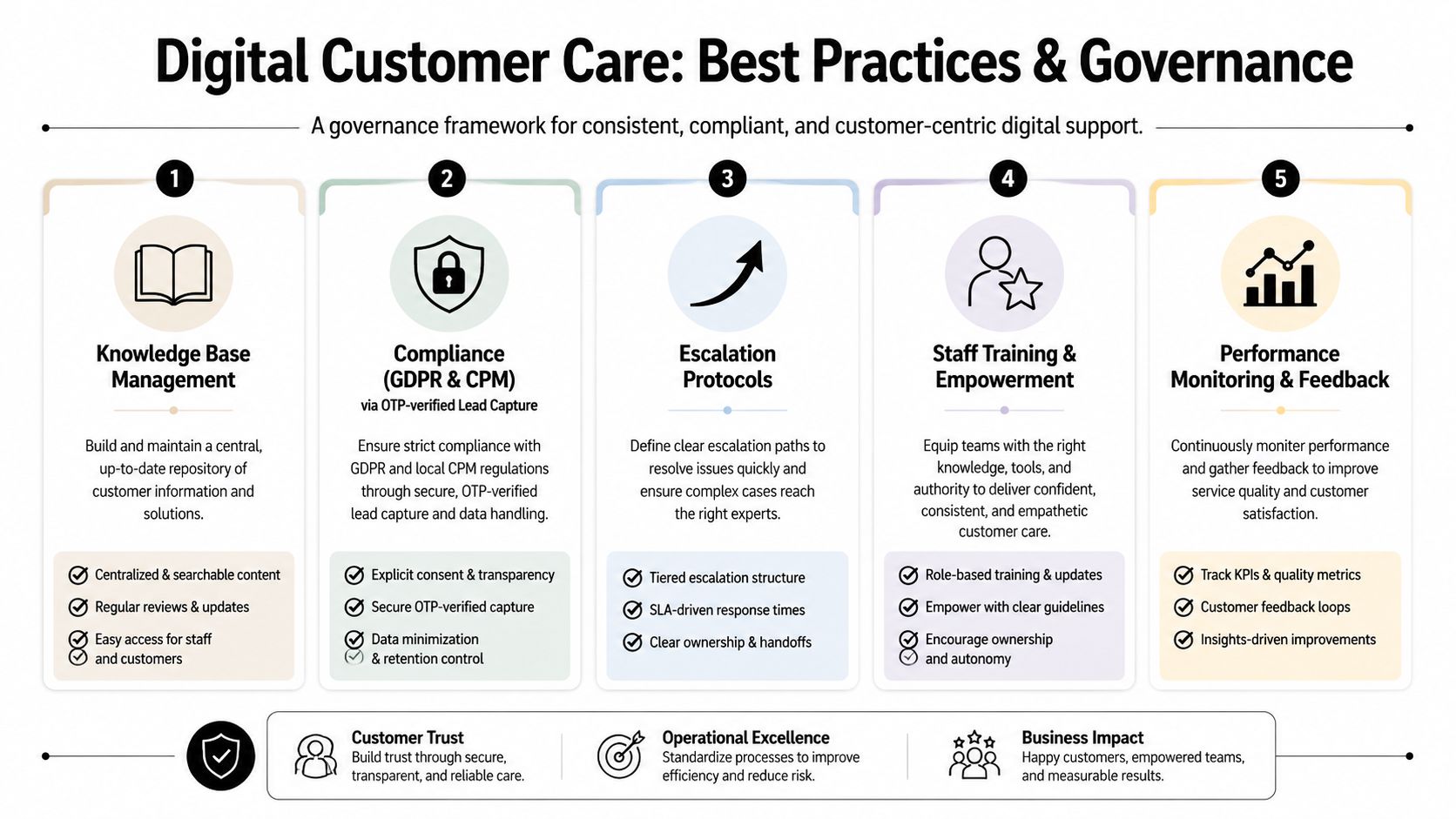
For SMBs, governance is the operating system behind digital care. It matters even more when you are connecting website chat, social DMs, email, phone, and local teams without a dedicated IT group. If the rules are unclear, each new channel adds another place for messages, promises, and customer data to drift apart.
Build one source of truth
Your knowledge base works like the master recipe in a restaurant group. Each location can adjust for local ingredients or hours, but everyone starts from the same approved version. Without that shared reference, staff improvise, bots improvise, and service quality becomes uneven.
A useful source of truth does not need to be large. It needs to be current, easy to update, and clear about what is global versus what is local.
Include items such as:
- Core business facts like hours, locations, delivery zones, return rules, and booking policies
- Service details such as treatment preparation, room features, product availability, or package inclusions
- Escalation notes that tell the system and staff when to hand off to a person
- Location overlays so each branch can show local differences without rewriting the whole base
This structure closes a common friction gap for multi-location SMBs. Corporate wants consistency. Local teams need flexibility. One shared base with approved local exceptions gives you both.
Protect data quality and compliance
Bad data creates extra work fast. A mistyped phone number, a missing location field, or a lead with no service interest forces staff to chase details instead of helping customers. That problem gets worse when inquiries arrive through Instagram, WhatsApp, forms, and phone calls that do not feed the same system cleanly.
Set a few simple controls early:
- Require the minimum fields your team needs to reply or book correctly
- Use verification where it fits the customer journey so fake or incomplete submissions do not flood the inbox
- Define who can edit policies, pricing, and service details to avoid accidental conflicts across locations
- Review data capture by channel because social inquiries often need different rules than website forms
If your team is tying together calls, CRM records, and digital messages, Hosted Telecommunications' integration guide shows where handoff design can create daily friction if ownership is unclear.
Set rules for AI and human fallback
Automation works best when it has boundaries. A good rule is simple. Let automation handle repeatable questions with approved answers, then route exceptions to a person with the right context.
That sounds obvious, but SMB teams often skip the middle step. They buy a tool, connect a few channels, and assume the system will sort itself out. Without clear fallback rules, the bot keeps talking when it should stop, or staff jump in without seeing the full thread.
Use governance rules like these:
- Route sensitive topics to humans such as complaints, refunds, health questions, legal concerns, or high-value sales inquiries
- Document brand voice so replies stay plain, polite, and consistent across channels and locations
- Review failed conversations every week to catch missing answers, broken routing, or unclear prompts
- Train staff on override behavior so they correct the system in a consistent way instead of creating side processes
For teams building these rules for the first time, this guide to best customer service practices can help turn general service goals into day-to-day operating rules.
A good governance model decides who owns the answer, who can change it, and when a human should take over.
Pick tools your team can run. For many SMBs, the best setup is not the one with the most features. It is the one your branch managers, front-desk staff, and support leads can maintain without waiting on a technical specialist every time a policy changes.
Implementation Roadmap for SMBs
The fastest way to fail is to buy software before mapping the workflow. SMBs often do this because the pain feels urgent. Messages are piling up, so any tool looks like relief. But if the underlying process is messy, the tool just scales the mess.
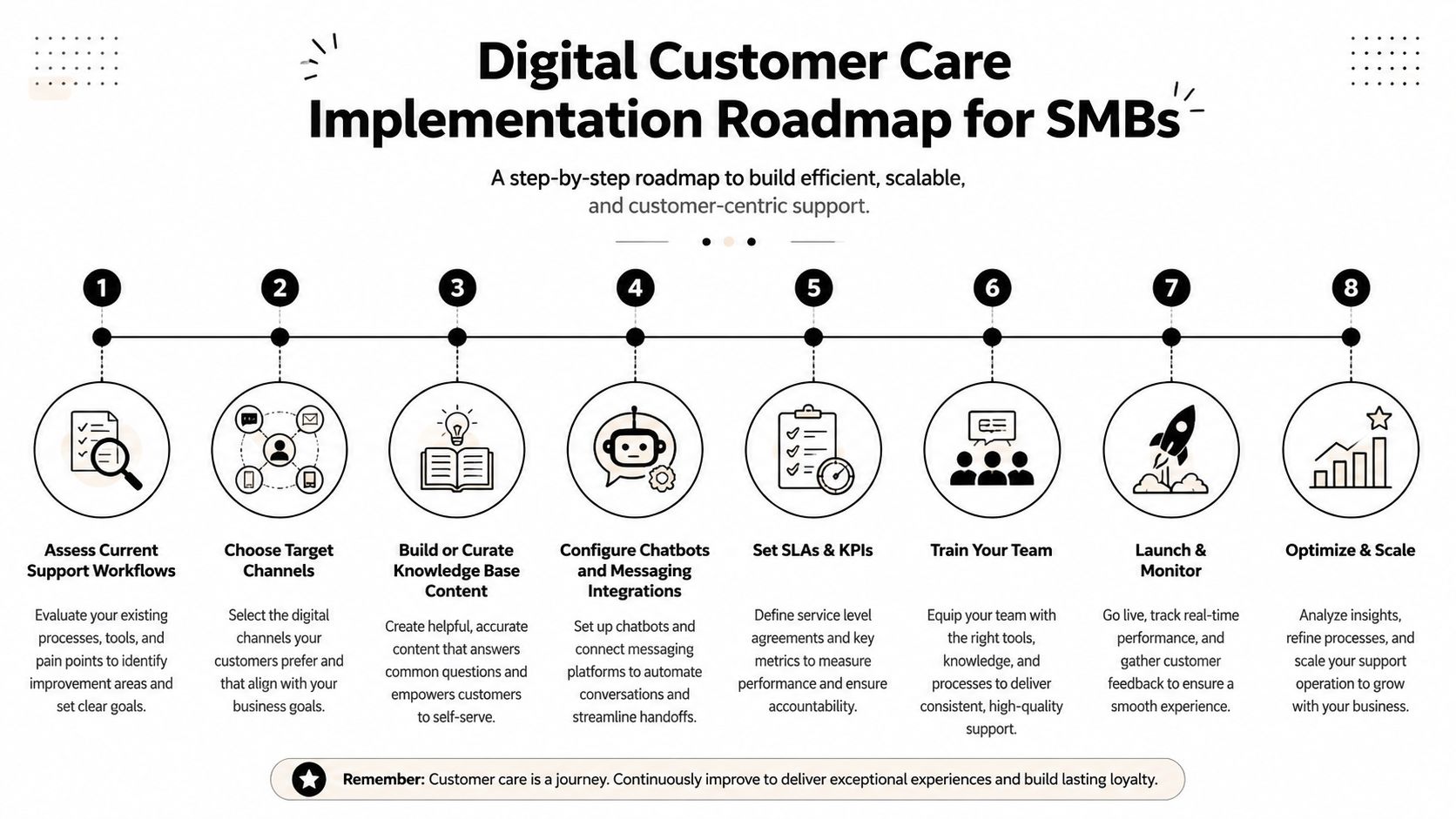
A staged rollout works better than a big launch
Start with the current state. Write down every place customers contact you now. Include the website form, Instagram, WhatsApp, Facebook, email inboxes, and any direct staff numbers customers use unofficially.
Then trace what happens after a message arrives:
- Assess current support workflows. Who answers first, where details get stored, and where conversations get lost.
- Choose target channels. Pick one or two channels with the highest value or highest volume.
- Build or clean the knowledge base. Use real customer questions, not idealized marketing copy.
- Configure chatbot and messaging flows. Keep the first version narrow and accurate.
- Set SLAs and KPIs. Decide how your team will judge whether the system is helping.
- Train staff. Make handoffs, overrides, and ownership clear.
- Launch in one location or one service line. A pilot is easier to fix than a chain-wide rollout.
- Optimize and scale. Add locations only after the pilot shows stable handling.
Address the friction gap directly
The most overlooked SMB problem is the friction gap between channels. 73% of customers use multiple channels, yet 68% of SMBs rely on manual copying between apps, creating a digital friction gap that increases repeat queries by 40%, according to Adobe's digital customer experience guidance.
That gap shows up in ordinary moments. A customer asks on Instagram, then follows up on WhatsApp. The staff member on duty doesn't see the earlier message, so the customer repeats everything. The business thinks it has “multiple channels.” The customer experiences disconnect.
Pick tools your team can actually run
For many SMBs, no-code setup matters more than feature depth. A system that staff can update is more useful than one that needs outside help for every change.
When comparing tools, look for:
- Simple knowledge import from website pages, PDFs, or FAQs
- Unified inboxes that show the conversation history
- Verification options for lead quality
- Location-level controls for multi-branch updates
- Clear escalation settings so humans can take over quickly
One option in this category is Hyperleap AI, which supports website, WhatsApp, Instagram, and Facebook workflows with a unified inbox and location-specific knowledge overlays. For SMBs without dedicated IT teams, that kind of setup is easier to manage than stitching together several disconnected apps.
Real-World Examples for SMBs and Multi-Location Businesses
A dental clinic with several locations often gets the same questions every day: Do you take walk-ins? What should I bring? How much does cleaning cost? Can I book from WhatsApp? If each branch answers in its own style, patients get mixed messages. A better setup uses one shared knowledge base for standard policies, then lets each location add its own hours, dentists, and availability. The chatbot handles intake questions, and staff step in only when the case is unusual or sensitive.
A boutique hotel group faces a different issue. Guests ask on the website before booking, on Instagram after seeing photos, and on WhatsApp during travel. If the reservation team treats each inbox separately, guests repeat room questions, check-in timing, parking details, and local requests. A unified digital care workflow keeps those recurring answers consistent while leaving room for local property differences. The lesson is simple: centralize the common information, localize the details.
A local e-commerce business often sees support and sales merge into one conversation. Someone comments on a product post, moves to DMs, asks about delivery, and wants a payment link or store pickup option. If the team replies late or loses the thread, the customer moves on. With digital customer care, the first response is immediate, the lead details are captured cleanly, and a person joins only when the customer is close to buying or needs exception handling.
These examples are representative, not measured case studies. They reflect common patterns SMBs run into when they digitize support.
If you want to see how service providers present actual client outcome pages, Aim Set Win's proven results is worth reviewing as a reference for how businesses structure outcome storytelling. The useful takeaway isn't any single result. It's the discipline of tying operational changes to concrete business outcomes.
The best SMB examples usually aren't flashy. They solve a narrow problem well, then expand.
Conclusion and Next Steps
A good digital care setup for an SMB works like a front desk with one shared logbook. No matter which door a customer uses, the team can see what already happened and what should happen next. For multi-location businesses, that matters even more because the friction often sits between channels and locations, especially when there is no dedicated IT team to stitch everything together.
The practical goal is simple: fewer repeated questions, fewer dropped handoffs, and clearer ownership.
That usually starts with a small operating model, not a large software project. First, list every place customer messages arrive today. Then mark which channels drive actual bookings, sales, or service issues. After that, write the core answers every location should share, and separate the details that need local control, such as hours, inventory, delivery zones, or appointment rules.
Next, decide the handoff rules. Which questions can be answered automatically? Which ones need a person right away? Which ones should route to the local team instead of a central inbox? SMBs often get stuck here because each channel is added one at a time, like adding pipes without a plumbing plan. The result is not more reach. The result is more leaks.
Keep the rollout narrow. Start with one high-volume channel or one pilot location. Review real conversations each week, fix the missing answers, and tighten the routing. Once the process holds up under normal day-to-day volume, copy it to the next location with only the local details changed.
If you want a practical way to put this in place, Hyperleap AI is one option for SMBs that need no-code chatbot deployment across website, WhatsApp, Instagram, and Facebook, along with verified lead capture, appointment flows, and a unified inbox. A sensible next move is to trial one channel, load your core FAQs, and review the first set of conversations for gaps before scaling further.