Effortless Calendar Integration for Chatbots & Web
Master calendar integration for your chatbot & website. Learn setup, authentication, and sync for Google, Calendly, & Cal.com.
Your team is probably living this already. A lead asks for “tomorrow afternoon,” someone checks one calendar, someone else forgets the second location's schedule, a chatbot offers a slot that looked open five minutes ago, and the customer ends up in the wrong time zone or with a booking that collides with an internal meeting.
That's the moment when calendar integration stops being a nice feature and becomes operational infrastructure. For SMBs, especially multi-location service businesses, a scheduling system has to do more than display a few open slots. It has to read availability safely, write bookings accurately, keep multiple tools in sync, and stay reliable when real people reschedule, cancel, and move between locations.
The good news is you don't need a giant engineering team to get this right. You do need clear priorities, disciplined integration choices, and a design that treats security, sync logic, and time zones as business issues rather than backend details.
Table of Contents
- Why Smart Calendar Integration Is a Game-Changer
- Understanding the Core Integration Components
- A Practical Guide to Connecting Your Calendars
- Mastering Timezones Availability and Two-Way Sync
- Ensuring Secure and Reliable Calendar Connections
- Beyond Basic Booking The Rise of AI Agents
Why Smart Calendar Integration Is a Game-Changer
Manual scheduling looks cheap until it starts leaking revenue. Staff spend time replying to routine booking questions, leads go cold while someone verifies availability, and small errors create outsized damage because a customer only remembers that your business “booked the wrong time.”
A smart calendar integration fixes that by turning scheduling into a system instead of a back-office task. Your website, chatbot, forms, and internal calendars start working from the same source of truth. When someone asks for an appointment at midnight, the business can still capture the lead, verify availability, and move the conversation forward without waiting for office hours.
For SMBs, that matters most in businesses where speed and coordination drive conversion. A moving company, for example, doesn't just need a time picker. It needs intake, qualification, and scheduling to happen in one flow. If you want a concrete example of how appointment automation is framed in that context, MoveJoy for moving companies is a useful reference point.
What changes when scheduling is integrated
A connected setup improves operations in ways teams feel immediately:
- Fewer avoidable errors: Availability checks happen against real calendars instead of memory, screenshots, or message threads.
- Better lead handling: Customers can request appointments when they're ready, not when your team happens to be online.
- Cleaner handoffs: Sales, service, and front-desk teams stop maintaining separate versions of the day's schedule.
- More consistent customer experience: The same rules apply whether the booking starts on your website, in chat, or through a follow-up message.
Practical rule: If booking requires a staff member to retype information from one system into another, the process is still manual. It's only partially digitized.
The biggest shift is strategic. Once scheduling is integrated, you can route by location, service type, or staff role instead of forcing every customer through the same generic booking link. That's where calendar integration becomes a growth lever, not just an admin convenience.
Understanding the Core Integration Components
A customer books the last open slot for your downtown location at 4:58 PM. At 5:01 PM, a staff member at the uptown location books the same specialist from Outlook because the website had not picked up the earlier change yet. That is the kind of failure SMB teams blame on "calendar sync," but the underlying problem is usually architecture.
Teams often do not need to master provider-specific API details. They do need a clear model of the parts that control availability, booking writes, and change detection across Google, Microsoft 365, and any scheduling layer they add on top. That matters even more for SMBs running multiple providers or multiple locations without a large engineering team.
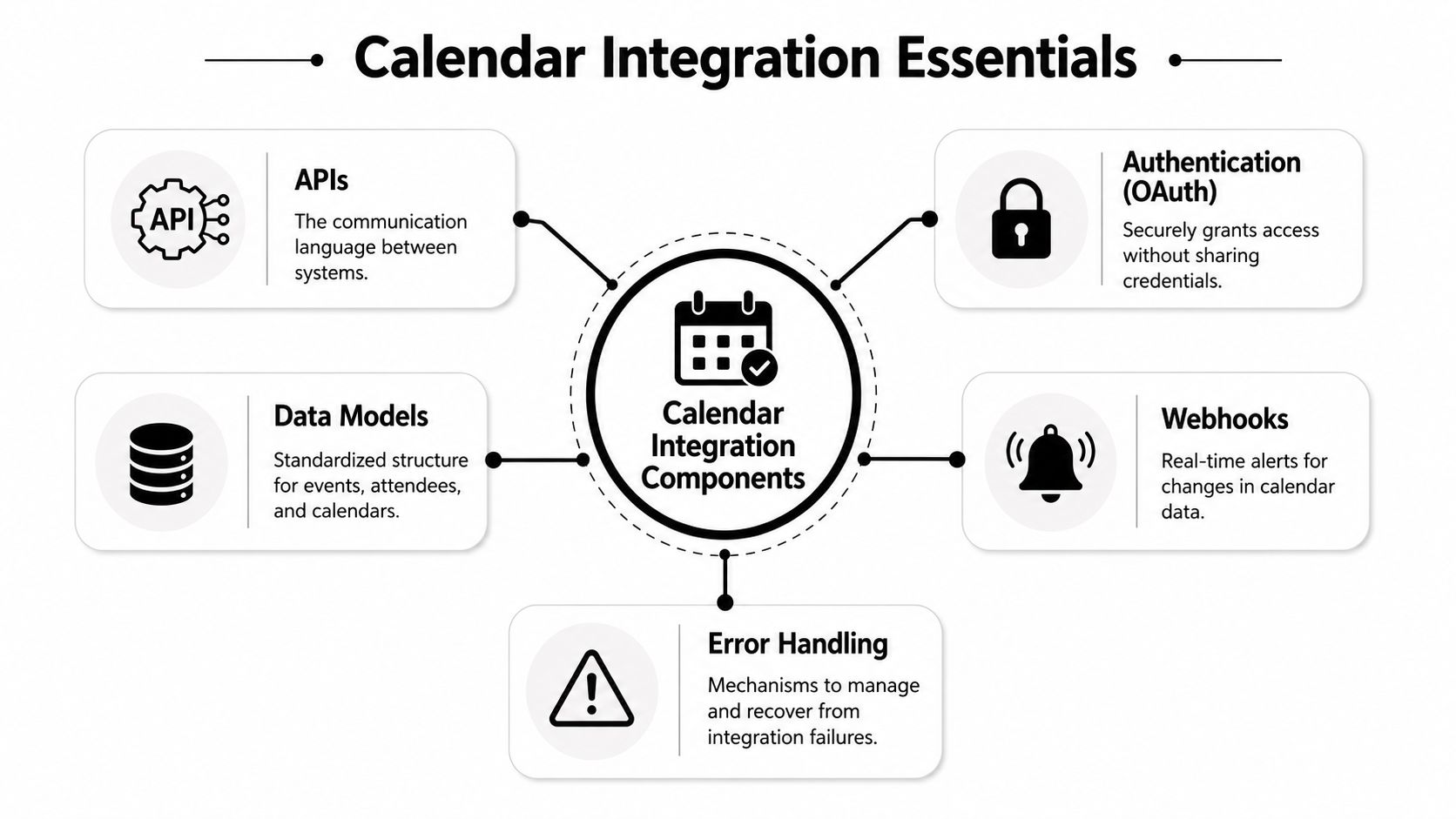
The components that actually determine whether scheduling works
At the center is the API layer. It reads calendars, creates events, updates bookings, and checks whether a proposed time is still available. For an SMB, the business value is simple. If the API layer is inconsistent, every booking surface starts showing different answers.
The next layer, your internal data model, is often the source of complexity for many projects. Google Calendar, Microsoft 365, and vertical tools all describe events a little differently. One may represent attendees one way, another may treat all-day events differently, and a third may expose availability states you do not use anywhere else. If you do not normalize that data into one internal format, every new provider adds custom logic to pricing rules, staff assignment, buffers, and reporting.
That problem shows up quickly in operations-heavy businesses. Teams comparing adjacent categories can see the same pattern in integrations for tour operators, where booking data has to pass cleanly between calendars, reservations, and customer workflows.
OAuth is a product decision, not just a security step
OAuth 2.0 handles access without asking users for calendar passwords. For product teams, the important detail is scope design. If the first task is checking availability, read access is often enough. If the user confirms a booking later, event creation permissions can come at that point if the provider and flow support it.
Over-requesting access creates avoidable drop-off. Under-requesting access creates broken booking flows that fail only after the customer has chosen a time. The practical goal is to ask for the minimum permission set that still supports the full journey you are offering.
Token handling matters too. Access tokens expire. Refresh tokens can be revoked. Admin policies can disable your app after launch. A scheduling feature that works for the first week and then stops syncing is harder to detect than a total outage because some users still appear connected while others are stale.
Here is the working model I recommend teams keep in view:
| Component | What it does | What goes wrong when it's weak |
|---|---|---|
| API layer | Reads availability and writes bookings | Different channels show different open times |
| OAuth | Grants controlled access to calendars | Connection rates drop or bookings fail after consent |
| Data model | Standardizes events, attendees, and status | Provider-specific edge cases spread through the product |
| Webhook system | Receives change notifications quickly | Cancellations and reschedules arrive too late |
| Error handling | Retries failures and surfaces issues | Missed updates stay hidden until customers complain |
A booking experience also lives or dies on the front end. If the scheduler sits inside a chat interface, this guide to embedding a website chatbot is useful for planning where the booking flow appears and how much context the user keeps while connecting a calendar.
Webhooks are what keep availability honest
Polling looks acceptable in an early prototype. The app checks calendars every few minutes and updates the UI on a schedule. The problem is the gap between checks. In a busy service business, a few minutes is long enough to create double-bookings, stale slots, and support tickets.
Webhooks reduce that gap because the provider sends your system a notification when a calendar changes. Your app still needs fallback logic. Webhook deliveries can fail, subscriptions can expire, and providers do not all behave the same way. The reliable pattern is to use webhooks for fast updates and background reconciliation jobs to catch anything missed.
This video gives a helpful visual overview before you get into implementation details:
Connected calendars are only the starting point. A scheduling product works when permissions, normalized data, change notifications, and failure recovery all support the same business rule set across every provider and location.
A Practical Guide to Connecting Your Calendars
A good implementation starts from the user journey, not the provider docs. The customer wants an appointment. Your system needs to guide permission, availability, and booking in the right order without exposing credentials or creating hidden conflicts.
If your booking flow sits inside chat, this appointment scheduling chatbot overview is a helpful example of the product surface you're building around the calendar layer.
Start with the booking journey not the provider
The cleanest mental model is three actions:
- Grant permission
- Check availability
- Book the slot
Those seem obvious, but teams often blur them together. They ask for full write access before they need it, fetch too much calendar data too early, or create tentative bookings without a strong conflict check.
A better sequence looks like this:
- First step, connect the account: The user chooses Google Calendar, Microsoft 365, or another provider and completes OAuth.
- Next, ask only for what the flow needs: If the immediate job is to show openings, read-only access is enough.
- Then, calculate availability using business rules: Duration, staff assignment, service buffers, and location constraints all apply before you ever show a slot.
- Only after confirmation, write the event: Create the booking and return a clear success state to the user.
The actual connection flow
From a product standpoint, the implementation has a simple backbone.
Register the app
Your team first registers the application with the provider's console. For Google Calendar that means Google Cloud. For Microsoft calendars it means Azure AD. In this console, redirect settings, branding, and consent details are defined.
Authenticate with OAuth 2.0
When the user clicks connect, they're sent to the provider's consent screen. After approval, your app gets an access token tied to the scopes the user approved. Those access tokens expire within 1 hour, so the integration must support refresh logic to stay functional over time, as noted in the earlier linked developer guide.
Call the calendar endpoints
With a valid token, the app can read availability or create events. This is the point where product rules matter more than raw API capability. A hair salon may need service-duration padding. A real estate group may need agent calendars filtered by office. A clinic may need separate intake and follow-up schedules.
The best booking flows don't expose the calendar's complexity to the customer. They translate business rules into simple choices.
Direct calendar vs scheduling platform
There's an important difference between integrating with a direct calendar like Google Calendar and integrating with a scheduling layer like Calendly or Cal.com.
| Option | Best when | Trade-off |
|---|---|---|
| Direct calendar integration | You need deeper control over event logic and availability rules | More implementation responsibility |
| Scheduling platform integration | You want quicker deployment with hosted booking logic | Less flexibility over edge cases and custom routing |
A direct integration gives you more control over availability calculations, event metadata, and downstream workflows. It's usually the better path if you need location-aware scheduling, staff assignment, or CRM-linked automation.
A scheduling platform is faster when your booking rules are simpler. It can handle public booking pages well, but you may still need direct calendar logic behind the scenes if you're coordinating multiple providers or custom business constraints.
What works in practice
For most SMB teams, the winning pattern is not “connect everything at once.” It's to ship a narrow but reliable first version.
- Start with one booking path: For example, new consultation requests for one service line.
- Add one provider first: Google Calendar is often the easiest place to validate the workflow.
- Log every state change: Connected, token refreshed, availability fetched, event created, webhook received.
- Make failures visible: If booking fails, the customer should never wonder whether the slot is reserved.
What doesn't work is hiding uncertainty. If your system “probably” created the event, your staff will end up double-checking manually, and the integration loses its purpose.
Mastering Timezones Availability and Two-Way Sync
A customer in Chicago books a 10:00 AM appointment. The staff member works out of Phoenix. The room is managed on one calendar, the rep's schedule lives in another, and someone on the team drags the event to a new time directly inside Outlook five minutes later. If your scheduling logic does not resolve those changes correctly, the business pays for it in no-shows, double bookings, and manual cleanup.
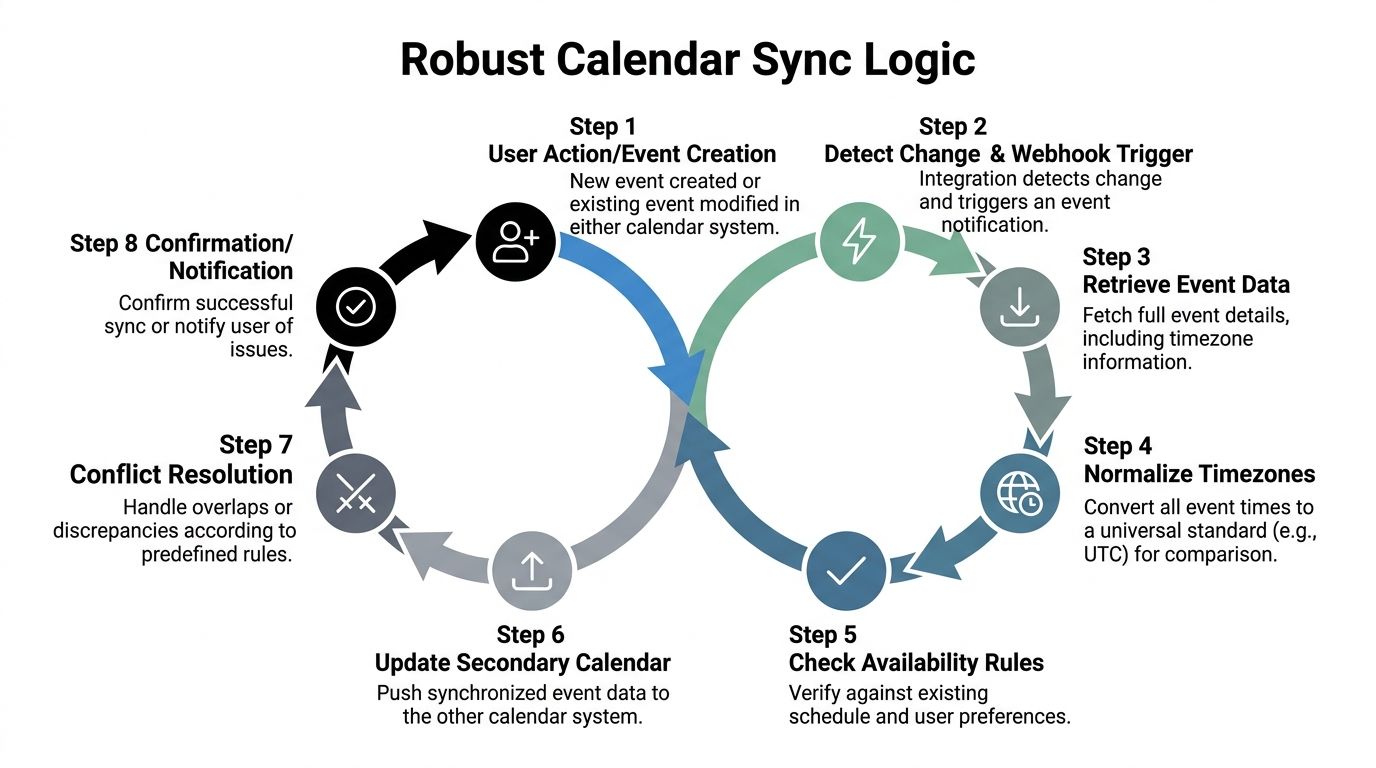
Where fragile scheduling logic breaks
Time zones are usually the first source of hidden defects. Browser time, calendar time, business location time, and provider-specific formatting can all differ. A slot can look open in your UI and still collide once the event is written to the staff calendar if those values are not normalized before every availability check and every write.
The practical rule is simple. Store time in one internal standard, keep the original timezone context, and convert for display only at the edges. Use the IANA timezone database so daylight saving changes and regional rules do not turn into support tickets twice a year.
Provider sprawl creates the second failure mode. Many SMBs operate with a mix of Google Calendar, Microsoft 365, and scheduling links set up by individual locations. That is manageable at low volume. It gets messy once you add branch-specific staff, shared rooms, buffers, and reschedules coming from more than one system.
The technical problem is synchronization drift. The business problem is trust. Once front-desk staff believe your booking layer is sometimes wrong, they start checking everything by hand.
How to build two-way sync that holds up
Two-way sync needs a clear source-of-truth model. Without it, every update becomes an argument between systems.
In practice, each appointment should have:
- A stable internal booking ID
- The provider event ID for every connected calendar
- A last-updated timestamp
- Ownership metadata that shows which system created the event
- A sync status field for retry and exception handling
That data model matters because webhook payloads are rarely enough on their own. Providers send different event shapes, different update semantics, and different levels of detail. A deleted event in one provider may arrive as a cancellation. In another, it may look like a missing record on fetch. Your integration has to treat webhook notifications as signals to re-check state, not as final truth.
A reliable sync sequence
- Receive the webhook: Verify the event belongs to a connected account and queue it for processing.
- Fetch the latest record: Pull the current event state from the provider API.
- Normalize the payload: Convert timestamps, attendee status, cancellation state, and recurrence data into your internal schema.
- Re-run booking rules: Check staff availability, room assignment, service duration, buffers, and location eligibility.
- Apply the update idempotently: The same webhook may arrive more than once, so repeated processing must not create duplicate changes.
- Write downstream changes: Update your booking system, CRM, or secondary calendar only after the rules pass.
- Flag exceptions: If a conflict cannot be resolved automatically, route it to staff with the exact reason.
Silent failure is what causes drift.
Multi-location availability is a product problem first
Engineering can calculate free time. Product decisions determine whether the result is useful.
A clinic with two branches does not just need to know whether Dr. Lee is free. It needs to know whether Dr. Lee is free at the right branch, for the right appointment type, with the right room, with setup and cleanup buffers, and without colliding with an external hold from another booking source. Those constraints should live in your scheduling model from the start, even if the first release supports only one location.
For SMB teams without a large engineering bench, that trade-off matters. A narrow first release with the right data model scales better than a fast launch built on provider-specific shortcuts.
A practical multi-location model usually includes these checks:
- Location eligibility: Only consider staff, rooms, and services assigned to that branch.
- Calendar aggregation: Pull busy blocks from whichever provider that location uses.
- Buffer logic: Add travel, prep, and cleanup time before offering a slot.
- Conflict priority: Decide which system wins if two sources disagree temporarily.
- Booking ownership: Preserve where the event originated so edits reconcile correctly.
Teams also run into privacy concerns once calendars, customer records, and automated booking flows start sharing data. This guide to AI chatbot security and data privacy for businesses is a useful reference if your scheduling flow touches customer conversations or CRM-linked appointments.
For SMBs supporting multiple providers and locations, the goal is not perfect architectural purity. The goal is a scheduling system staff can trust, customers can book without confusion, and a small team can maintain without spending every week reconciling calendar mismatches.
Ensuring Secure and Reliable Calendar Connections
A customer picks 2:00 PM, gets a confirmation, and your front desk still sees the slot as open. That failure usually starts long before the booking itself. It starts with weak permission design, expired tokens, missed webhook events, or unclear fallback rules.
For SMBs, calendar integration transitions from a feature checklist item to an operating risk. A small team does not have hours each week to investigate duplicate appointments, reconnect broken accounts, and explain to customers why a confirmed meeting vanished. Security and reliability work best when they are built into the scheduling flow from the first release, even if the product starts with one provider and one location.
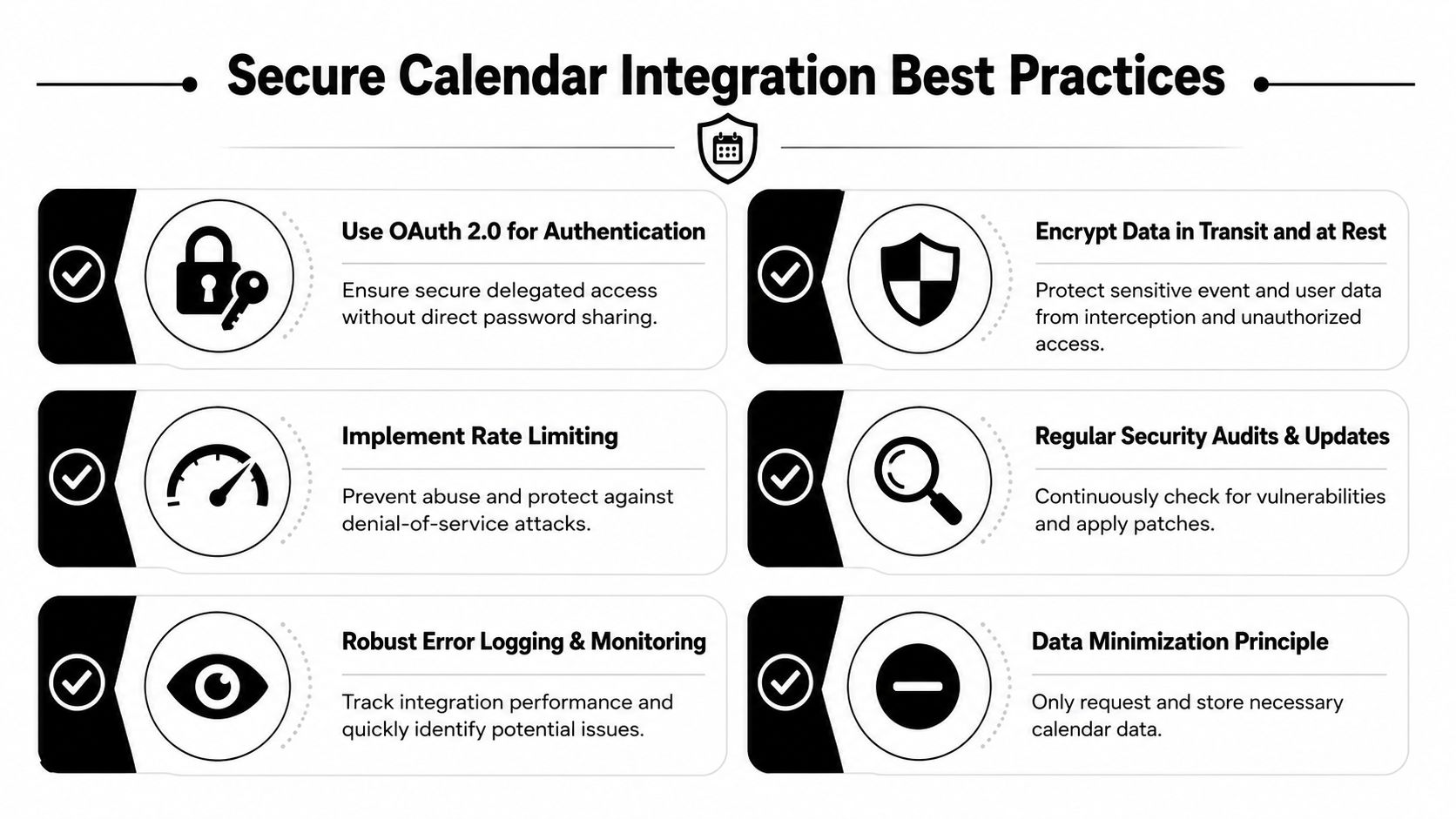
Trust starts at the consent screen
Teams often lose calendar connections before sync even begins. The consent prompt asks for broad access, the app name is unfamiliar, or the reason for the request is unclear. Users hesitate, especially when they are connecting a work calendar that contains customer meetings, internal notes, and staff schedules.
Ask for the narrowest scope that supports the current action. If the product only needs free/busy data, request that. If users later want the app to create or update events, request expanded access at that point and explain why. Incremental permissions usually convert better than asking for every scope on day one.
Operational trust matters too. Verification status, audit readiness, encryption, and clear data-handling policies affect whether an SMB owner is comfortable connecting the calendar that runs their business. This AI chatbot security and data privacy business guide is useful if booking flows also involve chat, CRM data, or customer intake steps.
Reliability comes from recovery paths
Calendar APIs fail in ordinary ways. Access tokens expire. Webhooks arrive late or not at all. Providers throttle writes during spikes. Users revoke permissions without telling your app. If the system assumes every notification arrives and every write succeeds, availability drift follows.
The fix is not complicated, but it does require discipline.
A reliable integration should include:
- Retry handling: Queue failed webhook processing and replay missed changes from the provider when needed.
- Token refresh safeguards: Refresh before expiry when possible, and flag reconnect flows before customers hit booking errors.
- Idempotent writes: Prevent duplicate events when the same booking request is retried after a timeout.
- Structured logging: Capture provider, account, calendar ID, event ID, error type, and retry status so support can diagnose issues quickly.
- Safe fallback behavior: If the system cannot confirm an event write, show the booking as pending review instead of claiming success.
These controls matter even more in a multi-provider setup. Google and Microsoft do not fail in exactly the same way, and each location may rely on a different mix of staff calendars, room calendars, and shared inbox workflows. SMB teams without a large engineering bench need one recovery model across providers, not custom troubleshooting for each integration.
A practical troubleshooting view
The fastest way to reduce support load is to map symptoms to likely failure points and decide who owns the first response.
| Symptom | Likely issue | First check |
|---|---|---|
| User will not connect calendar | Scope request is too broad, app branding is weak, or verification is incomplete | Review consent text, requested permissions, and verification status |
| Bookings appear late | Webhook processing failed or retry jobs are stuck | Inspect delivery logs, queue backlog, and last successful sync time |
| Wrong slot shows as open | Busy events were missed, filtered incorrectly, or normalized to the wrong timezone | Verify raw provider events and internal UTC storage |
| Event created but not reflected elsewhere | External ID mapping or update rules are incomplete | Check source event IDs, sync direction, and conflict handling |
| Duplicate appointments appear | Create call was retried without idempotency protection | Review request IDs and event deduplication logic |
I also recommend a simple health model that product, support, and engineering can all read. Track connected accounts, token refresh failures, webhook delay, sync lag, and pending reconnects by provider and by location. That gives a small team an early warning system instead of a weekly cleanup exercise.
Teams planning conversational booking should apply the same discipline there. Double My Leads' AI insights are a useful reminder that automated scheduling only works when the systems behind it can recover cleanly from real-world failures.
Customers do not care whether the root cause was OAuth, a webhook queue, or a provider outage. They care whether the time they booked stays booked.
Beyond Basic Booking The Rise of AI Agents
The next step in calendar integration isn't another booking widget. It's a system that can hold a conversation, understand intent, and negotiate availability without making the customer feel like they're clicking through a form.
That matters because most guidance still focuses on API mechanics while ignoring the user experience layer. This resource on calendar API integration gaps notes that existing content overwhelmingly emphasizes technical implementation while missing the gap in AI-driven availability negotiation for non-technical SMB staff. It also states that 99% of SMBs need automated appointment booking to reduce staffing costs.
From slot display to real scheduling assistance
An AI agent can do more than expose open time blocks. It can answer pre-booking questions, narrow the right service, route by location, and propose alternative times when the first choice isn't available. That's especially useful in clinics, med spas, hotels, and real estate teams where scheduling depends on context, not just a blank opening on a calendar.
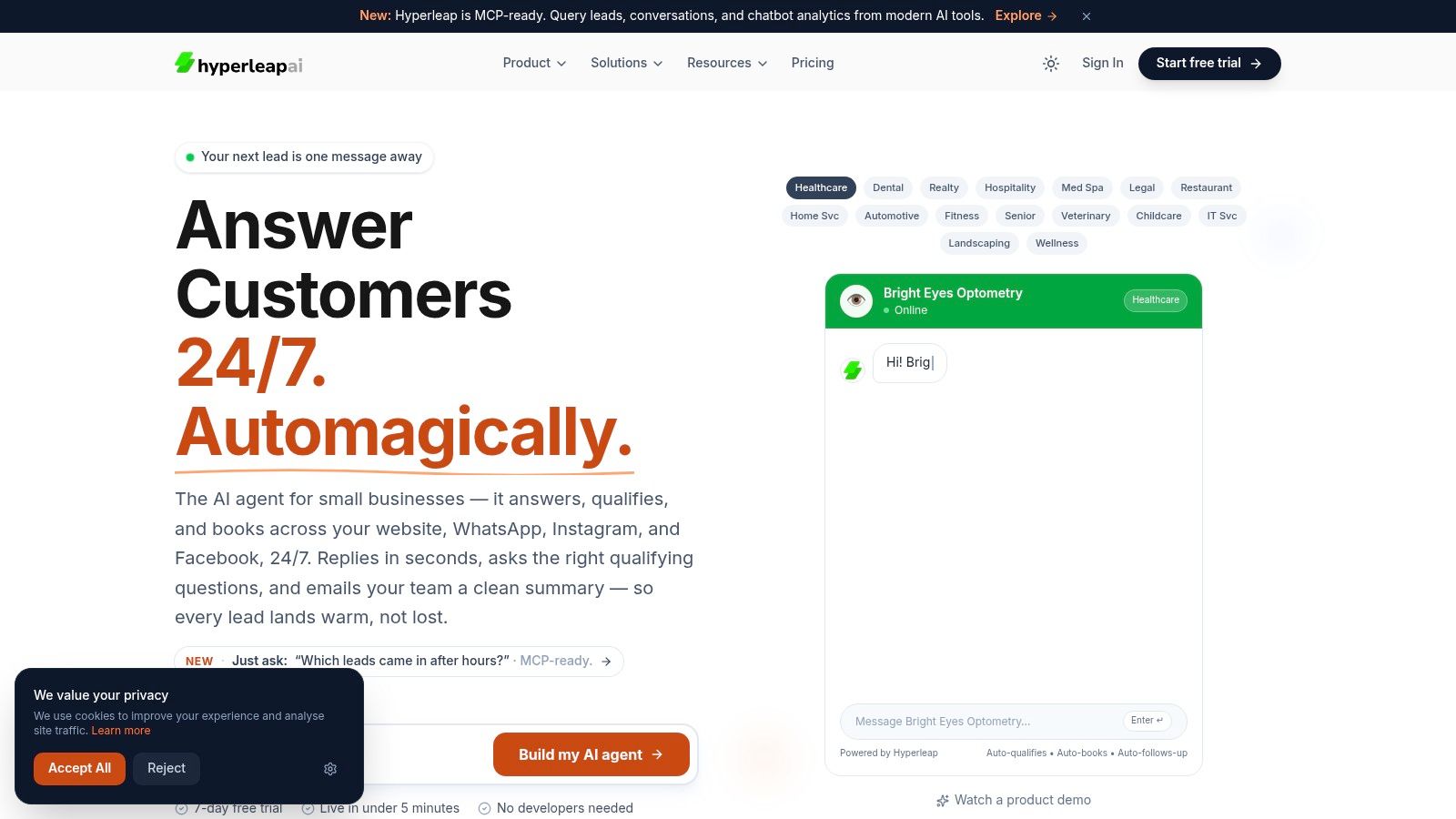
The key is that AI doesn't replace the integration foundations covered earlier. It depends on them. If time zones are inconsistent, if webhooks drift, or if permission requests feel unsafe, the conversational layer just exposes those weaknesses faster.
For teams thinking about how conversational systems change booking behavior, Double My Leads' AI insights are a useful complement. The broader lesson is clear: once the calendar layer is reliable, AI can turn scheduling from a utility into a responsive front door for the business.
If you want a faster path to 24/7 lead capture and appointment booking, Hyperleap AI gives SMBs a no-code way to launch an AI assistant across web and messaging channels, connect scheduling flows, and support multi-location customer conversations without building the entire stack from scratch.