Chatbots in Ecommerce: Your 2026 SMB Growth Guide
Discover how chatbots in ecommerce can boost your sales, capture leads, and provide 24/7 support. Our 2026 guide is for SMBs wanting to grow without hiring.

A shopper lands on your store at 9:47 p.m. They've got one last question before buying. Maybe it's about sizing, shipping, stock, returns, or whether a product works with something they already own. Nobody answers. They leave.
That's the daily leak most small and mid-sized businesses live with. Not because the product is weak, and not because demand isn't there. The problem is simple. Your site is open all day, but your team isn't.
That's where chatbots in ecommerce finally became useful. Not as novelty popups, and not as those old script-only bots that trapped customers in canned menus. A well-set-up chatbot acts more like a round-the-clock sales and support rep. It answers routine questions, captures leads, helps people compare options, nudges hesitant buyers forward, and handles post-purchase requests without forcing you to hire for every hour of the day.
For SMBs, the win isn't theoretical. It's practical. Better lead capture, fewer repetitive support tasks, and more consistent customer handling across your website, WhatsApp, Instagram, and Facebook. If you're still evaluating the category, this overview of AI chatbots for ecommerce is a useful companion read because it frames the shift in plain business terms.
The key is deployment. Most businesses don't need a custom build, a developer, or a giant automation project. They need a no-code system, a clean knowledge base, a handful of high-value workflows, and a channel strategy that doesn't treat the website widget as the whole program.
Table of Contents
- Introduction Your 24/7 Digital Sales Team Awaits
- What Are Ecommerce Chatbots Really
- The Real ROI of Chatbots for Small Businesses
- Five High-Impact Chatbot Use Cases for Ecommerce
- Where to Deploy Your Chatbot A Channel Strategy
- How to Launch Your First Chatbot Without Code
- Measuring Success and Avoiding Common Pitfalls
Introduction Your 24/7 Digital Sales Team Awaits
Most ecommerce owners don't need another software pitch. They need fewer missed conversations.
When someone reaches your site, they're usually trying to do one of three things. Buy now, get comfortable enough to buy later, or solve a problem after purchase. If your team can't respond quickly, the customer has to do the work alone. In ecommerce, that usually means they bounce, delay, or message you somewhere else.
A chatbot closes that gap. It greets visitors, answers common questions instantly, routes people to the right product or next step, and keeps service moving outside business hours. For a small team, that matters more than any flashy AI headline. It means your store doesn't go quiet when your staff clocks out.
Why this matters for SMBs
Small businesses tend to feel support load more sharply than bigger brands. One busy afternoon can overwhelm inboxes, DMs, and live chat. Multi-location businesses have another problem. Each branch gets asked similar questions, but customers expect local answers about hours, inventory, booking, and service availability.
That's why the smartest first move isn't building a “perfect AI assistant.” It's giving customers a reliable first response layer.
Practical rule: If a question gets asked every week, your chatbot should handle the first answer.
That first layer can do more than deflect tickets. It can collect contact details, share product details, provide order updates, and hand people to a human when the issue needs judgment or exception handling.
What a useful deployment looks like
A useful chatbot for ecommerce usually starts small:
- Answer repetitive questions: Shipping, returns, availability, sizing, store hours, and payment options.
- Guide buying decisions: Recommend products, compare options, and reduce hesitation.
- Capture leads cleanly: Collect emails, phone numbers, and request details when the shopper isn't ready to buy.
- Support after purchase: Handle order status, returns, and exchange requests without creating more inbox work.
That's the practical lens for the rest of this guide. Not AI for AI's sake. Just a no-code path to better response speed, stronger conversion support, and fewer dropped conversations.
What Are Ecommerce Chatbots Really
Old bots felt like decision trees in a speech bubble. They asked customers to click through fixed options and broke the second someone typed a real question.
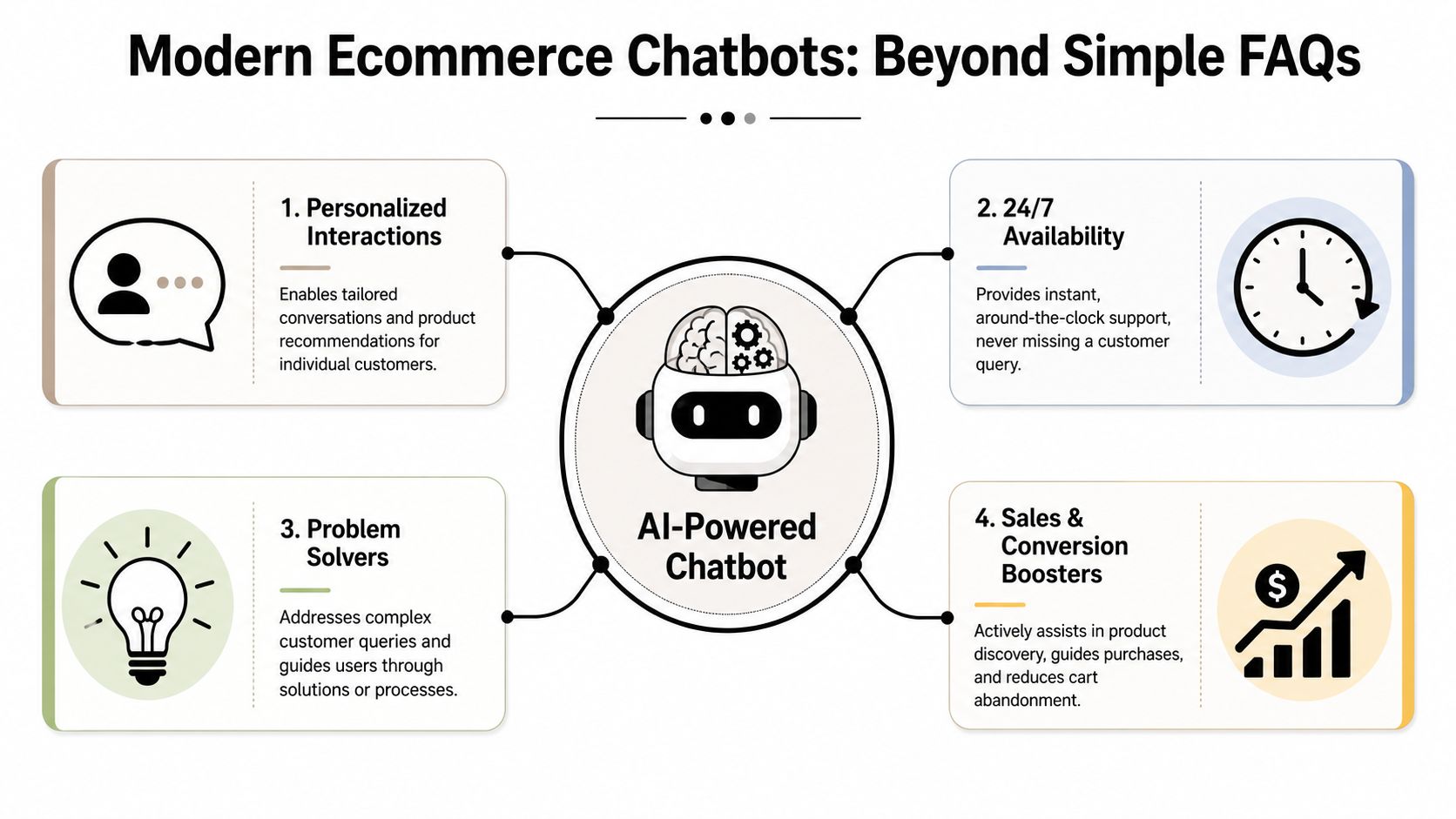
Modern chatbots in ecommerce are different. They're closer to a digital sales associate that's been trained on your products, policies, support docs, and customer journey. If the setup is sound, the bot doesn't just repeat FAQ text. It uses your business information to answer in context.
From FAQ widget to business system
The easiest way to think about it is this:
| Type | What it acts like | What it does well | Where it fails |
|---|---|---|---|
| Basic rule-based bot | A clickable FAQ page | Repeats fixed answers | Breaks on nuanced questions |
| Modern AI chatbot | A trained store rep | Handles natural questions and guides next steps | Fails if your data is messy or incomplete |
That difference matters because customers rarely ask neat, textbook questions. They ask things like, “Will this fit a narrow hallway?” or “Can I return this if I ordered the wrong variant?” or “Which one is better for sensitive skin?” Those are buying moments, not just support moments.
For Shopify merchants especially, chat quality also depends on how well the bot reflects your catalog, content, and brand positioning. If you're working through that side of the stack, this piece on AI content strategy for Shopify brands is helpful because it connects store content quality to AI response quality.
Why the category matured fast
The market shift tells the story. The global chatbot market was valued at $5.4 billion in 2023 and is projected to reach $15.5 billion by 2028, growing at a 23.3% CAGR. The same reporting notes that over 80% of customer support organizations are expected to use AI by the end of 2025 (Yep AI).
That adoption happened because businesses stopped treating bots as side widgets. They became part of commerce operations.
A chatbot becomes valuable when it can answer real customer questions in your language, using your policies and product knowledge, without forcing the shopper to hunt for pages.
The best setups don't try to sound magical. They sound accurate. That's what builds trust.
The Real ROI of Chatbots for Small Businesses
Most SMB owners ask the right question first. Will this make me money, save my team time, or both?
The answer depends on where your current friction is. Some stores lose revenue because customers hesitate and leave. Others are drowning in repetitive support. Many have both problems at the same time.
Revenue impact shows up first
One industry summary reports that AI chatbots can deliver 4x higher conversion rates, recover 35% of abandoned carts, and increase average order value by 25%. The same source says chatbot interactions may cost $0.50 to $0.70 compared with $8.00 to $15.00 for human agents (Nectar Innovations).
Those figures line up with what operators care about most:
- More buyers converted: The bot answers purchase-blocking questions while the shopper is still engaged.
- More carts recovered: Proactive outreach brings some abandoners back before intent fades.
- Larger baskets: Relevant suggestions help returning customers add complementary products.
- Lower support cost: Routine interactions move away from human handling.
What matters here isn't that every business gets the same result. They won't. What matters is that the economics can work even with modest traffic if your team currently spends real time answering the same questions all day.
A simple ROI check before you buy anything
Use a back-of-the-napkin test.
- Look at your weekly support volume.
- Mark the conversations that are repetitive and rules-based.
- Look at carts abandoned after obvious questions or checkout friction.
- Check how many product-choice questions come in before purchase.
- Estimate what happens if the bot handles the repetitive layer and assists the hesitant buyer sooner.
If your store gets steady product questions, return-policy questions, order-status requests, or booking requests, there's usually enough waste in the current process to justify a no-code chatbot.
Here's the practical scoring model I use with SMB teams:
- High ROI potential: You get frequent pre-sale questions, recurring support inquiries, and after-hours traffic.
- Medium ROI potential: You have lower support volume, but high-value products or longer consideration cycles.
- Lower ROI potential: Your catalog is tiny, questions are rare, and most buying decisions are instant and simple.
Don't buy a chatbot to “have AI.” Buy it if it will remove repeat work, rescue buying intent, or standardize customer handling across channels.
The strongest ROI usually comes from a narrow first deployment. Pick one buying bottleneck and one support bottleneck. Fix those first. Expand later.
Five High-Impact Chatbot Use Cases for Ecommerce
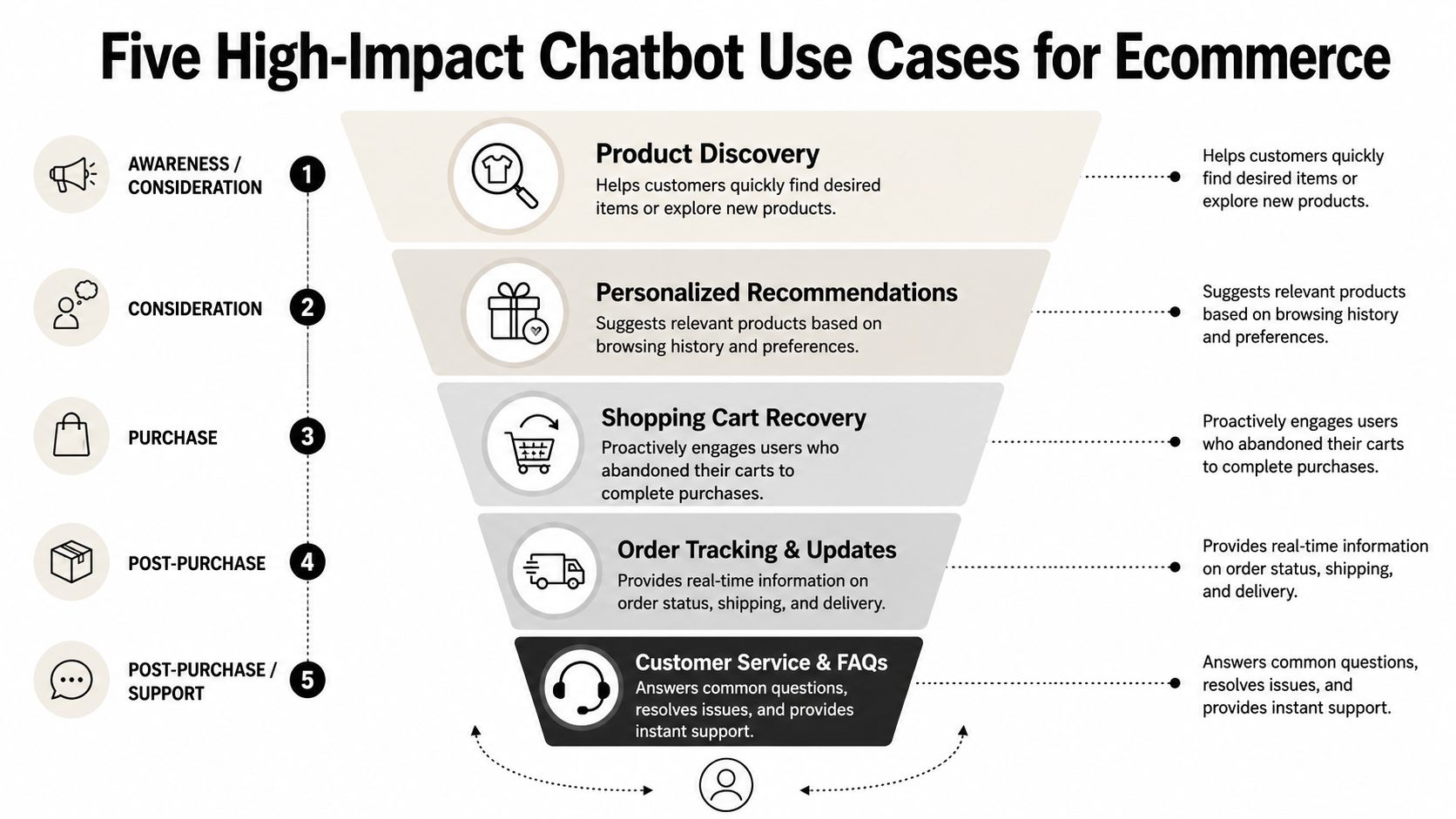
The most effective chatbot programs don't start broad. They start where customer friction is expensive.
IBM notes that effective ecommerce chatbots integrate via API into core systems like Shopify and messaging apps so they can handle order status, checkout assistance, refunds, and exchanges across the journey, not just static FAQs (IBM).
If you're planning workflows around service and support as well as sales, this guide to automating Shopify customer experience adds useful operational context.
Lead capture that qualifies interest
A simple “Need help?” chatbox isn't enough. The better use case is a lead capture flow that asks the right short questions and stores clean contact details.
For a multi-location furniture retailer, that might mean asking what room the customer is shopping for, preferred price range, and nearest store. For a real estate group, it might mean budget, area, timeline, and whether they want a call back.
The win isn't just collecting a lead. It's collecting a lead with context your team can act on.
Support that removes buying friction
This is the easiest first deployment. Let the bot answer shipping, returns, warranty, stock, store-policy, and order-status questions.
Customers don't experience these as “support” questions. They experience them as purchase blockers. If the answer arrives instantly, they keep moving. If not, intent cools.
Product discovery and guided selling
At this stage, chatbots start acting more like in-store associates.
A skincare brand can ask about skin type, sensitivity, and goals, then narrow the catalog. A cycling store can ask about terrain, riding style, and budget, then recommend categories. A boutique apparel store can guide by fit, occasion, or material preference.
For more ideas on turning conversational flows into demand generation, this article on chatbot marketing workflows is worth reviewing.
Customers rarely want “all products.” They want help getting to the right few products.
Cart recovery and re-engagement
Cart recovery works when the message solves hesitation, not when it just says “you left something behind.”
A better chatbot follow-up asks whether the customer had a question, offers help on shipping or returns, or brings them back to the exact product discussion they were already having. This is especially useful on messaging channels, where the conversation feels persistent instead of reset.
Booking for service-led and multi-location brands
Not every ecommerce business ends at checkout. Many need consultations, fittings, demos, showroom visits, or service appointments.
A med spa can use a bot to answer treatment basics and route qualified prospects to booking. A home services brand can collect need, location, and urgency, then schedule the next step. A jewelry retailer can book in-store consultations after helping a shopper shortlist products.
That mix of selling, support, and scheduling is where chatbots become part of operations, not just site decoration.
Where to Deploy Your Chatbot A Channel Strategy
Most businesses still think “chatbot” means a widget in the bottom corner of the website. That's too narrow.
Recent coverage points to a broader shift. Chatbots are increasingly used across WhatsApp, Instagram, and Facebook for end-to-end shopping, and the challenge is designing one journey that moves between channels without losing context (Insider One).
Website chat catches high intent
Your website is where buyers evaluate. They've clicked an ad, searched for a product, landed on a collection page, or opened a support page because they want something now.
Website chat is best for:
- Pre-purchase questions: Fit, compatibility, pricing, shipping, and returns.
- Checkout friction: Payment confusion, promo-code issues, or product uncertainty.
- Support triage: Order updates, exchange eligibility, and policy lookups.
If you're comparing this approach with traditional live chat tools, this roundup of live chat software for small business helps clarify where human chat still belongs.
Messaging apps keep the conversation alive
Messaging apps work differently. The customer doesn't need to stay on your site. The conversation persists.
That makes WhatsApp, Instagram, and Facebook useful for:
| Channel | Best use | Main strength | Main risk |
|---|---|---|---|
| Website | High-intent buying moments | Immediate conversion support | Conversation ends when visitor leaves |
| Follow-up, support, re-engagement | Persistent thread and direct contact | Can feel intrusive if used poorly | |
| Instagram and Facebook | Discovery and social inquiries | Meets customers where they already browse | Easy to create fragmented handoffs |
Unified journeys beat isolated tools
The primary upgrade is continuity. A shopper asks about a product on Instagram, visits your site later, then wants an order update on WhatsApp. If your systems act like those are three unrelated people, your customer experience feels broken.
That's why SMBs should prefer one knowledge base and one inbox over separate bots for each channel. Especially for multi-location businesses, unified handling prevents duplicate work and inconsistent answers.
The channel matters less than the continuity. Customers remember when they have to repeat themselves.
How to Launch Your First Chatbot Without Code
A practical first launch usually starts the same way. A customer asks about shipping on your website at 9:30 p.m., sends a product question on Instagram the next morning, then wants an order update on WhatsApp later that week. If your setup only covers the website widget, you still end up answering the same question three times.
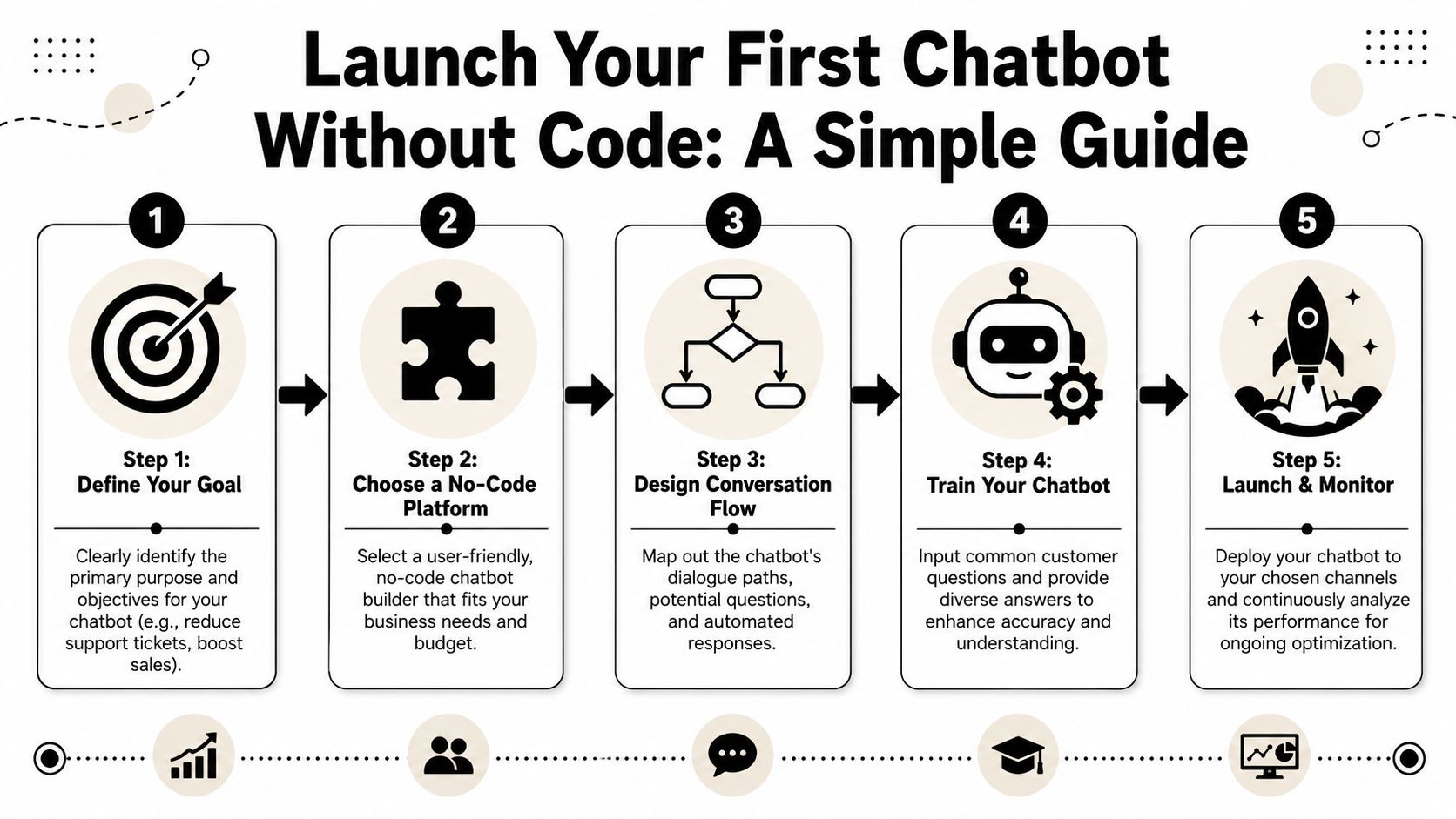
For a small business, the better no-code path is narrower and more useful. Start with one job, one source of truth, and one setup that can answer consistently across your site and messaging channels.
Start with one business goal
Choose the first outcome you want the bot to improve. Good first goals are specific: answer repeat support questions, qualify leads, help shoppers pick between products, or route people to booking.
Vague goals create messy bots. “Handle everything” usually produces weak answers, poor handoffs, and a cleanup project two weeks later.
Then clean up the information the bot will rely on. In practice, that usually means pulling from:
- Your website pages: product pages, shipping, returns, FAQs, and location pages
- Internal documents: policy docs, brochures, menus, service sheets, and call scripts
- Real customer language: repeated questions from chat, email, WhatsApp, Instagram, and Facebook DMs
If you run multiple locations, organize answers by store, service area, or inventory rules before launch. Store hours, pickup policies, and local availability are common failure points when one generic answer gets applied everywhere.
A walkthrough helps here:
Build the minimum useful version
The first version should cover the conversations you already know are happening. It does not need every policy exception on day one.
I usually recommend four basic flows:
- Greeting and routing: Set expectations fast. Tell visitors what the bot can help with and offer clear options.
- Top questions: Add answers for common product, shipping, returns, and order-status questions.
- Lead capture: Ask for email or phone only when there is a clear reason, such as a quote request or follow-up.
- Human handoff: Send complex issues to a person with context attached, not a dead-end “contact us” message.
If you sell on Shopify, this guide to adding a chatbot to Shopify covers the practical embed steps.
One caution here. Do not write every answer in polished marketing language. Use the phrasing customers use. “Do you ship to Canada?” performs better than a paragraph titled “International fulfillment options.”
Go live with controlled scope
A small launch beats a long build.
Start with your website, then add the messaging channel your customers already use most. For some stores that is WhatsApp. For others it is Instagram or Facebook. The goal is not to be everywhere at once. The goal is to keep answers consistent wherever the conversation starts.
Before launch, test with real questions from your inbox and social DMs. Use messy wording, partial questions, and impatient follow-ups. That is how customers ask.
Run this short check:
- Accuracy: returns, shipping, pricing, and store info are current
- Tone: replies sound like your business, not a generic support script
- Handoff: customers can reach a person for exceptions or sensitive issues
- Channel consistency: website, WhatsApp, and social replies do not contradict each other
The first version does not need to feel advanced. It needs to answer correctly, collect the right details, and stop your team from repeating the same work every day.
Measuring Success and Avoiding Common Pitfalls
A chatbot should earn its place. That means tracking what it changes and fixing what causes customer frustration.
Salsify notes that chatbot performance depends heavily on backend data accuracy and low latency. Instant access to live inventory and order systems is essential for resolving customer questions effectively, and conversational AI can reduce customer service costs by up to 30% when the setup is right (Salsify).
What to track every week
Use a short KPI set first.
| KPI | What It Measures | SMB Goal |
|---|---|---|
| Conversation Volume | How many chats the bot handles | Confirm that customers are actually using it |
| Lead Conversion Rate | How many chats become captured leads | Improve lead quality, not just quantity |
| Containment Rate | How many issues the bot resolves without human help | Reduce repetitive manual work |
| Customer Satisfaction Score | How customers rate the interaction | Catch frustration early |
| Handoff Rate | How often the bot passes to a human | Identify gaps in knowledge or policy handling |
Mistakes that break performance
Three problems show up constantly.
- Weak source data: If your policies, product details, or inventory references are outdated, the bot gives shaky answers. Fix the knowledge base before tweaking prompts.
- No human handoff: Some issues need judgment. Returns exceptions, damaged orders, and unusual requests should move to a person quickly.
- Trying to automate everything at once: Broad deployments create messy conversations. Start with the repetitive, high-confidence tasks.
Accuracy beats personality. A friendly wrong answer still damages trust.
The best chatbot programs improve because someone owns them. Review transcripts, update weak answers, and keep the bot aligned with real customer language.
If you want a no-code way to put this into practice, Hyperleap AI is built for SMB teams that need one chatbot across website, WhatsApp, Instagram, and Facebook, with grounded answers, lead capture, and appointment routing without a developer-heavy rollout.