Chatbot for Marketing: Your 2026 SMB Growth Guide
Back to Blog
Guide

Chatbot for Marketing: Your 2026 SMB Growth Guide

Learn how a chatbot for marketing can capture verified leads, book appointments, and answer FAQs 24/7. Our 2026 guide helps SMBs implement and measure ROI.

Gopi Krishna Lakkepuram
May 29, 2026
13 min read

At 10 PM, a customer lands on your website, has one question, and is ready to book if they get a fast answer. Your staff is offline. Your contact form feels like work. The prospect leaves.

That leak happens every day in small businesses. It happens on websites, Instagram, Facebook, and WhatsApp. Most owners don't need more traffic first. They need a better way to catch demand when it shows up.

A good chatbot for marketing solves that specific problem. It answers routine questions, qualifies buyers, collects usable contact details, and routes hot leads into your sales process while intent is still high. The important part isn't the chat bubble. It's whether the bot produces real leads your team can use, and whether you can prove it added business instead of just generating chat transcripts.

Table of Contents

Your 24/7 Marketing Assistant Is Here

For most SMBs, missed leads don't come from bad service. They come from delayed service. A buyer asks about pricing, availability, insurance, location, or booking times after hours, then moves on to the next option because nobody replied.

That's why a chatbot for marketing has shifted from a nice-to-have to basic operating infrastructure. The global chatbot market was estimated at USD 9.56 billion in 2025 and is projected to reach USD 41.24 billion by 2033, with a projected 19.6% CAGR according to Grand View Research's chatbot market analysis. That kind of spending doesn't happen around a gimmick. It happens when businesses start treating a tool as part of customer acquisition and service delivery.

What small businesses actually need from it

Small businesses usually don't need a complex AI project. They need coverage.

They need a system that can:

  • Answer buying questions fast so visitors don't bounce while comparing options
  • Collect verified contact details instead of filling the CRM with fake names and dead phone numbers
  • Hand off serious prospects to a human, calendar, or sales pipeline without delay
  • Work after hours without hiring more staff
  • Stay consistent across channels so the same business doesn't sound confused on the website and social inboxes

Practical rule: If your chatbot can't help a customer take the next step, it isn't doing marketing. It's just chatting.

The businesses that get value from chatbots keep the scope tight at first. They don't try to automate everything. They start with lead capture, qualification, bookings, and common pre-sales questions. That gives them a cleaner test of whether the bot is creating usable demand.

What changes when the bot is built well

A bad bot hides contact info, traps people in loops, and wastes your team's time with junk leads.

A useful one acts like a front-desk teammate who never sleeps. It greets, answers, screens, and routes. For a local service business, that can mean fewer missed inquiries. For a clinic, it can mean fewer repetitive calls. For an agency, it can mean less time spent sorting low-fit prospects from ready buyers.

What Exactly Is a Marketing Chatbot

A marketing chatbot isn't just a pop-up with canned replies. It's a digital front-desk agent that handles three jobs at once. It welcomes visitors, answers common questions, and moves the right people toward a sale or booking.

An infographic diagram explaining the three key roles and functions of a modern marketing chatbot.

When owners picture a chatbot, they often think of the clunky website bots that only say "How can I help?" and then fail on the second message. Modern chatbot tools are different when they're grounded in real business information and connected to the rest of your stack.

Three parts that make it useful

A practical chatbot for marketing usually has three working parts.

First, there's the knowledge base. That's your website copy, FAQs, service pages, brochures, policies, menus, product details, and other business documents. Without that, the bot doesn't know your business well enough to answer accurately.

Second, there's the conversation engine. That's what interprets questions and turns your content into natural replies. If you want a plain-English comparison of models, prompts, and limitations, this guide on chatbot AI vs ChatGPT is useful because it separates the general-purpose model from the business-ready deployment.

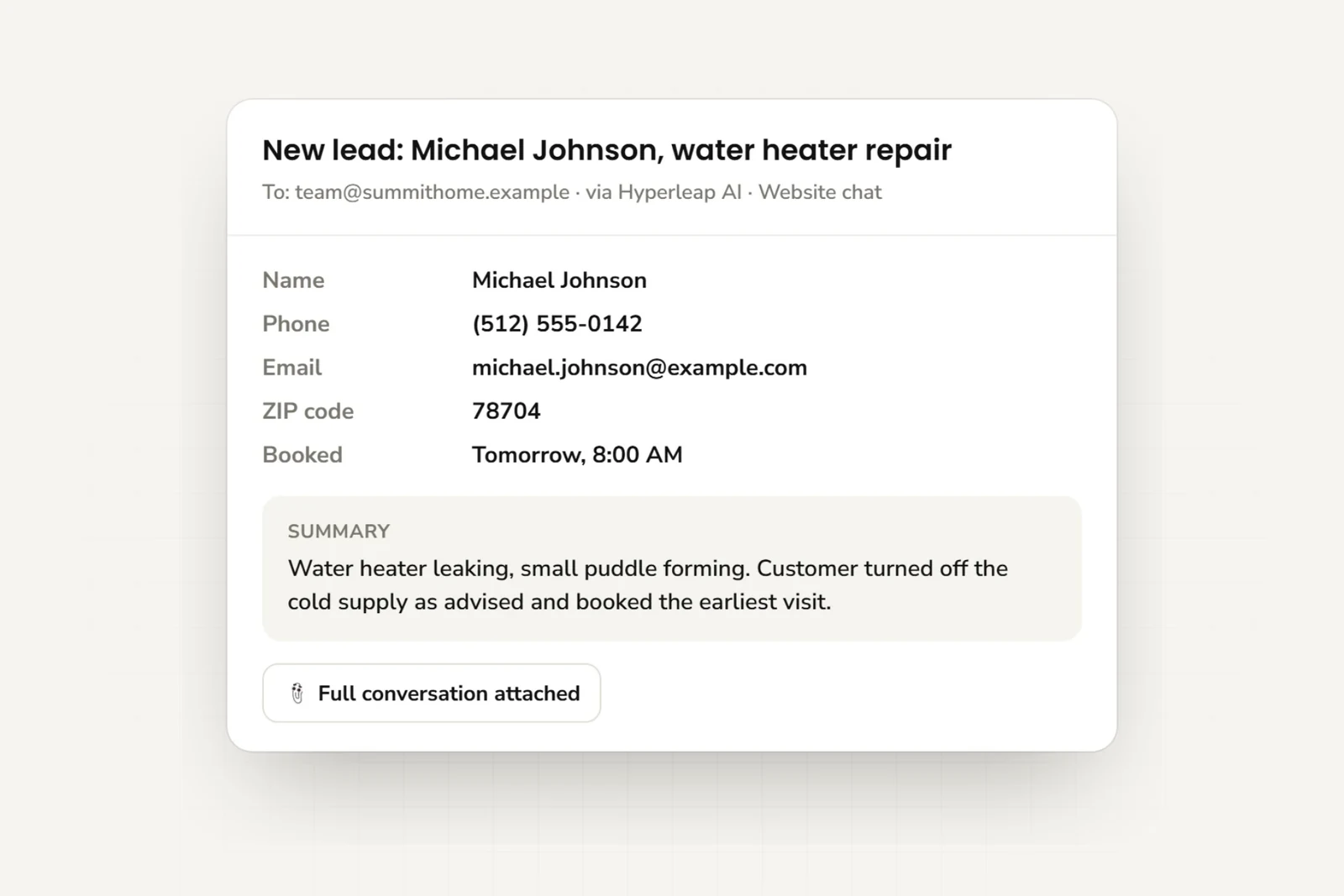
Third, there are the integrations. These connect the chatbot to your CRM, booking tool, forms, email alerts, or inbox. Without integrations, the chat stays trapped in the widget. With them, the conversation becomes an actual lead or appointment.

What good answers depend on

The biggest mistake I see is assuming the model is the product. It isn't. The actual product is the system around it.

If you feed the bot vague, outdated, or thin business information, you'll get vague answers back. If you give it grounded material and clear rules, it can handle a surprising amount of front-line work while staying on-brand.

A marketing chatbot should answer like your best-trained coordinator, not like a search engine improvising.

This is also where business owners should be realistic. A chatbot is strong at repeatable questions, intake, routing, lead capture, and early-stage qualification. It is weaker at unusual edge cases, emotionally sensitive situations, and anything that needs judgment beyond your documented process.

For companies evaluating business uses of conversational AI more broadly, Four Eyes has a practical breakdown of the benefits of ChatGPT for companies. It helps frame where AI supports operations well and where human oversight still matters.

Top 5 Marketing Chatbot Use Cases for SMBs

The easiest way to judge a chatbot is simple. Did it help you get more customers or reduce staff load without hurting the customer experience?

Research summarized by Zoom notes that 55% of companies using chatbots experience an increase in high-quality leads, and companies using AI in customer interactions saw satisfaction scores rise by 22.3% according to Zoom's chatbot statistics roundup. That lines up with what works in the field. The best use cases sit close to revenue and repetitive customer questions.

Here's a visual summary before the details.

An infographic showing the top five marketing chatbot use cases for small businesses, represented as a funnel.

Where small businesses get the fastest wins

  1. 24/7 lead capture and qualification

This is the biggest one. A visitor asks about service areas, pricing range, availability, or whether you handle their case. The bot answers the basics, asks qualifying questions, and collects contact details once the person shows intent.

This beats a plain contact form because the visitor gets help before being asked to submit anything.

  1. Appointment booking

Booking friction kills demand. A good chatbot can answer pre-booking questions and then route the person to Calendly, Cal.com, or your existing scheduler at the right moment.

That matters for clinics, salons, legal consults, hotels, home services, and any business where the sale usually starts with a meeting.

Before moving on, this short walkthrough is helpful if you want to see common chatbot use cases in action:

  1. Instant FAQ handling

Your staff shouldn't spend the day answering the same six questions. Parking, delivery radius, accepted insurance, return policy, check-in time, treatment prep, office hours, and pricing basics are ideal bot tasks.

This doesn't replace your team. It protects their time for the conversations that need a person.

Why these use cases outperform a basic chat widget

The next two use cases usually separate serious setups from casual ones.

  • Proactive nurturing: A bot can offer a brochure, service guide, treatment explainer, or relevant next step based on what the visitor asks. That's more useful than saying "leave your email and we'll get back to you."
  • Multi-channel continuity: Many customers don't stay on one channel. They may discover you on Instagram, ask a follow-up on WhatsApp, then book from your website. A chatbot strategy works better when those interactions feel coordinated instead of fragmented.

If your website bot captures leads but your Instagram DMs sit unanswered, you're still leaking demand.

What doesn't work is using the same generic script for every business. A dentist needs insurance and appointment context. A hotel needs dates and room type context. A marketing agency needs budget, timeline, and service-fit context. The more the flow reflects your actual buying process, the more the chatbot behaves like a revenue tool instead of a novelty.

Your 5-Step Chatbot Implementation Roadmap

Most small businesses don't fail with chatbots because the technology is too hard. They fail because they launch a widget before deciding what outcome they want.

A five-step infographic showing the chatbot implementation roadmap, from defining goals to monitoring and optimizing performance.

Step 1 and Step 2

Step 1 is to define one primary goal.
Pick one: more qualified leads, more bookings, fewer repetitive support questions, or faster response across channels. If you try to optimize for everything on day one, the conversation flow gets messy and the reporting becomes useless.

Step 2 is to build the bot's knowledge base.
Gather the pages, PDFs, FAQs, price ranges, service details, policies, and location-specific information your staff already uses to answer questions. Clean this material first. If your website is inconsistent, your bot will repeat those inconsistencies.

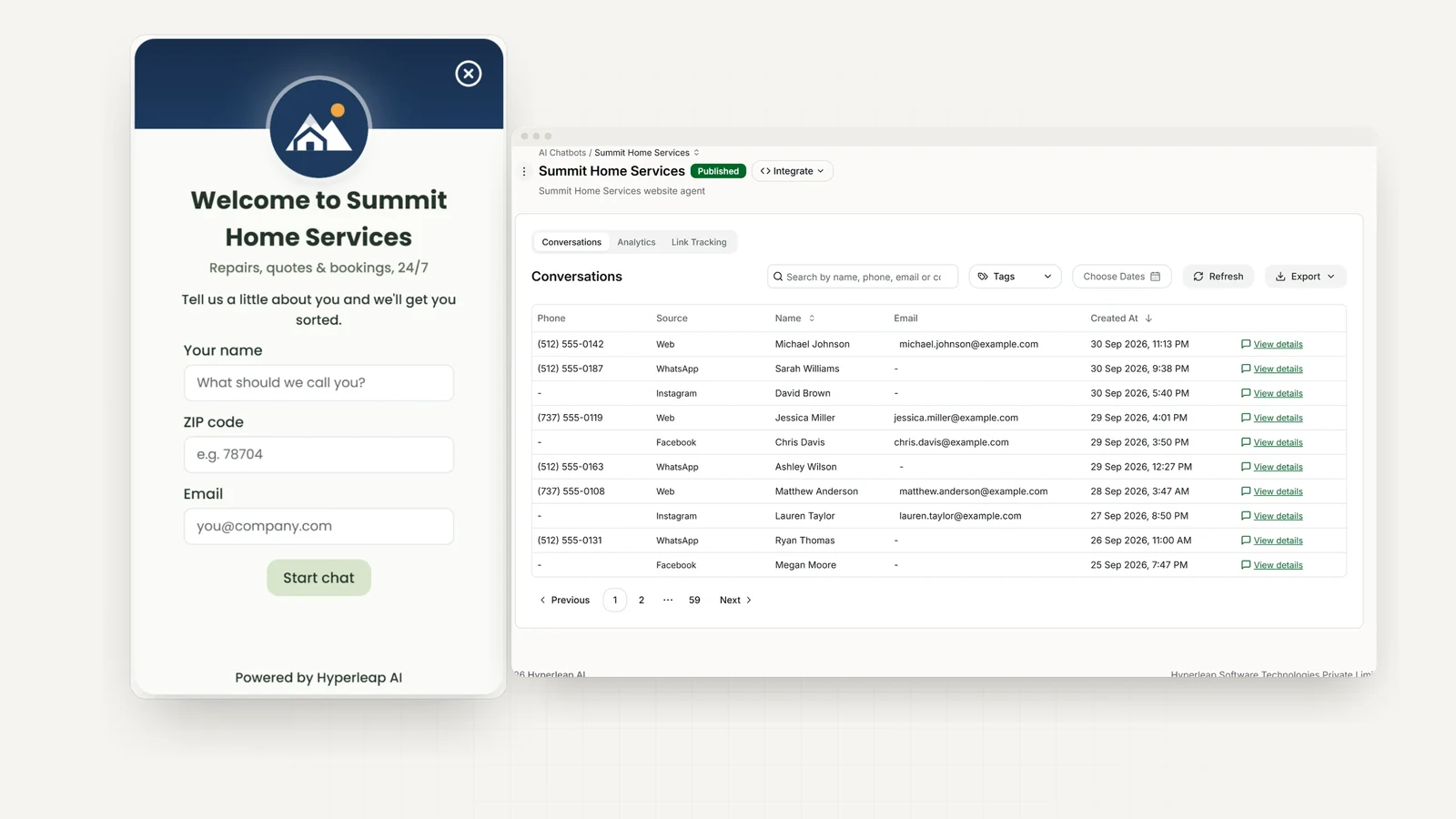
A no-code platform can speed this up. For example, Hyperleap AI lets teams create a chatbot from a website URL or uploaded documents, then deploy it across website and social messaging channels without custom development. That kind of setup is useful for SMBs that need practical deployment, not a long software project.

Step 3 through Step 5

Step 3 is conversation design.
Map the top visitor intents and write paths for each. Don't start with edge cases. Start with the questions your team hears every week.

A strong flow usually includes:

  • A clear welcome message that tells people what the bot can help with
  • Short qualification prompts that don't feel like an interrogation
  • A value-first sequence that answers something useful before asking for contact details
  • A human handoff path for complex or sensitive issues

Step 4 is integration. IBM notes that effective chatbot marketing depends on integration with CRM and marketing automation systems so lead data moves instantly into the pipeline in IBM's overview of chatbot marketing. Many deployments fail at this stage. If the bot captures interest but your team has to manually copy details into spreadsheets, response speed drops and intent fades.

For SMBs comparing options, it's worth reviewing software categories before buying. This guide to live chat software for small business helps clarify where live chat, chatbot, and hybrid tools fit differently.

Step 5 is test, then launch narrowly.
Test real customer questions before rollout. Check whether the bot answers correctly, captures the right data, and routes people properly. Launch on one channel or one service line first. Then expand after you've reviewed transcripts and fixed dead ends.

Launching a narrow, accurate chatbot beats launching a broad, sloppy one every time.

How to Measure Your Chatbot's Marketing Success

A lot of businesses look at conversation count and assume the chatbot is working. That's not enough. Volume can go up while revenue stays flat.

The harder and more useful question is whether the chatbot created incremental lift. Zapier highlights this exact gap in its chatbot marketing guide. Businesses need to know whether the bot improved pipeline quality and booking rates, not just whether more people clicked the chat icon.

Start with business outcomes

A chatbot for marketing should be judged by downstream results. Start with the action that matters most in your business.

If you're a clinic, track booked appointments that started in chat. If you're a service company, track qualified inquiries passed to sales. If you're a hotel, track reservation inquiries and completed bookings. If you're an agency, track discovery calls with fit criteria met.

What to watch:

  • Lead qualification rate: How many conversations turn into leads your team would pursue
  • Booking rate: How many chatbot conversations end in a scheduled appointment or reservation
  • Lead verification rate: How many submitted contacts are real and reachable
  • Sales follow-up speed: How quickly the team contacts chatbot leads after handoff
  • Assisted conversion rate: How often buyers interacted with the bot before converting

Mapping Marketing Goals to Chatbot KPIs

Business Goal Primary Chatbot KPI How to Measure It
Generate more sales leads Qualified leads from chat Count leads that meet your sales criteria after a chatbot conversation
Book more appointments Booking completion rate Divide completed bookings by chatbot sessions that reached a booking prompt
Reduce junk inquiries Verified contact rate Compare total captured leads with leads confirmed as reachable
Improve customer experience Post-chat satisfaction signal Use a simple end-of-chat rating or review conversation outcomes manually
Prove ROI Incremental conversions Compare periods, channels, or audiences with and without chatbot exposure

You don't need perfect attribution to get useful direction. Start by separating bot-assisted outcomes from non-bot outcomes. Then look for differences in lead quality, booking completion, and follow-up success.

The metric that matters isn't "How many chats did we get?" It's "Which chats turned into real business we might have missed otherwise?"

A final point matters for SMBs. If your bot collects fake emails, duplicate inquiries, or wrong phone numbers, your performance report will lie to you. You'll think lead volume improved when your sales team is chasing noise.

Example Chatbot Flows for Your Business

The strongest chatbot flows feel consultative. They help first, then ask for details. Qualimero reports that consultative chatbot flows can increase conversion rates by 25–40% compared with traditional lead capture methods in its write-up on AI chatbot marketing strategies.

A bakery employee holding a tablet displaying a chatbot conversation about reserving fresh sourdough bread.

Good flow design matters as much as the underlying model. If you want inspiration on making conversations easier to follow, this guide to chatbot interface design is worth a look.

Hotel inquiry flow

Guest: Do you have rooms this weekend?
Bot: I can help with that. What check-in and check-out dates are you looking at?
Guest: Friday to Sunday.
Bot: Thanks. Are you looking for a standard room, family room, or suite?
Guest: Family room.
Bot: Got it. I can help you check options and share the booking link. Would you also like parking and breakfast details?
Guest: Yes.
Bot: Parking is available, and I can send the booking path now. If you'd like, I can also send a reservation summary to your phone or email.

The bot helps with room type and stay details before asking for contact information. That feels useful, not extractive.

Dental clinic flow

Patient: Do you do teeth cleaning and whitening?
Bot: Yes. I can explain both and help you book the right appointment. Are you a new or existing patient?
Patient: New patient.
Bot: Thanks. For new patients, a cleaning appointment may differ from whitening depending on your needs. Would you like a quick overview of both options first?
Patient: Yes.
Bot: A cleaning focuses on oral health and plaque removal. Whitening is cosmetic. If you want, I can help you request the right appointment and share available times.

This works because the bot reduces confusion first. Only after clarifying the service should it ask for name, phone, or booking preference.

Marketing agency flow

Prospect: I need help with lead generation.
Bot: I can help narrow that down. Are you looking for paid ads, SEO, content, or outbound support?
Prospect: Paid ads and landing pages.
Bot: Understood. What's the main goal right now, more booked calls, lower acquisition friction, or better lead quality?
Prospect: Better lead quality.
Bot: That helps. I can route you to the right strategist. Before I do, would you like a short overview of how we approach qualification and funnel handoff?

This is the pattern to copy. Give a prospect clarity, not a form wall.

Best Practices and Common Pitfalls to Avoid

Most chatbot problems are trust problems in disguise. Zendesk points out that effective chatbot marketing depends on consent, minimizing fake contacts, and safe handling across channels in its guide to the benefits of chatbots.

For SMBs, that means a few essential requirements:

  • Be transparent: Tell visitors they're talking to a bot. People don't mind automation when it's useful. They mind feeling tricked.
  • Offer human handoff: Complex billing, sensitive health questions, complaints, and unusual cases need an easy route to a person.
  • Verify leads when possible: If lead quality matters, use verification steps such as OTP-based confirmation so your team doesn't waste time on fake phone numbers and throwaway contacts.
  • Ask for less at first: Long intake sequences reduce trust. Collect only what's needed for the next step.
  • Respect channel context: WhatsApp, Instagram, Facebook, and website chat don't all feel the same. Keep the workflow consistent, but adapt the tone and response path to the channel.

What should you avoid?

Don't judge your chatbot by how busy it looks. Judge it by whether your team gets cleaner leads, better bookings, and fewer dead-end inquiries.

Another common mistake is treating the chatbot like an isolated widget. It should support your broader visibility and conversion strategy. If you're also trying to improve how your business gets discovered in AI-driven results, this primer on how to boost brand visibility with AEO adds useful context.


If you want a practical way to launch a chatbot for marketing without adding headcount, Hyperleap AI is built for small businesses that need website and social messaging coverage, grounded answers from their own content, appointment routing, and OTP-verified lead capture. The main test is simple. If your bot can answer real customer questions, collect usable details, and hand off opportunities cleanly, it can become part of your sales process instead of just another plugin.

Gopi Krishna Lakkepuram

Founder & CEO

Gopi leads Hyperleap AI with a vision to transform how businesses implement AI. Before founding Hyperleap AI, he built and scaled systems serving billions of users at Microsoft on Office 365 and Outlook.com. He holds an MBA from ISB and combines technical depth with business acumen.

Published on May 29, 2026