Customer Inquiry Handling: AI Strategies for 2026
Master customer inquiry handling with AI. Integrate platforms like Hyperleap AI to capture verified leads, streamline support, and scale your operations in

If you're running a small business, customer inquiries rarely arrive in a neat line. They hit your website chat, land in a shared inbox, show up in Instagram DMs, bounce through WhatsApp, and sometimes get buried in Facebook messages before anyone notices. By the time your team replies, the customer has already repeated the same question twice and your staff is irritated for reasons that have nothing to do with the customer.
That mess is expensive. It slows sales, weakens trust, and turns simple questions into operational noise.
Good customer inquiry handling isn't about sounding polished. It's about building a system that captures every inquiry, routes it correctly, answers routine questions fast, and gets a real person involved when context or emotion matters. For SMBs, that used to require enterprise software and a full operations team. It doesn't anymore. Modern AI tools, shared inboxes, and verified lead capture have made a much more disciplined setup accessible without a long implementation project.
Table of Contents
- Build Your Foundation for Flawless Inquiry Intake
- Deploy Smart Triage with AI and Human Agents
- Turn Every Inquiry into a Verified Lead
- Standardize Responses and Escalation Paths
- Measure Performance with Essential KPIs and SLAs
- Implement Your Framework with Modern AI Tools
Build Your Foundation for Flawless Inquiry Intake
A lot of SMBs don't have a response problem first. They have an intake problem.
One person checks Gmail. Another watches Instagram. A salesperson replies to WhatsApp from a personal phone. Facebook messages sit untouched over the weekend. Everyone thinks someone else handled it. Then the customer follows up with, "Just checking if anyone saw this."
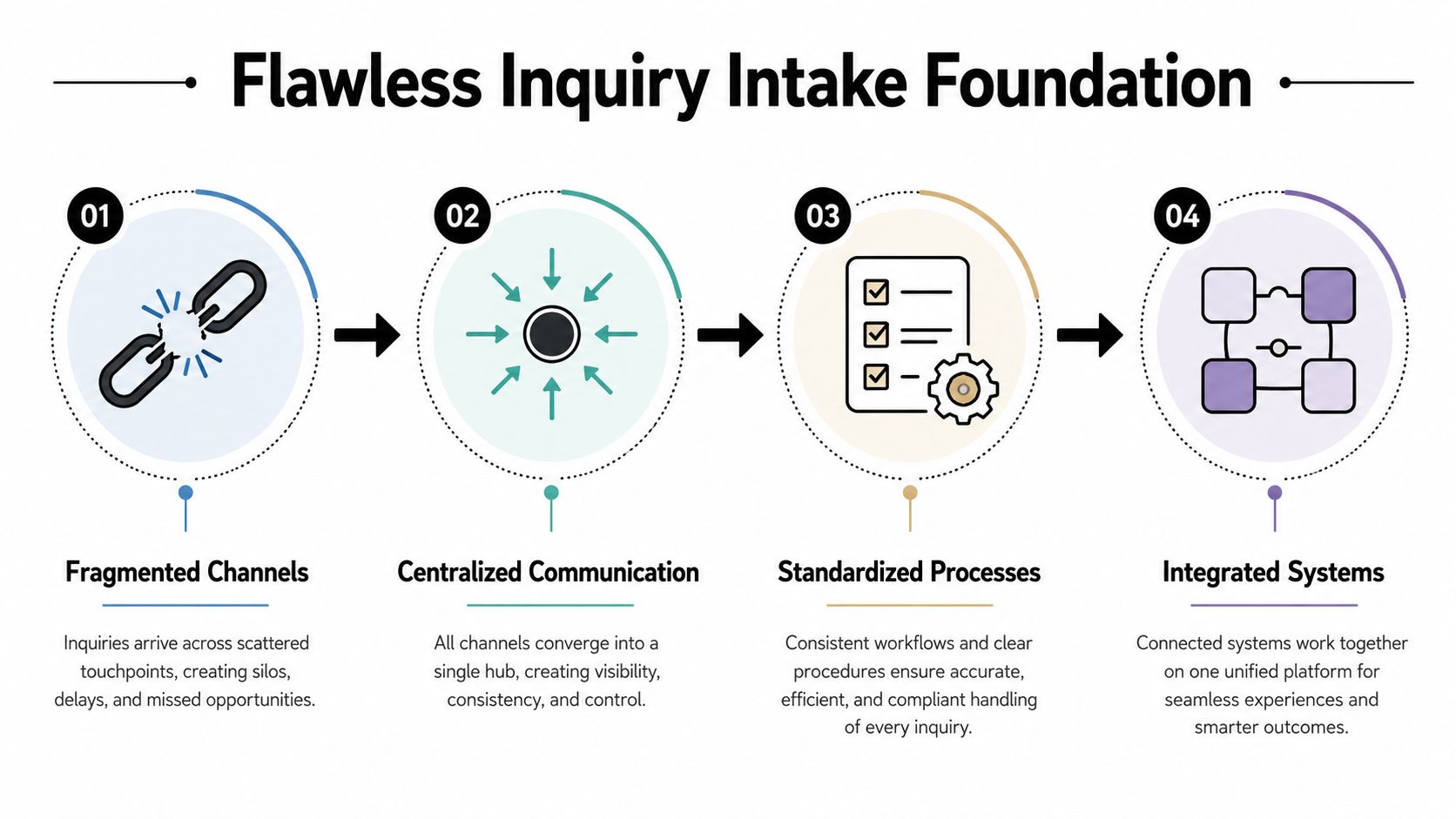
According to Clarity Voice's customer service analysis, delayed response times can lead to a 30% increase in churn risk, and businesses that fail to set realistic response times experience a 25% lower Net Promoter Score. Fragmented communication channels also force customers to repeat themselves, which is one of the fastest ways to make a simple inquiry feel like bad service.
Unify channels before you optimize replies
The fix starts with a single intake queue. Not a vague promise to "check messages more often." A real operational rule: every inquiry, from every channel, must enter one place where your team can see status, history, and ownership.
That means your website form, live chat, WhatsApp, Instagram, Facebook, and email should feed a central inbox or CRM ticket view. If a prospect asks about pricing on Instagram and follows up later by email, your team should see both conversations without hunting through separate tools.
Practical rule: If your team has to ask "Where did this message come from?" more than once a day, your intake system is broken.
For many SMBs, an AI receptionist for small business operations proves useful. The value isn't novelty. It's centralization, first-response coverage, and clean handoff into one working queue.
What a usable intake setup looks like
You don't need a huge implementation. You need a disciplined setup with a few absolute essentials.
One owner for channel routing
Someone has to be responsible for making sure every inquiry source feeds the same system. Without clear ownership, gaps stay permanent.A shared status model
Keep it simple: new, waiting on business, waiting on customer, escalated, resolved. Teams get sloppy when statuses are too detailed.Channel tags with business meaning
Tag by source and intent, not vanity. "Instagram DM" is useful. "Blue label" isn't. Good tags help you spot where buying questions, service issues, and repeat complaints are coming from.Published response expectations
Customers don't need instant resolution every time. They do need to know when they'll hear back. Set realistic time windows by channel and train your team to honor them.
| Intake problem | What happens in practice | Better approach |
|---|---|---|
| Separate inboxes | Messages get missed or duplicated | Route all channels into one queue |
| No ownership | Staff assume someone else replied | Assign channel and shift responsibility |
| No history | Customers repeat the issue | Store thread history in one CRM view |
| No response promise | Customers chase updates | Publish and follow channel-specific expectations |
A unified inbox isn't a luxury for larger companies. It's the minimum structure that keeps your team sane when inquiry volume grows. Without it, every later improvement, AI, scripts, reporting, booking, sits on top of chaos.
Deploy Smart Triage with AI and Human Agents
The next decision is simple: who should answer what.
Most small businesses waste human time on low-value repetition. Password resets, store hours, appointment questions, order tracking, service-area checks, refund policy basics, document requests. These are predictable, rules-based, and often urgent only because the customer wants a fast answer.
Salesmate's customer service statistics roundup states that approximately 65 to 70% of routine customer service inquiries can be automated using AI tools. The same source notes a critical limit: 42% of small businesses report that customers become 3x more frustrated when chatbots fail to resolve issues within two attempts.
That tells you exactly how to use AI well. Automate the routine. Escalate early when confidence drops.
What AI should handle first
Start with inquiries that have clear, bounded answers and don't require judgment.
- Status questions: Order tracking, appointment confirmation, opening hours, location details.
- Simple process help: Password resets, booking steps, required documents, intake instructions.
- Basic qualification: Budget range, service type, preferred location, timeline, availability.
- Content delivery: Brochures, pricing sheets, FAQs, product photos, service menus.
These are ideal because customers value speed more than conversation depth. You also get consistency. The bot doesn't forget business hours, mix up branch details, or skip a qualifying question because it's busy.
Where human agents should take over
Humans should step in when the inquiry carries emotion, ambiguity, exception handling, or revenue risk.
Use a person for:
- Complaints with frustration already visible
- Billing disputes or policy exceptions
- High-intent sales conversations
- Technical troubleshooting with several moving parts
- Any conversation where the customer has already repeated themselves
A hybrid model works better than an AI-only or human-only setup because each side handles the work it does best. AI gives speed and coverage. Humans provide judgment, reassurance, and flexibility.
Customers rarely get angry because automation exists. They get angry when automation traps them.
How to recover when automation fails
This is the part most businesses skip. They build a bot, write a few FAQs, and call it a strategy. Then the bot misses the mark and the customer arrives at the human handoff already annoyed.
Your recovery playbook should be explicit:
Acknowledge the failed attempt
Don't pretend the bot interaction didn't happen. Your agent should recognize it and move forward with context.Pick up the thread without forcing repetition
If the customer already shared an order number, issue summary, or appointment preference, your agent should have it.Reset confidence fast
Tell the customer what happens next and who owns the issue.Reserve human follow-up for emotional repair
A short, competent human reply often fixes more than another automated message ever will.
For teams working on this transition, a documented human handoff workflow for AI conversations helps prevent the worst failure mode, which is a handoff that feels like starting over.
A short product walkthrough helps show what this hybrid setup looks like in practice.
If you're deciding whether to automate, don't ask "Can AI answer this?" Ask, "If AI answers this wrong, what happens to trust, revenue, or workload?" That's the essential triage question.
Turn Every Inquiry into a Verified Lead
A surprising number of businesses answer inquiries quickly and still lose the opportunity. The reply goes out. The customer disappears. Sales has an email address that bounces or a phone number with a typo. Marketing keeps paying to attract leads it can't reach again.
That's avoidable. Customer inquiry handling should capture verified contact data, not just collect whatever someone types into a form.
Stop collecting dead contact data
If an inquiry might turn into a sale, callback, visit, or booked appointment, the contact details need to be usable. Otherwise your team is doing support work without building pipeline.
Many SMB workflows break because they treat contact capture as an admin step after the conversation. It should happen inside the conversation, while attention is high and intent is clear.
A stronger process looks like this:
Ask for contact details at the right moment
Not as the first screen for every visitor. Ask after the business has delivered some value, such as answering a pricing or availability question.Verify before routing to sales
OTP verification matters because it filters fake, mistyped, and throwaway entries before they hit your CRM.Capture intent with the contact record
"Interested in kitchen remodel" is better than "website lead." Your sales team needs context, not just names.
A lead without verified contact data is often just an expensive transcript.
The practical upside is immediate. Your team spends less time chasing unreachable contacts, your sales reports become more honest, and your retargeting lists improve because they reflect real people.
Build qualification into the conversation
A good inquiry flow doesn't feel like an interrogation. It feels helpful. The assistant answers the question, then asks one or two smart follow-ups that help route the person properly.
For example, a clinic can ask preferred location and appointment type. A property group can ask buying timeline and target neighborhood. A local service company can ask job type and postcode before offering booking options.
Use conversational qualification to collect:
| What to capture | Why it matters |
|---|---|
| Contact details | Gives sales or support a reliable callback path |
| Need or use case | Helps route to the right team |
| Location or branch | Prevents misrouting in multi-location businesses |
| Timing | Separates urgent demand from long-term interest |
| Preferred next step | Supports booking, callback, or email follow-up |
If you're evaluating tooling for this, an AI lead generation tool for inquiry capture should support real-time qualification, contact verification, and CRM-friendly summaries. Otherwise you still end up cleaning bad data by hand.
Treat support conversations as business development moments. Not every inquiry is a buyer, but every inquiry can leave you with cleaner intent data than you had before.
Standardize Responses and Escalation Paths
Consistency beats improvisation in customer inquiry handling.
When teams answer from memory, quality swings wildly. Your most experienced employee sounds calm and precise. A newer team member sends vague replies, forgets key steps, or escalates too late. Customers experience that inconsistency as unreliability, even when everyone is trying hard.
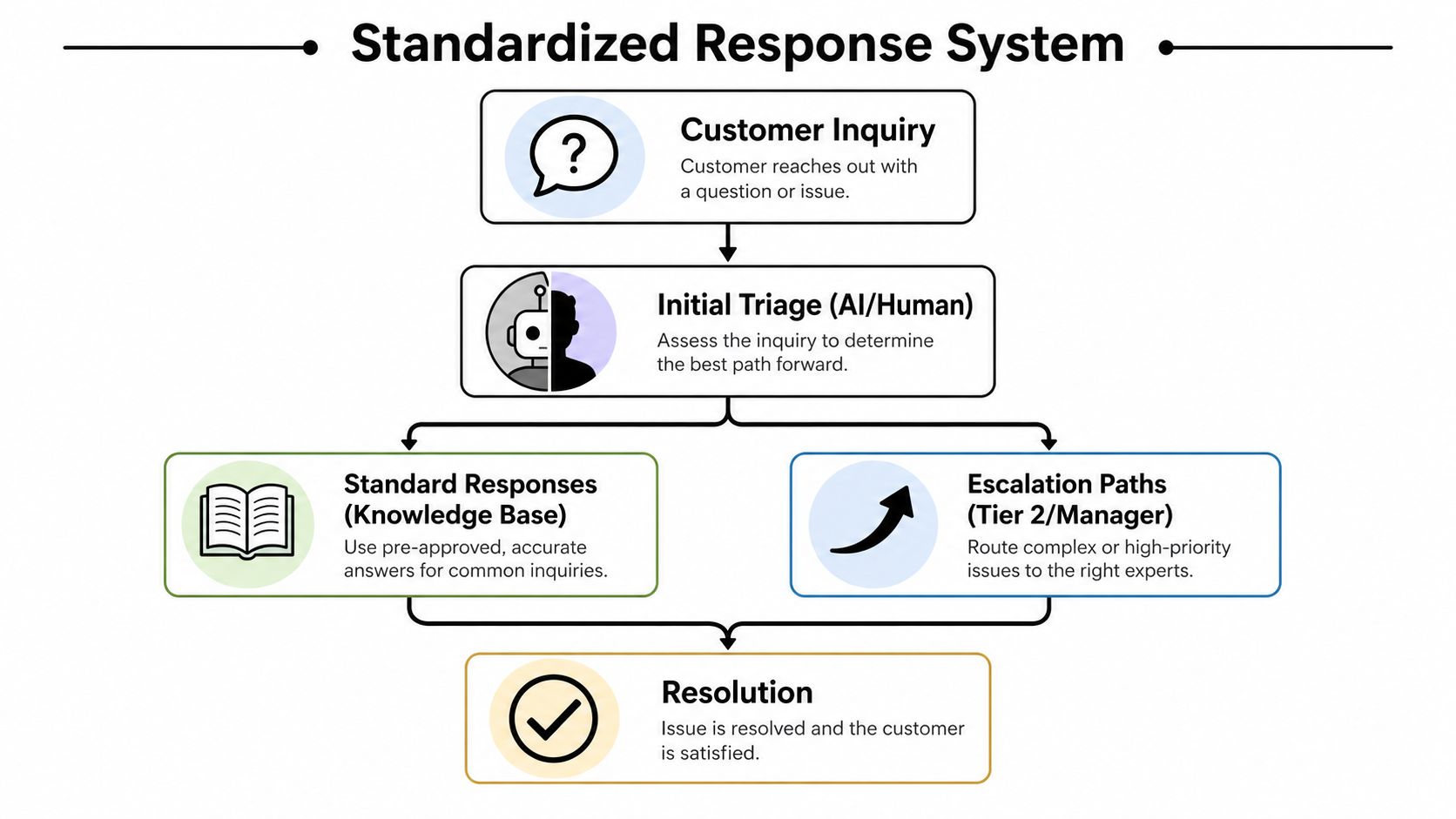
Convin's guide to customer inquiry examples outlines a standardized methodology built on active listening, acknowledging the concern, offering a clear solution or escalating, and following up. It also points to the operational support system behind that method: a unified CRM, response templates, and an internal knowledge base.
Use a simple service model your team can repeat
The four-step model works because it gives staff a stable structure without making them sound robotic.
Listen
Read or hear the whole issue before jumping to the answer. In chat and email, that means checking attachments, previous messages, and account context before replying.Acknowledge
Confirm the customer's concern in plain language. This isn't scripted sympathy for its own sake. It shows the customer you've understood the actual problem.Solve or escalate
If the answer is known, give it clearly. If the issue needs another team member, say that directly and explain the next step.Follow up
Closure matters. If the issue wasn't fully resolved in one interaction, someone must own the update.
Here are examples of where templates help and where they hurt:
| Use templates for | Avoid rigid templates for |
|---|---|
| Hours, policies, booking steps | Escalated complaints |
| Password help and FAQs | Billing disputes with nuance |
| Document requests | Customers upset after failed automation |
| Standard onboarding replies | Complex technical diagnosis |
Map escalation before your team needs it
A weak escalation path creates two bad outcomes. Either frontline staff sit on issues too long, or they escalate everything because they don't know the boundary.
Set escalation triggers in advance. Good triggers include account risk, policy exception, emotional intensity, technical complexity, or missing system access. Then define where the issue goes next and what context must travel with it.
Use this checklist:
- Trigger defined: What exactly requires escalation?
- Destination assigned: Which role receives it?
- Context transferred: What notes, screenshots, and customer history must go with it?
- Customer message prepared: What does the customer hear while the transfer happens?
- Follow-up owner named: Who checks that the issue closes?
If your escalation process depends on a staff member remembering who "usually handles this," you don't have a process yet.
Build your response library around the questions your business gets every week. Keep scripts short. Store them where staff and AI can both access the same approved answers. Review them whenever policies, pricing, operating hours, or service boundaries change.
Measure Performance with Essential KPIs and SLAs
Many SMBs measure activity instead of performance. They count messages answered, inboxes checked, and tickets closed. Those numbers can be useful, but they don't tell you whether your customer inquiry handling system is creating loyalty or preventing avoidable loss.
The metrics that matter are the ones that change decisions.
Wavetec's customer experience statistics notes that for every 10-percentage-point increase in customer satisfaction, companies can achieve 2 to 3% higher revenue growth rate. The same source reports that 89% of consumers are more likely to make another purchase after a positive customer service experience.
Track the numbers that change decisions
Focus on a small operating dashboard your team can review weekly.
First Contact Resolution
This tells you whether customers get an answer in one interaction or enter a slow loop of follow-ups. If it drops, your knowledge base, triage, or escalation rules probably need work.Average Handle Time
This matters, but only in context. Shorter isn't always better. If handle time falls while repeat contacts rise, your team is rushing.Customer Satisfaction
This is the cleanest signal that your service experience matches customer expectations. It's also the metric most directly tied to growth in the data above.Backlog by channel
A backlog reveals where your system is under-resourced or badly routed. Social DMs often become the hidden queue for SMBs.
Set SLAs your team can actually meet
An SLA is a promise, not a hope. If you publish unrealistic response times, you'll create disappointment at scale.
A practical approach is to define response windows by channel and inquiry type. Urgent service issues may need tighter coverage than general product questions. Social messages may need a different promise than email. The key is consistency.
Use this simple operating model:
| Metric or SLA | What it tells you | What to do if it slips |
|---|---|---|
| First Contact Resolution | Whether answers are complete | Improve scripts, knowledge base, and routing |
| Average Handle Time | How efficient conversations are | Check for tool friction or weak templates |
| Customer Satisfaction | Whether customers felt helped | Review tone, speed, and escalation quality |
| First response SLA | Whether your promise is realistic | Rebalance staffing or narrow the promise |
One caution from practice: don't let SLAs push your team into shallow replies. A fast acknowledgment with no ownership still feels like delay. Customers care about momentum, clarity, and follow-through.
Implement Your Framework with Modern AI Tools
A lot of SMB inquiry systems break at implementation, not strategy. The process looks solid on paper, then the team ends up juggling a website chat tool, a shared inbox, social DMs, a booking app, and a spreadsheet for follow-up. Response quality drops because context is scattered, and owners pay for that in missed leads and extra admin time.
The right tool stack should reduce handoffs, reduce copying, and give staff one place to work. For an SMB, that usually means choosing a platform that can handle intake, automation, human takeover, and lead capture in the same operating layer.
Choose tools that reduce admin, not add to it
Start with the jobs the system needs to do every day. Fancy features matter less than whether your team can run the workflow without workarounds.
A practical AI-first setup should cover:
Central knowledge management
Answers should come from one approved source, so the bot and your team are not improvising from old docs or memory.No-code deployment
Small teams rarely have developer time for every channel change, routing update, or booking flow adjustment.Verified lead capture
If a platform collects contact details, it should help confirm they are real before they enter your sales pipeline.Booking integration
Routine service questions often end in scheduling. The path from inquiry to Calendly or Cal.com should be direct.Conversation history and export
Managers need searchable records, usable transcripts, and reporting they can act on.
Hyperleap AI is one example of this category. It supports website, WhatsApp, Instagram, and Facebook messaging, answers from uploaded business knowledge, captures OTP-verified leads, and routes customers to booking tools without custom development.
That matters more than it sounds. If your staff still has to retype details, switch tabs, or ask the same qualifying questions twice, the tool is adding cost instead of removing it.
Make multi-location inquiry handling manageable
Multi-location businesses feel the cracks faster. A single-location company can sometimes get away with informal processes for longer. A group practice, hotel brand, real estate network, or med spa chain usually cannot.
The challenge is simple. Customers expect one brand experience, but each location has different hours, staff, service coverage, and booking rules. Generic automation creates errors. Fully manual handling creates inconsistency and delay.
The fix is a shared AI framework with local controls. Keep one central knowledge base for brand policies, core services, and approved language. Then add location-level details for each branch, clinic, or office.
A rollout usually works best in this order:
Centralize shared answers
Build one approved source for policies, FAQs, pricing logic, and common service questions.Add local data
Set branch-specific hours, addresses, appointment links, staff details, inventory, or service-area information.Connect the live channels
Website chat, Meta messaging channels, and scheduling tools should use the same routing rules and knowledge structure.Audit real conversations
Review transcripts for wrong-location replies, weak fallback answers, and missed lead qualification opportunities.
I usually advise SMB owners to resist overbuilding in the first phase. Get one or two high-volume inquiry paths working well first, then expand. That approach lowers risk, gives the team time to trust the system, and surfaces gaps before they spread across every channel.
Official channel integrations also matter for regulated businesses and high-message teams. So does keeping the AI and human handoff in the same conversation record. If agents have to piece together context from separate tools, response quality drops the moment a case gets more specific.
Good implementation is not about sounding advanced. It is about giving customers a fast, accurate answer, capturing real lead data, and making each conversation easier for your team to manage.