AI Lead Capture Chatbot: Convert Website Visitors Into Qualified Leads
An AI lead capture chatbot does what forms can't: qualify intent, capture contacts, and hand clean leads to your team — across four channels, 24/7.

TL;DR: An AI lead capture chatbot engages website visitors in real conversation, asks qualification questions in the right sequence, captures contact details, and hands a structured, context-rich lead to your team — all without a human rep watching the queue. Unlike a static form that dumps raw contacts into your CRM, a well-configured AI chatbot differentiates buyers from browsers before the lead ever touches your inbox. This guide covers the qualification frameworks that work in chat, the four-channel reality of where capture actually happens today, how to evaluate vendors against criteria you can use this week, and where Hyperleap fits — including transparent pricing and the OTP verification add-on for high-intent industries.
For the complete capture → qualify → notify → export lifecycle, see our chatbot lead generation guide.
What an AI Lead Capture Chatbot Actually Is
An AI lead capture chatbot is a conversational interface — deployed on your website, WhatsApp, Instagram DM, or Facebook Messenger — that identifies a visitor's intent, collects qualifying information through natural dialogue, and produces a structured lead record your sales team can act on immediately.
That definition matters because it draws a clear line between three things that often get confused:
A basic chat widget answers questions reactively. The visitor has to initiate, ask something specific, and the bot responds. There is no proactive qualification, no scoring, and no structured lead output. This is a support tool, not a lead capture tool.
A contact form collects fields. It's passive, requires the visitor to be motivated enough to fill it out, and returns raw data with no context about what the visitor actually wants. Industry benchmarks put typical contact form conversion rates at 1–3% of page visitors.
An AI lead capture chatbot does something different: it opens a two-way dialogue, adapts based on answers, decides in real time whether this visitor is worth routing to a human, and assembles a lead record complete with intent signals, qualification data, and the full conversation. The result your team receives is a summary, not a transcript. A queue of buyers, not a pile of contacts.
If you want to go deeper on how AI agents compare to standard chatbots in general, the AI chatbot for business overview covers the category well. This article is about the specific job of lead capture and qualification — and how to do it without burning sales time on contacts that were never real buyers.
Why Static Forms and Live Chat Aren't Enough
The business case for AI lead capture is straightforward once you've run the numbers on what your current setup actually costs.
Forms convert cold. A visitor who fills out a contact form is already motivated — they've decided to reach out on your schedule, using your fields, with no help. The majority of visitors who would have been good leads for you don't get that far. They land, they read, they leave. A form captures only the most determined slice of your audience. The rest are invisible.
Forms produce noise, not pipeline. Of the leads that do come through a form, a large share are misqualified — wrong company size, wrong budget, wrong use case, or not the decision-maker. Your sales team spends the first 15 minutes of every discovery call doing the qualification work the form should have done. That's not a pipeline; that's a triage exercise.
Live chat staffing doesn't scale. A human chat team is great for complex, high-stakes conversations. It is not a solution for 24/7 lead capture across time zones and business hours. Every unanswered chat at 9pm is a visitor who went to a competitor's site and found an answer. Lead response time is a documented conversion factor — the longer the gap between inquiry and response, the sharper the drop in conversion likelihood.
The gap AI fills: an AI chatbot is always on, never has a queue, asks the right questions in the right sequence, and doesn't need a manager to define what a "good lead" looks like. You define the qualification criteria once. The chatbot applies them consistently to every visitor, across every channel.
For a deeper treatment of how to structure lead generation flows, the lead generation chatbot playbook is a good companion to this article — it covers five qualification frameworks and sample conversation flows.
The Qualification Framework That Works in Chat
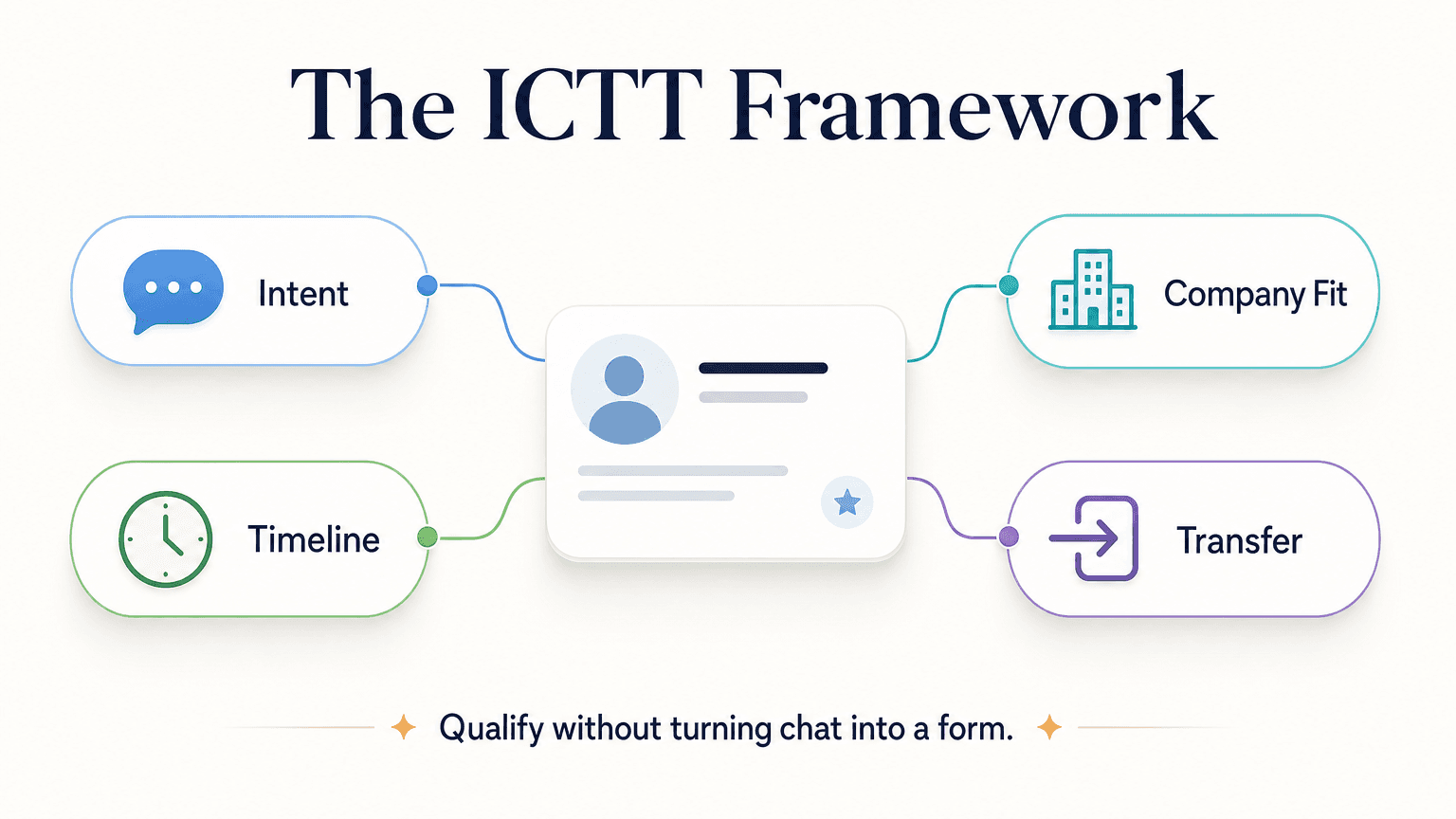
The goal of qualification in chat is to gather the minimum signals you need to decide whether this visitor is worth routing to a sales rep — and to do it in five turns or fewer before the visitor loses patience.
The framework below is adapted from standard B2B qualification methodologies for the constraints of a chat environment. We call it ICTT: Intent, Company fit, Timeline, and Transfer signal.
ICTT in Practice
Intent — What brought them here, in their words. Not a dropdown; an open question or a small button set that captures the visitor's actual problem. This is the richest signal you'll collect and the one most forms miss entirely.
"What are you trying to solve?" or "What brings you here today?" Button options: [Capture more leads] [Qualify my leads faster] [Replace a contact form] [Something else]
Company fit — Are they in your ICP? Role, company size, and industry determine whether the rep's time is worth spending. Don't ask for a LinkedIn URL. Ask the questions directly.
"What kind of business are you running?" or "Roughly how many people are on your sales team?"
Timeline — When do they need a solution? This separates buyers from researchers. A prospect with a 90-day deadline routes differently from one who is "just exploring."
"How soon are you looking to have something in place?" Button options: [This month] [Next 1–3 months] [Just researching]
Transfer signal — The moment you know enough to route. This is not a question; it's the scoring logic running in the background. When Intent + Company fit + Timeline cross your threshold, the bot offers the next step: a booking link, a tailored pricing summary, or a direct handoff message to a rep.
A Sample Qualification Sequence
Here is a five-turn flow for a B2B SaaS company using ICTT. You can adapt it to any industry by changing the intent options and company-fit question.
Bot: Hey — what brings you to the site today?
     [Capture more leads from my website] [Qualify inbound leads faster]
     [Replace a static form] [Something else]

User: Qualify inbound leads faster

Bot: Got it. Quick question — how big is your sales team?
     [Just me] [2–5 reps] [6–20 reps] [20+]

User: 2–5 reps

Bot: Makes sense at that size — every rep's time counts. What's your
     rough timeline for putting something in place?
     [This month] [Next 1–3 months] [Just exploring]

User: This month

Bot: Perfect. I can pull together a setup that fits your team size —
     what email should I send the details to?

User: alex@company.com

Bot: Done. One last thing — anything specific you'd like us to know
     before we reach out? Tools you're comparing, anything we should
     address?

User: Comparing Drift and a few others. We want to avoid long contracts.

[Lead created: intent = "qualify leads", team size = "2–5", timeline = "this month",
email captured, competitive context flagged, no long-contract objection noted]

Bot: Thanks Alex — you'll hear from us within the hour. If you want
     to book a 20-minute call now, here's a link: [booking link]
Five turns. Less than two minutes. The lead that lands in your inbox has intent, company fit, timeline, competitive context, and a named objection — everything a rep needs to open the follow-up call without a blank-slate discovery exercise.
The lead qualification glossary entry covers the broader mechanics of what makes a lead "qualified" if you want the definitional grounding.
Channels: Where Lead Capture Actually Happens
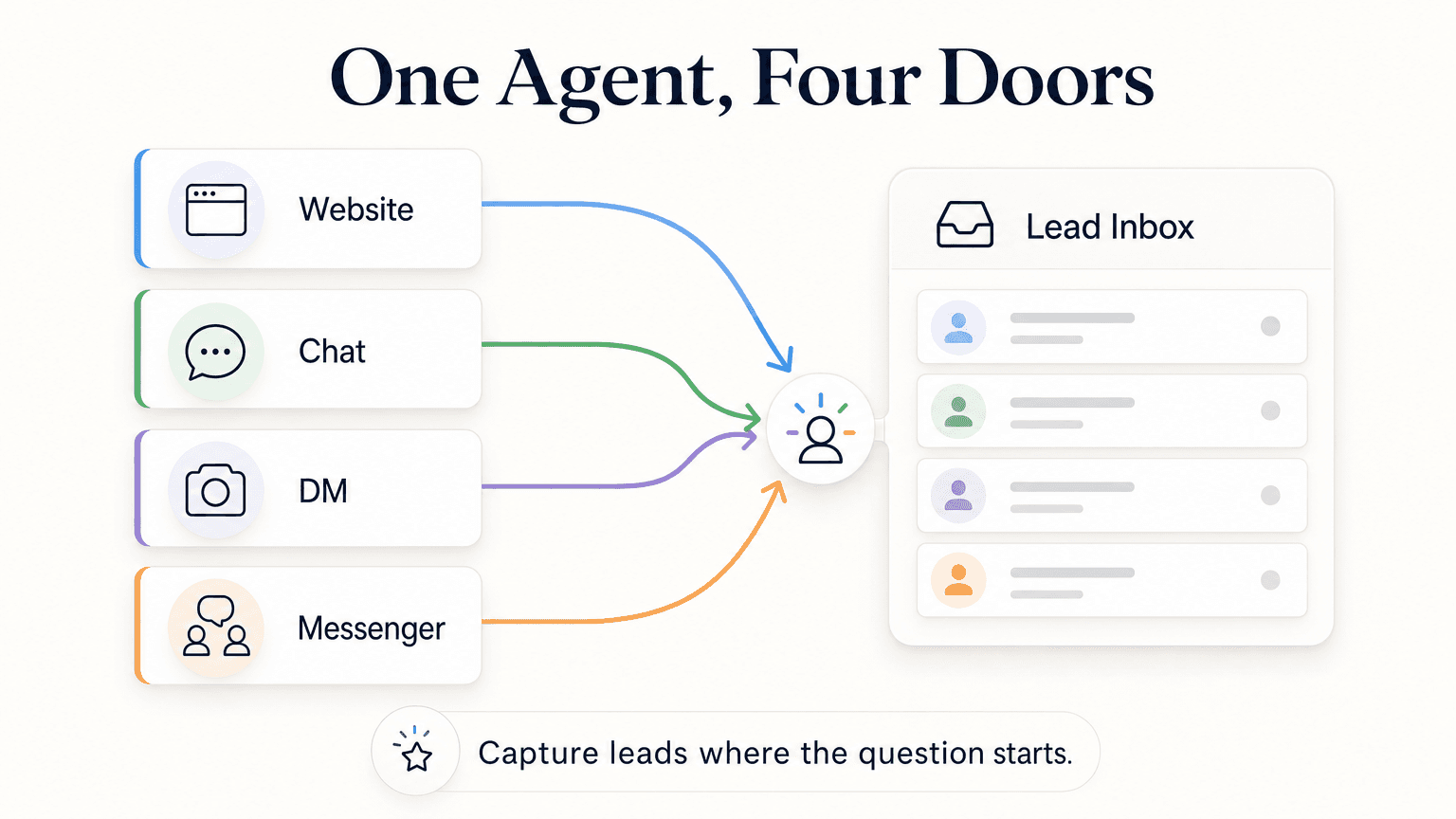
A significant share of the conversations that could be leads never happen because the business only has a website widget. Visitors who come from Instagram ads go back to Instagram after they see a form. WhatsApp users prefer WhatsApp. Facebook users prefer Facebook Messenger.
The four channels where lead capture happens today are: Website, WhatsApp, Instagram DM, and Facebook Messenger. Each has a distinct user behaviour pattern. Each matters.
Website
The website widget is the default. It captures visitors who arrive from search, direct, or paid search — people actively seeking a solution. These visitors are already in research or evaluation mode, which means they are among your highest-intent audiences. A well-configured website chatbot meets them at the moment of peak interest instead of asking them to do the work of filling a form.
WhatsApp is where follow-up conversations live. A visitor who gives their WhatsApp number to a chatbot has effectively opted into a direct message thread — open rates are dramatically higher than email, and reply rates follow. For industries where the sales cycle extends beyond a single session (real estate, financial services, professional services, education), WhatsApp is not a nice-to-have; it is the channel where deals close.
WhatsApp lead capture requires WhatsApp Business API access, not a personal WhatsApp account. The WhatsApp Business API page covers what that entails.
Instagram DM
If you run Instagram ads, you already have a lead capture surface you are likely underusing. A prospect who taps your ad, watches your story, and messages your account is one of the warmest touchpoints in your funnel — they raised their hand from inside a platform they use daily. An AI chatbot that handles that DM automatically, qualifies the visitor, and hands a lead to your team can shorten a two-day response lag to two minutes.
Facebook Messenger
Facebook Messenger serves a different demographic than Instagram but operates similarly. Businesses running Facebook ads — especially in sectors like home services, legal, financial services, and local retail — see significant inbound Messenger volume that currently goes unanswered or gets a canned "thanks for your message, we'll be in touch" auto-reply. That is a lost lead.
Why One Agent Across All Four Matters
The operational argument for a single AI agent across all four channels is simple: you define the qualification logic once, and it runs everywhere consistently. You don't maintain four separate bots, four separate lead flows, or four separate CRM connections. When a prospect starts on your website and follows up on WhatsApp three hours later, your team has both conversations in context.
For industry-specific examples of how multi-channel lead capture works in practice, the real estate AI chatbot lead qualification post shows a concrete vertical application.
From Conversation to Qualified Lead
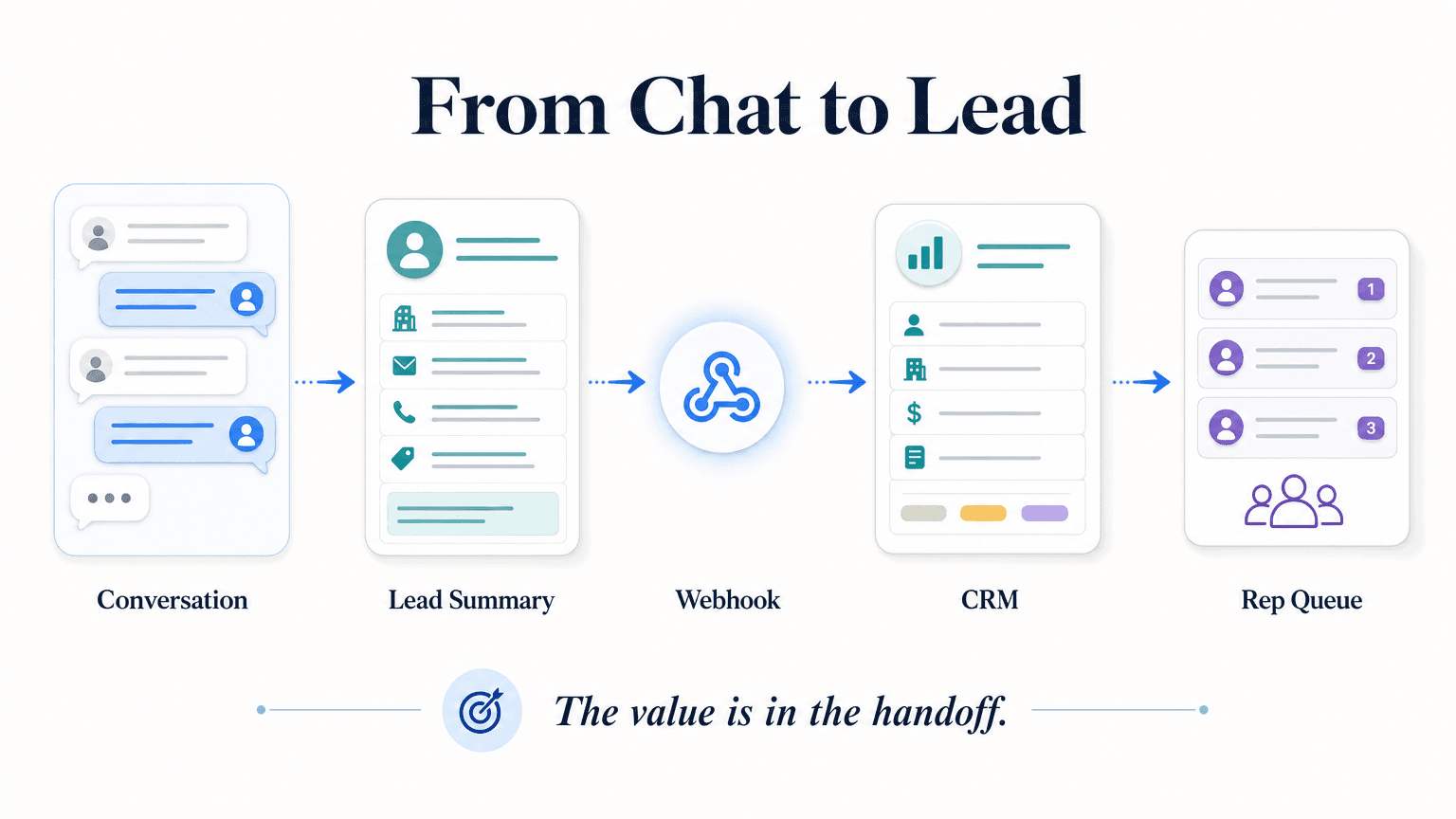
A conversation that ends without a structured output isn't lead capture — it's customer service. The handoff workflow is what separates a chatbot that feels useful from one that actually moves pipeline.
The Lead Summary
When the qualification conversation is complete, the AI should produce a structured lead summary — not a raw transcript — that a rep can read in thirty seconds. A good lead summary includes:
- Contact details: name, email, phone (if collected)
- Intent: what the visitor said they're trying to solve, in their words
- Qualification signals: company fit, role, team size, or whichever fields your framework collected
- Timeline: when they need a solution
- Score or priority flag: hot / warm / cold, based on your defined criteria
- Conversation context: any objections, competitor mentions, or specific requirements the visitor named
- Recommended next action: auto-booked meeting, send pricing PDF, add to nurture sequence
The difference between a raw transcript and a structured summary is the difference between a rep spending eight minutes preparing for a call versus thirty seconds scanning the summary and dialing.
CRM Handoff via REST API and Webhooks
Hyperleap connects to your CRM through REST API and webhooks — not native CRM plug-ins. This distinction matters when you're evaluating tools. Native integrations sound simpler, but they introduce version dependencies and limit customisation. REST API and webhook delivery gives your team full control: you define the payload shape, the destination, and the trigger event.
The webhook fires the moment a lead is created, when a new message is received, and when a conversation is started. Your CRM, your team notification system, or your internal tooling can all be endpoints. The result is sub-second lead delivery — the rep's queue updates in real time, not on a nightly batch.
For leads that require human verification before routing (high-value deals, regulated industries, enterprise accounts), the same API lets you query conversation data, pull lead records, and update lead status from your CRM back to Hyperleap so the chatbot knows not to re-qualify an existing customer.
OTP Verification for High-Intent Industries
For businesses where phone number accuracy matters — fintech, lending, real estate, legal, healthcare intake — the OTP verification add-on confirms the visitor's mobile number during the chat conversation. The visitor receives a one-time code on their phone and enters it in the chat. Unverified numbers don't make it into the lead queue.
This is a paid add-on, available on Pro and Max plans only, usage-based with recharges from $100. It is not included in any base plan. Industries where this earns its cost quickly: any vertical where a single qualified lead is worth several hundred dollars and where the risk of a fake number wasting a rep's time is real.
How to Evaluate AI Lead Capture Chatbot Vendors
If you're actively comparing tools, use this checklist. Copy it to a doc, score each vendor 0–2 per criterion, and see where they land.
| Criterion | What to verify |
|---|---|
| Channel coverage | Does it ship on Website, WhatsApp, Instagram DM, and Facebook Messenger — or just website? Single-channel tools create a second problem: managing multiple vendors. |
| Qualification logic | Can you define custom question sequences and branching based on answers? Or is it a fixed template? A fixed template won't match your ICP. |
| Lead summary quality | Does the tool produce a structured summary, or does it dump the raw transcript into your CRM? Ask to see an example lead record. |
| CRM handoff method | REST API and webhooks are the right answer. "Native integration" is worth scrutinising — ask what version, what fields, and what happens when the CRM API changes. |
| Response grounding | Does the AI answer only from your documents and configured knowledge, or does it also draw from its general training data? Document-grounded responses reduce the risk of inaccurate answers. |
| Handoff speed | How long between lead completion and delivery to your CRM or notification endpoint? Sub-second webhook delivery is the right answer. |
| Language support | Does it support the languages your prospects actually use? A global product should cover 100+ languages, not just English. |
| Add-on transparency | Is OTP verification, Multi-variant (locations, courses, etc), or any advanced feature clearly priced as an add-on — or buried in "custom pricing"? |
| Trial conditions | Is there a real trial with access to the full product? Does it require a credit card? How long? What happens when the trial ends? |
| Pricing structure | Are the plan limits clear — AI responses, chatbots, channels per chatbot, team members? Opaque usage pricing becomes a budget problem. |
| Setup time | Can you launch a working lead capture flow in under a day, or does it require a professional services engagement? |
| Support model | Is there a human to talk to when the qualification flow isn't working, or only a ticket queue? |
Score each vendor honestly. A vendor that ships on one channel but has great CRM integration is a worse trade-off for most SMBs than one that ships on four channels with API-based handoff, even if the integration is less polished.
Hyperleap Fit and Setup
Hyperleap AI is an AI chatbot platform built for SMBs that need lead capture and qualification across multiple channels without a technical team to maintain the stack. Here is how it maps to what this guide has covered.
Channels
Hyperleap ships on all four channels: Website, WhatsApp Business API, Instagram DM, and Facebook Messenger. One agent configuration — one set of qualification questions, one set of knowledge documents — deploys across all four simultaneously. When you update the qualification flow, it updates everywhere.
Qualification and Knowledge Grounding
You configure the qualification sequence in the Hyperleap Studio, set branching logic based on visitor answers, and connect your product or service documentation as the knowledge base. The chatbot answers questions from your documents, which means responses are grounded in what you've actually told it — not generated from general training data. When the chatbot doesn't have an answer, it routes to a human instead of guessing.
See the full product features page for the current capability set.
Lead Summaries and Exports
When a conversation completes, Hyperleap generates a structured lead summary and delivers it via webhook to your CRM or chosen destination. Your team sees intent, qualification data, timeline, and conversation context — not a transcript they need to parse.
OTP Verification (Paid Add-On)
If you need verified phone numbers, the OTP verification add-on is available on Pro and Max plans. It is usage-based, recharges from $100, and is not included in any base plan. For industries where a verified mobile number is the difference between a real lead and a fake one, it pays for itself quickly.
Pricing
Hyperleap offers three paid plans, all with a 7-day free trial (credit card required):
| Plan | Price | AI Responses | Chatbots | Channels |
|---|---|---|---|---|
| Plus | $40/mo | 3,000 | 1 | 4 per chatbot |
| Pro | $100/mo | 12,000 | 2 | 4 per chatbot |
| Max | $200/mo | 30,000 | 5 | 4 per chatbot |
There is no free plan. After the trial ends or a subscription is cancelled, access is restricted. Full plan details are on the pricing page.
Setup Time
Most teams launch a working lead capture flow within a day. The setup sequence: connect your channels, upload your knowledge documents, configure the qualification questions and branching logic, and activate the agent. Hyperleap offers a Managed Setup add-on ($299 Free) for teams that want the initial configuration handled for them.
Common Mistakes to Avoid
1. Asking Too Many Questions
Five turns is the practical ceiling before drop-off accelerates. If your ICTT framework needs eight questions, you have a framework problem, not a chatbot problem. Pick the three signals that matter most for your sales process and move the rest to the rep's first call.
2. Burying the Contact Capture or Making It the Opening Line
Contact details should be collected at the point where the visitor has already expressed intent and received enough value to want follow-up — typically a pre-chat form that gates the conversation (which also means your lead record always includes a name, email, and phone before a single AI response is sent). If your platform defers contact collection to mid-conversation, ask at the natural moment after the bot has addressed the visitor's core question — not as the first bot message. "Hi! What's your email?" as message one is a form wearing a chat costume; it produces the same friction and abandonment as a bad static form, without any of the qualification upside.
3. No Scoring Logic
If every lead looks the same when it lands in your CRM — same fields, no priority flag — you haven't improved on a contact form. Define what a hot lead looks like (decision-maker role, specific timeline, intent expressed in their words) and configure the bot to flag it before it reaches your team.
4. Ignoring Off-Hours Traffic
A chatbot that qualifies leads during business hours and goes silent at 6pm is solving half the problem. Set up the qualification flow to handle conversations at any hour, deliver the lead summary to your CRM immediately, and send the rep a notification so they can follow up in the morning with a prepared context brief — not a cold inbox full of raw form submissions.
5. Treating WhatsApp as Optional
If your buyer is in any market where WhatsApp is a primary communication channel, and you only capture leads through a website widget, you are invisible on the channel where your prospects actually respond. WhatsApp capture isn't a feature upgrade; it's a gap in your lead funnel.
6. Skipping the Post-Handoff Confirmation
When the bot captures a lead and fires the webhook, sending the visitor a confirmation message in the same chat window — "You'll hear from us within [timeframe]" — sets expectations and prevents the prospect from going dark before the rep follows up. No confirmation = the visitor assumes the message went nowhere.
7. Using Generic Knowledge
A chatbot that answers "What does your product do?" with a vague paraphrase of your homepage copy is not going to hold a qualification conversation. Load specific pricing context, use-case examples, and objection-handling scripts into the knowledge base. The more specific the knowledge, the more document-grounded and useful the responses.
FAQ
How long does it take to set up an AI lead capture chatbot?
For a straightforward setup — one channel, a five-question qualification flow, and webhook delivery to one CRM destination — most teams are live in under a day. Connecting multiple channels (Website + WhatsApp + Instagram DM + Facebook Messenger) and configuring branching qualification logic adds time but is typically complete within two to three days. If you want the setup handled for you, Hyperleap's Managed Setup add-on is $299 Free.
What does an AI lead capture chatbot cost?
Pricing varies significantly by vendor and feature set. Hyperleap's plans start at $40/month (Plus) for one chatbot with up to 3,000 AI responses per month, $100/month (Pro) for two chatbots and 12,000 responses, and $200/month (Max) for five chatbots and 30,000 responses. All plans include a 7-day free trial with a credit card required. Advanced features like OTP verification are available as usage-based add-ons on Pro and Max plans. See Hyperleap pricing for the full breakdown.
Which channels are included?
Hyperleap's AI lead capture chatbot ships on four channels: Website chat widget, WhatsApp Business API, Instagram DM, and Facebook Messenger. All four are available on every paid plan. SMS, voice, email, Slack, and Telegram are not current channels.
Can it integrate with my CRM?
Hyperleap connects to CRM systems via REST API and webhooks — not native plug-in integrations. Your CRM, Slack workspace, or internal tooling receives a webhook event the moment a lead is created, containing the structured lead summary and full conversation data. This gives your team full control over how data maps to your CRM fields and which events trigger which actions. If your CRM has a webhook endpoint, the connection typically takes under an hour to configure.
Does it work for my industry?
AI lead capture is industry-agnostic at the mechanism level — the channels, qualification logic, and handoff workflow apply whether you are running a SaaS company, a law firm, a real estate agency, a financial services practice, or a home services business. The qualification questions and knowledge base are specific to your business; the infrastructure is the same. For a detailed look at how lead capture and qualification works in a specific vertical, the real estate AI chatbot lead qualification post is a useful example.
What happens to first-party data captured by the chatbot?
Contact details, qualification signals, and conversation data captured during the chat belong to your business and are delivered to your configured destinations (CRM, webhook endpoint, email notification). For teams prioritising first-party data collection as a growth strategy, the AI lead capture and first-party data guide covers the broader data ownership and strategy angle.
Is OTP phone verification included in the base plan?
No. OTP verification is a paid add-on, available on Pro and Max plans only. It is usage-based, with recharges starting from $100. It is not included in any base plan at any tier. If verified phone numbers are a requirement for your business — common in fintech, lending, real estate, and healthcare intake — factor this into your budget calculation before comparing plans.
Start Capturing Leads That Are Worth Your Team's Time
An AI lead capture chatbot does one job: turn anonymous website visitors and social followers into structured, qualified leads your sales team can act on immediately. The qualification logic, the four-channel coverage, and the clean handoff are what separate a real lead capture system from a form with a chat bubble on top.
Ready to see it in action?
- Start your 7-day free trial — credit card required, all four channels included
- See the full feature set — qualification flows, lead summaries, REST API, webhooks, and more
- Review pricing — Plus at $40/mo, Pro at $100/mo, Max at $200/mo
- Book a demo — schedule a 20-minute call to walk through a qualification flow built for your use case
Further Reading
Authoritative external sources used and recommended for further research on this topic:
Related Articles

Lead Qualification Chatbot: Questions, Fields, and Handoff Rules
A lead qualification chatbot turns raw contacts into ranked, routed leads — before a rep wastes the first call. Here's the question stack, scoring, and handoff logic that works.

OTP-Verified Lead Capture for AI Chatbots
OTP-verified lead capture confirms a visitor's phone number inside the chat before the lead enters your queue — here's how it works, what it costs, and which industries need it most.

Facebook Messenger Chatbot for Local Businesses
A Facebook Messenger chatbot helps local businesses answer FAQs, capture leads, share booking links, and route inquiries 24/7 — without a human watching the queue.

Chatbot Lead Summaries: What Your Team Should Receive After Every Conversation
A raw transcript creates work. A chatbot lead summary — contact details, intent, qualification signals, timeline, and a next action — means your rep is ready to call in 30 seconds.