AI Receptionist for Small Business: Boost Revenue 2026
Discover how an AI receptionist for small business captures leads, books appointments 24/7, & grows revenue in 2026. Explore benefits, features, & setup!
You close the shop, silence the office phone, and finally sit down for dinner. Then a potential customer calls with a simple question. Can you fit them in tomorrow? Do you serve their area? Can they book right now?
If nobody answers, that caller usually doesn't wait. They call the next business.
That's the reason small businesses are looking at an AI receptionist for small business use today. Not because it's trendy. Not because it sounds futuristic. Because missed calls turn into missed appointments, missed leads, and missed revenue. For a local service business, law office, clinic, salon, or property team, the front desk is often the cash register in disguise.
The strongest operators now treat reception less like an admin task and more like a revenue system. If your business depends on inbound inquiries, your first question shouldn't be “Does this tool have enough features?” It should be “Will it catch opportunities my team currently misses?”
Table of Contents
- Your New Hardest-Working Employee Arrives
- What an AI Receptionist Is and What It Is Not
- Core Benefits Beyond Simple Cost Savings
- The Must-Have AI Receptionist Features Checklist
- Calculating the ROI for Your Business
- Implementation and Getting Started in Minutes
- Common Questions and Your Next Steps
Your New Hardest-Working Employee Arrives
A plumbing company gets an urgent call after closing. A dental office gets a late-night voicemail from a new patient. A real estate team misses a buyer inquiry while everyone is on showings. None of those moments feel dramatic in real time. But when nobody answers, the prospect often moves on.
That's why many owners now think of an AI receptionist as a digital employee who never sleeps. It doesn't replace your best people. It covers the moments your team can't, including evenings, weekends, lunch rushes, and those chaotic stretches when everyone is already helping someone else.
This isn't an edge-case tool anymore. The global AI receptionist services market was valued at $16 billion in 2022 and is projected to reach $55 billion by 2028, while roughly 68% of small businesses are already using some form of AI in their operations, according to CallCow's market overview of AI reception for small business. That tells you two things. Demand for always-on service is real, and small businesses are no longer waiting for big companies to prove the model.
A front desk that only works when your team is free isn't really a front desk. It's a gap in your revenue system.
For owners trying to streamline agent workflows, this matters beyond phone coverage. The same logic applies whether leads arrive by call, website chat, or social inbox. Fast response wins attention. Slow response hands it away.
The practical takeaway is simple. If your business depends on inbound conversations, an AI receptionist for small business use isn't just about convenience anymore. It's becoming part of normal operating discipline.
What an AI Receptionist Is and What It Is Not
Think of it like a trained front desk hire
The easiest way to understand a modern AI receptionist is to stop thinking of it as a bot and start thinking of it as a new front desk hire with perfect memory.
It can learn your hours, service areas, appointment rules, FAQs, escalation paths, and intake questions. It can communicate across customer touchpoints without getting tired or forgetting your script. And unlike a human receptionist, it can handle many conversations at once.
That's very different from the old FAQ widgets most owners remember. Those older tools relied on rigid keywords and dead-end flows. A customer asked a question in an unexpected way, and the system fell apart. The result was frustration, not service.
A modern AI receptionist works better when it's grounded in your actual business information. That means it responds from your website content, uploaded documents, booking rules, and approved answers rather than guessing. For a small business owner, that distinction is everything. Good automation saves your team time. Bad automation creates cleanup work.

Where the line is
An AI receptionist is strong at routine front-desk work. It's not a substitute for judgment-heavy conversations.
Use it for things like:
- Answering repeated questions: hours, locations, service availability, basic pricing guidance, and next steps.
- Booking and routing: moving qualified people into Calendly, Google Calendar, or your scheduling process.
- Lead capture: collecting names, contact details, and inquiry context before your team follows up.
- Triage: sending urgent or unusual situations to the right human quickly.
Don't expect it to handle everything.
- Emotional nuance: a worried legal client, an upset patient, or a sensitive billing dispute still needs a person.
- Complex exceptions: unusual refunds, policy disputes, or custom quoting often require human judgment.
- Relationship building: your best team members still own trust, empathy, and high-stakes conversations.
Practical rule: Let the AI handle the predictable first 80 percent of front-desk traffic. Keep humans available for the moments that need reassurance, negotiation, or discretion.
Owners get into trouble when they ask the tool to be their entire customer experience. It isn't. The best setup uses AI to clear routine volume fast, then preserves clean handoffs for anything important.
Core Benefits Beyond Simple Cost Savings
The missed-call problem is really a revenue problem
Most articles about an AI receptionist for small business focus on labor savings. That's only half the picture, and often not the part that matters most.
For service businesses, the bigger upside is often revenue capture. Zoom's coverage of AI reception for small business makes this point directly: the biggest value may not be labor savings, but revenue recovered from calls that would otherwise go to voicemail. It also argues that the primary buying question isn't “what can it do?” but “how many leads or bookings will it recover?” You can read that framing in Zoom's discussion of AI reception for retail and small business.
That lens changes how you evaluate the tool. If your office misses inquiries during lunch, after hours, or during peak periods, your problem isn't just operational inefficiency. You're leaking demand.

What changes when every inquiry gets an answer
When an AI receptionist is set up well, several business outcomes improve at once.
- After-hours lead capture: The call that used to hit voicemail now gets answered, qualified, and pushed toward a booking or callback.
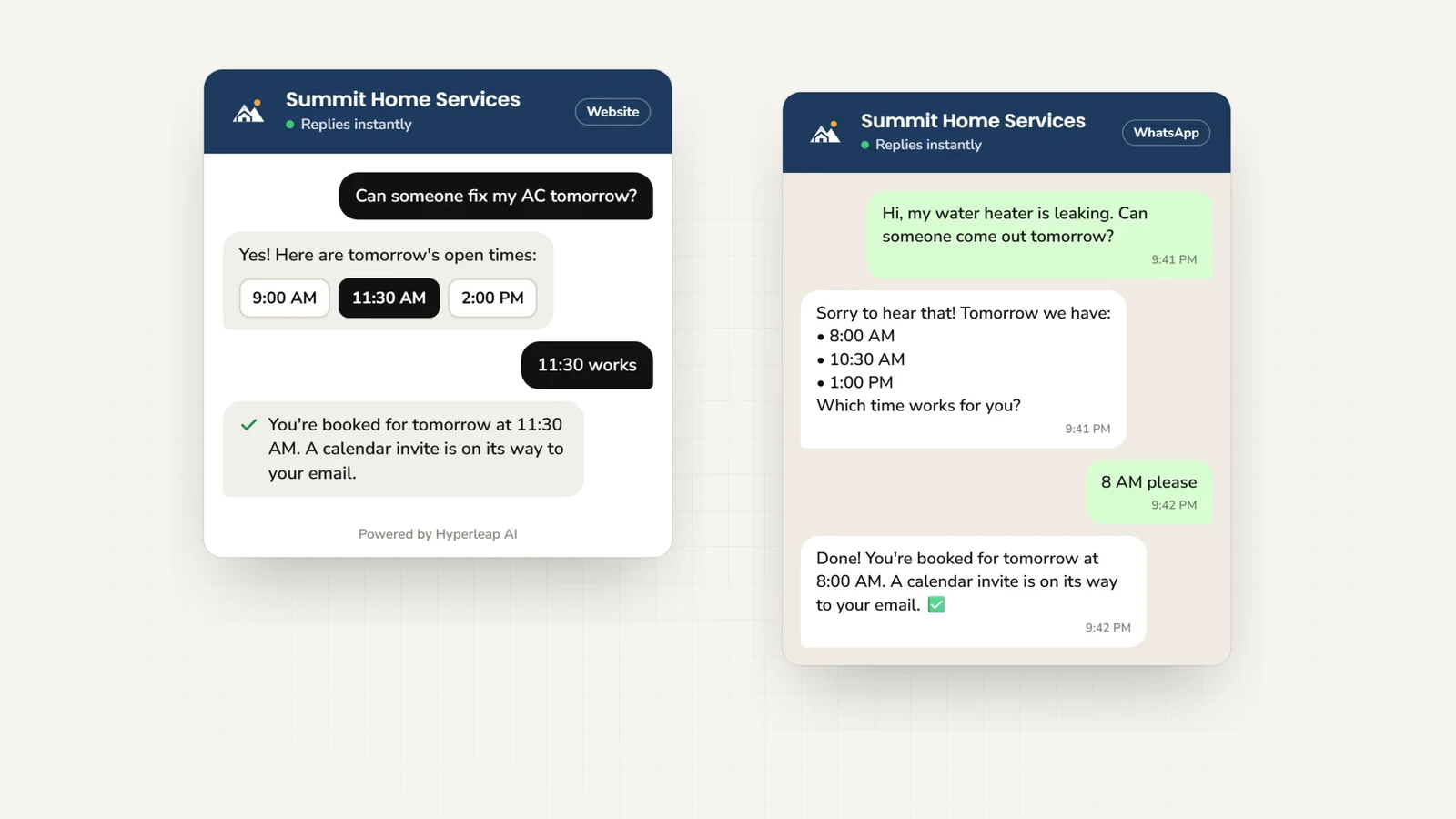
- Faster appointment conversion: If the system can move someone directly into your calendar, there's less drop-off between interest and action.
- Less front-desk interruption: Staff can stop bouncing between serving in-person customers and chasing repetitive phone questions.
- More consistent intake: Every caller gets the same screening questions, same routing logic, and same record of what they asked.
- Broader accessibility: Multilingual support helps you serve customers who might otherwise abandon the conversation.
The practical effect isn't abstract. It's fewer loose ends.
A salon doesn't lose a booking because the team is busy with walk-ins. A contractor doesn't miss a weekend inquiry. A clinic doesn't ask staff to spend the morning returning basic scheduling calls that could have been handled automatically overnight.
If you're comparing whether automation or staffing is the better move, this AI chatbot vs hiring receptionist cost comparison is a useful complement to the revenue-capture lens. It helps frame the decision beyond “software is cheaper” and closer to “which setup captures more demand with less friction?”
Owners often buy reception tools to save money. The stronger reason is that unanswered demand is expensive.
What doesn't work is treating the system like a feature showroom. Booking, routing, multilingual support, CRM updates, and intake forms matter only if they reduce delay between a customer's question and your business's next action.
The Must-Have AI Receptionist Features Checklist
What good performance actually looks like
A provider can promise conversational AI, smart workflows, and business automation all day long. The better question is whether it handles routine demand quickly and cleanly.
One industry benchmark says a high-performing AI receptionist should answer in under 5 seconds, resolve 90–95% of inquiries without human escalation, and integrate with calendars and CRMs, according to GetNextPhone's guide to AI receptionist performance. That's a strong buyer filter. If a system can't pick up fast, contain routine traffic, and sync with your tools, it won't feel helpful to customers or staff.
AI Receptionist Feature Checklist
| Feature | Why It Matters for Your Business |
|---|---|
| Knowledge-grounded answers | Prevents the assistant from giving off-brand or incorrect responses. This is the difference between useful automation and a cleanup headache. |
| Fast pickup and first response | Speed shapes first impressions. If callers wait too long, you lose the benefit of automation. |
| Calendar integration | A receptionist that can't complete a booking leaves money on the table. It should connect to the scheduling tools you already use. |
| CRM integration | Captured leads should flow into your system automatically so nobody has to retype notes from a transcript or email. |
| Clear escalation rules | You need to define when the AI transfers to a person, takes a message, or flags urgency. |
| Multi-channel support | Customers don't all start with a phone call. Website chat, WhatsApp, Instagram, and Facebook often carry the same pre-sales questions. |
| Lead verification | OTP-verified capture helps reduce fake contacts and keeps your follow-up list cleaner. |
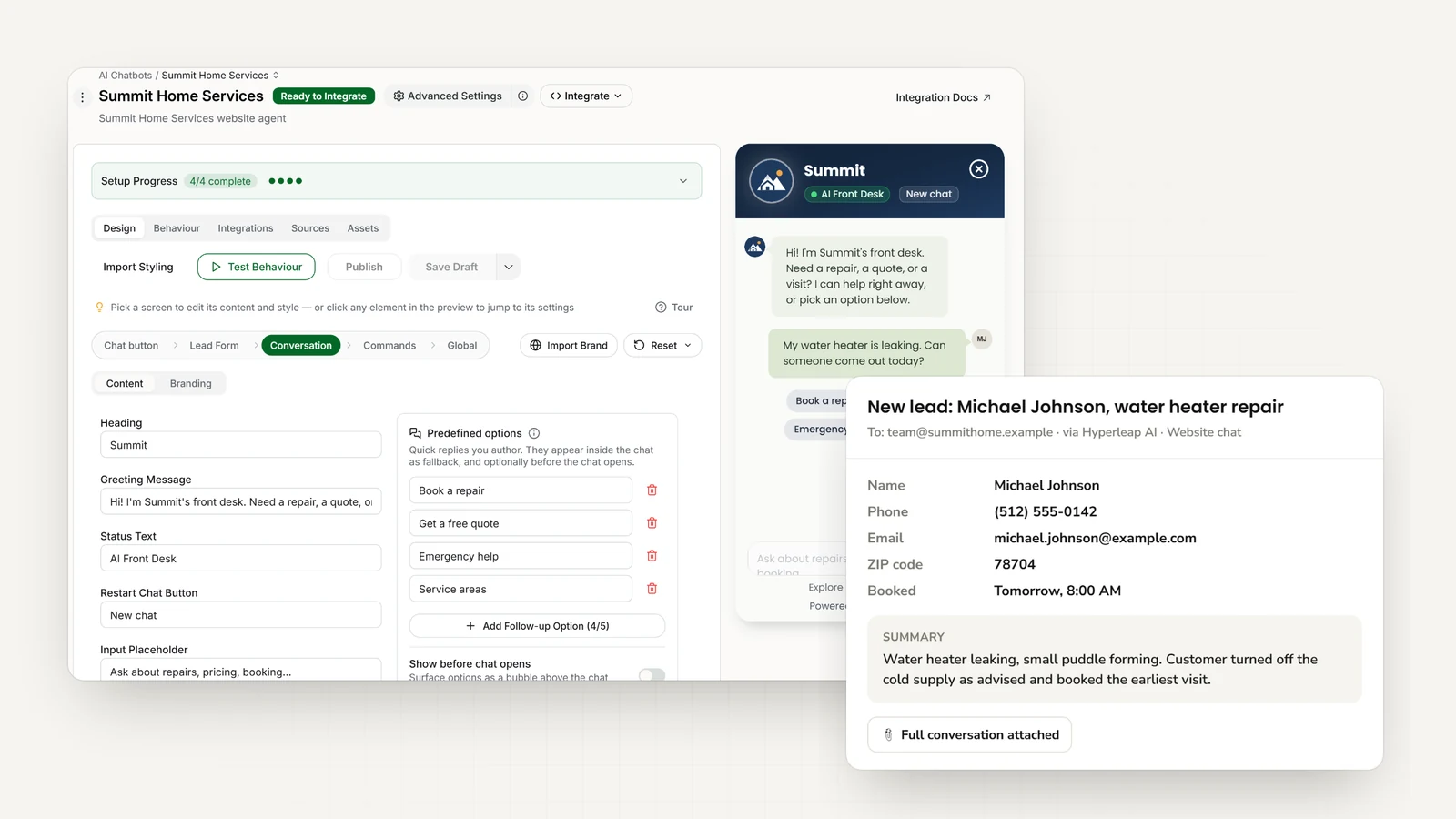
| Conversation history and summaries | Your team should see what was asked, what was answered, and what still needs action. |
| Multi-location controls | If you run several branches, you need one central knowledge base with location-specific details layered in. |
| Easy no-code editing | If changing a holiday schedule or service policy requires a developer, the system will go stale fast. |
A few practical buying notes matter more than flashy demos.
- Test exceptions: Ask about refunds, service-area edge cases, and same-day scheduling. Routine questions are easy. Edge cases reveal quality.
- Check booking behavior: Some tools only push people to a scheduling link. Others can guide them into a live booking flow.
- Review handoff quality: When the AI escalates, your team should receive context, not just a transferred conversation with no background.
- Look for channel consistency: The tone and business rules should stay aligned whether the inquiry starts by phone or chat.
For text-based customer conversations, one option in this category is Hyperleap AI, which lets small businesses paste a website URL or upload documents, then deploy grounded responses across website chat and social channels while connecting lead capture and scheduling flows. That kind of no-code setup is useful when you want consistent intake logic without rebuilding your process from scratch.
Calculating the ROI for Your Business
Start with direct cost replacement
If you want to evaluate an AI receptionist like an operator, start with the simplest math first. What does the tool cost compared with basic front-desk coverage?
One industry guide estimates a full-time human receptionist at $35,000 to $45,000 annually in salary alone, while an AI alternative often costs $600 to $2,400 annually, which creates a 15–20x cost advantage before benefits or turnover are added, according to GetAira's AI receptionist cost comparison.
That doesn't mean every small business should replace a person. Many shouldn't. But it gives you a hard baseline.

Then add revenue recovery and staff time
The better ROI model has three buckets.
Direct reception cost avoided
If you're covering only overflow, after-hours, or routine calls, estimate what portion of paid staff time currently goes to those tasks.Revenue recovered from missed opportunities
Look at the calls and inquiries that currently hit voicemail, wait for callbacks, or disappear when staff are busy. Ask what even a small increase in booked jobs, consults, or appointments would mean.Time returned to your team
The less your staff interrupts billable or customer-facing work to answer repetitive questions, the more productive your existing team becomes.
Don't build your business case on “AI is cheaper.” Build it on “this system captures demand and frees my team for higher-value work.”
A back-of-the-napkin model can be simple:
- List your monthly AI cost
- Estimate the staff hours it replaces or protects
- Estimate the value of appointments or leads recovered
- Subtract the monthly subscription from those combined benefits
You don't need a perfect spreadsheet to make a good decision. You need a useful one. If you want a structured version, use an AI receptionist ROI calculator to plug in your own assumptions around labor, lead value, and missed opportunities.
Track a short list of operational metrics after launch:
- Appointments booked
- Qualified leads captured
- Calls resolved without staff involvement
- Messages requiring callback
- Staff time reclaimed from routine interruptions
What usually fails here is overcomplicating the analysis. Owners try to assign a precise value to every interaction before they start. You don't need that. Start with a month of baseline data, launch the system, then compare what changed.
Implementation and Getting Started in Minutes

Choose feed and connect
Most owners delay implementation because they picture a long software project. In practice, the cleanest setups are usually simple.
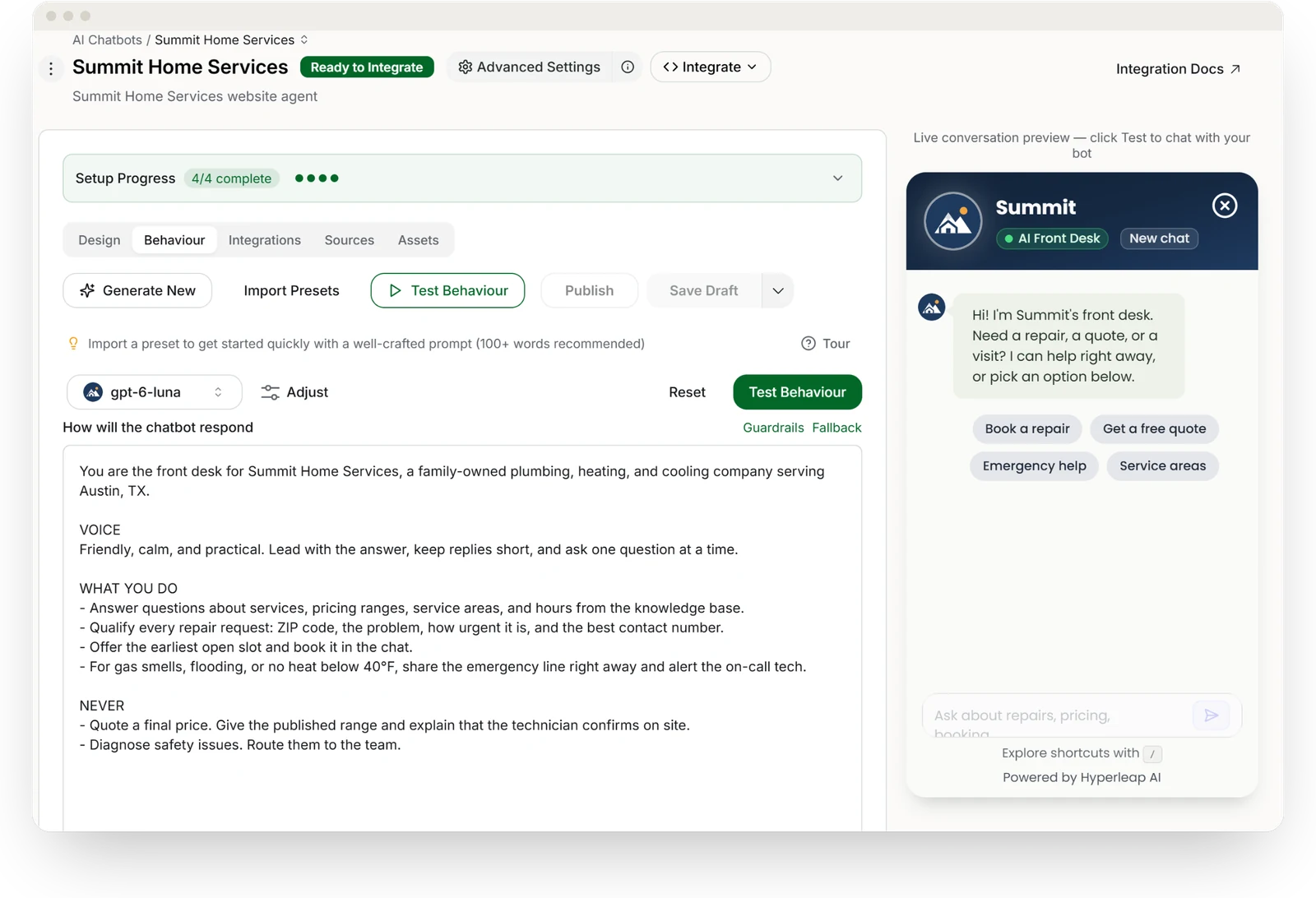
You choose the tool. You feed it your business information. You connect the few systems it needs to act usefully, usually scheduling and lead capture.
That's why no-code platforms have changed adoption. Instead of writing scripts from scratch, you can often start with your website, service pages, FAQs, intake documents, and booking rules. If you want a practical prep list before launch, use this AI chatbot implementation checklist for SMBs.
A straightforward rollout usually looks like this:
- Choose one primary job first: after-hours calls, appointment booking, lead qualification, or routine Q&A.
- Feed the right source material: website copy, service menus, policies, office hours, and escalation instructions.
- Connect action tools: Calendly, Cal.com, your CRM, email notifications, or social messaging channels.
Launch small then tighten the handoffs
The first live version doesn't need to do everything. It needs to do one thing reliably.
Start with the highest-volume, lowest-risk conversations. That usually means business hours, availability, booking requests, directions, and lead intake. Then test it like a skeptical customer. Ask confusing questions. Try edge cases. See how it behaves when it doesn't know the answer.
A good implementation habit is to review transcripts and summaries during the first few days. You'll quickly find wording gaps, policy ambiguities, and handoff rules that need tightening.
This short walkthrough gives a feel for what a lightweight deployment looks like in practice:
A few details matter more than owners expect:
- Security and compliance: choose providers whose data handling matches your business requirements.
- Escalation design: define who gets urgent requests and what details they receive.
- Multi-location logic: if you have several offices, keep shared information centralized and local specifics separated.
- Ongoing ownership: assign one person to update holiday hours, promotions, and policy changes.
What works is an afternoon setup followed by small weekly improvements. What doesn't work is waiting for a perfect, all-knowing system before going live.
Common Questions and Your Next Steps
Three concerns owners usually raise
The first question is usually whether it will sound robotic. That depends less on the label “AI” and more on setup quality. If the system is grounded in your actual business information and has clean escalation rules, customers usually experience it as fast and helpful, not strange.
The second concern is data safety. That's the right concern to have. You should check how the provider handles stored conversations, access controls, and any compliance requirements relevant to your business. Don't assume all tools are equal here.
The third concern is whether it's hard to manage. It shouldn't be. If updating hours, changing a service description, or adjusting a routing rule is painful, your team won't maintain it and the experience will decay.
Pick the tool your staff will actually keep current. Usability is part of accuracy.
A simple next-steps checklist
If you're serious about adding an AI receptionist for small business use, keep the first move small and concrete.
- Pick one use case: after-hours answering, lead capture, or appointment booking.
- List your repeat questions: write down what your team answers every day.
- Define your handoff points: decide what should always go to a human.
- Connect one booking workflow: make sure the assistant can move a real prospect to the next step.
- Review early conversations: tighten answers, routing, and exceptions after launch.
The businesses that get value fastest usually don't overengineer the rollout. They solve one front-desk bottleneck, prove the result, and expand from there.
If you want a low-friction way to test this approach, Hyperleap AI lets small businesses start with a website URL or uploaded documents, then deploy grounded customer conversations across web and social channels without a developer. That makes it practical to validate lead capture, Q&A, and booking workflows before committing to a larger operational change.