Facebook Messenger Customer Service: The 2026 SMB Guide
Transform your Facebook Messenger customer service with this step-by-step guide. Learn to set up, automate, capture leads, and boost sales for your SMB.

Facebook Messenger is the top channel for social customer service, with 45% of users choosing it over other platforms according to Sprout Social's Facebook statistics for marketers. That changes the way SMBs should think about Messenger. It isn't a side inbox anymore. It's a frontline support desk, a lead capture point, and in many cases the fastest path from question to booked sale.
There's also a common search-intent problem worth clearing up early. Some people searching for Facebook Messenger customer service want help using Messenger as a business support channel. Others want help with the Messenger app itself. Those are different problems. This guide is for businesses that need to serve customers through Messenger, automate the repetitive work, and keep handoffs clean when a human needs to step in.
Most SMBs don't need a developer to get this right. They need a structured system, a grounded knowledge base, verified lead capture, and a no-code workflow that doesn't fall apart once message volume picks up.
Table of Contents
- Why Messenger Is Your Most Important Support Channel
- Foundational Setup for Professional Service
- Building Automated Chatbot Flows That Work
- From Support Queries to Qualified Leads and Sales
- Conversation Scripts and Human Escalation Paths
- Measuring Performance and Ensuring Compliance
- Conclusion Your Proactive Service Partner
Why Messenger Is Your Most Important Support Channel
As noted earlier, Sprout Social reports heavy business and customer activity on Messenger. For an SMB, the takeaway is simple. Customers already use it as a place to ask questions, request help, chase updates, and decide whether to buy.
That changes how the channel should be managed. Messenger is not a side inbox someone checks between calls. It is a live service queue tied directly to revenue, customer satisfaction, and staff workload.
I see the same pattern in small businesses over and over. A page starts with a manageable trickle of messages. Then inquiries stack up across product questions, appointment requests, delivery issues, refunds, and repeat follow-ups. Without triage, ownership, and automation, response times slip and good leads go cold while the team spends time answering the same basic questions.
There is also a search intent problem around “Facebook Messenger customer service.” Some people want support for the Messenger app itself. Business owners usually want to provide customer service on Messenger. Those are different problems. SMBs need operating rules, automated first responses, lead capture, routing, and a clean path to a human when the issue calls for judgment. Zendesk's discussion of Messenger customer service use cases points to that business use case clearly.
For SMBs, the opportunity with Messenger extends beyond faster replies. Messenger can qualify leads, collect OTP-verified contact details, answer policy questions from an approved knowledge base, and push the right conversations to staff with context attached. Those used to be developer-heavy projects. Now they can be built with no-code tools if the system is designed correctly.
That is why Messenger matters so much. It sits close to customer intent and close to operational friction.
If the page itself needs cleanup before you build on top of Messenger, start with this guide for performance marketers on Facebook Pages. If you want a practical example of how a no-code system can handle support and capture leads in the same channel, review this Facebook Messenger chatbot resource.
Foundational Setup for Professional Service
A professional Messenger setup starts before the first bot flow. Most failures happen because the business connects the page, turns on messaging, and assumes the rest will sort itself out. It won't. You need clear ownership, predictable defaults, and a clean starting structure.
Connect the right business assets
First, make sure the Facebook Business Page is owned and administered through the correct business account. If the page setup itself is shaky, support operations stay shaky too. Teams that need a clean page structure can use this guide for performance marketers on Facebook Pages to tighten the basics before layering Messenger workflows on top.
Then connect Messenger to the system where replies will be handled. For a very small team, that may begin in Meta's native tools. For any business with recurring inquiries, multiple staff members, or multiple locations, use a shared inbox platform so one conversation doesn't get split across personal logins and browser tabs.
Set the static service layer first
Before automation gets advanced, configure the parts every customer sees:
- Greeting message: A short welcome that tells people they're in the right place.
- Away response: A fallback when live staff are unavailable.
- Response expectations: Say when a person will reply if the issue needs human help.
- Business identity cues: Use the business name, service hours, and the right department wording.
This sounds simple, but it fixes a common trust problem. Customers don't mind talking to automation if the handoff path is clear. They do mind if they can't tell whether anyone is monitoring the inbox.
A useful starter format looks like this:
| Setting | What to include | Why it matters |
|---|---|---|
| Greeting | business name, help scope, next step | Reduces confusion immediately |
| Away message | service hours, urgent alternatives | Sets expectations early |
| FAQ prompt | top topics customers can tap | Speeds up self-service |
| Role ownership | who monitors, who escalates | Prevents dropped conversations |
Lock down team roles and response standards
Messenger gets messy fast when everyone can do everything. Assign access intentionally. One person may own page settings. Another may manage automation. Agents should respond to conversations without changing core flows or permissions unless that's part of their job.
Use a short internal standard for tone and handling:
- Acknowledge fast: Even if the final answer takes longer.
- Keep replies short: Messenger is not email.
- Move to verification when needed: Especially before discussing account details.
- Escalate based on rules: Don't let agents improvise escalation standards.
Fast responses only help when the answer is accurate and the ownership is clear.
The foundational setup isn't glamorous. It's what keeps later automation from creating confusion at scale.
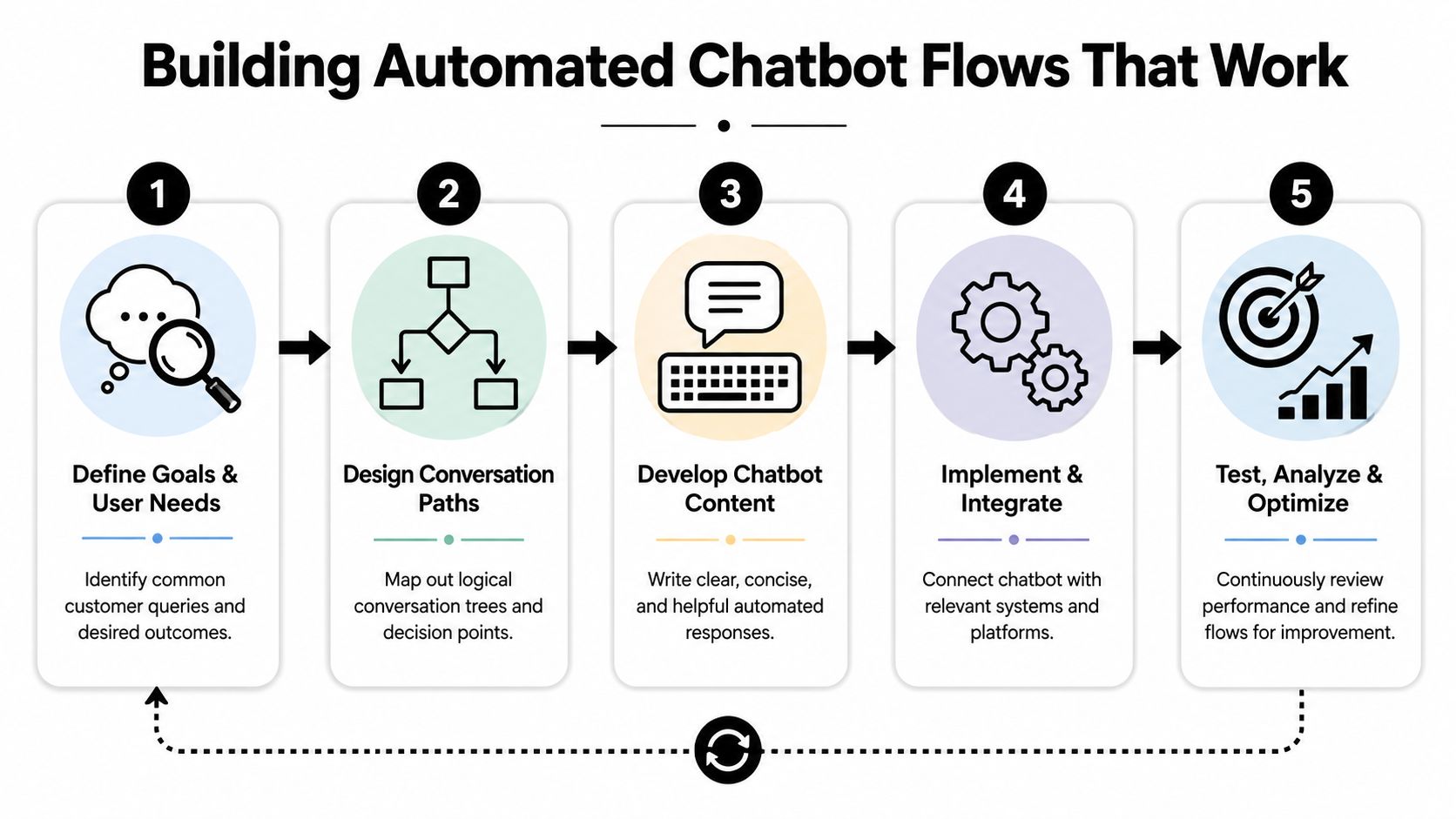
Building Automated Chatbot Flows That Work
Good Messenger automation handles the repetitive work, pulls in the right context, and exits cleanly when a person needs to take over.
Start with recurring intents, not fancy flows
Start from your inbox history, not from a flowchart template.
For SMBs, the first wins usually come from a small set of repeat questions: order status, pricing, opening hours, booking requests, returns, delivery areas, and service availability. If those journeys are clear, the team gets time back and customers stop waiting for answers they should have received instantly.
A practical build process looks like this:
- Review recent Messenger conversations and tag repeated intents.
- Select the questions that follow a repeatable pattern and do not require judgment.
- Write one approved path per intent with a clear answer and one next step.
- Add an exception route for account-specific, high-risk, or unusual cases.
- Test on mobile because that is where Messenger interactions usually happen.
The trade-off is simple. Broad coverage sounds attractive, but it creates fragile flows that are hard to maintain. Narrow, high-volume flows produce better ROI because they remove the same workload dozens of times per week.
Teams that also want to tighten message quality across support and marketing can use this guide on how to choose an AI content tool to standardize copy decisions.
Use rules for routing and macros for response quality
The strongest no-code Messenger setups use two layers. Rules decide where the conversation goes. Macros return the approved response with the right fields filled in.
That structure matters because speed alone does not fix support. A fast reply with the wrong branch, stale wording, or missing context still creates rework. In practice, rules-based routing paired with variable-driven macros cuts first-response time for routine questions and keeps quality more consistent than a static script.
Here is the working model:
- Rules detect intent signals such as order tracking, booking, refund requests, or store hours.
- Macros return the approved answer using variables like first name, branch, appointment type, or reference number.
- Escalation triggers stop the automated path when the issue shows risk, ambiguity, or frustration.
A support flow should behave like a trained front desk. It should identify the request, answer what is safe to answer, collect what is needed, and pass the rest to a person with enough context to continue.
Example macro logic:
| Intent detected | Bot action | Variable examples |
|---|---|---|
| Order status | ask for lookup detail, confirm request | first name, last order number |
| Appointment request | qualify service and preferred time | service type, location |
| Complaint | acknowledge and escalate | first name, ticket summary |
| Product question | answer from knowledge source | product name, availability note |
This is how SMBs get close to developer-level output without custom code. The no-code tool handles the routing logic, variable insertion, and handoff conditions. Your team still needs to define the decision rules well.
Ground the bot in approved business knowledge
Messenger bots fail when they answer from messy source material. If the knowledge base is outdated, the automation scales bad information faster than any agent could.
Use a controlled source of truth:
- Upload or connect approved documents
- Use website pages only when they are current
- Separate location-level details from company-wide policies
- Review answers after any change to pricing, hours, services, or inventory rules
Hyperleap AI fits this operating model for SMBs that want no-code deployment, grounded answers, verified lead capture, and unified routing across channels without a custom build.
One clarification matters here. Business owners searching for "facebook messenger customer service" are usually trying to improve customer service on Messenger, not get technical support for the Messenger app itself. Your automation should reflect that business goal. Resolve common support queries, capture intent, and route edge cases with context. That is a service workflow problem, not an app troubleshooting problem.
Later, test the live conversation experience, not just the logic diagram.
The best flow feels routine in the right way. Customers get a clear answer fast, and your team only steps in when human judgment adds value.
From Support Queries to Qualified Leads and Sales
A Messenger inbox shouldn't just absorb questions. It should sort buyers from browsers, verify real contact details, and move ready prospects toward the next commercial step.
Many SMBs miss revenue because they treat every conversation as support-only. A customer asking about pricing, insurance coverage, stock availability, or appointment slots often isn't just asking a question. They're signaling intent. If the system answers the question but fails to capture verified contact information or offer the next step at the right moment, that intent disappears.
Why verification matters before handoff
Social messaging attracts low-intent and fake submissions. That's why OTP-verified capture matters. In the verified data for this brief, implementing OTP verification can eliminate 30% of fake leads from social channels. For SMBs that rely on quick follow-up, that's not a minor cleanup feature. It changes the quality of the pipeline sales and front-desk staff receive.
The practical sequence is straightforward:
- The bot answers the initial query.
- It detects purchase or booking intent.
- It requests contact details through a verified step.
- It creates a structured lead record and summary.
- It hands that verified lead to staff or to an automated scheduler.
Without verification, teams waste time on dead contacts, duplicate entries, and incomplete inquiry threads.
Don't send an unverified Messenger lead into your sales process if the next step requires staff time.
A unified inbox is the second half of this system. The same verified-data set states that a unified inbox increases agent efficiency by 45%. That makes sense operationally. Agents work faster when they can see the full conversation history, the source channel, prior follow-ups, and attached context without switching systems.
Turn intent into bookings without friction
Messenger becomes a revenue channel when the system knows the moment to stop explaining and start converting. The same verified data shows that routing qualified prospects to a scheduler at the right moment can boost booking rates by 35%.
That “right moment” usually appears after one of these signals:
- Service-fit confirmation: The prospect has confirmed they need the service you offer.
- Location match: They've selected the right branch or service area.
- Budget or eligibility fit: They've accepted the relevant price range or qualification condition.
- Time-based urgency: They want a slot, callback, viewing, or consultation soon.
At that point, don't force another back-and-forth. Offer the next action directly inside the chat. That can be a scheduler, brochure, service video, intake form, or branch-specific information packet.
A simple operating model for SMBs looks like this:
| Conversation type | Best next step | Bad next step |
|---|---|---|
| “Do you offer this service?” | answer, then qualify | dumping a calendar link immediately |
| “How much does it cost?” | answer range or policy, then verify interest | asking for full form completion too early |
| “Can I book today?” | send scheduler after fit check | telling them to call later |
| “I need details for my location” | send branch-specific info | giving generic company-wide copy |
The revenue lesson is simple. Support and sales are not separate conversations in Messenger. They're often the same conversation at different stages. If your automation can detect intent, verify the lead, and present the next step without friction, Messenger stops being a reactive burden and starts producing measurable commercial value.
Conversation Scripts and Human Escalation Paths
Automation should never trap the customer. The bot's job is to handle the repeatable part of the conversation and then hand over with context when judgment, empathy, or exception handling is needed.
Convince & Convert's summary of Meta data notes that 66% of adult users are more inclined to buy from or work with a brand that they can reach via Messenger. Reachability helps, but responsiveness and handoff quality decide whether that trust holds up.
Scripts that keep conversations moving
A few script patterns work well across industries.
Welcome and triage
Hi [First Name], thanks for messaging [Business Name]. I can help with bookings, pricing, location details, order updates, or getting a team member involved. What do you need help with today?
Lead qualification
I can help with that. Before I suggest the right next step, which service are you asking about, and which location is most convenient for you?
Complaint acknowledgment
I'm sorry you've had this issue. I'm collecting the details now so a team member can review the case without asking you to repeat everything.
Appointment confirmation
You're all set. I've recorded your request and the team will follow up with the details, or you can choose a time directly using the booking option below.
These scripts work because they do one thing at a time. They don't overwhelm the user with a wall of options. They move the conversation forward.
What a clean handoff actually looks like
A handoff should trigger when the conversation becomes risky, ambiguous, sensitive, or emotionally charged. A common mistake is escalating too late. By then, the customer has already repeated themselves and lost patience.
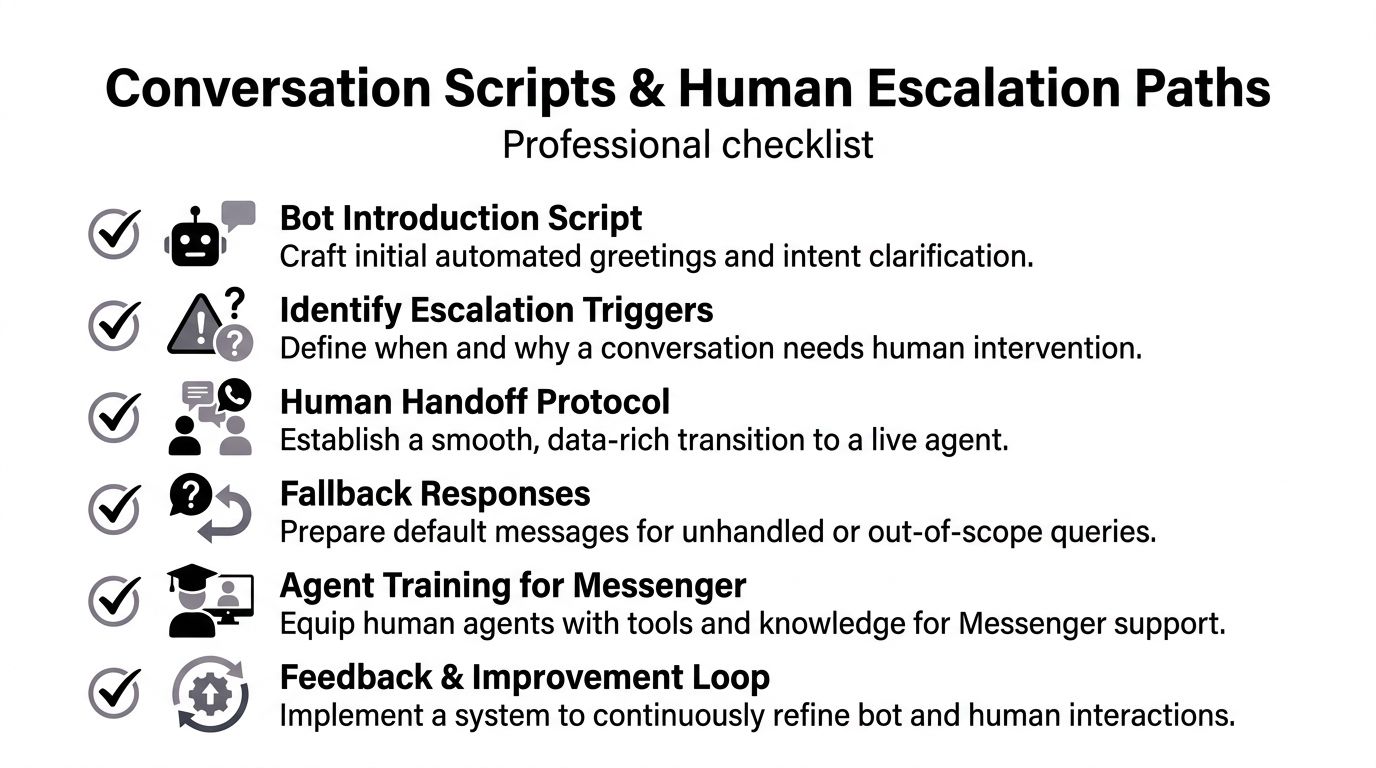
Use clear triggers such as:
- Account-specific disputes: refunds, billing disagreements, identity-sensitive updates
- Negative sentiment: angry language, repeated failed attempts, complaint language
- Unresolved fallback loops: the bot can't match intent after a small number of tries
- High-value buying signals: the lead is qualified and ready for a person
The receiving agent needs context, not just an alert. Before handoff, package the essentials:
| Handoff field | Why the agent needs it |
|---|---|
| Customer summary | Quick orientation |
| Intent detected | So they know why the chat started |
| Key facts collected | Avoids repetition |
| Verification status | Confirms whether the lead is usable |
| Suggested next step | Speeds agent action |
A bad handoff feels like starting over. A good handoff feels like the same conversation continuing.
Teams refining this process should review practical examples of human handoff in AI chat workflows. The key is consistency. Every escalation should follow the same operational pattern so customers don't get one polished experience on Monday and a broken one on Tuesday.
Measuring Performance and Ensuring Compliance
If you can't see what Messenger is doing for service quality and pipeline quality, you'll either overestimate the bot or blame it for problems caused by bad setup.
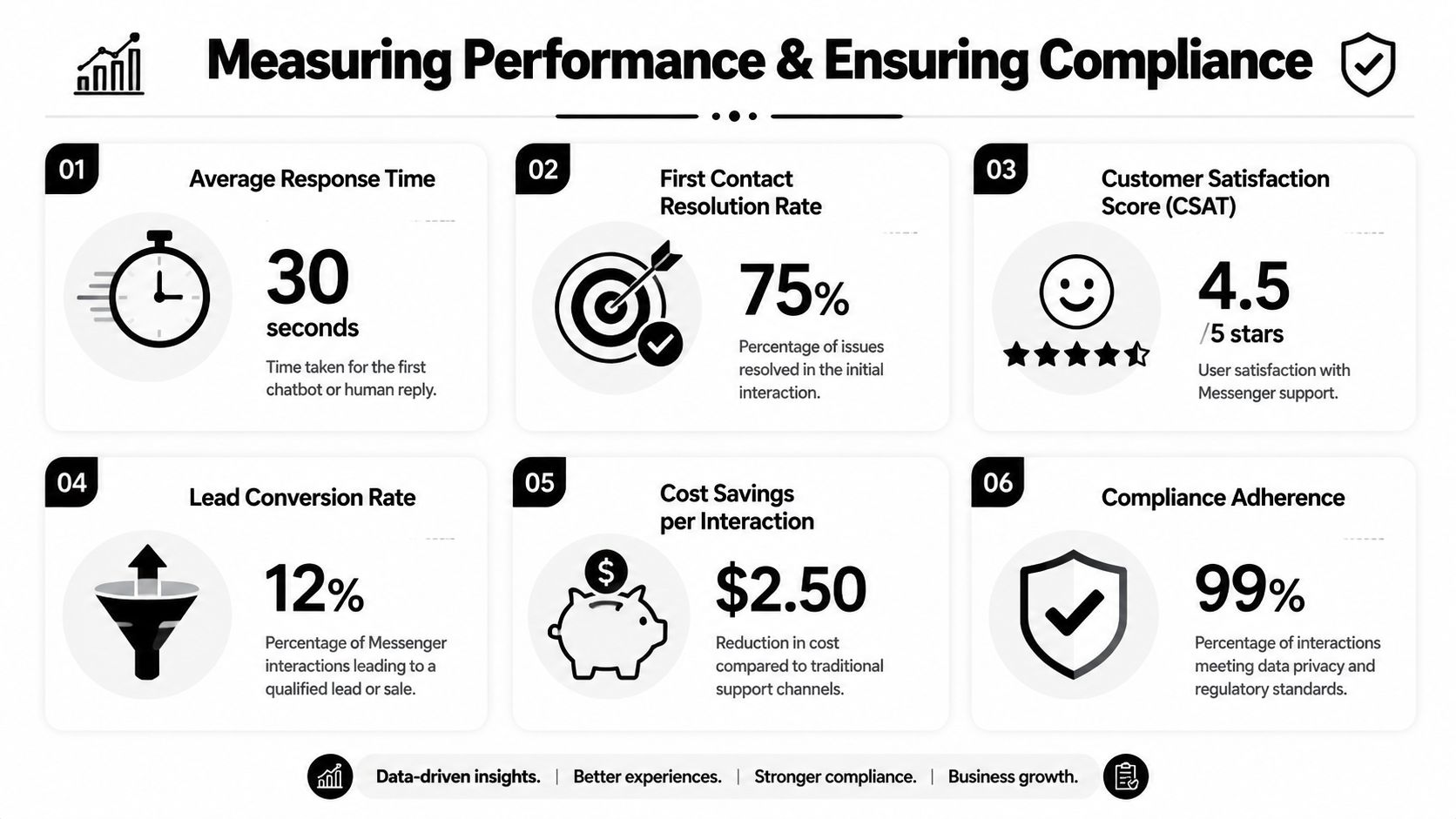
The infographic above is illustrative. Use your own actual reporting numbers. What matters is choosing metrics that connect support activity to operational outcomes.
Track operational metrics and business outcomes
For Messenger, I'd separate measurement into two layers.
Operational metrics
- First response time: How quickly the bot or agent replies.
- Routine resolution rate: How many common requests close without escalation.
- Escalation volume: Which topics still require human support.
- Inbox handling quality: Whether conversations are tagged, summarized, and closed cleanly.
Business metrics
- Verified leads created: Not just raw lead count.
- Booked appointments from Messenger: The clearest downstream conversion point for many SMBs.
- Sales-qualified conversations: The subset of chats that showed real buying intent.
- Location or service demand patterns: Useful for staffing and offer planning.
This internal reporting guide to KPIs for customer service is a helpful framework for building dashboards that show service impact, not vanity activity.
A short review rhythm works better than a giant monthly postmortem. Check transcripts weekly. Look at failure points. Find where the bot gave a technically correct answer that still didn't move the conversation forward.
Compliance is part of service quality
Messenger automation often touches personal data. That means compliance isn't a legal afterthought. It's part of the service design.
The verified implementation guidance in this brief notes that platforms adhering to Meta Technology Provider compliance standards achieve 99.9% uptime and GDPR-grade security, and that standard matters most in categories where chats may include sensitive personal details. Healthcare, real estate, finance-adjacent services, and local service businesses handling customer records should take this seriously.
Focus on a few basics:
- Use compliant APIs and approved integrations
- Limit data collection to what the workflow needs
- Verify leads before sending summaries internally
- Keep one source of truth for knowledge and updates
- Apply location-specific overlays carefully so staff aren't working from outdated information
Compliance and performance reinforce each other. When data handling is clean, routing is reliable, and the knowledge base is current, customers get faster answers and the business takes on less operational risk.
Conclusion Your Proactive Service Partner
Facebook Messenger customer service works when it's treated as a system, not a side task. The businesses getting value from Messenger aren't just replying faster. They've built a channel that can answer common questions instantly, verify real leads, route serious buyers to the right next step, and bring a human in without forcing the customer to start over.
That's what makes Messenger useful for SMBs. It can serve support, sales, and operations at the same time, but only if the setup is disciplined. Static greetings matter. Rules and macros matter. Knowledge grounding matters. Verified lead capture matters even more once staff time is involved.
The good news is that developer-level results don't require a developer-only workflow anymore. With the right no-code stack and the right process, SMBs can run Messenger like a serious customer channel instead of a reactive burden.
If you want to put this into practice, Hyperleap AI is built for SMBs that need no-code Messenger automation, knowledge-grounded answers, OTP-verified lead capture, appointment routing, and a unified inbox across customer messaging channels.