Private AI Chatbot: The SMB Guide to Secure Automation
Discover what a private AI chatbot is and how it can securely capture leads and automate tasks for your SMB. A complete guide for non-technical owners.

A lot of small business owners are stuck in the same loop. A lead comes in at 9:40 p.m. Nobody answers until morning. A customer asks the same pricing or availability question your team handled six times already that day. Someone fills out a generic contact form with bad details, and your staff wastes time chasing a fake inquiry.
That pressure adds up because your website, inbox, Instagram DMs, and WhatsApp messages don't close at 5 p.m. Customers expect a fast answer. You need something that can respond immediately, stay accurate, and avoid turning private customer conversations into training data for somebody else's model.
That's where a private AI chatbot fits. For an SMB, it isn't some exotic enterprise system. It's closer to a trained front-desk employee who knows your business, sticks to approved information, captures real leads, and hands off the right people to booking or sales without exposing more data than necessary.
Table of Contents
- The Hidden Cost of Being 'Always On'
- What Makes an AI Chatbot Truly Private
- Public vs Private Chatbots Understanding the Tradeoffs
- Top Business Risks of Using a Public Chatbot
- How SMBs Use Private Chatbots to Grow
- Your Implementation and Vendor Evaluation Checklist
- Example Prompts and Templates to Get Started
The Hidden Cost of Being 'Always On'
A local clinic gets website inquiries after dinner. A real estate office gets weekend questions about availability, pricing, and next steps. An ecommerce brand wakes up to overnight messages asking about shipping, returns, and product fit. The pattern is the same. Buyers ask when they're ready, not when your team is online.
Most SMBs try to solve this with a patchwork of forms, autoresponders, and shared inboxes. It works just enough to stay in place, but not enough to feel reliable. Forms don't answer follow-up questions. Human staff can't sit on live chat all day. Generic bots often sound robotic or drift off-script.
The hidden cost isn't only missed messages. It's the steady leak of qualified opportunities, slower response times, and staff energy spent repeating the same answers instead of doing higher-value work.
Practical rule: if your team answers the same questions every week, that work should be documented once and delivered automatically.
A well-built private AI chatbot changes the shape of the problem. Instead of acting like a search box bolted onto your site, it can greet visitors, answer from your approved content, collect lead details, and route people to the next step such as a quote request or appointment.
For SMB owners, that matters because the goal isn't “using AI.” The goal is better service with less risk. You want the speed of automation without handing your customer conversations, pricing context, internal policies, or uploaded documents to a public system that you don't control.
When it works, the bot becomes part receptionist, part sales assistant, part support rep. It doesn't replace your team. It handles the first layer cleanly, so your people can spend time where judgment is most valuable.
What Makes an AI Chatbot Truly Private
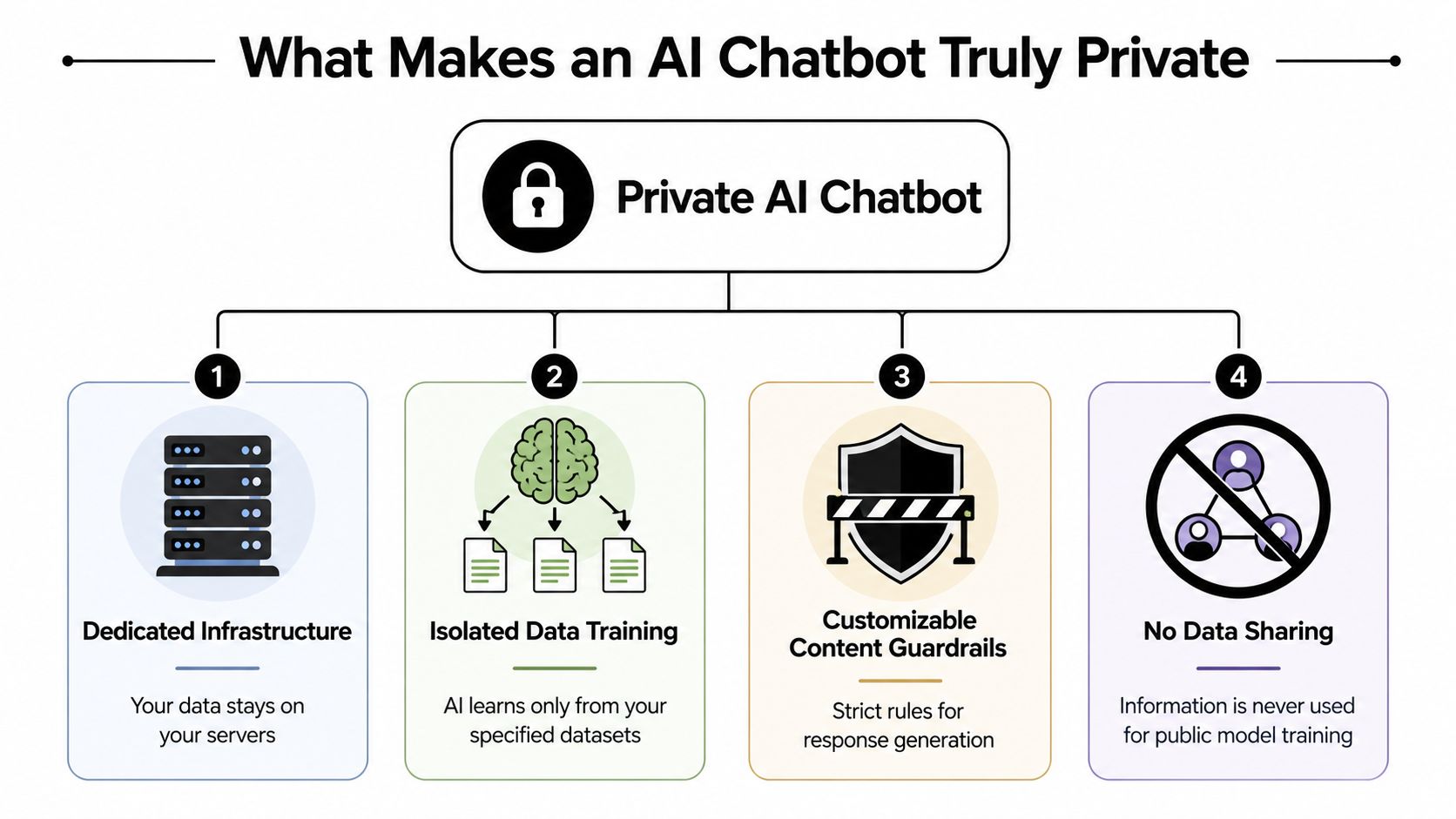
The phrase private AI chatbot gets used loosely. Some vendors mean encrypted storage. Others mean they won't train on your chats. Others mean the model runs locally on your own device or server. Those are not the same thing.
Private means controlled, not magical
The easiest way to think about it is this. A public chatbot is like hiring a smart generalist who has read a huge amount of public material and may answer from broad pattern recognition. A private chatbot is like giving an assistant a company handbook, price sheet, FAQ binder, policy folder, and appointment rules, then telling them to answer from those materials.
That distinction matters because “private” is really about control:
- Your approved knowledge stays separate from the general model.
- Your response rules define what the bot can and can't say.
- Your retention settings determine how long chats are stored.
- Your training boundaries decide whether conversations can be reused.
How RAG keeps answers grounded
The most practical architecture for this is retrieval-augmented generation, often shortened to RAG. OpenAI's developer guidance describes a private-data chatbot as a setup that uses both a conversational model and an embeddings engine for semantic search, so the assistant can answer from a separate index of private documents rather than improvising from general knowledge alone, which is why this approach is commonly used to reduce hallucination risk on private content (OpenAI community guidance on chatbot creation with private data).
If that sounds technical, the business version is simple. Your chatbot doesn't need to memorize your business. It needs a way to look up the right information quickly from your website pages, uploaded PDFs, brochures, service descriptions, policy docs, and internal FAQs.
Picture an open-book exam. The model is the language engine that can explain things naturally. The retrieval layer is the approved book it's allowed to consult. Without that book, the assistant may sound fluent while being wrong. With it, the assistant has somewhere specific to look.
A private chatbot should answer like a careful staff member with a binder, not like a confident stranger guessing from memory.
What doesn't work well for SMBs is dropping a public bot onto the site and hoping it “figures out” your services, hours, coverage area, exclusions, or booking rules. That usually creates two problems. The bot sounds generic, and it answers beyond what you approved.
A good private AI chatbot stays on-script because its job isn't to be universally knowledgeable. Its job is to represent your business accurately.
Public vs Private Chatbots Understanding the Tradeoffs
Free public chat tools are convenient. That's why so many teams start there. You can open a browser tab, ask a question, paste some copy, and get a useful response in seconds.
For internal brainstorming, that may be fine. For handling customer conversations, quoting services, discussing policies, or answering from business documents, the tradeoff changes fast.
The real tradeoff is convenience versus control
The biggest issue isn't that public models are “bad.” It's that they're built for broad utility, while your business needs bounded behavior.
Stanford HAI reported that six leading frontier developers use user chat data by default for model training, and some retain it indefinitely, which means the main failure mode is often retention and training reuse rather than the model architecture itself (Stanford HAI on chatbot data retention and training reuse).
For an SMB owner, that has practical implications:
- Customer privacy: If staff paste customer details, complaint histories, or intake notes into a public tool, you may be exposing more than you intended.
- Business accuracy: Public bots can answer broadly. That's useful until they confidently invent a return policy, quote process, or service limitation you never approved.
- Brand consistency: A generic model doesn't know your tone, escalation rules, or what should trigger a handoff to a human.
- Operational responsibility: If the bot gives the wrong answer to a prospect, your business owns the fallout, not the model vendor.
A practical comparison
| Criteria | Public chatbot | Private chatbot |
|---|---|---|
| Setup speed | Fast to start | Takes some setup |
| Data boundaries | Often unclear to everyday users | Deliberately defined by vendor settings or local deployment |
| Answer source | Broad model knowledge | Your documents, site content, and approved rules |
| Brand voice | Generic unless heavily managed | Easier to align to your tone and policies |
| Lead handling | Usually manual or improvised | Can be designed around your funnel |
| Risk profile | Higher for customer-facing use | Better suited to controlled business use |
A lot of owners ask whether they need local deployment. Sometimes yes, especially for sensitive or regulated data. Sometimes no. A secure cloud setup with explicit no-training controls, short retention, and clean access boundaries can be enough for a typical SMB use case.
The mistake is treating every “AI chatbot” as interchangeable. They aren't. If you're choosing a vendor, this guide on how to choose an AI chatbot platform is a useful framework because it pushes the conversation beyond demo quality and into deployment reality.
A public chatbot is good at being available. A private chatbot is good at being accountable.
Top Business Risks of Using a Public Chatbot
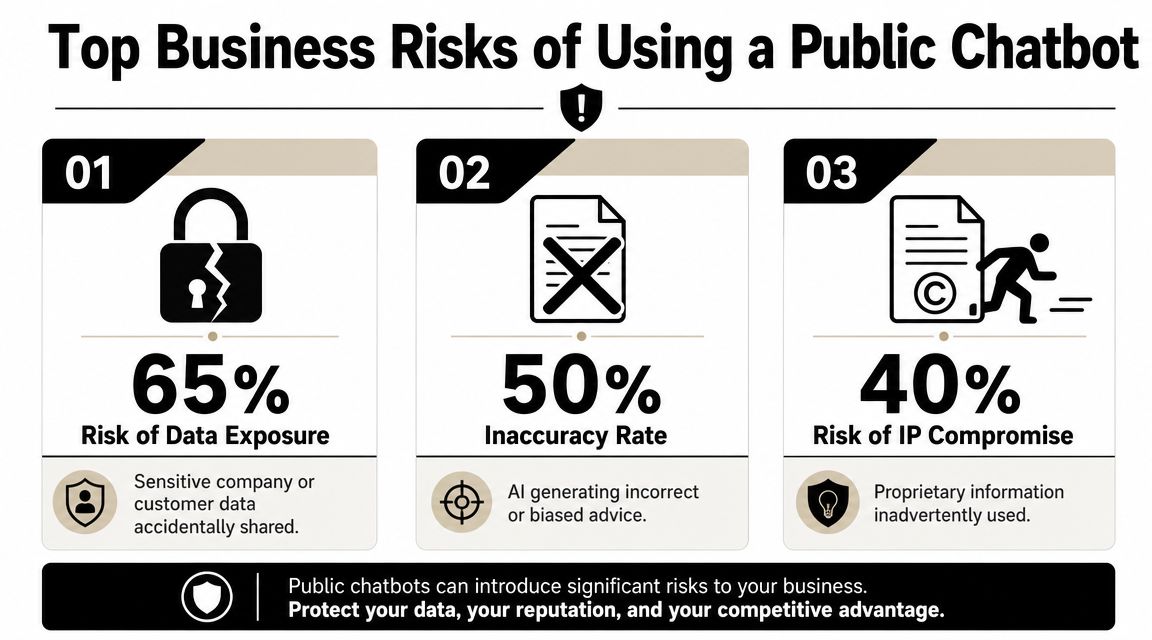
The risk story around public chatbots often gets framed as a technical debate. For an SMB, it's much simpler. The danger is using the wrong tool in the wrong context, then discovering the cost in customer trust, staff cleanup, or compliance headaches.
Data collection is broader than most owners expect
Surfshark's analysis of popular AI chatbot apps found that all analyzed apps collect some form of user data, with an average of 14 data types out of 35 collected per app, and 70% of the apps collect users' locations. In the same analysis, Meta AI collected 33 of 35 possible data types, or nearly 95% of the total (Surfshark analysis of AI chatbot privacy practices).
That doesn't mean every chatbot is unsafe. It does mean privacy concerns aren't hypothetical. Mainstream tools often gather a meaningful amount of information, and that's before a staff member uploads a document, pastes a customer complaint, or shares a pricing sheet in a hurry.
Three risks show up repeatedly in real business settings:
- Sensitive information goes to the wrong place. That can include customer contact details, appointment context, internal notes, or document uploads.
- Teams blur the line between drafting and decision-making. A public bot that helps write a response can effectively become the source of truth for policy or pricing.
- Nobody defines limits. Staff use the tool ad hoc, with no shared rules about what can be entered or what the bot is allowed to answer.
For a deeper operational view, this business guide to AI chatbot security and data privacy covers the policies organizations should set before rolling anything out.
The business cost of a wrong answer
The second category is reputational. A bot doesn't need to leak data to create damage. It only has to be confidently wrong in front of a customer.
A service business might have nuanced pricing. A clinic may have intake rules or booking constraints. A multi-location brand may offer different services at different branches. Public models are weak at staying inside those boundaries unless you build strong controls around them.
If a customer asks, “Can you do this for me next week, and what will it cost?” a vague or invented answer isn't a minor error. It's a sales and trust problem.
There's also a compliance angle. If your business touches personal data, health-related information, financial details, or regulated records, casual use of public AI can create obligations your team didn't think about when they copied and pasted a chat transcript into a tool.
The safest pattern is straightforward. Keep general ideation in public tools if you must. Keep customer-facing automation and business-specific knowledge inside a private system with explicit guardrails.
How SMBs Use Private Chatbots to Grow
Once the privacy piece is handled, the value becomes very practical. SMBs don't need a research lab. They need a bot that captures demand, answers accurately, and moves people toward the next step.

Lead capture that feels like a real conversation
A private AI chatbot works best when it does more than say, “Leave your message.” It should qualify intent.
Take a local home services company. A visitor lands on the site after hours and asks whether you handle a certain service in a specific area. The chatbot can answer from your approved service pages, ask a few follow-up questions, collect contact details, and route serious prospects to a booking link or callback flow.
That beats a static form because the customer gets progress, not homework.
For service businesses, good lead capture usually includes:
- Intent questions that separate browsing from buying.
- Contact verification so the team doesn't chase fake inquiries.
- Handoff logic that sends hot leads to scheduling at the right moment.
- Conversation summaries so staff can pick up without re-asking everything.
A platform such as Hyperleap AI fits this no-code SMB use case because teams can load website content or documents, deploy across website and messaging channels, and use features like OTP-verified lead capture, appointment routing, and a unified inbox without building the stack themselves.
Service without adding headcount
A private chatbot also works well as a front-line support layer. An ecommerce store can answer questions about shipping windows, returns, product details, and order-related policies from approved content. A dental clinic can handle common questions about services, preparation steps, office hours, and what happens next after a booking request.
The key is that the chatbot doesn't need to solve every problem. It needs to resolve repetitive, predictable questions cleanly and escalate the rest.
The best SMB chatbot projects start with the questions your staff already answer every day. That's the lowest-risk, fastest-return use case.
A lot of no-code deployments succeed. You don't begin with “AI transformation.” You begin with the top questions in your inbox and the points where leads currently drop off.
A short product walkthrough helps make that real:
Consistency across locations and channels
Multi-location businesses get another advantage. A hotel group, clinic network, or real estate brand often struggles with fragmented information. One branch uses one answer. Another location says something slightly different. Social DMs tell a different story than the website.
A private AI chatbot can solve that by using one central knowledge base with location-specific overlays. The parent brand controls the common rules, while each location keeps its own details such as hours, local services, or inventory notes.
That gives you consistency without forcing every inquiry through a central team.
For SMB owners, that's a significant win. Better lead capture, faster answers, cleaner handoffs, and fewer avoidable mistakes. The bot becomes an operating tool, not just a widget.
Your Implementation and Vendor Evaluation Checklist
Most bad chatbot deployments fail before launch. The business buys a demo, not a workflow. The right approach is simpler. Start with your use case, your data sensitivity, and your team's actual tolerance for setup.
Questions to ask before you buy
A 2025 Stanford analysis found that six leading U.S. AI companies feed user inputs back into their models by default to improve capabilities, which is one reason privacy has shifted from a niche concern to a mainstream buying criterion for chatbot tools (Stanford report on why chatbot privacy now matters).
That means vendor evaluation should start with plain questions, not feature theater:
- What data is used for training? If the answer is vague, keep digging.
- How long are chats retained? Shorter, clearer retention policies are easier to live with.
- Can you delete conversations and uploaded content? You need a workable cleanup path.
- Is setup no-code? Many “simple” tools still require a developer once you move past the demo.
- What sources can the bot use? Website pages, PDFs, brochures, FAQs, and policy docs should all be easy to load.
- Where can it deploy? Website is only the start for many SMBs. Messaging channels matter too.
- How does handoff work? Good bots know when to route to a calendar, form, or human.
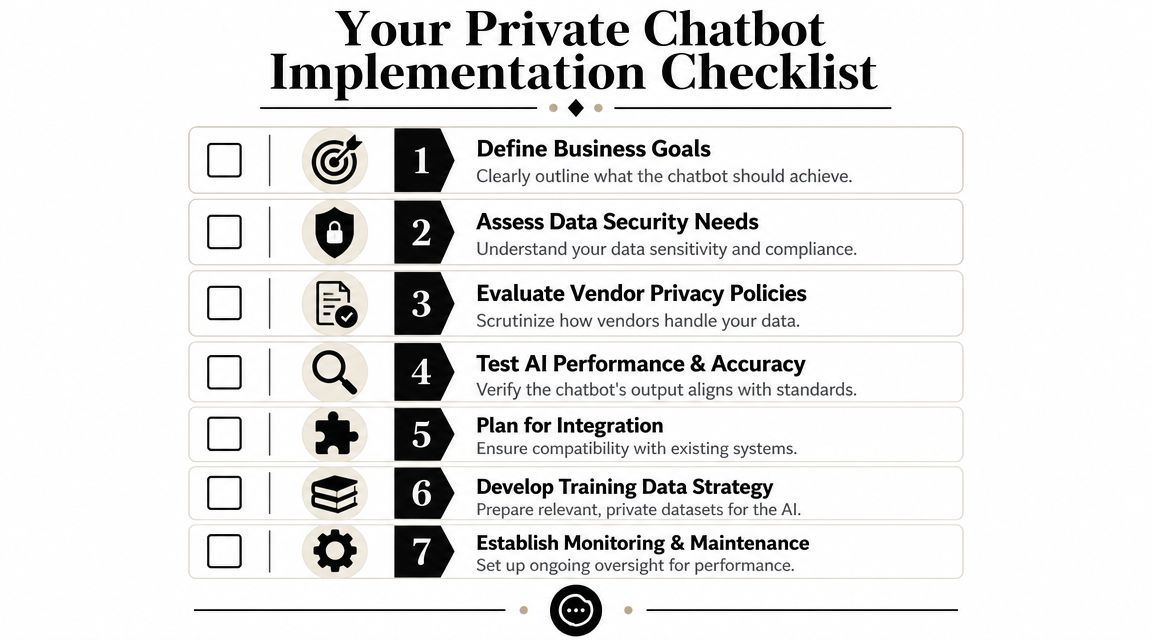
If you want a more detailed buying sequence, this SMB implementation checklist for AI chatbots is a useful companion because it maps vendor questions to rollout tasks.
Private Chatbot Options for SMBs
| Feature | Generic Public Bot (e.g., free ChatGPT) | Developer-Heavy (Build with API) | All-in-One Platform (e.g., Hyperleap AI) |
|---|---|---|---|
| Initial setup | Very fast | Slow unless you have technical help | Usually fast |
| Control over knowledge | Limited for customer-facing use | High | High |
| Privacy controls | Vary widely | Depends on what you build | Depends on vendor settings |
| Maintenance burden | Low at first | Ongoing | Lower than custom build |
| Lead and booking workflows | Usually manual | Custom-built | Often built in |
| Fit for SMB teams | Fine for drafting | Better for technical teams | Better for non-technical teams |
This table is why many SMBs skip the custom route. Building with APIs can work well, but it turns a business problem into a software project. Unless your chatbot is central to your product itself, that's often unnecessary overhead.
What a sensible rollout looks like
A practical implementation usually follows this order:
- Choose one business goal. Start with lead capture, booking, or FAQ deflection. Don't start with all three.
- Collect your source content. Use your most current website pages, service docs, intake notes, and policy materials.
- Define forbidden answers. List what the bot should never guess about, such as custom pricing, clinical advice, or exceptions.
- Set handoff rules. Decide when the bot routes to a calendar, staff inbox, or phone call.
- Test with real customer questions. Use the messy wording people type, not the ideal version.
- Monitor transcripts. Tighten weak answers, remove confusing content, and refine prompts.
- Expand gradually. After the website works, add WhatsApp, Instagram, or Facebook if those channels matter.
Owner's shortcut: if a vendor can't explain setup, retention, training policy, and handoff rules in plain English, the product probably isn't ready for a small business team.
The best private AI chatbot for an SMB is rarely the most customizable one. It's the one your team can deploy, understand, and govern without needing a full-time technical operator.
Example Prompts and Templates to Get Started
A good launch starts with narrow prompts and clear boundaries. Keep the bot helpful, specific, and honest about what it knows.
Copy and adapt these starter templates
Welcome message
“Hi, I can help with services, pricing basics, availability, and next steps. Ask a question, or tell me what you need and I'll point you in the right direction.”
Lead capture prompt
“You're the website assistant for our business. Answer only from our approved knowledge base. If a visitor shows buying intent, ask for their name, phone, email, and what service they need. Keep questions short. If details are missing, ask one follow-up at a time.”
Pricing FAQ template
“When asked about pricing, provide only the approved pricing information in our knowledge base. If pricing depends on scope, explain the factors briefly and offer the next step to get an exact quote. Never invent a price.”
Booking handoff prompt
“If the visitor is ready to speak with us, summarize their need in one sentence and invite them to book through our scheduling link. If the matter is urgent or outside policy, tell them a team member will follow up.”
One last buying point matters here. Privacy claims vary a lot. As Privacy Guides' overview of AI privacy tradeoffs notes, “private” can mean encrypted cloud storage, no-training policies, anonymous sessions, or true offline execution. Those options have different implications for risk, usability, and cost. Pick the one that matches your business, not the one with the cleanest marketing language.
If you want a no-code way to launch a private AI chatbot for lead capture, customer questions, and appointment booking, Hyperleap AI is one option built for SMB teams that need fast setup across website and messaging channels without handing the project to developers.