Customer Service Automation: The Complete Guide (2026)
Customer service automation done right: what to automate, what to keep human, which tools to evaluate, and how to roll it out without breaking what already works.

TL;DR: Customer service automation replaces repetitive, rules-based support work with software — chatbots, AI agents, automated routing, self-service portals — so your human team focuses on the conversations that actually need them. Done right, it reduces response time from hours to seconds, captures leads around the clock, and scales your support without scaling your headcount. Done wrong, it frustrates customers who can't reach a person when they need one. This guide tells you exactly how to get it right.
Every business owner I've spoken to lands in the same place eventually. The team is stretched. After-hours inquiries pile up unanswered. The same questions get answered a hundred times a week. And somewhere in the inbox is a lead who asked about pricing on a Sunday afternoon, never heard back, and bought from a competitor by Monday.
The answer everyone reaches for is automation. But "automate your customer service" is advice wide enough to mean almost nothing. Which parts? With what tools? In what order? What do you keep human?
I built Hyperleap AI to answer those questions for small and mid-sized businesses specifically — not enterprise teams with six-month implementation cycles and a dedicated IT department. This guide is the complete playbook I wish existed when I started. It covers the full picture: definitions, decision frameworks, tool categories, rollout steps, metrics, and the mistakes that kill otherwise good projects.
If you want the data layer — benchmarks, industry adoption rates, ROI ranges — read the companion post on customer service automation statistics and come back here for the how.
What Is Customer Service Automation?
Customer service automation is the use of software to handle support interactions — or parts of them — without requiring a human agent to be actively present.
That covers a spectrum. At the narrow end: an auto-reply email that says "We got your message, we'll respond within 24 hours." At the broad end: an AI agent that answers in real time, pulls from your product documentation, qualifies the lead, and emails you a clean summary of the conversation.
The useful distinction is between rule-based automation and AI-powered automation.
Rule-based automation follows explicit if-then logic. If a customer submits a refund request, route it to billing. If a ticket mentions "urgent," escalate to a senior agent. These systems are predictable and auditable, but they break the moment the customer phrases something outside the expected pattern.
AI-powered automation understands natural language. A customer asks "do you guys work with dental practices?" and the AI agent doesn't need a rule that says "if question contains 'dental practices', respond with…" — it reads the intent and answers from your knowledge base. This is what makes modern conversational AI for customer service qualitatively different from the chatbots of five years ago.
Most businesses need both, layered together.
What to Automate — and What to Keep Human
The most common automation mistake is automating the wrong things. Not everything that can be automated should be. Here is a decision framework built around one question: does this interaction require judgment, empathy, or accountability?
| Interaction Type | Automate? | Why |
|---|---|---|
| FAQs and product questions | Yes | High volume, low variance, available in your knowledge base |
| Hours, location, pricing | Yes | Factual, static, queried constantly |
| Lead qualification (initial) | Yes | Structured questions, no judgment required |
| Appointment booking | Yes | Books in chat via Calendly or Cal.com; shares your booking link for other tools |
| Order status lookups (via API) | Yes | Structured data retrieval |
| After-hours inquiry capture | Yes | Collects details + notifies team |
| Complaint escalation | No | Requires empathy and accountability |
| Refund decisions | No | Requires policy judgment and trust |
| High-value sales conversations | No — assist only | Human builds rapport; AI provides context |
| Legal, medical, or financial guidance | No | Liability and nuance |
| VIP / enterprise customer issues | No | Relationship stakes too high |
| Negative reviews / public complaints | No | Tone and judgment are critical |
The pattern is clear: automate the informational and transactional. Keep humans on the relational and consequential. An AI agent that answers 70% of your incoming chats and routes the remaining 30% to the right person has done its job correctly.
Categories of Customer Service Automation Software
The market is fragmented, and vendors use overlapping terminology. Here are the five main categories and what each actually does.
1. AI Chat Agents (Conversational AI)
These are the most visible form of customer service automation in 2026. An AI agent sits on your website, WhatsApp, Instagram DM, or Facebook Messenger channel and answers customer questions in real time, grounded in your business's own knowledge base — product documentation, FAQs, policies, pricing.
The key differentiator between AI agents and older chatbots is knowledge grounding. A rule-based chatbot gives a scripted response from a decision tree. An AI agent reads your uploaded documents and generates contextually accurate answers, reducing the risk of confabulation. Look for a solution that is explicit about document-grounded responses rather than one that relies on general LLM knowledge.
Hyperleap AI sits in this category. Our agents draw only from what you upload — not from the open web — and run on Website chat, WhatsApp, Instagram DM, and Facebook Messenger.
For a deeper look at this category, see our breakdown of conversational AI for customer service.
2. Help Desk and Ticketing Systems

Platforms like Zendesk, Freshdesk, and Intercom route incoming support requests into a structured queue. They handle assignment, SLA tracking, internal notes, and status updates. AI layers on top of these platforms can suggest responses, auto-tag tickets, or summarize long threads for agents picking up mid-conversation.
Help desk systems are the backbone of mid-market and enterprise support operations. For smaller teams — under ten agents — they can introduce more overhead than they eliminate unless you already have significant inbound volume.
3. Automated Email and Ticket Routing
Rule-based systems that inspect incoming messages and route them to the appropriate team or agent. Keyword detection, sender identification, and sentiment flags are the common triggers. Modern versions layer lightweight NLP to catch intent even when the customer doesn't use the exact trigger word.
4. Self-Service Portals and Knowledge Bases
A searchable library of articles, guides, and tutorials that customers can access without contacting support at all. Well-structured knowledge bases deflect a significant share of common inquiries before they become tickets. The challenge is keeping them current — stale documentation creates its own support volume.
AI-powered search within a knowledge base (semantic search, not keyword matching) materially increases deflection rates by surfacing the right article even when the customer's search terms don't match the article's title.
5. Workflow and Integration Automation
Tools like Zapier, Make, or custom webhooks that connect your support channels to your CRM, email, or internal notifications. When a new lead submits a form and starts a conversation, a webhook fires and creates a contact record. When a conversation closes, a summary emails to your team.
This layer doesn't replace human agents or AI agents — it makes both more effective by eliminating the manual work of moving information between systems.
Benefits of Customer Service Automation
The case for automation isn't theoretical. Here are the concrete, structural benefits.
24/7 availability without 24/7 staffing. Customers ask questions at 11pm on a Tuesday. Without automation, those questions sit unanswered until the next business day — and some percentage of those customers don't wait. An AI agent covers the gap with no incremental cost per conversation.
Faster first response. Response time is among the highest-impact variables in customer satisfaction and lead conversion. A human team might respond to a new inquiry in two to four hours. An AI agent responds in under three seconds. For businesses in competitive categories, that delta is decisive — 82% of customers expect instant responses to their inquiries, according to Salesforce State of Service, 2024.
Consistent quality. Human agents have good days and bad days. They get tired, skip steps, or phrase things differently depending on their mood. An AI agent is document-grounded and consistent — the answer to "what's your return policy" is the same at 9am and 9pm, on Monday and Sunday.
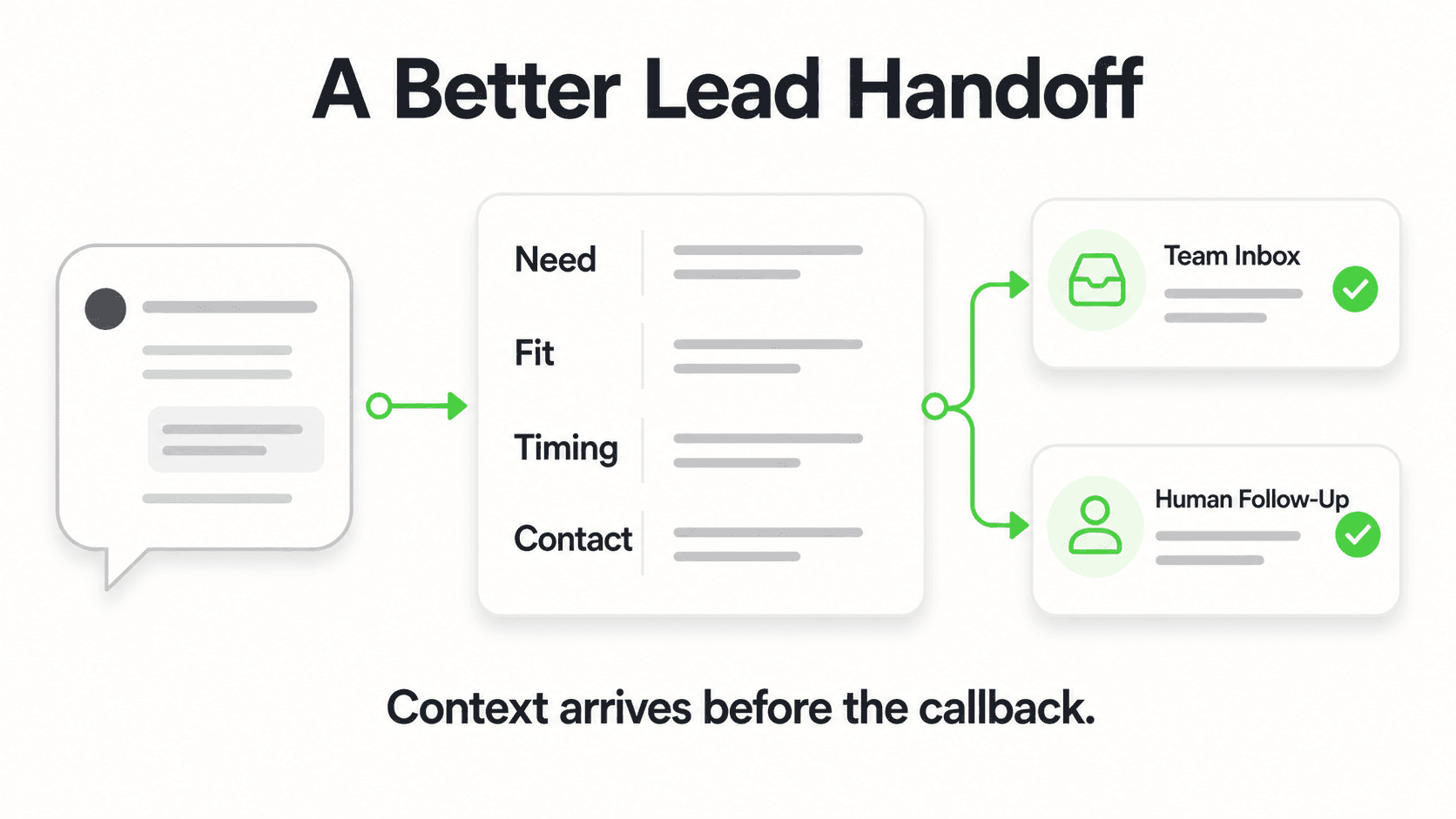
Scalable lead capture. Most small business websites are passive — they wait for the customer to find a phone number or fill out a contact form. An AI agent is active, engaging visitors proactively and capturing their name, email, phone, and intent through a structured lead form before the conversation begins. Your team wakes up to a qualified lead summary, not an empty inbox.
Agent leverage, not agent replacement. Automation handles the volume so your human agents can concentrate on the conversations where judgment, relationship, and accountability actually matter. Most businesses that deploy AI agents find their team's job becomes more interesting, not redundant.
Reduced cost per resolution. The math is straightforward: if an AI agent handles two-thirds of your inbound chat volume at a fixed monthly cost, the per-resolution cost of your support operation drops materially. For small businesses operating on thin margins, this compounds quickly.
For quantified benchmarks across industries, the customer service automation statistics companion post pulls together the data, and our state of AI customer service for small businesses report covers where adoption actually stands this year.
Step-by-Step Rollout for Customer Service Automation

A rollout that fails usually fails for one of three reasons: it started with the wrong channel, it skipped knowledge preparation, or it went live without a human-handoff path. Here is the sequence that works.
Step 1: Audit your current support volume.
Before you choose a tool, understand what you're automating. Pull the last 90 days of support tickets, chat logs, and email threads. Categorize them. What percentage are FAQ-type questions? What's the top ten most repeated questions? Which inquiry types require human judgment? This audit shapes everything downstream.
Step 2: Build and clean your knowledge base.
Your AI agent is only as good as the knowledge you give it. Take the most common questions from your audit and write clean, accurate answers. If you're starting from a blank page, the free customer service response templates tool drafts answers you can edit. Consolidate your pricing page, return policy, service descriptions, and FAQs into a structured document. Remove outdated information. Remove contradictions. The hour you spend here saves weeks of post-launch corrections.
Step 3: Define your handoff rules.
Decide which conversation types should escalate to a human, and how. Typical triggers: customer explicitly asks for a person, sentiment is negative, inquiry involves a refund or complaint, or conversation has gone three exchanges without resolution. Your AI agent should surface a handoff path — a phone number, an email address, a callback request — rather than leaving the customer in a dead end.
Step 4: Set up lead capture before deployment.
If your AI agent is also a lead-generation tool — and it should be — configure the lead form that gates the conversation. Name, email, phone, and one qualifying question (budget range, company size, industry, or use case) collected before the chat begins. This means every conversation starts with a known contact, and your CRM gets populated even if the lead doesn't convert immediately.
Step 5: Deploy on your highest-volume channel first.
Start where you already have traffic and existing inquiries — usually your website. Get the agent calibrated, test edge cases, and establish a feedback loop before expanding to WhatsApp, Instagram DM, or Facebook Messenger. Multi-channel from day one increases complexity before you've validated the core experience.
Step 6: Run a two-week shadow period.
For the first two weeks after launch, have a human review every conversation daily. Not to intervene — to learn. Where does the agent give an imprecise answer? Where do customers phrase things the knowledge base doesn't address? Use these findings to update your knowledge documents. The agent improves as the knowledge improves.
Step 7: Expand channels and workflows.
Once the website agent is stable and your team trusts it, expand to additional channels — WhatsApp is typically the next highest-value move for most SMBs. Then layer in workflow automation: webhooks that fire on new leads, email summaries that route to the right team member, and CRM updates via REST API.
Step 8: Review metrics monthly.
Set a recurring monthly review against the metrics below. Automation is not a set-and-forget deployment. Query volume grows, your product evolves, and your knowledge base needs to keep pace.
For a detailed breakdown of the technical rollout steps, see how to automate customer support.
Metrics to Track
What gets measured gets improved. These are the metrics that actually tell you whether your customer service automation is working.
First Response Time (FRT). The time between a customer's first message and the agent's first reply. Automation should compress this to seconds for covered topics. Track separately for AI-handled and human-handled conversations.
Containment Rate. The percentage of conversations fully resolved by the AI agent without escalation to a human. A healthy containment rate for a well-configured AI agent running on a good knowledge base is in the 60–80% range for FAQ-heavy businesses, lower for complex products. Track this weekly during the first three months — it's one of the core chatbot KPIs worth building a dashboard around.
Escalation Rate. The inverse of containment: what fraction of conversations hands off to a human. High escalation is not failure — it may mean your agent is appropriately recognizing its limits. But track the reasons for escalation to find knowledge gaps.
CSAT (Customer Satisfaction Score). A simple post-conversation rating (1–5 or thumbs up/down). Collect it at conversation close. Compare CSAT for AI-resolved versus human-resolved conversations — the gap tells you where to invest.
Lead Capture Rate. Of all visitors who open the chat widget, what percentage complete the lead form? A low rate suggests the form is too long, asks for too much too early, or the prompt copy is weak.
Lead-to-Pipeline Conversion. Of the leads captured through chat, what percentage turn into qualified pipeline or customers? This is your ultimate measure of whether the automation is driving business value, not just handling volume.
Knowledge Base Coverage. The percentage of incoming queries the AI agent answers confidently versus deflects. Track the deflected categories — they are your content backlog.
Cost per Resolution. Total support cost (human agents + software) divided by total resolved interactions. Automation should move this number down over time as AI handles a growing share of volume.
Common Mistakes That Kill Automation Projects
I've seen good intentions result in frustrated customers. Here are the failure modes to avoid.
Mistake 1: Launching without a human-handoff path. An AI agent that can't get the customer to a real person when needed — especially for complaints or complex issues — damages trust faster than no automation at all. Always build the exit ramp.
Mistake 2: Treating the AI agent as a search engine. Customers don't search for answers in chat — they ask questions, share context, and change direction mid-conversation. Configure your agent for conversational flow, not keyword retrieval.
Mistake 3: Automating before the knowledge base is ready. Deploying an AI agent against a sparse or inaccurate knowledge base produces incorrect answers. A bad first impression from automation is worse than a slow human reply. Build first, deploy second.
Mistake 4: Ignoring the lead form. Many businesses deploy an AI agent for support only, ignoring the lead-capture opportunity. Every visitor who opens the chat widget is a potential customer. Capturing their contact details — through a structured form before the conversation begins — is one of the highest-ROI moves in the entire automation stack.
Mistake 5: Automating in one channel while ignoring others. Your customers don't restrict themselves to your website. If you answer instantly on website chat but take 48 hours to respond to WhatsApp or Instagram DM, the multi-channel experience creates frustration. A unified AI agent running across all channels removes that inconsistency.
Mistake 6: Setting it and forgetting it. AI agents degrade over time if the knowledge base isn't maintained. Prices change. Policies update. Products launch or retire. Schedule a monthly knowledge review as part of your operations rhythm.
Mistake 7: Over-automating high-stakes interactions. Angry customers, refund requests, and high-value deals are not places to save agent time. Automate the informational; protect the relational. An automation strategy that costs you one enterprise client or generates one viral complaint has negative ROI.
For a focused guide on FAQ-specific automation, see our post on building an effective FAQ chatbot.
How Hyperleap AI Fits
Hyperleap AI is an AI agent platform built for small and mid-sized businesses that want to deploy customer-facing automation without a six-month implementation project.
Here is how it maps to the framework above.
Document-grounded responses. You upload your knowledge — product docs, FAQs, pricing, policies — and the agent answers from that content. It does not draw on general internet knowledge, which means answers are specific to your business and bounded by what you've provided.
Lead capture before conversation. Every Hyperleap agent can be configured with a lead form that collects visitor details before the chat begins. Name, email, phone, and custom qualifying questions. No conversation starts without a contact record. Your team receives a clean lead summary by email when the conversation closes.
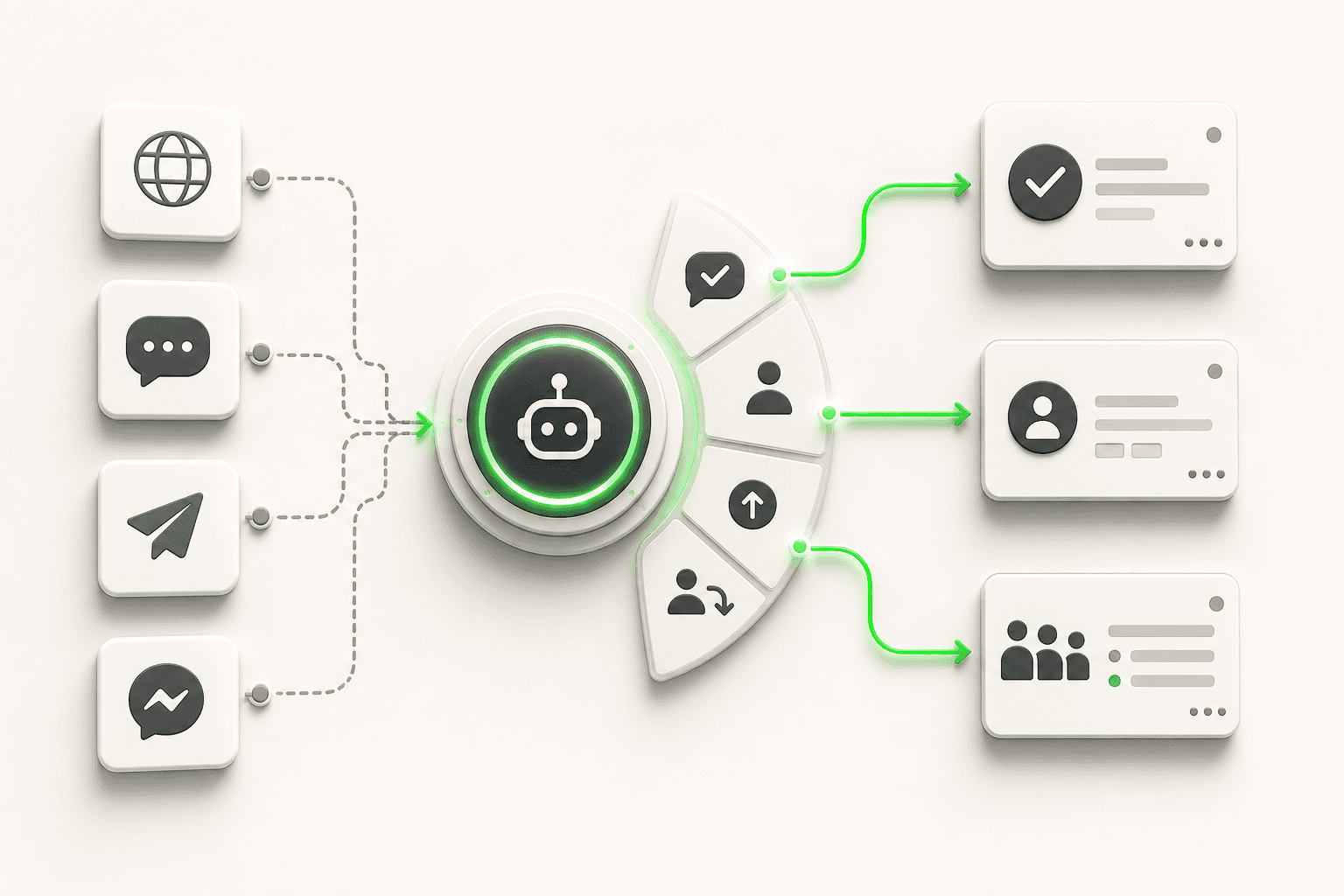
Four channels, one configuration. The same agent runs on Website, WhatsApp, Instagram DM, and Facebook Messenger. You configure the knowledge base and conversation flow once; it deploys consistently across all four channels. No separate setup per channel, no inconsistent behavior.
Agentic workflows. Beyond answering questions, Hyperleap agents can book appointments in the conversation through Calendly or Cal.com on Pro and Max (or share your booking link on Plus and for other tools), send conversation summaries, and connect to your CRM or internal systems via REST API and webhooks.
100+ languages. The agent reads and responds in the customer's language without separate configuration. For businesses serving international customers, this removes a common setup bottleneck.
Transparent pricing with a 7-day trial. Plus is $40/month (3,000 AI responses, 1 chatbot), Pro is $100/month (12,000 responses, 2 chatbots, white-label), Max is $200/month (30,000 responses, 5 chatbots). All plans include a 7-day free trial; a credit card is required. There is no free plan. Add-ons — Suite ($99 one-time for AI Tools, AI Assistants, Prompts API and Personas API), OTP Verification (Pro/Max only), Multi-variant (locations, courses, etc) (Pro/Max only) — are priced separately and never included in base plan costs.
For businesses that want us to build the agent for them, Managed Setup is $299 Free.
If you're evaluating AI agents for your business, the fastest way to understand fit is to map your top ten most-repeated support questions against your current knowledge assets. If you can answer those ten questions in a document, an AI agent can answer them in chat. Start there.
Explore use cases by industry at AI agents by industry, or if you're a smaller operation, see chatbot for small business for a more targeted breakdown.
When you're ready to see pricing and plan limits side by side, the pricing page has everything.
Frequently Asked Questions
What is customer service automation software?
Customer service automation software is any platform or tool that handles support interactions — fully or partially — without requiring a live human agent. This includes AI chat agents, help desk ticketing systems, automated email routing, self-service knowledge bases, and workflow automation tools that connect support channels to CRMs or notification systems. Modern AI-powered platforms like Hyperleap AI combine several of these layers: the AI agent handles real-time conversations, a lead form captures contact details, and webhooks (Pro and Max) push data to the rest of your stack.
What types of customer service interactions should NOT be automated?
High-stakes interactions should stay with humans: complaints requiring empathy, refund decisions, legal or medical guidance, VIP and enterprise account issues, and any situation where the customer has already expressed frustration and escalated. Automation works best on informational and transactional interactions — FAQs, product details, pricing, booking link delivery, order status — where the answer is factual and the stakes of getting it wrong are low.
How long does it take to set up a customer service AI agent?
For a business with a reasonably well-documented knowledge base — an FAQ page, a product description, a pricing document — a basic AI agent can be configured and live within a day. The constraint is knowledge preparation, not platform setup. If your knowledge base needs to be built from scratch, budget a week of focused effort to write and organize the content before deployment. The post-launch calibration period (shadowing conversations and refining knowledge) typically runs two to four weeks before the agent is operating at full effectiveness.
How does customer service automation affect lead generation?
Done correctly, it dramatically improves it. A traditional website is passive: it waits for visitors to find a contact form or phone number. An AI agent is active: it engages visitors in real time, collects their contact details through a structured lead form before the conversation begins, qualifies their intent, and sends a clean summary to your team. For most small businesses, this shifts lead capture from a manual process to a continuous, automated one — running 24/7 including after hours, weekends, and holidays.
What should I look for when evaluating customer service automation software?
Five criteria matter most for small and mid-sized businesses. First, knowledge grounding: does the AI answer from your documents or from general internet knowledge? Document-grounded systems are safer and more accurate. Second, channel coverage: does it run on the channels your customers actually use — website, WhatsApp, Instagram DM, Facebook Messenger — or just one? Third, lead capture mechanics: does it collect contact details before the conversation starts, or does it let visitors browse anonymously? Fourth, human handoff: can customers reach a real person when they need one? Fifth, transparent pricing: are the costs clear, and do add-ons have explicit pricing rather than "contact sales" gates?
Related Articles

How to Automate Customer Support: A Practical Playbook
Learn how to automate customer support the right way — audit repetitive tickets, ground an AI agent in your docs, and keep humans where they matter most.

AI Customer Service Best Practices for 2026
12 AI customer service best practices covering disclosure, escalation design, knowledge base upkeep, weekly KPI review, and PII handling for SMB teams.
AI for Small Business Customer Service: Where to Start
A step-by-step guide to AI for small business customer service — triage your support load, choose buy vs. DIY vs. hire, set a budget, and roll out in 30 days.

Conversational AI vs Chatbot: The Real Difference
Conversational AI vs chatbot explained: rule-based scripted bots versus LLM-powered conversational AI, plus a comparison table and decision framework.