AI Chatbot Knowledge Base: Best Practices for Accuracy
Your AI chatbot is only as good as its knowledge base. Learn how to structure, write, and maintain content for accurate responses.

TL;DR: Your AI chatbot can only answer what it knows. The difference between a chatbot that frustrates customers and one that resolves their questions accurately comes down to a single factor: the quality of your AI chatbot knowledge base. Chatbots powered by well-structured knowledge bases consistently achieve higher response accuracy than those loaded with unstructured content — a pattern documented across information retrieval research and real-world deployments. The gap is not about having a better AI model. It is about feeding the model better content. Modern AI chatbots use Retrieval-Augmented Generation (RAG) to deliver document-grounded responses — pulling answers directly from your uploaded knowledge rather than generating them from scratch. This means the content you provide is the ceiling on your chatbot's accuracy. In this guide, we will walk through seven proven best practices for building, structuring, and maintaining an AI chatbot knowledge base that actually performs.
Your knowledge base is what a RAG chatbot retrieves from — RAG is the engine that turns the content below into accurate, document-grounded answers.
And the workflow it all feeds: conversational AI for customer service — what an AI customer support chatbot answers, qualifies, and routes.
What Is an AI Chatbot Knowledge Base?
An AI chatbot knowledge base is the collection of documents, Q&A pairs, policies, and reference materials that your chatbot draws from when answering customer questions. Think of it as the chatbot's brain — except instead of learning from the entire internet, it learns exclusively from the content you provide.
This is fundamentally different from old-school FAQ chatbots. Traditional chatbots matched keywords to pre-written responses. If a customer phrased their question differently from how you wrote the FAQ, the bot failed. Modern AI chatbots use a technology called Retrieval-Augmented Generation (RAG) to understand questions contextually and pull relevant information from your documents to compose natural, accurate responses.
"Training" Your Chatbot Means Curating This Knowledge Base
When people hear "train an AI chatbot," they often picture data scientists writing machine learning code. For modern business chatbots, that is not what training means. Most AI chatbots today do not require traditional ML training at all — they use RAG to answer from the documents you provide. So "training" your chatbot really means curating the knowledge base it retrieves from: giving it the right content, in the right structure, and keeping it current. You are not writing code or building models — you are preparing the content library that determines the quality of every answer. That is why the rest of this guide is about content, not technology. For how RAG compares to other approaches, see RAG vs. fine-tuning vs. prompt engineering.
How RAG Works Behind the Scenes
Here is a simplified view of what happens when a customer asks your chatbot a question:
- Chunking: Your uploaded documents are split into smaller sections (chunks) that can be individually searched and retrieved.
- Embedding: Each chunk is converted into a mathematical representation (a vector) that captures its meaning, not just its keywords.
- Retrieval: When a customer asks a question, the system finds the chunks most semantically similar to the question.
- Generation: The AI model reads the retrieved chunks and composes a natural-language answer grounded in that specific content.
The critical insight here is that the AI can only retrieve and use what you have given it. If a topic is not covered in your knowledge base, the chatbot either makes something up (a hallucination) or tells the customer it does not know. Well-designed systems are configured to do the latter — delivering document-grounded responses rather than fabricated ones.
For businesses operating across multiple locations, this retrieval process becomes even more complex. A hotel chain needs the chatbot to know that breakfast starts at 7 AM at the Dallas property but 8 AM at the San Antonio resort — and never confuse the two. When several location pages read almost the same, the chatbot has to pick the right location's source before answering; here's how that works for multi-location businesses.
The bottom line: RAG-powered chatbots are only as good as the documents they retrieve from. Which is why your AI chatbot knowledge base is the single most important factor in chatbot accuracy.
Why Most Chatbot Knowledge Bases Underperform
Most businesses approach knowledge base creation with the best intentions — and the wrong strategy. Here are the four most common failure modes we see across hundreds of deployments.
Dumping Raw PDFs Without Structure
The most common mistake is uploading your entire document library and expecting the AI to figure it out. Businesses upload 50-page employee handbooks, poorly formatted PDFs, marketing brochures full of promotional language, and scanned documents with OCR errors.
The problem is that RAG systems chunk documents mechanically. A 50-page PDF gets split into dozens of chunks, many of which lack context on their own. A chunk that says "The fee is $50" means nothing without the surrounding context of which service that fee applies to. When the AI retrieves this isolated chunk, it may attach it to the wrong question entirely.
The fix: Break large documents into focused, self-contained pieces. Each document should cover one topic completely enough that any chunk from it carries sufficient context.
Outdated Information Eroding Trust
Nothing destroys customer trust faster than a chatbot confidently stating your old pricing, discontinued services, or last season's hours of operation. Unlike a website page that someone might update when they remember, knowledge base documents tend to be uploaded once and forgotten.
A dental clinic that changed its Saturday hours six months ago but never updated the knowledge base will have its chatbot sending patients to a closed office. A hotel that raised its room rates but left old pricing in the knowledge base will create booking conflicts and frustrated guests.
The fix: Treat your knowledge base like a living document. Schedule monthly reviews and update immediately after any policy, pricing, or operational change.
Missing Edge-Case Questions
Businesses typically load their knowledge base with the questions they want customers to ask — standard FAQs about pricing, hours, and services. But customers ask edge-case questions constantly: "Can I bring my dog?" "Do you offer payment plans?" "What happens if I need to cancel on the same day?"
When the chatbot encounters a question that is not covered, it either hallucinates an answer or gives a generic "I don't know" response. Both outcomes frustrate customers and erode confidence in the chatbot.
The fix: Mine your actual customer interactions — support tickets, phone call logs, chat transcripts, email threads — for the questions real customers actually ask. These are almost always different from the questions businesses assume customers ask.
Duplicate and Contradictory Content Confusing Retrieval
When multiple documents cover the same topic with slightly different information, the RAG system may retrieve contradictory chunks for a single question. If one document says your return policy is 30 days and another says 14 days, the chatbot may cite either one — or worse, blend them into a nonsensical answer.
This commonly happens when businesses upload both old and new versions of a policy document, when different departments create overlapping documentation, or when marketing materials contradict operational documents.
The fix: Audit your knowledge base for overlapping topics. Maintain a single source of truth for each topic and remove outdated versions.
7 Best Practices for Building an Accurate AI Knowledge Base
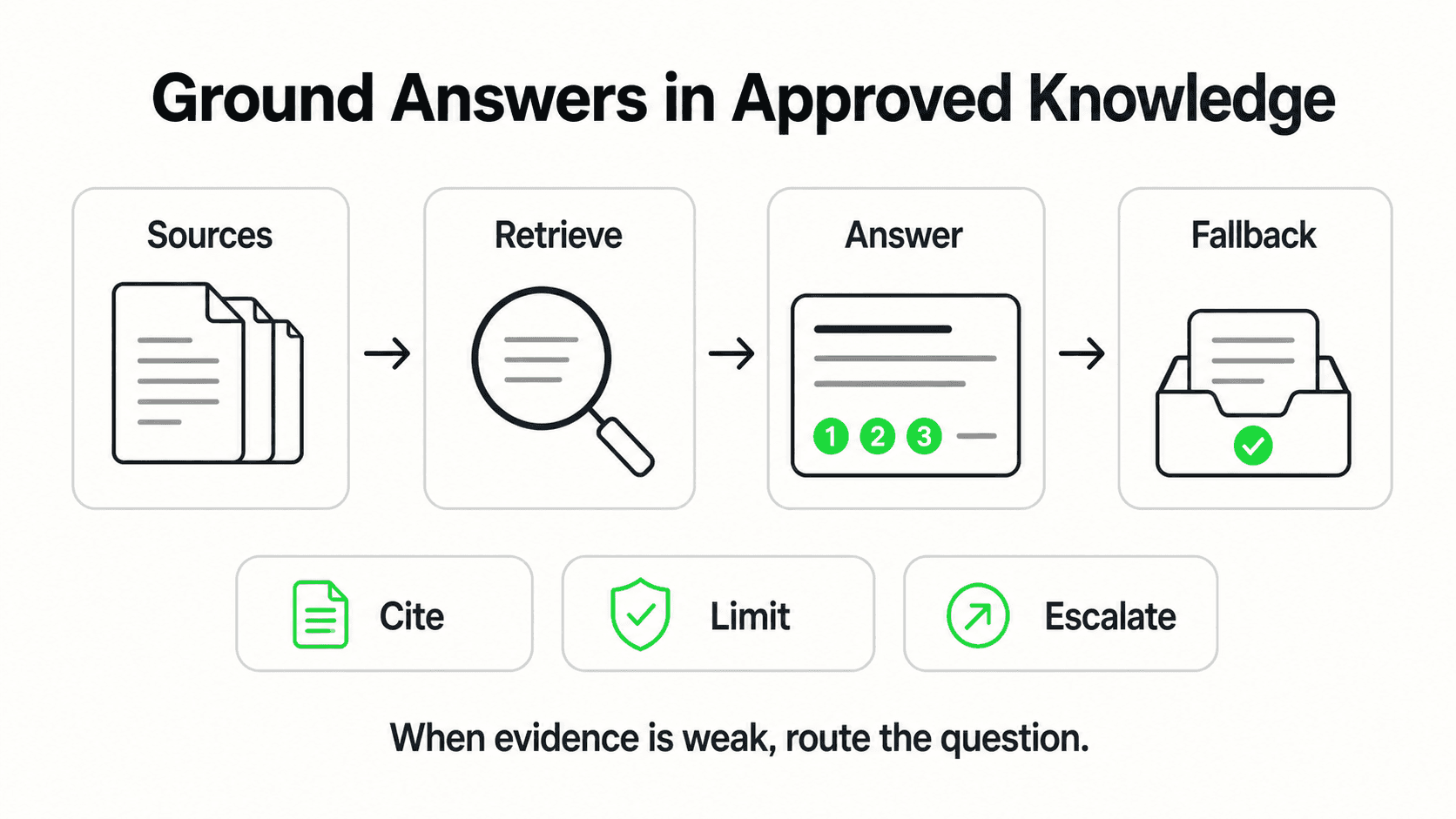
These seven practices are drawn from what we have observed working with businesses across industries — from hospitality groups to dental practices to real estate teams. Each practice includes a concrete explanation of what it looks like in action and why it works.
1. Start With Real Customer Questions, Not Your FAQ Page
What this looks like in practice: Before writing a single knowledge base document, export your last 100 customer inquiries from whatever channels you use — email, phone logs, chat transcripts, social media DMs, Google Business Profile messages. Group them into clusters by topic. You will likely find that 80% of questions fall into 10-15 topic clusters.
Why it works: Your FAQ page reflects what you think customers want to know. Your actual customer inquiries reflect what they actually want to know. The gap between these two is often significant. Businesses commonly find that their top customer questions are about things not even mentioned on their FAQ page — specific policies, edge cases, location-specific details, or comparison questions about competitors.
Real-world impact: When businesses build their knowledge base from real inquiries rather than assumed FAQs, they typically see a meaningful improvement in first-contact resolution because the chatbot is trained on the questions customers actually ask, not the ones the business wishes they would ask.
Key takeaway: Let your customers write your knowledge base outline. Your actual inquiry data is the best possible starting point.
2. Write in Q&A Format for Maximum Retrieval Accuracy
What this looks like in practice: Instead of uploading a dense paragraph about your cancellation policy, write it as a series of question-and-answer pairs:
- Q: What is your cancellation policy? A: You can cancel up to 24 hours before your appointment at no charge. Cancellations within 24 hours incur a $25 fee.
- Q: How do I cancel my appointment? A: Call us at (555) 123-4567 or reply to your confirmation email with "CANCEL."
- Q: Will I be charged if I don't show up? A: Yes, no-shows are charged the full appointment fee.
Why it works: RAG systems perform best when the structure of your knowledge base mirrors the structure of customer queries. When a customer asks "What happens if I don't show up?" the system can directly retrieve the Q&A pair that addresses this exact scenario. Dense paragraphs force the system to extract the relevant sentence from a larger context, which increases the chance of retrieval errors.
Real-world impact: Q&A-formatted knowledge bases consistently deliver higher retrieval precision in RAG systems compared to unstructured prose, based on widely documented findings in information retrieval research.
Key takeaway: Write your knowledge base the way customers ask questions — in clear Q&A pairs, not corporate prose.
3. Keep Documents Short and Topic-Focused
What this looks like in practice: Instead of one document titled "Everything About Our Services," create separate documents:
pricing-and-plans.md— All pricing informationcancellation-and-refunds.md— Cancellation policies and refund proceduresbusiness-hours-and-locations.md— Hours for each location, holiday schedulesservice-descriptions.md— What each service includes
Each document should be 500-1,500 words. Long enough to be comprehensive on its topic, short enough that every chunk from it carries relevant context.
Why it works: When the RAG system chunks a focused document, each chunk inherits the topic context of the document. A chunk from cancellation-and-refunds.md is unambiguously about cancellations. A chunk from a 30-page general document could be about anything, making retrieval less precise.
Real-world impact: Businesses that restructure from a few large documents to many focused documents often see a noticeable improvement in answer relevance. The chatbot retrieves the right information more consistently because each chunk carries clearer topical signals.
Key takeaway: One topic per document. Think of each document as a chapter, not a book.
4. Include Policies, Pricing, and Edge Cases Explicitly
What this looks like in practice: Document everything a customer might ask about, even if you think it is obvious:
- Pricing: All plan prices, what is included, what costs extra, payment methods accepted
- Policies: Cancellation, refund, late arrival, rescheduling, bring-a-friend policies
- Edge cases: Pet policies, accessibility features, parking information, dress codes, age restrictions
- Negative answers: What you do NOT offer (this prevents the chatbot from making assumptions)
Why it works: AI chatbots designed to minimize hallucinations will only answer from your documents. If a policy is not documented, the chatbot will either say "I don't know" (better) or, depending on configuration, attempt to infer an answer (worse). Explicitly documenting what you do NOT do is just as important as documenting what you do. If you do not offer payment plans, write: "Q: Do you offer payment plans? A: We do not currently offer payment plans. Full payment is due at the time of booking."
Real-world impact: Knowledge bases that include explicit negative answers — topics you deliberately do not cover or services you do not offer — see fewer hallucinated responses. The chatbot has clear guidance instead of filling in gaps with assumptions.
Key takeaway: If a customer might ask about it, document it. Especially document what you do not do.
5. Set Up "I Don't Know" Boundaries
What this looks like in practice: Configure your chatbot to acknowledge its limitations rather than guessing. This means:
- Setting system instructions that tell the AI to say "I don't have information about that" when a question falls outside the knowledge base
- Creating a fallback document that outlines how to handle out-of-scope questions: "If the customer asks about topics not covered in the knowledge base, politely let them know and offer to connect them with a team member."
- Defining escalation triggers for specific topics (legal questions, complaints, medical advice)
Why it works: Customers respect honesty. A chatbot that says "I'm not sure about that — let me connect you with someone who can help" builds more trust than one that confidently provides wrong information. This is the difference between document-grounded responses and unconstrained generation. The best chatbot platforms, like Hyperleap AI, are designed to keep responses anchored to your uploaded content and gracefully handle gaps.
Real-world impact: Businesses that explicitly configure "I don't know" boundaries alongside human escalation paths report higher customer satisfaction with their chatbot interactions. The chatbot handles what it can and hands off what it cannot — mimicking the behavior of a well-trained employee.
Key takeaway: A chatbot that knows what it does not know is more valuable than one that pretends to know everything.
6. Review Conversation Transcripts Weekly
What this looks like in practice: Set a recurring 30-minute weekly review where you or your team:
- Read through the week's chatbot conversations
- Identify questions the chatbot struggled with or answered incorrectly
- Find questions that triggered "I don't know" responses
- Note any new topics customers are asking about
- Update the knowledge base with new Q&A pairs or corrections
Why it works: Your knowledge base is never "done." Customer questions evolve with seasons, promotions, news events, and market changes. A dental clinic will get more questions about teeth whitening before wedding season. A hotel will get questions about a specific local festival. A real estate team will get questions about new mortgage rates. Weekly reviews catch these trends early and keep your knowledge base current.
Real-world impact: The Jungle Lodges & Resorts case study demonstrated this principle clearly. Their reservation team reviewed chatbot conversations weekly, identified knowledge gaps, and updated the knowledge base continuously. This iterative approach helped them maintain 99%+ response accuracy over time — accuracy that would have degraded without ongoing maintenance.
Key takeaway: Schedule 30 minutes weekly to review transcripts and update your knowledge base. This is the single highest-ROI maintenance activity for your chatbot.
7. Version and Date Your Knowledge
What this looks like in practice: Every knowledge base document should include:
- Last updated date: "Last updated: March 2026"
- Version indicator: When you update a document, note what changed
- Seasonal flags: Mark content that is seasonal or time-limited ("Summer hours: June 1 - August 31")
- Expiration markers: Flag content that will become outdated ("2026 pricing — review before January 2027")
Why it works: Versioning creates accountability and makes it easy to audit your knowledge base for staleness. When you can quickly see that a document was last updated 8 months ago, you know to review it. Without dates, outdated content silently degrades your chatbot's accuracy. Seasonal flags prevent the chatbot from citing summer hours in December. Expiration markers create natural review triggers.
Real-world impact: Teams that version their knowledge base documents catch outdated information faster and maintain higher sustained accuracy. This is especially critical for businesses with frequently changing pricing, seasonal operations, or promotional offers.
Key takeaway: Date everything. Version everything. Your future self will thank you when it is time to audit.
Build a Chatbot That Answers Like Your Best Employee
Hyperleap AI uses RAG-powered document-grounded responses to deliver accurate answers from your knowledge base — across your website, WhatsApp, Instagram, and Facebook Messenger.
Start Your Free TrialReal Results: How Knowledge Base Quality Drives Performance
The connection between knowledge base quality and chatbot performance is not theoretical — it shows up clearly in deployment data.
Jungle Lodges & Resorts: A Knowledge-First Approach

When Karnataka's premier eco-tourism enterprise deployed Hyperleap AI, the results were striking: 99%+ response accuracy and 3,300+ qualified leads captured in three months. But the real story was not the technology — it was the knowledge base strategy.
Jungle Lodges operates multiple resort properties across Karnataka, each with unique amenities, pricing, activities, and booking policies. Their team invested significant time upfront in building a comprehensive, property-specific knowledge base. Every property had its own set of documents covering rates, room types, meal plans, adventure activities, check-in/check-out policies, and local travel information.
The weekly review process was central to their sustained accuracy. The reservation team reviewed chatbot conversations every week, identified gaps, and updated the knowledge base. When guests started asking about a newly launched glamping experience at one property, the team had the knowledge base updated within days — not months.
The Pattern Across Deployments
Based on our experience across deployments, the pattern is consistent: businesses that invest in knowledge base quality before and after launch see meaningfully better outcomes than those that upload documents once and move on.
The common thread across high-performing deployments is not the size of the knowledge base — it is the quality, structure, and maintenance rhythm. A focused knowledge base with 15-20 well-written Q&A documents will typically outperform a disorganized collection of 200 uploaded PDFs.
Key metrics that improve with knowledge base quality (typical results vary):
- Response accuracy: Well-structured knowledge bases help chatbots stay grounded in accurate information
- Escalation rates: When the chatbot can answer more questions correctly, fewer conversations need human intervention
- Lead capture: Accurate, helpful responses build trust, making visitors more likely to share their contact information
- Customer satisfaction: Customers who get correct answers on the first interaction rate the experience significantly higher
Knowledge Base Content Templates by Business Type
The seven best practices apply universally, but the content you prioritize varies by industry. Use these starter templates as a foundation, then customize based on the real customer questions you mined in Practice 1.
Dental Clinic
Priority clusters: services and procedures (cleaning, fillings, crowns, emergency care); insurance and payment (accepted insurance, payment plans, costs without insurance); appointments (booking, rescheduling, cancellation policy); patient preparation (what to bring, pre/post-care).
Q: How much does a teeth cleaning cost without insurance? A: A standard adult teeth cleaning costs $120–$150 without insurance. Deep cleanings (scaling and root planing) range from $200–$350 per quadrant. We offer a 10% discount for patients who pay in full at the time of service.
Hotel or Resort
Priority clusters: rooms and rates (room types, amenities, seasonal pricing, packages); booking and policies (check-in/out times, cancellation, group bookings); on-property amenities (pool, restaurant, spa, parking, Wi-Fi); local information.
Q: What time is check-in and check-out? A: Check-in is at 3:00 PM and check-out is at 11:00 AM. Early check-in (from 12:00 PM) is available for $30 subject to availability. Late check-out until 2:00 PM is complimentary for loyalty members and $20 for other guests.
E-Commerce Store
Priority clusters: products (descriptions, sizing, materials, availability); ordering (payment methods, order tracking, gift options); shipping (costs, delivery times, international); returns and exchanges (policy, process, timeline, refund method).
Q: What is your return policy? A: We accept returns within 30 days of delivery for unworn items with tags attached. Refunds are processed within 5–7 business days after we receive the item. Original shipping costs are not refunded.
Professional Services Firm
Priority clusters: services (offerings, process, deliverables, timelines); pricing (fee structures, payment terms, retainers, free consultations); credentials (certifications, experience, jurisdictions); getting started (consultation process, what to prepare).
Q: Do you offer free consultations? A: Yes, we offer a free 30-minute initial consultation by phone or video call. We will review your situation, explain your options, and provide a fee estimate if you decide to proceed. No obligation.
Your Knowledge Base Setup Checklist
Here is a step-by-step process for building your AI chatbot knowledge base from scratch. This process works whether you are setting up a new chatbot or restructuring an existing one.
Step 1: Export your last 100 customer inquiries. Pull from every channel — email, phone logs, live chat transcripts, social media DMs, Google Business Profile messages. If you do not have 100 inquiries logged, start tracking them now and revisit this step in 2-4 weeks.
Step 2: Group inquiries into topic clusters. You will likely find 10-15 distinct clusters: pricing, hours/availability, specific services, policies, location/directions, booking process, and so on. These clusters become your knowledge base outline.
Step 3: Write Q&A documents for each cluster. For each topic cluster, create a focused document with 5-15 Q&A pairs. Write in natural language. Include the specific details customers ask about — exact prices, exact hours, exact policies. Do not use vague language.
Step 4: Document your negative answers. For each cluster, add Q&A pairs for things you do NOT do. "Do you offer financing?" "Do you do emergency visits?" "Can I pay with cryptocurrency?" Documenting these explicitly prevents hallucinations.
Step 5: Upload and test with real questions. Upload your documents to your chatbot platform and test with 20-30 real customer questions from your inquiry export. Note which questions get accurate answers, which get wrong answers, and which get "I don't know" responses.
Step 6: Fill gaps and fix errors. For every wrong answer or missed question in testing, update your knowledge base. This testing-and-fixing loop is where most accuracy gains happen.
Step 7: Launch and schedule weekly reviews. Go live, then commit to a 30-minute weekly review of conversation transcripts. Update your knowledge base based on what you find.
Knowledge Base Size
Hyperleap AI supports up to 40MB of knowledge base content across all plans. For most businesses, this is more than sufficient — 40MB of text equates to roughly 20,000 pages. Focus on quality over quantity. A well-structured 20-document knowledge base will outperform a poorly organized 200-document one every time. See our pricing page for full plan details.
Step 8: Iterate monthly. Beyond weekly transcript reviews, do a deeper monthly audit. Check for outdated pricing, seasonal content that needs updating, and new topics that have emerged. Update version dates on every document you modify.
This process typically takes 2-3 days for initial setup and about 30 minutes per week for ongoing maintenance. The upfront investment pays for itself quickly in reduced escalations and higher customer satisfaction.
Better Knowledge In, Better Answers Out

Your AI chatbot knowledge base is the foundation that everything else is built on. The best AI model in the world cannot deliver accurate responses if the underlying content is disorganized, outdated, or incomplete.
The good news is that building a high-quality knowledge base is not a technical challenge — it is an operational one. Start with your real customer questions. Write in clear Q&A format. Keep documents focused and current. Review transcripts weekly. Version and date everything.
These practices are straightforward, but they separate the chatbots that actually help customers from the ones that frustrate them. The businesses that get the best results from AI are not the ones with the fanciest technology. They are the ones that take their knowledge base seriously.
Your content is your chatbot's capability. Invest in it accordingly.
Further Reading
Authoritative external sources used and recommended for further research on this topic:
Frequently Asked Questions
How many documents do I need to start?
You do not need hundreds of documents to launch an effective chatbot. Most businesses can start with 10-20 well-written Q&A documents covering their core topic clusters: pricing, services, hours, policies, booking/ordering process, and FAQs. A focused set of documents that thoroughly covers your top 80% of customer questions is far more effective than a large but shallow document library. You can always add more documents after launch as you identify gaps through conversation reviews.
What file formats work best?
For maximum retrieval accuracy, plain text and Markdown formats work best because they are cleanly structured and chunk predictably. PDFs work well if they contain actual text (not scanned images). Avoid uploading scanned documents without OCR, heavily formatted brochures where text is embedded in images, or spreadsheets with complex layouts. If you have content in these formats, consider extracting the key information and rewriting it in a clean Q&A format before uploading.
How often should I update my knowledge base?
Follow a weekly review, monthly audit cadence. Weekly, spend 30 minutes reviewing chatbot conversation transcripts to identify gaps and wrong answers. Monthly, do a deeper audit checking for outdated pricing, seasonal content, and new topics. Update immediately whenever you change pricing, policies, hours, or services. The businesses that maintain the highest chatbot accuracy treat their knowledge base as a living document, not a one-time project.
Can the chatbot learn from conversations automatically?
Current AI chatbots using RAG do not automatically incorporate conversation data into the knowledge base. The chatbot retrieves from the documents you have uploaded — it does not "learn" from interactions the way a machine learning model trains on data. However, conversation transcripts are an invaluable source of insights for manual knowledge base updates. By reviewing transcripts, you can identify questions the chatbot struggles with and add or refine Q&A pairs to address them. This human-in-the-loop approach gives you control over what the chatbot knows and ensures accuracy.
What if my chatbot gives a wrong answer?
First, identify the root cause. Wrong answers typically fall into three categories: (1) the correct information is not in the knowledge base at all, (2) the information exists but is in a poorly structured document that chunks badly, or (3) contradictory information exists across multiple documents. For category 1, add the missing information as a clear Q&A pair. For category 2, restructure the document into shorter, topic-focused sections. For category 3, remove the outdated or duplicate document and maintain a single source of truth. After fixing the knowledge base, test the same question again to confirm the improvement. For a deeper look at how AI chatbots handle accuracy, see our guide on minimizing hallucinations in AI chatbots.
Do I need technical skills to manage the knowledge base?
No. Modern chatbot platforms like Hyperleap AI are designed so that non-technical team members can upload, edit, and organize knowledge base documents without writing code. If you can write a document in Google Docs or Word, you can manage an AI chatbot knowledge base. The key skill is not technical — it is organizational. You need to write clearly, structure content logically, and maintain a consistent review cadence. The most successful knowledge base managers are often customer service team leads or operations managers who understand what customers actually ask about.
Do I need anything extra for multiple locations?
Only if your knowledge base has several near-identical sources, such as one page per location. Standard RAG searches all your documents as one pool, which works well until several branch pages read almost the same. Picking the right location's source before answering keeps the chatbot from mixing up locations (for example, giving the Dallas hotel's breakfast hours when a guest is asking about the San Antonio property). If you operate a single location, standard RAG is sufficient. Hyperleap AI offers this as the Multi-variant (locations, courses, etc) add-on on Pro and Max plans ($40/mo plus 2x credits per request): it answers from the right location or course, compares across all of them, and asks which one when a question doesn't say.
Ready to Build Your Knowledge Base?
Hyperleap AI makes it easy to upload, organize, and maintain your knowledge base — and deploy an AI chatbot across your website, WhatsApp, Instagram, and Facebook Messenger in minutes.
Get StartedPut this into practice
Related Articles
Conversational AI vs Generative AI: A Business Guide
Conversational AI vs generative AI explained: how they relate, a comparison table, risks and controls, and what a small business actually buys.

What Is Conversational AI? A Plain-English Guide
Conversational AI explained in plain English: how NLU, LLMs, and RAG work, how it differs from chatbots, and where businesses use it today.

Generative AI for Customer Service: A Practical Guide
Generative AI for customer service explained: how RAG-grounded agents work, what benefits they deliver, hallucination risks to manage, and implementation steps for SMBs.

How Accurate Are AI Chatbots in 2026? An Honest Benchmark
Document-grounded (RAG) chatbots answer far more reliably than vanilla LLMs. How to benchmark accuracy and what accurate enough means.