FAQ Chatbot: What It Is and How to Build One
An FAQ chatbot answers customer questions instantly, 24/7, from your own documents — how it works, how it beats a static FAQ page, and how to build one.

TL;DR: An FAQ chatbot is an AI-powered conversational assistant that answers customer questions in real time, drawing its responses directly from your business's documents, knowledge base, and policies. Unlike a static FAQ page — which requires customers to scroll and scan to find their answer — an FAQ chatbot understands natural language, interprets what the customer is actually asking, and delivers a precise response instantly. Because it is grounded in your own content rather than a generic language model, the answers stay accurate and relevant to your business. Most small and mid-sized businesses can deploy an FAQ chatbot without custom software development, using a no-code or low-code platform, in a matter of days.
You have a FAQ page. You probably spent real time writing it — pricing questions, return policy, shipping timelines, opening hours, whatever your customers ask most. And yet the same questions keep landing in your inbox, your live chat, your WhatsApp DMs. Your team answers them one at a time, every day.
The problem is not that customers can't read. It's that a static FAQ page is a search task disguised as a help resource. Customers arrive with a specific question in their own words and then have to translate it into your document's structure to find the answer. Some will manage. Many will not — and they'll message you instead, or worse, leave.
An FAQ chatbot inverts this dynamic. The customer asks their question in plain language. The chatbot understands the intent, retrieves the right answer from your content, and responds in seconds. No scrolling, no searching, no waiting for a human to reply. What follows is a complete guide to how these systems work, how they compare to the static FAQ page, and how to build one for your business.
What Is an FAQ Chatbot?
An FAQ chatbot is a conversational AI assistant trained on your business's specific content — your FAQ document, product pages, policy files, help articles, and any other text-based information you provide — that answers customer questions in a natural, back-and-forth format.
The term "FAQ chatbot" spans a wide range of technical sophistication. At the simple end, you have rule-based systems that match keywords to pre-written answers. At the more capable end — which is what most modern platforms offer — you have AI-powered systems that understand the intent behind a question, handle variations in phrasing, ask clarifying follow-ups when needed, and generate fluent responses from your source documents rather than hard-coded scripts.
The distinguishing characteristic of a good FAQ chatbot is that its answers come from your content, not from a general-purpose AI model's training data. This approach — known as Retrieval-Augmented Generation, or RAG — means the chatbot retrieves relevant passages from your documents and uses them to compose a response. The output is grounded in what you've written, which keeps it accurate and specific to your business.
This is meaningfully different from asking a generic AI assistant a question about your company. A generic model will answer based on whatever it may (or may not) have learned about you during training. A RAG-based FAQ chatbot answers based on the exact documents you have loaded — your pricing, your policies, your product specs.
On Document-Grounded Responses
The accuracy of an FAQ chatbot depends on the quality of the content you load into it. A chatbot built on clear, current, comprehensive FAQs will outperform one built on outdated or incomplete documentation — regardless of which AI model powers it. Content quality is the work that matters most.
FAQ Page vs. FAQ Chatbot: What Actually Changes
A static FAQ page and an FAQ chatbot are both tools for answering customer questions. They solve the same problem using opposite approaches. Here is how they compare across the dimensions that matter to a business owner.
| Static FAQ Page | FAQ Chatbot | |
|---|---|---|
| How the customer gets their answer | Scans a list of questions to find their match | Asks their question in their own words |
| Phrasing flexibility | Customers must match the question as you phrased it | Understands synonyms, paraphrasing, and incomplete questions |
| Answer speed | Instant (if they find it) | Instant |
| Multi-turn interaction | None — one static page | Can ask follow-ups and refine the answer |
| Available hours | 24/7 (if your site is up) | 24/7 |
| Lead capture | Passive — no mechanism | Active — a lead form can collect contact details before or during the conversation |
| Analytics | Basic page views, time on page | Conversation logs, unanswered questions, top topics |
| Update workflow | Edit the page, republish | Update the knowledge base document |
| Escalation path | Customers leave and contact you separately | Can hand off to a human or collect contact info |
| Cost to build | Low (page editing time) | Low to moderate (platform subscription) |
The key shift is not that the FAQ chatbot is faster — both can answer instantly. The shift is that the chatbot removes the customer's burden of searching. They do not need to know how you labeled the answer. They just need to describe what they want to know. For businesses whose customers arrive with real questions — not just browsers looking for a policy page — this removes a meaningful drop-off point.
The second meaningful difference is the escalation and capture path. When a static FAQ page fails a customer, they leave. When an FAQ chatbot fails — which it sometimes will, because no system handles everything — it can acknowledge the gap, collect the customer's contact information, and flag the conversation for follow-up. That is a recoverable situation. A customer who bounced from your FAQ page is not.
How an FAQ Chatbot Works
Understanding the mechanics of an FAQ chatbot helps you set it up correctly and manage expectations with your team.
Step 1: You provide the content. The chatbot's knowledge comes from documents you upload: FAQ files, policy PDFs, product descriptions, help articles, pricing pages, and anything else that contains information customers might ask about. The quality of these documents directly determines the quality of answers the chatbot will give.
Step 2: The content is indexed. The platform processes your documents and creates a searchable index. Modern systems use a technique called vector embeddings — a way of representing the meaning of text numerically so that semantically similar content can be retrieved even when the exact words don't match. When a customer asks "what's your refund policy?" the system retrieves the relevant section of your returns document even if that section is titled "Returns and Exchanges."
Step 3: The customer asks a question. This happens in a chat interface on your website, or in a messaging channel like WhatsApp, Instagram DM, or Facebook Messenger. The customer types their question in their own words.
Step 4: The system retrieves and generates. The chatbot searches the indexed content for the most relevant passages, then uses a language model to compose a response grounded in what it found. The answer reads naturally — not as a copy-pasted paragraph but as a coherent reply to what the customer asked.
Step 5: The conversation continues or escalates. If the customer has a follow-up question, the chatbot handles it. If the customer's question is outside the chatbot's knowledge, it can acknowledge the gap and collect the customer's contact details so a human can follow up. On Hyperleap AI, a lead form collects the customer's name, email, and any other details you want before the conversation begins — so no lead falls through the gap even if the chatbot reaches its limits.
Step 6: The team reviews. Every conversation is logged. You can see what customers are asking, which questions went unanswered, and how customers are engaging. Recurring unanswered questions are signals to add content to your knowledge base.
What Types of Questions Can an FAQ Chatbot Handle?

An FAQ chatbot is particularly well-suited to a specific category of customer interaction: questions that have a correct, document-based answer that a knowledgeable team member could give by reading from your materials.
Pricing and plan questions. "How much does the Pro plan cost?" "What is included in the annual subscription?" "Do you offer a free trial?" These are often the highest-volume questions businesses receive, and they are highly repetitive. An FAQ chatbot handles them without any human involvement.
Policy questions. Return policies, shipping timelines, warranty terms, cancellation procedures, privacy practices. These answers are almost always in writing somewhere — the FAQ chatbot just makes that writing conversational.
Product and service details. "Does this come in size medium?" "Can I use this on mobile?" "What languages does your platform support?" "Is it compatible with my existing setup?" Product questions tend to have clear factual answers that live in your product documentation.
Process and procedure questions. "How do I reset my password?" "What happens after I submit the form?" "How long does onboarding take?" Step-by-step process questions are straightforward to answer from documentation.
Eligibility and qualification questions. "Do you work with businesses in my country?" "Is this right for a team of five people?" "Do you have an enterprise plan?" Questions about fit and qualification often have structured answers that the chatbot can retrieve and personalize.
Hours, location, and contact questions. "When are you open?" "How do I reach your team?" "Is there a phone number?" Operational questions that appear on every contact page — but that customers still ask in chat because it's easier than navigating to a separate page.
What an FAQ chatbot should not handle alone:
- Questions that require access to live account data (order status, booking confirmation) — these require system integration via API, which is possible but is a layer beyond basic FAQ setup
- Sensitive situations requiring human judgment (complaints, legal matters, medical concerns) — the chatbot should recognize these and route them to a human
- Novel, open-ended questions with no document-based answer — the chatbot should acknowledge the gap rather than attempt an answer
For a full picture of how conversational AI for customer service fits into a broader support strategy, that guide covers the complete stack.
Benefits of an FAQ Chatbot for Small Businesses
For a small or mid-sized business, the case for an FAQ chatbot is not about automation for its own sake. It is about recovering time that your team currently spends on work that does not require human judgment.
Staff time recovered. Answering the same twenty questions repeatedly is not high-leverage work for your team. An FAQ chatbot handles this category without any incremental effort from your staff, freeing them to focus on conversations that actually need a human.
24/7 coverage without staffing costs. Customers ask questions at 11pm, on weekends, and across time zones. A chatbot does not have business hours. Queries that arrive outside your staffed windows no longer go unanswered until morning — they get an immediate, accurate response.
Faster response on the questions that matter. Even during business hours, a chatbot answers instantly. Customers who would otherwise wait for a reply get what they need immediately and move on — or move forward.
Fewer support tickets on routine questions. When customers can get answers through chat, they file fewer email tickets and make fewer phone calls on the same topics. This reduces queue volume and lets your human support team address genuinely complex cases.
Lead capture on every interaction. Unlike a static FAQ page, an FAQ chatbot can collect a visitor's contact information before or during the conversation. Even if the customer came with a simple question, you now have their details and can follow up with relevant offers or check-ins. A lead form that runs at the start of the chat is simple to configure and ensures no visitor goes unidentified.
Conversation analytics you did not have before. A static FAQ page tells you how many people visited. A chatbot tells you what they asked, which questions it could not answer, and where conversations end. This is a quality signal for your content — the gaps in chatbot knowledge are a direct readout of the gaps in your FAQ coverage.
Consistent answers across channels. A chatbot gives the same answer every time based on your documents. Human respondents, even well-trained ones, introduce variation. For policy-based answers where consistency matters — refund windows, cancellation terms, eligibility requirements — the chatbot is more reliable.
How to Build an FAQ Chatbot: A Step-by-Step Approach
Building an FAQ chatbot is significantly less technical than it sounds. With a modern no-code platform, the process looks like this:
1. Audit the questions your customers actually ask.
Before you touch any software, pull your last three months of support emails, live chat transcripts, and WhatsApp messages. Identify the twenty questions that appear most often. These are the questions your FAQ chatbot must answer well on day one. You can expand from there, but start with the highest-frequency items.
2. Prepare your source documents.
Create clear, structured FAQ documents for each topic area. Write questions as customers phrase them — not as internal documentation tends to phrase them. The answer should be complete and self-contained. A useful heuristic: if a new team member could read this document and give a correct answer on the phone, the FAQ chatbot can use it.
Common sources to include: your existing FAQ page, pricing documentation, product or service descriptions, policy documents (returns, shipping, cancellation, privacy), onboarding or setup guides, and any help articles you have written.
3. Choose a platform and create your chatbot.
Select a platform appropriate for your business size and technical resources. For most SMBs, a no-code chatbot builder is the right choice — no engineering resources required, and you can be live in a matter of days. If you want the platform to do the setup work for you, a managed setup option — where the vendor's team configures the chatbot on your behalf — is also available. For context on what the build-vs-buy decision looks like in more detail, see AI chatbot development services.
4. Upload your content.
Load your FAQ documents, policy files, and any other materials into the knowledge base. Most platforms accept PDFs, Word documents, plain text, and URLs. Organize by topic where possible — it makes ongoing updates easier to manage.
5. Configure your lead form.
Decide what contact information you want to collect before or during the conversation. Name and email are standard. Phone number and company name are appropriate if your business involves follow-up calls or B2B qualification. Configure this in the chatbot settings so every visitor's details are captured.
6. Configure channels.
Decide where you want the chatbot to operate. Website chat is the baseline. WhatsApp Business API, Instagram DM, and Facebook Messenger are common additions for businesses where customers contact them on those platforms. Each channel has its own setup steps, but a good platform manages these through a unified interface.
7. Test with real questions.
Before going live, ask the chatbot the actual questions from step one. Evaluate each answer: Is it accurate? Is it complete? Does it sound right? If any answer is wrong or missing, correct the underlying document — do not try to patch the chatbot directly. The document is the source of truth.
8. Launch and monitor.
Go live, then check the conversation logs weekly for the first month. Look for recurring questions the chatbot could not answer — these are gaps in your knowledge base to fill. Look for questions where the answer was technically present but the chatbot struggled — these are signals to improve how the source content is written.
Want to see how quickly you can go from FAQ document to live chatbot?
Start a 7-day free trial and upload your first FAQ file. Most teams have a working chatbot the same day — or add Managed Setup and we will build it for you (~~$299~~ Free).
Explore PlansCommon Mistakes That Undermine FAQ Chatbot Quality

The technology is not usually the reason an FAQ chatbot fails. The content and setup decisions are. Here are the mistakes worth avoiding.
Loading raw internal documentation. Internal wikis, employee handbooks, and backend process docs often contain jargon, abbreviations, and context that your customers do not share. When loaded into an FAQ chatbot, these produce confusing or off-topic answers. Keep the knowledge base customer-facing.
Vague or incomplete answers in source documents. The chatbot can only give answers as good as what you've written. "Contact us for pricing" is a non-answer in a source document. "Our Pro plan is $100 per month and includes 12,000 AI responses" is a usable answer. Write source content the way you would explain it in a conversation.
Expecting the chatbot to handle everything. An FAQ chatbot is excellent at a specific subset of customer interactions. Designing it to handle complex account issues, emotional complaints, or genuinely novel situations without a human escalation path creates a poor experience. Build in an explicit handoff mechanism.
Ignoring conversation logs after launch. The logs are your best signal for ongoing improvement. A chatbot left untended for six months is a chatbot that does not reflect your current pricing, policies, or product. Assign someone a monthly review task to keep the knowledge base current.
Treating multilingual support as an afterthought. If a meaningful share of your customers prefer a language other than English, configure the chatbot to respond in their language from the start. Modern platforms handle 100+ languages. A customer who writes in Spanish and receives a response in English is not a customer who will continue the conversation.
How Hyperleap AI Fits
Hyperleap AI is an AI agent platform designed for businesses that want to deploy customer-facing chatbots across multiple channels without a development team. An FAQ chatbot is one of the most common configurations businesses start with.
The knowledge base takes your FAQ documents, policy files, and help articles and makes them retrievable in conversation. Responses are document-grounded — the chatbot draws from what you've loaded, not from general AI training data. Every conversation begins with a lead form that collects the customer's contact details before the chat starts, so every visitor is identifiable regardless of whether the chatbot fully resolves their question.
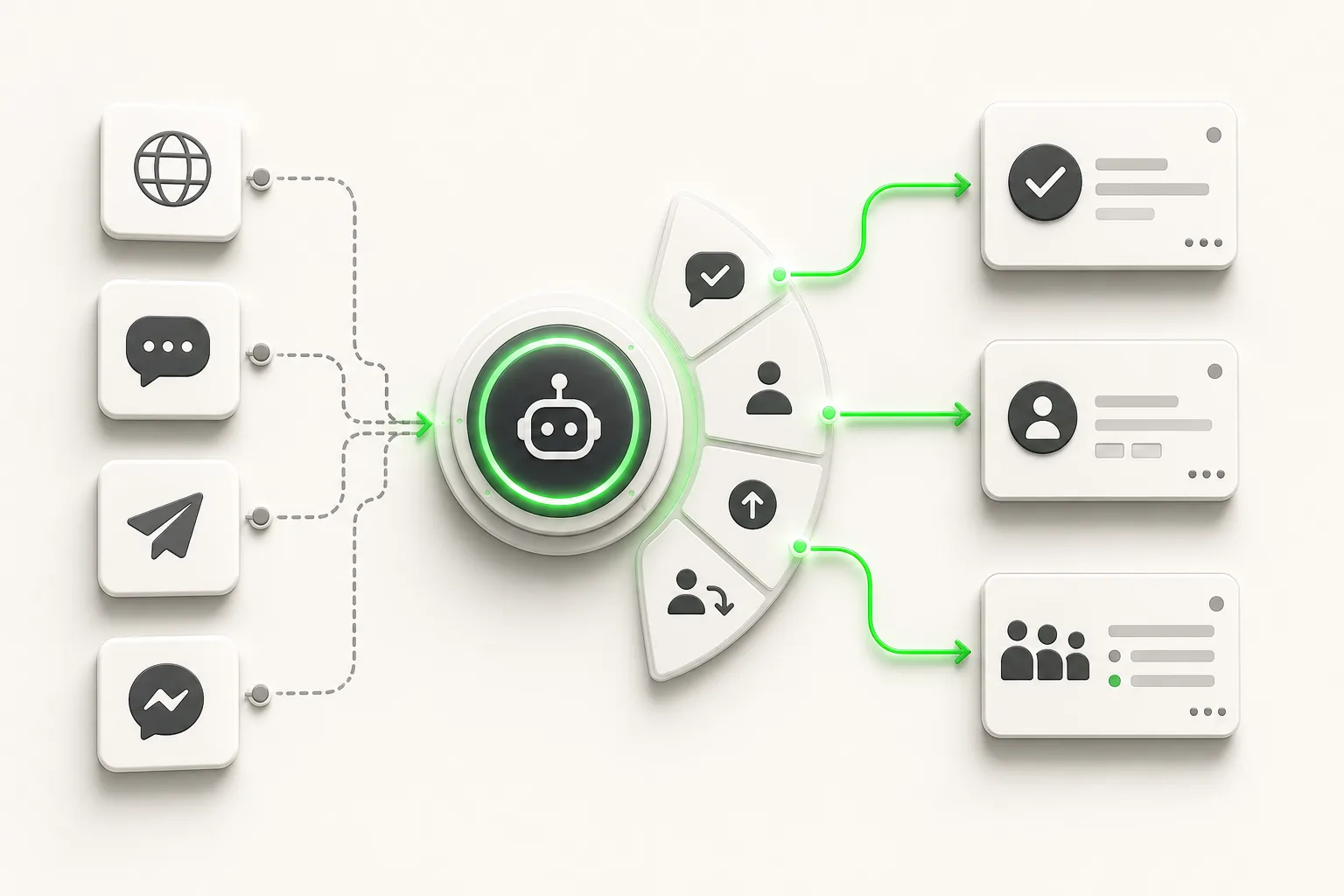
The chatbot runs simultaneously on Website chat, WhatsApp, Instagram DM, and Facebook Messenger — from a single configuration. You manage one knowledge base; the content serves all four channels. Each conversation generates a lead summary emailed to your team.
Plans start at $40 per month (Plus) with a 7-day free trial. If you would rather have the Hyperleap team configure your chatbot for you, Managed Setup is offered $299 Free. For the full breakdown of what each plan includes, see pricing.
For broader context on how AI agents work across different business types and industries, the AI agents overview covers the range of use cases. And if you are thinking about customer support automation more broadly — beyond just FAQ handling — how to automate customer support covers the full picture.
Build your FAQ chatbot today
Upload your FAQ document and go live in hours. 7-day free trial (card required, cancel anytime) — and Managed Setup available if you want us to do it for you.
See Plans and PricingFrequently Asked Questions
What is an FAQ chatbot?
An FAQ chatbot is an AI-powered assistant that answers customer questions in a conversational format, drawing its responses from documents you provide — your FAQ files, policies, product information, and help content. Unlike a static FAQ page, it understands natural language questions phrased in the customer's own words and delivers a specific, accurate answer instantly, without requiring the customer to search or scroll.
How is an FAQ chatbot different from a static FAQ page?
A static FAQ page requires customers to scan a list of pre-written questions to find one that matches their situation. An FAQ chatbot accepts the customer's question in their own phrasing, interprets the intent, and retrieves the relevant answer from your content. It also supports follow-up questions, can collect contact information from visitors who need further help, and generates analytics on what customers are actually asking.
How accurate are FAQ chatbot responses?
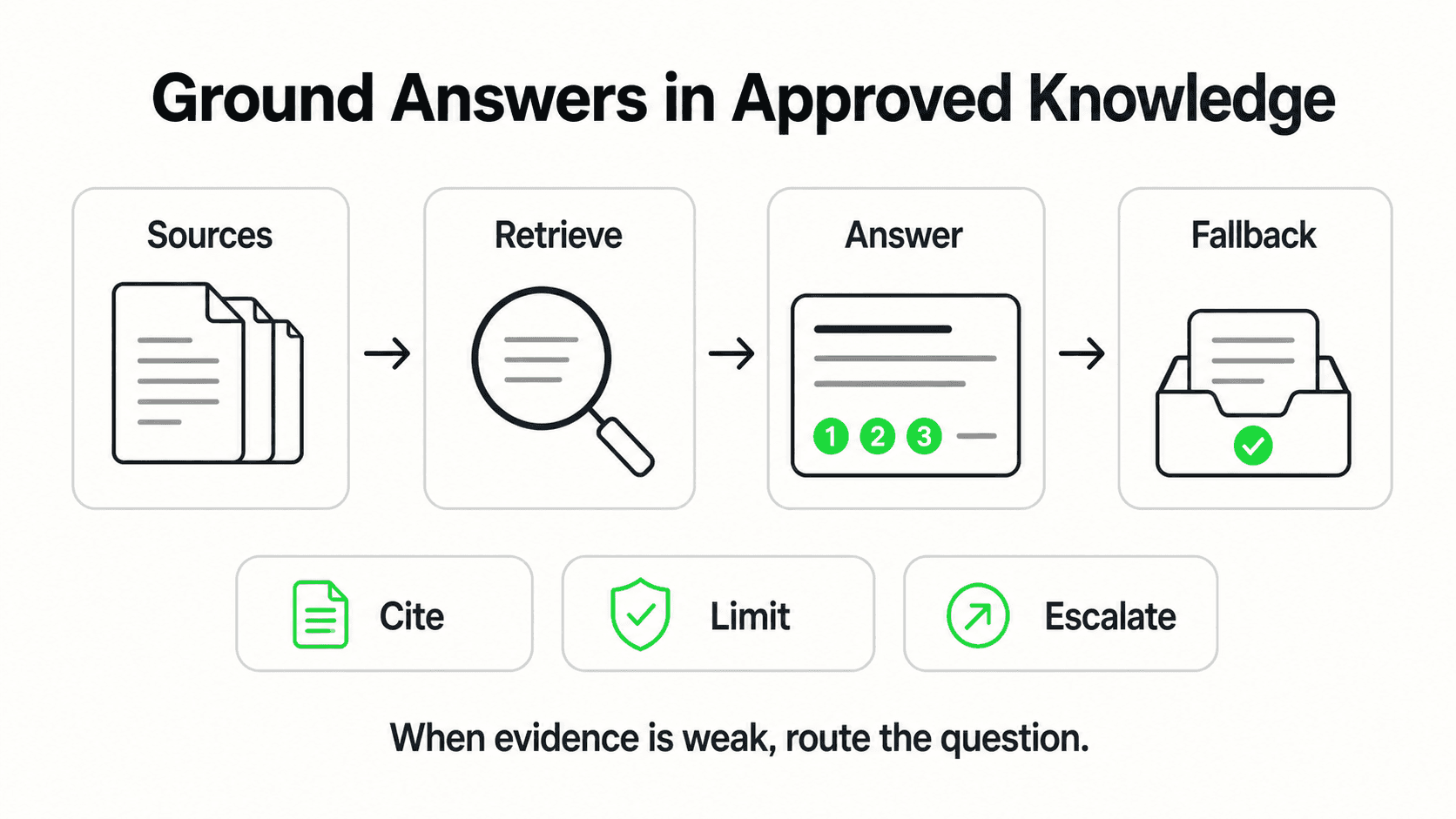
Accuracy depends primarily on the quality and completeness of the documents loaded into the chatbot. A system built on clear, current, comprehensive source content produces accurate answers. A system built on vague or outdated documentation will produce vague or outdated answers. Modern platforms use Retrieval-Augmented Generation (RAG) to ground responses in your specific documents — this is designed to minimize responses that go beyond what your content supports. No system eliminates all errors, which is why ongoing monitoring of conversation logs matters.
What content should I load into an FAQ chatbot?
Start with the documents that contain the answers to your twenty most frequently asked questions. Common sources include: your existing FAQ page, pricing documentation, product or service descriptions, return and shipping policies, cancellation terms, and any help articles you have published. Avoid loading internal-facing documents that contain jargon or context your customers do not share. Write source content in the same way you would explain it to a customer on the phone.
How long does it take to set up an FAQ chatbot?
With a no-code platform and reasonably well-organized FAQ content, most businesses have a working chatbot the same day they start. A realistic estimate for a business going from zero to a tested, live chatbot on their website is one to three days. The main variable is content preparation — if your FAQ materials are already organized and current, setup is fast. If they need to be written or reorganized, that is the work that takes time. If you want a faster path to launch, managed setup services handle the configuration for you, typically getting you live in three to five business days.
Related Articles
AI for Small Business Customer Service: Where to Start
A step-by-step guide to AI for small business customer service — triage your support load, choose buy vs. DIY vs. hire, set a budget, and roll out in 30 days.

Best Customer Service Software for Small Business (2026 Guide)
Compare the best customer service software for small business: help desks, live chat, AI agents, and shared inboxes — with an honest evaluation framework.

Customer Service Automation: The Complete Guide (2026)
Customer service automation done right: what to automate, what to keep human, which tools to evaluate, and how to roll it out without breaking what already works.

How to Automate Customer Support: A Practical Playbook
Learn how to automate customer support the right way — audit repetitive tickets, ground an AI agent in your docs, and keep humans where they matter most.