Infrastructure Management: A Practical Guide for SMBs
Learn the fundamentals of infrastructure management. This practical guide for SMBs covers core components, automation, best practices, and key metrics.

You're probably already doing infrastructure management, just without calling it that.
A staff member says the internet at one location is slow again. Your booking system hangs during busy hours. A file goes missing and nobody's sure whether it was deleted, never backed up, or saved on one person's laptop. Your website works fine most days, until the one day you run a promotion and customers hit errors at checkout.
For a small business owner, that doesn't feel like an “infrastructure” issue. It feels like lost sales, frustrated staff, and customers who may not come back. That's why this topic matters. Infrastructure management is less about racks, cables, and technical diagrams, and more about whether your business can operate smoothly when people need you most.
Table of Contents
- Why Infrastructure Management Matters for Your Business
- The Foundations of Your Digital Business
- Exploring the Core Components of IT Infrastructure
- Managing the Infrastructure Lifecycle and Governance
- The Role of Automation and IaC
- Practical Best Practices for SMBs
- Your First Steps in Infrastructure Management
Why Infrastructure Management Matters for Your Business
A common small business disaster begins subtly. You announce a sale, send the email, post on social media, and traffic picks up. Then the site slows down. Checkout pages stall. Staff can't tell whether the problem is the website host, the payment app, the internet connection, or an overloaded plugin. Customers don't wait around for a diagnosis. They leave.
That chain of events is what infrastructure management tries to prevent.
At a business level, infrastructure management means making sure the systems behind your website, phones, files, apps, and locations stay available, secure, and consistent. If your business has multiple branches, the stakes go up fast. One weak internet line, one expired device, or one poorly documented setup can create different customer experiences from site to site.
It's not an IT hobby. It's operational risk control
When owners hear “infrastructure,” they often picture enterprise data centers. But the same principle applies to a five-person office, a growing e-commerce store, or a multi-location clinic. If your systems fail, the customer experience fails with them.
Think about what customers notice:
- Speed: Pages load, payments go through, booking forms work.
- Reliability: Services are available during business hours, not just on good days.
- Trust: Their information is handled safely.
- Consistency: One location doesn't feel organized while another feels chaotic.
Practical rule: If a customer-facing system breaks and no one knows who owns it, documents it, or monitors it, you have an infrastructure management problem.
This is one reason the category keeps expanding. The Data Center Infrastructure Management market reached USD 4.3 billion in 2024, with projected CAGR of over 22.7% from 2025 to 2034, according to Global Market Insights on the DCIM market. You don't need a data center to learn from that trend. It shows how seriously organizations now treat the systems that keep operations running.
The business impact is immediate
Good infrastructure management helps you avoid the expensive kind of surprise. The kind that appears during a product launch, a holiday rush, or a Monday morning when every team member needs access at once.
For SMBs, the value is practical:
- Fewer interruptions: Staff spend less time chasing preventable issues.
- Better security habits: Systems get updated, monitored, and backed up.
- Cleaner growth: New locations, new hires, and new tools don't create as much chaos.
You don't need enterprise complexity to get these benefits. You need clear ownership, a simple plan, and a willingness to treat your tech setup like part of the business, not an afterthought.
The Foundations of Your Digital Business
A useful way to understand infrastructure management is to compare it to a building.
If you own a retail store, clinic, or office, you already know the basics. The building needs a foundation, electrical wiring, plumbing, locks, storage rooms, and a maintenance plan. Customers may never think about those systems, but they notice immediately when one fails.
Your digital business works the same way.
IT Infrastructure Management is the ongoing oversight of hardware, software, networks, and data centers to keep systems reliable, secure, and efficient, with a focus on maximizing uptime and minimizing disruptions, as explained in Atlassian's guide to IT infrastructure management.
The building analogy that makes it easier
Here's the simple translation:
- Servers are the structure: They hold up the apps and services your team uses.
- Networks are the roads and hallways: They let information travel between people, devices, and systems.
- Storage is the stockroom: It's where files, records, images, and business data live.
- Security is the locks and alarm system: It controls who gets in and what they can access.
- Monitoring is the maintenance crew: It spots leaks, outages, and unusual behavior before things get worse.
If one of those parts is weak, the whole business feels it. You may still be “open,” but operations become slower, riskier, and more expensive than they need to be.
What owners usually get wrong
Many SMBs grow in layers. One person sets up the Wi-Fi. A vendor installs software. Another employee buys a storage subscription. Someone's nephew configures the printer network. None of this seems dangerous while the business is small.
Then growth exposes the cracks.
A second location opens and doesn't match the first. Different teams use different logins and processes. Devices don't get replaced on schedule. Nobody knows where the most current files are stored. This is why infrastructure management matters. It creates order across systems that would otherwise drift apart.
Good infrastructure management isn't about owning more technology. It's about making the technology you already depend on behave predictably.
The core purpose in plain language
At the SMB level, the purpose comes down to a few basics:
Keep the business available Your website, shared files, communication tools, and core applications need to work when staff and customers need them.
Reduce disruption Problems will still happen. The difference is whether your team catches them early and recovers quickly.
Protect data Customer records, payment information, contracts, and internal files need clear safeguards.
Support growth without chaos Opening a new office or adding a new platform should feel like a controlled rollout, not a scramble.
What effective management looks like day to day
In practice, that usually includes:
- Proactive monitoring: Watching systems before users complain.
- Automated patching: Keeping software current without relying on memory.
- Security controls: Managing access, updates, and protective tools.
- Disaster recovery planning: Knowing how you'll restore operations if something fails.
For a non-technical owner, the big takeaway is simple. Your infrastructure is the hidden operational layer under every customer interaction and every internal workflow. When it's managed well, business feels smooth. When it's ignored, even small issues spread quickly.
Exploring the Core Components of IT Infrastructure
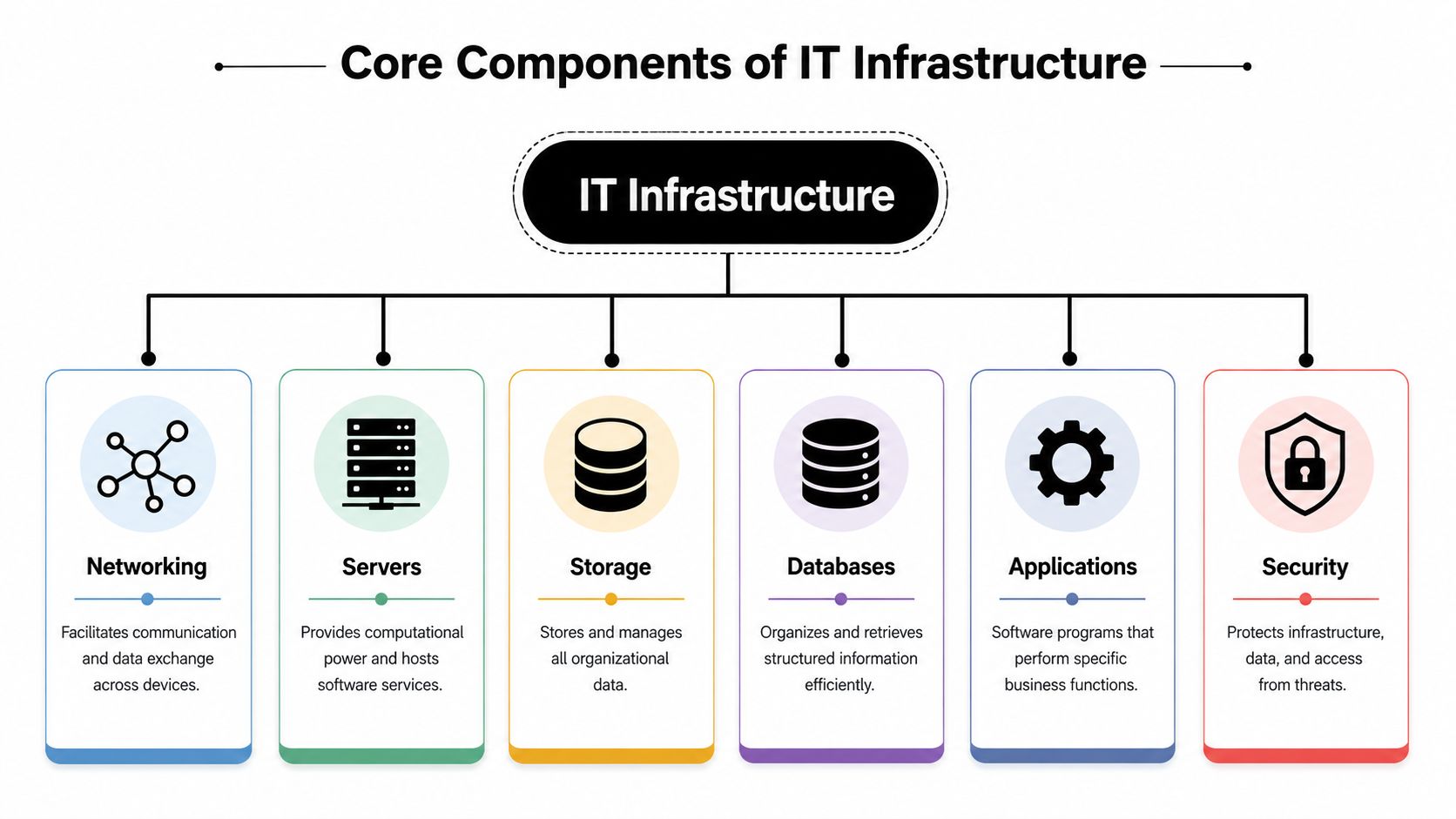
Before you improve infrastructure management, you need a clear picture of what you're managing. Most SMB environments come down to a handful of moving parts. They're less mysterious than they sound.
Networking
Your network is the road system of the business. It connects laptops, phones, printers, cloud apps, payment systems, and locations.
For one office, that may mean a router, Wi-Fi, and internet provider. For a multi-location business, it also includes how each branch connects securely and consistently. If the roads are congested or unreliable, everything on top of them slows down.
A business owner usually notices networking trouble as dropped calls, lagging cloud apps, card terminal delays, or staff saying, “The system is slow today.”
Servers
Servers provide the computing power behind your operations. In older setups, that might be a physical machine in a back room. In newer setups, it's often a cloud service running your website, files, apps, or databases.
The practical choice for SMBs is often not “Which is more advanced?” but “Which is easier to maintain with our budget and team?” Physical servers can offer control, but they also create maintenance responsibility. Cloud servers often reduce that burden and make it easier to support multiple locations.
Storage and databases
Storage is where your files live. Databases are where your structured business information lives, such as bookings, customer records, inventory, or orders.
These are related, but they're not the same thing.
| Component | Simple analogy | Business example |
|---|---|---|
| Storage | Filing room | PDFs, images, contracts, backups |
| Database | Organized index system | Customer records, appointments, product data |
This distinction matters because a business can have plenty of file storage and still struggle if its key data systems are poorly organized or poorly protected.
Applications
Applications are the tools your staff and customers interact with directly. That includes your CRM, accounting software, booking platform, email system, point-of-sale software, and website tools.
Owners often blame “the software” when something breaks. Sometimes that's true. But many software problems are really infrastructure issues underneath, such as weak connectivity, poor permissions, storage problems, or unmanaged updates.
If staff need three workarounds to complete one routine task, the application may not be the only problem. The underlying infrastructure may be making a simple tool feel unreliable.
Monitoring
Monitoring is the part many SMBs skip until after a failure. It's the practice of watching system health so issues can be spotted early.
Without monitoring, you find out about outages from customers and staff. With monitoring, you get warning signs sooner. That might mean noticing low storage space, repeated failed backups, unstable connections, or unusual spikes in system activity.
For a lean business, monitoring doesn't need to start with a complex platform. Even a basic dashboard and alert process can improve visibility.
Security
Security protects access to everything above. It includes account permissions, software updates, device controls, network protection, backup hygiene, and staff habits.
For multi-location companies, security also has a consistency problem. One location may follow good practices while another shares logins or delays updates. That gap creates risk, even if headquarters thinks standards are in place.
A simple way to think about these six components is this: networking moves information, servers process it, storage keeps it, databases organize it, applications use it, and security protects it. Infrastructure management is the discipline that keeps them working together.
Managing the Infrastructure Lifecycle and Governance
Infrastructure management doesn't end when you buy a device, sign up for a cloud tool, or open a new location. Every piece of infrastructure has a lifecycle. If you only focus on setup and ignore what happens later, complexity starts piling up.
That's where many SMBs get stuck. They add systems faster than they retire them.
The four lifecycle stages
A healthy setup usually follows four stages:
Planning
You decide what the business needs, what problem you're solving, and how the new system will fit with existing tools.Deployment
The system gets installed, configured, tested, and handed over for actual use.Operation
This is the long middle stretch. Systems are monitored, maintained, updated, and supported.Retirement
Old hardware, accounts, services, and data stores are decommissioned safely.
The retirement stage gets ignored more often than owners realize. Old laptops sit in closets. Former vendors retain access. Legacy subscriptions continue billing. Files remain scattered across old systems “just in case.”
According to the TIM framework from IVI, neglecting retirement phases can lead to infrastructure sprawl that degrades system performance by 15 to 20% over three years. Even if your business is much smaller than the environments discussed in technical frameworks, the lesson still applies. Old systems don't stay neutral. They create drag.
Governance is the rulebook
Governance sounds corporate, but for SMBs it's simply the set of rules that keeps infrastructure from becoming random.
Governance answers questions like:
- Who approves new tools
- Who has admin access
- How locations should be configured
- What happens when a device is replaced
- How data is archived or disposed of
For a multi-location business, governance is what keeps one branch from becoming a special case that nobody can support properly later.
Owner's shortcut: If every location buys, configures, and retires technology differently, your business isn't scaling. It's fragmenting.
Two practical controls that pay off quickly
A lightweight governance model can start with just a few habits:
- Maintain an asset list: Record devices, key software, owners, renewal dates, and where critical data sits.
- Create a retirement checklist: Before any device or service is removed, confirm data transfer, access removal, and secure disposal.
If you need a practical reference for disposal and end-of-life planning, this guide to IT asset strategy for secure data is useful because it frames retirement as a security issue, not just a cleanup task. For the policy side, these best practices for data security help business owners think through access, protection, and consistency.
The point isn't bureaucracy. It's control. Infrastructure governance helps you make repeatable decisions, especially when your business adds locations, staff, software, and vendors over time.
The Role of Automation and IaC
Manual infrastructure work has a hidden cost. It doesn't just take time. It creates variation.
One location gets a setting changed slightly differently from another. A new staff laptop is configured one way this month and another way next month. A website update goes live, but a backup step is forgotten because the usual person is out. These are ordinary business problems, and automation exists to reduce them.

Why automation matters for smaller teams
For SMBs, automation is less about replacing people and more about removing repetitive work that invites mistakes.
Useful examples include:
- Automatic software patching
- Scheduled backups
- User account provisioning for new hires
- Alerts when systems stop responding
- Consistent setup for devices across locations
A small team can't afford to rely on memory for these tasks. Automation turns important routines into repeatable processes.
IaC is a blueprint, not magic
Infrastructure as Code, often shortened to IaC, means describing infrastructure in a reusable, documented format so systems can be created and updated consistently.
The easiest analogy is an architectural blueprint.
If you build one new branch location from memory each time, every site ends up slightly different. If you build from a standard blueprint, the layout stays consistent and easier to maintain. IaC does that for digital systems. Instead of manually configuring everything from scratch, you define the setup once and reuse it.
That matters when your business is growing. If you need to launch a new environment, recover from failure, or align several locations, a documented blueprint is far more reliable than tribal knowledge.
One useful way to think about this shift is from “someone knows how to set it up” to “the business knows how it should be set up.”
For business owners exploring time-saving workflows more broadly, this overview of automation for small business is a good companion read because it connects automation to lean operations rather than enterprise complexity.
Governed automation works better than ad hoc automation
Automation still needs guardrails. Fast changes without oversight can spread mistakes quickly. Strong infrastructure management balances speed with control.
The ITU guidance on DCIM notes that when tools enforce governed change execution and credible telemetry and reconciliation, incident response times improve by 40%, which helps reduce unplanned downtime events. The language is technical, but the business lesson is simple. Automation works best when changes are visible, documented, and checked.
Here's a short explainer if you want the visual version before choosing tools or processes:
A sensible starting point
You don't need to jump straight into advanced tooling. Start where repetition already exists.
- If staff repeat the same setup steps, document and automate them.
- If updates depend on one person remembering, schedule them.
- If every location is slightly different, create a standard configuration.
- If recovery would be chaotic, define the rebuild steps clearly.
That's the core value of automation and IaC for SMBs. Not sophistication for its own sake. Consistency, speed, and fewer avoidable mistakes.
Practical Best Practices for SMBs
Most small businesses don't need a large infrastructure team. They need a short list of habits that lower risk and keep operations stable.
The mistake is assuming good infrastructure management must start with expensive tools. It doesn't. It starts with discipline around a few high-impact areas.
Focus on the boring basics first
The least glamorous tasks usually protect the business best.
- Standardize your core tools: Don't let every location choose different routers, storage methods, or business apps unless there's a clear reason.
- Turn backups into a routine: Backups shouldn't depend on one person's memory or one device staying healthy.
- Patch systems regularly: Old software creates reliability and security problems.
- Document recurring fixes: If staff solve the same issue twice, write down the steps.
- Assign ownership: Every critical system should have a named owner, even if that owner works with an external IT partner.
The fastest way to improve infrastructure management is often to remove ambiguity. Who owns this system? Where is the data? How do we restore it? What happens if this device fails?
Build for multi-location consistency
If you run several sites, consistency matters as much as raw technical quality. One branch using an improvised setup can create support headaches for everyone else.
A good low-cost approach is to create simple runbooks. These are short operating documents for common situations, such as internet outages, password resets, new device setup, printer replacement, or restoring access to a shared system.
They don't need to be elegant. They need to be usable.
Track a few metrics that actually matter
Many owners avoid monitoring because they assume they need a complex dashboard. In reality, a few metrics can tell you a lot about your environment.
| Metric | What It Measures | Why It Matters for Your Business |
|---|---|---|
| Uptime | Whether core systems stay available | Directly affects customer access and staff productivity |
| Response time | How quickly systems or apps react | Slow systems frustrate users even when they're technically online |
| Downtime frequency | How often services fail or become unavailable | Repeated small failures often signal bigger structural issues |
| Restoration speed | How quickly service is recovered after a problem | Recovery time shapes customer impact and staff disruption |
| Storage capacity utilization | How full your storage systems are | Running out of space can break backups, apps, and daily workflows |
| Network performance | The health and consistency of connectivity | Poor connections make cloud tools, calls, and transactions unreliable |
These are aligned with the kinds of operational indicators used in mainstream infrastructure management practice, especially around downtime, restoration speed, storage utilization, and network performance.
A practical order of operations
If your budget is tight, this is a sensible sequence:
Protect data first
Make sure backups exist, work, and are restorable.Stabilize connectivity
If staff and systems can't connect reliably, everything else suffers.Improve visibility
Add basic monitoring and alerting for your most important services.Reduce variation
Standardize devices, account practices, and setup procedures across locations.Document the repeatable stuff
The less your business depends on memory, the easier it is to grow.
This approach works because it respects how SMBs operate. Limited time. Limited budget. No appetite for bloated projects. Good infrastructure management at this stage is about preventing avoidable pain, not chasing technical perfection.
Your First Steps in Infrastructure Management
If all of this still feels big, shrink it down. Infrastructure management doesn't begin with a major overhaul. It begins with a clear look at what you already have and where it could fail.
Step one, audit what exists
Make a simple list of your critical systems.
That usually includes internet providers, Wi-Fi equipment, shared file storage, business applications, laptops, payment systems, backup tools, and any location-specific technology. For each one, note who owns it, where the data lives, and what happens if it stops working.
You're not aiming for perfection. You're trying to replace guesswork with visibility.
Step two, identify your biggest single risk
Most SMBs don't have ten urgent infrastructure problems. They have one or two serious weak points surrounded by smaller issues.
Common examples include:
- No reliable backup process
- One person holding all admin access
- A single internet connection with no fallback plan
- Different setups across branches
- Old devices still handling important work
Pick the risk that would hurt operations most if it failed tomorrow. That's your starting point.
Small businesses make progress faster when they solve the next meaningful problem, not when they try to modernize everything at once.
Step three, commit to one improvement in the next 30 days
Choose something concrete and finish it.
Good examples include documenting your shared systems, setting up automated backups, standardizing Wi-Fi hardware across locations, reviewing who has admin access, or creating a short outage runbook for staff. One completed improvement is worth more than a long list of intentions.
If you want a practical outside perspective for SMEs, this guide to Networking2000's IT management expertise offers a grounded view of how smaller organizations can approach infrastructure without overcomplicating it. And if your growth plans depend on customer systems talking to each other cleanly, this piece on CRM synchronization is worth reading because disconnected systems often create infrastructure headaches that show up as service issues.
Infrastructure management is really about business reliability. It helps you serve customers consistently, protect data responsibly, and grow without creating operational confusion at every new step. For SMBs and multi-location teams, that's not a luxury. It's part of building a business that can handle success.
If your business is also trying to improve customer response, lead capture, and consistency across locations, Hyperleap AI helps small teams automate conversations across website, WhatsApp, Instagram, and Facebook from one central knowledge base. It's a practical way to scale customer communication without adding headcount.