Chatbot CRM Integration 2026: HubSpot, Salesforce, Zoho
How chatbot-to-CRM integration works in 2026 — what data to push, real-time vs batch, and patterns for HubSpot, Salesforce, Zoho.

TL;DR: A chatbot that does not write to your CRM is a missed conversation. The hard part is not connecting the two systems — it is deciding what gets written, when it gets written, and how it survives duplicates, schema drift, and a sales rep who edits the same record from the other side. This guide covers what data the chatbot should push (lead, contact, deal, activity, custom fields), the real-time-vs-batch decision, integration patterns for HubSpot, Salesforce, Zoho, Freshworks/Freshsales, Pipedrive, Microsoft Dynamics, Close, and Kommo, plus the WhatsApp Business API → CRM play that matters most for WhatsApp-first markets. A reference architecture, a webhook payload example, and the failure modes nobody warns you about are at the end.
Chatbot CRM Integration Guide 2026: HubSpot, Salesforce, Zoho, Freshworks, and Beyond
Most "chatbot + CRM integration" articles tell you the integration exists. They do not tell you what to do with it.
The result is predictable. A chatbot drops a half-formed Contact into HubSpot every time someone says "hi." Three days later, the SDR queue is full of duplicates, the lead-scoring model is broken because every visitor now has the same score, and the marketing ops lead has quietly turned off the chatbot integration.
This guide is the version we wish existed when we started shipping integrations across HubSpot, Salesforce, Zoho, and Freshworks for our own customers. It is opinionated, technical, and WhatsApp-aware — which means the WhatsApp Business API gets first-class treatment, not a footnote.
Who this guide is for
RevOps leaders, growth engineers, and founders evaluating or rebuilding chatbot-CRM integration. You should be comfortable reading a JSON payload and the words "webhook" and "upsert."
Why chatbot-to-CRM integration is harder than it looks
A chatbot collects three kinds of signal during a conversation:
- Identity — name, email, phone, company, anything the visitor types or the chat widget captures that maps to a person.
- Intent — pricing question, demo request, support issue, churn risk, expansion signal.
- Context — the page they were on, the campaign that brought them, the products they asked about, the budget range, the geography.
Your CRM, meanwhile, has a fixed schema (Contact, Lead, Deal/Opportunity, Activity, Custom Object) and a set of business rules (lead routing, scoring, deduplication, stage progression). The integration's job is to translate fuzzy conversational signal into structured records without breaking the rules the CRM is enforcing on the other side.
That is harder than it sounds. The chatbot does not know whether sarah.miller@acmecorp.com is already a Contact owned by an AE in Austin, or whether it should create a Lead and let routing decide. It does not know whether "we are evaluating tools" should advance an existing Opportunity from Discovery to Evaluation, or whether that stage transition is restricted to a manual SDR action. It certainly does not know that your Salesforce admin added a required Industry__c field last Tuesday.
Every decision below is downstream of one question: who owns the truth, the chatbot or the CRM? The honest answer is "the CRM, always" — and the integration design follows from that.
What data the chatbot should push to the CRM
Before talking about transport (webhook, native, Zapier), decide on the payload. The minimum viable mapping looks like this.
1. Lead vs Contact — pick one model and stick to it
In HubSpot, everything is a Contact; "lead" is a lifecycle stage. In Salesforce, Lead and Contact are different objects; conversion is an explicit step. In Zoho and Freshworks, both objects exist and most teams use Lead as the inbox and convert to Contact + Deal at qualification.
The chatbot should not decide. The CRM admin should configure the target object once, and the chatbot writes there every time. Mixing the two — sometimes a Lead, sometimes a Contact — is the single biggest source of duplicate records we see in the wild.
2. The five fields to always write
Regardless of CRM, write these five fields on every chatbot-originated record:
email— the dedupe key. Lowercased, trimmed, validated.phone— secondary dedupe key, normalized to E.164 (+14155552671, not4155552671).source— set tochatbotor, better,chatbot:<bot-id>so you can split performance per bot.first_conversation_url— the landing page where the chat started. Marketing attribution dies without this.utm_*— capture and store all UTMs from the page. Even if your CRM has them, capture them at the chatbot layer.
3. Activity, not just identity
The conversation itself belongs in the CRM as an Activity (or Engagement in HubSpot, Task/Note in Salesforce, Event in Zoho). Push:
- The full transcript (or a link to it if PII rules apply).
- A one-line AI summary — "Asked about pricing for the Pro tier, annual billing, ~50 seats."
- Detected intent labels (
pricing,demo_request,support,competitor_mention). - Sentiment if you score it.
Sales reps will not read the transcript. They will read the summary. Without it, the integration is just a contact harvester.
4. Deal/Opportunity creation — be conservative
Do not create a Deal from every chatbot conversation. The right rule: create a Deal only when the conversation contains a qualifying signal — explicit demo request, pricing question with company size, competitor evaluation. Otherwise, create the Contact + Activity and let the SDR decide.
If you do create a Deal, set:
dealstageto your earliest stage (HubSpot: "Appointment Scheduled" or a custom "Chatbot Captured"; Salesforce: "Prospecting").amountonly if the visitor stated it. Never fabricate.closedateto a generous default (90 days) — most CRMs require it.pipelineexplicitly. Most teams have multiple, and the API default is rarely what you want.
5. Custom fields — map them once, write them every time
Every CRM has custom fields the chatbot can populate: Industry, Company Size, Use Case, Trial Status. Build the mapping in the chatbot's admin once. Do not let the chatbot guess field API names — drift will kill you. When the CRM admin adds Industry__c, the chatbot mapping should fail loudly, not silently.
Real-time vs batch sync — when each is right
This is the decision most teams get wrong. The default assumption is "real-time, obviously." The real answer is "depends on what you are syncing."
Real-time (webhook on every event) is correct for:
- New lead creation — sales needs to call within five minutes.
- Demo requests — must hit the rep's calendar instantly.
- Support escalations — latency = churn.
- High-intent triggers (pricing, competitor questions).
Batch (every 5–15 minutes, or hourly) is correct for:
- Conversation transcripts — nobody reads them in real time.
- Sentiment scoring updates.
- Engagement counters ("messages in last 30 days").
- Bulk re-syncs after schema changes.
Why it matters: every CRM has API rate limits. HubSpot's free tier is 100 requests / 10 seconds. Salesforce gives you 15,000 API calls/day on Enterprise. Zoho's free CRM gives 5,000/day, period. Push every typed character through the API and you will hit the ceiling by 11am, then the integration will silently fail and your sales team will think the chatbot is broken.
The right architecture: a queue between the chatbot and the CRM. High-priority events (lead created, demo requested) jump the queue and fire immediately. Low-priority events (transcript chunks, sentiment updates) batch.
Integration patterns: webhook, native, iPaaS, custom
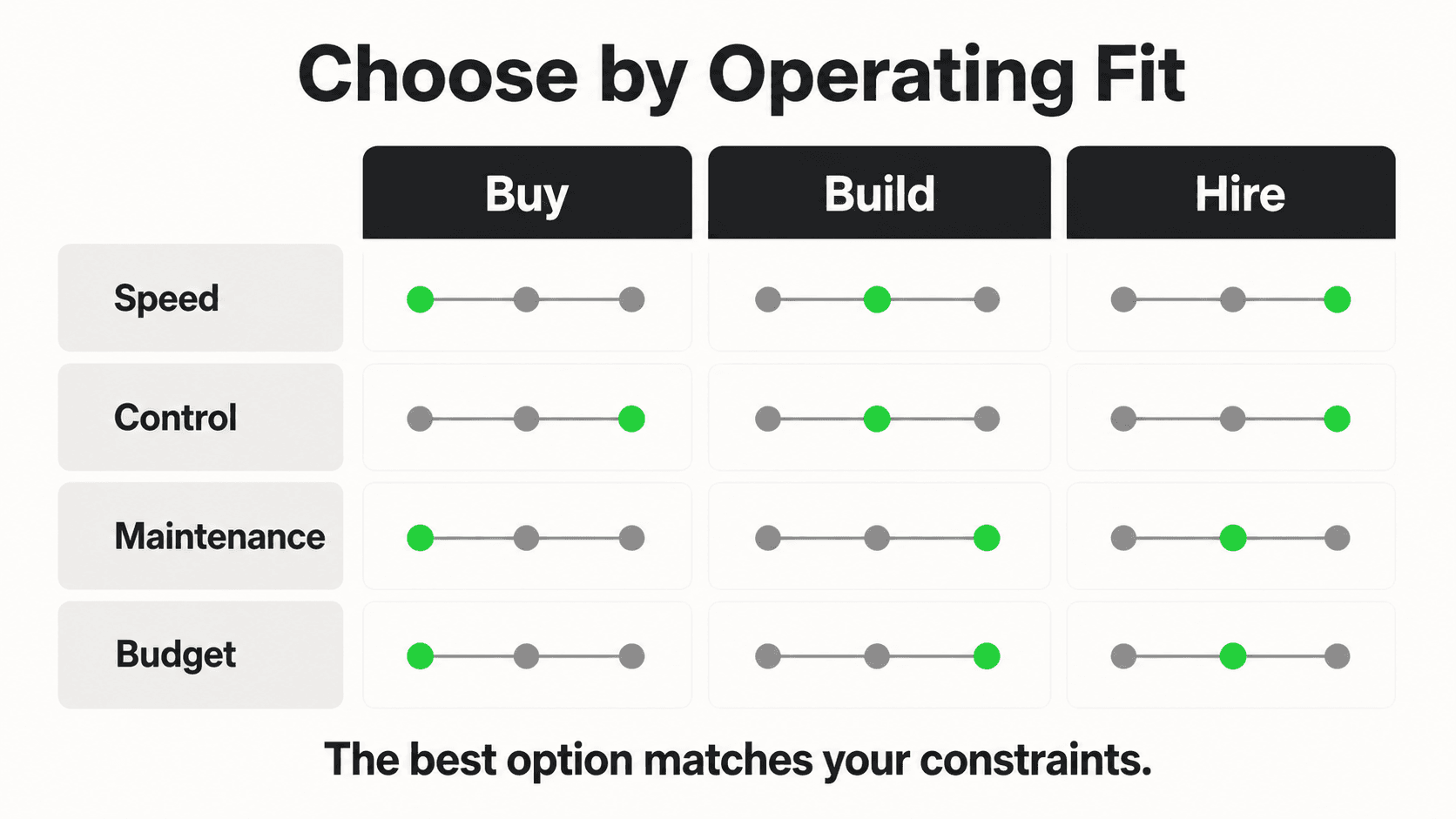
Four ways to connect a chatbot to a CRM. Each has a sweet spot.
Native integration
The chatbot vendor builds and maintains a first-party connector to the CRM, typically via OAuth.
- Best for: the 80% case. HubSpot, Salesforce, Zoho — if your chatbot vendor supports them natively, use that.
- Pros: field mapping UI, automatic schema discovery, OAuth refresh handled for you, dedupe usually built in.
- Cons: you are bound to whatever the vendor exposes. Custom objects often unsupported.
Webhook (chatbot → your endpoint → CRM)
The chatbot fires a webhook on conversation events. You own a small service that receives it, transforms the payload, and writes to the CRM API.
- Best for: custom logic — routing rules, multi-CRM fan-out, enrichment-before-insert.
- Pros: total control. You can call your dedupe service, your enrichment provider (Clearbit, Apollo), or a lead-scoring model before the record lands in the CRM.
- Cons: you operate it. Idempotency, retry, dead-letter queues — all yours.
iPaaS (Zapier, Make, n8n, Workato)
A middleware platform sits between chatbot and CRM, with a no-code mapping UI.
- Best for: marketing teams without engineering bandwidth, or a long tail of less-trafficked CRMs.
- Pros: fast to set up, easy to change, no code.
- Cons: per-task pricing scales painfully, transformation logic is fragile, debugging a failed Zap at 11pm is misery. Latency is usually 30 seconds to a few minutes.
Custom (direct CRM API from chatbot backend)
The chatbot's backend talks directly to the CRM API.
- Best for: when you are the chatbot vendor, or when you have unique CRM logic no off-the-shelf integration covers. If you are evaluating chatbot development frameworks, CRM-write ergonomics should be a top selection criterion.
- Pros: lowest latency, most control.
- Cons: you maintain the OAuth refresh, the schema drift, the rate limiting, all of it. Most teams underestimate this cost by 5x.
A decision tree
- Does your chatbot vendor have a native integration with your CRM? → Use it.
- Do you need custom routing, enrichment, or multi-CRM fan-out? → Webhook + your service.
- Is engineering blocked or is the CRM uncommon? → iPaaS (Zapier/Make).
- Are you the chatbot vendor? → Custom + native, in that order.
CRM-by-CRM: what actually works
| CRM | Native chatbot integrations? | Sync type | Best for |
|---|---|---|---|
| HubSpot | Yes — most chatbot vendors | Real-time webhook + batch | SMB to mid-market, marketing-led teams |
| Salesforce | Yes — via AppExchange, OAuth | Real-time (Platform Events) + batch (Bulk API) | Enterprise, complex sales motion |
| Zoho CRM | Yes — most India-focused vendors | Real-time webhook | India SMBs, cost-sensitive teams |
| Freshworks (Freshsales) | Yes — native + webhook | Real-time webhook | India and APAC mid-market, support-led GTM |
| Pipedrive | Yes — via Marketplace + webhook | Real-time webhook | Founder-led sales, simple pipeline |
| Microsoft Dynamics 365 | Limited native; mostly webhook + Power Automate | Batch + Dataverse events | Enterprises already on Microsoft 365 |
| Close | Yes — webhook + REST API | Real-time webhook | High-volume outbound teams, call-heavy GTM |
| Kommo (formerly amoCRM) | Yes — strong WhatsApp/chat focus | Real-time webhook | Messaging-first sales (LATAM, India, MENA) |
HubSpot
HubSpot is the easiest CRM to integrate with. Use the HubSpot Forms API for low-volume captures, the CRM API (/crm/v3/objects/contacts) for everything else, and the Conversations API for transcripts. HubSpot's Engagement object is purpose-built for chatbot activity — use it.
Use OAuth, not the legacy hapikey. HubSpot deprecated hapikey in 2022. Vendors still using it will break.
Custom properties get an internalName and a label — write to internalName. Schema drift is the #1 failure mode here.
Salesforce
Salesforce has the most powerful API and the most ways to mess up the integration. Some rules:
- Use the Composite API to insert a Lead and an Activity in one round trip. Two separate calls double your governor-limit usage.
- For high volume, use Platform Events (Pub/Sub) for real-time and the Bulk API 2.0 for batches > 200 records.
- Respect required fields. Salesforce admins add them constantly. Always read
describeSObjectbefore mass writes. - Lead conversion is its own ceremony —
Lead.convertLeadcreatesContact + Account + Opportunity. The chatbot should rarely do this; let the SDR.
Zoho CRM
Zoho is dominant in many SMB segments globally, particularly across India and APAC. Two things to know:
- Zoho's Workflow Rules can fire on any record creation. Build dedupe and routing as Zoho workflows, not in the chatbot. The CRM is the source of truth for routing.
- Zoho gives different API limits per edition. The Free edition is 5,000 calls/day total — not enough for any real chatbot. Anyone deploying a chatbot to a Zoho Free CRM will brick the integration in week one.
- Use the Zoho COQL (CRM Object Query Language) for dedupe lookups before insert. It is dramatically faster than
searchRecords.
Freshworks (Freshsales)
Freshsales is the dark-horse winner in India and APAC. Native chatbot integration is via Freddy AI, but the open API works well for any vendor — and pairs well with most live chat alternatives that ship CRM connectors.
- Use the Lead Scoring API to push chatbot-derived signals (intent, engagement) into Freshsales' built-in scoring model.
- Freshsales' Sales Sequences can be triggered by an API call when the chatbot detects a high-intent signal — a clean handoff pattern.
- Freshchat (Freshworks' own chat) writes directly into Freshsales without any of this. If you are already Freshworks, evaluate Freshchat first.
Pipedrive
Pipedrive is deal-pipeline-first. Map chatbot output to:
- A
Person(always). - An
Activity(always — the conversation). - A
Deal(only if qualified).
Pipedrive's webhook system is reliable. The API is straightforward. The trap is that Pipedrive's Person deduplication is by name + organization, not email — turn on email-based dedupe in settings before integrating anything.
Microsoft Dynamics 365
Dynamics integration almost always goes through Power Automate (the iPaaS) or Dataverse (the underlying data platform). Direct API integration is technically possible via the Web API, but every Dynamics customer we have shipped to ended up using Power Automate — it is what their admins know.
For real-time, use Dataverse Webhooks on Contact/Lead create. For batch, the Dataverse Web API with $batch is your friend.
Close
Close is built for outbound-heavy sales teams. Its API is REST, well-documented, and chatbots integrate cleanly via webhook or direct API. Close has a particularly good Smart Views system — surface chatbot-originated leads in a dedicated view for SDRs.
Kommo (formerly amoCRM)
Kommo is messaging-native. WhatsApp, Telegram, Instagram DM, and Facebook Messenger are first-class channels, and the Salesbot feature is genuinely good. If your GTM is WhatsApp-first (most India D2C and real estate is), Kommo is worth evaluating against Zoho and Freshworks.
Two-way sync: chatbot reading from CRM
Most articles cover chatbot → CRM and stop. The other direction is where the magic is.
When a known contact returns and starts a chat, the chatbot should pull from the CRM:
- Owner — "Hi Sarah, I see your account is owned by Mike. Want me to ping him?"
- Lifecycle stage — Don't ask a paying customer if they want a demo.
- Open deals — "I see you have a renewal in 30 days. Anything blocking?"
- Recent activities — Continuity. The chatbot should know about last week's email exchange.
- Custom segmentation — VIP customers get the support queue jump, free-tier visitors get self-serve docs first.
Pulling from the CRM on every message is rate-limit suicide. The pattern: pull once at conversation start, cache for the conversation, invalidate on hard CRM events (deal stage change, owner change). Push events from the CRM to the chatbot via webhook so the cache stays warm.
De-duplication and lead scoring
The chatbot is a deduplication problem before it is anything else.
Dedupe before insert, always
The naïve pattern — POST /contacts with the chatbot's payload — creates duplicates. The right pattern:
GET /contacts?email=<lowercased>(or the CRM's equivalent search).- If found,
PATCHthe existing record. Append the activity. Update thelast_chatbot_interaction_attimestamp. - If not found,
POSTa new record. - Wrap the whole thing in an idempotency key. If the chatbot retries the webhook, you do not want two records.
Phone-as-secondary-key matters in India. Many WhatsApp-originated leads have no email. Normalize to E.164, dedupe on phone first, fall back to email.
Lead scoring on the CRM side
Do not score leads inside the chatbot. Push the signals to the CRM, score there.
Signals worth pushing as custom fields or activities:
chatbot_messages_count— engagement depth.chatbot_last_intent— last detected intent label.chatbot_pricing_questions_count— high-intent flag.chatbot_competitor_mentions— array of competitor names.chatbot_avg_sentiment— rolling sentiment.
The CRM (HubSpot's scoring, Salesforce's Einstein, Zoho's lead-scoring rules) takes these signals and combines them with email opens, page views, demo bookings. That is where scoring belongs.
Reference architecture
Described in text so you can rebuild it on a whiteboard:
[ Visitor on website / WhatsApp ]
            │
            ▼
[ Chatbot Runtime (LLM + tools) ]
            │
            ├──── reads CRM context (cached, 5 min TTL) ────► [ CRM API ]
            │
            ▼
[ Event Bus / Queue ]
   ├── high-priority → [ Webhook Service (your code) ] ──► [ CRM Write API ]
   └── low-priority  → [ Batch Worker (every 5 min) ] ───► [ CRM Bulk API ]
            │
            ▼
[ Dead-letter queue + retry + alerting ]
            │
            ▼
[ CRM (HubSpot / Salesforce / Zoho / Freshworks) ]
   ├── Workflow rules (routing, dedupe, scoring)
   └── Outbound webhook on stage change ──► back to chatbot cache
Five components, in priority order:
- Event bus between chatbot and CRM writer. Without it, every CRM hiccup takes the chatbot down with it.
- Idempotent writer service — every CRM API call carries an idempotency key, retries with backoff on 5xx, dead-letters on 4xx after one retry.
- Cache layer for CRM reads — Redis, 5-minute TTL, invalidated by CRM webhooks.
- Schema-aware mapper — reads the CRM's
describeSObject/ properties API on startup, fails the integration build if expected fields are missing. - Observability — every chatbot conversation has a trace ID that follows it into the CRM. When sales says "this lead is wrong," you can replay the conversation and the CRM writes.
Webhook payload — a real example
Here is the shape of the JSON payload our customers' chatbots send to a webhook service before it writes to HubSpot/Salesforce/Zoho:
{
  "event_id": "evt_01HQ8X9F2K3M5N7P9R1S3T5V7W",
  "event_type": "lead.qualified",
  "occurred_at": "2026-05-04T11:23:45.123Z",
  "bot_id": "bot_acme_pricing",
  "conversation_id": "conv_01HQ8X8R7T6Y5U4I3O2P1A9S8D",
  "visitor": {
    "email": "sarah.miller@acmecorp.com",
    "phone": "+15125550142",
    "name": "Sarah Miller",
    "company": "AcmeCorp Industries",
    "country": "US"
  },
  "context": {
    "source_url": "https://hyperleap.ai/pricing",
    "referrer": "https://www.google.com/",
    "utm_source": "google",
    "utm_medium": "cpc",
    "utm_campaign": "us-pricing-q2",
    "session_id": "sess_01HQ8X8R..."
  },
  "intent": {
    "primary": "pricing_inquiry",
    "labels": ["pricing", "team_plan", "annual_billing"],
    "qualification_score": 78,
    "competitor_mentions": ["intercom"]
  },
  "transcript": {
    "summary": "Asked about Pro tier pricing for a 50-seat team based in Austin. Wants annual invoicing and a demo. Comparing against Intercom.",
    "messages": 14,
    "duration_seconds": 312,
    "transcript_url": "https://app.hyperleap.ai/conv/01HQ8X8R...",
    "sentiment": "positive"
  },
  "crm_target": {
    "object": "contact",
    "create_deal": true,
    "deal_stage": "appointment_scheduled",
    "owner_routing": "round_robin:us_ae"
  }
}
Notes on the shape:
event_idis the idempotency key. Receivers must reject duplicates by ID.event_typeis a verb-noun.lead.qualifiedis different fromlead.created— the receiver picks a different code path.crm_targetis an explicit instruction, not a guess. The chatbot tells the writer service what to do; the writer service does not infer.
Common failure modes (and how to avoid them)

We have shipped a lot of these integrations. The same five things break every time.
1. Duplicate leads
Cause: POST without dedupe, race conditions on near-simultaneous chats, email casing, phone formatting.
Fix: Lowercase emails, normalize phones to E.164, idempotency keys on every write, dedupe-on-read before insert.
2. Broken stage transitions
Cause: chatbot writes a Deal with a stage the CRM admin has restricted, or moves a deal backwards.
Fix: Read the pipeline definition from the CRM API on integration startup. Cache it. Validate before write. Never let the chatbot write to a stage that requires manual approval.
3. Schema drift
Cause: CRM admin adds a required field. Chatbot integration doesn't know. All writes start failing.
Fix: Healthcheck that runs describeSObject (Salesforce) / properties (HubSpot) / fields (Zoho) every hour and alerts on schema diffs. Fail loud, not silent.
4. Rate-limit cliffs
Cause: Chatbot pushes every message as a separate API call. Hits daily limit at 11am. Fix: Queue + batch. Real-time only for the events that matter. Monitor remaining quota and alert at 70%.
5. GDPR / DPDP issues
Cause: Storing transcripts with PII in a CRM that is not DPDP-compliant, or pushing data into an EU CRM from an Indian visitor without consent capture.
Fix: Capture consent at the chatbot level, store the consent record alongside every CRM write (consent_given_at, consent_text_version), and respect the visitor's region. India's DPDP Act (2023) has real teeth — purpose_of_processing should be in your payload.
The DPDP / GDPR rule of thumb
If the chatbot collects email or phone, it is collecting personal data. The conversation must capture and timestamp consent before that data lands in the CRM. "By chatting with us you agree…" in the bot's footer is not enough — it must be an explicit checkbox or affirmative response, and the consent record must travel to the CRM as a custom field.
The India play: WhatsApp Business API → CRM
If you sell in India, WhatsApp is the chatbot. Your website chat is secondary.
The flow:
- A lead clicks a "Chat on WhatsApp" link or a Click-to-WhatsApp ad.
- The conversation lands in your WhatsApp Business API provider (Gupshup, AiSensy, Wati, Interakt, Twilio, 360dialog, or Meta Cloud API direct).
- A chatbot answers, qualifies, books the demo.
- The conversation must land in the CRM, with the WhatsApp number as the primary key.
Patterns that work:
- Phone-as-primary-key. WhatsApp leads rarely give an email until later. Dedupe on E.164 phone. Add email when they share it.
- Click-to-WhatsApp attribution. Meta passes the ad ID and CTWA CLID in the first inbound message. Capture both, push to CRM as
ctwa_clidandad_idcustom fields. Without this, Meta ads → WhatsApp → CRM attribution is broken. - Templates ≠ conversations. WhatsApp's 24-hour service window matters. The CRM should track the
last_inbound_atso reps know whether they need a template or can free-text. - Provider-CRM fit. Kommo, Zoho CRM, and Freshworks/Freshsales all have native WhatsApp integrations. AiSensy and Wati have native Zoho/HubSpot connectors. Use them — building WhatsApp-API-to-CRM from scratch is six weeks of work.
WhatsApp + CRM is the integration that drives the most revenue per integration-hour-spent in India. Treat it as a first-class CRM channel, not an afterthought.
Where Hyperleap fits
Hyperleap chatbot — native CRM integrations
Hyperleap ships native, OAuth-based integrations with HubSpot, Zoho CRM, and Salesforce, plus a configurable webhook for everything else (Freshworks, Pipedrive, Microsoft Dynamics, Close, Kommo, custom CRMs). Field mapping, dedupe-on-write, idempotency, and the WhatsApp Business API → CRM flow are built in — no middleware, no Zapier surcharge. See how it works.
A 14-day rollout plan
If you are starting from zero, here is the order:
- Days 1–2: Pick the CRM target object (Lead vs Contact). Lock the five required fields. Decide native vs webhook vs iPaaS.
- Days 3–5: Wire the integration in a sandbox CRM. Test dedupe on 50 fake leads.
- Days 6–7: Add the activity/transcript push. Validate with three real reps that the summary is what they want.
- Days 8–9: Add the two-way sync — chatbot reads CRM context on conversation start.
- Day 10: Add monitoring — quota usage, write success rate, dead-letter queue depth. Alert on each.
- Days 11–12: Run a soft launch on 10% of traffic. Hand-audit every record.
- Days 13–14: Full launch. Schedule a 30-day review of duplicate rate, dead-letter rate, and rep-reported quality.
Most teams skip days 5, 8, and 10. They are the ones that come back six months later wondering why their CRM is full of garbage.
Conclusion
Chatbot-CRM integration is not a checkbox. It is a series of small, opinionated decisions: which object you write to, which fields are required, which events deserve real-time, where the dedupe runs, who owns the truth.
Get those right and the chatbot becomes the highest-fidelity lead-capture channel you have. Get them wrong and you have a duplicate-generation machine your sales team will quietly ignore.
Pick the patterns above that fit your stack. Skip the rest. Then go ship.
Further Reading

Authoritative external sources used and recommended for further research on this topic:
- Anthropic research and product documentation
- Google Search Central documentation
- Gartner customer service research
Frequently Asked Questions
What is an AI chatbot in business terms?
A customer-facing chat agent that answers questions, qualifies inquiries, and captures leads 24/7. Modern AI chatbots are grounded in your business content (not the open internet) and run across your website and messaging channels with the same persona and knowledge.
How is Hyperleap different from a chat widget or a live chat tool?
Live chat tools route to humans; basic widgets follow scripted flows. Hyperleap is an AI agent grounded in your content — it understands intent, retrieves from your knowledge base, qualifies leads, and escalates only when needed. Same answers across website, WhatsApp, Instagram DM, and Facebook Messenger.
How long does it take to set up an AI chatbot with Hyperleap?
Most SMBs go live in 3–5 days for self-serve setup. With Managed Setup ($299 Free, available on every plan), Hyperleap builds the bot for you on your content and channels. A 7-day free trial is included on every plan.
Which channels does the chatbot run on?
Hyperleap deploys the same AI agent across four channels: your website widget, WhatsApp Business, Instagram DM, and Facebook Messenger. SMS, Slack, Telegram, MS Teams, and voice are on the roadmap and are not shipped yet.
Related Articles
Chat vs Voice AI Receptionists: An Honest Comparison
Chat vs voice AI receptionists compared honestly: cost, setup, lead quality, and which fits phone-first vs message-first small businesses.

AI Chatbot for Pest Control: Stop Losing Jobs to Silence
A pest control chatbot answers roach, rodent, and termite inquiries 24/7, books same-day service, and handles the calls your team can't pick up.

AI Chatbot for Nonprofits: Donor Engagement at Scale
How nonprofits use AI chatbots to answer donor questions, capture volunteer signups, and route program inquiries — without adding headcount or losing the personal touch.
Best AI Chatbot for WhatsApp Business 2026: Buyer Guide
WhatsApp is the highest-converting channel for most SMBs in 2026. Here's what a serious AI chatbot for WhatsApp Business actually needs to do.