Patient Appointment Scheduling: Automation Guide 2026
Automate patient appointment scheduling. This guide covers journey mapping, tool selection, no-show reduction, and measuring clinic success.
Your front desk already knows the problem. The phones ring while patients are checking in, a voicemail is waiting from someone who wants the last opening this afternoon, a provider is running late, and two people need to reschedule before lunch. Manual scheduling doesn't fail because your staff isn't working hard enough. It fails because the system asks humans to juggle too many moving parts at once.
That's why patient appointment scheduling has become an operations issue, not just an admin task. A modern scheduling system has to protect staff time, make booking easier for patients, reduce gaps in the calendar, and still leave room for exceptions, urgent needs, and equity concerns that software alone can miss.
Table of Contents
- Why Manual Patient Scheduling Is Holding Your Practice Back
- Map Your Patient Journey Before Choosing a Tool
- Choosing and Integrating Your Scheduling Automation Stack
- Enforce Verification and Champion Data Privacy
- Proactively Reduce No-Shows and Address Care Equity
- Measure Your Performance and Optimize for Success
- From Scheduling Tool to Strategic Patient Engagement
Why Manual Patient Scheduling Is Holding Your Practice Back
A manual schedule looks manageable until the day gets busy. Then the cracks show fast. Phone-based booking creates a queue before care even starts, and staff spend their attention switching between callers, in-person patients, provider requests, and calendar corrections.

The industry has already moved in a different direction. The global patient scheduling software market was valued at approximately USD 629.8 million in 2024 and is projected to reach USD 1,542.6 million by 2033, growing at a 10.5% CAGR from 2025 to 2033. In the same market, cloud-based deployment accounted for about 76% of share in 2024, which shows how strongly clinics are moving away from older on-premise scheduling setups toward more accessible systems (patient scheduling software market data).
The real cost of staying manual
Most clinics don't feel the pain as one dramatic failure. They feel it as constant friction:
- Front desk overload means staff answer the same availability questions repeatedly instead of solving higher-value patient issues.
- Calendar errors show up as double-booked slots, wrong visit lengths, and openings that never get filled.
- After-hours demand gets lost because manual scheduling usually stops when the office closes.
- Provider time gets distorted when a short follow-up is booked like a complex first visit, or the reverse.
Manual scheduling turns every exception into human labor.
That's also why practices often underestimate how much scheduling affects the rest of the operation. If your calendars are fragmented across providers, rooms, locations, and channels, even simple coordination becomes harder. Teams that are still patching that together with shared phones and ad hoc workarounds can benefit from simple coordination habits first, including effective iPhone calendar sharing strategies when multiple staff members need a cleaner view of availability.
Automation is about control, not convenience
Good automation doesn't remove judgment. It removes repetitive decisions that shouldn't require judgment in the first place. Patients should be able to book the right appointment type, at the right location, with the right provider rules already applied. Staff should step in for exceptions, not every routine request.
That's the shift to make in 2026. Patient appointment scheduling isn't just about making the front desk quieter. It's about building a system that scales without making patients feel processed.
Map Your Patient Journey Before Choosing a Tool
Buying software before mapping workflow is how clinics end up with expensive friction. The tool isn't usually the first problem. The hidden problem is that nobody has documented what should happen from first contact to follow-up.
A scheduling platform can only automate the process you give it. If your visit lengths are vague, your reminder points are inconsistent, or your staff handles similar booking requests in different ways, the software will automate confusion.
Start with visit types, not software demos
A proven methodology begins with an audit of schedules over several weeks. Categorize visits into short, medium, and long appointments, then track actual in and out times to refine the estimates before you build those rules into the scheduler (appointment scheduling methodology from ACP).
In practice, that means getting specific. A dental clinic shouldn't treat a cleaning, an emergency pain visit, and a root canal consult as variations of the same “appointment.” A med spa shouldn't book every consultation into one standard slot if provider prep and room turnover differ. A primary care office shouldn't guess how long medication follow-ups take based on habit.
Use a simple working table like this during your audit:
| Visit type | Initial expected length | Actual observed pattern | Scheduling note |
|---|---|---|---|
| New patient consult | Longer | Often includes paperwork delays | Don't place back-to-back without cushion |
| Routine follow-up | Shorter | Usually stable | Good candidate for self-scheduling |
| Procedure visit | Longer | Room prep affects flow | Tie slot to room and staff availability |
| Same-day urgent request | Variable | Disrupts schedule if unmanaged | Hold protected capacity daily |
Practical rule: If the staff says “it depends” about visit length, that appointment type isn't ready for automation yet.
Map every patient touchpoint around the appointment
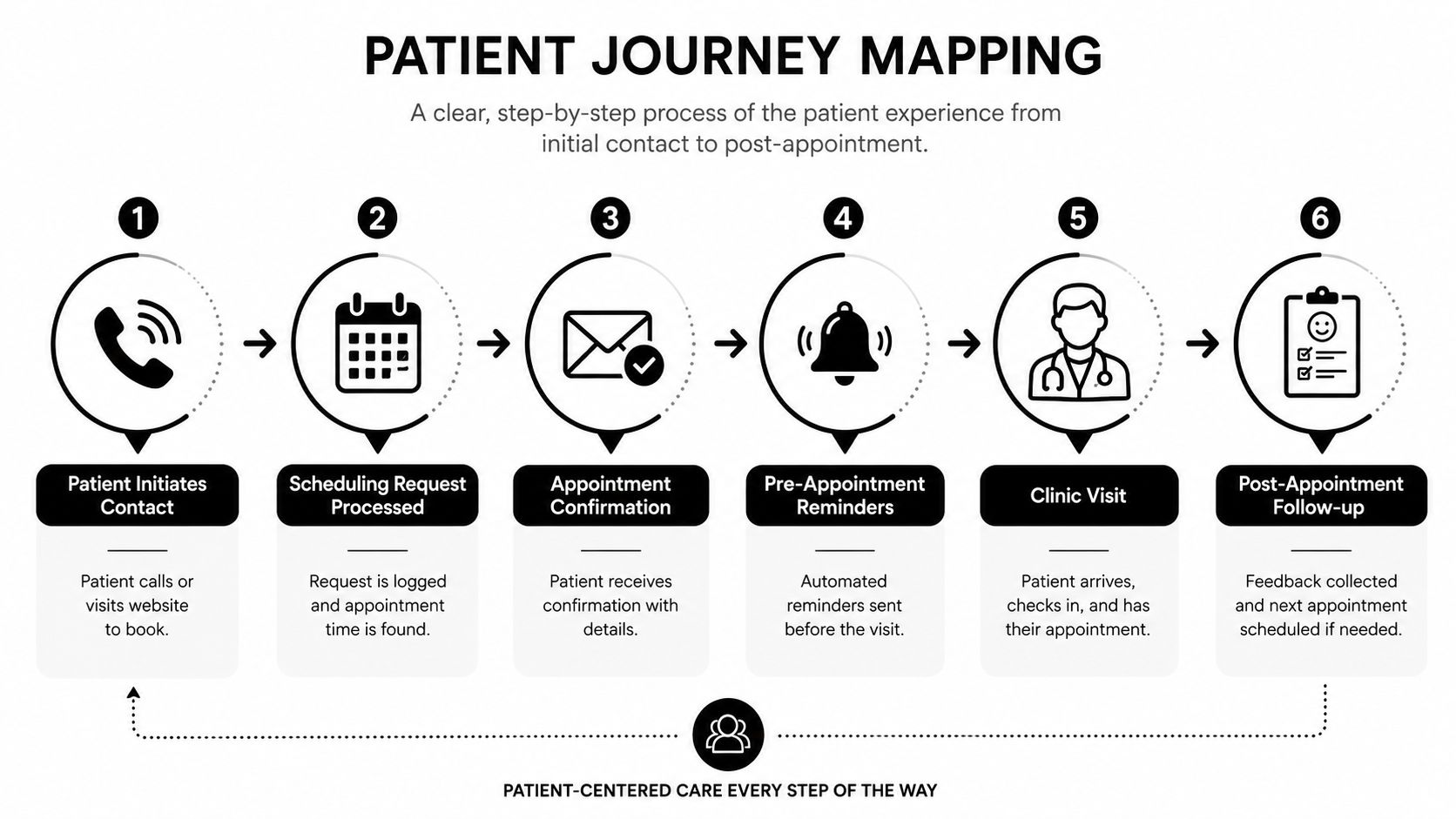
Once visit types are defined, map the communication journey around them. The booking itself is only one step. Most clinics need to document at least these moments:
- Initial request through phone, website, chatbot, referral, or messaging.
- Triage or routing to determine provider, service, and location.
- Confirmation so the patient knows the appointment is real and correct.
- Reminder sequence before the visit.
- Arrival and check-in with any intake dependencies.
- Follow-up for feedback, recall, or next appointment booking.
This walkthrough is worth watching if your team needs a visual example of how scheduling flow breaks down in real operations:
A useful patient journey map also captures where patients get stuck. Maybe new patients abandon the process when they have to wait for a callback. Maybe established patients reschedule often because reminder timing is poor. Maybe staff manually re-enter website requests because the form and calendar don't connect.
Those aren't software features. They're workflow failures. Fix the map first, then choose the tool that matches it.
Choosing and Integrating Your Scheduling Automation Stack
Once the workflow is mapped, the technology decision gets much easier. You're no longer asking, “Which scheduler has the most features?” You're asking, “Which stack handles our routing, booking, reminders, and follow-up without forcing staff to babysit it all day?”
That distinction matters because most clinics don't need one giant platform to do everything equally well. They need a clean stack where each layer has a clear job.
Compare the stack by job, not by feature list
The strongest patient appointment scheduling setups usually combine a few parts:
| Layer | What it handles | What to watch for |
|---|---|---|
| Core scheduling calendar | Provider availability, appointment rules, booking pages | Multi-location logic, appointment type controls, rescheduling |
| Intake or routing layer | Captures reason for visit and directs patient correctly | Can it prevent wrong bookings before they happen? |
| Reminder and recall system | Confirms visits, reduces no-shows, brings patients back | Two-way messaging matters more than one-way blasts |
| Waitlist logic | Fills cancellations quickly | Needs usable staff workflows, not just automation claims |
Online appointment scheduling is already proven to help operations. AI-powered platforms report 87% fewer no-shows compared to traditional methods and can reduce appointment wait times by 60% to 80%, according to the verified data compiled here (online appointment scheduling statistics). That's why the stack should be judged on practical flow, not on glossy dashboards.
If you're early in your software search, broad comparisons of best small business booking solutions can help you separate lightweight booking tools from systems that support more structured workflows.
What a practical integration should look like
A basic scheduler works if patients already know what they need and which provider to choose. That's not always true in healthcare. Many booking errors happen before the calendar appears.
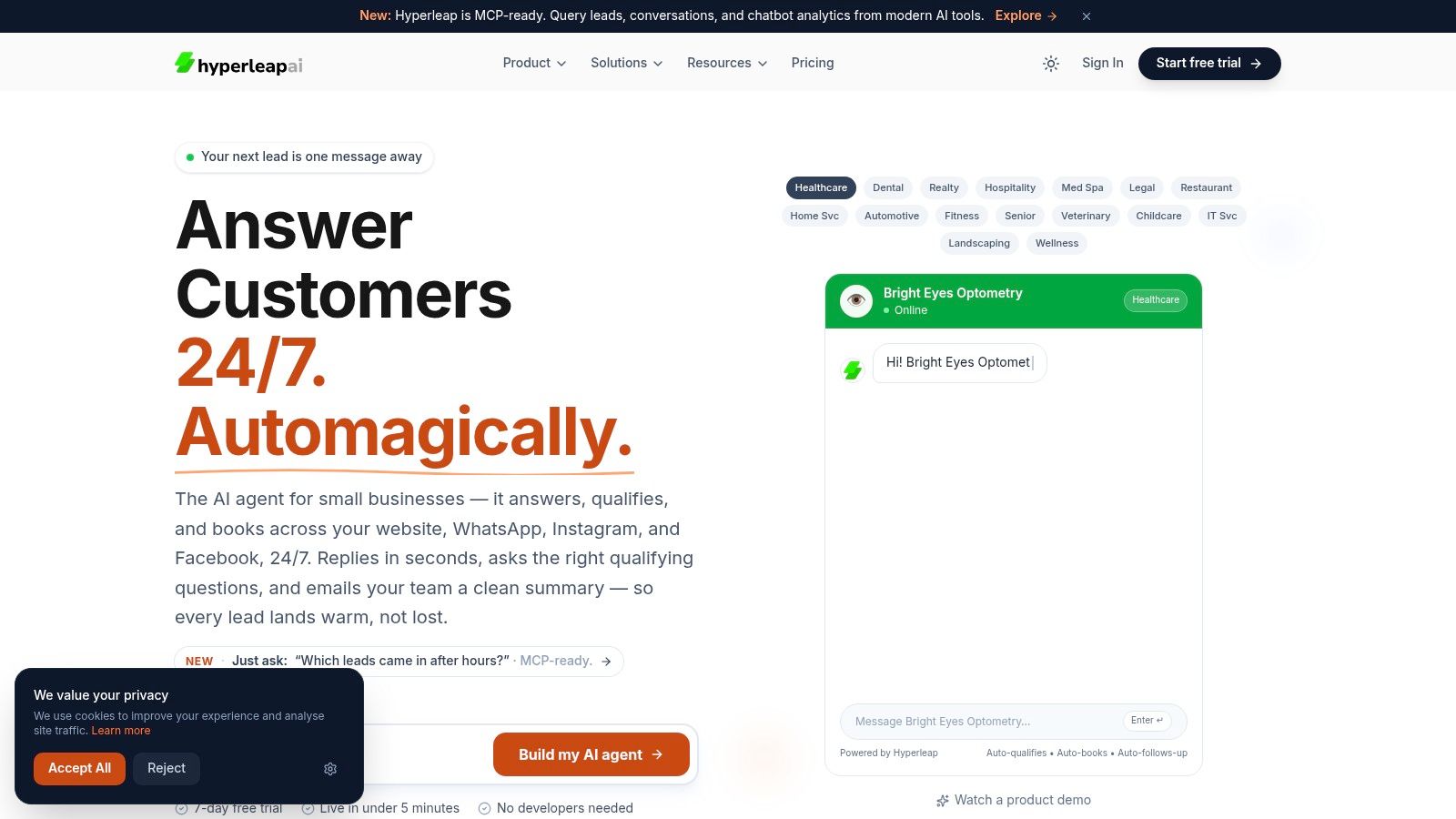
A better model is to put an intelligent front door in front of the calendar. A chatbot on the website or on messaging channels can ask a few structured questions, clarify service type, answer routine questions, and then send the patient to the correct booking path. In a multi-location operation, it can route by service, geography, or provider availability instead of dumping everyone onto one generic calendar page.
That's where clinics often compare tools like Calendly or Cal.com for the calendar layer, then add a conversational intake layer on top. One option in that category is Hyperleap AI, which can route website or messaging conversations into scheduling flows and connect people to booking tools at the right moment. Teams considering that model can also review how an AI receptionist for small business works when the goal is to qualify inbound demand before it reaches the schedule.
The right stack doesn't just book faster. It prevents avoidable booking mistakes upstream.
When you evaluate vendors, focus on three questions:
- Can it route correctly? If the system can't distinguish between appointment types, locations, or provider rules, your staff will still be cleaning up its work.
- Can it fit your channels? Website-only booking misses patients who start on WhatsApp, Instagram, or referral pages.
- Can it support verification and follow-through? A full calendar means little if half the bookings are low intent, incomplete, or unreachable.
That's the difference between automation that saves labor and automation that creates a second queue behind the scenes.
Enforce Verification and Champion Data Privacy
Scheduling in healthcare isn't a simple ecommerce checkout. A booked slot reserves clinician time, room time, and staff attention. If the booking is fake, incomplete, or created through an insecure workflow, the damage reaches both operations and trust.
That's why verification and privacy belong in the design phase, not in a compliance folder someone opens after launch.
Verification protects real capacity
Most clinics have seen some version of this problem. A patient enters the wrong phone number. Someone books speculatively and disappears. Staff can't confirm the visit, but the slot sits there until it's too late to recover.
A practical fix is phone verification with a one-time password before the appointment is finalized. That doesn't solve every attendance issue, but it does tie the booking to a real, reachable contact. It also improves downstream communication because reminders, follow-ups, and rescheduling messages have a far better chance of reaching the right person.
Verification matters even more when you open self-scheduling across multiple channels. The easier you make booking, the more you need guardrails that keep the calendar trustworthy.
Privacy choices shape patient trust
Patients don't separate “operations” from “privacy” the way internal teams often do. If they're asked to share details through a third-party tool, they want to know the process is legitimate and respectful.
That means vetting every scheduling or chatbot vendor for healthcare use. Review what data the tool collects, where it lives, how messages are handled, and whether your team can limit what gets exposed in routine booking conversations. If you're evaluating conversational systems for healthcare intake and scheduling, this overview of HIPAA-compliant AI chatbots for healthcare is a useful starting point for the questions to ask.
A few practical standards help:
- Limit data collection to what's necessary for booking and follow-up.
- Separate routing from diagnosis so the scheduling layer doesn't invite oversharing.
- Review access controls so front desk staff, managers, and vendors only see what they need.
- Define fallback steps for patients who don't want to use digital channels.
Privacy is part of patient experience. People notice when your process feels careful, and they notice when it feels careless.
Clinics sometimes frame these controls as barriers to convenience. In practice, they do the opposite. They make self-service scheduling believable.
Proactively Reduce No-Shows and Address Care Equity
A full schedule can still hide an access problem. I have seen clinics cut open slots with automation, then realize three months later that the patients missing visits are still the same groups. The system got faster. It did not get fairer.
No-show reduction works best when it is built around patient behavior, communication barriers, and access needs, not just efficiency targets.
Reminder programs should reflect how patients actually respond
Automated text and email reminders can increase kept appointments by 20% to 30% compared with manual phone calls alone, and outpatient care commonly deals with 15% to 25% no-show rates, according to the benchmark data summarized in appointment reminder benchmarks and scheduling pitfalls. That makes reminders a strong early use case for scheduling automation.
The operational mistake is sending the same reminder sequence to everyone.
Patients do not have the same phone access, language preferences, work schedules, transportation reliability, or comfort with portals. A single-channel workflow often works best for the patients who already have fewer barriers. It tends to fail the people your clinic has the hardest time reaching.
Set up reminder logic with a few practical rules:
- Use two-way reminders so patients can confirm, cancel, or request a callback.
- Offer more than one contact method for patients who do not reliably respond to text alone.
- Keep a live waitlist so canceled appointments can be filled quickly.
- Record outreach preferences by patient and update them when staff learn something new.
- Route unresolved reminder responses to staff when a patient signals confusion, transportation trouble, or a need to reschedule.
For many clinics, the best reminder system is not the most advanced one. It is the one staff can monitor, adjust, and explain to patients. Teams looking for a practical model can review this guide on reducing no-shows in a dental practice with automated reminders, then adapt the workflow to their own visit types and patient population.
Efficiency rules can create unequal access if nobody checks them
Scheduling software often includes prioritization logic. It may rank appointment offers, suggest overbooking patterns, or flag patients as high risk for no-shows. Those features can help throughput. They can also shift inconvenience onto the same populations that already face longer waits, less flexible work hours, and weaker digital access.
Verified reporting on this issue notes both the upside of automated reminders and the risk that some scheduling systems can extend wait times for Black patients through biased prioritization rules, as discussed in reporting on algorithmic bias in scheduling systems.
Clinic managers should treat this as an operations review, not a theoretical ethics exercise.
Use a short fairness check before trusting automated scheduling decisions:
| Question | Why it matters |
|---|---|
| Who gets the next available slot? | Prioritization rules can favor patients who are easiest to process, not those with the greatest need |
| Who is offered less convenient times after a missed visit? | Risk scoring can turn one missed appointment into slower future access |
| Which patients complete booking digitally, and which need staff help? | A portal-first design can screen out patients with limited digital access |
| Can staff override the system easily? | Human review prevents rigid rules from causing avoidable harm |
One simple policy helps: never let a predicted no-show score determine access on its own. Use it to guide outreach, not to push people to the back of the line.
A patient-centered scheduling system reduces empty chairs without making access less fair.
That usually means automating reminders, confirmations, waitlist fills, and routine rescheduling, while keeping a human path open for patients who need flexibility or support. Clinics that do this well do not remove the human touch. They reserve it for the moments when it matters most.
Measure Your Performance and Optimize for Success
A scheduling launch can look successful in week one and still create new problems by month two. The calendar fills. Staff stop complaining about manual booking. Then patients start waiting longer for certain visit types, reminder complaints increase, or front-desk staff rebuild workarounds outside the system.
That is why measurement has to be practical. The goal is not a bigger dashboard. The goal is to spot where access, workload, and patient experience are drifting out of balance, then correct them early.
Build a small dashboard your team uses
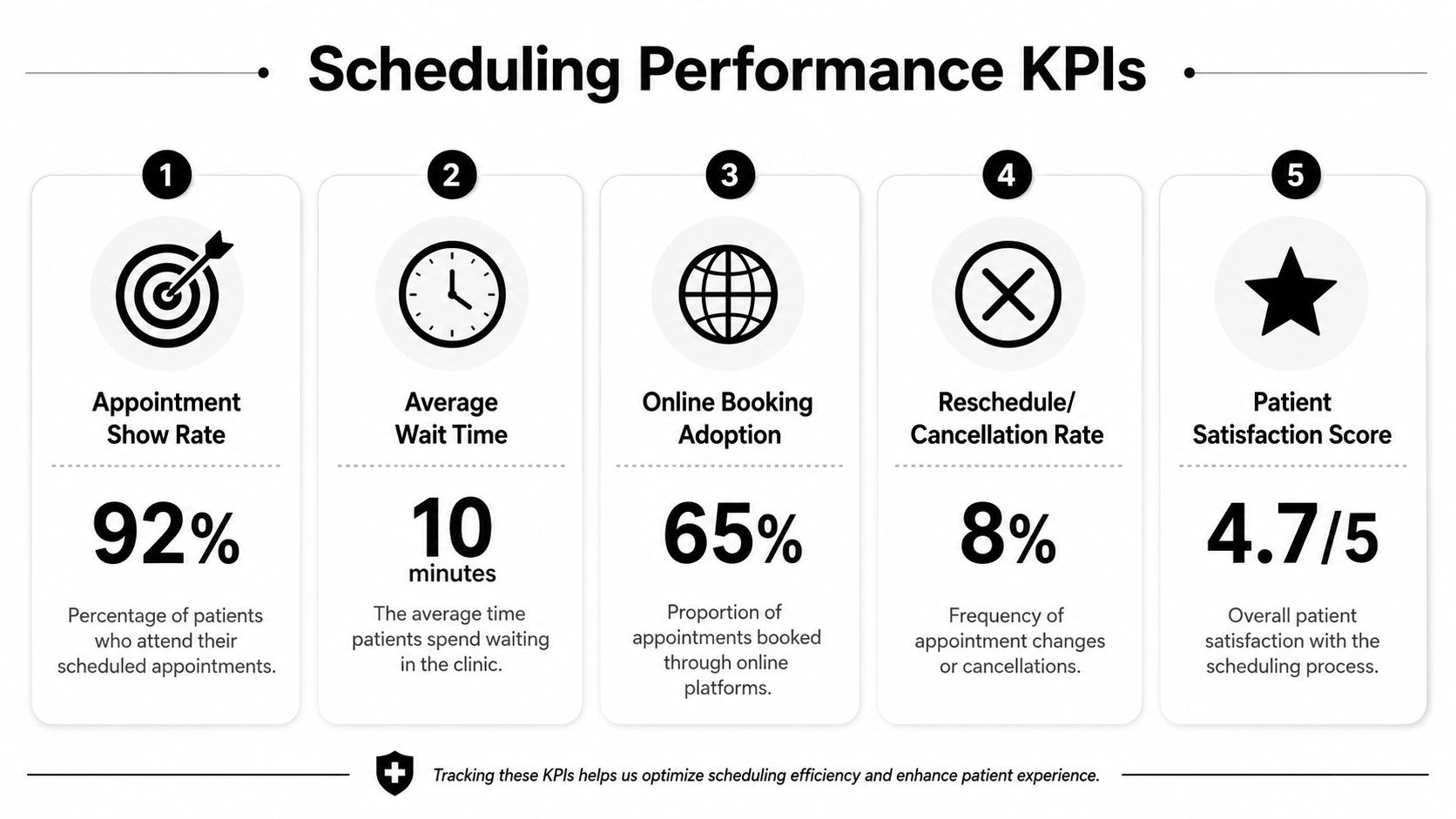
Start with a weekly review that a clinic manager, front-desk lead, and operations owner can read in ten minutes. If the report takes too long to pull or nobody knows what to do with it, it will die.
Track a short set of measures tied to decisions:
- Show and no-show patterns by provider, location, visit type, and booking channel.
- Average time to book from patient request to confirmed appointment.
- Reschedule and cancellation patterns to identify friction in reminder timing, visit type selection, or pre-visit instructions.
- Staff intervention rate to show how often automation still needs manual correction.
- Patient feedback themes related to booking, reminders, and check-in.
Add one more view that many clinics miss. Break a few of these measures out by patient group, language preference, insurance type, or booking channel when appropriate and compliant. If self-scheduling works well for portal users but creates delays for patients who rely on phone support, the system is efficient for one group and weaker for another.
Measure where access gets harder, not just where the schedule looks full.
Use the data to change operations
Good review meetings end with operational decisions. If short visits routinely run long, adjust visit lengths or add buffers. If one service line has repeat reschedules, confirm that patients understood the reason for the visit and the prep required. If staff keep overriding the same automation rule, the rule probably needs to change.
Outreach data deserves the same discipline. As noted earlier, reminder response patterns often differ across patient populations. A clinic may get better confirmation rates with text for some patients and better follow-through with a text-plus-call approach for others. That is not a reason to make access harder. It is a reason to match communication to patient need.
A practical monthly review should produce four decisions:
- One scheduling rule to refine, such as visit length, provider template logic, or buffer placement.
- One communication workflow to update, such as reminder timing, channel mix, or follow-up for unconfirmed visits.
- One equity check to review, such as wait times, booking completion, or reschedule rates across patient groups.
- One staff pain point to remove, especially where manual cleanup is creeping back in.
I usually tell clinic leaders to watch for one warning sign above all: staff creating side processes to protect patients from the system. When that happens, the automation is not fully serving real workflow. It may also be missing patients who need a different booking path, more explanation, or direct human help.
Optimization is ongoing work. The clinics that get the most value from scheduling automation are not the ones with the most reports. They are the ones that keep adjusting the system so it stays efficient, fair, and easy for patients to trust.
From Scheduling Tool to Strategic Patient Engagement
The strongest scheduling systems don't feel like scheduling systems to patients. They feel clear, responsive, and easy to trust. That is the true standard.
When clinics automate well, staff stop spending their day on repetitive calendar maintenance and start spending more time on exceptions, reassurance, and in-person service. Patients get faster access, clearer communication, and fewer dead ends. Managers get a cleaner view of where demand, bottlenecks, and missed opportunities sit.
The important shift is this. Patient appointment scheduling shouldn't be treated as isolated front-desk software. It's the operational front door to your practice. If that front door is confusing, insecure, or unfair, the rest of the care experience starts on unstable ground. If it's designed well, automation supports both efficiency and dignity.
That's why the best scheduling project isn't the one with the most features. It's the one that helps the right patient book the right visit, through the right channel, with the right amount of human support.
If you're building a more structured scheduling workflow and want a conversational layer for routing questions, qualifying inquiries, and sending patients into booking flows, Hyperleap AI is one option to evaluate alongside your core scheduler. It can handle website and messaging conversations, route users to booking tools, and support verified lead capture, which can be useful for clinics trying to automate access without losing control of the process.