AI-Native Sales Team: Query Your Chatbot via MCP
Dashboards are a pre-LLM artifact. AI-native sales teams query live chatbot data in plain English from Claude, ChatGPT, and Cursor. How to get there in 90 days.

TL;DR: The dashboard is an artifact of a world where the only way to make data accessible to non-developers was to pre-package every possible question into a chart. That world is over. The AI-native sales team does not open a CRM tab — they ask a question in Claude Desktop, get a synthesized answer in seconds, and move on. The protocol that makes this real today is called MCP. And the teams adopting it first are building an unfair advantage over everyone still clicking through filters.
The AI-Native Sales Team: Why Dashboards Are a Pre-LLM Artifact
Let me say something that will age either as obvious or as provocative depending on when you read it: the sales dashboard is going to look as dated as the spreadsheet-as-database in five years.
Not because dashboards are bad engineering. They were brilliant engineering — for a world without LLMs.
Think about why dashboards were invented. Before large language models, extracting insight from raw data required one of two things: a developer who could write a SQL query, or a product team that could pre-package every useful question into a chart, a filter, a pivot table. Dashboards were the compromise. They put structured, pre-answered questions in front of the people who needed answers — salespeople, managers, founders — without requiring them to touch raw data.
That constraint no longer exists.
When you can type "which leads from last week have not had a follow-up and came in through the WhatsApp channel?" and get a clean answer in natural language, the pre-packaged chart is not a feature. It is a workaround for a problem that has been solved.
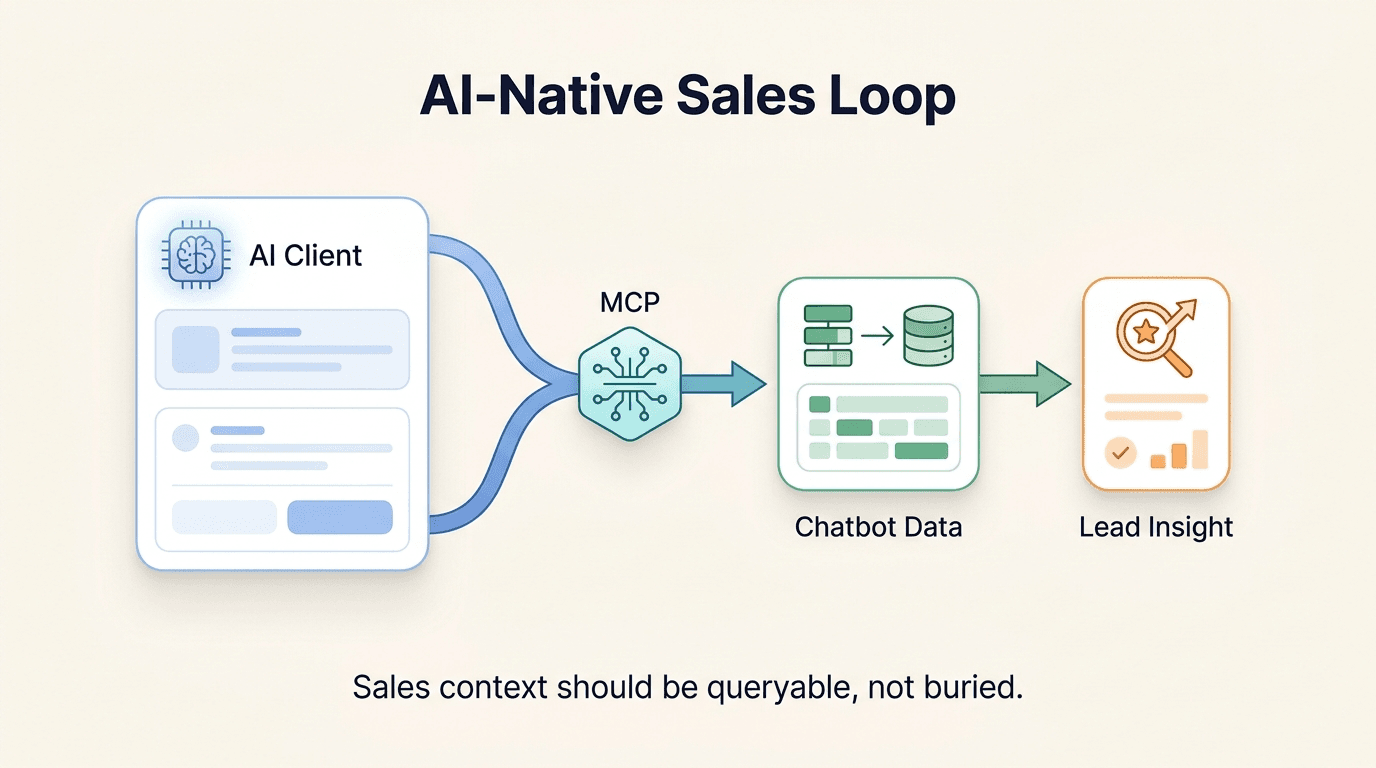
The shift is architectural. What changed is not just the capability of the model — it is the emergence of a standardized protocol that lets LLM clients talk to live data sources. That protocol is the Model Context Protocol, or MCP. It was open-sourced by Anthropic in late 2024, and it is quietly becoming the lingua franca of AI-native tooling.
MCP lets any LLM client — Claude Desktop, Cursor, Raycast, Continue.dev — connect to a data source through a defined interface. The client calls tools, the server returns structured data, the model synthesizes the answer. No scraping. No copy-paste. No tab switching. The question is the interface.
The AI-native sales team does not wait for a BI team to build a new chart. They ask the question. Today.
What an AI-Native Sales Team's Day Actually Looks Like
This is not a thought experiment. The following three personas represent how forward-leaning sales organizations are operating right now, using Hyperleap AI's MCP integration alongside Claude Desktop and similar clients. The workflows are real; the data in the prompts is anonymized.
The Founder Running Their Own Sales
It is 7:45 AM. Before opening email, before checking Slack, before touching the CRM, the founder opens Claude Desktop with the Hyperleap MCP server connected.
Three questions. Five minutes. Done.
Prompt 1: "Give me a quick digest of the leads that came in overnight. Who looks qualified? What did they ask?"
The model pulls the newest leads, reads their conversations with the chatbot, looks for buying signals (pricing questions, demo requests, specific use-case mentions), and returns a ranked summary. Not a list of rows. A synthesized read with the three highest-priority leads flagged.
Prompt 2: "Any leads from this week who asked about integrations or pricing but haven't heard from us yet?"
The model cross-references what each lead asked the chatbot with your team's notes and activity log. A lead with no notes and no activity since it arrived is a lead nobody has followed up. It surfaces the gaps — not as a filter the founder has to apply manually, but as a direct answer.
Prompt 3: "Compare leads from the two weeks since we updated the chatbot's knowledge base with the two weeks before. Are their conversations longer, and are more of them reaching Qualified?"
That third question is the one that would have taken a BI analyst an afternoon two years ago. Today the model works it out in one go: it splits recent leads by the date they arrived, checks the message count on each lead's conversations, and compares the stages they've reached.
The founder closes Claude, opens email, and responds to the three leads flagged in the digest. Their pipeline review just happened before breakfast without opening a single dashboard.
The Sales Manager
It is Friday afternoon. In a pre-MCP world, the sales manager's weekly transcript review looked like this: open the CRM, filter by week, click into each conversation, read transcripts, take notes, compile a summary doc, schedule a coaching call. Two to three hours, minimum, if they were thorough.
With the Hyperleap MCP connected in Claude Desktop, the same review takes under thirty minutes.
Prompt: "Review this week's chatbot conversations and our team's notes on those leads. Identify what objections came up most and where conversations dropped off. Then, for each of our three reps, check whether their notes and follow-ups match what the lead actually asked, and suggest one specific thing they should do differently next week. Pull actual quotes from the transcripts where relevant."
The model reads the week's transcripts and the notes each rep wrote, then identifies patterns — the pricing objection that keeps appearing in long conversations, the product comparison question that always leads to a handoff, the moment where one rep's follow-up misses what the lead actually asked. It returns a structured coaching brief.
The manager spends the thirty minutes they saved having a better conversation instead of preparing for one.
This is what coaching sales reps from AI chatbot transcripts looks like in practice — not as a feature demo, but as a Friday afternoon ritual.
The RevOps Lead
The RevOps lead does not think of themselves as a salesperson. They think of themselves as an infrastructure person. They have Cursor open. They are writing the weekly board update.
Halfway through the slide on pipeline health, they hit a question they cannot answer from memory: how many leads did each chatbot and channel bring in over the past month, and how far have those leads moved through the pipeline?
In the old world: open the CRM, export to CSV, open a spreadsheet, pivot, draw a chart, copy-paste into the slide deck. Twenty minutes, minimum.
Prompt inside Cursor: "Using the Hyperleap MCP tools, count the leads created in the past 30 days by chatbot and by channel, and show what share of each group has reached Qualified or later. Call out anything that changed partway through the month."
The model pages through the leads, groups them by chatbot and channel, compares where each group sits in the pipeline, and spots the shift (illustrative example: WhatsApp leads in the second half of the month reaching Qualified far less often than website leads). It returns a paragraph the RevOps lead pastes directly into the board update, lightly edited.
The slide took four minutes instead of twenty. The board update is accurate to the current day, not to the last export.
The Tooling Shift: From CRM-as-Destination to CRM-as-Data-Backend
Here is what is actually changing architecturally, stripped of the hype.
The old model: the CRM is a destination. People go there. They log in, navigate the UI, apply filters, read rows, take notes, and leave. The CRM is the primary interface for understanding sales data.
The new model: the CRM is a data backend. LLM clients query it on demand, through structured interfaces like MCP. The CRM stops being a place people go and becomes infrastructure that intelligent clients access.
The difference is not trivial. When the CRM is a destination, every new question requires either a developer to build a new view or a user to spend time navigating. The friction compounds. Teams under-use their data not because they do not want insight — but because retrieving insight costs more time than it returns.
When the CRM is a backend, the cost of a new question drops to the cost of typing it. The question becomes trivially cheap. Teams use their data more because using it is no longer a workflow — it is a sentence.
The workflow comparison is stark:
Old workflow: Open CRM tab → log in → navigate to reports → apply date filter → apply channel filter → apply status filter → read table → screenshot or export → paste into Slack or doc.
New workflow: Ask Claude. Paste answer.
The Hyperleap MCP server exposes nine tools — lead details, conversation transcripts, pipeline stage data, activity logs, account totals, extracted lead insights, notes, and more. They read; they don't create, edit, or delete records or send messages. The one thing any tool saves is the insights extract_lead_insights adds to a lead. This is intentional: every member of the sales team can connect with their own MCP key without worrying about accidental writes or corrupted data, and each connection sees only the leads that person can already see in Studio. The safety model is embedded in the architecture.
Compatible clients today: Claude (Desktop, web, and Claude Code), ChatGPT, Cursor, Codex, and other clients that support remote MCP servers with OAuth sign-in. Connecting Claude Desktop to Hyperleap takes under five minutes. The setup friction is gone. The organizational friction is what remains — and that is a change management problem, not a technical one.
What Still Requires a UI — and What Has Been Replaced
Credibility requires honesty. Not everything has been replaced. Here is the actual breakdown.
What still requires a UI
Editing lead status, adding notes, updating fields. The Hyperleap MCP tools read your data and don't change records (the one exception is that extract_lead_insights saves the insights it finds). Any action that changes data still happens in the product UI. This is by design, not a limitation — write operations through an LLM interface introduce ambiguity that read operations do not.
Deep multi-step workflow design. Building chatbot flows, configuring knowledge bases, setting up channel integrations — these are UI-native tasks. The visual representation matters. A language interface does not replace a workflow builder.
Team admin and access management. Adding users, managing permissions, configuring integrations — still in the UI.
Payment and billing. Obviously.
Real-time collaboration and annotation. When the whole team needs to review something together, annotate specific moments, and leave comments — a UI with shared state is still the right tool.
What has been replaced
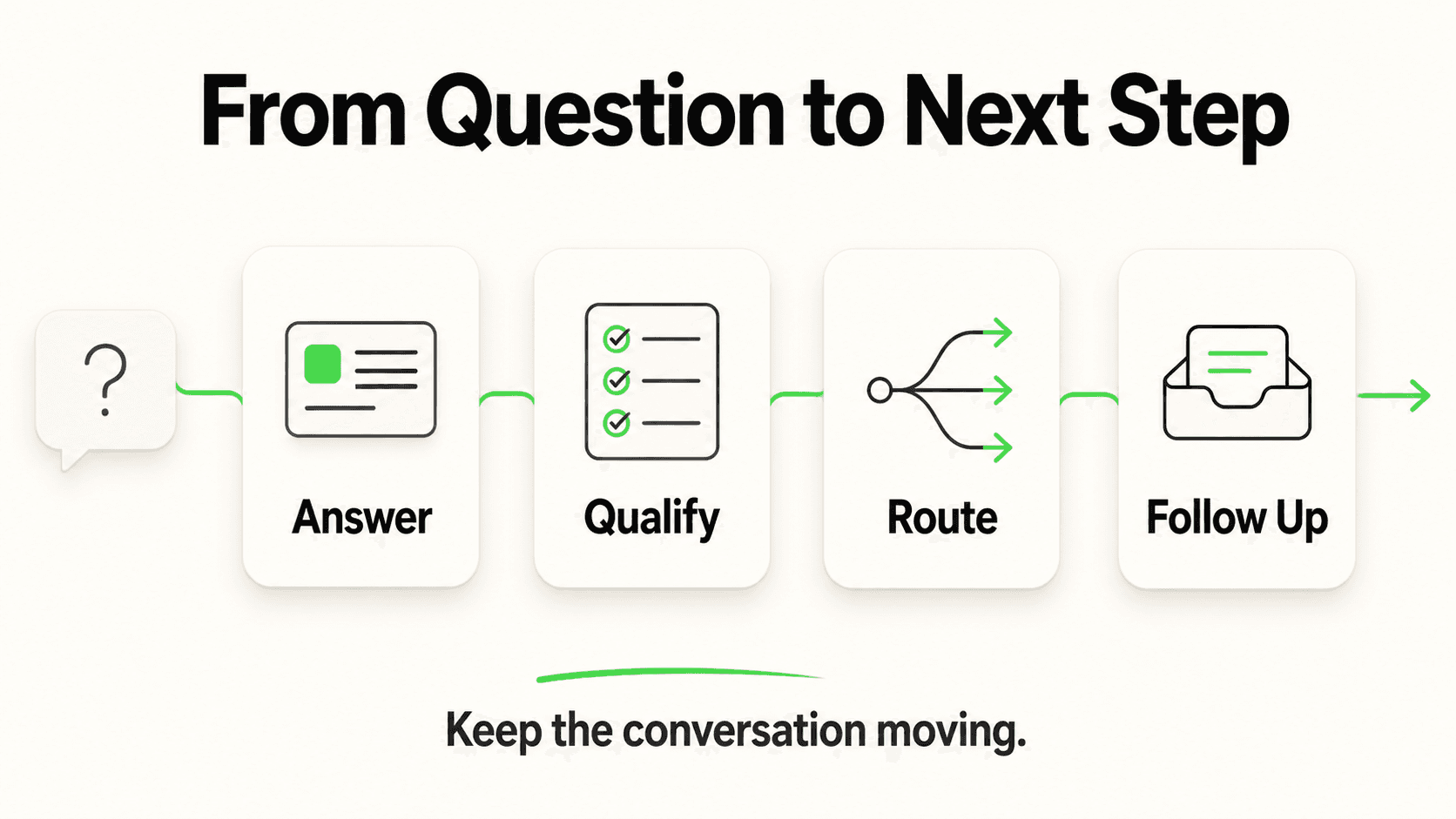
Dashboard reading. If the question you are asking can be answered by a chart the CRM already shows you, the LLM will answer it faster without you navigating there. Pre-packaged charts are slower than typed questions.
Ad-hoc queries. Any question that is not already surfaced in the CRM — the long tail of "I wonder if..." questions — is now answerable without a developer.
Transcript scanning. Reading through raw conversation logs to find patterns, objections, or moments worth coaching on. This was always the highest-leverage, lowest-priority sales activity because it was so time-consuming. The LLM changes the economics entirely.
Summary generation. Weekly digests, board updates, pipeline summaries, rep performance briefs. All of these are synthesis tasks — exactly what LLMs are built for.
Exec reporting on sales activity. The CFO asking "what are leads asking about most this month?" no longer requires a report that took a week to build.
The dividing line is clearer than it might seem: anything that requires reading and synthesizing → LLM. Anything that requires acting and changing → UI. The two workflows are complementary, not competing.
The 90-Day Adoption Playbook
The teams that will look back at 2026 as the year they pulled ahead are not the ones who waited for the perfect tooling stack. They are the ones who started with one person, one workflow, and built from there.
Here is how to get from zero to AI-native in ninety days without a big-bang transformation.
Days 1–30: One Person, One Workflow
The goal in the first month is not to transform the team. It is to build proof of concept that anyone can point to.
One person — the founder if it is a small sales org, the sales manager if it is a team — connects Claude Desktop to the Hyperleap MCP server and starts running daily sales standups with Claude. One fifteen-minute session each morning. Three consistent prompts:
- What came in overnight?
- What needs follow-up today?
- Any patterns worth noting from the past week?
The goal is to develop a cadence before scaling. By day thirty, this person should have a set of five to ten prompts that reliably produce useful output. These prompts are the intellectual property that gets shared in month two.
Days 31–60: The Whole Sales Team Gets Access
In month two, have every member of the sales team create their own MCP key in Studio and connect their AI client. There's no permission anxiety: the tools don't change records, and each person sees only the leads they can already see in Studio. Anyone can connect, query, and explore without risk of corrupting pipeline data.
Share the prompt library in Slack. Not as a mandate — as a resource. "Here are the five prompts I use every morning. Try them. Modify them. Add your own."
The manager runs the Friday transcript review with the team watching, live, in Claude Desktop. This is the most effective demonstration of the workflow's value — not a demo, not a slide deck, but watching someone ask a real question and get a real answer in real time.
By day sixty, the team has developed their own prompts for their own use cases. Some will use it daily. Some weekly. Both are fine. The goal is that MCP is available when someone needs it, not that everyone uses it in the same way.
Days 61–90: Power Users and Custom Surfaces
Month three is for the people who want to go deeper.
The RevOps lead integrates the Hyperleap MCP into Cursor, so data queries happen inside the document they are already writing. No context switching — the insight lands in the draft.
The technical co-founder builds a simple Raycast extension that surfaces the morning digest with a keyboard shortcut. Thirty-second check-in, no app-switching.
Someone on the team builds a small custom MCP client that pipes specific reports into a Notion doc on a schedule. Or into a Slack message. Or into a daily email.
By day ninety, MCP is not a feature you use occasionally. It is the default surface for sales data. The CRM is still there — as backend infrastructure, doing its job of storing and organizing data. The LLM client is the new front door.
The organizations that move through this playbook in 2026 will have built something their competitors will spend 2027 trying to replicate.
Further Reading
Authoritative external sources used and recommended for further research on this topic:
- Model Context Protocol specification
- Anthropic MCP documentation
- MCP servers reference (modelcontextprotocol/servers)
Frequently Asked Questions
What is MCP and why does it matter for sales teams?
MCP, or Model Context Protocol, is an open standard that allows LLM clients like Claude Desktop, Cursor, and Raycast to query external data sources through a structured interface. For sales teams, it means that any question about pipeline data, lead conversations, or rep performance can be asked in plain English and answered in seconds — without opening a CRM, running a report, or waiting for a BI team. MCP is the plumbing that turns the conversational interface from a novelty into a production-grade workflow.
Is the Hyperleap MCP integration read-only? Can someone accidentally change my data?
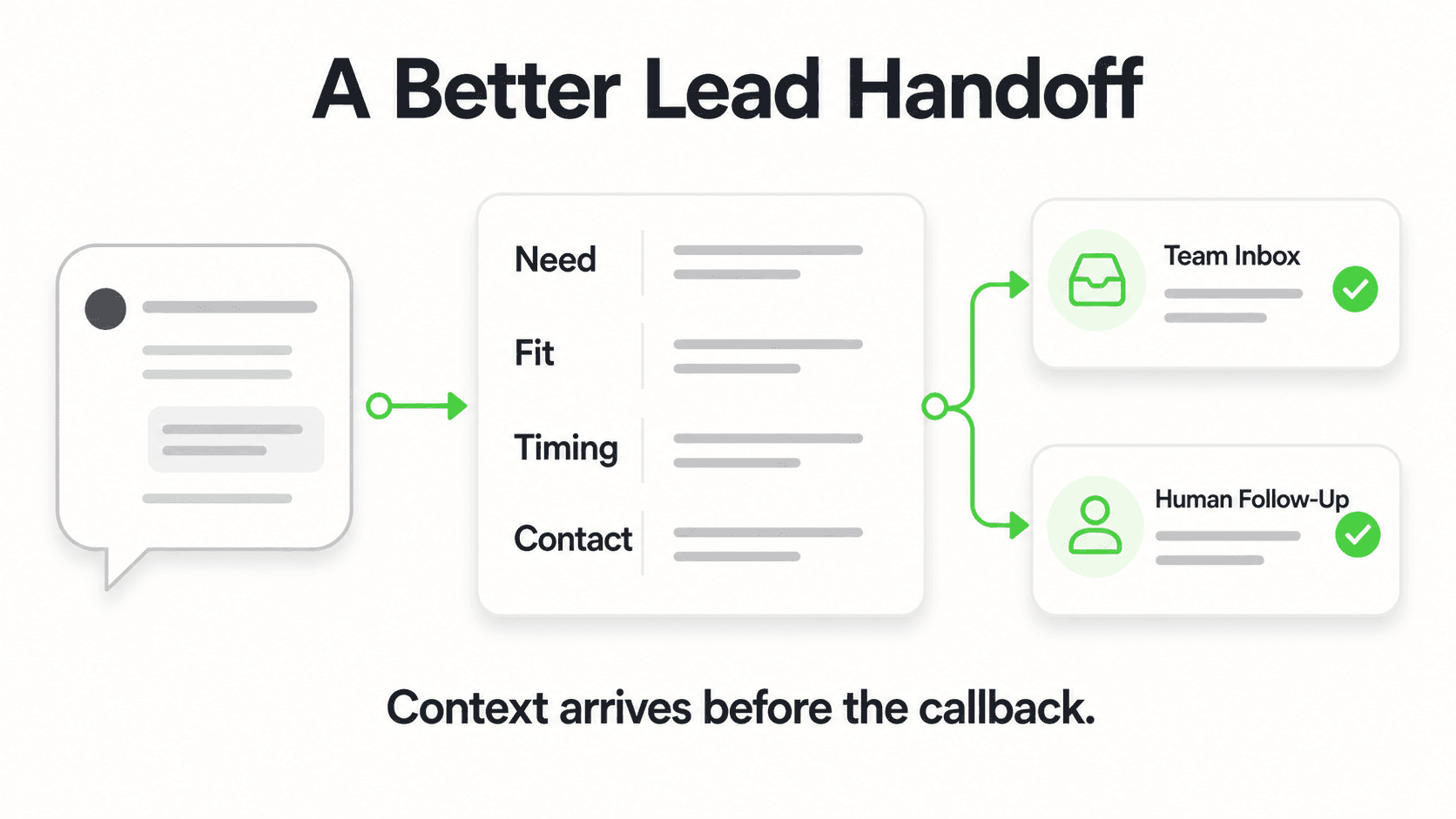
Almost entirely. The Hyperleap MCP server exposes nine tools, and none of them can create, edit, or delete leads, notes, stages, or conversations, or send a message. The one thing any tool saves is the insights extract_lead_insights finds, which it adds to the lead's profile. This means your entire sales team can connect, each with their own MCP key, without risk of accidental data modification. The design is an architectural choice — it reflects the reality that reading and synthesizing data is where LLMs add the most value, while data entry and editing remain better suited to purpose-built UIs with validation and confirmation flows.
Which AI clients are compatible with the Hyperleap MCP integration?
Hyperleap hosts the server at https://api.hyperleapai.com/mcp, and it works with clients that support remote MCP servers with OAuth sign-in: Claude (Desktop, web, and Claude Code), ChatGPT, Cursor, Codex, and others. The most common starting point for sales teams is Claude Desktop — it has the most polished conversational experience for non-technical users, and setup takes under five minutes.
Do I need technical skills to set this up?
No. You create a personal MCP key in Hyperleap Studio (profile menu → My MCP Keys), add Hyperleap as a connector in Claude Desktop using the server URL, and paste the key when the sign-in page asks for it. There's nothing to install and no config file to edit. The setup guide walks through the process step by step.
What kinds of questions can I actually ask?
The nine tools in the Hyperleap MCP integration cover lead details and contact information, full conversation transcripts, the facts leads shared (budget, timeline, requirements) extracted from their conversations, pipeline stage data, activity history, notes, and account-wide CRM totals. In practice, this means you can ask questions like "which leads from this week asked about pricing?", "summarize the objections that came up in conversations over the past month", "which of our leads from the Facebook Messenger channel have no notes or follow-up yet?", and "are leads who arrived since we updated the knowledge base having longer conversations?"
Does this replace my CRM?
No. The CRM remains the system of record — the place where data is stored, organized, and updated. MCP changes the access layer, not the storage layer. Think of it as giving your CRM a natural language interface. The CRM does what it does best (structured data storage, workflow automation, pipeline management). The LLM client does what it does best (reading, synthesizing, and surfacing insight on demand).
Is this only useful for large sales teams?
The smallest viable team for this workflow is one person — a founder managing their own sales. In many ways, solo founders benefit most. They have the least time, the most questions, and no support team to delegate research to. An AI-native workflow that delivers a morning digest before email in five minutes has an outsized impact when there is no analyst to do it for you.
What should I look for in a sales AI solution to make sure MCP is actually useful?
The value of MCP scales with the richness of the underlying data. A solution that stores shallow lead records — name, email, status — produces shallow MCP outputs. A solution that stores full conversation transcripts, extracted lead insights, channel metadata, and activity history produces genuinely useful synthesis. When evaluating sales AI platforms for MCP compatibility, ask: what does a single lead record actually contain? Can I query conversation content, not just lead fields? The Hyperleap MCP tools reference documents exactly what data each of the nine tools returns — a useful benchmark for what "complete" looks like.
The teams building an AI-native sales workflow today are not doing it because it is trendy. They are doing it because the compounding advantage of asking the right question in one sentence — versus spending twenty minutes finding the same answer — is real, and it accumulates every single day.
The dashboard had a good run. The question is the interface now.
Start with one prompt. Ask it tomorrow morning. See what happens. Connect Hyperleap to Claude Desktop →
Related Articles
ChatGPT Enterprise vs Custom AI Agent: 2026 Cost Breakdown
ChatGPT Enterprise starts around $60/user/month. A custom AI agent for the same business often costs less and does more. Here's the honest math.

What Makes AI Chatbots Work: 7 Findings from Deployments
Real AI chatbot deployments reveal 7 patterns that separate high-performing implementations from ones that disappoint — plus the data to spot the difference early.

The Second-Order Effects of Generative AI on Business
Everyone sees the obvious AI impacts. The real competitive advantage comes from understanding the second-order effects that will reshape industries.
What Missed Calls Really Cost Your Small Business
A worked example of what missed calls cost small businesses in lost jobs, plus where inquiries actually arrive now and what to do about it.