Guide
Customer Engagement Tools: 10 Options for SMBs in 2026
Compare customer engagement tools for SMBs, with pricing, pros, cons, and industry picks for hospitality, healthcare, retail, and agencies.

Gopi Krishna Lakkepuram · Founder & CEO
· 13 min read
It's 9 p.m. and a salon owner is looking at three messages. One asks if Saturday at 10 is open. One asks what a balayage costs. One asks where to park. Nobody on the team is online, and by morning those threads are cold.
The right customer engagement tools answer those questions, capture a real contact, and leave a clean summary for the first person who clocks in. This guide sorts ten options by the job they do: a 24/7 front desk, a ticket desk, a CRM-attached service hub, or a lifecycle marketing engine. Match the gap in the journey before you compare price grids.
These tools grew out of relationship marketing, not chat widgets. A historical review published through Taylor & Francis reports that Bain added CRM to its management-tools list in 2000, when 35% of surveyed organizations said they were using it, and a separate 2000 survey in that review found 25% already using CRM with another 25% implementing it. Half the respondents were already in the work.
Voice still matters too. If phone calls carry a share of your bookings, compare VoIP pricing and integrations alongside these platforms so a call lands in the same customer record as a chat thread. Then buy software for the conversation you keep losing.
Table of Contents
- 1. Hyperleap AI
- 2. Intercom
- 3. Zendesk
- 4. HubSpot Service Hub
- 5. Salesforce Service Cloud
- 6. Freshdesk
- 7. Tidio
- 8. Zoho Desk
- 9. Gorgias
- 10. Braze
- How the Ten Customer Engagement Tools Compare on Pricing, Free Options, and Best Fit
- Match the Tool to the Conversation You Need to Win
1. Hyperleap AI
A front desk that only works while someone is logged in is a missed-lead machine. This one is built for the opposite shift: questions, qualification, and booking on your website, WhatsApp, Instagram DMs, and Facebook Messenger, with no developer in the loop.
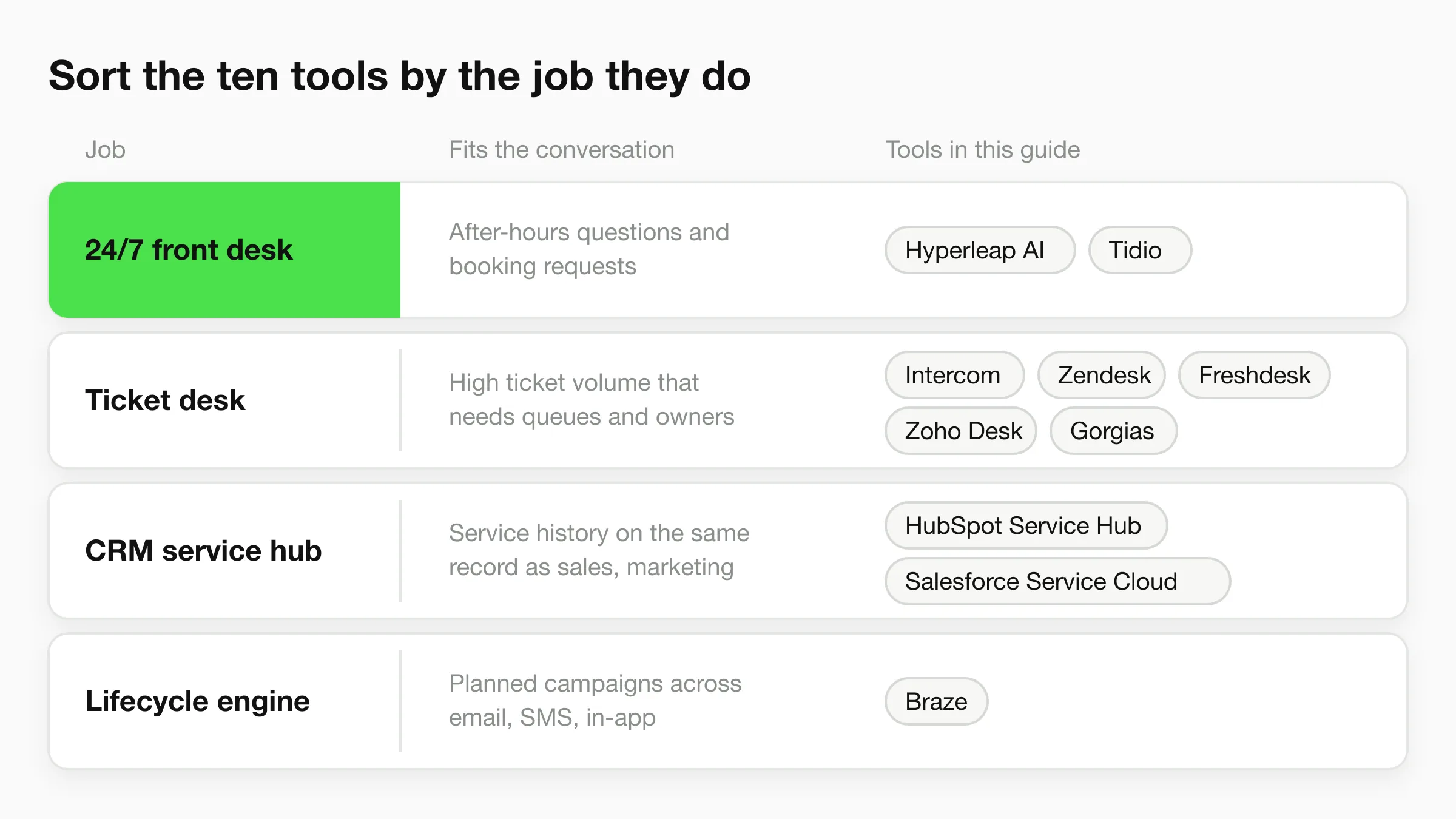
You paste your website URL and Studio reads the site and drafts the assistant's instructions, which you edit; then you add your documents, check the answers, and publish. Replies stay grounded in that material across 100+ languages, and on Pro and Max the assistant can share photos, brochures, and videos and book a ready prospect in the chat with Calendly or Cal.com (on Plus, it shares your booking link). The published Plus plan runs $40 a month with 3,000 AI responses, which works out to $0.013 each; higher tiers bring that down to $0.008 and $0.007 per response. Every plan carries a 7-day trial and includes answers drawn from your own content plus one inbox across channels. Pro and Max add campaign attribution, so you can see which links and campaigns bring chats. GPT-6 Luna and Claude Haiku 5.5 are included, or you bring your own OpenAI or Anthropic API key. Hyperleap is GDPR compliant with 99.9% uptime, and it is a Meta Technology Provider and Business Partner, so WhatsApp, Instagram, and Messenger run on Meta's official Business APIs. See current limits on the AI front desk plans.
What the morning handoff looks like
- Verified contacts: With OTP verification (a paid add-on on Pro and Max, website chat only), the number is checked before it hits your follow-up list, which filters out fake leads.
- One inbox: Website and messaging history sit together, with an email summary your team can act on and CSV/Excel export for reporting.
- Location control: The Multi-variant add-on ($40/mo plus 2x credits per request, Pro and Max) answers from the right location and asks which one when a question doesn't say, so a second site's customers don't get the wrong hours.
PwC's 2025 Customer Experience Survey found that 58% of consumers were only somewhat or not at all comfortable using AI tools to engage with brands. Set the line for uncertainty in plain language, such as call or email, and block topics the assistant must not touch. You also choose which teammates can see customer details.
If it can't answer from your documents, it should offer a person, not a guess.
For teams that want lead data inside tools they already run, every paid plan supports MCP, so Claude, ChatGPT, or Cursor can query leads, conversations, and pipeline. Those connections are read-only apart from saving lead insights to a profile; they can't send messages or change settings. A full REST API covers deeper builds.
Industry pick: Hotels, clinics, and local services that live on messaging. Skip it if your agents already work only inside a heavy CRM and you need ticket-routing depth over lead capture.
2. Intercom
Intercom is the support desk for teams that answer on a website or inside an app and still want a person on the hard tickets. The shared inbox, live chat, help center, workflows, and Fin AI agent sit in one product. Fin can also run against a helpdesk you already own, so you don't have to migrate the whole operation to try the bot.
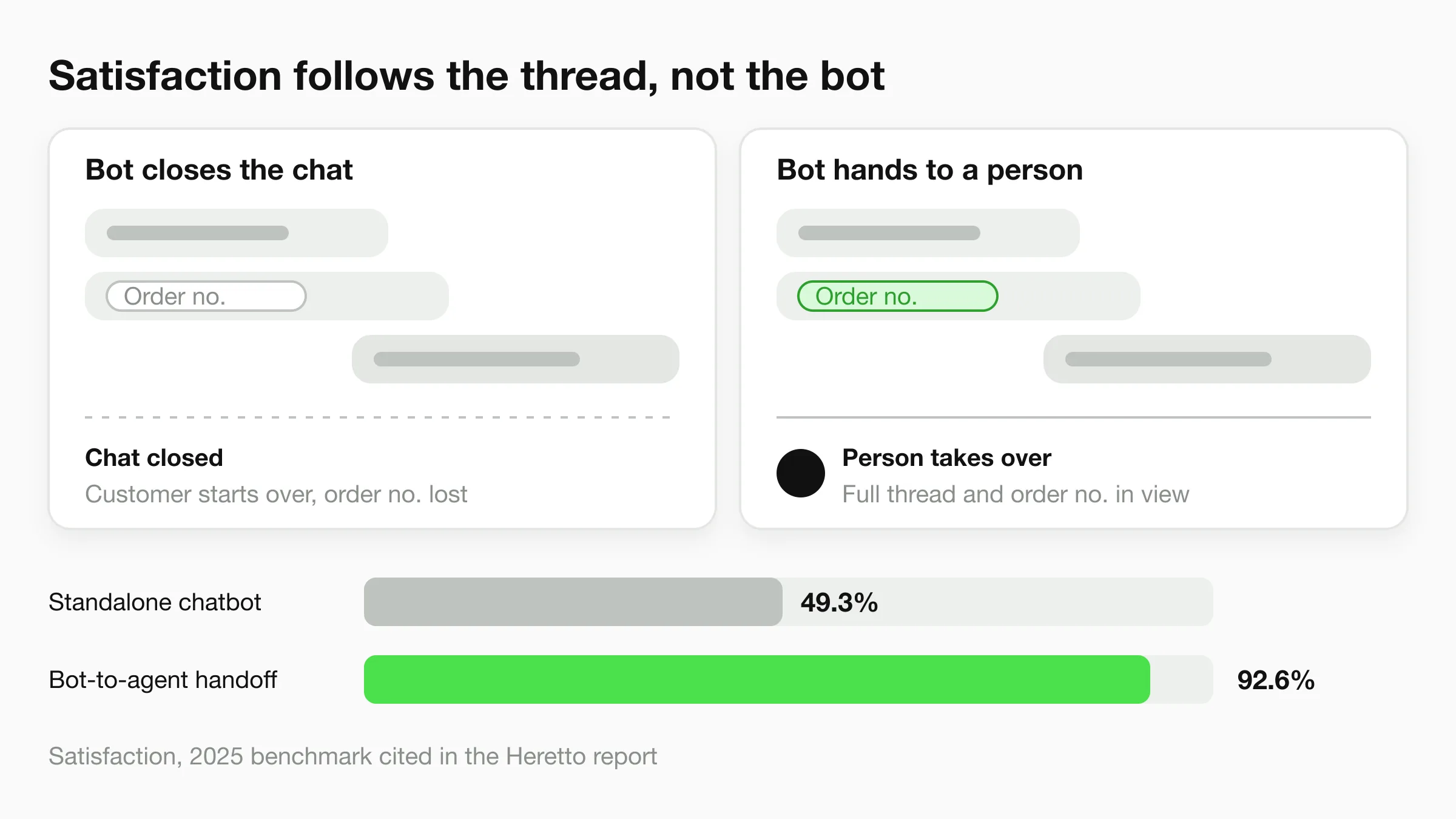
A 2025 benchmark covered in the Heretto report put bot-to-agent handoff satisfaction at 92.6%, up from 86.7% the year before, while standalone chatbot satisfaction was 49.3%. That gap is the buying test. A handoff that keeps the thread beats a bot that closes the chat and loses the order number.
- One queue: Tickets, live chat, and in-app messages share context.
- Deflection: The help center and workflows take the repeat questions.
- Metered cost: AI resolutions and extra channels can add usage charges, and higher plans get steep for a tiny team.
I wouldn't use it as a pure after-hours booker for a single med spa. For a lighter front desk, see these Intercom alternatives for 2026. Details are on Intercom.
Industry pick: Agencies and productized service brands with in-app chat. Weak fit for a hotel that mostly needs WhatsApp booking.
3. Zendesk
Zendesk earns its place when the job is ticket volume, not a cute website widget. Ticketing, messaging, live chat, voice, a knowledge base, routing, and AI agents are built for teams that need a queue, owners, and reports.
Microsoft's global customer-service research covering 2015 through 2019 found that most customers used three to five channels to resolve issues, with an average share in that range of 47.8% across the period. Voice was still the leading preferred channel at 34%, ahead of email at 17%, live chat at 15%, and self-service at 9%. A suite that can route voice and messaging into one ticket matches that behavior. A chat-only tool does not.
The trade-off is weight. The full suite is more than a five-person shop needs, and higher tiers plus add-ons move the bill fast. If you want the inbox without the platform, compare Zendesk chat alternatives. Start from Zendesk.
Industry pick: Growing retail and multi-location support teams with real ticket SLAs. Poor fit for an owner-operator who only needs overnight FAQs.
4. HubSpot Service Hub
Pick Service Hub when the service conversation has to sit on the same contact record as marketing and sales. Help desk, ticketing, a shared inbox, and automation live next to HubSpot CRM. It is a CRM with a service layer, not a chatbot you paste onto a homepage.
Twilio's 2025 State of Customer Engagement Report found that 88% of consumers were more likely to buy when engagement was personalized in real time, while only 44% of brands said they were executing that. A shared CRM is how a small team even attempts it, because the agent can see the last email and the open deal.
A free tier exists, which is rare in this list. Paid service features, extra seats, and extra hubs are where the invoice grows, and the platform takes real setup time.
Industry pick: Agencies and B2B service firms already on HubSpot. Skip it if you are not going to use the CRM. The Service Hub page is the right place to check seat math.
5. Salesforce Service Cloud
Service Cloud is the case system for a company that already runs Salesforce and has someone who will administer it. Cases, self-service, digital channels, and AI tools on selected editions all hang off the CRM record.
Cross-channel demand is not a theory. Verint's 2025 customer-experience research reported that 85% of customers used at least two channels during the year, up from 66% previously, while only 54% of U.S. customers believed companies met or exceeded expectations for assistance. A deep case model can hold that trail. It will not do it on a Saturday afternoon install.
Practical rule: If nobody on staff will own Salesforce admin, don't buy Service Cloud to grow into it.
Starting prices sit above SMB chat tools. Channel features depend on the edition or add-ons, and implementation is a project.
Industry pick: Established healthcare groups or hotel groups already on Salesforce. Wrong tool for a clinic that wants a no-code receptionist this week. See Salesforce Service Cloud.
6. Freshdesk
Freshdesk is the help desk you buy when you want tickets, a portal, and a knowledge base without adopting a full CRM. Routing, multilingual help-desk tools, and Freddy AI features come in as you move up plans. Per-agent pricing is easier to forecast than a bundle of hubs.
It is still a support desk. It will not replace a lead-capture and appointment bot for a dental clinic that needs a booked slot, not a solved ticket. Some AI features carry usage limits or extra charges, so read the meter before you turn Freddy loose on every email.
Teams that outgrow the shape of the product can look at Freshdesk alternatives. Pricing lives on Freshdesk.
Industry pick: Retail and local service desks with a steady email queue. Weak fit for hospitality teams whose win is a reservation, not a closed ticket.
7. Tidio
Tidio is the small-site chat tool. Live chat, ticketing, the Lyro AI agent, and no-code Flows cover the first automation pass without an enterprise contact center. There is a free plan, published paid plans, and a short trial, which makes a weekend test realistic.
Watch the quotas. Conversation and AI allowances affect the actual monthly cost, and a larger team can opt for a custom plan. It is not designed for complex, multi-department support with strict routing rules.
- Fast start: Chat on the site, then add Flows for the questions you answer ten times a day.
- Human plus bot: Assignment still lets a person take the thread.
- Ceiling: Enterprise workflows and deep CRM context are not the point.
Industry pick: Shopify and Webflow shops that want chat this week. Less useful for a multi-location hotel group. Plans are on Tidio.
8. Zoho Desk
Zoho Desk makes sense when the rest of the company already lives in Zoho. Email, social, tickets, workflows, a knowledge base, and, on eligible tiers, messaging, AI, and live chat connect to that ecosystem. A free edition covers up to three users, and published entry prices stay accessible.
The catch is the tier chart. Messaging and live chat are not in the lowest paid plan, and features jump hard as you climb. New users also feel the size of the Zoho catalog. Budget a week to decide what you will ignore.
Industry pick: SMBs already on Zoho CRM, including small agencies. Skip it if you want one messaging bot and nothing else. Compare editions on Zoho Desk.
9. Gorgias
Gorgias is an ecommerce helpdesk, especially for Shopify stores. The inbox pulls store context so an agent can see the order while answering a "where's my parcel" message. Automation and an AI Agent sit on top of that, across the channels those brands use.
It is the wrong shape for a dental clinic or a real estate desk. Pricing follows conversation or ticket volume, and AI Agent charges are separate, so a sale weekend can spike the bill even when the team didn't hire anyone.
Industry pick: Retail brands on Shopify. Leave it if you don't have orders to look up. Volume math is on Gorgias.
10. Braze
Braze is not a ticket tool. It orchestrates lifecycle messages across email, SMS, MMS, WhatsApp, and in-app, with profiles, audiences, experiments, and frequency controls. Growth teams with a real campaign calendar are the buyer. A shop that needs someone to answer "are you open Sunday" is not.
Buying intent for this category is real but not first in line. Twilio's 2025 survey of 637 business leaders found customer-engagement platforms were a purchasing priority for 25% of businesses, just behind data-management platforms at 26% and ahead of marketing-automation platforms at 23%. The same survey found 44% still struggled to connect customer data across channels. Braze assumes you can feed it that data.
Standard pricing means a sales call. There is no standard free plan, and the integration work is heavier than a chat embed.
Industry pick: Multi-location hospitality and retail brands with a lifecycle program. Wrong first buy for a clinic. Talk to Braze only after the inbound desk works.
How the Ten Customer Engagement Tools Compare on Pricing, Free Options, and Best Fit
Use the table as a shortlist filter. The first split is free entry versus paid-only: HubSpot Service Hub, Tidio and Zoho Desk let a team start without a paid plan, Hyperleap AI uses a 7-day trial, and Braze moves straight to custom pricing.
The pricing column shows the trade-off. Per-agent and tiered tools can rise with seats or add-ons, usage-based tools can rise with conversations, AI resolutions or messaging, and campaign tools usually mean a sales call. Match that cost driver to ticket volume before comparing feature lists.
| Item | Primary Focus | Free Option | Pricing Model | Best For |
|---|---|---|---|---|
| Hyperleap AI | No-code AI front desk, lead capture, and appointment booking | No free tier; 7-day trial requires a card | Paid monthly plans from $40, with reply and chatbot limits | Small businesses automating customer conversations across web and social channels |
| Intercom | Customer service inbox, messaging, workflows, and AI support | No free plan listed; check current trial terms on the vendor's pricing page | Plans may include usage charges for AI resolutions and messaging | Teams combining AI support with human-agent handoff |
| Zendesk | Omnichannel customer-service management and ticketing | No free plan listed; check current trial terms on the vendor's pricing page | Tiered plans; add-ons and higher tiers can increase costs | Growing teams with structured, multi-channel support needs |
| HubSpot Service Hub | CRM-connected customer service and support | Free tier available | Tiered pricing; costs can vary with seats and additional hubs | Teams already using HubSpot for sales or marketing |
| Salesforce Service Cloud | CRM-based service operations and case management | No free plan listed; check current trial terms on the vendor's pricing page | Paid editions; some channels require add-ons | Established teams with complex, configurable service processes |
| Freshdesk | Help desk, ticketing, and customer self-service | No free plan listed; check current trial terms on the vendor's pricing page | Per-agent plans; some AI features may cost extra | Teams seeking structured support without a broad CRM suite |
| Tidio | Website live chat, AI support, and no-code automation | Free plan available | Paid plans with usage quotas; custom plans for larger teams | Small businesses adding chat and basic automation |
| Zoho Desk | Customer support, ticketing, and workflow automation | Free edition for up to three users | Tiered plans with comparatively accessible entry pricing | Small and midsize businesses using Zoho products |
| Gorgias | Ecommerce customer support and store-connected workflows | No free plan listed; check current trial terms on the vendor's pricing page | Pricing tied to conversation or ticket volume; AI Agent charged separately | Ecommerce teams, especially those using Shopify |
| Braze | Cross-channel customer engagement and campaign orchestration | No standard free plan | Custom pricing; contact sales | Growth and marketing teams running sophisticated engagement campaigns |
Match the Tool to the Conversation You Need to Win
List the three conversations that cost you money. After-hours enquiries, booking requests, and leads that went cold are the usual three. A 24/7 front desk fits the first two. A support desk fits a ticket-heavy team. A CRM hub or a lifecycle platform fits a business that already has sales or marketing workflows and someone to run them.
Adoption headlines are a weak shopping list. Thryv's 2025 survey found that 55% of small businesses used AI, while 46% specifically used customer-engagement applications such as chatbots. The same write-up notes another 2025 survey that put AI adoption among small businesses at 28%. Same year, very different "use." Buy the outcome, not the badge.
A 30-day test that isn't a feature tour
- Real FAQs: Load the questions from last month, including prices, parking, insurance, and "can I reschedule."
- Plan truth: Confirm booking, channels, and AI limits on the tier you will pay for.
- Refusal rules: Write what the tool says when it doesn't know, and who may see customer details.
- Scoreboard: For 30 days, count replies, verified leads, booked appointments, no-shows, and staff time. Split human-only and automated threads.
One booked appointment can beat a thousand low-intent chats. If the bot creates false contacts or forces a rewrite, that cost belongs in the ROI, not in a vanity containment rate. A wider map of the top AI tools for customer service helps once this test shows which job you still haven't covered. Don't add a second platform until the first one has a number attached to revenue or saved hours.
If after-hours questions, lead details, and bookings are the gap, an AI front desk can answer from your website and documents, collect the contact (with optional OTP verification, a paid add-on on Pro and Max for website chat), and email your team a summary. It runs on website chat, WhatsApp, Instagram, and Messenger without a developer. See how that fits your channels at Hyperleap AI.