Guide
ChatGPT for Customer Support: A Step-by-Step Setup Guide
Set up ChatGPT for Customer Support step by step: pick use cases, write grounded prompts, route handoffs, protect data and test before going live.

Gopi Krishna Lakkepuram · Founder & CEO
· 17 min read
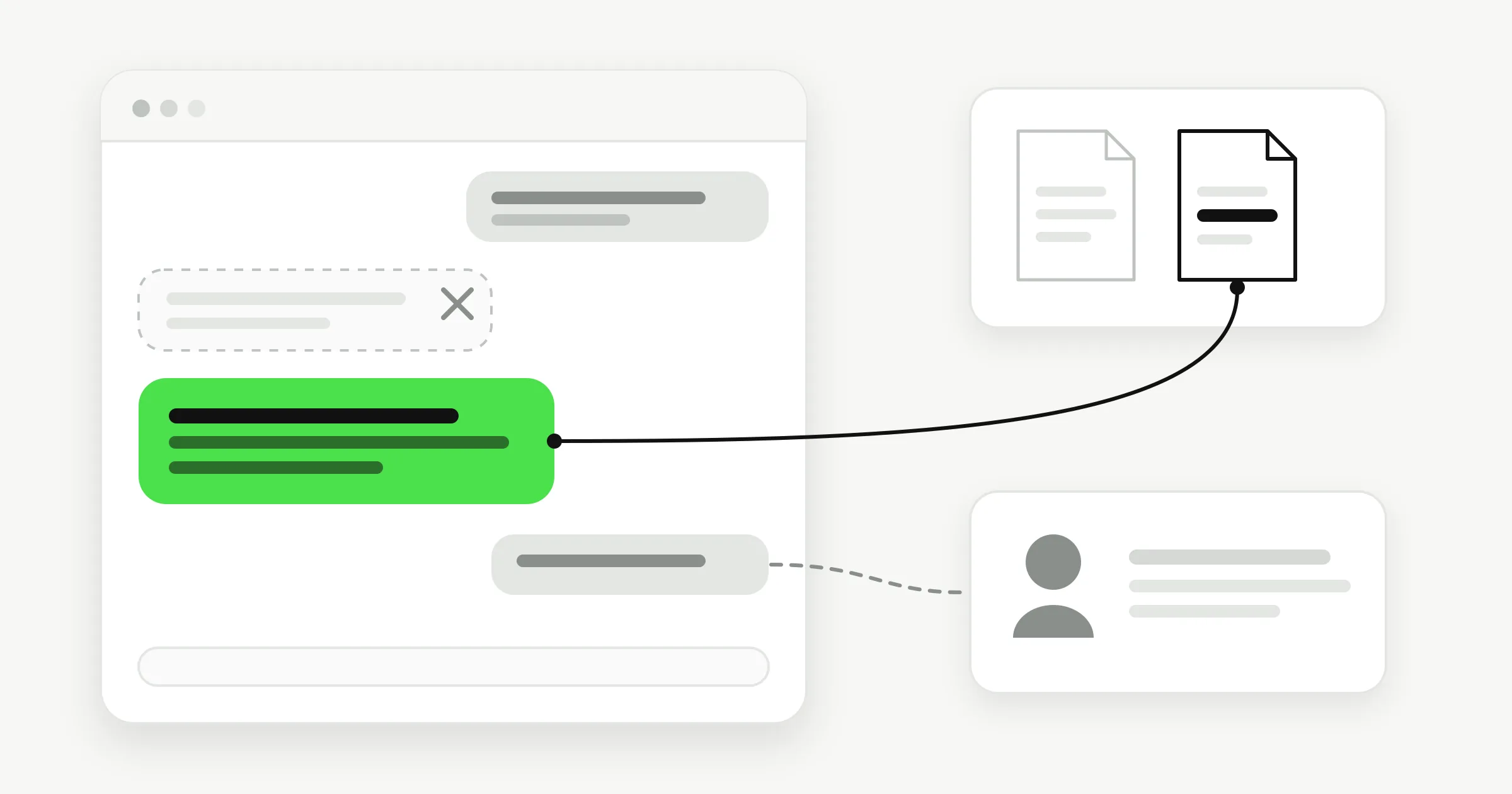
It's 9:40 on a Tuesday night and there are 34 unread messages spread across your inbox, WhatsApp and Instagram. Eleven are about parking. Six want to know whether you're open on the holiday Monday. Three are booking requests. One is a refund demand from someone who has already written twice.
Someone told you ChatGPT can handle most of that. They're half right. The answering part is easy now. The part that costs money is the plausible wrong answer: the bot that says "yes, full refund within 30 days" in a warm, confident voice and creates a promise your team has to honour or break.
Customer expectations moved fast. OpenAI released ChatGPT on November 30, 2022, and by November 6, 2023, Sam Altman announced 100 million weekly active users, as TechCrunch reported at the time. People now type into a chat widget expecting an answer, not a form. Your job is to give them one without inventing policy.
Table of Contents
- Choose the Support Questions to Automate First
- How to Write Grounded Prompts and Conversation Flows
- Connecting Website, WhatsApp, Instagram DM and Messenger
- Handoff and Lead Capture Rules That Protect Customers
- Compliance and Disclosure Rules for Customer Data
- How to Test and Measure Before You Go Live
- Ready-to-Use Prompt Templates for Small Businesses
- Launch Your First Assistant on One Channel
Choose the Support Questions to Automate First
A question is safe to automate when three things are true at once. The answer is already written down somewhere. It changes rarely. And a wrong reply costs little. Most topics fail at least one of those tests, which is why the first job isn't prompt writing. It's sorting.
Start by exporting the last 90 days of messages from everywhere customers reach you, email, WhatsApp, Instagram and the contact form, into one sheet. Tag each conversation with a single topic and count how often each topic appears. The counts beat your intuition about what people ask. The questions you find boring are usually the ones filling the queue.
Customer-service leaders are facing this same selection problem. Gartner's 2024 survey of 187 customer-service leaders found that 85% planned to explore or pilot customer-facing conversational generative AI in 2025, with the survey run in July to August 2024. Planning to pilot is not the same as knowing which questions to hand over. That's the work below.
| Question type | Typical frequency | Risk if wrong | Automate? |
|---|---|---|---|
| Opening hours, location and parking | High | Low | Yes, fully |
| Pricing and package questions | High | Medium | Yes, from an approved price list |
| Order or booking status | High | Medium | Yes, after a verified lookup |
| Appointment booking and rescheduling | High | Medium | Yes, with a calendar link |
| Refund and cancellation requests | Medium | High | Collect details, then route to a person |
| Complaints and angry customers | Medium | High | Acknowledge and hand off quickly |
| Medical, legal or financial advice | Low | Very high | No, route immediately |
Three rows cause the most damage, and all three look routine in a ticket list. Refunds appear often enough that teams automate them and then discover the bot can't see the order system, the payment date or the exception a manager approved last month. Complaints arrive with an emotional load that a friendly paragraph makes worse, not better. Medical, legal and financial questions are rare enough to look unimportant in a frequency sort and expensive enough to end the project when one goes wrong.
The scoring rule: high frequency with low risk goes first. High frequency with high risk gets a collect-and-route flow, where the bot gathers the details and a person decides. Rare and high risk stays with people from day one.
The first week's goal is small on purpose. Pick three automatable topics and one route-to-human topic, and write the approved answer for each of them before you touch a single prompt. If you can't write the approved answer, you've found a knowledge problem, not a chatbot problem.
How to Write Grounded Prompts and Conversation Flows
A prompt that says "be helpful and friendly" produces confident guesses. The model fills every gap in your knowledge with plausible text, and plausible text is exactly what a support desk can't ship. Grounding comes from structure. You build the knowledge first, then the rules, then the flows.
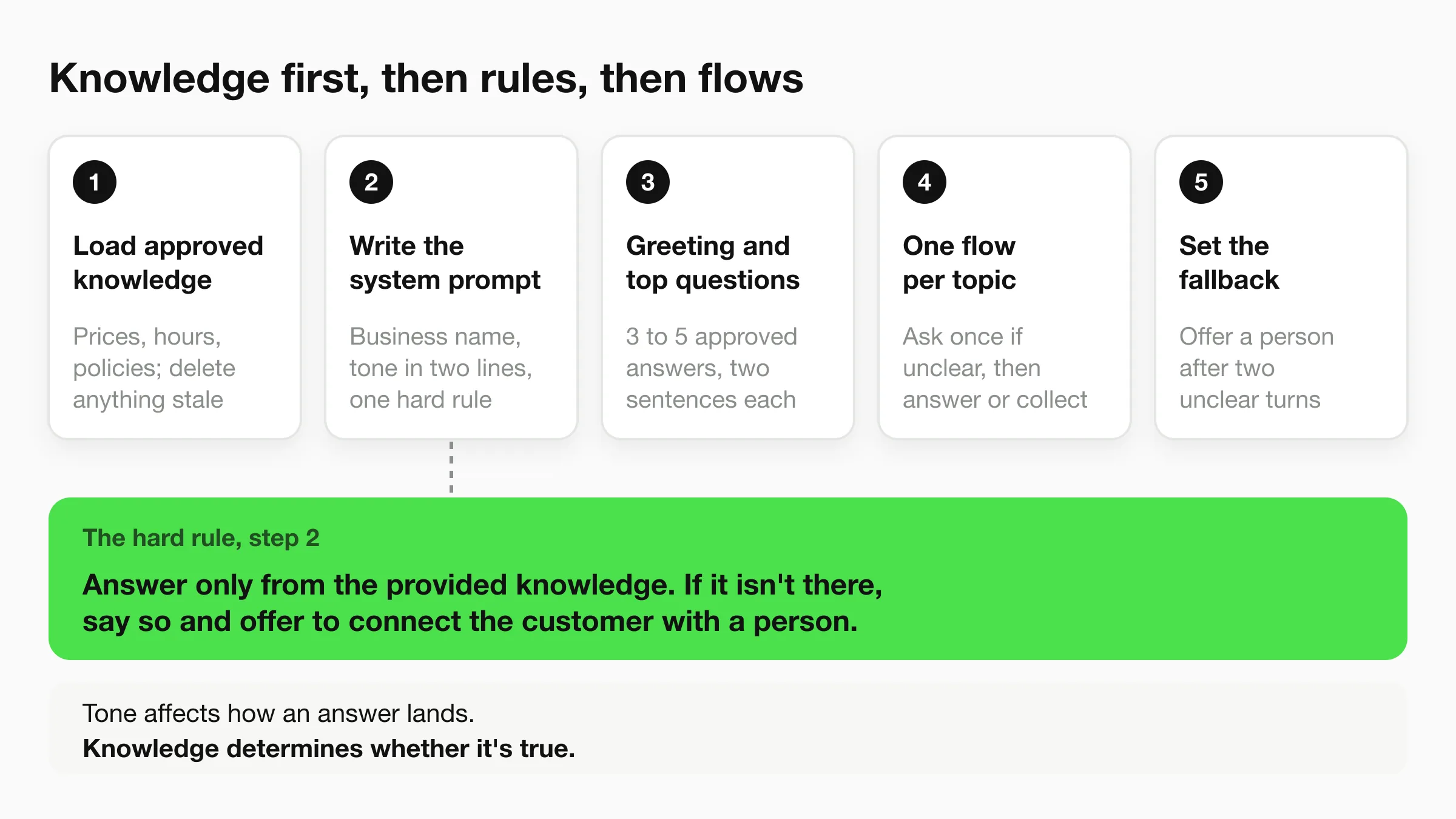
The build sequence
Load approved knowledge first. Paste the price list, opening hours, service descriptions and refund and cancellation policies into the knowledge base, then delete anything out of date. If your source is a web page, read the page as written, because the assistant will. A stale "2024 pricing" section becomes a wrong answer with a citation attached. Our guide to knowledge base practices for AI chatbots covers how to structure those documents so the model retrieves the right passage.
Write the system prompt. Name the business, describe the tone in two sentences, and add one hard rule that outranks everything else.
Answer only from the provided knowledge. If the answer is not there, say so and offer to connect the customer with a person.
Add the greeting and your top questions. Three to five common questions with approved answers cover most first turns. Keep each answer to two sentences plus a next step, because long answers bury the part the customer needs.
Build a flow for each topic. If intent is unclear, ask one clarifying question. Then either answer from the knowledge or collect the details you need, such as name, phone number and preferred time, and confirm the next step in a single line.
Set the fallback. After two unclear turns, offer a person. Two is the number because a third attempt reads as a loop, and customers describe that feeling with words you don't want in a review.
One exchange, written out
A dental clinic booking a cleaning looks like this in practice.
Customer: Do you have anything Saturday morning? Assistant: I can check. What's your name, and which Saturday suits you best? Customer: Dana, the 14th. Assistant: Thanks, Dana. Saturday the 14th has 9:20 and 10:40 with the hygienist. Which works better?
Notice what the assistant doesn't do. It doesn't invent a slot, and it doesn't quote a price for a cleaning that isn't on the approved list. Slots come from the calendar. Prices come from the list. Anything else gets the fallback line and a handoff.
The common slip is treating the prompt as the product. Teams spend an afternoon polishing tone and five minutes loading knowledge, then wonder why the bot confidently offers a service the clinic stopped running in March. Tone affects how an answer lands. Knowledge determines whether it's true.
Before you test, check three things. Every answer in the greeting flow traces to a document you can open. Every topic has a written exit to a human. And the fallback sentence exists in one place, so you can change it once.
Connecting Website, WhatsApp, Instagram DM and Messenger
One knowledge base and one set of flows can serve all four channels. What changes is the setup, the message rules and the way people write in each place. Treat the channels as four front doors into the same building, not four separate assistants you have to maintain.
Website chat usually goes live first because it needs no account approvals and catches the pre-sale question someone is asking while sitting on your pricing page. It also collects a name and number at the exact moment interest is highest. If you're planning to expand later, it helps to see how a multi-channel AI chatbot strategy fits together before you duplicate flows by hand.
| Channel | Setup needed | Best for | Watch out for |
|---|---|---|---|
| Website chat | Chat widget on key pages | Pre-sale questions and lead capture | Slow loading on mobile makes visitors leave |
| Business account and approved message templates | Bookings, order updates and follow-ups | Outside the 24-hour service window only approved templates can be sent | |
| Instagram direct messages | Professional account connected to the bot | Quick product and availability questions | Short, informal messages need fewer clarifying questions |
| Facebook Messenger | Facebook page connected to the bot | Prices and hours requests sent to the page | Messages pile up without a shared inbox and named owners |
WhatsApp is where the 24-hour rule bites. Inside the service window you can reply freely. Outside it, you can only send message templates approved in advance, which means every reminder and follow-up needs a template written and approved before you need it. Teams that skip this step discover the gap on a Sunday, when a booking reminder fails to send.
Instagram messages run short. Reduce clarifying questions to one, lean on quick replies, and don't send a paragraph where three words will do. Messenger attracts the price and hours questions, and it's the channel most likely to rot, so assign an owner by name rather than assuming the shared inbox covers it.
If a video walkthrough helps your team, this one covers setting up the assistant and connecting channels:
Pick the first channel by one test. Go where your busiest repeated question already arrives. Add the others only after that first channel has run for two weeks without an unanswered message left sitting overnight.
Handoff and Lead Capture Rules That Protect Customers
A customer asks whether a refund covers shipping. The assistant says yes, in a full sentence, from a page that only covers product returns. Nobody types "agent." The handoff never fires, and the team hears about it when the chargeback arrives.
A plausible wrong answer costs more than a slow one. The customer has no reason to ask for a person, so the escape route never opens.
The 2025 PwC customer experience survey of 5,511 consumers and 406 executives recommends AI for routine requests with fast handoffs when empathy or judgment is needed, and it cites a Five9 finding that 72% of consumers were open to AI-powered interactions only when they could escalate to a human, while 54% expected generative AI to improve customer experience.
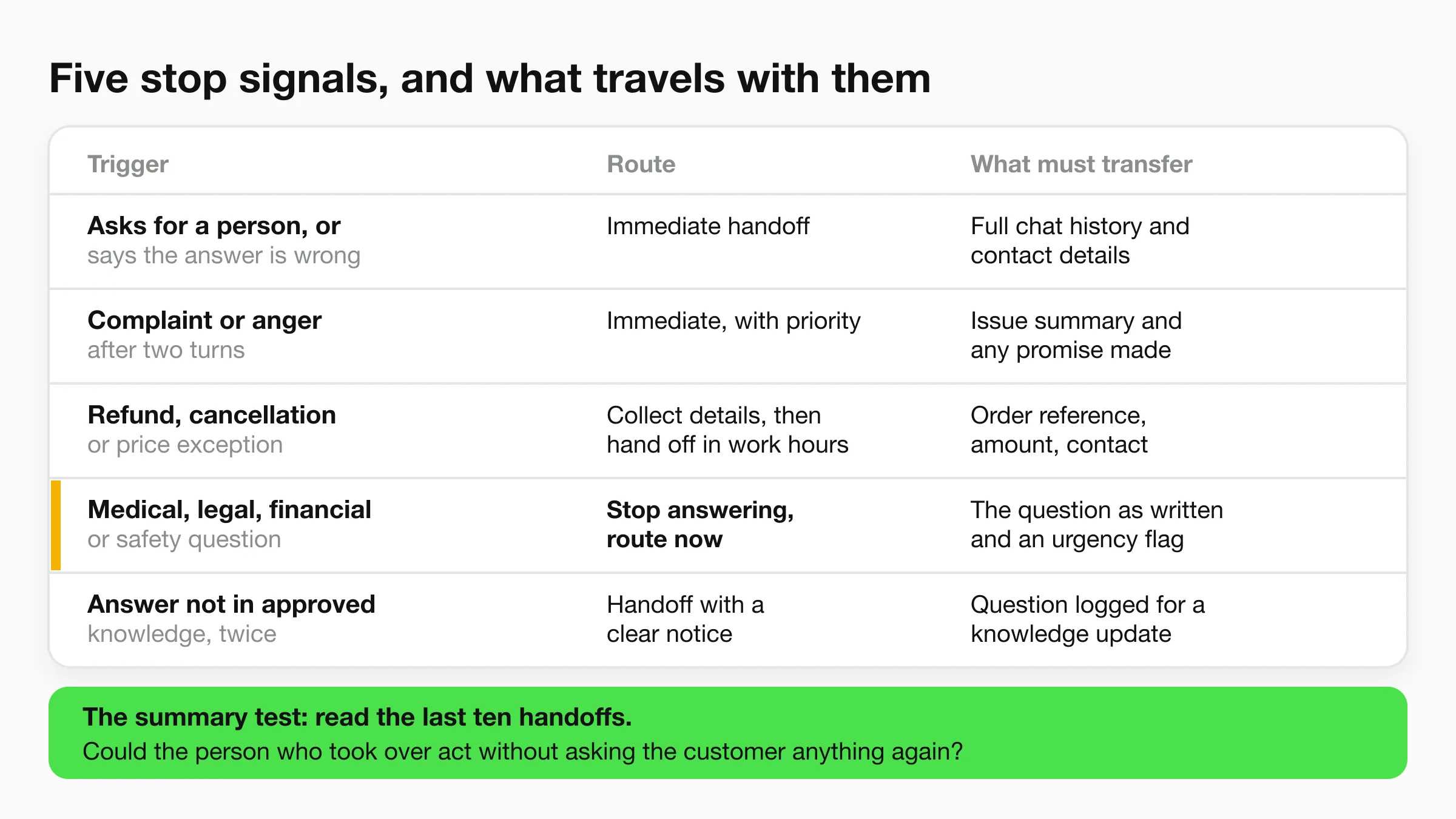
| Trigger | Route | What must transfer |
|---|---|---|
| Customer asks for a person or says the answer is wrong | Immediate handoff | Full chat history and contact details |
| Complaint, anger or frustration after two turns | Immediate handoff with priority | Summary of the issue and any promise made |
| Refund, cancellation or price exception | Collect details, then hand off during working hours | Order reference, amount and customer contact |
| Medical, legal, financial or safety question | Stop answering and route now | The question as written and an urgency flag |
| Answer not found in approved knowledge twice | Handoff with a clear notice | Unanswered question logged for a knowledge update |
A request for a person is a stop signal. Anger after two turns is a stop signal. So is any question that touches health, money, law, or safety. Refunds, cancellations, and price exceptions can wait for working hours, but only after the order reference, the amount, and a contact are already on the ticket.
If approved knowledge does not contain the answer, say so on the second miss and hand off. Do not let the model fill the gap with a nearby sentence that sounds specific. I treat that second miss as the line between a useful assistant and a confident wrong answer.
The person who takes over needs the full chat, the contact details, and any promise already made. If any of those are missing, the customer repeats the story.
The summary test: read the last ten handoffs and ask whether the person who took over could act without asking the customer anything again. Then run questions whose correct answer is not in the knowledge, including one a tired agent might believe. If the assistant invents a refund rule, a price, or a policy, or if the human still has to re-ask, do not launch.
Lead capture uses the same path. Ask for a name and a phone number, then confirm the number before the lead reaches your team. A one-time code sent to the visitor's phone confirms the number is real, which stops mistyped numbers from becoming dead leads. On Hyperleap AI, OTP verification is a paid add-on on Pro and Max and works on website chat only. Your team receives the customer's details and chat history by email, ready to follow up. The AI front desk uses your business information to answer customers, collects their details, and sends your team a summary.
Capacity is the other half. If handoff volume outgrows the people answering it, the fix is coverage on the human side.
Compliance and Disclosure Rules for Customer Data
A customer asks whether a refund will reach their card this week. The assistant replies with a confident date that is not in your policy. They do not ask for a person, because the answer sounded finished. That wrong reply costs more than a slow one. It creates a complaint, and if you never said they were talking to AI, it also creates a trust problem your team has to unwind by hand.
Disclosure is the control that costs one line. A 2025 holiday-shopping survey cited in this analysis of multilingual customer-service systems found that only 22% of respondents said companies clearly disclosed AI use, while 69% believed brands should always disclose it. The same survey found 55% had escalated an AI-handled issue to a human and 45% said AI failed to understand their problem.
Put this in the greeting, not on a privacy page:
You're chatting with our AI assistant. A team member can take over at any time.
Show it on website chat, WhatsApp, Instagram DM and Messenger, where the customer is already reading. Someone who knows the speaker will challenge a bad answer. Someone who feels misled will not.
Collect only what the answer needs
A booking needs a name, a phone number and a time. It does not need a date of birth or a home address. Extra fields train people to hand over data you cannot use and must still protect. Map each flow to the fields the reply uses, then delete the rest.
The Data Processing Agreement explains how customer data is handled. Read it next to the privacy settings worth reviewing before you switch on.
Choose which team members can see customer details and conversations, and remove access the day someone leaves. For a WhatsApp or email follow-up that goes past the service thread, record an explicit opt-in before you send it.
Once a quarter, check three things: the disclosure is on every channel, the stored fields match the flow, and the access list matches current staff.
Test each language before you promise it
Intent accuracy can differ by language. A model that handles English well can miss the same request in another language, or in a message that mixes both. That miss is how a plausible wrong answer goes out instead of a handoff.
Before you offer a language, run the same customer questions in that language and in the mixed forms people send: code-switching, local names, currencies, time zones and location-specific policies. I would not turn a language on until its rate of unsupported answers is no worse than your English baseline, and until a wrong or uncertain reply still routes to a person instead of inventing a policy.
Before launch, take a short set of real questions that touch money, timing or eligibility. Confirm the greeting discloses the AI, the reply stays inside your documents, and any answer you cannot ground triggers a handoff with the history attached. If one of those questions would leave a customer acting on a made-up fact, the assistant is not ready.
How to Test and Measure Before You Go Live
A guest asks about late check-out. The assistant replies in seconds, quotes a rule that sounds official, and the guest arrives at noon. The approved sheet said 11am. Speed scored a pass. The front desk paid for the miss.
That is the launch test: a plausible wrong answer, and a handoff that should have fired and did not. Run it on conversations the assistant has never seen.
Build the set from your own history. Classify past chats by intent, frequency, resolution, and whether a person had to step in. Hold back around 50 conversations. Keep frequent intents and rare intents in separate groups so a busy FAQ cannot hide a refund, a booking change, or an identity check.
Treat grounding as the routing rule you score against. The assistant answers only from approved procedures, says what information is missing, and sends uncertain or high-risk cases to a person. Score the two intent groups apart. One blended pass rate will clear the easy half and ship the half that creates rework.
Averages hide the same spread across staff. The NBER summary of the field study covering roughly 3 million conversations and 5,172 agents found gains of up to 35% for lower-skilled, less-experienced agents, little or no improvement for the most experienced, and an 8.6% reduction in attrition among workers with access to the tool. If your senior people already own the hard intents, an assistant that lifts the average can still be wrong on the cases that cost money.
| Measure | Definition | Expansion gate |
|---|---|---|
| Grounded-answer accuracy | Share of answers that match approved knowledge | Every miss traces to a missing or outdated document, not a guess |
| Resolution rate | Share of conversations where the customer's problem was solved | Matches or beats your human-only baseline on the same conversations |
| Escalation rate | Share of conversations handed to a person | Flat or lower than pre-launch on the same intents |
| Unsupported-claim rate | Share of answers making claims the approved knowledge does not back | Near zero on the held-out set |
Run the four measures by language, location and product before you look at the total. A single blended score hides the segment that's failing.
The hotel split shows the gate in practice. English late check-out matches the current policy sheet. Spanish still quotes the old 11am rule. Overall grounded-answer accuracy looks healthy. The Spanish-speaking guest at reception is the result that counts. Fail that segment and you do not expand, even when the total is green.
I would not open the full queue on day one. Go live with audit sampling: a person reviews a fixed share of live chats each week. Widen coverage only when unsupported claims stay near zero on the held-out set and high-risk intents still hand off. Bookings, refunds, healthcare, and identity requests need the longest sampling window. A wrong answer there becomes a charge, a lost booking, or a bad disclosure, not a second try.
Ready-to-Use Prompt Templates for Small Businesses
Three starting points, each built on the same grounding rule and filled with the business's own approved answers. Copy one, replace the bracketed details, and test it against your held-out conversations before it goes anywhere near a customer.
You are the booking assistant for [clinic name]. Answer only from the approved service list and opening hours. To book, collect the patient's name, phone number and preferred day, then offer only slots returned by the calendar. For pain, bleeding or any medical question, stop and say a team member will call you today.
The clinic version earns its keep on the last sentence. Dental and med spa enquiries often start as a booking and turn into a symptom description mid-conversation, and that's the point where the assistant must stop typing.
You answer guest questions for [hotel name] using only the approved policy sheet for this location. Late check-out, parking and breakfast rules differ by property, so confirm the location first. For refunds or room changes, collect the booking reference and hand off to the front desk.
Multi-property hotels get the most value from the location-first instruction. One shared prompt with a location check beats four separate assistants that drift apart within a month.
You help customers check order status. Ask for the order number and the email used at checkout, verify both against the order system, then share the status shown. Never promise delivery dates that are not in the system. For damaged items or refund requests, collect a photo and the order number and route to the support team.
For online shops, the "never promise" line is the whole ballgame. Delivery estimates belong to the carrier feed, not the model's imagination.
Whatever template you start from, two lines survive every edit: the disclosure that the customer is talking to an AI, and the triggers that stop the bot and bring in a person. Change the pricing, change the tone, change the language. Leave those two alone.
Launch Your First Assistant on One Channel
Launch website chat first, unless your busiest repeated question already arrives on WhatsApp, in which case launch there. Start with the three safe topics and the one route-to-human topic you picked from your own message history, and nothing else. A narrow assistant that's right beats a broad one that's interesting.
Here's the week, written so you can copy it into a calendar.
- Day one, load and configure. Load the approved knowledge, paste the greeting and the grounding rule, and let Quick Start draft your starting shape: paste your website URL and Studio reads the site and drafts the agent's instructions, which you edit, saving an afternoon of blank-page work.
- Day two, test on held-out conversations. Run the 50 unseen conversations and log every unsupported claim in a sheet. Don't fix anything yet. Just record.
- Day three, close the knowledge gaps. Fix the documents the misses exposed and rerun only the failed cases. If the same topic fails twice, the source document is the problem.
- Day four, wire the handoff and the disclosure. Set the triggers, confirm the disclosure line appears on the channel, and decide which team members can see customer details and conversations. You choose that access per person, so start narrow.
- Day five, go live with audit sampling. Review a fixed share of live chats each morning for the first week, and reply to anything the assistant left hanging before lunch.
Week two has one rule. Add WhatsApp or Instagram only when the first channel has run two full weeks with no unanswered messages and no unsupported claims in the audit. Trying to be everywhere in week one ends up maintaining four half-finished assistants. One channel that works earns the second one.
Hyperleap AI is built for exactly this sequence. You paste your website URL so Quick Start drafts the agent's instructions, upload your documents, and the assistant is designed to answer only from your own knowledge across website chat, WhatsApp, Instagram DM and Messenger, with an email summary to your team. One-time-code verification of website leads is a paid add-on on Pro and Max. If you want to see how your busiest ten questions hold up before you commit to a full rollout, start with Hyperleap AI and test it on the conversations you already have.