Guide
Real Estate Template Guide: Types, Setup and Lead Capture
Compare the five real estate template types, learn when to use each, and set one up to capture leads, with examples and starter snippets.

Gopi Krishna Lakkepuram · Founder & CEO
· 14 min read
You've answered the same questions all week: Is the property still available? What are the fees? Can we view it after work? The answers sit in separate emails, and nobody has a reliable record of who asked what or who should follow up. A useful real estate template fixes that operational problem, not just the appearance of your marketing.
Table of Contents
- What a Real Estate Template Is and Who Uses It
- Five Real Estate Template Types and When to Use Each
- Customizing a Template for the Questions Buyers Actually Ask
- How to Set Up a Template in Seven Steps
- Capturing Leads Across Locations and Chatbots
- Worked Examples and Starter Snippets
- Launch Your First Template This Week
What a Real Estate Template Is and Who Uses It
A real estate template is a reusable starting point for a property workflow. It might look like a listing page, a PDF, an email or a chatbot conversation, but the visible layout is only part of it.
Every useful template combines these elements:
- Customer-facing content: The property description, flyer headline, enquiry form or greeting a prospect sees.
- Structured fields: The listing or lead details, including their source, current status and timeline.
- A next-step process: Who responds, what they need to do and when the prospect should expect an answer.
Say an agent receives a viewing request. A complete template presents the property, saves the requested time against the correct listing and assigns the enquiry to someone who can confirm access. A polished form that sends an unlabelled email hasn't finished the job.
The audience determines the fields. First-time buyers need budget and financing questions; repeat owners need selling timelines and equity considerations. Landlords and investors need rental rules and return assumptions, while renters need lease terms and move-in dates.
The market's breadth has deep roots: U.S. homeownership increased from 44% in 1940 to approximately 66% by 2000, according to the U.S. Census Bureau's historical homeownership tables.
For property-management workflows, a standard property management contract template is a useful reference when identifying responsibilities your intake process should capture. It isn't a substitute for jurisdiction-specific legal review.
Choose the workflow first. Then adapt its fields to a defined audience and give every enquiry a working path to a person.
Five Real Estate Template Types and When to Use Each
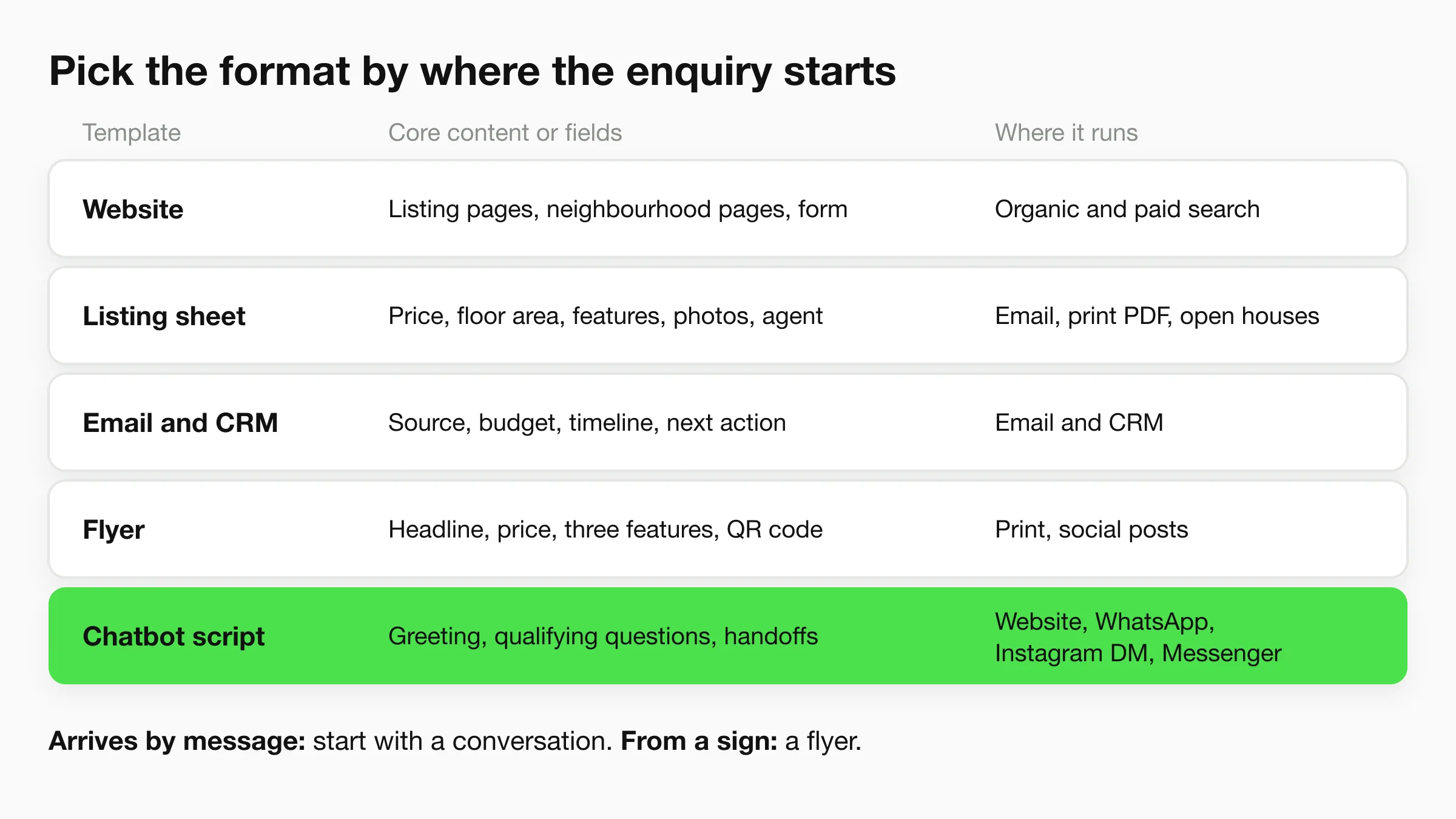
Use this comparison to choose the format that matches where prospects first encounter your business. You don't need every type at launch, and a matching design across formats matters less than consistent property information.
Real estate template types, best use and channel
| Template type | Best for | Core content or fields | Where it runs |
|---|---|---|---|
| Website template | Agents and brokerages needing a permanent listing site | Search filters, listing pages, neighbourhood pages, enquiry form | Organic and paid search |
| Listing sheet template | Sellers and agents presenting one property | Price, floor area, features, photos, agent contact | Email and print PDF, open houses |
| Email and CRM template | Teams following up with many leads | Source, budget, timeline, financing status, next action | Email and CRM |
| Flyer template | Local and open-house marketing | Headline, price, three features, QR code, contact line | Print, social media posts |
| Chatbot and AI script template | Handling after-hours enquiries and booking viewings | Greeting, qualifying questions, handoff rules, booking link | Website chat, WhatsApp, Instagram DM, Messenger |
The formats share information, but each serves a different point of contact.
Website and Listing Sheet Templates
A website template gives your brokerage a permanent front door. Use property pages for detailed information, neighbourhood pages for factual local context and an enquiry form attached to each listing. Check that individual property pages have editable titles, descriptive URLs and useful mobile layouts.
Its weakness is upkeep. A beautiful site becomes misleading if sold properties remain searchable as available or enquiry buttons lose the listing reference. Choose a content management system that lets staff update records without rebuilding pages.
A listing sheet packages a property for an email attachment, viewing appointment or open-house handout. Include the price, floor area with units, key features, approved photographs and the responsible agent's contact details. Give the sheet a revision date so recipients can identify an older copy.
PDFs are convenient, but downloaded copies don't update themselves. Keep the live listing page as the current reference, and regenerate the sheet when material information changes.
Follow-Up, Flyer and Conversation Templates
An email and CRM template works when enquiries exceed what your team can reliably remember. Build messages around stages such as viewing requested, viewing completed and documents requested. Each message should support a next action, not repeat a greeting.
Avoid sending a sequence regardless of what the prospect says. A reply about postponing a purchase should change the lead's stage and pause irrelevant reminders.
A flyer template is best for a quick local introduction. Give readers a clear headline, current price, selected features and an obvious route to more information. Test the QR code from an actual printed copy, and send it to the relevant property rather than your homepage.
A flyer can start a conversation, but it can't hold every disclosure or cost assumption. Keep the copy specific and let the destination page carry the detail.
A chatbot and AI script template handles conversational enquiries when an agent isn't available. It needs approved answers, qualifying questions, booking instructions and clear escalation rules. Its main limitation is its knowledge: an assistant shouldn't infer a missing fee, availability date or property feature.
Selection rule: If the lead arrives by message, start with a conversation template. If it arrives from a sign or a doorstep, start with a flyer that leads to current property information.
Customizing a Template for the Questions Buyers Actually Ask
A buyer comparing two homes may see similar prices and still face very different decisions. One may need immediate repairs; the other may have higher recurring fees. A useful real estate template therefore works as both a clear presentation and a structured record: it keeps key facts, their sources, and the next steps together.
Assess a template by audience fit, channel fit, qualifying fields, local disclosure needs and editing effort. If staff must update the same price in several places, or buyers must answer irrelevant questions before requesting a viewing, the structure is creating avoidable work.
Start with the decision the buyer needs to make. Someone considering a renovation needs condition details and likely costs. Someone seeking a move-in-ready home needs clear information about documented repairs and current systems. Similar budgets and neighbourhood preferences do not make these buyers' questions interchangeable.
Add the Condition Information Photos Can't Explain
More than half of surveyed U.S. buyers or active shoppers reported difficulty understanding a home's true condition and lacked confidence judging its performance, according to the homebuyer study announcement published by Business Insider Markets.
That concern calls for a property-condition explainer, not another preference form. Translate approved inspection findings and disclosures into plain language. Keep the source attached, and avoid diagnosing problems or promising how long equipment will last.
Condition and cost fields to add to a property template
| Field | Why buyers need it | Verify with |
|---|---|---|
| Roof and HVAC age | Helps anticipate possible replacement spending | Inspection report and seller disclosure |
| Moisture or flood exposure | Affects insurance cost and damage risk | Flood zone map and seller disclosure |
| Estimated monthly running cost | Shows affordability beyond the asking price | Tax records, utility bills, insurance quote |
| HOA or strata fees and rules | Identifies limits on rentals, pets and renovations | Association documents |
| Commute time at rush hour | Helps assess daily livability | Route measured at peak time |
| Verified or estimated flag | Distinguishes documented facts from assumptions | Source and date recorded for each field |
An installation date shown on an invoice is different from a seller's recollection. Record the source and label the recollection as seller-reported. Likewise, an inspector's observation of equipment condition does not establish its remaining service life.
Keep uncertainty visible: Mark estimates clearly and add a verify-before-relying note wherever a buyer could mistake an assumption for a confirmed property fact.
Put Running Costs Beside the Asking Price
Build a comparison panel with purchase price, estimated property tax, insurance, utilities, HOA or strata fees, a maintenance reserve and financing assumptions. Keep the purchase price distinct from recurring costs, and avoid counting mortgage principal repayment twice through overlapping calculations.
For an initial budgeting exercise, buyers can use an affordability calculator, then compare the estimate with lender figures. Treat general calculations as planning estimates. Replace assumptions with property-specific records and confirmed financing information as those become available.
Show the date, confidence level and basis beside each estimate. A utility bill records past consumption, not what a different household will spend. An insurance quote depends on its coverage assumptions, while a maintenance reserve is a planning allowance rather than a bill.
Add address-specific fields for rental limits, pets, fencing, parking and school-zone confirmation. Attach the association document, municipal source or official school lookup used for that property. For rush-hour commute estimates, record the destination, travel mode and observation conditions so buyers can understand what the range represents.
Before publishing, localize energy labels, disclosure wording and professional referrals. If a defect remains unresolved, describe what is known and what still needs checking rather than turning uncertainty into reassuring marketing language. When buyers cannot tell whether a visit is worthwhile, identify the missing answer and add that information to the template.
How to Set Up a Template in Seven Steps
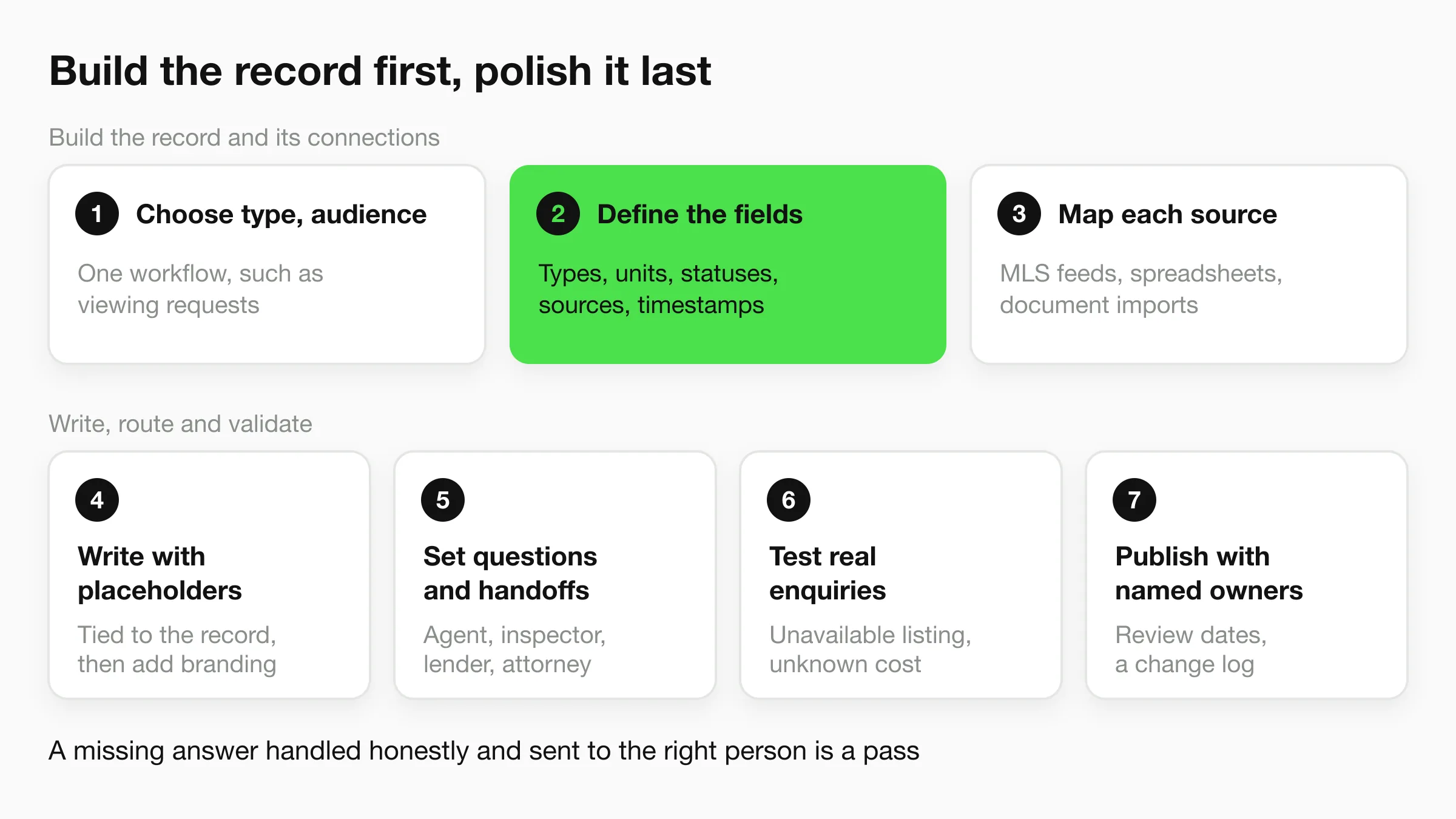
Build the working record before polishing its presentation. The RESO Data Dictionary organizes real-estate information into resources, fields and controlled values, providing a useful model for separating property details from descriptive text.
The visual overview shows the launch sequence; the implementation steps below add the data mapping and responsibility checks needed for live operations.
Build the Record and Its Connections
Choose a type and primary audience. Start with a specific workflow, such as viewing enquiries from first-time buyers, rather than a universal brokerage template. Write down the action that counts as completion, such as a confirmed viewing or an assigned callback.
Define stable field names, data types, units, permitted statuses, source identifiers and last-updated timestamps. Store bedrooms as a numeric field and listing status as an allowed value such as Active or Sold, rather than burying both in a description. Keep local extensions, such as jurisdiction-specific disclosure fields, separate from the shared core.
Map each incoming source to that schema. Use a separate mapping layer for MLS feeds, spreadsheets and document imports so source-specific labels don't reach customer-facing copy. The RESO Web API provides a standardized exchange approach; check status conversions, missing values, media references and update handling at the connection boundary.
Write, Route and Validate
Write content with placeholders tied to the record, then apply your logo, colours and layout. A price change should update the relevant display without someone searching through copied paragraphs. Add fallback behaviour so a missing floor-area field disappears cleanly instead of leaving an empty label or an invented value.
Set qualifying questions and handoff rules. Decide which answers the template can provide and which require an agent, inspector, lender or attorney, then connect the appropriate contact or booking route. Use the real estate lead handoff checklist to make ownership and the information passed to staff explicit.
Test realistic enquiries covering an available listing, an unavailable property, a viewing request, an unknown running cost and a high-stakes question. Compare every answer against the underlying record or document, including what happens when information is absent. Check mobile display, form delivery and the assigned recipient, not just the wording.
Publish with named maintenance owners. Assign responsibility for listing status, property documents, local rules and contact details, and set review dates suited to how those items change. Keep a simple change log so staff can identify whether a discrepancy came from the original source, an import or a manual edit.
A successful test isn't only a correct answer. It's also a missing answer handled honestly and sent to the right person.
Capturing Leads Across Locations and Chatbots
Ask for enough information to complete the next action, not enough to populate every possible CRM field. A viewing request needs a property reference, preferred availability and a reliable contact route. Detailed financial documents don't belong in a casual opening chat.
This platform screenshot provides context for the customer-facing assistant.
Request a verified contact method where practical, such as a phone number confirmed with a one-time code (on Hyperleap AI, OTP verification is a paid add-on on Pro and Max, website chat only). Verification helps establish that the prospect controls that contact method; it doesn't establish buying readiness. Record the source channel and send the responsible agent an immediate summary containing the request, property and promised next step.
Write consent wording around the intended use of the details. Separate permission to respond to an enquiry from optional ongoing marketing, and have local requirements reviewed before launch. Offer a clear human contact route, such as your own contact page, rather than forcing every visitor through automation.
Keep Branch Routing Explicit
For a multi-location brokerage, maintain a master template with shared fields plus a short section for each branch. Put branch hours, phone numbers, service areas and routing rules in those branch sections rather than duplicating the entire knowledge base.
Use a branch identifier tied to the property or the prospect's confirmed choice. If the location is ambiguous, ask before assigning it. Outside office hours, tell the prospect when a person will respond and what happens to an urgent request.
Give the Assistant Boundaries
State clearly that the assistant is automated. Limit property answers to approved records and documents, and route personalized financing, legal and valuation questions to an appropriate person. The real estate AI chatbot lead qualification guide can help structure the questions without making the conversation feel like an application.
Prepare reviewed wording in the languages your audience uses, especially for consent, uncertainty and escalation. Test translated answers against the same property facts.
Use the accompanying video when reviewing the conversational workflow with your team.
Before launch, apply these checks:
- Do test routing: Submit enquiries for each branch and confirm who receives them.
- Do review fair housing language: Don't steer by race, religion, national origin, disability, family status or other protected traits. Use approved factual school, transit and service information.
- Don't imply a preferred resident: Remove wording such as perfect for young professionals from headlines, flyers and automated answers.
- Don't promise unsupported answers: An unanswered question should trigger escalation, not a confident guess.
Worked Examples and Starter Snippets
Say a small brokerage uses a listing sheet for property presentations, a flyer for open houses and an email template for viewing requests. Its lead record tracks source, budget, timeline, financing status and next action, while the property record supplies the marketing details.
A larger group uses a shared master template with branch-specific contact and routing settings. When a buyer asks about a property in another office's area, staff receive the property reference and conversation summary rather than forwarding an unexplained phone number.
A listing review should include supporting documents, not just the finished brochure.
Starter Copy to Adapt
- Chatbot greeting: Hi, I'm an automated assistant. I can help with listing details and viewing requests. What area are you looking in?
- Email subject: Your viewing request for [address] is confirmed.
- Flyer headline: [Bedrooms] bed home in [Neighbourhood], open [confirmed day].
- Listing-sheet note: Verify property tax and HOA fees before relying on estimates.
- Cost comparison line: Estimated monthly running cost [amount], based on [documents], reviewed [date], excluding [items].
Only send the confirmation subject after the appointment is confirmed. Replace bracketed placeholders with schema fields, and suppress any line whose required information is missing.
The buyer questions identified in Realtyna's real-estate content guidance include taxes, utilities, insurance, HOA dues, commuting and property rules. Use those questions to populate an address-specific comparison, not a generic neighbourhood sales pitch.
For the human follow-up, use the guide to responding to a real estate lead to turn the captured request into a relevant reply.
Launch Your First Template This Week
A larger template library won't fix an unreliable lead path. Start with the format that matches your busiest enquiry channel, give it a clear owner and test it against actual property documents before expanding.
Your launch decision should depend on evidence from the workflow, not whether the page looks finished. Submit the test enquiries yourself, read the messages staff receive and confirm that the prospect knows what happens next.
Your Publication Gate
- Traceable property details: Every displayed price and status has a named source and review date.
- Visible uncertainty: Estimates are labelled, and missing information doesn't turn into an unsupported answer.
- Accountable follow-up: A named person receives the enquiry and can meet the response time shown to the prospect.
If you use Hyperleap AI's Quick Start, which reads your website and drafts the agent's instructions, treat that draft as a starting point you edit. Our website setup can go live in under 5 minutes after you paste your website URL and add a script tag, but deployment speed isn't a substitute for checking property information and response behaviour.
Launch the initial channel when those checks pass. Add another format only when staff can consistently use the records coming from the first.
Finish today by writing down the template type you'll build first and the person who owns it. Give that person the source documents, a test enquiry and authority to correct the workflow before publication.
Paste your website URL and Hyperleap AI's Quick Start reads the site and drafts your agent's instructions, which you edit, so you can build a property assistant around your approved information. Visit Hyperleap AI to try your listing documents and lead-capture workflow with the 7-day trial included in every plan, then test the answers and handoff before going live.