Guide
System Availability Explained: Targets and Downtime Math
System availability explained: what 99.9% means in downtime hours, how to calculate it from your logs, and how to check a vendor's uptime claims.

Gopi Krishna Lakkepuram · Founder & CEO
· 14 min read
Organizations surveyed for the State of Resilience 2025 report averaged 86 outages a year, each lasting 196 minutes, which adds up to roughly 280 hours of downtime annually. That's seven working weeks of broken service, and the report notes a record like that can still sit inside a 97% availability SLA.
The gap between the number on the contract and the experience of the customer is where small businesses get hurt. System availability is sold as a percentage and paid for in minutes, and the two rarely get compared until a booking widget fails on a Saturday night.
A target is a budget, not a promise about frequency. It tells you how many minutes of the month may be lost. It says nothing about how often those minutes go, how long a single incident runs, or which failures the provider has excluded from the count.
So the work is this: convert every target into minutes and hours, then test the promise against the parts of the chain that deliver a booking.
Table of Contents
- Availability Targets and the Downtime Each One Allows
- Availability, SLA and Related Metrics
- Calculating Availability From Your Own Logs
- Causes of Downtime Most Teams Overlook
- Redundancy and Failover for Each Dependency
- Monitoring, Backups and Restore Testing
- How to Run the First Hour of an Outage
- Choose a Target and Check Vendor Uptime Claims
Availability Targets and the Downtime Each One Allows
An availability target is a subtraction problem dressed as a promise. Subtract the percentage from 100 and the remainder is the share of the period the service may be down. Put that share into clock time and a proposal becomes a downtime budget you can spend.
| Availability target | Allowed downtime per 30-day month |
|---|---|
| 97% | 21.6 hours |
| 99% | 7 hours 12 minutes |
| 99.9% | 43 minutes 12 seconds |
| 99.99% | 4 minutes 19 seconds |
A 30-day month holds 43,200 minutes. At 99.9%, the allowance is 43 minutes and 12 seconds, about one coffee break, or roughly 8.8 hours across a year. A clinic that books most appointments between 6pm and 9pm can spend that entire monthly allowance in a single failed deploy on a Tuesday evening. The yearly total looks roomy until one bad evening takes the month.
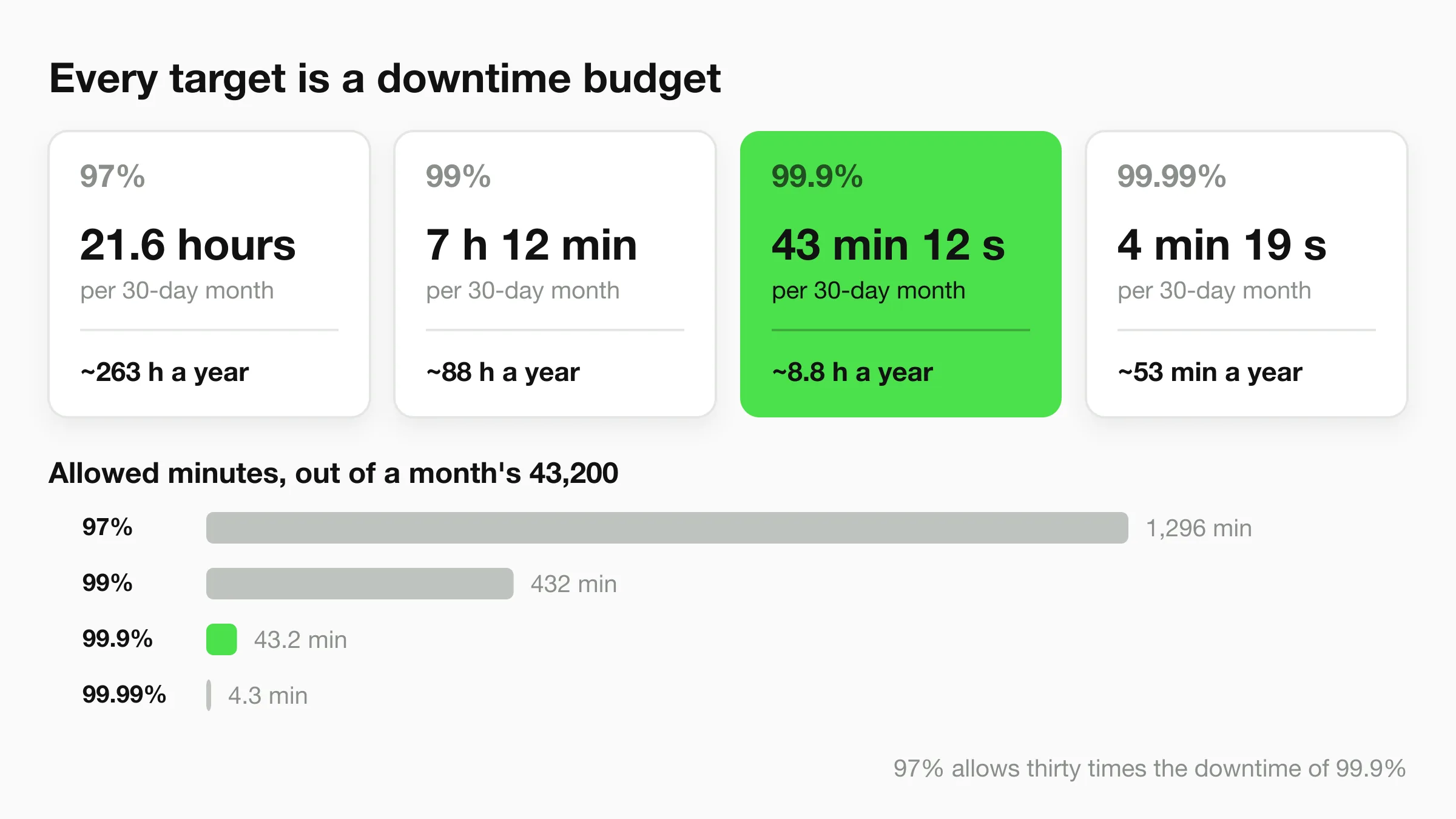
Allowed minutes are a ceiling on lost time. They do not say whether one incident may use all of them, or whether the meter pauses for maintenance, a region, or a dependency the contract leaves out of scope.
Read the 97% row against 99.9%. 21.6 hours a month next to 43 minutes is a thirty-fold gap in permitted downtime. On a one-page proposal both can look like high availability. For a business that sells appointments inside a three-hour evening window, 21.6 hours is several ruined nights, not spare capacity.
The percentage also hides the measurement rules. Four questions decide whether two vendors are even comparable. Is the figure global or per region? Does a down messaging channel, the path a booking takes, count against the target? Does the clock stop when an upstream platform fails, or when an identity check or calendar feed is broken? Do service credits return anything meaningful on a small monthly fee, or only a line on next month's invoice?
The same conversion applies to payment endpoints, identity checks, and the other always-on pieces around a booking. A side-by-side comparison of endpoints is only useful after each target is written as hours per month and hours per year, and after you know what happens to the clock during maintenance.
Availability, SLA and Related Metrics
Four terms carry the rest of this conversation, and mixing them up is how buyers end up arguing about the wrong number.
- Availability is the share of a period in which the service is up and able to do its job.
- Uptime is the raw time the server answers. It can sit above availability, because a server that replies "error" to every request is technically up while every booking fails.
- MTBF, mean time between failures, is operating time divided by the number of failures.
- MTTR, mean time to restore, is total outage time divided by the number of incidents.
A worked month makes the relationship concrete. Say 30 days gives 720 hours of operating time and three incidents consumed 90 minutes in total. MTBF is 720 ÷ 3, or 240 hours. MTTR is 90 ÷ 3, or 30 minutes. Availability is MTBF divided by MTBF plus MTTR, in matching units: 240 ÷ 240.5, which gives 99.79%.
Two more numbers belong alongside those. The recovery time objective (RTO) is the longest restore time you'll accept, for example two hours. The recovery point objective (RPO) is the most data you can afford to lose, for example a day of leads.
An SLA is the contract wrapped around all of it: the target, the measuring window and location, the excluded events such as planned maintenance, the reporting method and the service credits. A target without those details is a slogan with a percentage sign attached.
Calculating Availability From Your Own Logs
A vendor's claim is someone else's arithmetic. Your figure comes from your own incident log, and the formula is short:
Availability (%) = (total minutes in the period − minutes of downtime) ÷ total minutes in the period × 100
Run it on a real month. A booking chat that runs for 30 days has 43,200 minutes of possible service. Two incidents removed 40 minutes in the morning and 25 minutes in the evening, so 65 minutes are gone. (43,200 − 65) ÷ 43,200 × 100 = 99.85%. That clears a 99% target, misses 99.9%, and leaves the month roughly 22 minutes over budget.
Define what counts as downtime before the first incident, not after. A workable rule: a check fails from two monitoring locations for five consecutive minutes. A single timeout on one probe is noise, and counting it will drag the monthly number around for reasons nobody can explain.
Then separate the server answering from the job getting done. Replies may flow while WhatsApp messages bounce, or the widget loads while the calendar link returns an error. Track completed conversations and confirmed bookings beside the ping results, because a customer who got a cheerful apology and no appointment is a failure regardless of what the status page says.
Whether planned maintenance counts depends entirely on the SLA, so read that clause and apply it consistently. If maintenance is excluded, the excluded hours stay in the denominator and out of the numerator, and your number will look better than the customer's experience.
Practical rule: record the start time, the end time and the cause of every incident as it happens. A month-end figure reconstructed from memory won't survive a conversation with a provider's support team.
Causes of Downtime Most Teams Overlook
Human error belongs at the top of the checklist, not the bottom. Nearly 40% of organizations reported experiencing a major outage caused by human error during the previous three years, according to Uptime Institute's 2025 outage analysis. Configuration changes, permission edits and deployments pushed without a rollback path all live inside that figure.
The rest of the list is quieter, and it hits small operations hardest.
- Expired certificates, domains and tokens. A channel access token that lapses at 2am on a Sunday takes WhatsApp offline without touching the chat engine.
- DNS and identity provider failures. The site resolves for you because your cache is warm and unreachable for a first-time visitor in another city.
- Third-party messaging outages. Meta's APIs, calendar providers and SMS gateways fail on their own schedule, and your engine stays perfectly healthy while customers hear nothing back.
- Usage caps reached at peak. The plan includes a monthly message or AI response allowance, the busiest hour of the month exhausts it, and the assistant goes silent until someone notices.
- Single-region hosting. A regional incident produces an outage that no amount of software quality prevents.
Symptoms, causes and the first check to run
| Symptom | Likely cause | First check |
|---|---|---|
| Chat replies stop everywhere at once | Hosting or region outage | Provider status page and region health |
| Replies work but WhatsApp messages do not arrive | Channel API or access token problem | Channel dashboard and token expiry date |
| Bookings fail after a calendar change | Expired or revoked calendar connection | Integration login status |
| Website widget shows errors after launch | Recent deployment or configuration change | Change log for the last 24 hours |
| Replies slow only at peak hours | Capacity limit or usage cap reached | Usage meters and response time graphs |
| Login or verification codes not sent | Identity or SMS provider issue | Provider status and a fallback channel |
One symptom can have several causes, so treat the first check as a way to narrow the list quickly rather than as proof of the answer. The widget error after a launch is usually the deployment, occasionally the certificate, and now and then a rate limit that only shows up under load.
Keep a dated change log for every configuration, credential and integration edit. When a channel goes quiet, that log answers the first question in thirty seconds instead of an hour, and the channel connection notes explain what happens to a connection when its credentials age out.
Redundancy and Failover for Each Dependency
A headline uptime figure usually measures the hosting engine, and the engine is one link in a chain. A lead arrives through a website widget or a WhatsApp message, gets verified by a code, checks a calendar and lands in an inbox. Every link has to work at the same moment.
The headline keeps improving. The 2025 Uptime Institute analysis reported that average availability for applications deployed across regions improved substantially, while the worst-affected customers still faced annual application downtime that reached about six hours. Its 2025 survey also found that one in two respondents had experienced a data-center outage within the previous three years.
Average improvement and tail risk are different things. The average is what the vendor publishes. The tail is what your clinic experiences on the night a provider's authentication service stops issuing codes.
Mapping the chain
| Component | If it fails | Fallback to set up |
|---|---|---|
| Chat engine hosting | Customers get no replies | Status page notice and a web form or phone number |
| WhatsApp or Instagram DM channel | Messages stop on that channel only | Website chat and email as alternate capture |
| Calendar integration | Bookings cannot be confirmed | Save the requested time and confirm by email within a set hour |
| DNS | Domain unreachable for some users | Secondary DNS provider and a low record cache time |
| Identity or OTP verification | New leads cannot verify | Queue the lead and verify later, or capture name and phone |
| Email delivery | Summaries and alerts arrive late | Secondary sending domain and a second recipient |
Offline lead capture is the piece many teams skip. When a dependency is down, the fallback should still collect a name, a phone number and the requested time into a form or a chat that writes to your own storage, then retry the booking or the outbound message when the dependency returns. A queued lead with a callback promise is worth more than a perfect error message.
Then test it. Once a quarter, switch off one channel on purpose during business hours and time how long a test enquiry takes to reach a person. The number you get is your real MTTR, and it's usually the first honest one anyone on the team has measured.
Improving average cloud availability doesn't eliminate the risk that lands on the customer who meets the next major incident.
Monitoring, Backups and Restore Testing
Order matters here, because monitoring without a restore path just tells you faster that you've lost data.
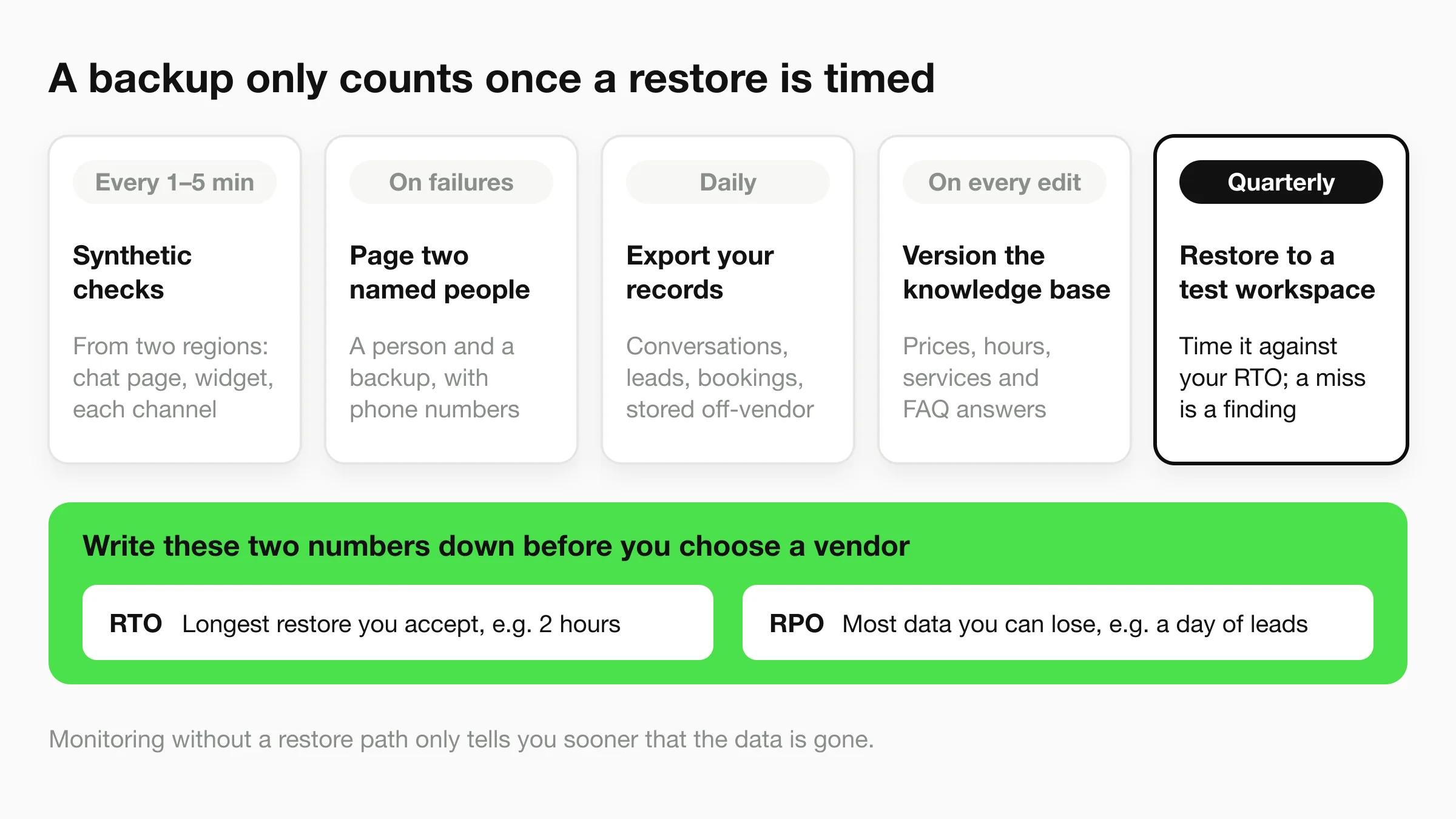
- Run synthetic checks every one to five minutes from two regions. Point them at the chat page, the widget script and a test message through each messaging channel, so a failing channel is caught while the server still answers.
- Set an alert threshold and name two people. A few consecutive failures should page a named person and a named backup, with phone numbers attached, not an email alias nobody reads on a Sunday.
- Export lead records daily through CSV, Excel or the API, along with anything else your tools let you export, and store the copy somewhere the vendor can't reach.
- Keep versioned copies of the knowledge base: prices, opening hours, service lists and FAQ answers. A restore is worthless if it brings back last quarter's pricing.
- Restore into a test workspace every quarter and time it against the RTO you wrote down. A restore that takes nine hours against a two-hour RTO is a finding, not a failure.
The tests only prove something if you know what "working" looks like to the customer, and an AI front desk acceptance test plan gives you the specific checks to run against replies, lead capture and booking handoff.
Write your RTO and RPO down before you choose a vendor. Those two numbers decide how much backup, monitoring and redundancy is enough, and without them every reliability conversation turns into a debate about feelings.
How to Run the First Hour of an Outage
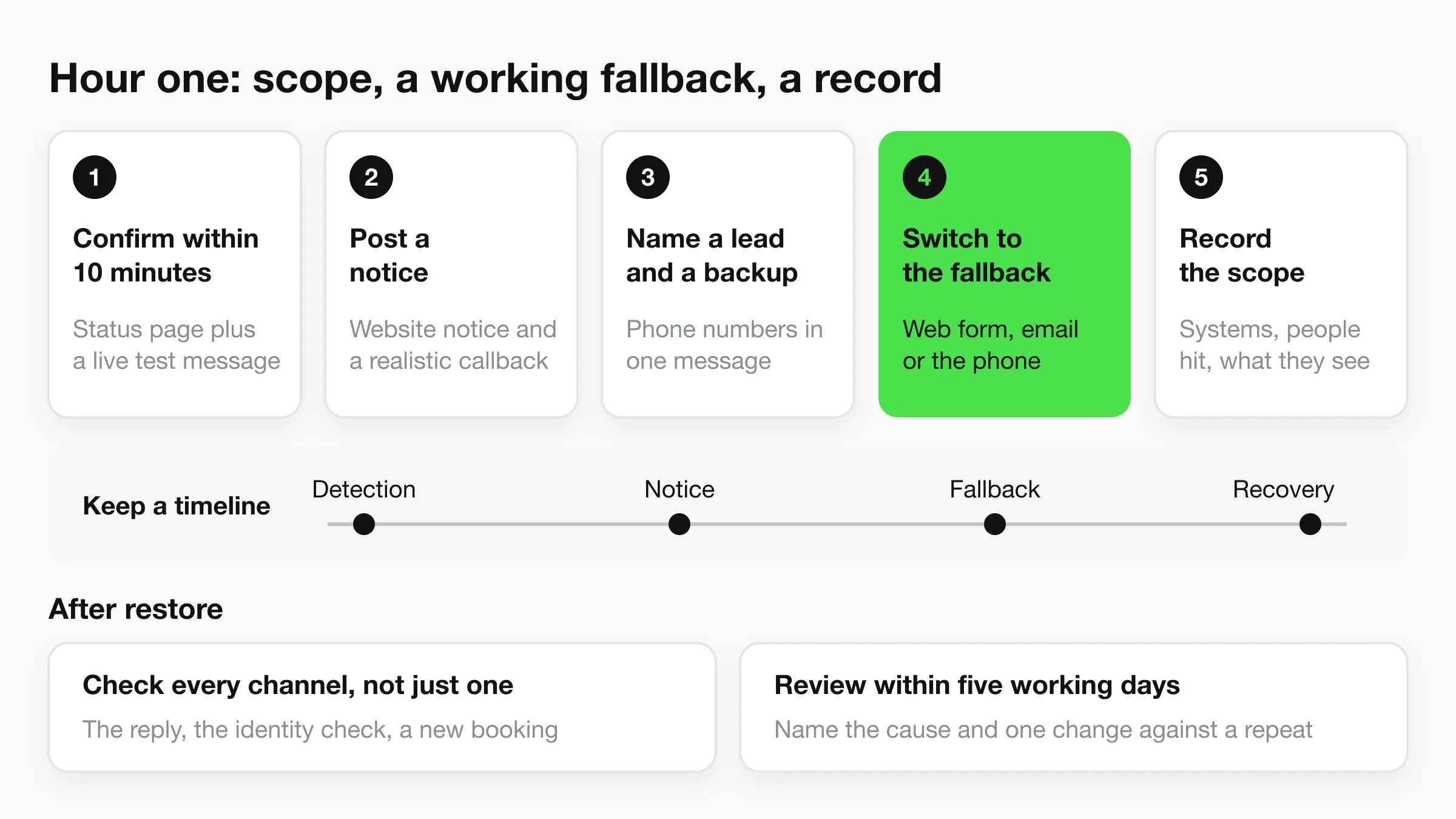
A year's downtime allowance can disappear in one evening if the path customers use is the one that failed. Website chat, WhatsApp, Instagram DM, Messenger, or the booking handoff can each be the broken piece while the rest of the stack still answers. The sequence below assumes a named person is already being paged, so the first hour is about scope, a working fallback, and a record you can defend later.
- Confirm within 10 minutes using two checks: the provider status page and a live test message through the affected channel. One check tells you what the vendor admits. The other tells you what customers see.
- Post a notice on the website, and switch on an automatic reply that gives a realistic callback time if the chat tool allows it. Silence reads as indifference.
- Name an incident lead and a backup, and put the phone numbers they need in one message. Two names prevents the pause where everyone waits for someone senior.
- Switch to the fallback channel listed against the failed dependency, whether that is a web form, email, or the phone. A booking link that will not open is still an outage for the customer trying to reserve a slot.
- Record the scope: systems affected, how many people are impacted, what customers see. Vague notes cost an hour of re-explaining later.
- Keep a timeline with detection, notice, fallback, and recovery. Providers ask for these times when they assess credit claims.
- After restore, confirm leads are arriving on every channel, not just the one you fixed. Check the reply, the identity check, and whether a new appointment actually books.
- Write a short review within five working days that names the cause and one change that prevents a repeat. An incident without a change is a rehearsal.
Part of that intake can run without someone sitting in the inbox. When a client reports an outage, Hyperleap AI can acknowledge the client and ask which systems are affected, how many people are impacted, and what they see. On Pro and Max, a teammate can take over the conversation through human handoff, and an Agentic Workflow can email your on-call engineer a summary once the conversation ends. Keep the troubleshooting guide with those phone numbers so the lead is not rebuilding the sequence from memory.
Choose a Target and Check Vendor Uptime Claims
The decision rule is shorter than most buying processes. A single-location shop with someone who can answer the phone can accept 99.9% plus an email fallback. A multi-location clinic or hotel group should require 99.9%, at least two capture channels and a restore time it has tested itself.
Six questions that turn a percentage into a contract
- Is availability measured globally or per region? A global figure can look healthy while your region is the one having the bad month.
- Are third-party messaging channels included, or only the hosted engine? WhatsApp being down is still your customer's problem, whichever contract excludes it.
- Does the clock stop during provider or platform outages? If it does, the outages you can't control are the ones that don't count against the number.
- Which planned maintenance is excluded, and how much notice is given? An exclusion with no window and no notice is unbounded.
- Over what window is uptime measured, how are credits calculated, and are they meaningful for a business paying a monthly fee? A credit worth a day's subscription rarely covers a lost weekend of bookings.
- Is monthly status history published so the claim can be checked against an independent monitor? History you can audit beats a promise you can't.
Apply the list to us as one example. We publish a 99.9% uptime figure for the platform, so ask us the six questions above just as you would any other vendor. Convert any stated target into hours per month and ask what a customer sees in minute 20 of an incident.
Finally, ask the vendor to state in writing which parts of the chain it controls and which depend on Meta, a calendar provider, an SMS gateway or DNS. A vendor that can draw that line knows its own architecture. One that can't is quoting a percentage it can't defend.
Hyperleap AI puts an AI front desk on your website, WhatsApp, Instagram DM and Messenger, answering and capturing leads at the hours when a partial outage costs the most. We hold a 99.9% uptime figure, and support answers by email and chat within 24 hours on every plan. On Pro and Max, human handoff lets your team take over outage reports, and an Agentic Workflow can email your on-call engineer a summary. Visit Hyperleap AI to see the availability model and get a working assistant live in minutes.