Conversational AI for Small Business: A Starter Guide
A practical guide to conversational AI for small business: what to build first, a 5-step setup week, real costs, and the 3 use cases that pay for it first.

TL;DR: Conversational AI for small business does not need to look like the enterprise platforms built for 500-agent contact centers. A small business needs three things working well: after-hours lead capture, FAQ deflection, and booking assistance — and those three use cases typically pay for the tool before you touch anything else. You can have a working setup in a week: connect a knowledge source, write 15-20 core answers, set escalation rules, pick your channels, and test with real questions before going live. Expect to spend somewhere between $40 and $200 a month depending on conversation volume and how many chatbots and channels you need — not the five-figure annual contracts enterprise vendors quote. This guide covers exactly what to build first, what to ignore until later, and where the real limitations are.
Who This Guide Is For
This is written for the owner or operator of a small business — not an IT department — who has heard the term "conversational AI" and wants a straight answer on what to actually set up, in what order, and for how much. If you want the plain-English explanation of the underlying technology first, read what conversational AI actually is. If you have already deployed something and want the operational playbook — knowledge base design, escalation rules, measurement — read conversational AI for customer service, which picks up where this guide leaves off.
It is 9:47 PM on a Tuesday. Someone lands on your website, reads three pages, and types a question into the little chat bubble in the corner — "do you have anything available this weekend?" Nobody answers. Not because your team is lazy, but because your team went home at 6. By the time you open your laptop Wednesday morning, that visitor has already messaged your competitor, gotten an answer, and booked with them instead. You will never see this happen. You will just notice, eventually, that your inquiry volume looks fine but your close rate keeps drifting down.
This is the problem conversational AI for small business actually solves — not "digital transformation," just: someone is asking a question right now, and if nobody answers in the next few minutes, they go somewhere else. Research from InsideSales found that leads contacted within five minutes are dramatically more likely to convert than leads contacted even an hour later, and the average business takes far longer than that to respond at all. A conversational AI system is, at its core, a way to close that gap without hiring a night shift.
The catch is that most conversational AI advice is written for companies with a dedicated support org, a data team, and a six-figure software budget. This guide is not that. It is written for the owner who wears the sales hat, the operations hat, and the "why is the chatbot broken" hat all before lunch — what a small business actually needs, what a first week of setup looks like, what it costs, which three use cases pay for the whole thing first, and where the real limits are.
What Is Conversational AI for Small Business?
Conversational AI for small business is a scaled-down, outcome-focused application of the same underlying technology enterprises use — natural language understanding paired with a large language model — configured to do a handful of specific jobs well instead of everything a Fortune 500 contact center might need. It answers questions in plain language, captures contact details before the conversation ends, and hands off anything it cannot safely resolve to a person.
The distinction that matters is not the underlying AI model — most vendors, including Hyperleap AI, run on comparable large language models. The distinction is scope. Enterprise conversational AI platforms are built to route across dozens of departments, integrate with ticketing systems, and support hundreds of concurrent agents. A small business does not need any of that in week one. It needs:
- A way to answer the same 15-20 questions instantly, at any hour, without a person typing
- A way to capture a name, contact detail, and intent before a promising conversation evaporates
- A way to share availability or a booking link without someone manually checking a calendar
- A way to know when the AI should stop and hand off to a human — pricing negotiations, complaints, anything sensitive
That is the whole starter kit. Everything else — advanced analytics dashboards, multi-department routing, custom API integrations, enterprise SSO — is either a distraction in month one or something you add later once the basics are proven. If you read a vendor's feature list and cannot picture using half of it, that is normal. Most of it was built for a buyer who is not you.
Definition, In One Sentence
Conversational AI for small business is software that answers customer questions in natural language, captures leads through a short form before the chat begins, and shares your booking link — deployed on your website and messaging channels, configured by you in days, without a developer.
Why This Is an SMB Problem Right Now
Small businesses feel the response-time gap harder than large companies do, and the reason is structural, not a failure of effort. A ten-person business does not have a night shift, a weekend rotation, or a dedicated inbox monitor — it has an owner who is also doing sales, and a small team that is already stretched across the jobs that keep the business running.
The volume grows faster than the team. As a small business gets more visibility — more ads, more search traffic, more referrals — inquiry volume rises. Staff headcount does not rise at the same rate, because hiring is slow and expensive relative to a marketing campaign that can double web traffic in a month. The gap between "questions coming in" and "people available to answer them" widens quietly until someone notices the close rate has dropped.
The after-hours window is real and unstaffed. Customers research and reach out on their own schedule — evenings, weekends, lunch breaks — not during your posted business hours. In Hyperleap AI's own Jungle Lodges deployment, 35% of all chatbot inquiries arrived after business hours, captured automatically with no staff on the line. That is over a third of total inquiry volume that a business without automated coverage either loses entirely or answers the next morning, cold.
Slow response has a measurable cost, and it compounds. According to HubSpot, 82% of customers expect an immediate response to a sales inquiry, and InsideSales research shows leads contacted within five minutes convert dramatically better than leads contacted later — while the average business takes hours, sometimes days, to respond. Multiply a modest number of missed after-hours inquiries by even a conservative close rate and an average deal size, and the monthly cost of "we'll get back to you in the morning" is usually a five-figure number most owners have never actually calculated.
Owners are already maxed out. According to QuickBooks research, small business owners work an average of 52 hours a week, and 39% work 60 or more. Nearly half of SMBs handle their own marketing with no dedicated staff (OutboundEngine). Asking that same owner to also monitor a chat widget at 10 PM is not a plan — it is a wish.
None of this means you need an enterprise-grade contact center. It means the gap between "someone asked a question" and "someone answered it" is the single most fixable revenue leak most small businesses have, and conversational AI is built specifically to close it without adding headcount.
What You Actually Need (Not What Enterprise Software Sells You)
You need less than most vendor demos suggest, and knowing what to ignore is as important as knowing what to set up. Here is the difference between the starter kit and the enterprise feature list that most small businesses will never touch.
What you actually need:
- A knowledge source — your FAQ page, service list, pricing, hours, and policies, uploaded as a document or pasted in directly
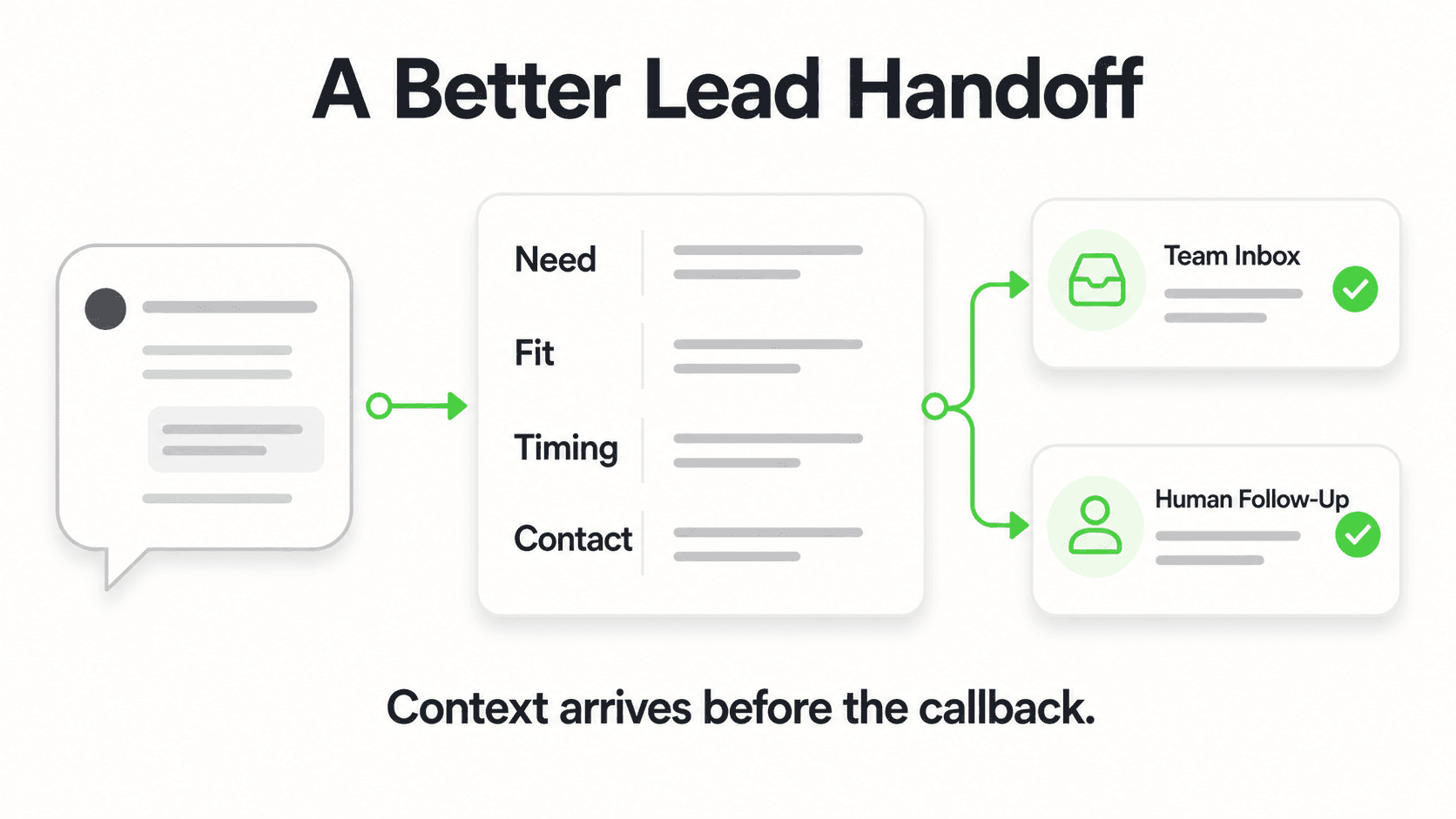
- A lead-capture form that gates the chat — a short form (name, contact detail, what they need) collected before the AI starts answering, so every conversation produces a usable lead even if the visitor closes the tab
- Channel coverage where your customers already are — typically your website chat widget plus WhatsApp, and Instagram DM or Facebook Messenger if social inquiries are a real channel for you
- A way to book — with Calendly or Cal.com connected, the AI shows live open times and books the slot in the conversation; with any other scheduling tool it shares your booking link
- Clear escalation rules — anything about pricing negotiation, complaints, medical or legal specifics, or anything the AI does not have a confident, document-grounded answer for gets routed to a person
- A notification path to your team — email or dashboard alerts so a human sees new leads within the hour, not at the next weekly check-in
What you can safely skip for now:
- Multi-department routing (you likely have one team, not twelve)
- Custom-built integrations with a CRM your five-person team does not have yet
- Voice deployment — not something most small-business platforms, including Hyperleap AI, currently offer; it remains a roadmap item across the industry
- SMS as a dedicated channel — most SMB conversational AI platforms today cover website chat, WhatsApp, Instagram DM, and Facebook Messenger; SMS support is not standard and is worth confirming before you assume it is included
- Enterprise analytics suites with dozens of dashboards you will check twice
- A fully custom-trained model — a well-configured, document-grounded system on a strong existing model gets you most of the value with none of the maintenance burden
The pattern across both lists: the starter kit is about capturing and answering, not about orchestrating a large operation you do not have yet. Add complexity when you have outgrown the basics, not before.
The specifics of what to load into the knowledge base shift a little by industry — a home services business needs service-area and quote questions covered, while a dental practice needs insurance and appointment-type questions covered — but the underlying starter kit above is the same regardless of what you sell.
The 3 Use Cases That Pay for Themselves First
Not every conversational AI use case delivers value at the same speed. For a small business, three specific jobs consistently produce a return before anything else is worth building — and in the right order, each one funds the next.
1. After-Hours Lead Capture
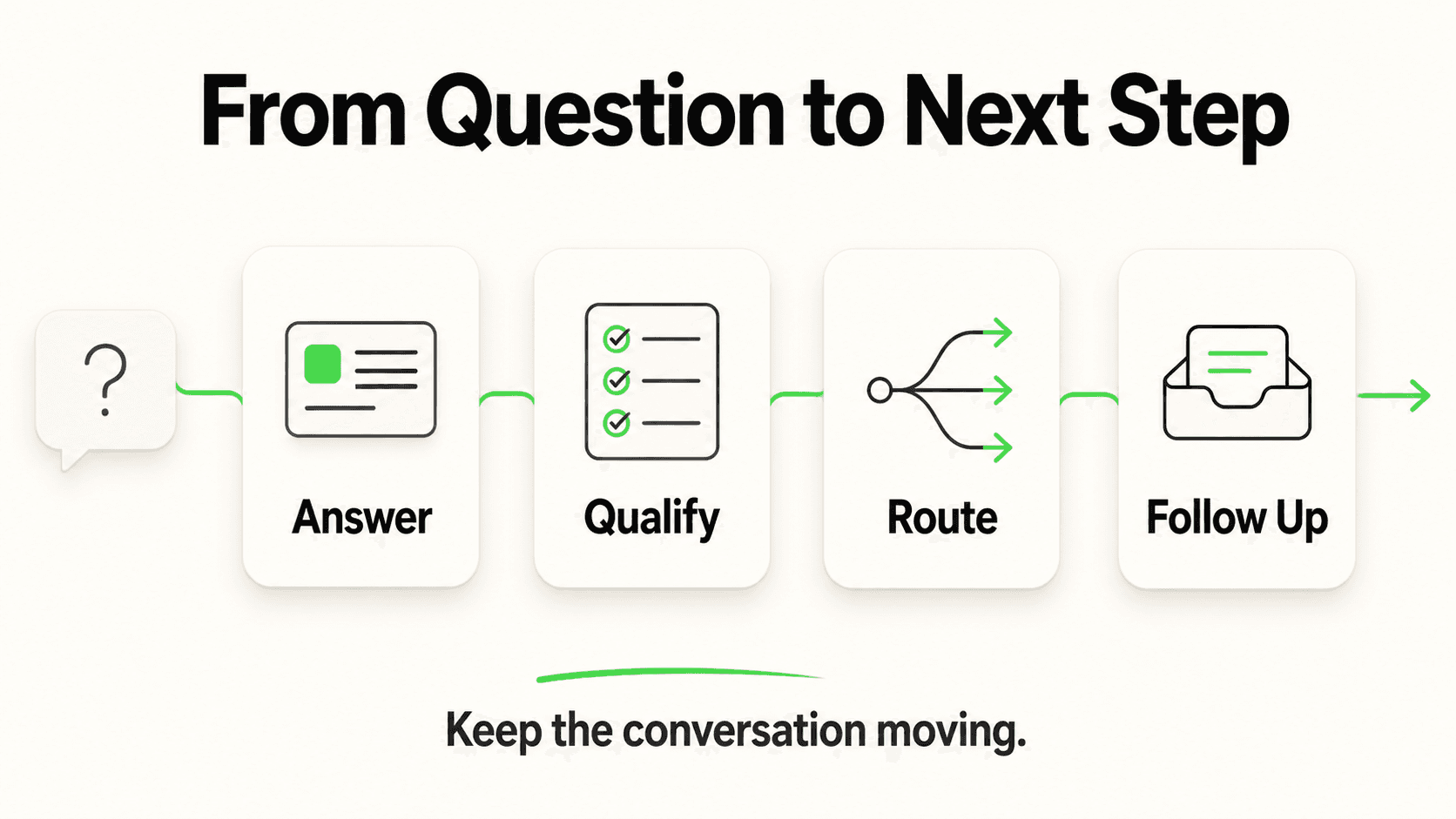
The job: Answer inbound questions and collect contact details when nobody on your team is working — evenings, weekends, and the gaps during the day when everyone is with a customer or on the phone.
Why it pays first: This is the purest version of "revenue you are currently leaving on the table." The inquiry already exists — someone found you, was interested enough to reach out — and the only thing standing between that inquiry and a booked customer is whether anyone answers before they move to the next search result. In the Jungle Lodges deployment, 35% of inquiries arrived after hours and were captured automatically; that is inquiry volume most competitors without after-hours coverage simply never see reflected in their numbers, because it shows up the next day as "already booked elsewhere."
How to think about the math: If your business gets even a handful of after-hours inquiries a week, and a reasonable share of those would have converted at your typical deal size, the monthly value of not losing them usually clears the cost of a conversational AI plan several times over. Run the calculation with your own numbers — average deal size, current after-hours volume, a conservative conversion estimate — rather than trusting a vendor's generic ROI claim.
2. FAQ Deflection
The job: Instantly answer the questions your team already answers the same way, every day — hours, location, pricing ranges, availability, "do you offer X," policies, and process questions.
Why it pays first: This is the fastest way to give your team hours back, and it is nearly risk-free because the answers are stable and low-judgment. Every business has a version of this: the same twenty questions asked in a thousand different phrasings. A conversational AI system grounded in your actual documentation handles the phrasing variation instantly and consistently, which a static FAQ page cannot — visitors do not read FAQ pages, but they will type a question into a chat box.
How to think about the math: If your team spends even an hour a day answering repetitive questions by phone, email, or chat, that is real weekly time you can reclaim. At a modest hourly value, that adds up to a meaningful chunk of change annually — money that was previously spent answering "what are your hours" for the thousandth time.
3. Booking and Scheduling Assistance
The job: Help a visitor go from "interested" to "on the calendar" without a human doing the back-and-forth of checking availability and confirming a time.
Why it pays first: Booking friction is where a lot of otherwise-qualified interest quietly dies. A visitor who has to email, wait for a reply, and then coordinate a time is a visitor who has three separate chances to lose momentum and go elsewhere. A conversational AI that shares your booking link the moment someone signals intent — "I'd like to come in Thursday" — collapses that friction into one step.
How to think about the math: This use case is harder to quantify directly since it accelerates a conversion that was already likely, rather than creating a new one. Track it qualitatively at first: how many booked appointments came from a chat conversation versus a phone call, and whether your no-show or drop-off rate between "inquired" and "booked" improves once the handoff is instant.
Start With One, Not All Three
Deploy after-hours lead capture and FAQ deflection first — they run on the same knowledge base and go live together. Add booking-link sharing once you see real conversation volume and know which questions signal booking intent. Trying to perfect all three before launch is the most common reason small businesses delay going live by months.
For a deeper look at how these use cases play out operationally — escalation design, measurement, and the failure modes to avoid — see our operational guide to conversational AI in customer service.
See the Starter Kit in Action
Watch how an AI agent handles after-hours lead capture, FAQ deflection, and booking-link sharing for a business your size.
Start Your Free TrialWhat to Skip Until Later
Resisting scope creep in week one is what separates a conversational AI deployment that actually launches from one that stalls in planning for two months. Here is what to deliberately postpone.
Skip advanced integrations at first. You do not need your AI agent talking directly to your CRM's internal database on day one. Most platforms, including Hyperleap AI, offer connectivity via REST API and webhooks — new lead created, new message, conversation started — which is enough to route leads into a spreadsheet or a lightweight CRM without a custom integration project. Save the deeper build for once you know exactly what data you need where.
Skip building out every possible conversation branch. Load your core 15-20 answers, go live, and watch what people actually ask — real conversation logs are a far better source of what to add next than a brainstorming session.
Skip channels you do not actually use. If your customers do not message you on Instagram, do not spend setup time configuring Instagram DM in week one. Match channels to where inquiries already arrive.
Skip voice for now. Voice AI is an active area of development across the industry, but it is not part of most small-business conversational AI platforms today, including Hyperleap AI's current offering. If a vendor promises phone-call automation as a core feature right now, ask exactly how it works and what it costs.
Skip elaborate reporting dashboards. In month one, you need to know two things: how many leads came in, and whether the AI is answering correctly. Cohort analysis and attribution modeling are worth building once you have enough volume for the numbers to mean something.
Cost Expectations: What Conversational AI Actually Costs a Small Business
A conversational AI system for a small business typically runs $40 to $200 a month, not the five-figure annual contracts enterprise vendors quote — and the difference between tiers usually comes down to conversation volume and how many chatbots or channels you need, not access to fundamentally different technology.
Using Hyperleap AI's plan structure as a concrete reference point:
| Plus — $40/mo | Pro — $100/mo | Max — $200/mo | |
|---|---|---|---|
| AI responses/mo | 3,000 | 12,000 | 30,000 |
| Chatbots | 1 | 2 | 5 |
| Channels | 4 per chatbot | 8 (4 per chatbot) | 20 (4 per chatbot) |
| Knowledge base | 40MB | 40MB | 40MB |
| Team members | 10 | 50 | 100 |
| White-label | — | Included | Included |
For most single-location small businesses just starting out, the entry tier is enough to cover a real month of after-hours lead capture and FAQ deflection. You would move up a tier when conversation volume genuinely outgrows the response cap, or when you are running more than one chatbot — separate agents for sales versus support, for example, or one per location.
All plans include a 7-day free trial; a credit card is required to start the trial, and there is no free-forever plan, so budget for the subscription from day one rather than assuming an extended no-cost period. A few features are priced separately as add-ons rather than bundled into the base plans — phone-verified lead capture (OTP verification, usage-based, available on Pro and Max), answers from the right location or course when you have several similar ones (Multi-variant (locations, courses, etc), Pro and Max only), and one-time managed setup if you would rather have someone configure the system for you. None of these add-ons are required to run the three starter use cases above; they matter once you have outgrown the basics.
Compare this to what a single missed after-hours lead is actually worth to your business, and the monthly cost tends to look less like a software expense and more like an insurance premium against inquiries you are currently losing without ever seeing them. For the full current pricing detail, see the Hyperleap AI pricing page.
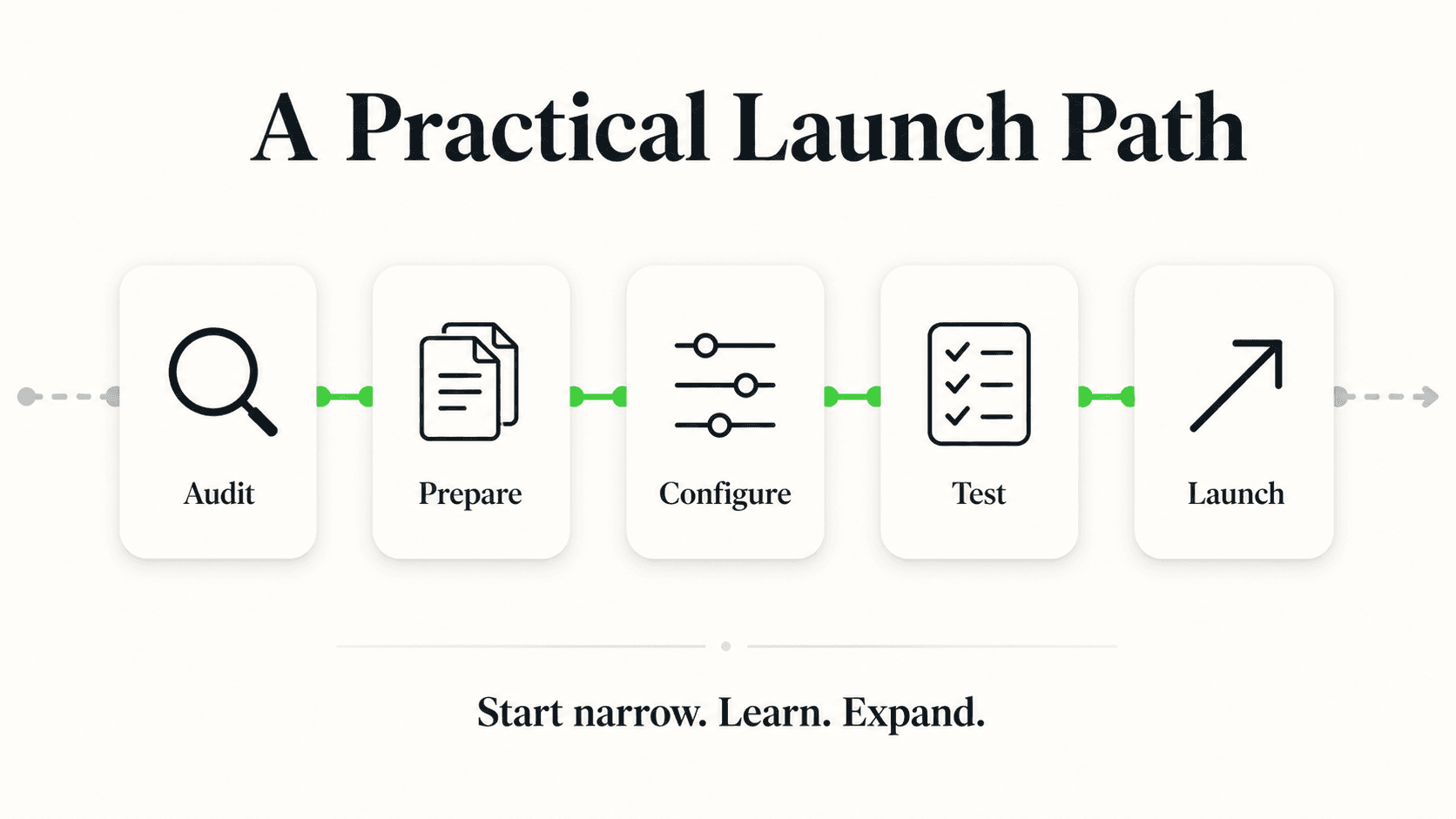
Your First Week: A 5-Step Setup Guide
A working conversational AI deployment does not require a development team or a multi-month rollout plan. Here is what an actual first week looks like, step by step.
Step 1: Gather your knowledge source (Day 1-2). Pull together what you already have — your FAQ page, service or product list, pricing ranges, hours, and cancellation or return policy. You do not need to write anything new yet; most of this content already exists somewhere on your website or in a document. Upload it as-is; a modern conversational AI platform is built to parse existing content, not require a rewritten knowledge base.
Step 2: Write your 15-20 core answers (Day 2-3). Identify the questions your team answers most often — literally list them from memory, then check against recent emails or messages if you have them — and make sure each one has a clear, accurate answer in your knowledge source. This is the highest-leverage hour you will spend in the entire setup, because it directly determines how many conversations the AI resolves without a handoff.
Step 3: Set your escalation rules (Day 3-4). Decide explicitly what the AI should never try to answer alone — pricing negotiations, complaints, anything involving medical or legal specifics, anything it is not confident about. Configure those as automatic handoffs to a human, with a clear message to the customer that someone will follow up. This single step is what prevents the most common conversational-AI failure: a system that guesses instead of saying "let me get you the right person for that."
Step 4: Turn on your lead-capture form and pick your channels (Day 4-5). Configure the short form that collects name, contact detail, and intent before the conversation begins — this is what turns every chat into a usable lead even if the visitor never finishes the conversation. Then enable the channels where your customers actually reach out: website chat at minimum, plus WhatsApp, Instagram DM, or Facebook Messenger depending on where your inquiries already come from.
Step 5: Test with real questions, then go live (Day 5-7). Before publishing the widget, ask the AI the actual questions a customer would ask — including the awkward, edge-case ones. Confirm it hands off correctly when it should, that the lead form captures cleanly, and that your team gets notified promptly when a new lead comes in. Then publish, and treat the first two weeks of live conversations as your real testing ground — review transcripts, add missing answers, and tighten the escalation rules based on what people actually ask, not what you guessed they would ask.
The Most Common First-Week Mistake
Trying to write a perfect, exhaustive knowledge base before launching. Real customer questions will always surprise you. Launch with a solid core of 15-20 answers and clear escalation rules, then refine weekly based on actual conversation logs — not a pre-launch guessing exercise.
Real Results and Realistic Limitations
Conversational AI genuinely closes the after-hours and repetitive-question gap for small businesses, but it is worth being direct about what it does not do, so expectations match reality from day one.
What it does well: Answering high-volume, low-judgment questions instantly and consistently, capturing leads that would otherwise arrive after hours and go unanswered, and freeing staff time currently spent on repetitive phone and chat questions. Businesses using AI chatbots report meaningful sales increases in aggregate studies (Intercom), and Gartner research suggests AI can handle a large share of routine customer inquiries without human intervention — though actual results vary by business, knowledge base quality, and how well escalation is configured.
What it does not do: It does not replace your team, and should not be positioned that way. It does not perform medical diagnosis, clinical assessment, or legal advice — a well-configured system routes those conversations to a person, and any vendor implying otherwise should be questioned closely. It does not guarantee perfect accuracy; document-grounded systems are designed to minimize incorrect answers, but "high accuracy" is the honest claim, not "never wrong." It does not process payments or handle cart abandonment recovery. And it does not currently cover voice calls, SMS as a first-class channel, or native integrations with most industry-specific software — treat those as evaluation criteria to check with any vendor, not assumed capabilities.
The honest framing: think of conversational AI as cloning your best employee's availability, not their judgment. It handles the repetitive 80% so your team has time and energy for the 20% that actually needs a human — the complex question, the upset customer, the negotiation. That division of labor, not full automation, is where the realistic and durable value sits.
For a broader look at where small businesses stand on AI adoption in customer service right now, see our state of AI customer service for small businesses report, and for the underlying economics of response speed, see how response time affects conversion rates by industry.
Conversational AI for Small Business Starts With One Decision
You do not need to solve customer service, sales, and support all at once. You need to stop losing the inquiries that arrive when nobody is watching — and that single decision, made this week, is usually enough to justify the entire setup before you touch anything more advanced.
The businesses that get the most value from conversational AI are not the ones with the most sophisticated deployment. They are the ones that started with after-hours lead capture and FAQ deflection, watched two weeks of real conversations, and expanded deliberately from there. Everything in this guide — the starter kit, the three use cases, the first-week plan — is built around that same principle: start small, prove the return, then grow into it.
Hyperleap AI's AI Agents are built specifically for this starting point — document-grounded answers, a lead form that gates the chat and captures every visitor before the conversation begins, in-chat booking through Calendly or Cal.com on Pro and Max (or your booking link on Plus and for other tools), and deployment across website chat, WhatsApp, Instagram DM, and Facebook Messenger. Setup takes days, not months, and there is no development team required.
Ready to Stop Losing After-Hours Leads?
Set up your first AI agent this week — knowledge base, lead capture, and booking-link sharing, live in days.
Start Your Free TrialFrequently Asked Questions
What is conversational AI for small business?
Conversational AI for small business is software that understands customer questions in natural language, answers them using your own business content, captures contact details through a lead-capture form before the conversation begins, and hands off anything sensitive or unclear to a person — deployed on your website and messaging channels without requiring a developer.
How much does conversational AI cost for a small business?
Most small-business conversational AI platforms cost between $40 and $200 a month depending on conversation volume, number of chatbots, and channels needed. Hyperleap AI's plans start at $40/month (Plus, 3,000 responses/month, 1 chatbot) up to $200/month (Max, 30,000 responses/month, 5 chatbots), all with a 7-day free trial that requires a credit card to start. There is no free-forever plan.
Which use case should a small business set up first?
After-hours lead capture and FAQ deflection, launched together since they run on the same knowledge base. These two typically produce the fastest, most measurable return because they directly address inquiries currently being lost or answered slowly. Booking-link sharing is a natural third addition once you see real conversation volume.
How long does it take to set up conversational AI?
A working deployment — knowledge source loaded, core answers written, escalation rules set, channels enabled, and tested — typically takes about a week for a small business. You do not need months of planning; launching with a solid core of 15-20 answers and refining weekly based on real conversations works better than trying to anticipate every question in advance.
Will conversational AI replace my customer service team?
No, and it should not be positioned that way. Conversational AI is designed to absorb high-volume, repetitive, low-judgment questions so your team has time for complex, relationship-building, or sensitive conversations that genuinely need a person. Escalation rules ensure anything the AI is not confident about — or anything sensitive, like a complaint or a medical or legal specific — routes to a human automatically.
Do I need technical skills to set up conversational AI?
No. Modern platforms are built for no-code configuration — uploading existing documents (your FAQ page, service list, policies) and writing answers in plain language, not writing code. If you can maintain an FAQ page or write a clear email, you have the skills needed to configure and maintain a conversational AI system.
Can conversational AI integrate with the software I already use?
Most platforms, including Hyperleap AI, connect to other tools via REST API and webhooks (new lead created, new message, conversation started) rather than deep native integrations with every CRM or industry-specific system. Calendly and Cal.com are the exception on Hyperleap AI: connected natively on Pro and Max, the agent reads live availability and books in the chat (in-chat booking needs Calendly Standard or higher). On Plus, and with other scheduling tools, the booking link is shared in conversation. Treat specific integration claims as something to verify with any vendor before assuming they are included.
What are the biggest limitations of conversational AI for small business?
It does not perform medical diagnosis or legal advice — it routes those conversations to a person. It does not guarantee perfect accuracy; document-grounded systems are designed to minimize wrong answers, not eliminate them entirely. And most small-business platforms today do not cover voice calls or SMS as a first-class channel — channels are typically limited to website chat, WhatsApp, Instagram DM, and Facebook Messenger. Confirm current channel and integration support directly with any vendor before you commit.
Data Sources
- InsideSales, lead response time and conversion research
- HubSpot, customer response-time expectations research
- Gartner, AI handling of routine customer inquiries
- Intercom, AI chatbot sales impact research
- QuickBooks, small business owner working-hours research
- OutboundEngine, small business marketing resourcing research
- Hyperleap AI Jungle Lodges case study (2024): 3,300+ leads captured in 90 days, 35% of inquiries arriving after business hours
Industry Solutions
See how AI chatbots work for these industries:
Related Articles

12 Conversational AI Examples From Real Businesses
12 real conversational AI examples organized by job-to-be-done — after-hours capture, FAQ deflection, booking, and more — with sourced outcomes.
Conversational AI vs Chatbot: The Real Difference
Conversational AI vs chatbot explained: rule-based scripted bots versus LLM-powered conversational AI, plus a comparison table and decision framework.
What Is Conversational AI? A Plain-English Guide
Conversational AI explained in plain English: how NLU, LLMs, and RAG work, how it differs from chatbots, and where businesses use it today.

Benefits of Conversational AI for Business (With Caveats)
The real benefits of conversational AI — 24/7 coverage, speed, cost, scale — with the conditions that make each one true, and where it doesn't hold.