Guide
Healthcare Appointment Scheduling: A Practical Guide
Healthcare appointment scheduling explained: booking channels, no-show fixes, access trade-offs, tool options and KPIs to track in your clinic.

Gopi Krishna Lakkepuram · Founder & CEO
· 15 min read
In Australia's 2024-25 financial year, 26.0% of people reported waiting longer than they considered acceptable for a general-practitioner appointment, according to the Australian Bureau of Statistics patient experiences release. That figure reframes healthcare appointment scheduling as an access problem, not an office chore. When a schedule fails, patients don't just wait longer. Clinicians lose usable time, rooms sit empty, and people who need care compete for slots that other patients will never use.
A clinic can't create clinician hours by buying software. It can, however, decide how those hours are offered, confirmed, released, and refilled. That's the practical work below: match the channel to the patient, measure leakage, and keep every route to the same calendar open.
Table of Contents
- How Healthcare Appointment Scheduling Works Across Channels
- Why Appointments Go Missing and What It Costs
- Who Digital Self-Scheduling Leaves Behind
- Choosing Between EHR, Standalone and Chatbot Scheduling
- Privacy and Consent Rules for Scheduling Data
- Reminder and Waitlist Workflows That Recover Slots
- KPIs That Show Whether Scheduling Works
- Rollout Plan, Templates and a Multi-Location Example
How Healthcare Appointment Scheduling Works Across Channels
Healthcare appointment scheduling matches patient need to clinician time. It needs three things: a slot inventory, booking rules that say who can take which slot and for how long, and a way for patients to reach that inventory.
Think of a hotel reservation desk. Rooms are fixed. Demand arrives through the phone, the front desk, and a website, and every door has to see the same availability or you'll sell the same room twice. Clinics run the same risk with provider templates, visit lengths, and room constraints layered on top.
What Patients Actually Use
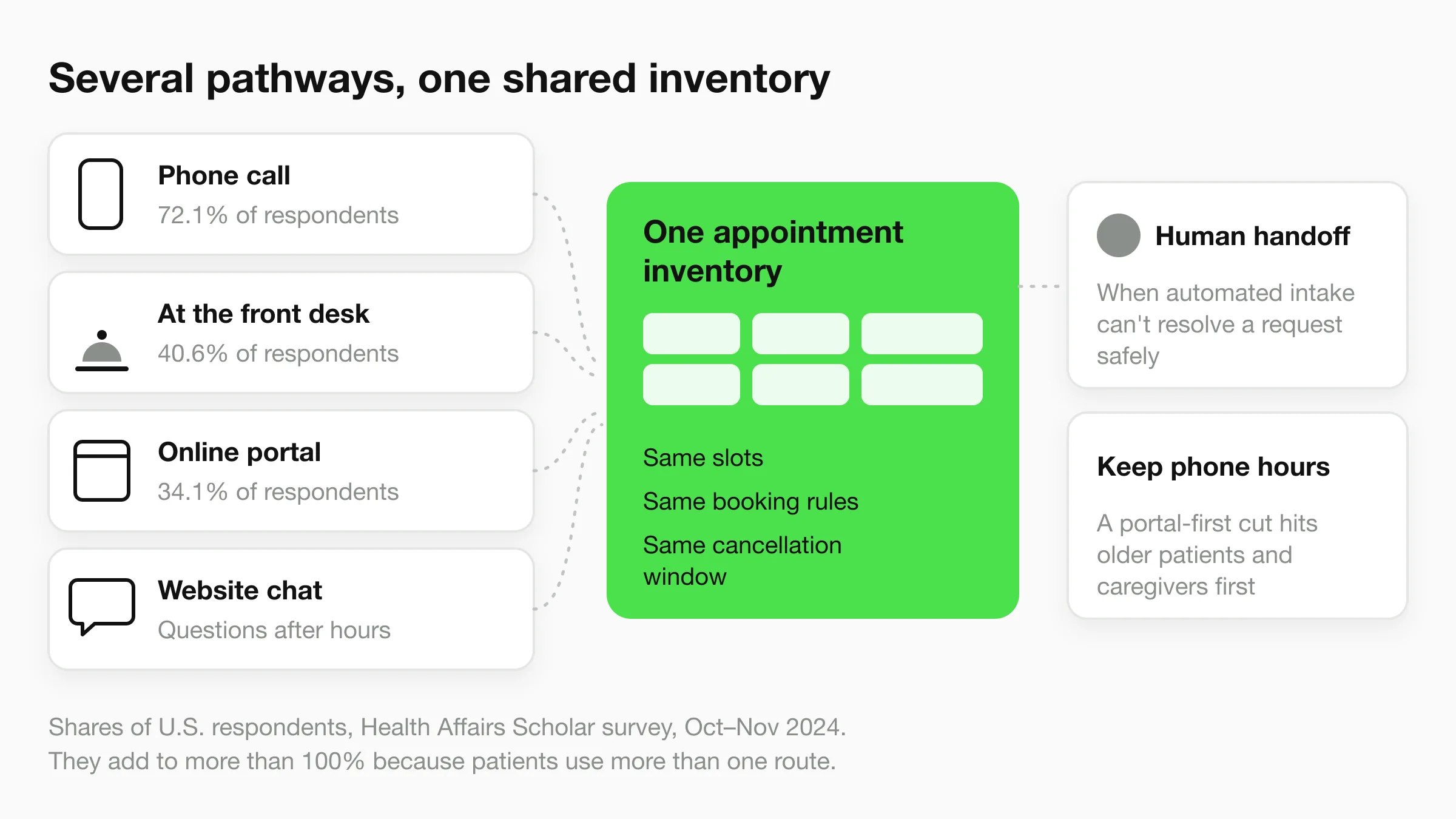
A nationally benchmarked U.S. survey reported in the Health Affairs Scholar study was conducted from October 16 to November 7, 2024, and collected 3,661 completed responses. 72.1% of respondents reported using phone calls to arrange medical appointments, 40.6% scheduled directly at the provider's office, and 34.1% used provider-operated online portals.
| Scheduling channel | Share of U.S. respondents | Typical reason patients use it |
|---|---|---|
| Phone call | 72.1% | Complex needs and a preference for speaking to staff |
| Directly at the provider's office | 40.6% | Booking or rebooking during or after a visit |
| Provider online portal | 34.1% | Routine follow-ups and booking outside office hours |
The numbers add to more than 100% because patients use more than one route. That's the lesson. Digital booking hasn't replaced the phone, it's joined it.
A portal that handles a third of your patients well can still fail the other two thirds if you let phone staffing shrink.
Build Blended Access
Keep phone and in-person workflows for patients who need a person to sort insurance, symptoms, referrals, or a sequence of visits. Use online booking for evenings, weekends, and routine follow-ups where the rules are simple and the patient already knows what they need.
Do a short exercise before you change anything. List every channel your clinic accepts bookings through, note which staff handle each one, and check whether all channels draw on the same appointment inventory. If your portal holds slots your phone team can't see, or the front desk keeps a paper reserve, you don't have one schedule. You have competing ones.
Why Appointments Go Missing and What It Costs
An empty slot is lost capacity you can't recover on the day. A clinician, a room, and support staff were reserved, another patient was turned away, and the time passed unused.
A 2024 primary-care study described in the PMC analysis of missed appointments examined 1,092 appointments and found 53 missed, a 4.9% overall non-attendance rate. The same source reports a large U.S. analysis of 1,118,236 primary-care appointments involving 109,328 patients, with 77,322 no-shows, or 6.9%, plus 75,545 late cancellations, or 6.8%.
| Setting or group | Missed or cancelled rate | Source context |
|---|---|---|
| Overall primary-care non-attendance | 4.9% | 2024 study of 1,092 appointments |
| Appointments with attending physicians | 3.6% | 2024 study of 1,092 appointments |
| Appointments with locum-tenens physicians | 4.0% | 2024 study of 1,092 appointments |
| Appointments with interns | 10.3% | 2024 study of 1,092 appointments |
| U.S. primary-care no-shows | 6.9% | Analysis of 1,118,236 appointments |
| U.S. primary-care late cancellations | 6.8% | Analysis of 1,118,236 appointments |
| General practice in France and the UK | 5% to 10% | Literature summary in the 2024 study |
Where to Look First
The breakdown matters more than the clinic-wide average. Intern appointments missed at nearly three times the rate of attending appointments, which points to continuity, patient confidence, or how those visits are booked and explained. Averaging that away hides the fix.
Lead time is the scheduling lever you control directly. Appointments booked more than 60 days in advance were associated with greater risk of being missed. Long horizons feel organized, but patients' symptoms, work, and insurance change. Shorter booking windows for routine visits, with protected longer windows for planned reviews, reduce that drift.
Double-booking usually isn't one person's mistake. It comes from manual overlap between phone, portal, and walk-in bookings that don't write to one calendar, or from staff deliberately overbooking to hedge against no-shows and then getting caught when everyone arrives.
Each leak has the same costs: lost clinician productivity, unused rooms, delayed care for patients waiting for a slot, and reduced revenue. Unanswered booking calls add a quieter loss before the visit is even made, which is worth costing as carefully as a no-show using the real cost of missed patient calls for small clinics.
- Pull your no-show rate by clinician: Don't stop at the clinic average.
- Check booking lead time: Count how many visits were booked more than 60 days out.
- Count double bookings last quarter: Log them as incidents, not anecdotes.
Who Digital Self-Scheduling Leaves Behind
Most vendor content assumes online booking helps everyone. Adoption data says otherwise.
The scene below is the route many patients still depend on, a conversation at the desk.
A July 2025 poll reported by MGMA on patient digital self-scheduling found 71% of medical practices had fewer than 25% of patients using digital self-scheduling, and only 3% reported that more than 75% of patients used it. The same source notes friction for people with limited digital literacy, limited English proficiency, or unreliable internet access. It also reports that across ten OECD countries, 18% of people waited more than a week to see a general practitioner or nurse, while 57% waited at least two days.
The Portal-First Trade-Off
A portal-first strategy lowers administrative load for digitally confident patients. If you then cut phone hours or front desk cover, you worsen access for older patients, caregivers booking for someone else, and patients without email, a smartphone, or a stable connection. Those are often the patients with the most appointments to manage.
Staff-assisted routes don't have to mean your own receptionists doing everything. Practices that need trained remote help with intake and booking sometimes use medical virtual assistants to keep a human pathway staffed while digital routes grow.
Keep Every Pathway Equivalent
- Multilingual booking flows: Translate the full flow, including errors and confirmations, not just the landing page.
- Mobile-first pages: Assume a small screen and a weak connection.
- Caregiver booking with consent: Let a named person book and receive reminders.
- Accessible identity checks: Offer a route that doesn't lock out patients without email, and test with screen readers.
- Equivalent phone or SMS alternative: Same slots, same rules, same cancellation window.
Adopt one principle: several pathways, one shared inventory, consistent rules, and a human handoff whenever automated intake can't resolve a request safely.
Choosing Between EHR, Standalone and Chatbot Scheduling
Start with three questions, not a feature list. Which system already holds the patient record? How many channels must share one calendar? How much message volume arrives outside office hours?
Your answers point to a category. A clinic with one provider and simple visit types needs something different from a multi-site group running referrals, procedure rooms, and telehealth on the same template.
Categories Side by Side
| Option | Works best for | Main strength | Limit to check |
|---|---|---|---|
| EHR-native scheduling module | Clinics already on one EHR | Shared chart and provider templates | Patient-facing booking is often basic |
| Standalone patient scheduling software | Multi-provider practices wanting online booking | Portal, reminders and waitlists | A second system to integrate with the EHR |
| Calendar tools (Calendly, Cal.com) | Single-provider or small practices | Quick setup and familiar booking pages | Limited clinical rules and reminders |
| AI chatbot or AI front desk (for example Hyperleap AI) | Clinics with high message volume across website and WhatsApp | Answers questions around the clock and books in the chat with Calendly or Cal.com (on Hyperleap AI, Pro and Max; Plus shares your booking link) | Needs grounded answers and a human escalation path |
| Telehealth scheduling module | Virtual-care services | Video visit booking and reminders | Identity and consent checks required |
An EHR-native module keeps booking close to the chart and provider templates, so visit rules, authorizations, and clinical history sit in one place. Its weakness is usually the patient side: booking pages that assume a portal account and a desktop.
Standalone patient scheduling software usually brings a better portal plus reminders and waitlists. You pay for that with an integration to maintain, and you need to confirm that bookings, cancellations, and arrival status write back to the EHR without manual cleanup.
Calendar tools such as Calendly or Cal.com suit a solo practitioner or small practice that needs to be bookable this week. They carry limited clinical rules, so you can't easily enforce visit-type lengths, equipment pairing, or provider eligibility.
An AI front desk answers questions from your website, WhatsApp, or Instagram around the clock, and can book appointments in the chat through a connected calendar tool such as Calendly or Cal.com. It's the right fit when messages arrive faster than staff can clear them. It needs answers grounded in your own clinic information and a clear escalation path for clinical questions, because a confident wrong answer about preparation or eligibility creates a failed visit. Comparing options in this category is easier with a structured review such as this guide to the best AI chatbots for healthcare.
A telehealth module handles video links, virtual waiting rooms, and reminders. Budget extra work for identity and consent checks, and confirm what happens when a patient needs to convert a video visit to in-person.
Three Integration Tests
Practical rule: If a tool can't show you a live booking landing on the real calendar, you're buying a promise, not a workflow.
- Writes to a single shared calendar: Book through each channel in the demo and watch the same calendar update, with no duplicate entry.
- Honours provider templates: Test visit lengths, blocked time, location rules, and buffer rules, not just open hours.
- Can be turned off or handed to staff: Confirm you can pause automation without losing bookings, transcripts, or waitlist order.
Failing any one test means staff will reconcile calendars by hand, which is where double bookings start.
Privacy and Consent Rules for Scheduling Data
Scheduling data is health data as soon as a name is linked to a provider, a clinic, and a time. Every tool in that chain needs a privacy review, including the chatbot and the analytics dashboard.
Build a Data Map First
List each place appointment details travel: EHR, reminder SMS, chatbot transcripts, calendar tool, telehealth module, and reporting. For U.S. practices, HIPAA applies to protected health information, so confirm a signed business associate agreement with each vendor that stores or transmits it. This overview of HIPAA compliant AI chatbots in healthcare sets out what to check, including encryption in transit and at rest, role-based access, and audit logs.
- Minimum necessary messages: Show clinic name and time, never specialty or visit reason. Cancellation links must not expose other patients' slots.
- Separate consent: Record SMS and WhatsApp consent separately from marketing consent, honour opt-outs the same day, and set retention periods for chat transcripts.
- EU and UK processing: GDPR needs a lawful basis, a data processing agreement with each processor, and a check on transfers outside the EEA.
Risk-based no-show scoring is profiling. Document a data protection impact assessment, explain the logic in plain language, and give patients a route to human review. For sensitive services, it's worth reviewing the privacy questions patients raise about therapy, so your booking flow answers them before they hesitate. Have counsel review final contracts, since duties vary by country and state.
Reminder and Waitlist Workflows That Recover Slots
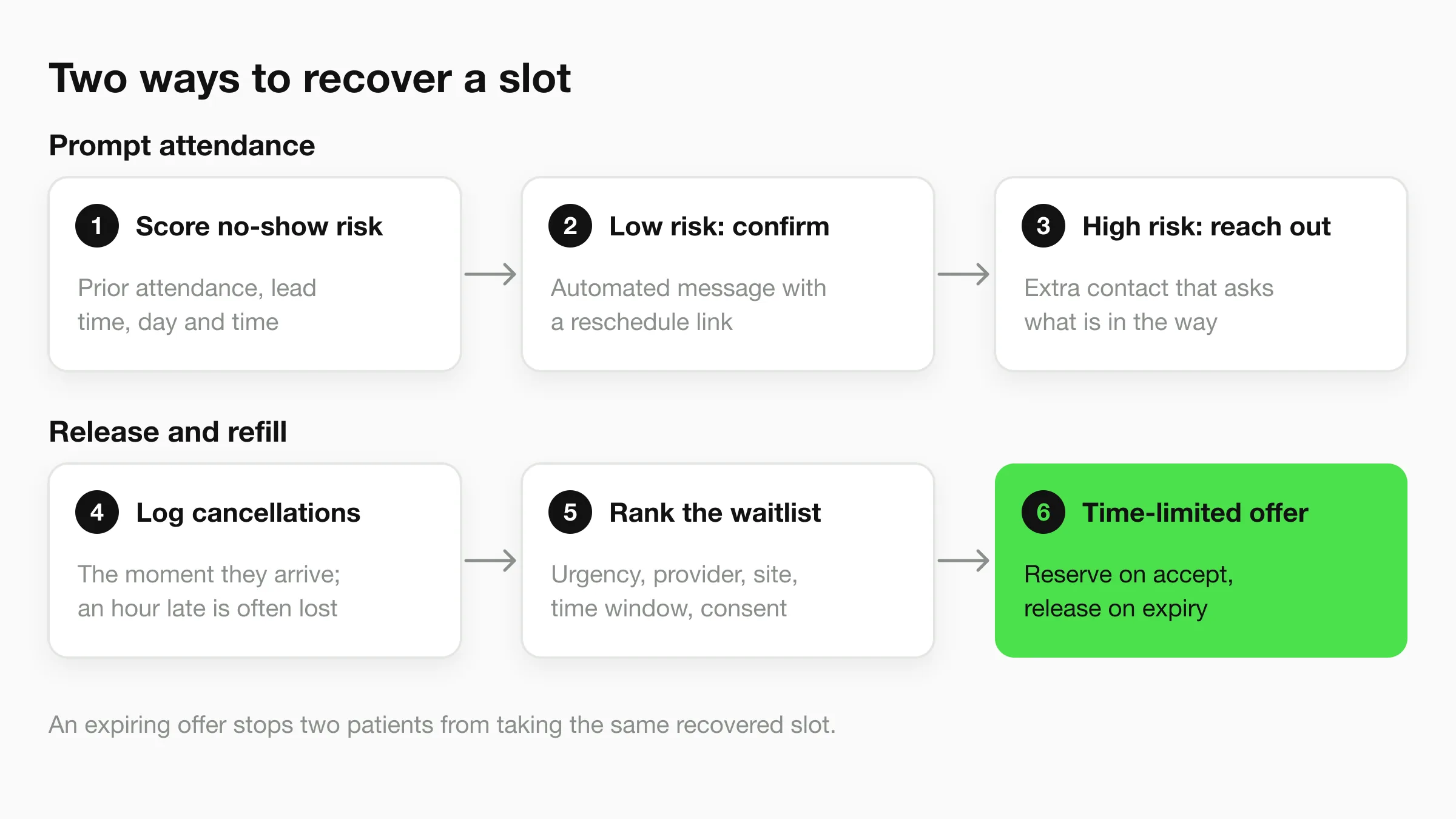
A clinic recovers capacity in two ways. It prompts attendance, and it releases slots early enough to refill them. Most reminder programs only do the first.
The flow below separates those two recovery paths, because they need different timing and different staff.
Why Risk-Based Reminders Work
Uniform outreach wastes calls on patients who always attend and under-serves the few bookings most likely to fail. A rapid systematic review summarized in the PMC review of predictive model reminders covered seven randomized controlled trials and one non-randomized study and found high-certainty evidence that predictive-model-based text reminders reduced outpatient no-shows, with a median risk ratio of 0.91 and an interquartile range of 0.90 to 0.92.
That effect is modest per message. It matters at volume, and it matters because staff time goes to the bookings where a call can change the outcome.
The Six-Step Workflow
- Score each booking for no-show risk: Use prior attendance, lead time, specialty, day and time, and contact history.
- Send low-risk patients automated confirmation: Include a cancellation and rescheduling link in the same message.
- Route high-risk patients to extra outreach: Add SMS, a voice call, or navigator contact, and ask what's in the way.
- Capture every cancellation immediately: A cancellation logged an hour late is often a slot you can't refill.
- Rank waitlisted patients: Order by urgency, specialty, provider, location, time window, and consent to receive offers.
- Send time-limited offers: Reserve the slot on acceptance and release it automatically if the offer expires or is declined.
Step 6 prevents race conditions. If two patients get an open-ended offer for the same slot, you'll double-book the recovery you just made.
A Short Illustrative Example
Say a two-doctor practice runs 30 daily slots. Scoring flags three high-risk bookings for the next day, so one staff member makes three calls instead of thirty. One patient says she can't travel that morning and cancels through the link. The waitlist offers that morning slot to the top-ranked urgent patient, who accepts, and the slot is filled the same day.
That same-day logic is what patients hope for when they try to find same-day dental appointments after a cancellation. Without a ranked queue and expiring offers, the slot goes to whoever happens to call.
An aggressive model can burden reliable patients and widen disparities, so check calibration and subgroup results before you widen outreach.
Compare no-show rate, recovered slots, contact cost per prevented no-show, and fairness by patient group before and after you switch on risk-based outreach. If high-risk flags concentrate on one language group, your contact history may be measuring your own outreach gaps rather than patient behaviour.
KPIs That Show Whether Scheduling Works
Measure what the schedule does for patients and capacity, not only how many bookings were made. A full calendar with a long wait for urgent care isn't a working schedule.
| KPI | How to calculate it | How to read it |
|---|---|---|
| No-show rate | No-shows divided by booked visits | Break it down by specialty and clinician |
| Late cancellation rate | Cancellations inside your notice window divided by booked visits | Shows whether cancellation rules are working |
| Median days advanced | Days moved earlier for patients who accept waitlist offers | Higher means patients reach care sooner |
| Waitlist fill rate | Cancelled slots refilled divided by cancelled slots | Shows whether the waitlist is active |
| Acceptance latency | Time from offer sent to patient response | Long delays release slots too late to refill |
| Double-booking incidents | Count per month | Aim for zero; benchmark each month against zero |
| Access by urgency and group | Days to next available visit, split by urgency and patient group | Reveals equity gaps |
The Access Metric That Proves Value
Bookings are activity. Median days advanced is outcome. In a 2025 evaluation reported in the Health Services Insights automated waitlist study, patients who accepted moved-up visits rescheduled themselves an average of 22.6 days earlier, with a 95% confidence interval of 22.2 to 22.9 days and a P value below .0001.
That's why a waitlist is an access intervention, not a convenience feature. Pair it with fill rate for cancelled slots and acceptance latency, and you can see whether you're moving patients earlier or just sending offers nobody can take.
Cut the Numbers Before You Act
Track no-show and fill rates by specialty and clinician. A clinic-wide average can hide a problem concentrated in one template, one session type, or one clinician group, and you'll fix the wrong thing with a blanket reminder campaign.
A small practice can run this monthly in a spreadsheet, reviewing five or six numbers plus the double-booking count. A multi-location group should compare the same metrics across sites, flag any site whose days to next available visit sits far above the group, and check the gap by urgency and patient group.
Review the KPIs before and after every change to reminders or booking rules. Without a before picture, you'll credit the tool for seasonal movement and miss harm to one patient group.
Rollout Plan, Templates and a Multi-Location Example
Run this in one quarter. Change one thing, measure it, then decide whether it earns a wider rollout.
- Baseline: Pull last quarter's channel mix, no-show and late cancellation rates by clinician, days to next available visit by urgency, and double-booking incidents.
- Choose a category: Apply the integration tests, then add the privacy checks as pass or fail criteria.
- Pilot one change: Run risk-based reminders or a waitlist for one specialty for four to six weeks, and compare it with the baseline.
- Expand only on evidence: Proceed when phone and in-person routes stay open and complaints or missed visits don't rise among older patients or non-English speakers.
Two Templates Worth Keeping
Booking rule sheet: appointment type, maximum lead time, reminder cadence, cancellation window, waitlist priority order, escalation owner.
Monthly KPI review note: metric, last month's value, target, cause, action. One line per metric forces a decision instead of a discussion.
Say a group with three sites shares one central waitlist and one inventory. Its monthly review shows the north site's urgent next available visit at 19 days against a group median of 6. Staff trace it to a provider template that blocked same-week slots, correct the template, and re-measure in the next cycle. The software didn't find that. The comparison did.
Before signing, confirm calendars are shared across all channels and a human handoff exists. On our side, Pro and Max let you book appointments in the chat with Calendly or Cal.com, while Plus shares your booking link. In-chat Calendly booking works on every Calendly plan, Free included (Calendly Free allows 5 in-chat bookings a day), and the AI sits on your own website where it handles lead capture and booking.
If your front desk is losing bookings after hours or across WhatsApp and Instagram, Hyperleap AI gives your clinic an AI front desk that answers patient questions from your own information, collects contact details, and books appointments in the chat around the clock with Calendly or Cal.com on Pro and Max (on Plus, it shares your booking link). Set it up without developers, keep your phone route open for patients who need a person, and measure the result against your no-show and fill rate baseline.