Guide
Healthcare Data Security: A Practical Guide for 2026
Healthcare data security for small and multi-location clinics: the rules, threats, controls, vendor checks and breach steps you need in 2026.

Gopi Krishna Lakkepuram · Founder & CEO
· 17 min read
Your office manager catches you between patients with a question that sounds routine. A laptop has gone missing from the second location. It held the day's schedule, a handful of intake forms, and the callback list for tomorrow's hygiene appointments. She wants to know whether the practice has to tell anyone.
The honest answer depends on three things: what kind of business you are, what was on the device, and whether the data was secured in a way that makes compromise unlikely. Two of those you can control. The third you can only answer by reading your own contracts and your own settings.
Most small practices get this wrong in the same way. They treat compliance as paperwork and security as an IT problem, then discover during an incident that the two were always the same conversation. The practices that come out of a bad week intact are the ones that sorted out which rules bind them before anything went missing.
Table of Contents
- Which Healthcare Data Rules Apply to Your Business
- The Threats Most Likely to Reach Your Clinic
- Technical Controls for Encryption, Access and Logging
- Written Policies Staff Will Actually Follow
- Vendor, Chatbot and AI Risks You Must Check
- Responding to a Breach Without Stopping Care
- Confirm Your Security Checklist Before You Act
Which Healthcare Data Rules Apply to Your Business
A three-site dental group that bills insurers electronically has its obligations fixed early. They come from the clearinghouse enrollment, the practice management vendor contract, and the kind of data the group keeps. A missing laptop changes the incident response, not the rulebook.
Four profiles cover almost every small healthcare business. Find your row, because every control later in this guide depends on the obligations you are under.
| Business profile | Main rules | Breach notification deadline |
|---|---|---|
| Clinic, dental practice or hospital billing insurers electronically | HIPAA Privacy, Security and Breach Notification Rules | Individuals without unreasonable delay and within 60 days of discovery; HHS rules require notice within 60 days for 500 or more people, or annually for fewer |
| Vendor storing or processing PHI for a clinic | HIPAA as a business associate, plus a signed Business Associate Agreement | Business associate duties require notice to the covered entity without unreasonable delay and within 60 days of discovery, or sooner if the contract requires |
| Practice treating patients in the EU or UK | GDPR, with health data as a special category | GDPR breach rules require notice to the supervisory authority within 72 hours of becoming aware, and notice to affected patients without undue delay when the risk is high |
| Med spa or wellness app outside HIPAA | FTC Health Breach Notification Rule and state health-data laws | FTC rule requires notice to individuals without unreasonable delay and no later than 60 days |
The scale behind those rows is larger than most clinicians assume. Since the HHS Office for Civil Rights began publishing reports of breaches affecting 500 or more people in 2009, it logged 6,612 breaches from October 2009 through December 2025, affecting 637,803,323 individuals, according to an analysis of HHS breach records published in JMIR Medical Informatics.
The more useful finding sits in the vendor row. Business associates were involved in 1,950 incidents, or 29.5% of all reported breaches, but those incidents reached 285,718,494 people, equal to 44.8% of the total, in that same analysis of HHS breach records published in JMIR Medical Informatics. A vendor incident is less common than a clinic incident and far larger when it lands.
That asymmetry is why a signed Business Associate Agreement deserves more attention than a glossy security questionnaire. The agreement sets the notification clock and makes the vendor contractually responsible for telling you fast. If you are adding an AI front desk to intake, start with the contract and the rules for HIPAA-compliant AI chatbots in healthcare. Hyperleap AI uses 256-bit AES encryption, and its Data Processing Agreement explains how customer data is handled. Customer data is encrypted in transit and at rest and is never sold.
Patients also read the public side of this. A clear, plain-language explanation, like the one on how patient data is protected, gives a practice a defensible baseline for its own notice. It also shows staff where to point patients before a small privacy concern becomes a larger trust problem.
The Threats Most Likely to Reach Your Clinic
A front desk inbox can take down a clinic faster than a fancy exploit. Someone opens a fake invoice, an admin login gets reused, or a shared folder stays public after a vendor setup. That is how most small practices get hit: through a legitimate door left open.
| Threat | How it reaches a small practice | First control |
|---|---|---|
| Ransomware | Opened attachment or unpatched remote access locks the schedule and records | Offline backups and MFA on remote access |
| Phishing and stolen logins | Fake invoice or password-reset email sent to the front desk | MFA and quarterly phishing training |
| Misconfigured cloud storage | Shared folder or database left readable by anyone with the link | Default-private settings and a quarterly access review |
| Vendor or integration compromise | Scheduling, messaging or billing tool with broad access to records | Vendor security review and minimum API permissions |
| Lost or stolen device | Unencrypted laptop or phone holding patient records | Full-disk encryption and remote wipe |
| Insider snooping or misuse | Staff opening charts without a clinical reason | Role-based access limits and reviewed access logs |
Ransomware deserves first place in planning because it can stop care, not just expose records. A stolen laptop is a privacy event. A locked schedule with no clean backup is a clinical event, because yesterday's appointments, notes and authorizations may be unavailable when the clinic needs them. That is why offline recovery matters as much as prevention. If restoration has never been timed, assume it will be slower on the worst day.
The cost case is serious, but detection time is the better planning number. IBM's Cost of a Data Breach report put the average healthcare breach at US$7.42 million, with healthcare the most expensive sector for the 12th consecutive year, down from US$9.77 million in 2024. The same research put average identification and containment at 279 days, the longest of any industry examined. Those figures came from breach data compiled by the Ponemon Institute from 600 organizations studied between March 2024 and February 2025.
A small team cannot match an enterprise security operation, so it should buy down delay where it can. Alerting on new admin logins, unusual exports and failed remote access gives the practice a chance to act in hours or days. Clear ownership matters too: one person should know who calls the vendor, who isolates a device and who keeps the clinic open while records are limited. Downtime planning belongs in the security program because patient safety depends on access to the right record at the right moment.
The triage question: for each threat in the table, ask whether a single email, a single device or a single login could give an outsider your entire schedule. If the answer is yes, that row is your next project.
Technical Controls for Encryption, Access and Logging
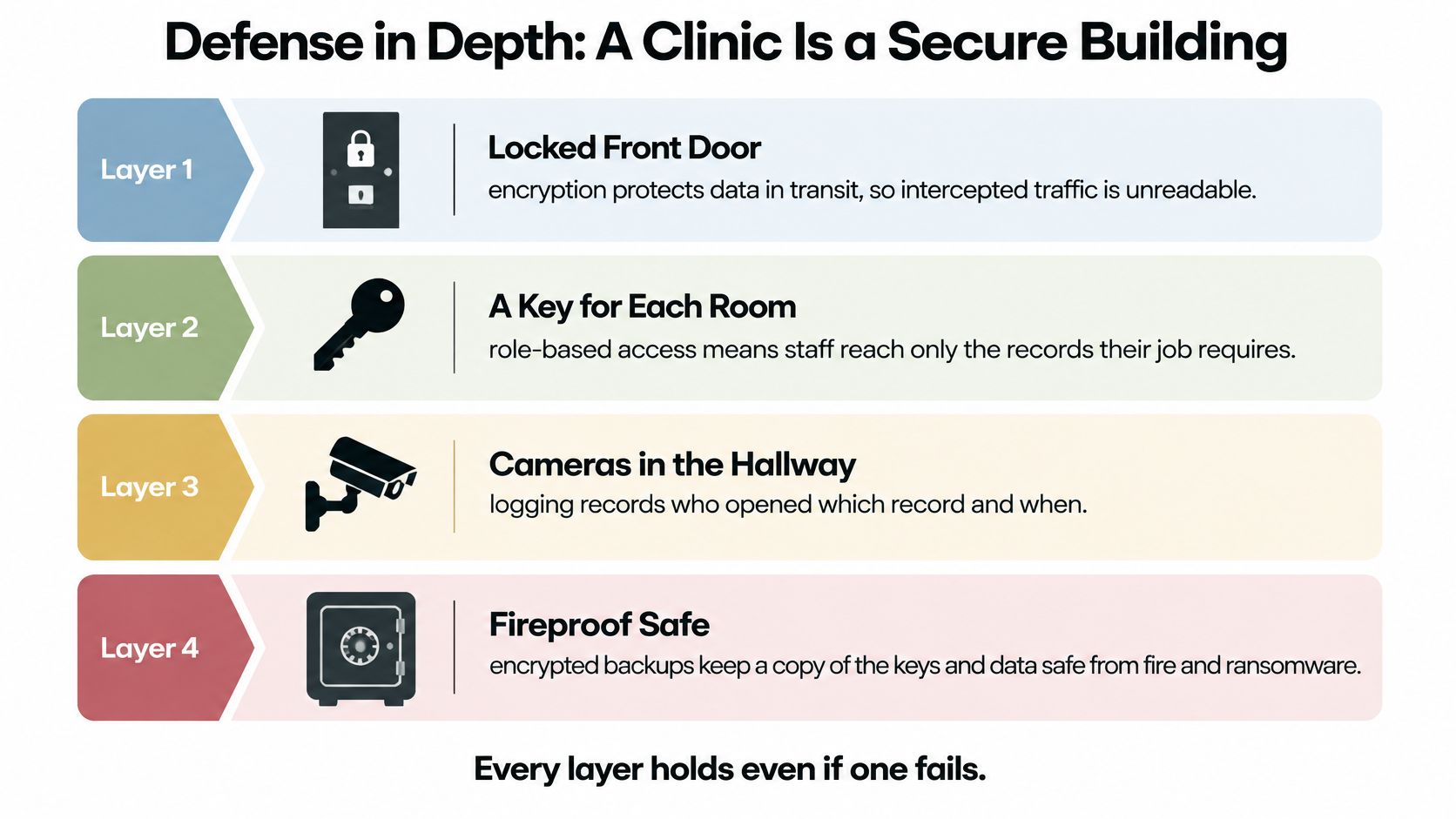
Think of your clinic as a building. There's a locked front door, a different key for each room, cameras in the hallway, and a fireproof safe holding copies of the keys. Any one of those can fail. The door can be propped open, a key can be copied, a camera can be unplugged, a safe can be left unsecured. Defense in depth means the building still holds when one layer goes.
What to set this month
These are the minimums, not the ambitions. Each one is verifiable, which matters more than each one being clever.
| Control | What it protects | Minimum setting |
|---|---|---|
| Multifactor authentication | Email, remote access and admin portals | Required on every internet-facing login and every admin account |
| Encryption at rest | Laptops, backups and databases | AES-256 or equivalent, with keys managed separately from the data |
| Encryption in transit | Patient messages, portals and API calls | TLS 1.2 or higher on every endpoint, TLS 1.3 where the vendor supports it |
| Role-based access | EHR, scheduling and shared drives | Staff see only the records their job needs, reviewed each quarter |
| Audit logging | Who opened, changed or exported a record | Logs retained under a written retention policy (HIPAA documentation is kept six years) and reviewed for unusual access |
| Automatic logoff | Shared workstations and tablets | Short idle timeout set by written policy |
| Tested backups | Recovery from ransomware | One offline or immutable copy, with a restore test every quarter |
HHS's healthcare-sector cybersecurity goals treat multifactor authentication and encryption as foundational controls, covering assets reachable from the internet and data moving through both IT and operational-technology environments, per the HHS cybersecurity performance goals. The same guidance adds three habits small teams skip: separate privileged administrator accounts from everyday logins, keep a live inventory of internet-facing systems, and patch known exploited vulnerabilities before anything else on the list.
How to verify a claim
Vendors describe themselves as secure. That sentence carries no information. Ask for the method in writing, stated as a setting rather than an adjective: AES-256 at rest, TLS 1.2 or higher in transit, keys held separately from the data. Our own platform protects data with 256-bit AES encryption, which is the kind of specific statement you can compare against a contract.
Then verify, control by control, with three questions. Who can show me the setting? Where does the evidence live? When was it last tested? For the chatbot or intake tool on your website, the deeper review is the AI chatbot security and data privacy guide for business, which covers the integration paths most practices forget to check.
A control you can't demonstrate to an auditor, a vendor or your own board isn't a control. It's an intention.
Written Policies Staff Will Actually Follow
Policies turn settings into habits. A setting enforces a rule; a policy tells a person which rule applies, who owns it and what happens when it's broken. Six documents cover a small practice.
- Risk analysis, dated within 12 months. HIPAA requires it, and so does every insurer and vendor questionnaire you'll fill out. Update it after any major system change, not just annually.
- A named security official. One person who owns the plan, is reachable during an incident, and knows where the backup restore procedure lives.
- A minimum necessary rule. Written limits on how much data each role sees and how much leaves the building in email, exports and screenshots.
- Training at hire and at least annually. Phishing recognition, password hygiene, and a single clear route for reporting something suspicious without fear of blame.
- A sanctions policy. Stated consequences for snooping in a family member's chart or forwarding records to a personal inbox. Without it, access reviews produce findings nobody acts on.
- Offboarding within 24 hours. Account removal, device return, badge deactivation, and a checklist someone signs.
Add a bring-your-own-device and remote-work rule. It should state which personal phones may hold patient data, whether those devices must be enrolled in mobile device management, and what happens if a personal phone is lost. "Use good judgement" is not a rule.
The distinction that saves arguments later is this: the policy says who may do what and why, while the control makes it impossible to do otherwise. A policy that says receptionists shouldn't open billing records is weaker than a role permission that prevents it, and you need both, because the permission won't cover the shared login someone created in a hurry.
Write every policy so a new receptionist could explain it on their first day. If it needs a compliance consultant to interpret, it won't survive a busy Tuesday.
Test each one the same way: can you show evidence it was followed? A training log with dates, an offboarding ticket closed the same day, a signed acknowledgement. Evidence is what separates a policy from a document nobody has opened since the last inspection.
Vendor, Chatbot and AI Risks You Must Check
A dental clinic adds a chatbot to its website. It answers questions about insurance, collects a name, a phone number, plan details and the reason for the visit, then emails a transcript to the front desk so someone can call back. The tool works. Appointment requests go up. Nobody notices that patient details now live in a vendor's database, in a staff inbox, and in a chat log nobody has looked at since March.
The common assumption is that vendor approval equals safety. It doesn't. Approval means someone signed a contract, not that anyone checked where the data goes or who can read it.
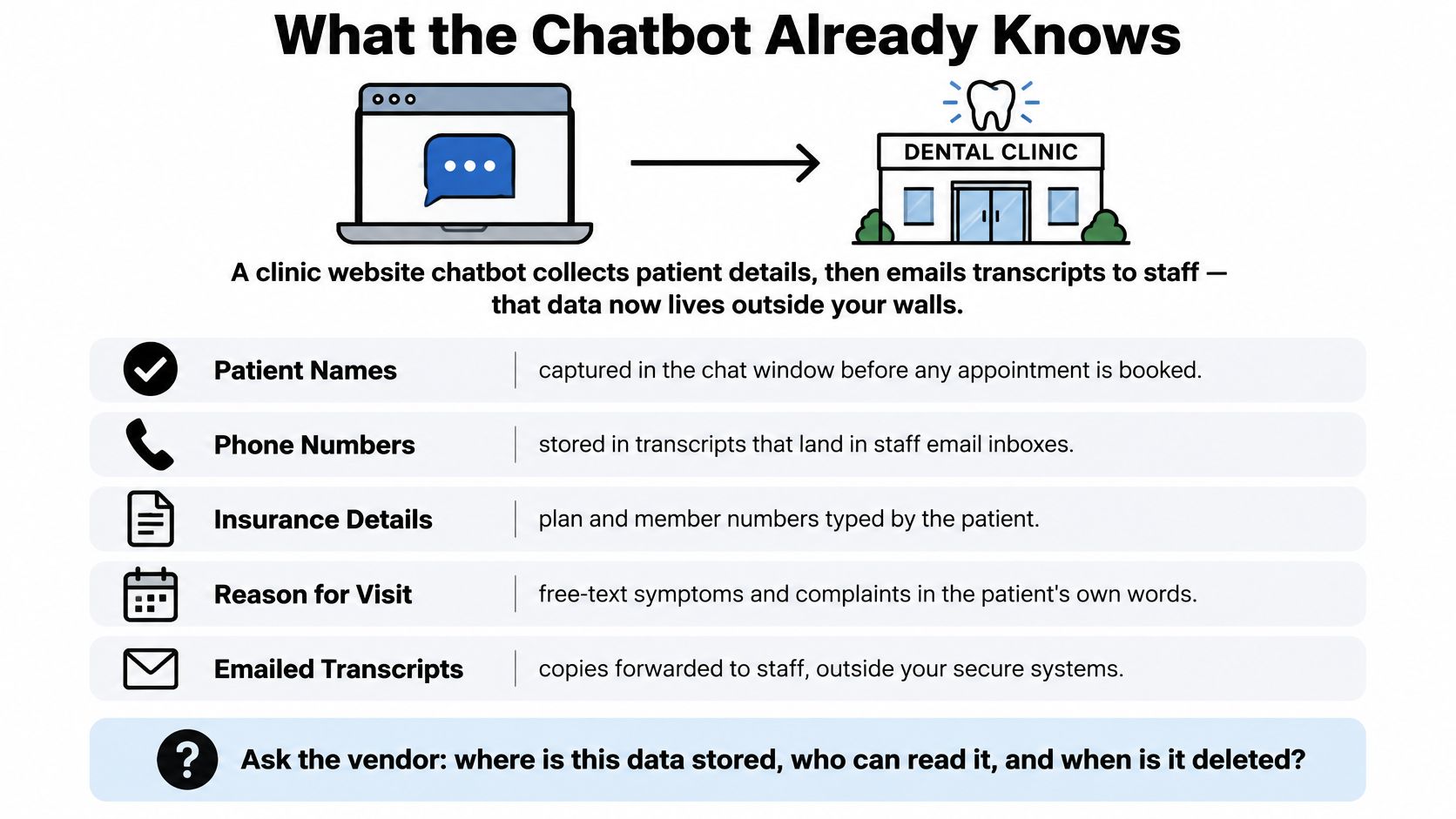
The evidence shows where that risk concentrates. Healthcare organizations name AI-vendor supply-chain exposure as their leading AI concern at 40%, followed by sensitive information leaking through prompts at 36% and AI-generated phishing or social engineering at 34%, according to Proofpoint's healthcare cybersecurity trends analysis. Separately, 60% report lacking controls governing sensitive data used in AI systems, while organizations experienced an average of 21 sensitive-health-information exfiltration or data-loss incidents over two years.
Read those last two together and the main problem appears. The biggest AI risk in most clinics isn't a clever model attack. It's a staff member pasting a patient's medication list into a tool that looked approved, with no logging and no rule saying otherwise.
The vendor questions to ask in writing
Ask all seven before go-live and keep the answers. Verbal reassurance is worthless in a notification decision.
- Is a Business Associate Agreement or Data Processing Agreement signed and current?
- Where is data stored, in which region, and is it encrypted at rest and in transit?
- Who can view conversations, and can that access be limited by role?
- Is chat data used to train models, and how long is it retained?
- Can individual records be deleted on request, and how quickly?
- Which subprocessors and which AI models are involved in answering a message?
- How fast will the vendor notify you of a breach, and through whom?
Our answers to those questions are on the record: customer data is encrypted in transit and at rest and is never sold, the Data Processing Agreement explains how customer data is handled, and Hyperleap AI is GDPR compliant. Compare that to what your other vendors will put in writing.
Chatbot controls that actually matter
Technical boundaries beat policy statements. Require tenant isolation so one clinic's data can't surface in another's answers. Use narrowly scoped service accounts rather than a shared admin key. Keep immutable logs of every conversation and every export. Put a human review step on any AI-generated summary before it reaches a chart. Filter responses so one patient's record is never returned to another patient's session.
The intake design matters most. A front desk bot can be built to avoid collecting symptoms, diagnoses or prescriptions in the first place and route clinical detail to secure channels. If you want a starting structure for that flow, the healthcare chatbot templates show how intake fields are scoped before any patient data is stored.
Responding to a Breach Without Stopping Care
A locked system is a privacy event and a patient safety event at the same time. When the schedule, medication list, and allergy record are unreachable, the front desk cannot verify care, the clinician cannot reconcile risk, and the practice starts losing clinical control by the minute. In 2025 alone, at least 61,556,256 individuals had protected health information exposed or impermissibly disclosed in U.S. healthcare breaches, per HIPAA Journal's 2025 breach report. That scale makes breach response routine operational work, not an exceptional project for the IT person who happens to be available.
Run the sequence below in order. Treat availability as a clinical control. A practice that preserves care during an incident reduces harm even when the technical restoration takes longer than anyone wants.
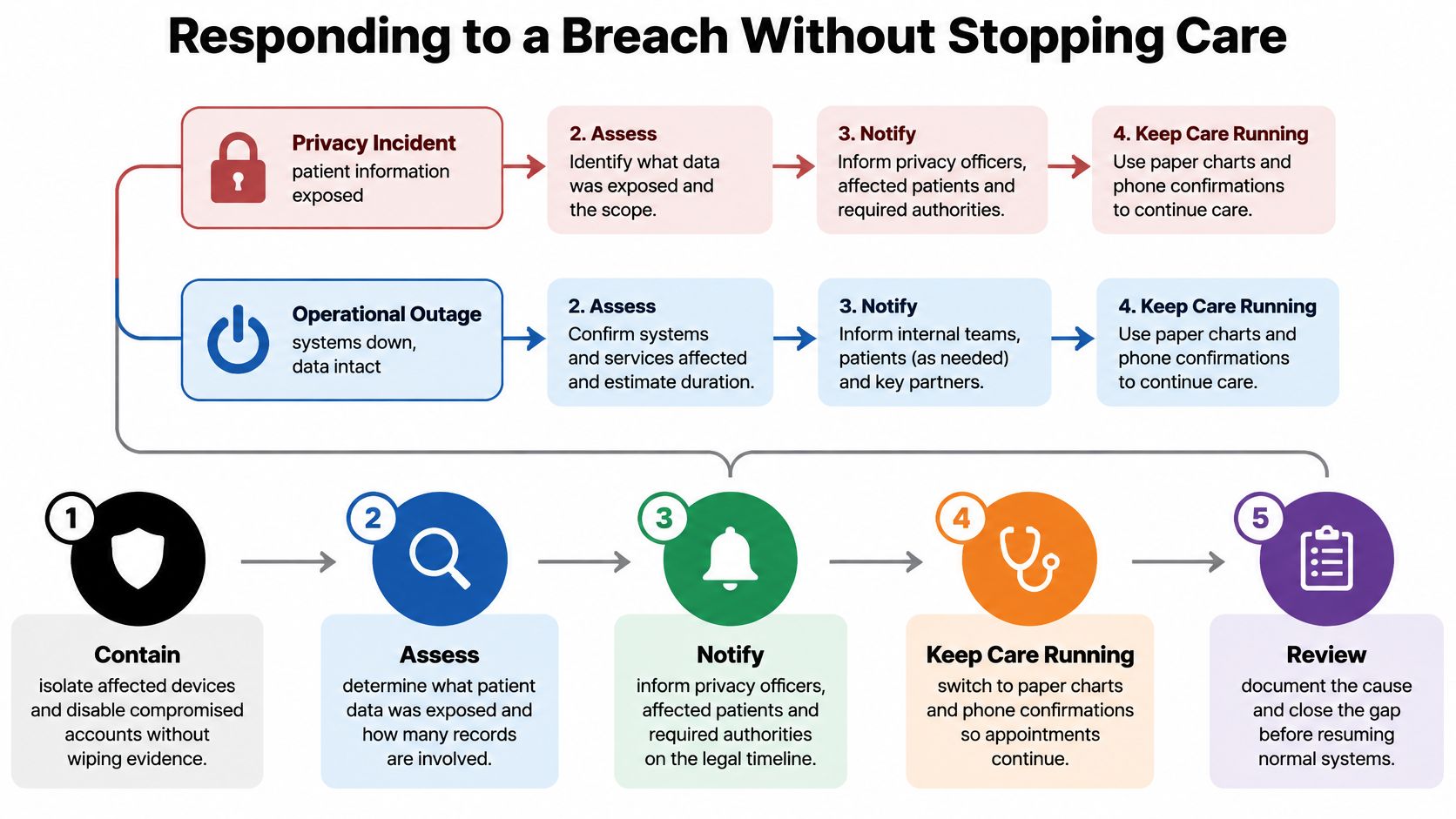
Contain. Isolate affected devices and disable compromised accounts, but do not wipe anything. Evidence you destroy is evidence you will need for the risk assessment and the notification decision.
Protect care first. If clinical work is at risk, switch to the downtime playbook immediately: paper intake, two-identifier patient checks, medication and allergy reconciliation by phone, triage for urgent cases, escalation to emergency services. Availability is a safety control, not an IT convenience.
Assess. Presume a breach of unsecured PHI unless a documented risk assessment shows a low probability of compromise. Write the assessment down, because "we didn't think it was serious" is not a defensible position.
Notify on the clock. Notify individuals, HHS, media where thresholds apply, and any EU supervisory authority within 72 hours.
Restore in priority order. Bring scheduling and clinical records back first, billing last. Test the backup before reconnecting, not after.
Reconcile. Enter the paper records once systems return, and log every manual change so the investigation has a trail.
Ransomware can disrupt essential hospital operations, and gaps in breach discovery and notification can increase individual risk and weaken trust, according to the 2025 Breach Barometer annual report. Small clinics cannot match an enterprise security program staffing level, so the trade-off has to be explicit. Spend limited effort on rehearsed downtime behavior, clean restoration paths, and written decision records. Those controls keep care moving while the privacy investigation proceeds.
| Who must be told | Deadline | Notes |
|---|---|---|
| Affected individuals | Without unreasonable delay and no later than 60 days after discovery | Written notice by first-class mail, or by email if the patient agreed |
| HHS, breach affecting 500 or more people | Same 60-day limit, submitted through the HHS breach portal | Reported at the same time as individual notice |
| HHS, breach affecting fewer than 500 people | Within 60 days after the end of the calendar year of discovery | Log each breach and submit it annually |
| Prominent media outlets | Within 60 days, when more than 500 residents of one state or jurisdiction are affected | Applies to large breaches only |
| EU supervisory authority under GDPR | Within 72 hours of becoming aware | Report even if the full picture is still incomplete |
Two numbers decide how well this goes. The first is your maximum tolerable downtime for each system, measured in hours, not aspirations. The second is how many times you've rehearsed. Twice a year with frontline staff, not just managers, is the minimum I'd accept.
Keep two tracks from the first hour of the incident. The privacy track runs on assessment, documentation, and notification deadlines. The outage track runs on clinical risk, downtime procedures, and restoration order. Confusing the two is how practices send a letter on day 55 and still cannot print a schedule.
That separation also helps multi-location clinics. One site may be safe to reopen on paper workflows while another remains locked out of clinical records. Assign a care lead who can make patient flow decisions and a response lead who preserves evidence and tracks notification timing. Do not make the front desk choose between those jobs during a busy clinic day.
Before reconnecting any site, confirm that routing and intake tools have not become a blind spot. Hyperleap AI routing rules can send messages mentioning a server, ransomware, or the whole office being offline straight to the on-call engineer. That shortens the time between a front desk report and the person who can decide whether to isolate a device or trigger downtime care. Customer data is encrypted in transit and at rest and is never sold, and Hyperleap AI encrypts its data with 256-bit AES encryption. Hyperleap AI is GDPR compliant, and the Data Processing Agreement explains how customer data is handled.
A breach response plan should fail safely. If the practice cannot reach records, the answer cannot be "wait until IT gets back to you." It should be a paper-based clinic day with known roles, known escalation paths, and a clean way to reconcile the record afterward.
Confirm Your Security Checklist Before You Act
Seven checks, each one finishable this week. Each maps back to a section above, so the detail is already written down.
- Risk analysis dated within the last 12 months, covering every location and every system holding patient data.
- MFA on every remote, email and admin login, with no exceptions for the owner's account.
- Encryption confirmed for laptops, backups and every transfer that leaves the building.
- A signed BAA or DPA with every vendor that touches patient data, including the chatbot on your website.
- Offboarding that removes access within 24 hours, with a signed checklist.
- A downtime drill completed in the last six months, run by frontline staff rather than managers.
- Named contacts ready for breach notification, internal and at each vendor.

Then take one concrete step. If your intake runs through a chatbot or AI tool, send the seven vendor questions to the provider before go-live and keep the replies in writing. Match each answer against the contract and the DPA rather than against a sales page, and reassess whenever the vendor adds a model or a subprocessor.
Apply the same test to us. You choose which team members can see customer details and conversations. Hyperleap AI does not access client systems and does not run anything remotely. We never ask for passwords, and when something breaks, your own engineer decides what the issue is.
If you're wiring an AI front desk into a clinic, the intake layer is where patient data first leaves your building, so it deserves the same scrutiny as your EHR vendor. Hyperleap AI builds healthcare assistants that capture leads and book appointments across your website, WhatsApp, Instagram and Facebook, with encryption in transit and at rest, role-based visibility into conversations, and a Data Processing Agreement that states how your data is handled. Visit Hyperleap AI to see how the intake flow is scoped before you connect it to anything clinical.