Guide
Healthcare Template Guide: Build a Safe Intake Bot
Choose, customize, test and deploy a healthcare template for intake, booking and routing, with privacy checks for clinics and multi-location practices.

Gopi Krishna Lakkepuram · Founder & CEO
· 15 min read
It's 8:40 on a Monday. The front desk has fourteen voicemails, two patients who insist they confirmed, and someone on hold asking whether her plan covers a procedure nobody has named yet. In another tab sits a healthcare template that promised to answer all of that by Friday.
What that template usually contains is a greeting, a list of common questions and a booking link. What it usually lacks is a workflow with stop conditions, a privacy record, a fallback route for the patients who won't touch it, and one named person who signs off when it changes.
The distance between those two things is where clinics get hurt. A bot that books an appointment badly is an annoyance. A bot that keeps collecting symptom details from someone describing chest pain is a different category of problem entirely, and it's the problem this guide is organized around.
Table of Contents
- Healthcare Template Types and Where Each Fits
- How to Customize Your Healthcare Template in Six Steps
- Escalation Rules for Symptoms and Urgent Messages
- Privacy and Compliance Checks Before Launch
- Testing a Healthcare Template Before Patients See It
- Rolling Out Across Locations and Keeping Phone Routes Open
- Launch Your First Template This Week
Healthcare Template Types and Where Each Fits
Start with the least dangerous template that produces a visible result this month. For most single-location dental, physiotherapy and primary care clinics, that's the appointment booking flow. For med spas and practices where nearly every visit is a new patient, it's the intake form. An urgent-message routing bot is the last template you switch on, not the first.
That ordering follows how these formats developed. A healthcare template is a set of consistent fields before it's anything else, which is what the move from paper charts to structured electronic health records demanded. When the HITECH Act created Medicare and Medicaid incentive programs in 2009, adoption moved quickly: the share of office-based physicians using an advanced EHR system rose from 17% in 2008 to 40% in 2012, according to CMS. By March 2013, more than 388,000 eligible professionals had registered for the incentive programs, 73% of eligible providers. Every one of those records depended on the same fields landing in the same place twice.
| Template | Best for | Core fields or flow | Human handoff needed | Risk level |
|---|---|---|---|---|
| Patient intake form | New patients at clinics and med spas | Name, contact, insurance, medication and allergy list | When answers conflict or are incomplete | Medium |
| Appointment booking flow | Dental, physio and multi-chair practices | Visit type, provider, preferred time, reminder consent | When slots are full or the request is urgent | Low |
| Urgent-message routing bot | After-hours front desks | Stop conditions, urgency routing to on-call staff (no symptom assessment) | Always for safety-critical symptoms | High |
| Insurance verification request | Billing offices | Payer, member ID, plan type, document upload | When eligibility is disputed | Medium |
| Follow-up and recall message | Chronic care and recall lists | Visit date, next step, opt-out link | When a patient replies with symptoms | Low |
| Referral intake | Specialist clinics | Referring provider, reason, urgency, attached records | When the referral is marked urgent | Medium |
A booked chair is measurable within days, which is why booking suits a single-location dental or physio practice. Intake suits a med spa because the form doubles as a first purchase conversation. Urgent-message routing only earns its risk at an after-hours front desk with a live on-call rota behind it.
Volume is thinner than the sales pitch suggests. In a July 2025 survey, 71% of medical practices reported that fewer than 25% of their patients used digital self-scheduling tools, according to the Medical Group Management Association. A booking template that buries the front desk number loses the other three quarters.
Here's the decision rule I'd apply: pick the template whose human-handoff column matches the staff you can reach between 9 and 5.
How to Customize Your Healthcare Template in Six Steps
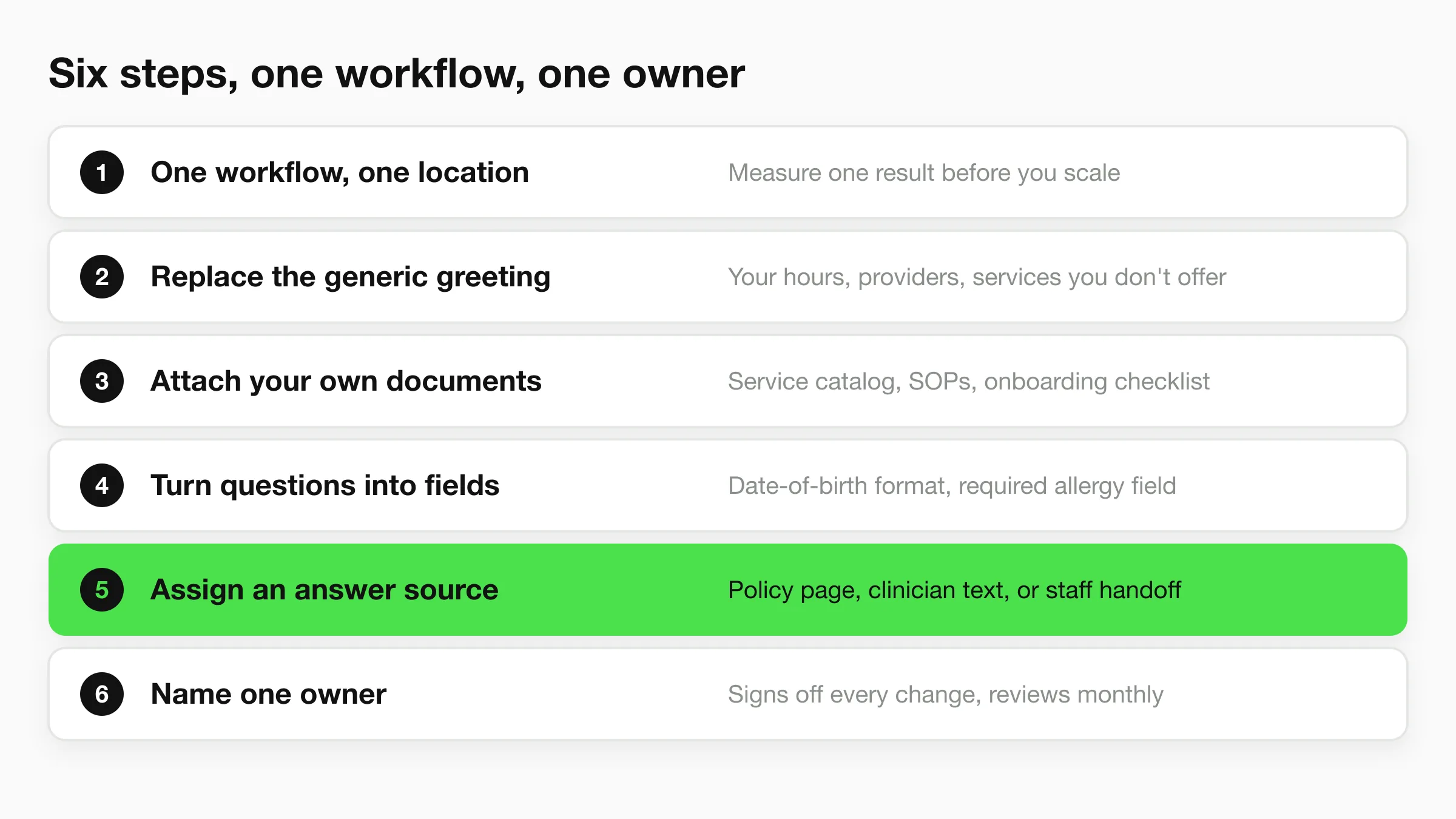
Six steps, one afternoon, one workflow. Work through them in this order and the template stops being a demo.
- Choose one workflow and one location. Measure a single result before you scale anything. The common slip is switching on four sites at once and then being unable to say which one improved.
- Replace the generic greeting and service list. Your hours, your providers, the services you don't offer, and your exact booking or cancellation policy. Leaving "we offer a wide range of services" in place is how a template starts capturing leads for treatments you don't perform.
- Attach your own documents. During setup you can attach your service catalog, policies, SOPs and onboarding checklist so the AI answers in your own way. A bot left to reason from generic web text will invent a same-day guarantee you never offered.
- Turn each question into a field with a validation rule. A date-of-birth format check, a phone number length check, a required allergy field that can't be skipped. Free-text complaint boxes feel friendly and produce records nobody can sort. Consistent fields are also what travel: by July 2013, providers in the federal EHR incentive programs had shared over 4.3 million care summaries between care settings, per CMS, and each handoff depended on both sides capturing the same data in the same structure.
- Assign an answer source to every question. Each question gets one of three: an approved policy page, clinician-written text, or a handoff to staff. Skip this and the bot guesses, politely, in your brand voice.
- Name one owner. One person signs off every change and reviews the field list monthly. Without an owner, a new service sits unlisted for a quarter while three staff members assume someone else added it.
A six-step build sounds slow until you compare it with the alternative, which is rewriting the whole flow after the first complaint.
What Done Looks Like
The artifact is deliberately boring. It's a one-page field list on the left and an answer-source map on the right, with every question pointing at where its answer comes from and every field showing its validation rule.
Practical rule: If a clinician and the front desk lead can't put their signatures on the same one-page field list and answer-source map, the template isn't ready to take a patient.
That signed page is also your change log. When a provider leaves or an insurance rule shifts, you edit the page first and the bot second.
Escalation Rules for Symptoms and Urgent Messages
The rule that governs every patient-facing template is simple to state and easy to break: it stops, it doesn't diagnose. Everything else in this section is detail hanging off that sentence.
Define the permitted scope before you write a single response. Administrative intake, insurance and demographic details, appointment routing, medication and allergy capture, and general educational FAQs belong inside the boundary. Chest pain, breathing difficulty, stroke symptoms, suicidal thoughts, severe allergic reaction, uncontrolled bleeding and anything else urgent sit outside it and trigger an immediate stop.
| Patient message | Bot action | Who handles it |
|---|---|---|
| Chest pain, trouble breathing or stroke signs | Stop, show emergency instructions, collect no further detail | Emergency services or on-call clinician |
| Suicidal thoughts | Stop, show crisis line instructions, flag immediately | Trained staff now |
| Severe allergic reaction | Stop, direct to emergency care | Emergency services |
| Uncontrolled bleeding | Stop, direct to emergency care | Emergency services |
| Request for diagnosis or medication change | Decline, route to clinician | Clinician or nurse, per your protocol |
| Vague symptoms with fever or pain | Don't assess; take contact details and flag for clinical review | Nurse queue |
| Booking, insurance or hours question | Answer from approved sources, collect fields | Front desk |
The reason to be strict is measurable. A systematic review of healthcare chatbot performance found symptom recognition at 98.5%, appropriate management assessment at 88.7%, and complication detection at 75.0% sensitivity with a 25.0% false-negative rate. Model competence is not uniform across tasks, and the task that fails most is the one where a patient describes something serious in vague terms.
Write the Handoff Into the Instructions
Vague escalation language produces vague escalation. Name who is on call, which hours the rota covers, what the patient sees on screen the moment a human takes over, and what happens if nobody answers within the stated window.
Dental practices need this most, because tooth pain arrives at night and patients underplay it. Ask your dentists which details they want passed along with an urgent message, so the case reaches a clinician as a handoff rather than a guessing game. The boundary is only useful if everyone knows where it sits.
What goes wrong is almost never a missing emergency keyword. It's a flow tuned for completion rate, which learns to keep gathering details from a patient who has already described something that needs a nurse.
Any safety-critical symptom, or any request for a diagnosis, goes to a human, every time, and the transcript shows who took it and when.
Privacy and Compliance Checks Before Launch
The misconception that causes the most trouble is the belief that a secure model or an encrypted connection makes a bot compliant. Those are two lines on a much longer list, and the rest of the list is about access, disclosure, retention and training.
Start by classifying what the template collects: name, phone number, appointment details, symptoms, insurance information and medical history. All of it is potentially protected health information once it's linked to a person. The HIPAA basics guidance from HHS is specific on this point: the Privacy Rule limits use or disclosure of protected health information to permitted purposes or to situations the individual has authorized in writing.
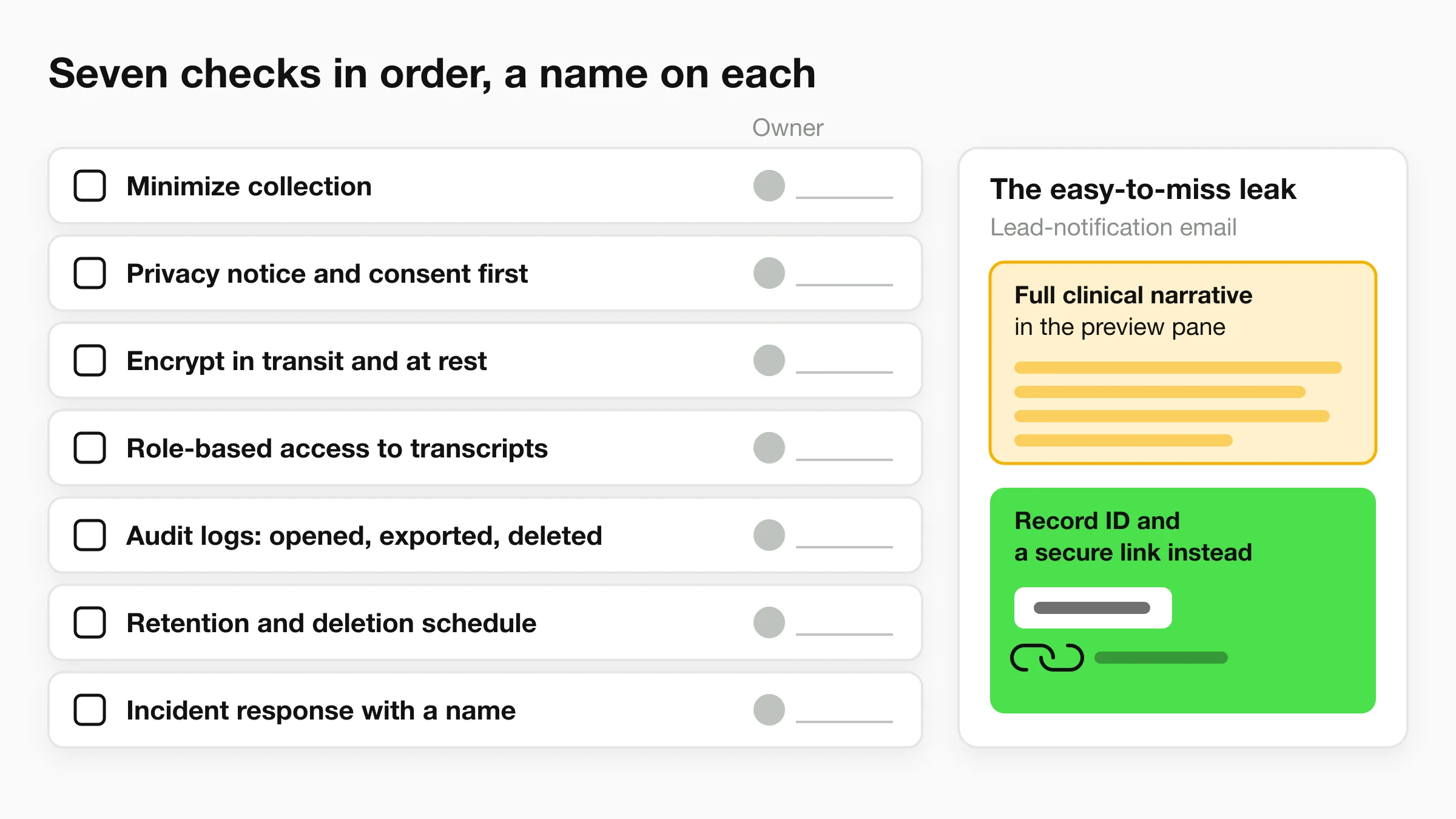
Work the list in this order, because each item depends on the one before it:
- Minimize collection. Keep only the fields the stated purpose needs. A marketing question about household income doesn't belong on a medical intake form.
- Show a privacy notice and capture consent before the first field is filled, not after.
- Encrypt in transit and at rest, and confirm which party holds the keys.
- Enforce role-based access on transcripts, exports and the shared inbox. Not everyone who can see the inbox needs to read symptom descriptions.
- Keep audit logs that record who opened, exported or deleted a record.
- Set retention and deletion schedules, then test that deletion removes the record from backups and exports.
- Write the incident-response step with a name attached, not a department.
The leak that is easy to miss isn't in the database. It's in the lead-notification email that arrives with a full clinical narrative in the preview pane. Send a record identifier and a secure link instead. Our own guidance on HIPAA-compliant AI chatbots in healthcare covers how those controls map onto a chat workflow.
Before signing with any vendor, read the contract for the data types you'll transmit, and check that the Privacy Policy and DPA pages exist and say something. A vendor should publish these documents openly: our site carries Terms of Use, Privacy Policy, Payment Terms, Partner Terms, Cookie Policy and DPA pages, which is the minimum I'd accept from anyone holding appointment data.
Assign a person to each line on that list. A checklist with no owners is a poster.
Testing a Healthcare Template Before Patients See It
A patient types "a bit of pressure after lunch." The bot keeps asking for insurance. That message is a stop condition, not another intake field. Decide what failure looks like, and how you would catch it, before the first test run. After go-live, transcript review often searches for evidence the team has already decided to ignore.
Build the test sets before launch. Six sets cover what a clinic faces.
| Test set | Scenario examples | What it checks |
|---|---|---|
| Normal intake | Standard bookings and complete forms | Field extraction and routing accuracy |
| Ambiguous | Vague symptoms, partial answers, mixed requests | Intent classification and follow-up questions |
| Multilingual | The same scenarios in the languages your patients use | Translation quality and field capture |
| Adversarial | Requests for diagnoses or drug advice | Refusal and handoff reliability |
| Emergency | Chest pain, stroke signs, suicidal thoughts | Escalation sensitivity, zero missed stops |
| Production audit | Weekly sample of real transcripts | Inappropriate reassurance and under-escalation |
The multilingual set catches more than translation quality. A patient who switches language halfway through a symptom description is testing whether field capture survives the switch. Many flows drop the symptom and continue the booking.
The Joint Commission's guidance on AI in healthcare lays out what oversight has to contain beyond a launch test: governance, patient privacy and transparency, data-security protections, continuous quality monitoring, safety-event reporting, bias assessment and staff education. Testing starts that cycle. It is not a box you close before go-live.
Set Pass Criteria Before the First Run
Write the criteria down and have the medical director sign them. A missed emergency is not a score you average out against eleven clean bookings. One missed stop fails the launch. One wrong dosing answer fails it too.
Run a one-week pilot with two or three staff whose job is to break the flow. They answer vaguely, change languages mid-conversation, ask for a diagnosis three different ways, and describe chest pain as "a bit of pressure after lunch." Then audit a weekly sample of real transcripts for inappropriate reassurance and under-escalation.
Keep completion rate as a secondary metric only. A high completion rate is what an unsafe flow produces when it keeps a patient talking instead of handing off. I would not treat a fast setup as a pass. Lock the rules in an AI front desk acceptance test plan before anyone outside the pilot can reach the bot.
Then write the rollback trigger as one event: a missed emergency, or a wrong dosing answer. Name the person authorized to pause the bot. A clause nobody can invoke is decoration. If that person cannot be reached from the chat, keep the phone line as the live route until the test passes.
Rolling Out Across Locations and Keeping Phone Routes Open
A typical rollout plan assumes a smartphone. The data says otherwise in two directions at once. In 2024, 77% of individuals in the United States were offered online access to their health information, while 65% accessed it at least once during the year, according to ONC. That leaves a substantial minority who were never offered access at all.
The gap isn't random. U.S. figures show portal access rising from 72.3% in 2019 to 83.7% in 2022 and reported use from 68.0% to 81.9%, yet a study of portal disparities in PubMed records that gaps persisted or worsened for people with lower incomes, less education and adults over 65. Hispanic respondents were 6.9 percentage points less likely than non-Hispanic respondents to be offered portal access; men were 10.8 points less likely than women.
Build the fallback routes into the template rather than bolting them on after complaints:
- A phone escalation path published at the top of the chat, not buried in a footer, with the same hours your desk answers.
- A translated and plain-language version of every field label, tested with someone who reads at a lower literacy level.
- Caregiver authorization handled by the front desk, because an adult child booking for a parent is the common case, not the exception.
- A low-bandwidth option that works on a basic phone browser and doesn't require an app install.
- A handoff to staff when a patient can't verify identity after two attempts, instead of a loop that ends in abandonment.
None of that is exotic. It's the difference between a template that serves your panel and one that serves your most confident third of it.
One Knowledge Base, Location Details on Top
Multi-site groups get into trouble by building a separate bot per location, then paying for five sets of mistakes. The workable structure is one central knowledge base holding the policies, service descriptions and escalation rules, with each location's hours, providers, parking and local phone number kept clearly labelled. Update a shared policy once, so a revised cancellation policy doesn't take three weeks to reach the last site.
Hyperleap reads your website pages and uses your logo and colours to create your AI front desk, which shortens the first pass on setup but doesn't replace the location-by-location review. For groups running several sites, Hyperleap's Multi-variant add-on ($40/mo plus 2x credits per request, Pro and Max) answers from the right location and asks which one when a question doesn't say, and the multi-location chatbot strategy guide covers how to structure those layers without duplicating the core.
Before go-live, have someone at each site dial the fallback number and confirm a human answers it during posted hours. Do that on a Tuesday, not during a fire drill.
Measure completed care journeys across digital and phone routes, not chatbot volume. More automation can reduce access when it replaces a human channel, and the only way to see that happening is to count patients who finished what they came to do, whichever route they used.
Launch Your First Template This Week
One template, one channel, this week. Start with the booking flow or the intake form on your own website, because a website deployment is the easiest to pause if something goes wrong.
Then work through these six steps in order.
- Run the pre-launch test sets, including every emergency scenario, and treat any missed stop as a failed launch rather than a number to improve later.
- Complete the privacy checklist and confirm the vendor contract covers every data type you'll send, including the ones that only appear in free-text answers.
- Keep the urgent-message routing flow switched off until a clinician has signed the escalation table from the earlier section.
- Confirm each site's phone fallback works and that staff can take a handoff during opening hours, not just receive an email about it.
- Set a one-week pilot with two or three named staff trying to break the flow, a weekly transcript audit, and a written rollback trigger with an owner.
- Add WhatsApp or another channel only after the website version passes every test. A second channel doubles the surface area before you've secured the first.
Setup speed is genuine and it's also beside the point. With Quick Start, setup takes under five minutes and three steps: paste your website URL so Studio reads the site and drafts the agent's instructions (which you edit), try a few questions to check the answers, then add the supplied code to your site. None of that is the part that keeps patients safe, and no vendor should let you confuse the two.
Judge any tool by how it handles emergencies, privacy and phone fallback. A bot that goes live in five minutes and escalates correctly beats a bot that goes live in five weeks and guesses. The decision to make on Monday is which template goes first and whose signature approves it.
Hyperleap AI gives clinics an AI front desk that answers patient questions from your own website and documents, collects contact details, and books appointments natively with Calendly or Cal.com on Pro and Max (on Plus it shares your booking link) across your website and messaging channels around the clock. You attach your service catalog, SOPs and escalation policy so answers stay inside the scope you set, then test the emergency paths before anything reaches a patient. If you'd rather start with one booking flow and grow from there, you can set it up and trial it at Hyperleap AI.