The AI front desk for small businesses
The AI sales agent that works your front desk
Hyperleap answers buying questions from your own content, asks the questions you choose, collects contact details, books the call or visit, and emails your team. It talks to the people who come to you. It does not cold-email strangers.
Quick Answer
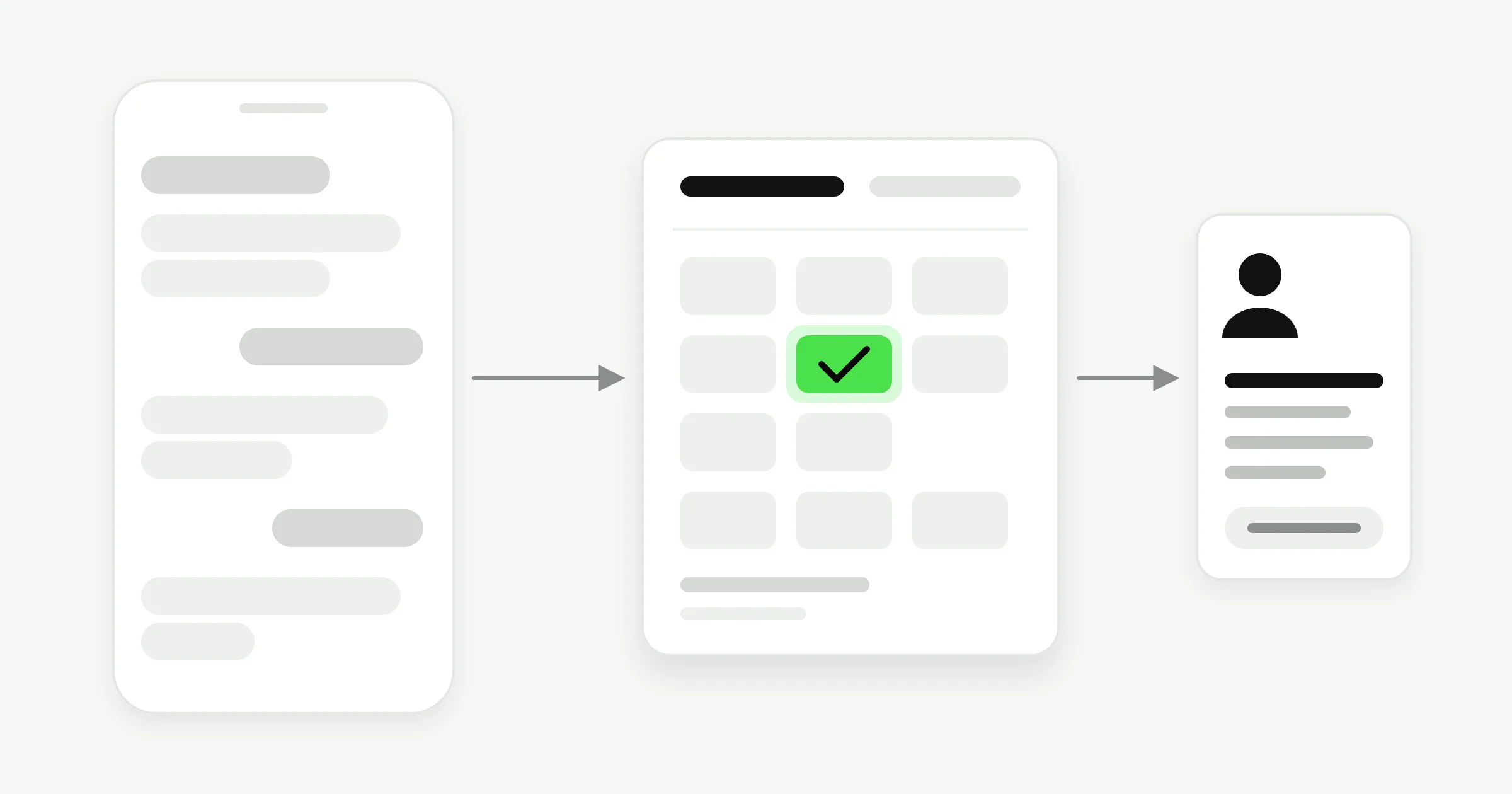
An AI sales agent talks to prospects for you. The inbound kind, which Hyperleap AI is, answers the questions people ask on your website, WhatsApp, Instagram, and Messenger, asks your qualifying questions, collects contact details, books the call, and emails your team. The outbound kind, often sold as an AI SDR, finds strangers and messages them first. Hyperleap does not do that. Plans start at $40/month with a 7-day free trial.
Inbound vs outbound
Two jobs that share a name
Inbound agents wait for a buyer and make that first conversation count. Outbound agents go looking for buyers. Most small businesses already get questions they answer too slowly, so the inbound job is where we focus.
| Hyperleap (inbound) | Outbound AI SDR tools | |
|---|---|---|
| Who starts the conversation | The buyer, on your website or in a DM | The tool, by cold email or message |
| What it works from | Your website, documents, and FAQs | A list of target contacts |
| Main job | Answer, qualify, book, hand over | Find prospects, write and send outreach |
| Finds new contacts | No | Usually yes |
| Sends cold email or LinkedIn messages | No | Usually yes |
| Books the meeting | Yes. In chat with Calendly or Cal.com on Pro and Max; Plus shares your link | Varies by tool |
| Best fit | Traffic and messages you already get | Pipeline you build from scratch |
Outbound tools differ from one another; the right-hand column describes the category in general. If you need cold outreach, use a tool built for it. If you need every inquiry answered and booked, that is what Hyperleap does.
The conversation
From first question to booked call
One conversation covers five steps. The agent answers first, because a buyer who gets a straight answer will give you their details.
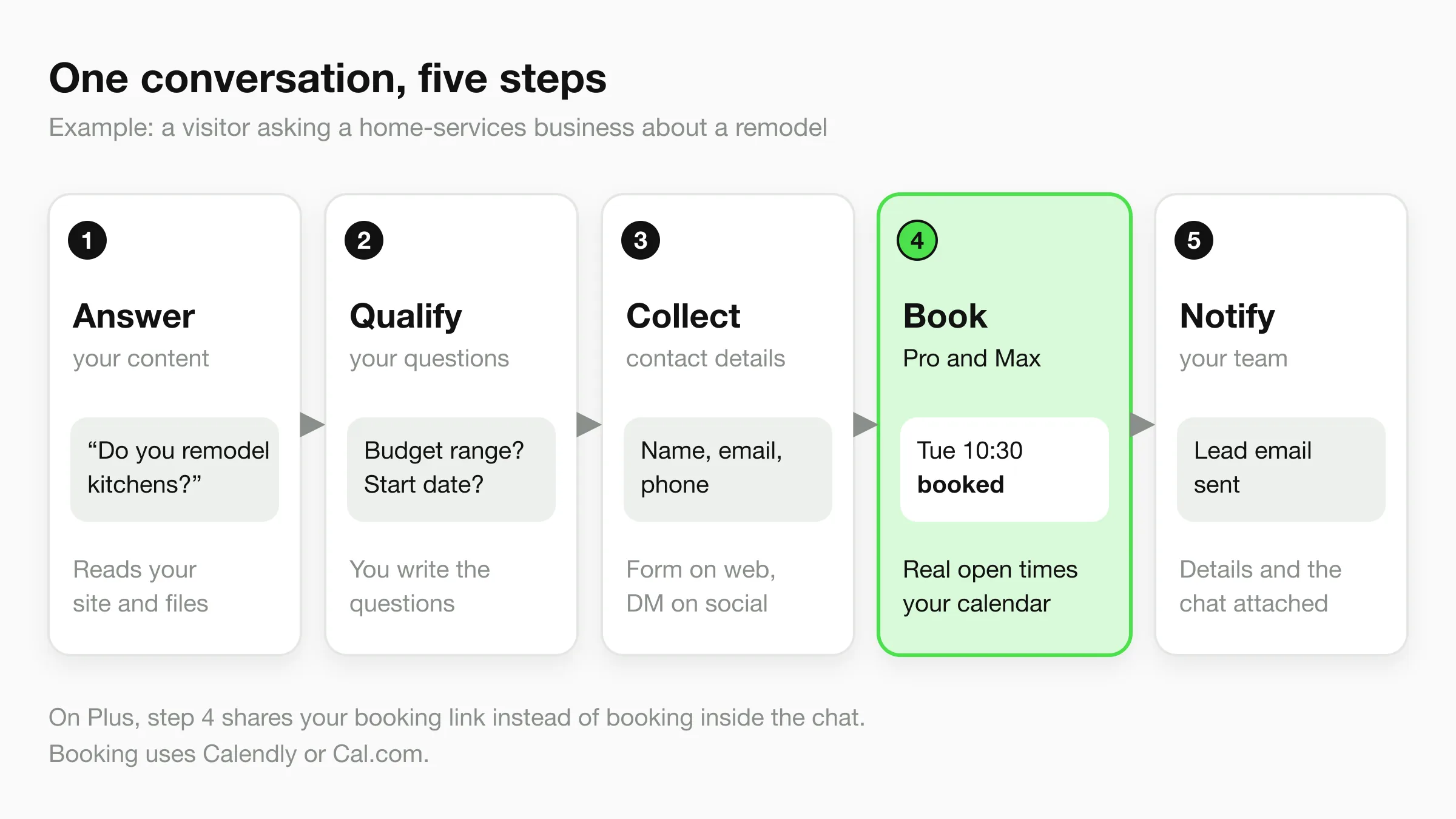
1. It answers from your content
Point the agent at your website and upload your price lists, service pages, and FAQs. It answers what buyers ask about price, scope, areas served, and timing from that material. Tell it when to say it cannot help and pass the question to your team.
2. It asks your qualifying questions
You write the questions in the agent’s instructions: budget, timing, location, what the customer needs. The agent works them into the conversation instead of reading a form aloud. The answers stay with the lead.
3. It collects contact details
Website chat can show a short lead form you control, and it is optional. On WhatsApp, Instagram DM, and Messenger the contact comes from the platform. Phone verification by one-time passcode is a paid add-on on Pro and Max, for website chat only.
4. It books the call or visit
On Pro and Max, with Calendly or Cal.com, it offers real open times and books the slot in the chat. The customer gets the calendar invite by email. On Plus, it shares your booking link.
5. It tells your team
The lead email goes out as soon as the lead is captured, to up to 10 verified addresses per chatbot. On Pro and Max, a customer can also ask for a person, your team is alerted, and anyone can take over the live chat.
Writing good qualifying questions is its own craft: see the lead qualification question stack. For booking setup, see the appointment scheduling chatbot page.
What it isn’t
Five things it does not do
Read this before you compare tools. Several of these are what other “AI sales agent” products sell.
Not an outbound prospector
It never builds lead lists, cold-emails, or sends LinkedIn messages. It speaks only when a customer speaks first.
No lead scoring
There are no hot, warm, or cold labels and no numeric score. You get the answers to your questions and the conversation, and your team decides who to call first.
No native CRM sync yet
Leads reach your CRM through CSV or Excel export, the REST API, or webhooks (webhooks on Pro and Max). Native pushes are not shipped.
Not a closer
It does not negotiate, take payments, or send contracts. It gets a qualified person onto your calendar so a human can sell.
Not a phone agent
It works on website chat, WhatsApp, Instagram DM, and Facebook Messenger. It does not answer calls or send texts.
Your team’s side
What your team receives
Each lead arrives with contact details, the answers to your questions, any booked time, and the full conversation. A rep reads it before the call instead of starting from zero.
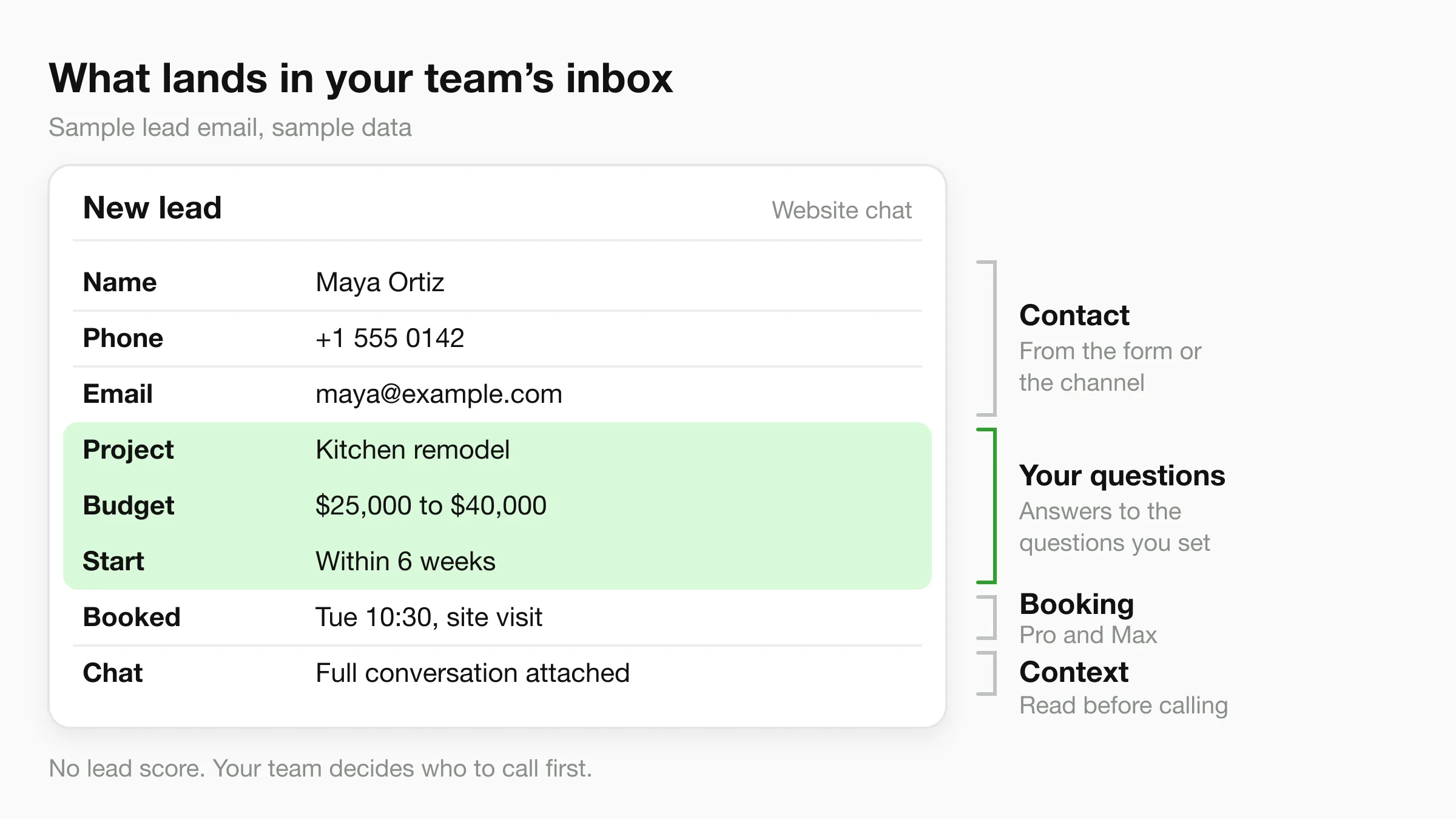
The lead email goes out as soon as the lead is captured. A separate email carries the chat transcript, sent a set time after the visitor’s first message. You pick the verified addresses for each, so leads can go to sales while transcripts go to support. On Pro and Max, you can also write an instruction such as “email the sales team a brief on anyone who asked for a quote.” After the chat goes quiet, the agent reads it and sends that brief only when the chat matches. For what a strong summary contains, read chatbot lead summaries.
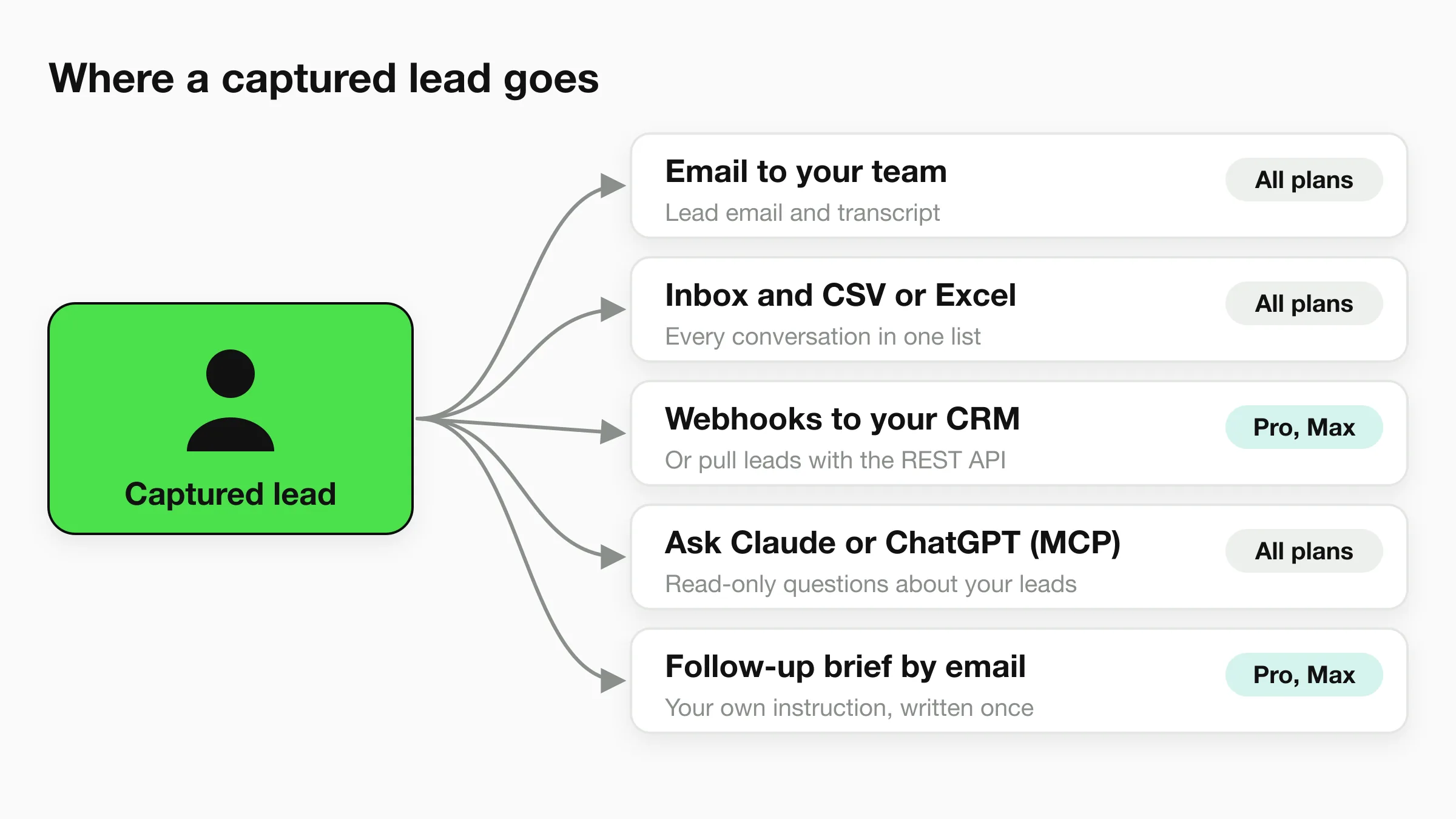
From there the lead goes wherever your process lives. Download leads as CSV or Excel for a spreadsheet or a CRM import. Pull them with the REST API, or send them to your own systems with webhooks, which fire when a lead is captured, a conversation starts, a message arrives, the AI replies, or an appointment is booked. Webhooks are on Pro and Max. Native CRM pushes are not available yet.
The Hyperleap MCP connection, included on every paid plan, lets you ask Claude or ChatGPT about your leads in plain English: “which leads came in from WhatsApp this week?” It is read-only, so it can look but not send messages or change settings. To go further, see how to build a read-only sales agent on MCP or how an AI-native sales team uses it.
The capture mechanics, such as lead forms, fields, and attribution, are covered on the chatbot lead generation page. This page is about the sales job around them.
Industries
Where an inbound sales agent pays off
Any business where a quick, informed reply decides who gets the job. Each page below shows the questions and handoffs for that trade.
Real estate
Ask budget and area, collect contact details, and book the viewing.
Home services
Capture quote requests with the job type and location while the crew is on site.
Roofing
Take inspection requests with the problem, the property, and a preferred time.
Insurance agencies
Collect the cover type and renewal timing, then book a call with an agent. No policy advice.
Automotive
Answer stock questions, learn what the buyer wants, and book a test drive.
Financial advisors
Ask what they want help with and book the first call. No financial advice from the agent.
Pricing
Plans start at $40 a month
Every plan has a 7-day free trial and all four channels. There is no free plan, and a card is required to start the trial. Annual billing saves up to 40%.
Plus
$40/month
3,000 AI responses, 1 chatbot, 4 channels
- Answers, qualifying questions, lead emails
- CSV or Excel export, MCP access
- Shares your booking link
Pro
$100/month
12,000 AI responses, 2 chatbots
- In-chat booking with Calendly or Cal.com
- Webhooks, human handoff, follow-up emails
- Link tracking
Max
$200/month
30,000 AI responses, 5 chatbots
- Everything in Pro
- Priority email and chat support
- Dedicated account manager
Full plan details are on the pricing page. Add-ons such as OTP verification cost extra.
FAQ
Frequently asked questions
What is an AI sales agent?
Is Hyperleap an AI SDR?
Can the AI sales agent book calls and visits?
Does it score leads or connect to my CRM?
How does my team find out about a new lead?
How much does an AI sales agent cost, and how fast is it live?
Keep exploring
Chatbot lead generation
How capture, notification, and export work.
Lead qualification question stack
What to ask, in what order.
Chatbot lead summaries
What a good summary contains.
Appointment scheduling chatbot
Booking setup in detail.
Build a sales agent on MCP
A scheduled agent that reads your leads.
AI-native sales team
Ask Claude or ChatGPT about your pipeline.
Answer every inquiry. Book the ones that fit.
One agent on your website, WhatsApp, Instagram, and Facebook. Live in under 5 minutes.
7-day free trial on all plans. Cancel anytime.